navigation system GMC YUKON DENALI 2009 Owner's Guide
[x] Cancel search | Manufacturer: GMC, Model Year: 2009, Model line: YUKON DENALI, Model: GMC YUKON DENALI 2009Pages: 100, PDF Size: 1.41 MB
Page 74 of 100
Additional Information Displayed
The navigation system may have this feature.
Touch the
4Additional Information Displayed screen
button to turn station, channel, CD, and MP3 information
on or off.
Touch the YES screen button to receive information,
when it is available, for the following; FM: RDS category
name and radio text, XM: Song Title and Artist Name,
CD: CD text, MP3: tag information.
Touch the NO screen button to receive no information.
Limit Features While Driving
The navigation system may have this feature.
Touch the Limit Features While Driving screen button
to turn on and off the ability to limit functions while
driving. When this screen button is highlighted,
the following functions will be limited while driving:
Music Navigator Scrolling
Radio Category Scrolling
Navigation Menu Scrolling and some functions
See “Category” earlier in this section for more
information. See “From Map” underDestination on
page 2-15for more information.
Number of Preset Pages
Touch the/Number of Preset Pages screen button to
change the number of preset pages, 1 through 6.
Each preset page can contain ve preset stations.
Touch the desired numbered screen button.
Remove/Add XM Categories
Touch the&Remove/Add XM Categories screen
button to remove or add XM categories when selecting
XM categories from the category list screen. The list
of XM categories will appear on the screen. Use the up
and down arrow screen buttons to scroll through the
list. The categories to remove will be highlighted and the
categories to add will be dark in color. Touch the
category that you would like to add or remove. Touch
the Restore All Categories screen button to add all
categories that have been removed.
3-8
Page 77 of 100
CD Player
The player can be used for CD and MP3. If your vehicle
has RSE, the player can be used for CD, MP3, DVD
audio, and as a DVD video player. SeeDVD Player on
page 3-17for more information about DVD audio
and video.
With the ignition on, insert a CD partway into the slot,
label side up. The player will pull it in and the CD should
begin playing. While playing a CD, the navigation
system is available. If you insert a CD with the system
off and the ignition on, it will start to play.
When you insert a CD, the CD tab will display.
If you turn off the ignition or radio with a CD in the
player, it will stay in the player. When you turn on the
ignition or radio, the CD will start playing where it
stopped, if it was the last selected audio source.As each new track starts to play, the track number will
appear on the display.
The CD player can play the smaller 3 inch (8cm)
single CDs with an adapter ring. Full-size CDs and the
smaller CDs are loaded in the same manner.
If an error appears on the display, see “CD Messages”
later in this section.
If viewing a map screen, touch the CD screen button.
The display will split between the audio screen and
the map screen. If you do not want to view a split screen
or you are not on a map screen, press the AUDIO
key then press the AUDIO key until CD is selected or
touch the CD screen button.
3-11
Page 81 of 100
Playing an MP3
With the ignition on, insert a CD partway into the slot,
label side up. The player will pull it in. The system may
take some time to read the MP3 disc. While playing
a CD, the navigation system is available. If you insert a
CD with the system off and the ignition on, it will start
to play.
When you insert a CD, the CD tab will display.
If you turn off the ignition or radio with a CD in the
player, it will stay in the player. When you turn on the
ignition or radio, the CD will start playing where it
stopped, if it was the last selected audio source.
As each new track starts to play, the track number will
appear on the display.
If an error appears on the display, see “CD Messages”
later in this section.
If viewing a map screen, touch the CD screen button.
The display will split between the audio screen and
the map screen. If you do not want to view a split screen
or you are not on a map screen, press the AUDIO
key, then press the AUDIO key until CD is selected or
touch the CD screen button.
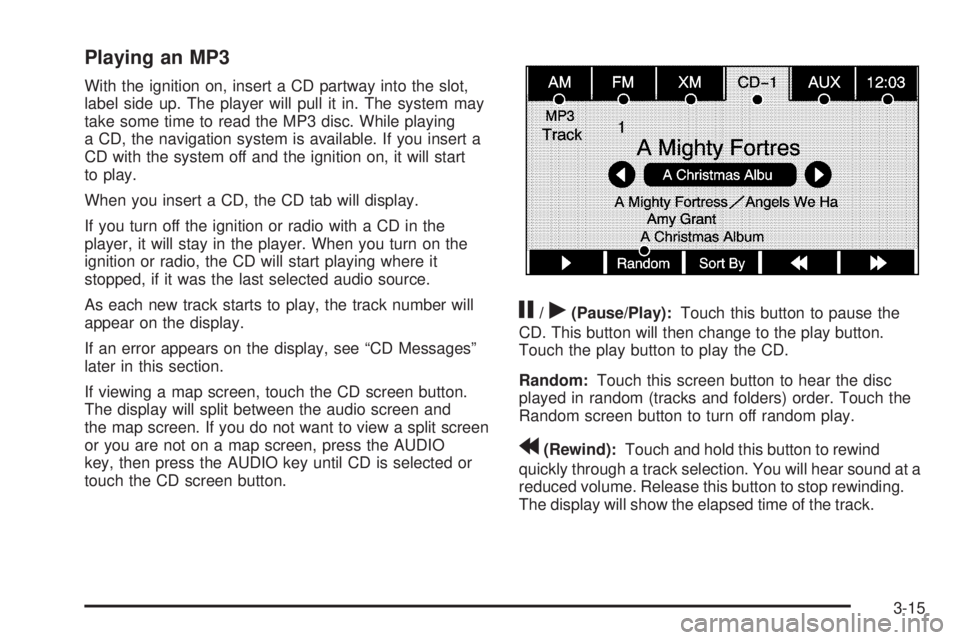
j/r(Pause/Play):Touch this button to pause the
CD. This button will then change to the play button.
Touch the play button to play the CD.
Random:Touch this screen button to hear the disc
played in random (tracks and folders) order. Touch the
Random screen button to turn off random play.
r(Rewind):Touch and hold this button to rewind
quickly through a track selection. You will hear sound at a
reduced volume. Release this button to stop rewinding.
The display will show the elapsed time of the track.
3-15
Page 83 of 100
DVD Player
The player can be used for DVD audio and DVD video.
With the ignition on, insert a DVD partway into the top
visible slot, label side up. The player will pull it in and the
DVD should begin playing. While playing a DVD, the
navigation system is available. If you insert a DVD with
the system off and the ignition on, it will start to play.
This feature will not operate on the navigation screen
unless the vehicle is in PARK (P).
The Rear Seat Entertainment (RSE) video screen will
start play of the DVD when a DVD has been inserted into
the navigation system. See “Rear Seat Entertainment
System” in the Index of your vehicle’s owner manual for
more information.
The DVD player is only compatible with DVDs of the
appropriate region code that is printed on the jacket of
most DVDs.
The DVD slot is compatible with most audio CDs,
CD-R, CD-RW, DVD-Video, DVD-Audio, DVD-R/RW,
DVD+R/RW media along with MP3 and WMA
“un-protected” formats.
If an error appears on the display, see “DVD Messages”
later in this section.
Rear Seat Entertainment (RSE)
If the Rear Seat Entertainment (RSE) video screen is
playing a DVD movie and the ignition is turned to LOCK
and then back to ACCESSORY, RUN, or START, the
RSE screen will not turn back on automatically. To view
the movie on the RSE video screen:
Press the remote controlO(power) button, then
the
r(play) button, which will continue the
movie from where it was stopped.
Press ther(play) screen button on the navigation
screen, which will continue the movie from where it
was stopped.
Eject and replace the DVD movie from the
navigation system, which will start the movie from
the beginning.
3-17
Page 84 of 100
Playing a DVD
There are three ways to play a DVD:
Once a DVD is inserted, the system will
automatically start play of the DVD.
If you are on a map screen, touch the DVD screen
button.
Press the AUDIO hard key, then touch the DVD
screen button.
When a DVD is loaded in the DVD player, the rear seat
operator can power on the RSE video screen and
use the remote control to navigate through the DVD.
O(Power/Volume):Press this knob to turn the system
on and off. Turn the knob to increase or decrease the
volume of the audio system.
Press and hold this knob for more than two seconds to
turn the navigation system, RSE, and RSA off.
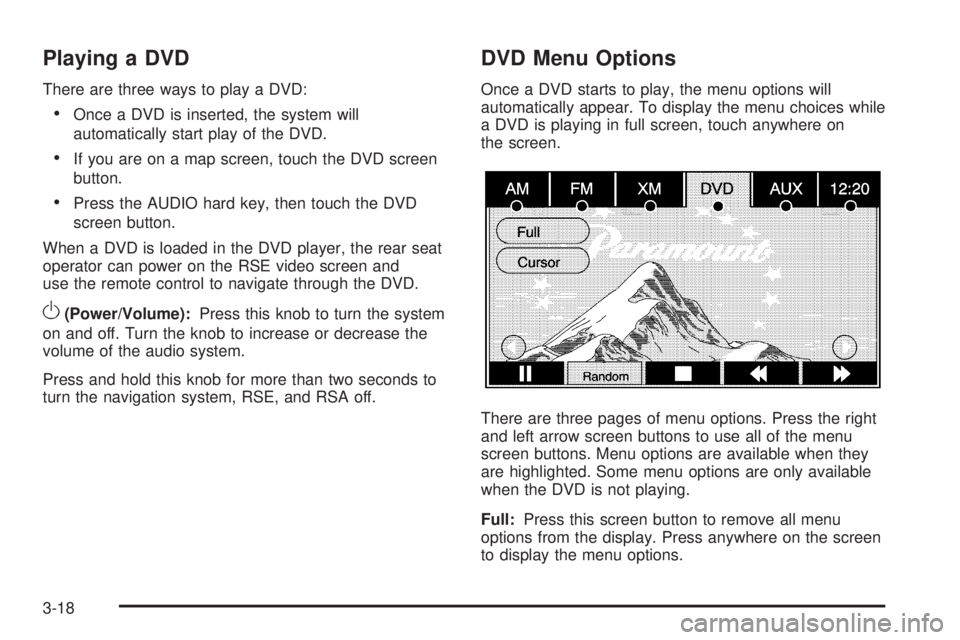
DVD Menu Options
Once a DVD starts to play, the menu options will
automatically appear. To display the menu choices while
a DVD is playing in full screen, touch anywhere on
the screen.
There are three pages of menu options. Press the right
and left arrow screen buttons to use all of the menu
screen buttons. Menu options are available when they
are highlighted. Some menu options are only available
when the DVD is not playing.
Full:Press this screen button to remove all menu
options from the display. Press anywhere on the screen
to display the menu options.
3-18
Page 86 of 100
_(Contrast):Touch the up or down screen arrows to
increase or decrease the contrast of the navigation
screen.
Auto (Automatic):Touch this screen button for the
system to automatically adjust the navigation screen
background depending on exterior lighting conditions.
Night:Touch this screen button and the system
will make the navigation screen background darken.
Day:Touch this screen button and the system will make
the navigation screen background brighten.
Monitor:From the DVD Setup screen, touch this
button to adjust the viewing angle of the DVD on the
navigation screen. This is not available on all DVDs.
Touch the
ebutton to close the screen in from the left
and right sides.
Touch the
Jbutton to ll the screen on the left and
right sides.
Touch the
dbutton to ll the screen on the top and
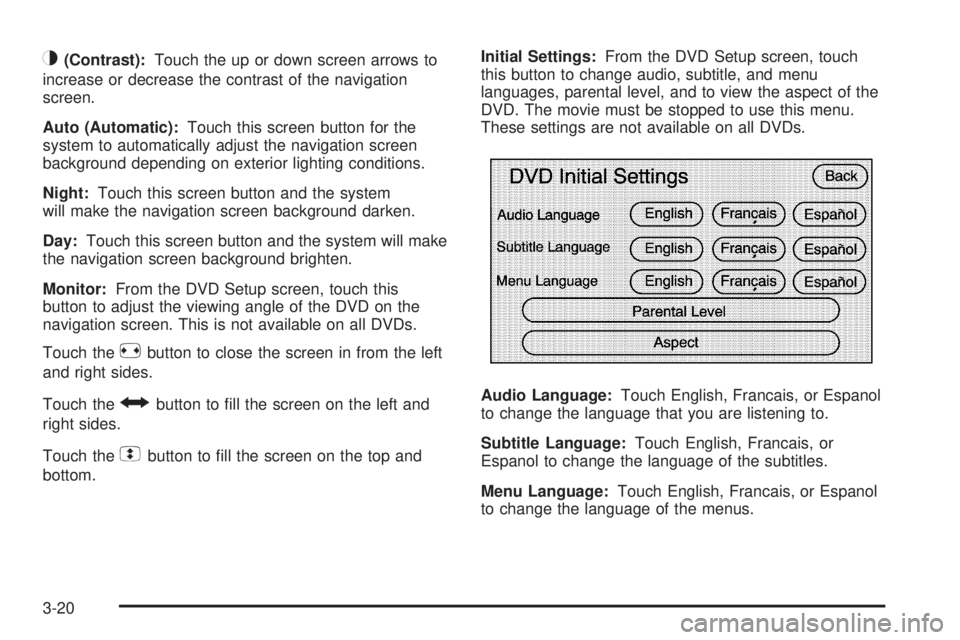
bottom.Initial Settings:From the DVD Setup screen, touch
this button to change audio, subtitle, and menu
languages, parental level, and to view the aspect of the
DVD. The movie must be stopped to use this menu.
These settings are not available on all DVDs.
Audio Language:Touch English, Francais, or Espanol
to change the language that you are listening to.
Subtitle Language:Touch English, Francais, or
Espanol to change the language of the subtitles.
Menu Language:Touch English, Francais, or Espanol
to change the language of the menus.
3-20
Page 89 of 100
Do not add any label to a CD or DVD, it could get
caught in the player. If a CD or DVD is recorded on a
personal computer and a description label is needed,
try labeling the top of the recorded CD or DVD with
a soft marker.
Auxiliary Devices
The navigation system has an auxiliary input jack
located in the upper right corner of the faceplate.
This is not an audio output; do not plug the headphone
set into the front auxiliary input jack. You can however,
connect an external audio device such as an iPod,
laptop computer, MP3 player, CD changer, or cassette
tape player, etc. to the auxiliary input jack for use
as another source for audio listening.
Drivers are encouraged to set up any auxiliary device
while the vehicle is in PARK (P). See “Defensive Driving”
in the Index of your vehicles owner manual for more
information on driver distraction.If your vehicle has rear audio/video input jacks, located
in the rear of the center console, they can be used
as another source for audio/video listening.
To use a portable audio player, connect a 3.5 mm
(1/8 inch) cable to the auxiliary input jack. When a
device is connected, the system will detect and
automatically begin playing audio from the device over
the vehicle’s speakers.
If a device is connected and you are listening to another
source (FM, CD, MP3, etc.), press the AUDIO key
then press the AUDIO key repeatedly until AUX is
selected or touch the AUX screen button. An auxiliary
device must be connected for the AUX screen button
to appear as an option to select or the vehicle must have
rear auxiliary jacks. See “Rear Seat Entertainment
System” in the Index of your vehicle’s owner manual for
more information on the rear auxiliary jacks.
3-23
Page 92 of 100
Voice Recognition
The navigation system’s voice recognition allows for
hands-free operation of the navigation system,
audio system, and OnStar
®features. The DVD map
disc must be installed in the navigation system for voice
recognition to work. See “Installing the DVD Map
Disc” underMaps on page 2-4. Voice recognition can
be used when the ignition is on or when Retained
Accessory Power (RAP) is active. See “Retained
Accessory Power (RAP)” in the Index of your vehicle’s
owner manual and for more information.
To use voice recognition, do the following:
1. Push and hold the SRCE (source) steering wheel
control until you hear a beep. The audio system,
if on, will mute.
2. Clearly state one of the commands listed on the
following pages.
Helpful Hints for Stating Commands
When a multiple command is available, choose the
command that best works for you.
Words that are in brackets are optional. For example,
for the command Radio [band] [select] FM, stating
Radio FM or Radio select FM are both valid
commands.
When the system recognizes the command the
system will:
either perform the function
ask you to conrm your choice by clearly
stating “yes or no”
issue an error message such as “System does
not recognize this command” or direct you to
“Please start speaking after the beep”
If the system is not yet ready, the system may state
“System is checking the disc. Please wait”.
To cancel a command or if the system response
does not match your verbal command, press and
hold the talk symbol button. The system will reply,
“System will cancel the voice recognition”.
4-2
Page 93 of 100
If you experience difficulty with the system
recognizing a command, try saying it more softly, and
wait for a few seconds after the beep, or you may just
try saying it again.
Background noise may cause voice commands to be
misunderstood, including airow noise from wind.
To use the voice recognition system, the map DVD
must be loaded.
This system is able to recognize commands in three
different languages. The system will only recognize
commands based on the language selected from the
Driver Information Center (DIC). See “Driver Information
Center, DIC Vehicle Personalization” in the Index of
your vehicles owner manual.
Voice Recognition Commands
The following list shows all of the voice commands
available for the navigation system with a brief
description of each. The commands are listed with the
optional words in brackets. To use the voice commands,
refer to the instructions listed previously.
Voice Tag Commands
The following are voice tag commands you can access
by clearly stating the commands exactly as they are
written. You may have up to 40 voice tag entries
for destinations.
Navigation go to [destination] (voice tag), navigation
select [destination] (voice tag):These commands
instruct the system to select a destination saved under
the voice tag you have stored.
When a destination is requested using a voice tag, the
system will state, “Press or say cancel if not correct”.
To cancel this voice tag destination, using voice
recognition, push and hold the SRCE button on the
steering wheel until you hear a beep, then say “cancel”.
Canceling voice tag destination by voice recognition,
must be done within ve seconds after the voice prompt.
If you are not currently driving on a route, the system
will automatically create the voice tag destination as
the nal destination. If you are currently driving on
a route, the system will automatically create the voice
tag destination as a waypoint. Up to three waypoints
can be created.
4-3
Page 94 of 100
Storing Voice Tags
From the address book entry information page, press
the Add Voice tag screen button. The system will
respond “Name Please?”.
Navigation Help
Navigation Help:This command instructs the system
to assist with navigation commands.
Display Commands
Use the following display commands to set the
display mode.
Display [set] day [mode]:Use this command to set
the display to daytime mode.
Display [set] night [mode]:Use this command to set
the display to night mode.
Display [set] auto [mode]:Use this command to set
the display to automatic mode. The system will
change between day and night mode automatically.
System help:This command instructs the system to
assist with display commands.
Radio Commands
The following are radio commands you can access by
clearly stating the commands exactly as they are written.
The commands are only available when you are in
one of the following audio modes, AM, FM, or XM™
(if equipped).
Radio:This command instructs the system to turn the
audio system on.
Radio [band] [select] AM, radio [band] [select] FM,
radio [band] [select] XM, radio [band] [select]
satellite:These commands instruct the system to go to
either the AM, FM, or XM (if equipped).
Radio [select] (frequency) AM, radio [select]
(frequency) FM:These commands instruct the system
to go to a specic frequency on either AM or FM.
Radio [select] (channel) XM, radio [select] (channel)
satellite:These commands instruct the system to
go to a specic channel on the XM™ band (if equipped).
The channel must be a valid channel or the system
will keep the radio at the current station setting.
The system will pause while searching for the channel.
Radio help:This command instructs the system to
assist with radio commands.
4-4