AUX GREAT WALL FLORID 2008 User Guide
[x] Cancel search | Manufacturer: GREAT WALL, Model Year: 2008, Model line: FLORID, Model: GREAT WALL FLORID 2008Pages: 281, PDF Size: 43.97 MB
Page 249 of 281
Downloaded from www.Manualslib.com manuals search engine GWFLORID Maintenance Manual242
Dashboard
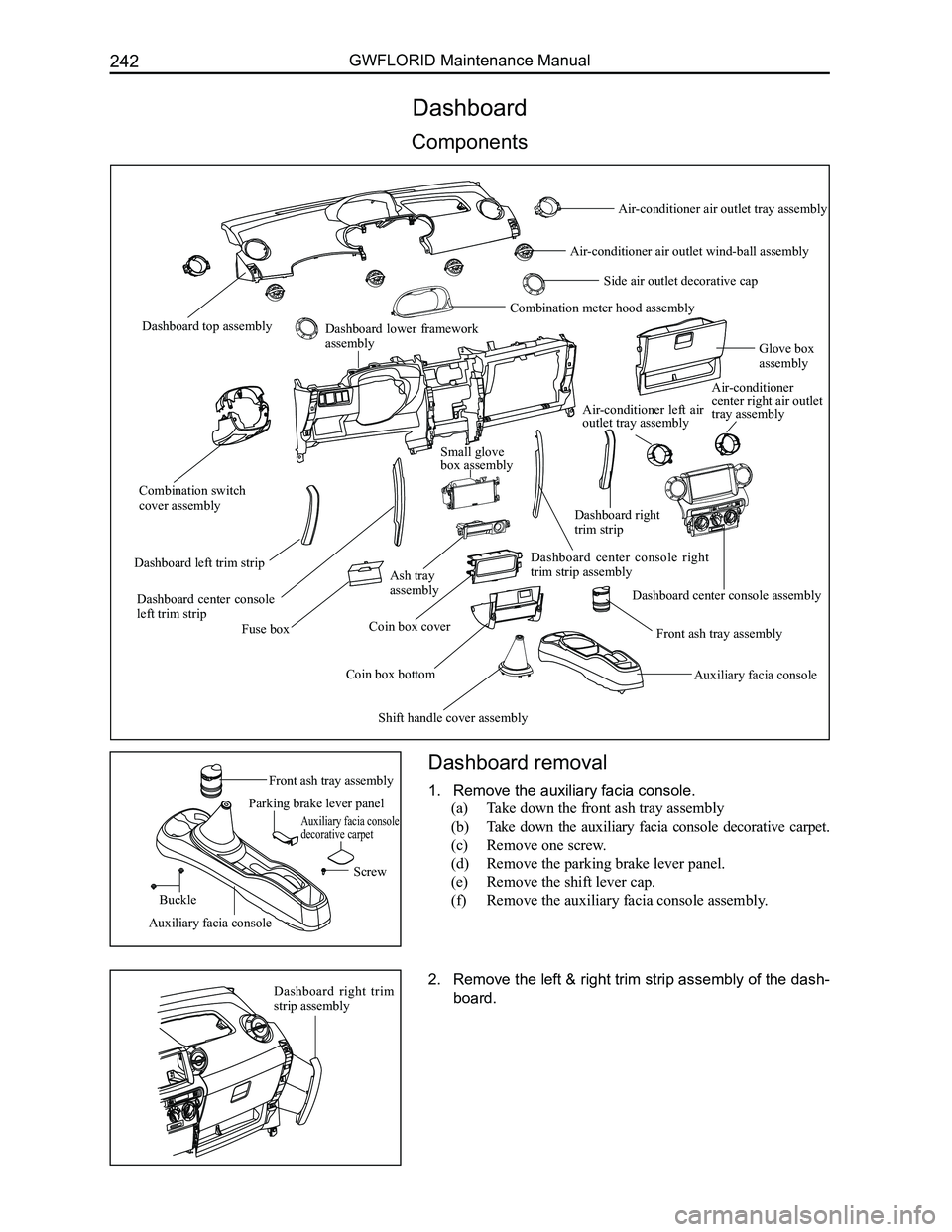
Components
Dashboard removal
1. Remove the auxiliary facia console.
(a) Take down the front ash tray assembly
(b) Take down the auxiliary facia console decorative carpet.
(c) Remove one screw.
(d) Remove the parking brake lever panel.
(e) Remove the shift lever cap.
(f) Remove the auxiliary facia console assembly.
2. Remove the left & right trim strip assembly of the dash-
board.
Front ash tray assembly
Dashboard top assembly
Combination switch cover assembly
Dashboard lower framework assemblyGlove box assembly
Fuse box
Dashboard left trim strip
Dashboard center console left trim strip
Ash tray assembly
Coin box bottom
Coin box coverFront ash tray assembly
Dashboard center console right trim strip assembly
Small glove box assembly
Shift handle cover assembly
Auxiliary facia console
Dashboard center console assembly
Air-conditioner center right air outlet tray assembly
Combination meter hood assembly
Side air outlet decorative cap
Air-conditioner air outlet wind-ball assembly
Air-conditioner air outlet tray assembly
Air-conditioner left air outlet tray assembly
Dashboard right trim strip
Parking brake lever panel
Auxiliary facia console decorative carpet
Screw
Buckle
Auxiliary facia console
Dashboard right trim strip assembly
Page 256 of 281
Downloaded from www.Manualslib.com manuals search engine 249Vehicle Body
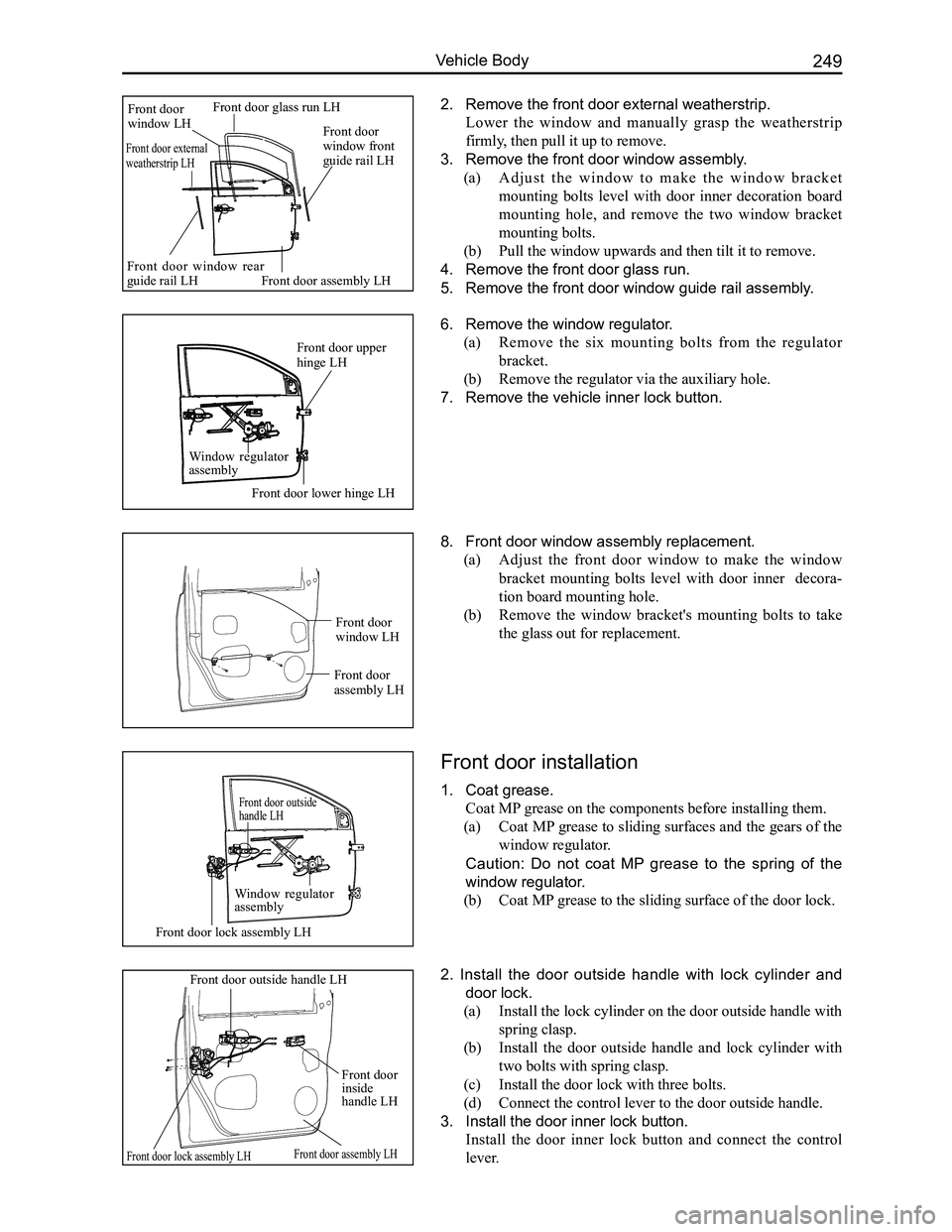
2. Remove the front door external weatherstrip.
Lower the window and manually grasp the weatherstrip
firmly, then pull it up to remove.
3. Remove the front door window assembly.
(a) A d j u s t t h e w i n d o w t o m a k e t h e w i n d o w b r a c k e t
mounting bolts level with door inner decoration board
mounting hole, and remove the two window bracket
mounting bolts.
(b) Pull the window upwards and then tilt it to remove.
4. Remove the front door glass run.
5. Remove the front door window guide rail assembly.
6. Remove the window regulator.
(a) Remove the six mounting bolts from the regulator
bracket.
(b) Remove the regulator via the auxiliary hole.
7. Remove the vehicle inner lock button.
8. Front door window assembly replacement.
(a) Adjust the front door window to make the window
bracket mounting bolts level with door inner decora-
tion board mounting hole.
(b) Remove the window bracket's mounting bolts to take
the glass out for replacement.
Front door installation
1. Coat grease.
Coat MP grease on the components before installing them.
(a) Coat MP grease to sliding surfaces and the gears of the
window regulator.
Caution: Do not coat MP grease to the spring of the
window regulator.
(b) Coat MP grease to the sliding surface of the door lock.
2. Install the door outside handle with lock cylinder and
door lock.
(a) Install the lock cylinder on the door outside handle with
spring clasp.
(b) Install the door outside handle and lock cylinder with
two bolts with spring clasp.
(c) Install the door lock with three bolts.
(d) Connect the control lever to the door outside handle.
3. Install the door inner lock button.
Install the door inner lock button and connect the control
lever.
Front door glass run LHFront door window LH
Front door assembly LH
Front door window front guide rail LH
Front door window rear guide rail LH
Front door external weatherstrip LH
Front door lower hinge LH
Front door upper hinge LH
Window regulator assembly
Front door lock assembly LH
Front door assembly LH
Front door assembly LH
Front door window LH
Front door outside handle LH
Window regulator assembly
Front door lock assembly LH
Front door outside handle LH
Front door inside handle LH
Page 257 of 281
Downloaded from www.Manualslib.com manuals search engine GWFLORID Maintenance Manual250
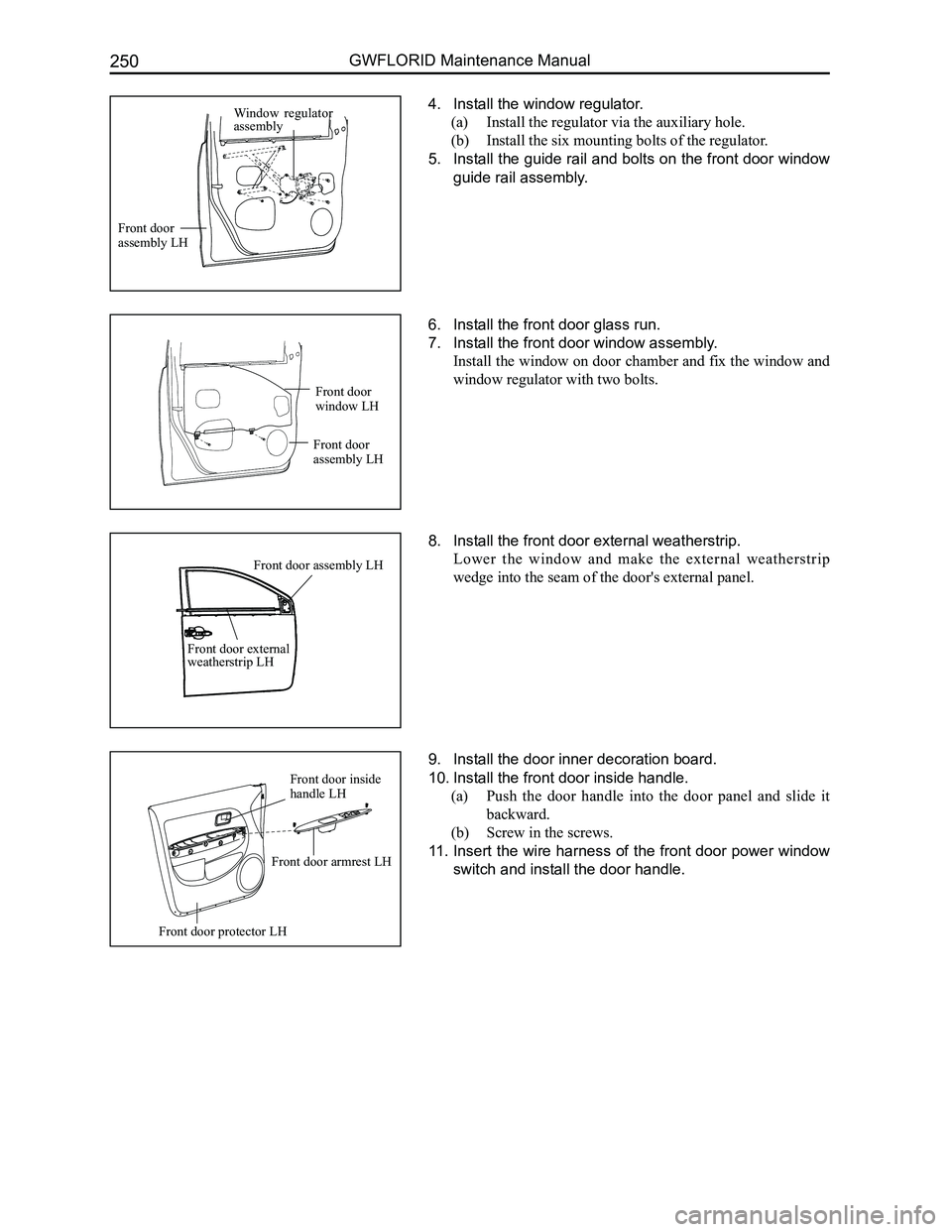
6. Install the front door glass run.
7. Install the front door window assembly.
Install the window on door chamber and fix the window and
window regulator with two bolts.
4. Install the window regulator.
(a) Install the regulator via the auxiliary hole.
(b) Install the six mounting bolts of the regulator.
5. Install the guide rail and bolts on the front door window
guide rail assembly.
9. Install the door inner decoration board.
10. Install the front door inside handle.
(a) Push the door handle into the door panel and slide it
backward.
(b) Screw in the screws.
11. Insert the wire harness of the front door power window
switch and install the door handle.
8. Install the front door external weatherstrip.
Lower the window and make the external weatherstrip
wedge into the seam of the door's external panel.
Front door protector LH
Front door assembly LH
Window regulator assembly
Front door assembly LH
Front door window LH
Front door assembly LH
Front door external weatherstrip LH
Front door armrest LH
Front door inside handle LH
Page 259 of 281
Downloaded from www.Manualslib.com manuals search engine GWFLORID Maintenance Manual252
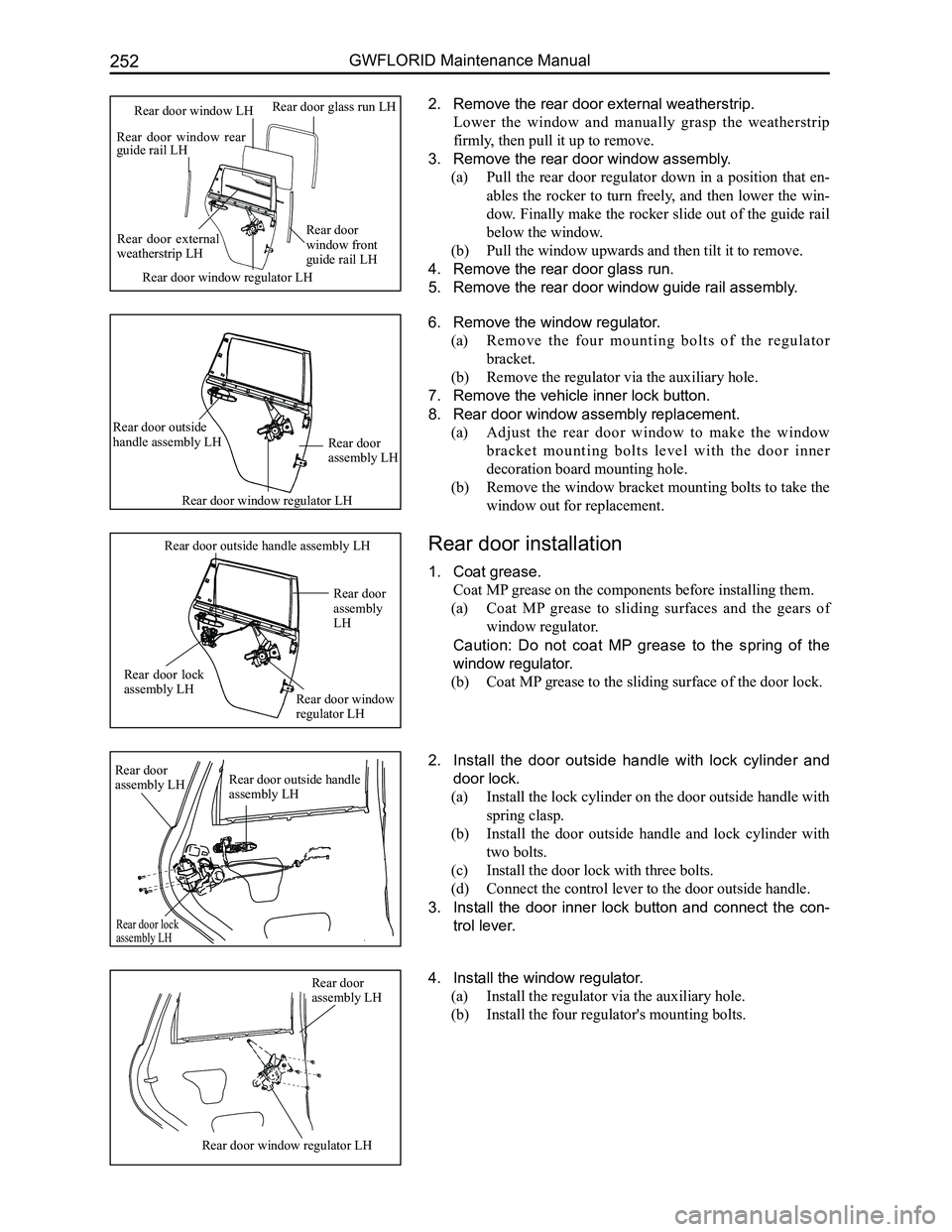
2. Remove the rear door external weatherstrip.
Lower the window and manually grasp the weatherstrip
firmly, then pull it up to remove.
3. Remove the rear door window assembly.
(a) Pull the rear door regulator down in a position that en-
ables the rocker to turn freely, and then lower the win-
dow. Finally make the rocker slide out of the guide rail
below the window.
(b) Pull the window upwards and then tilt it to remove.
4. Remove the rear door glass run.
5. Remove the rear door window guide rail assembly.
6. Remove the window regulator.
(a) Remove the four mounting bolts of the regulator
bracket.
(b) Remove the regulator via the auxiliary hole.
7. Remove the vehicle inner lock button.
8. Rear door window assembly replacement.
(a) Adjust the rear door window to make the window
b r a c k e t m o u n t i n g b o l t s l e v e l w i t h t h e d o o r i n n e r
decoration board mounting hole.
(b) Remove the window bracket mounting bolts to take the
window out for replacement.
Rear door installation
1. Coat grease.
Coat MP grease on the components before installing them.
(a) Coat MP grease to sliding surfaces and the gears of
window regulator.
Caution: Do not coat MP grease to the spring of the
window regulator.
(b) Coat MP grease to the sliding surface of the door lock.
4. Install the window regulator.
(a) Install the regulator via the auxiliary hole.
(b) Install the four regulator's mounting bolts.
2. Install the door outside handle with lock cylinder and
door lock.
(a) Install the lock cylinder on the door outside handle with
spring clasp.
(b) Install the door outside handle and lock cylinder with
two bolts.
(c) Install the door lock with three bolts.
(d) Connect the control lever to the door outside handle.
3. Install the door inner lock button and connect the con-
trol lever.
Rear door window rear guide rail LH
Rear door glass run LHRear door window LH
Rear door external weatherstrip LH
Rear door window front guide rail LH
Rear door window regulator LH
Rear door window regulator LH
Rear door assembly LH
Rear door outside handle assembly LH
Rear door window regulator LH
Rear door lock assembly LH
Rear door assembly LH
Rear door outside handle assembly LH
Rear door window regulator LH
Rear door assembly LH
Rear door outside handle assembly LH
Rear door assembly LH
Rear door lock assembly LH