check oil GREAT WALL FLORID 2008 User Guide
[x] Cancel search | Manufacturer: GREAT WALL, Model Year: 2008, Model line: FLORID, Model: GREAT WALL FLORID 2008Pages: 281, PDF Size: 43.97 MB
Page 137 of 281
Downloaded from www.Manualslib.com manuals search engine GWFLORID Maintenance Manual130
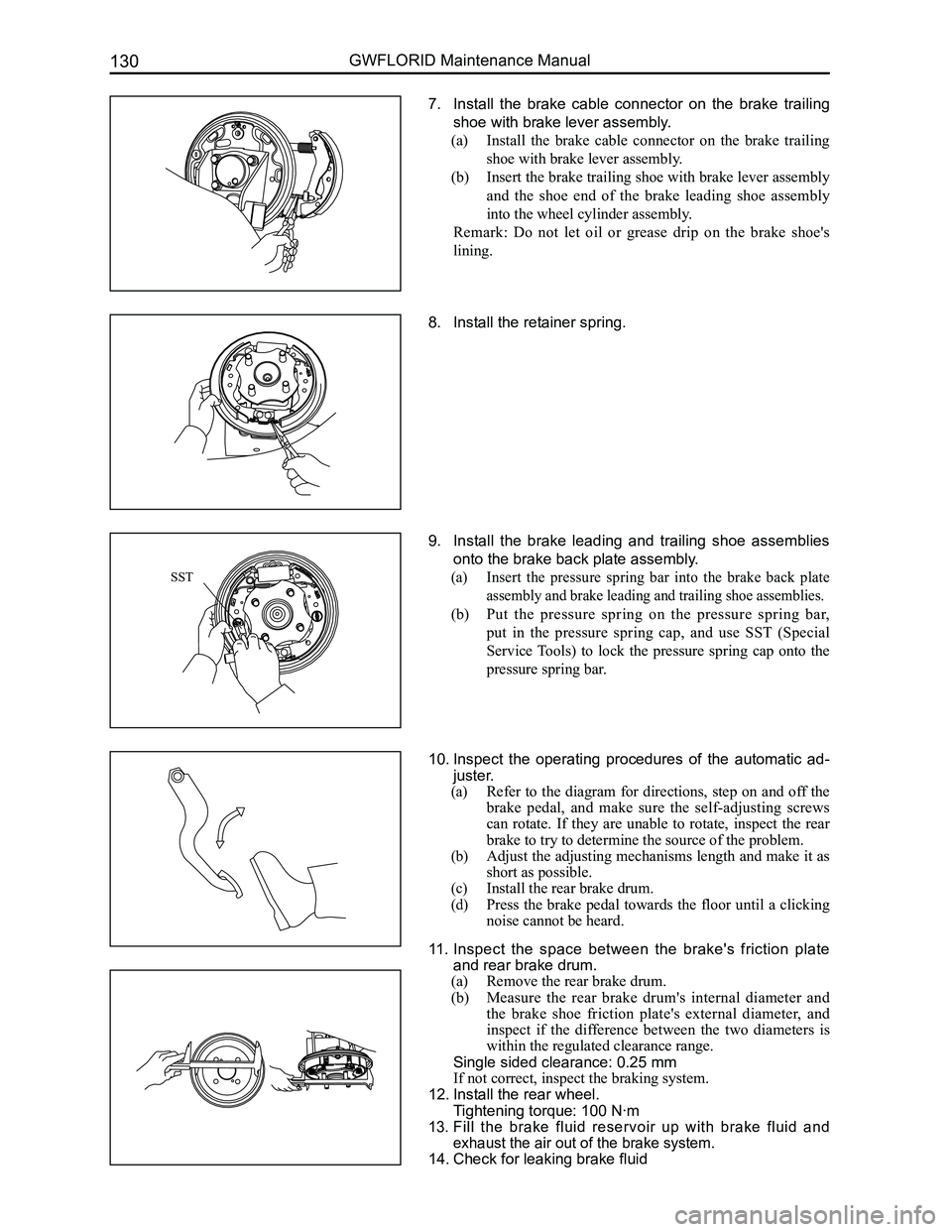
7. Install the brake cable connector on the brake trailing
shoe with brake lever assembly.
(a) Install the brake cable connector on the brake trailing
shoe with brake lever assembly.
(b) Insert the brake trailing shoe with brake lever assembly
and the shoe end of the brake leading shoe assembly
into the wheel cylinder assembly.
Remark: Do not let oil or grease drip on the brake shoe's
lining.
8. Install the retainer spring.
9. Install the brake leading and trailing shoe assemblies
onto the brake back plate assembly.
(a) Insert the pressure spring bar into the brake back plate
assembly and brake leading and trailing shoe assemblies.
(b) Put the pressure spring on the pressure spring bar,
put in the pressure spring cap, and use SST (Special
Service Tools) to lock the pressure spring cap onto the
pressure spring bar.
10. Inspect the operating procedures of the automatic ad-
juster.
(a) Refer to the diagram for directions, step on and off the
brake pedal, and make sure the self-adjusting screws
can rotate. If they are unable to rotate, inspect the rear
brake to try to determine the source of the problem.
(b) Adjust the adjusting mechanisms length and make it as
short as possible.
(c) Install the rear brake drum.
(d) Press the brake pedal towards the floor until a clicking
noise cannot be heard.
11. Inspect the space between the brake's friction plate
and rear brake drum.
(a) Remove the rear brake drum.
(b) Measure the rear brake drum's internal diameter and
the brake shoe friction plate's external diameter, and
inspect if the difference between the two diameters is
within the regulated clearance range.
Single sided clearance: 0.25 mm
If not correct, inspect the braking system.
12. Install the rear wheel.
Tightening torque: 100 N·m
13. Fill the brake fluid reservoir up with brake fluid and
exhaust the air out of the brake system.
14. Check for leaking brake fluid
SST
Page 142 of 281
Downloaded from www.Manualslib.com manuals search engine 135Steering System
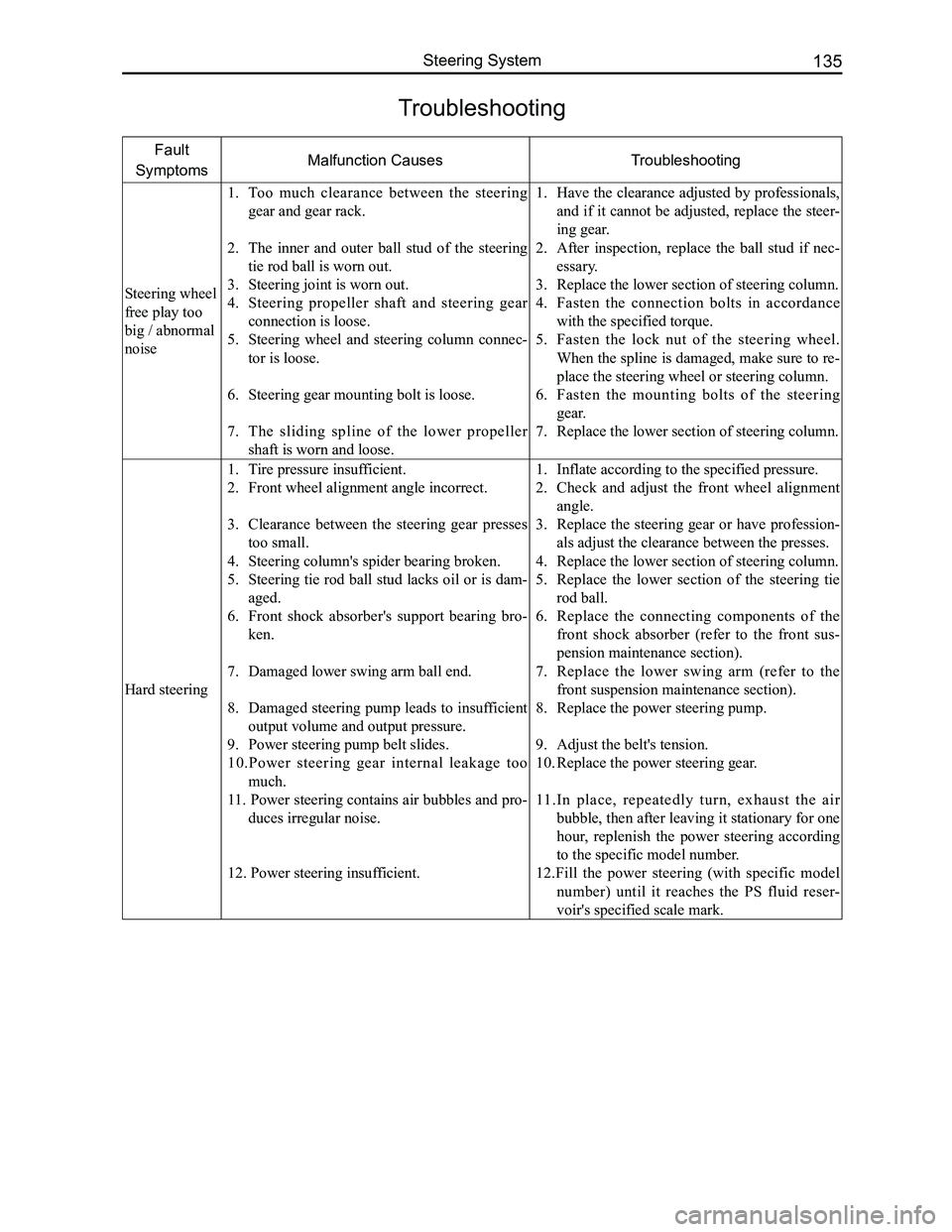
Troubleshooting
Fault
SymptomsMalfunction CausesTroubleshooting
Steering wheel
free play too
big / abnormal
noise
1. Too much clearance between the steering
gear and gear rack.
2. The inner and outer ball stud of the steering
tie rod ball is worn out.
3. Steering joint is worn out.
4. Steering propeller shaft and steering gear
connection is loose.
5. Steering wheel and steering column connec-
tor is loose.
6. Steering gear mounting bolt is loose.
7. The sliding spline of the lower propeller
shaft is worn and loose.
1. Have the clearance adjusted by professionals,
and if it cannot be adjusted, replace the steer-
ing gear.
2. After inspection, replace the ball stud if nec-
essary.
3. Replace the lower section of steering column.
4. Fasten the connection bolts in accordance
with the specified torque.
5. Fasten the lock nut of the steering wheel.
When the spline is damaged, make sure to re-
place the steering wheel or steering column.
6. Fasten the mounting bolts of the steering
gear.
7. Replace the lower section of steering column.
Hard steering
1. Tire pressure insufficient.
2. Front wheel alignment angle incorrect.
3. Clearance between the steering gear presses
too small.
4. Steering column's spider bearing broken.
5. Steering tie rod ball stud lacks oil or is dam-
aged.
6. Front shock absorber's support bearing bro-
ken.
7. Damaged lower swing arm ball end.
8. Damaged steering pump leads to insufficient
output volume and output pressure.
9. Power steering pump belt slides.
10.Power steering gear internal leakage too
much.
11. Power steering contains air bubbles and pro-
duces irregular noise.
12. Power steering insufficient.
1. Inflate according to the specified pressure.
2. Check and adjust the front wheel alignment
angle.
3. Replace the steering gear or have profession-
als adjust the clearance between the presses.
4. Replace the lower section of steering column.
5. Replace the lower section of the steering tie
rod ball.
6. Replace the connecting components of the
front shock absorber (refer to the front sus-
pension maintenance section).
7. Replace the lower swing arm (refer to the
front suspension maintenance section).
8. Replace the power steering pump.
9. Adjust the belt's tension.
10. Replace the power steering gear.
11.In place, repeatedly turn, exhaust the air
bubble, then after leaving it stationary for one
hour, replenish the power steering according
to the specific model number.
12.Fill the power steering (with specific model
number) until it reaches the PS fluid reser-
voir's specified scale mark.
Page 187 of 281
Downloaded from www.Manualslib.com manuals search engine GWFLORID Maintenance Manual180
Combination Meter
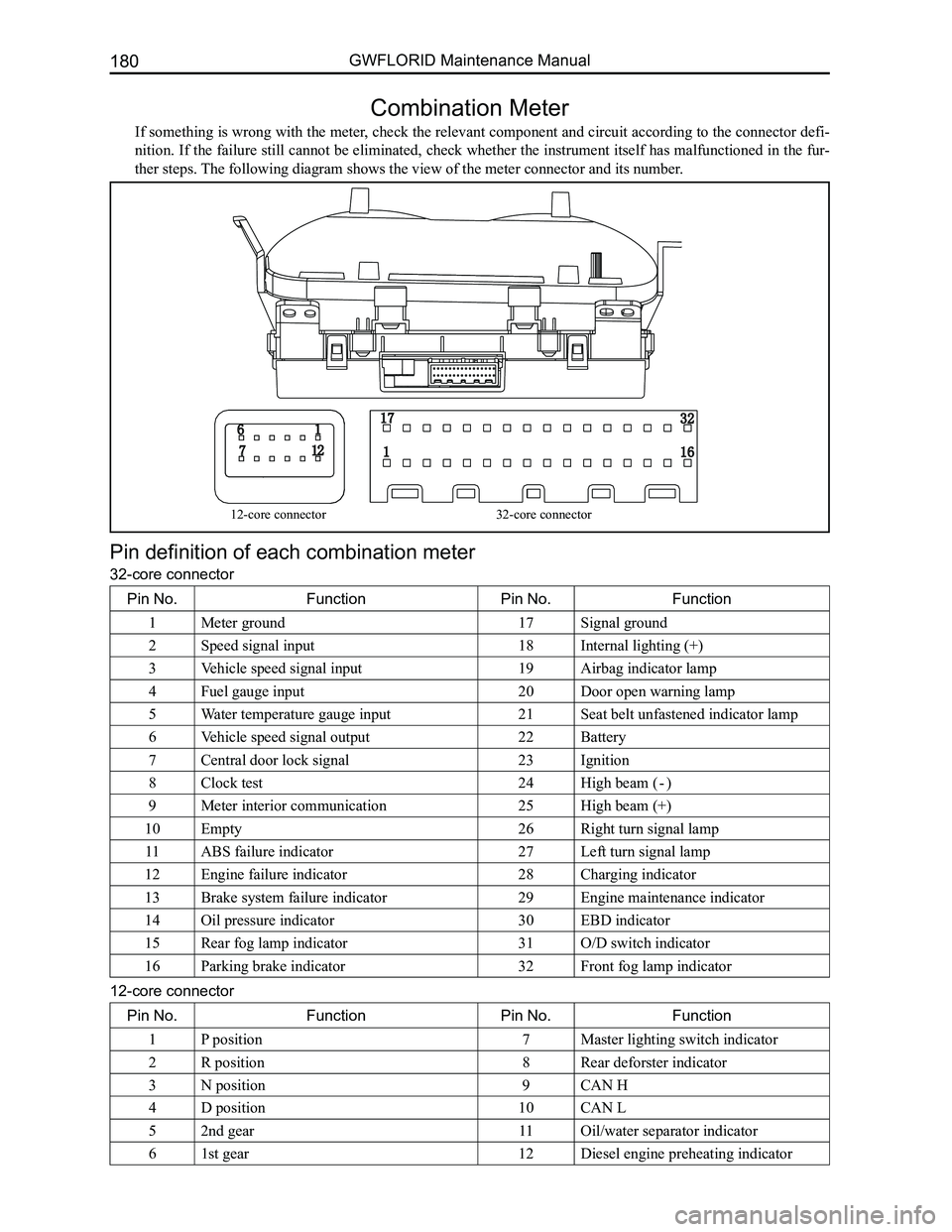
If something is wrong with the meter, check the relevant component and circuit according to the connector defi-
nition. If the failure still cannot be eliminated, check whether the instrument itself has malfunctioned in the fur-
ther steps. The following diagram shows the view of the meter connector and its numb\
er.
Pin definition of each combination meter
32-core connector
Pin No.FunctionPin No.Function
1Meter ground17Signal ground
2Speed signal input18Internal lighting (+)
3Vehicle speed signal input19Airbag indicator lamp
4Fuel gauge input20Door open warning lamp
5Water temperature gauge input21Seat belt unfastened indicator lamp
6Vehicle speed signal output22Battery
7Central door lock signal23Ignition
8Clock test24High beam ( - )
9Meter interior communication25High beam (+)
10Empty26Right turn signal lamp
11ABS failure indicator27Left turn signal lamp
12Engine failure indicator28Charging indicator
13Brake system failure indicator29Engine maintenance indicator
14Oil pressure indicator30EBD indicator
15Rear fog lamp indicator31O/D switch indicator
16Parking brake indicator32Front fog lamp indicator
12-core connector
Pin No.FunctionPin No.Function
1P position7Master lighting switch indicator
2R position8Rear deforster indicator
3N position9CAN H
4D position10CAN L
52nd gear11Oil/water separator indicator
61st gear12Diesel engine preheating indicator
12-core connector32-core connector
Page 195 of 281
Downloaded from www.Manualslib.com manuals search engine GWFLORID Maintenance Manual188
not necessarily mean that engine start failure is due to a immobilizer system malfunction. The reasons for start-
ing engine failures are numerous, including factors like fuel, gas, fire, electricity, wires, etc. If the engine cannot
start, first check if the immobilizer system is working normally. This can be judged by looking at the flashing
theft deterrent indicator lamp which is located on the dashboard in front of the driver seat: Insert the key into the
lock cylinder and turn it to the "ON" position. If a legal key is used to start the engine, once the warning lamp is
connected to the ON end and the transponder is confirmed, the LED will remain unlit. Then when the ON end is
disconnected and the key is pulled out, the LED will shine for 0.25 s and darken for 4 s, as to act as a warning.
If an illegal key is used to start up the engine or there is something wrong with the system, the alarm indicator
lamp will shine for 0.25 s and darken for 4 s. If all is normal, then check the other parts of the engine. If abnor-
mal, first perform immobilizer system troubleshooting. A scanner can be used to judge if the immobilizer system
is working normally, but the precondition is that the scanner must be able to establish communication with the
theft deterrent controller.
1. If communication cannot be established, consider the following:
(a) Check whether the battery voltage is higher than 9 V
(b) Check whether the scanner plug is well contacted to the vehicle socket
(c) Use a multimeter to check whether the 7 pin of the OBD-II plug (diagnostic plug) is connected to the theft
deterrent controller's A7 pin
(d) Check whether the power supply of the theft deterrent controller is normal. (Use a multimeter to measure
whether the voltage of the theft deterrent controller's socket A1 pin and A2 pin is higher than 9 V)
(e) Then adopt the substitution method, which is to replace the theft deterrent controller to check if there is
anything wrong with the theft deterrent controller.
• If the failure is related to the theft deterrent controller, change it and initiate re-matching.
• If the failure has nothing to do with the theft deterrent controller, remove the electronic controller which
is connected to the alarm's K wire, such as the ABS controller, engine electrojet controller, airbag ECU
assembly, etc., as to ascertain if the present fault is caused by the wire harness connected with the theft
deterrent controller's K wire.
2. If communication can be established
Connect the scanner to the vehicle diagnostic port. Insert the key into the steering lock, and turn it to the "ON"
position, then select the scanner to check the immobilizer system's trou\
ble code.
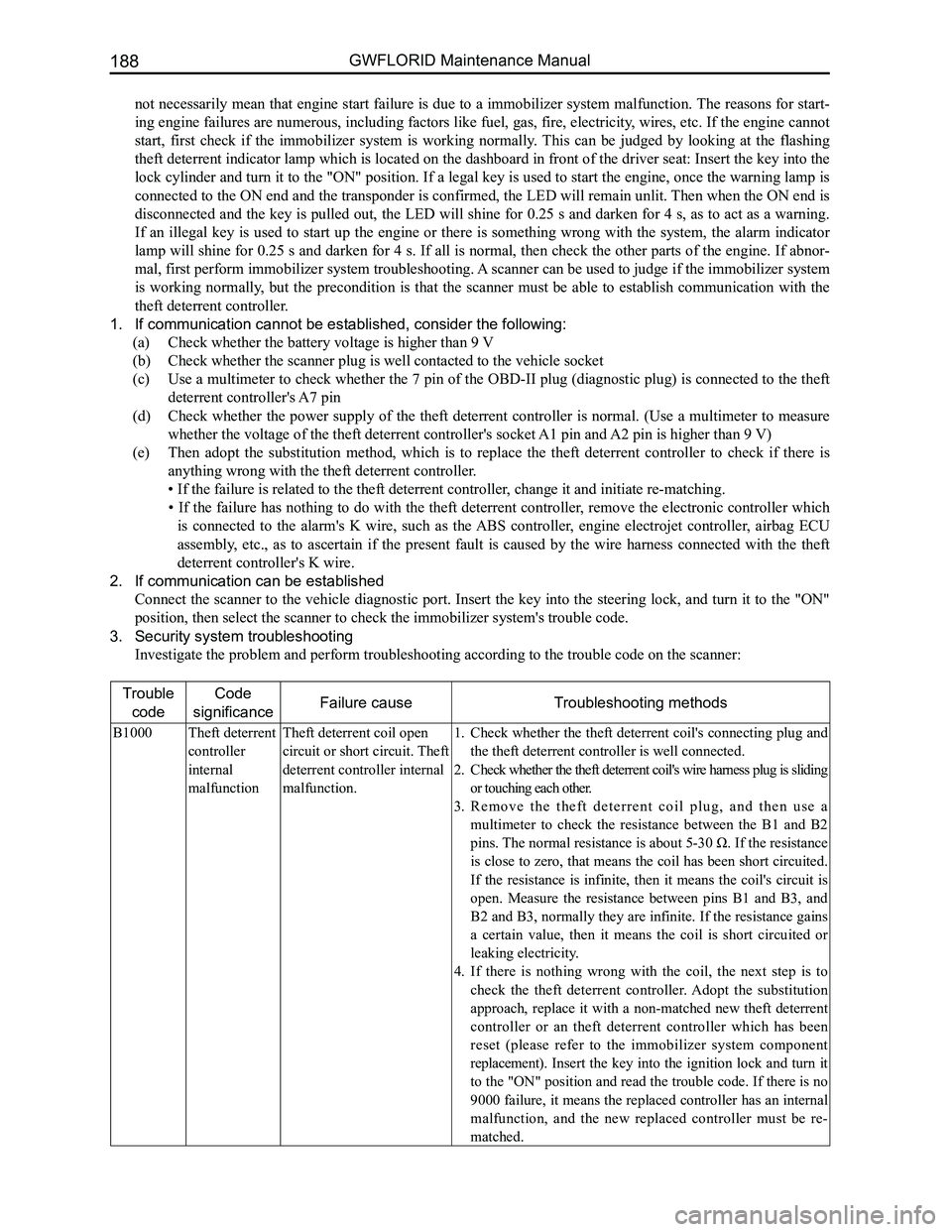
3. Security system troubleshooting
Investigate the problem and perform troubleshooting according to the tro\
uble code on the scanner:
Trouble
code
Code
significanceFailure causeTroubleshooting methods
B1000Theft deterrent
controller
internal
malfunction
Theft deterrent coil open
circuit or short circuit. Theft
deterrent controller internal
malfunction.
Check whether the theft deterrent coil's connecting plug and 1.
the theft deterrent controller is well connected.
Check whether the theft deterrent coil's wire harness plug is sliding 2.
or touching each other.
R e m o v e t h e t h e f t d e t e r r e n t c o i l p l u g , a n d t h e n u s e a 3.
multimeter to check the resistance between the B1 and B2
pins. The normal resistance is about 5-30 Ω. If the resistance
is close to zero, that means the coil has been short circuited.
If the resistance is infinite, then it means the coil's circuit is
open. Measure the resistance between pins B1 and B3, and
B2 and B3, normally they are infinite. If the resistance gains
a certain value, then it means the coil is short circuited or
leaking electricity.
If there is nothing wrong with the coil, the next step is to 4.
check the theft deterrent controller. Adopt the substitution
approach, replace it with a non-matched new theft deterrent
controller or an theft deterrent controller which has been
reset (please refer to the immobilizer system component
replacement). Insert the key into the ignition lock and turn it
to the "ON" position and read the trouble code. If there is no
9000 failure, it means the replaced controller has an internal
malfunction, and the new replaced controller must be re-
matched.
Page 197 of 281
Downloaded from www.Manualslib.com manuals search engine GWFLORID Maintenance Manual190
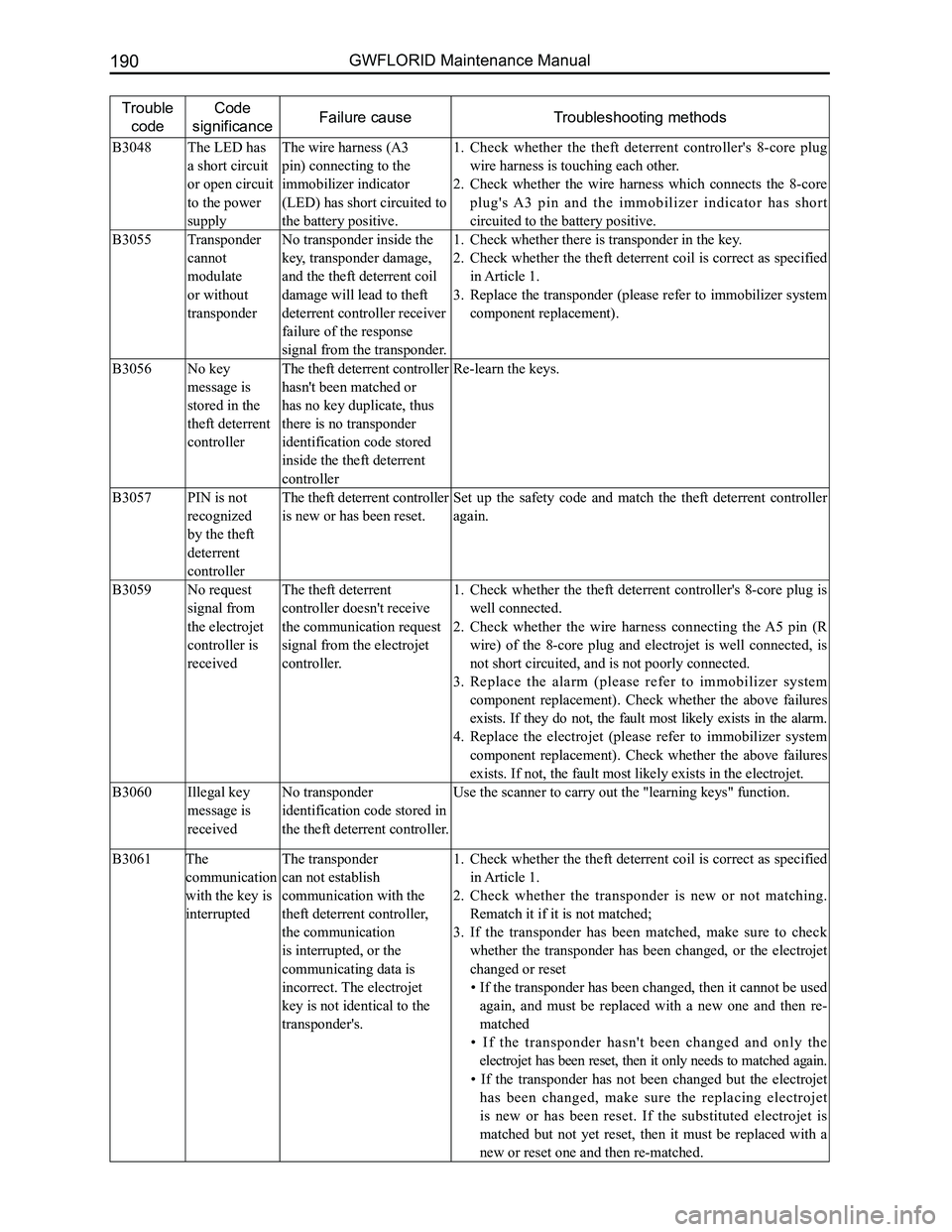
Trouble
code
Code
significanceFailure causeTroubleshooting methods
B3048The LED has
a short circuit
or open circuit
to the power
supply
The wire harness (A3
pin) connecting to the
immobilizer indicator
(LED) has short circuited to
the battery positive.
Check whether the theft deterrent controller's 8-core plug 1.
wire harness is touching each other.
Check whether the wire harness which connects the 8-core 2.
plug's A3 pin and the immobilizer indicator has short
circuited to the battery positive.
B3055Transponder
cannot
modulate
or without
transponder
No transponder inside the
key, transponder damage,
and the theft deterrent coil
damage will lead to theft
deterrent controller receiver
failure of the response
signal from the transponder.
Check whether there is transponder in the key.1.
Check whether the theft deterrent coil is correct as specified 2.
in Article 1.
Replace the transponder (please refer to immobilizer system 3.
component replacement).
B3056No key
message is
stored in the
theft deterrent
controller
The theft deterrent controller
hasn't been matched or
has no key duplicate, thus
there is no transponder
identification code stored
inside the theft deterrent
controller
Re-learn the keys.
B3057PIN is not
recognized
by the theft
deterrent
controller
The theft deterrent controller
is new or has been reset.
Set up the safety code and match the theft deterrent controller
again.
B3059No request
signal from
the electrojet
controller is
received
The theft deterrent
controller doesn't receive
the communication request
signal from the electrojet
controller.
Check whether the theft deterrent controller's 8-core plug is 1.
well connected.
Check whether the wire harness connecting the A5 pin (R 2.
wire) of the 8-core plug and electrojet is well connected, is
not short circuited, and is not poorly connected.
Replace the alarm (please refer to immobilizer system 3.
component replacement). Check whether the above failures
exists. If they do not, the fault most likely exists in the alarm.
Replace the electrojet (please refer to immobilizer system 4.
component replacement). Check whether the above failures
exists. If not, the fault most likely exists in the electrojet.
B3060Illegal key
message is
received
No transponder
identification code stored in
the theft deterrent controller.
Use the scanner to carry out the "learning keys" function.
B3061The
communication
with the key is
interrupted
The transponder
can not establish
communication with the
theft deterrent controller,
the communication
is interrupted, or the
communicating data is
incorrect. The electrojet
key is not identical to the
transponder's.
Check whether the theft deterrent coil is correct as specified 1.
in Article 1.
Check whether the transponder is new or not matching. 2.
Rematch it if it is not matched;
If the transponder has been matched, make sure to check 3.
whether the transponder has been changed, or the electrojet
changed or reset
• If the transponder has been changed, then it cannot be used
again, and must be replaced with a new one and then re-
matched
• If the transponder hasn't been changed and only the
electrojet has been reset, then it only needs to matched again.
• If the transponder has not been changed but the electrojet
has been changed, make sure the replacing electrojet
is new or has been reset. If the substituted electrojet is
matched but not yet reset, then it must be replaced with a
new or reset one and then re-matched.
Page 198 of 281
Downloaded from www.Manualslib.com manuals search engine 191Electrical Accessories
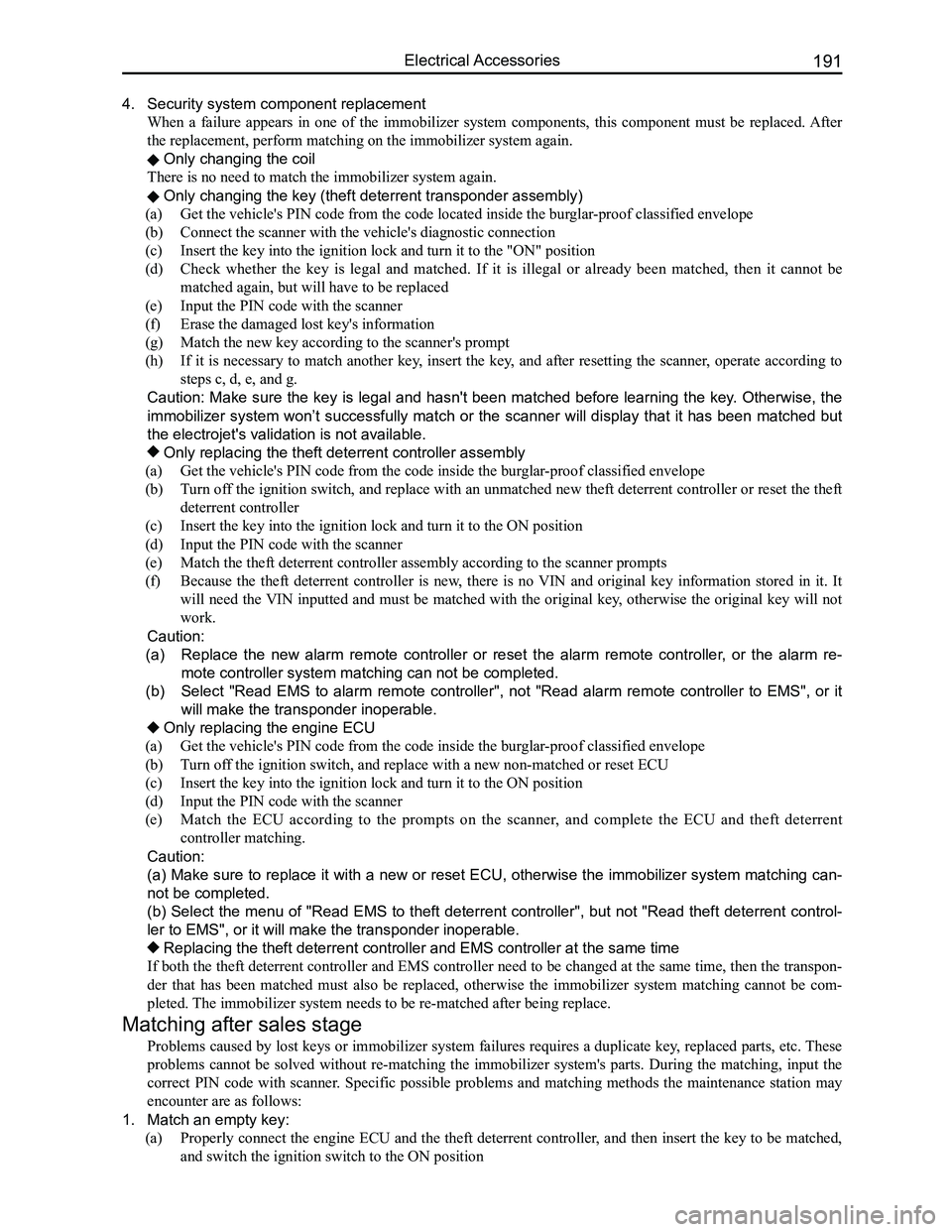
4. Security system component replacement
When a failure appears in one of the immobilizer system components, this component must be replaced. After
the replacement, perform matching on the immobilizer system again.
Only changing the coil
There is no need to match the immobilizer system again.
Only changing the key (theft deterrent transponder assembly)
(a) Get the vehicle's PIN code from the code located inside the burglar-proof classified envelope
(b) Connect the scanner with the vehicle's diagnostic connection
(c) Insert the key into the ignition lock and turn it to the "ON" position
(d) Check whether the key is legal and matched. If it is illegal or already been matched, then it cannot be
matched again, but will have to be replaced
(e) Input the PIN code with the scanner
(f) Erase the damaged lost key's information
(g) Match the new key according to the scanner's prompt
(h) If it is necessary to match another key, insert the key, and after resetting the scanner, operate according to
steps c, d, e, and g.
Caution: Make sure the key is legal and hasn't been matched before learning the key. Otherwise, the
immobilizer system won’t successfully match or the scanner will display that it has been matched but
the electrojet's validation is not available.
Only replacing the theft deterrent controller assembly
(a) Get the vehicle's PIN code from the code inside the burglar-proof classified envelope
(b) Turn off the ignition switch, and replace with an unmatched new theft deterrent controller or reset the theft
deterrent controller
(c) Insert the key into the ignition lock and turn it to the ON position
(d) Input the PIN code with the scanner
(e) Match the theft deterrent controller assembly according to the scanner prompts
(f) Because the theft deterrent controller is new, there is no VIN and original key information stored in it. It
will need the VIN inputted and must be matched with the original key, otherwise the original key will not
work.
Caution:
(a) Replace the new alarm remote controller or reset the alarm remote controller, or the alarm re-
mote controller system matching can not be completed.
(b) Select "Read EMS to alarm remote controller", not "Read alarm remote controller to EMS", or it
will make the transponder inoperable.
Only replacing the engine ECU
(a) Get the vehicle's PIN code from the code inside the burglar-proof classified envelope
(b) Turn off the ignition switch, and replace with a new non-matched or reset ECU
(c) Insert the key into the ignition lock and turn it to the ON position
(d) Input the PIN code with the scanner
(e) Match the ECU according to the prompts on the scanner, and complete the ECU and theft deterrent
controller matching.
Caution:
(a) Make sure to replace it with a new or reset ECU, otherwise the immobilizer system matching can-
not be completed.
(b) Select the menu of "Read EMS to theft deterrent controller", but not "Read theft deterrent control-
ler to EMS", or it will make the transponder inoperable.
Replacing the theft deterrent controller and EMS controller at the same\
time
If both the theft deterrent controller and EMS controller need to be changed at the same time, then the transpon-
der that has been matched must also be replaced, otherwise the immobilizer system matching cannot be com-
pleted. The immobilizer system needs to be re-matched after being replace.
Matching after sales stage
Problems caused by lost keys or immobilizer system failures requires a duplicate key, replaced parts, etc. These
problems cannot be solved without re-matching the immobilizer system's parts. During the matching, input the
correct PIN code with scanner. Specific possible problems and matching methods the maintenance station may
encounter are as follows:
1. Match an empty key:
(a) Properly connect the engine ECU and the theft deterrent controller, and then insert the key to be matched,
and switch the ignition switch to the ON position
Page 201 of 281
Downloaded from www.Manualslib.com manuals search engine GWFLORID Maintenance Manual194
Display characterMalfunctionSolutions
ERR3Disc is placed upside downEject the disc and reload
ERR4Incompatible disc file or formatCheck the disc format
ERR1
ERR1Disc structure errorEject the disc and replay
Trouble code
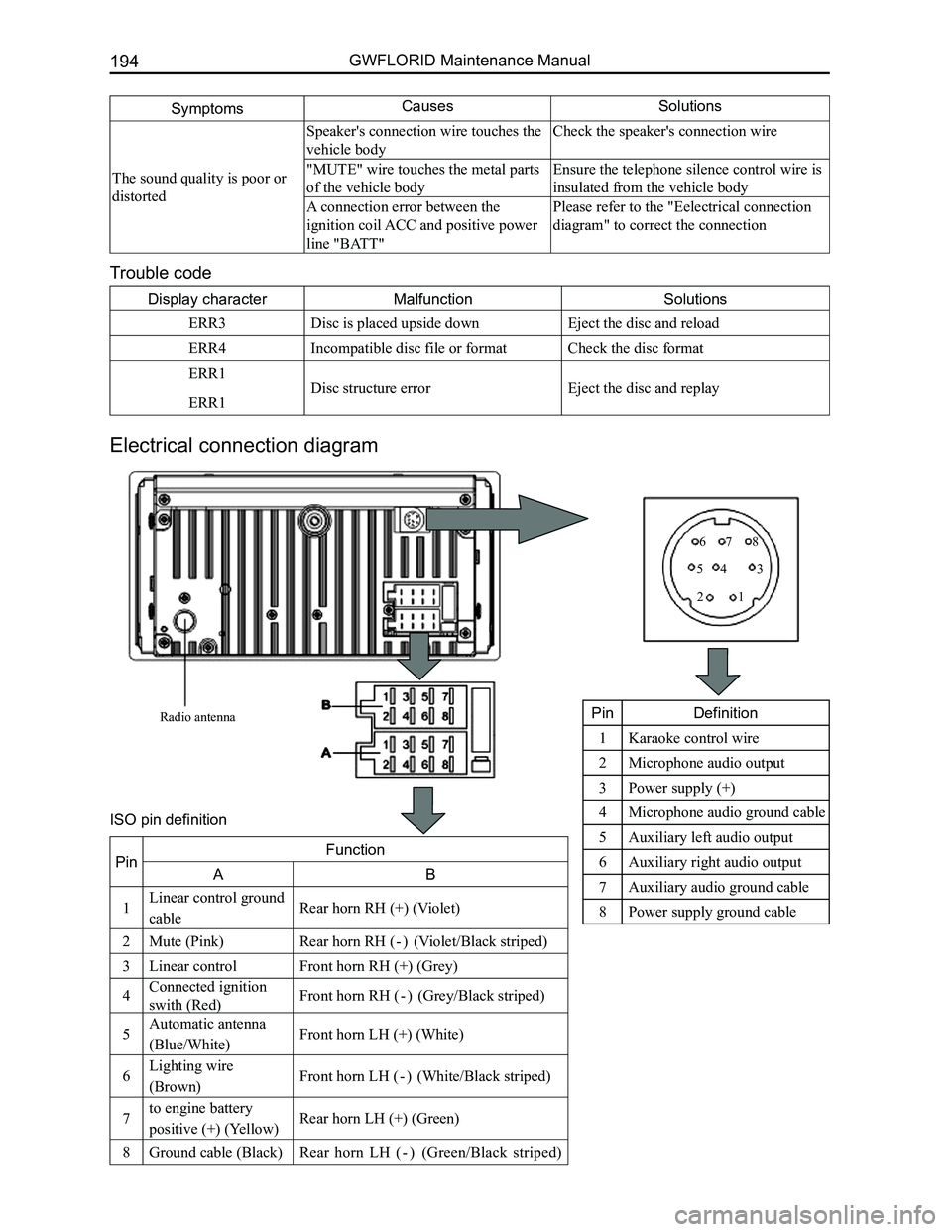
Electrical connection diagram
SymptomsCausesSolutions
The sound quality is poor or
distorted
Speaker's connection wire touches the
vehicle body
Check the speaker's connection wire
"MUTE" wire touches the metal parts
of the vehicle body
Ensure the telephone silence control wire is
insulated from the vehicle body
A connection error between the
ignition coil ACC and positive power
line "BATT"
Please refer to the "Eelectrical connection
diagram" to correct the connection
Radio antenna
12
345
678
PinDefinition
1Karaoke control wire
2Microphone audio output
3Power supply (+)
4Microphone audio ground cable
5Auxiliary left audio output
6Auxiliary right audio output
7Auxiliary audio ground cable
8Power supply ground cable
PinFunction
AB
1Linear control ground
cableRear horn RH (+) (Violet)
2Mute (Pink)Rear horn RH ( - ) (Violet/Black striped)
3Linear controlFront horn RH (+) (Grey)
4Connected ignition
swith (Red)Front horn RH ( - ) (Grey/Black striped)
5Automatic antenna
(Blue/White)Front horn LH (+) (White)
6Lighting wire
(Brown)Front horn LH ( - ) (White/Black striped)
7to engine battery
positive (+) (Yellow)Rear horn LH (+) (Green)
8Ground cable (Black)Rear horn LH ( - ) (Green/Black striped)
ISO pin definition
Page 204 of 281

Downloaded from www.Manualslib.com manuals search engine 197Electrical Accessories
Common faults and solutions
If the following faults occur while using this machine, please refer to \
the troubleshooting guide.
General problems
SymptomsCausesSolutions
Cannot start
Burnt fuseReplace with a new fuse of the same
specification
Vehicle supply battery fuse is burntReplace the vehicle supply battery fuse
Illegal operation and other factorsPress the reset button to reset the system
Remote controller doesn't
work
Remote controller battery is lowReplace the remote controller battery
Remote controller battery is reversely
installedProper battery installation
No sound or sound is too low
The volume of the head unit or the
connected component is too low
Raise the volume of the head unit or the
connected component
Speaker possibly damagedCheck the speaker
The sound balance settings lean to one
sideAdjust the sound balance
Speaker's connection wire touches the
vehicle body
Use insulated conductor to connect the
speaker and use insulating cement to cover
the exposed connections
Disc is not genuineUse a genuine disc
Speaker is incorrectly connectedPlease refer to the "Equipment connection
drawing" to correct the connection
The sound quality is poor or
distorted
Speaker's connection wire touches the
vehicle bodyCheck the speaker's connection wire
"MUTE" wire touches the metal parts of
the vehicle body
Ensure the telephone silence control wire
is insulated from the vehicle body
A connection error between ignition coil
ACC and positive power wire "BATT"
Please refer to the "equipment connection
drawing" to correct the connection
Common display characters and fault meaning
Display characterMalfunctionSolutions
No Disc
Disc is dirtyClean or replace the disc
The read side of the disc is inserted
upside-down
Insert the disc into the player with the
label side up
No disc in the playerInsert the disc
Bad disc
Disc is dirtyClean or replace the disc
The read side of the disc is reversely
inserted
Insert the disc into the player with the
label side up
Unknown disc Player cannot read discPlease use discs supported by this player
Region error The region code of this disc does not
match the region code for this player
Use discs that have a region code identical
to this player's
Page 210 of 281
Downloaded from www.Manualslib.com manuals search engine 203Air Conditioning System
Areas of Importance
1. When putting in a new compressor, adjust the new compressor's inner lubricant to make it the same
level as of the old compressor's.
2. When the air conditioner malfunctions, if the pipeline, condenser or evaporator is the source of the
damage leading to its replacement, just add model number RS20 profession\
al lubricant 5-10 ml.
3. The compressor is a high speed operating component, the smallest impurity in the air conditioning
system can lead to the compressor's damage, therefore the entire air conditioning system must be
cleaned.
4. In order to avoid liquid damage to the compressor, pay careful attention when filling the refrigerant.
When the vehicle stopped, fill the liquid refrigerant from the high pressure side. When in operation, fill
the liquid refrigerant from the low pressure side.
5. When undergoing maintenance, pay attention that the amount of refrigerant being added is 510±10 g.
Observe through the check glass to determine if there is sufficient new refrigerant charge.
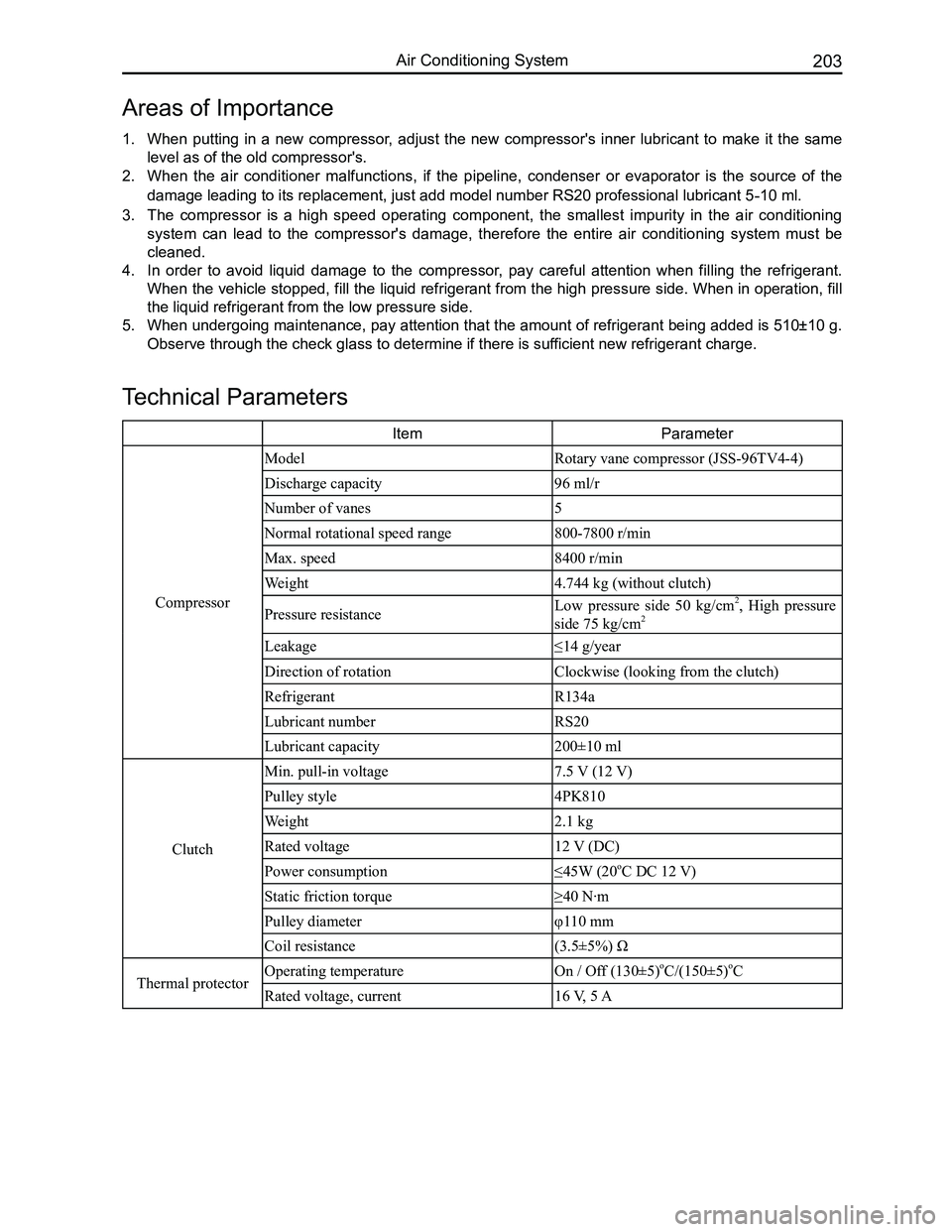
ItemParameter
Compressor
ModelRotary vane compressor (JSS-96TV4-4)
Discharge capacity96 ml/r
Number of vanes5
Normal rotational speed range800-7800 r/min
Max. speed8400 r/min
Weight4.744 kg (without clutch)
Pressure resistanceLow pressure side 50 kg/cm2, High pressure
side 75 kg/cm2
Leakage≤14 g/year
Direction of rotationClockwise (looking from the clutch)
RefrigerantR134a
Lubricant numberRS20
Lubricant capacity 200±10 ml
Clutch
Min. pull-in voltage7.5 V (12 V)
Pulley style 4PK810
Weight2.1 kg
Rated voltage12 V (DC)
Power consumption≤45W (20oC DC 12 V)
Static friction torque≥40 N·m
Pulley diameterφ110 mm
Coil resistance(3.5±5%) Ω
Thermal protectorOperating temperatureOn / Off (130±5)oC/(150±5)oC
Rated voltage, current16 V, 5 A
Technical Parameters
Page 218 of 281
Downloaded from www.Manualslib.com manuals search engine 211Air Conditioning System
Clutch Installation
1. Install the solenoid coil at the place pressing up against the head cover's end surface and pay atten-
tion to insert the dowel pin of the solenoid coil into the bottom hole of the head cover. Put the retaining
ring into the groove with circlip pliers, and press the solenoid coil's connecting wire onto the pressing
line plate on the head cover with a SST.
2. Put the compressor on a specially designed fixture or platform, with its head cover facing upwards.
Press the pulley into the head cover shaft, and put the pulley bearing's retaining ring into the groove
with circlip pliers.
3. Install the armature onto the main shaft's spline and seize the clutch's triangular piece with a clamp.
Then tighten the inner hexagon lock screws and washers with a torque wrench. Screw torque should
be between 150-180 N·m. After installation is done, make sure to check if the clutch's pulley and
armature are able to operate freely, and also check the clearance between the pulley and armature,
which should be 0.3-0.6 mm.
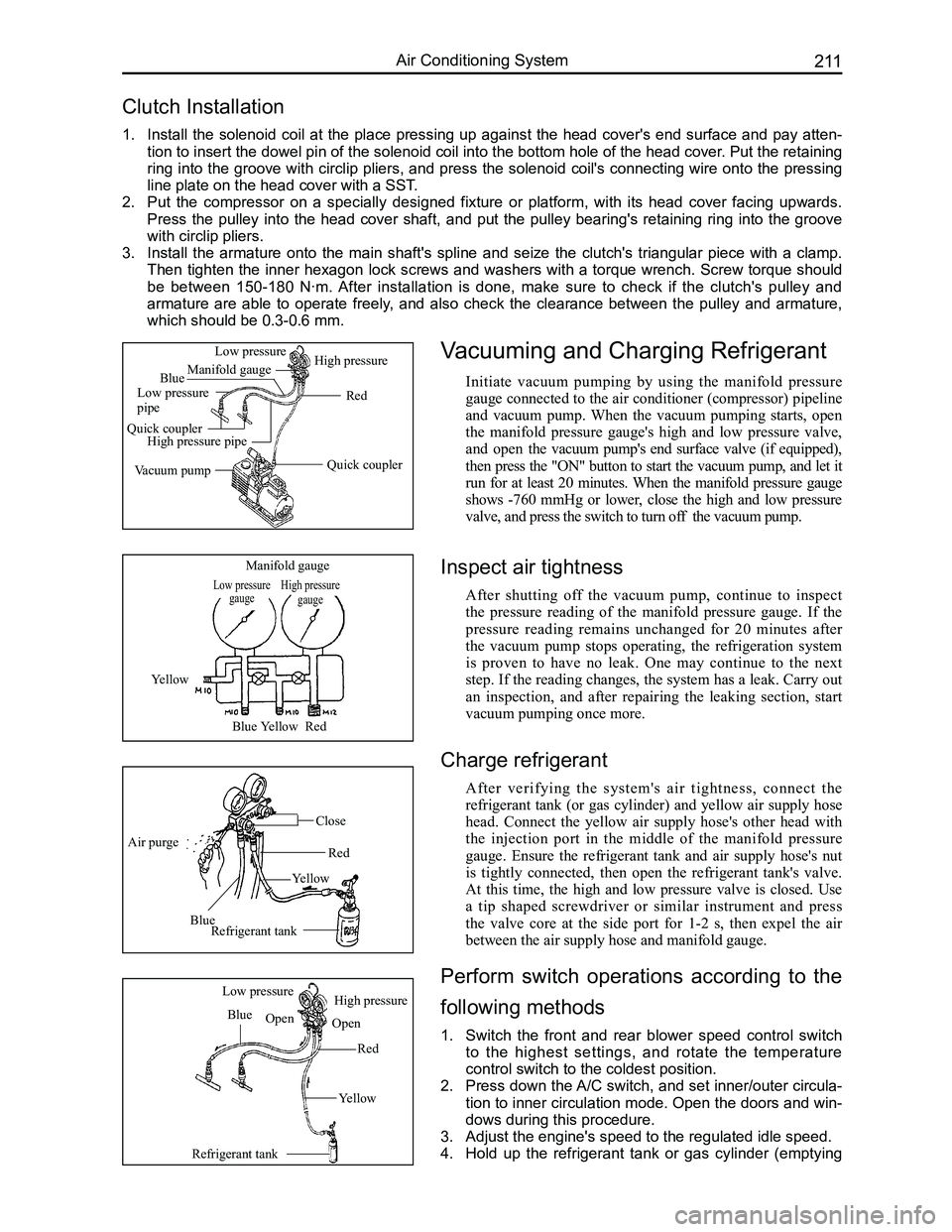
Vacuuming and Charging Refrigerant
Initiate vacuum pumping by using the manifold pressure
gauge connected to the air conditioner (compressor) pipeline
and vacuum pump. When the vacuum pumping starts, open
the manifold pressure gauge's high and low pressure valve,
and open the vacuum pump's end surface valve (if equipped),
then press the "ON" button to start the vacuum pump, and let it
run for at least 20 minutes. When the manifold pressure gauge
shows -760 mmHg or lower, close the high and low pressure
valve, and press the switch to turn off the vacuum pump.
Low pressure gaugeHigh pressure gauge
Manifold gauge
Yellow
BlueYellowRed
Air purge
Blue
Yellow
Red
Close
Refrigerant tank
Refrigerant tank
Blue
Red
Yellow
Low pressureHigh pressure
OpenOpen
Quick coupler
Red
Manifold gauge
Low pressure pipe
Quick couplerHigh pressure pipe
Vacuum pump
Low pressureHigh pressure
Blue
Inspect air tightness
After shutting off the vacuum pump, continue to inspect
the pressure reading of the manifold pressure gauge. If the
pressure reading remains unchanged for 20 minutes after
the vacuum pump stops operating, the refrigeration system
is proven to have no leak. One may continue to the next
step. If the reading changes, the system has a leak. Carry out
an inspection, and after repairing the leaking section, start
vacuum pumping once more.
Charge refrigerant
After verifying the system's air tightness, connect the
refrigerant tank (or gas cylinder) and yellow air supply hose
head. Connect the yellow air supply hose's other head with
the injection port in the middle of the manifold pressure
gauge. Ensure the refrigerant tank and air supply hose's nut
is tightly connected, then open the refrigerant tank's valve.
At this time, the high and low pressure valve is closed. Use
a tip shaped screwdriver or similar instrument and press
the valve core at the side port for 1-2 s, then expel the air
between the air supply hose and manifold gauge.
Perform switch operations according to the
following methods
1. Switch the front and rear blower speed control switch
to the highest settings, and rotate the temperature
control switch to the coldest position.
2. Press down the A/C switch, and set inner/outer circula-
tion to inner circulation mode. Open the doors and win-
dows during this procedure.
3. Adjust the engine's speed to the regulated idle speed.
4. Hold up the refrigerant tank or gas cylinder (emptying