clock GREAT WALL HOVER 2006 Service User Guide
[x] Cancel search | Manufacturer: GREAT WALL, Model Year: 2006, Model line: HOVER, Model: GREAT WALL HOVER 2006Pages: 425, PDF Size: 26.05 MB
Page 147 of 425
v. Install the thrust disc on the cylinder internal wheel axle. Refer to Figure 8.24and 8.19.
w. Connect the C2 /clutch C4 wheel axle assembly in clutch C4 disc, install the clutch C2 disc. Install the C3 wheel axle and
reinforce it by ring spring; ensure the ring spring is installed in the groove fixedly. Please refer to Figure 8.24.
10. Clutch C3 and reverse central gear system
The assembly procedure of clutch C3 and reverse central gear assembly (refer to Figure 8.28) is shown as follows:
Check the cleanness of hole on cylinder. Caution:
It should take out the clutch clearance assembly before immerse the assembly into the automatic transmission fluid
(ATF).
s. Use the gear selection plate to reach the correct specification. It should remove the clutch assembly and immerse the friction
disk in the automatic transmission fluid for 5 minutes at least before the installation if install the new friction disks. Lubricate
and install the 3-4 one-way clutch and install the sleeve on the C2 wheel axle. Adjust the handle rear and install the nylon thrust
washer on the C4 wheel axle. Refer to Figure 8.27.
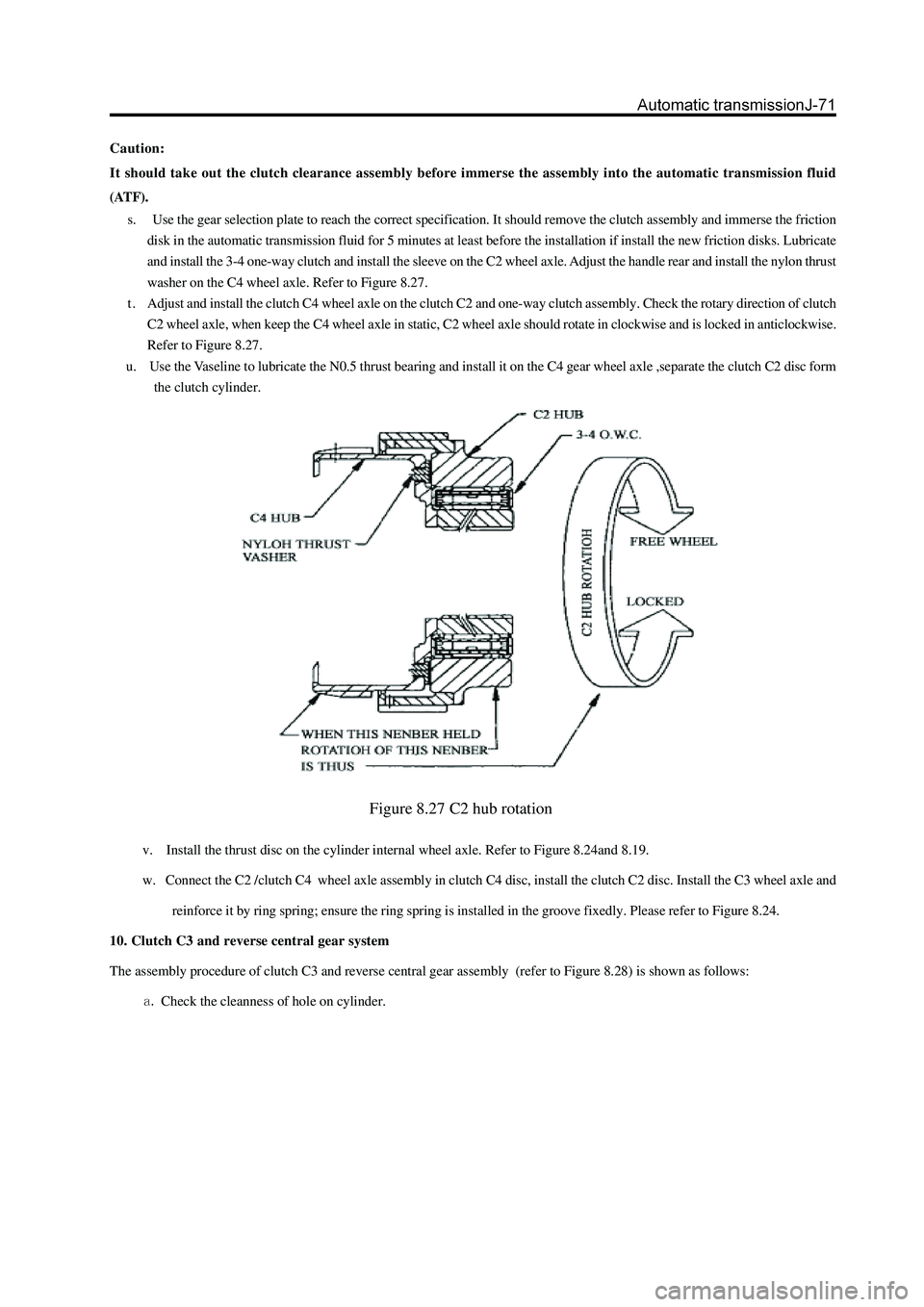
t . Adjust and install the clutch C4 wheel axle on the clutch C2 and one-way clutch assembly. Check the rotary direction of clutch
C2 wheel axle, when keep the C4 wheel axle in static, C2 wheel axle should rotate in clockwise and is locked in anticlockwise.
Refer to Figure 8.27.
u. Use the Vaseline to lubricate the N0.5 thrust bearing and install it on the C4 gear wheel axle ,separate the clutch C2 disc form
the clutch cylinder.
Figure 8.27 C2 hub rotation
Page 236 of 425
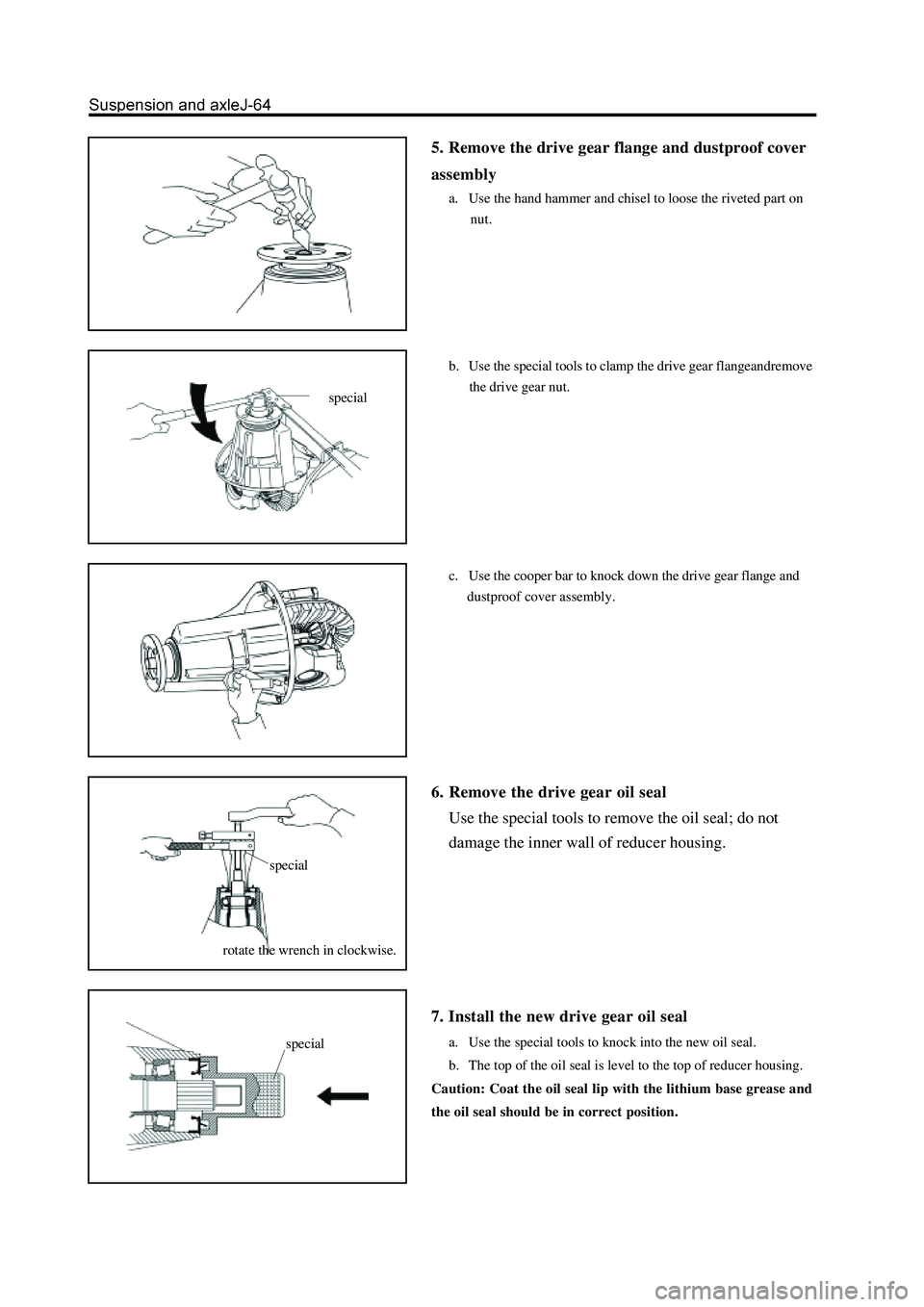
5. Remove the drive gear flange and dustproof cover
assembly
a. Use the hand hammer and chisel to loose the riveted part on
nut.
b. Use the special tools to clamp the drive gear flangeandremove
the drive gear nut.
c. Use the cooper bar to knock down the drive gear flange and
dustproof cover assembly.
6. Remove the drive gear oil seal
Use the special tools to remove the oil seal; do not
damage the inner wall of reducer housing.
7. Install the new drive gear oil seal
a. Use the special tools to knock into the new oil seal.
b. The top of the oil seal is level to the top of reducer housing.
Caution: Coat the oil seal lip with the lithium base grease and
the oil seal should be in correct position.
special
rotate the wrench in clockwise.
specialspecial
Page 251 of 425
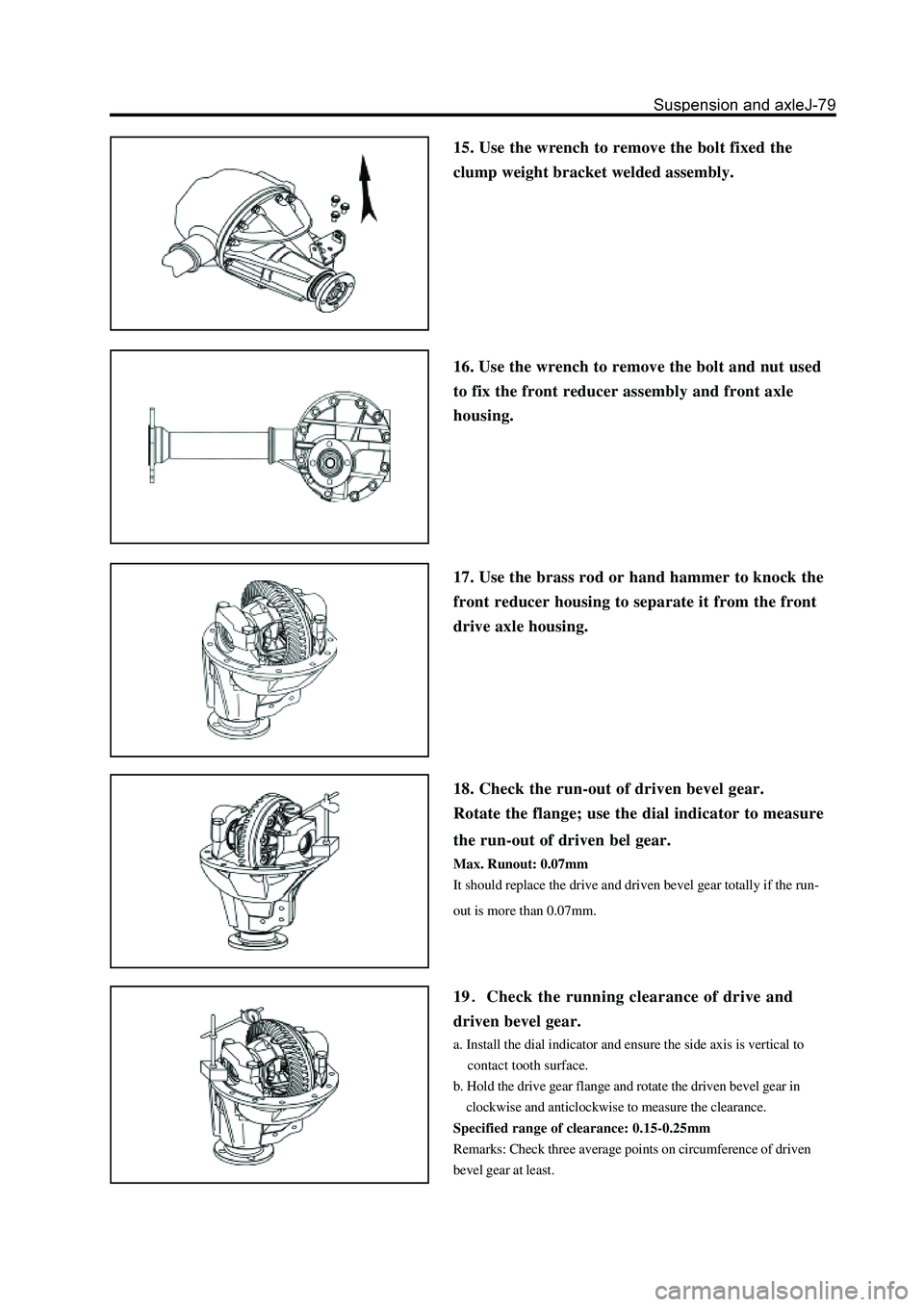
15. Use the wrench to remove the bolt fixed the
clump weight bracket welded assembly.
16. Use the wrench to remove the bolt and nut used
to fix the front reducer assembly and front axle
housing.
17. Use the brass rod or hand hammer to knock the
front reducer housing to separate it from the front
drive axle housing.
18. Check the run-out of driven bevel gear.
Rotate the flange; use the dial indicator to measure
the run-out of driven bel gear.
Max. Runout: 0.07mm
It should replace the drive and driven bevel gear totally if the run-
out is more than 0.07mm.
19Check the running clearance of drive and
driven bevel gear.
a. Install the dial indicator and ensure the side axis is vertical to
contact tooth surface.
b. Hold the drive gear flange and rotate the driven bevel gear in
clockwise and anticlockwise to measure the clearance.
Specified range of clearance: 0.15-0.25mm
Remarks: Check three average points on circumference of driven
bevel gear at least.
Page 253 of 425
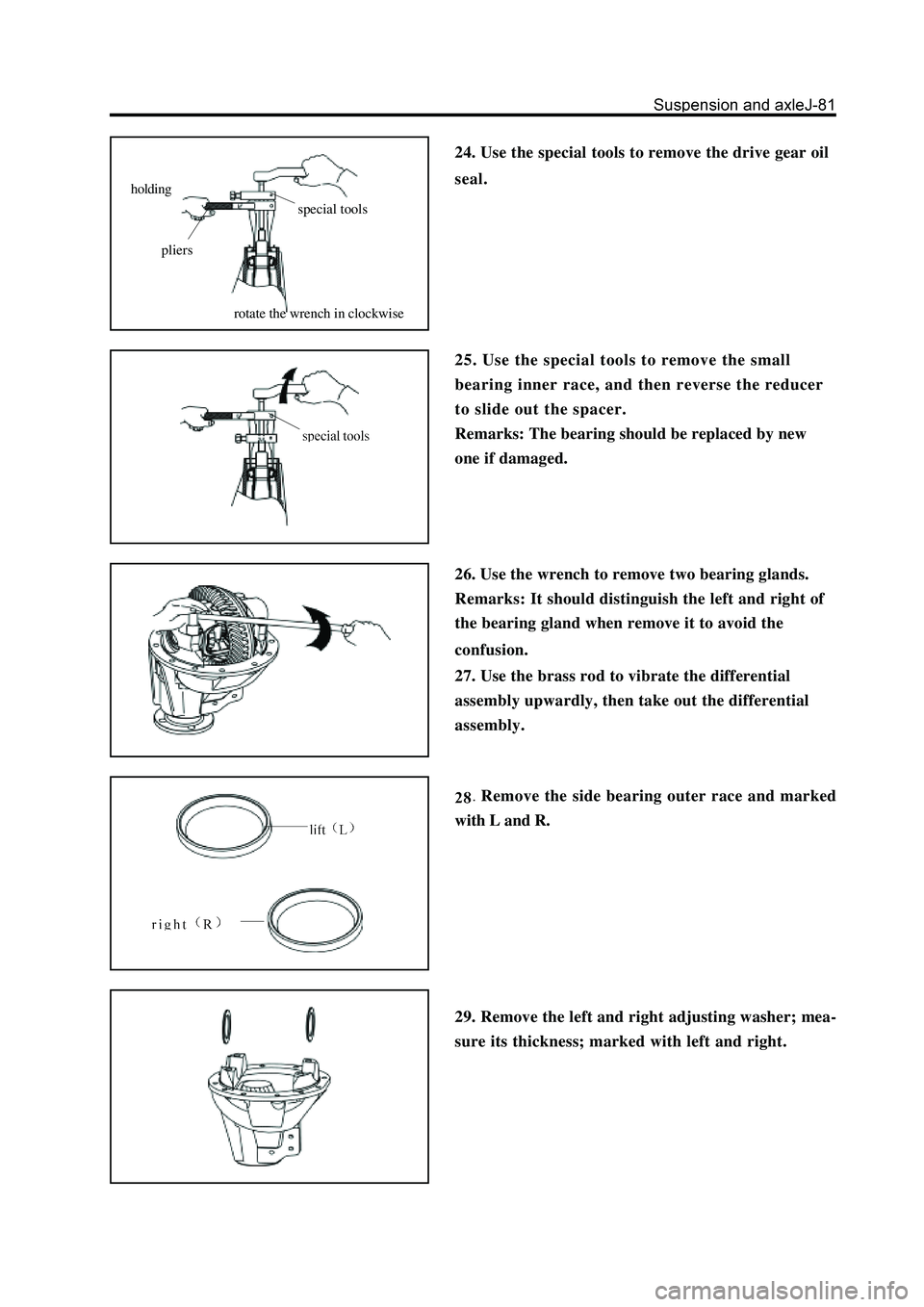
25. Use the special tools to remove the small
bearing inner race, and then reverse the reducer
to slide out the spacer.
Remarks: The bearing should be replaced by new
one if damaged.
26. Use the wrench to remove two bearing glands.
Remarks: It should distinguish the left and right of
the bearing gland when remove it to avoid the
confusion.
Remove the side bearing outer race and marked
with L and R.
29. Remove the left and right adjusting washer; mea-
sure its thickness; marked with left and right. 27. Use the brass rod to vibrate the differential
assembly upwardly, then take out the differential
assembly.
holding
pliers
special tools
rotate the wrench in clockwise
24. Use the special tools to remove the drive gear oil
seal.
Page 261 of 425
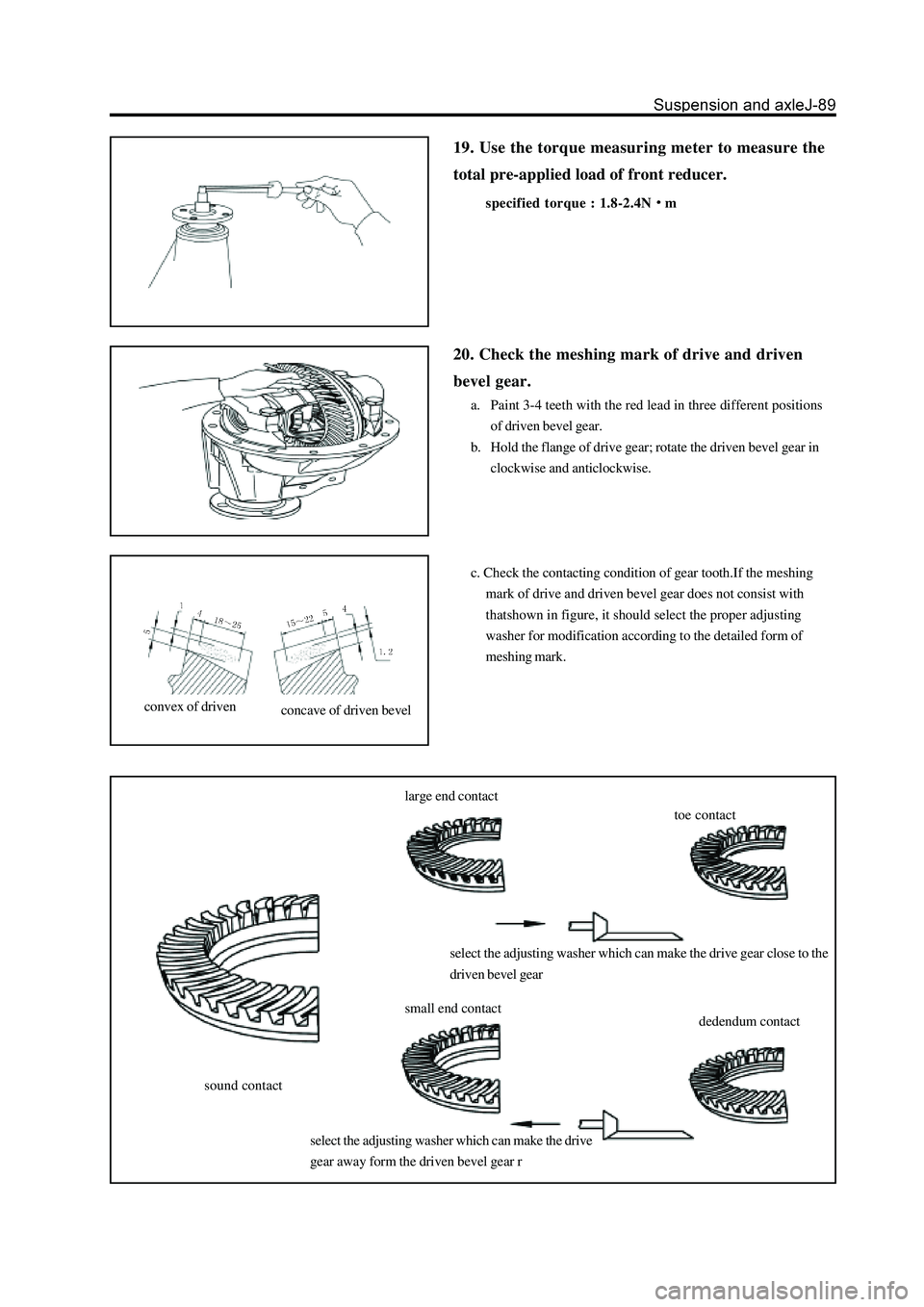
19. Use the torque measuring meter to measure the
total pre-applied load of front reducer.
specified torque : 1.8-2.4Nm
sound contactlarge end contact
toe contact
select the adjusting washer which can make the drive gear close to the
driven bevel gear
select the adjusting washer which can make the drive
gear away form the driven bevel gear rsmall end contact
dedendum contact
20. Check the meshing mark of drive and driven
bevel gear.
a. Paint 3-4 teeth with the red lead in three different positions
of driven bevel gear.
b. Hold the flange of drive gear; rotate the driven bevel gear in
clockwise and anticlockwise.
c. Check the contacting condition of gear tooth.If the meshing
mark of drive and driven bevel gear does not consist with
thatshown in figure, it should select the proper adjusting
washer for modification according to the detailed form of
meshing mark.
convex of drivenconcave of driven bevel
Page 279 of 425
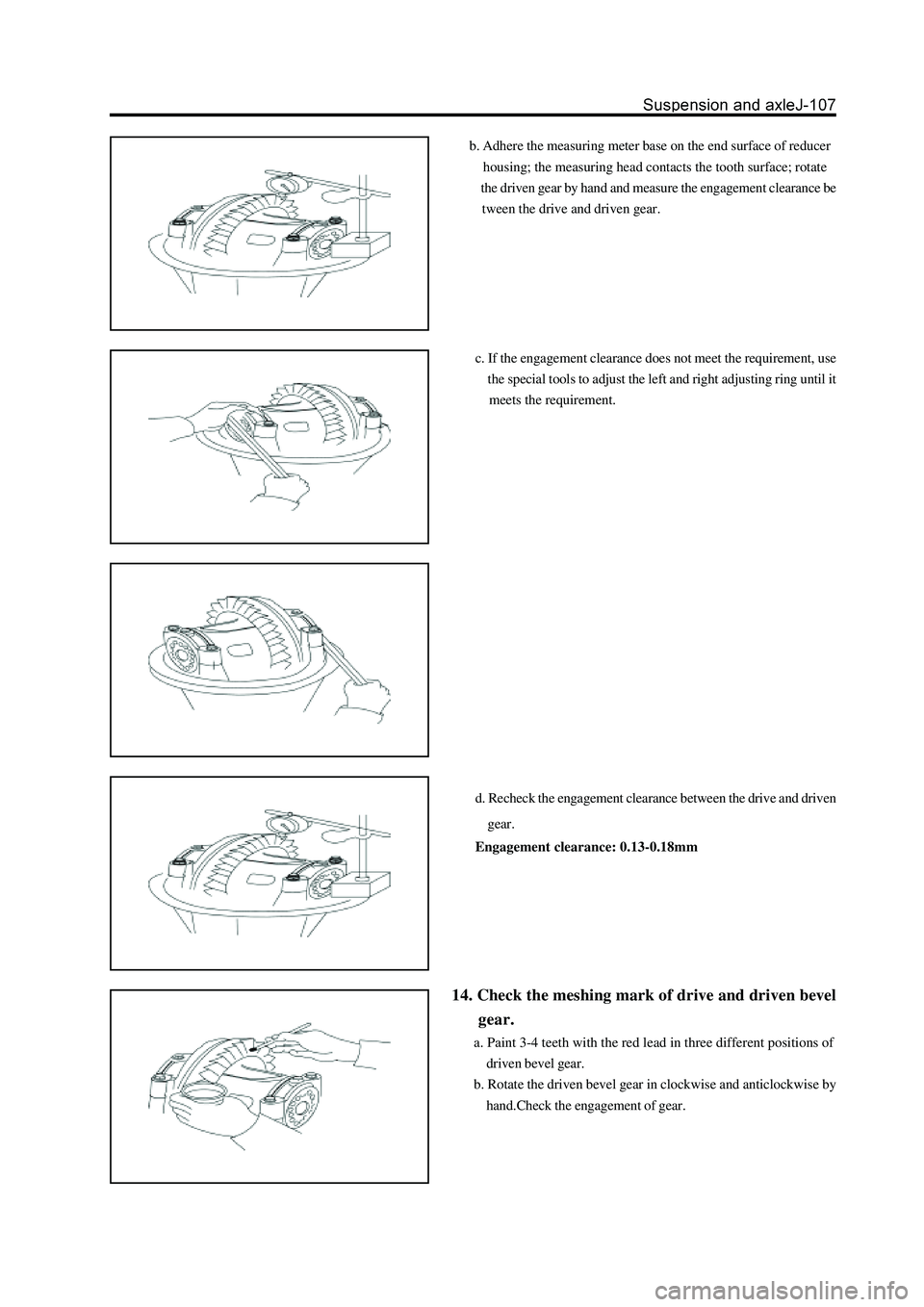
b. Adhere the measuring meter base on the end surface of reducer
housing; the measuring head contacts the tooth surface; rotate
the driven gear by hand and measure the engagement clearance be
tween the drive and driven gear.
c. If the engagement clearance does not meet the requirement, use
the special tools to adjust the left and right adjusting ring until it
meets the requirement.
d. Recheck the engagement clearance between the drive and driven
gear.
Engagement clearance: 0.13-0.18mm
14. Check the meshing mark of drive and driven bevel
gear.
a. Paint 3-4 teeth with the red lead in three different positions of
driven bevel gear.
b. Rotate the driven bevel gear in clockwise and anticlockwise by
hand.Check the engagement of gear.
Page 314 of 425
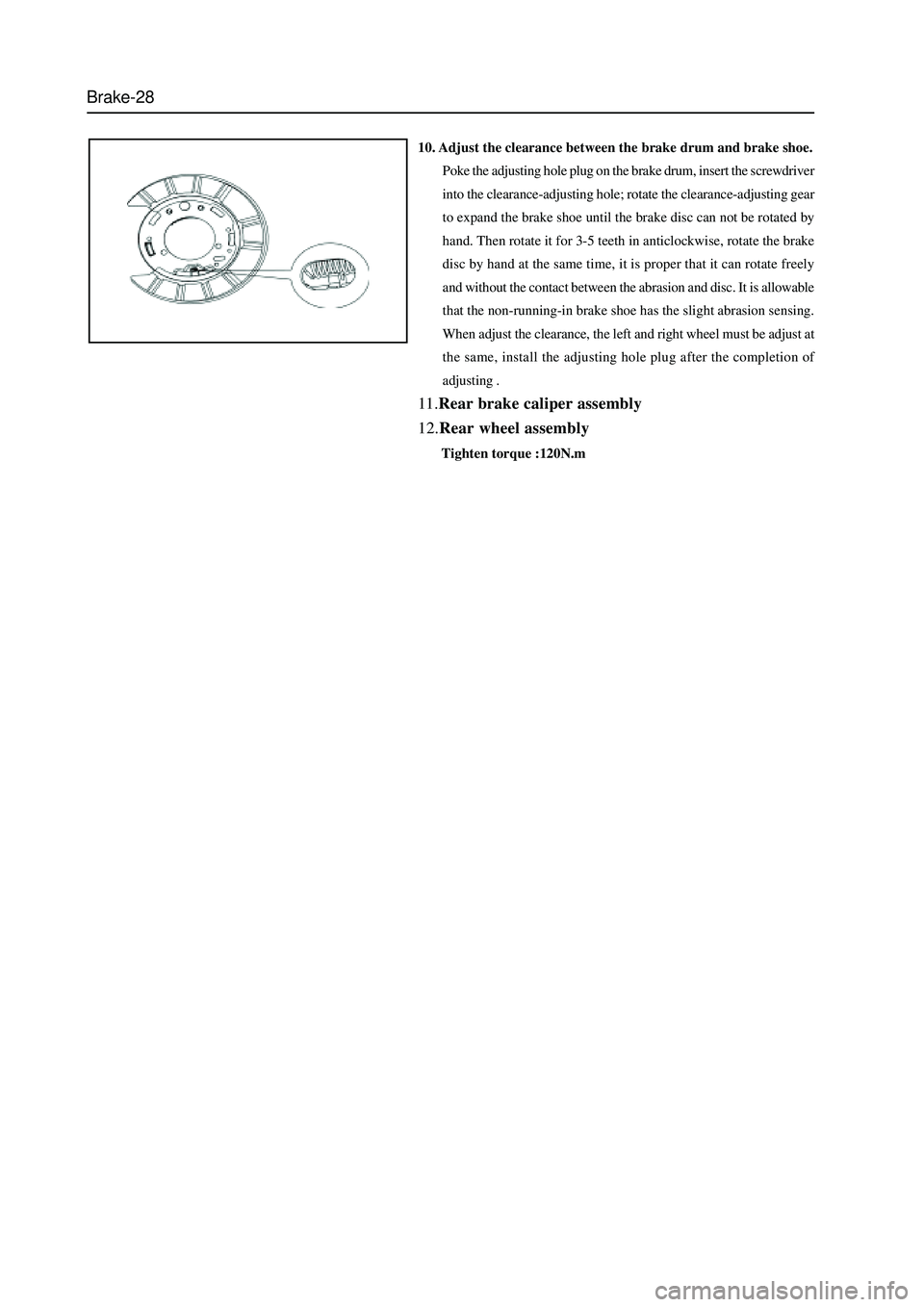
Brake-28
10. Adjust the clearance between the brake drum and brake shoe.
Poke the adjusting hole plug on the brake drum, insert the screwdriver
into the clearance-adjusting hole; rotate the clearance-adjusting gear
to expand the brake shoe until the brake disc can not be rotated by
hand. Then rotate it for 3-5 teeth in anticlockwise, rotate the brake
disc by hand at the same time, it is proper that it can rotate freely
and without the contact between the abrasion and disc. It is allowable
that the non-running-in brake shoe has the slight abrasion sensing.
When adjust the clearance, the left and right wheel must be adjust at
the same, install the adjusting hole plug after the completion of
adjusting .
11.Rear brake caliper assembly
12.Rear wheel assembly
Tighten torque :120N.m
Page 355 of 425
CD Player and Air Conditioning System-2
CD Player
Function Overview
This product is a kind of car audio system with VFD multi-information integrated display screen with such functions as PLL
electronic tuning radio, CD playing and operation & control of air conditioning system, it can receive AM, FM and FM stereo
radio broadcast programs, play CDs, electronically operate and control the air conditioning system of the car. The integrated
display screen can display the working state of the radio, CD player, air conditioning system, operating mode as well as
information concerning the equalizer, clock and the temperature inside and outside.
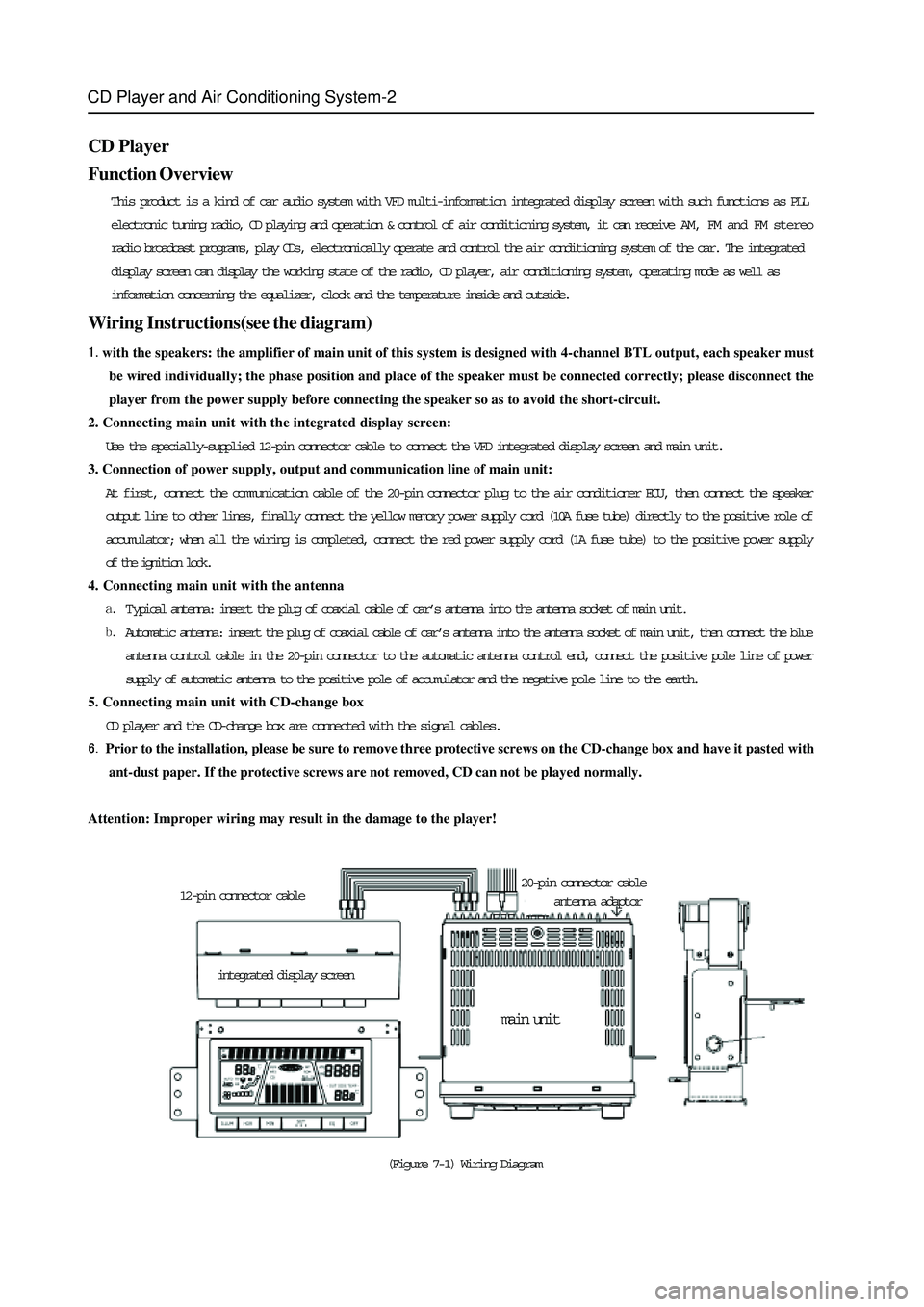
Wiring Instructions(see the diagram)
with the speakers: the amplifier of main unit of this system is designed with 4-channel BTL output, each speaker must
be wired individually; the phase position and place of the speaker must be connected correctly; please disconnect the
player from the power supply before connecting the speaker so as to avoid the short-circuit.
2. Connecting main unit with the integrated display screen:
Use the specially-supplied 12-pin connector cable to connect the VFD integrated display screen and main unit.
3. Connection of power supply, output and communication line of main unit:
At first, connect the communication cable of the 20-pin connector plug to the air conditioner ECU, then connect the speaker
output line to other lines, finally connect the yellow memory power supply cord (10A fuse tube) directly to the positive role of
accumulator; when all the wiring is completed, connect the red power supply cord (1A fuse tube) to the positive power supply
of the ignition lock.
4. Connecting main unit with the antenna
T ypical antenna: insert the plug of coaxial cable of car’s antenna into the antenna socket of main unit.
Automatic antenna: insert the plug of coaxial cable of car’s antenna into the antenna socket of main unit, then connect the blue
antenna control cable in the 20-pin connector to the automatic antenna control end, connect the positive pole line of power
supply of automatic antenna to the positive pole of accumulator and the negative pole line to the earth.
5. Connecting main unit with CD-change box
CD player and the CD-change box are connected with the signal cables.
Prior to the installation, please be sure to remove three protective screws on the CD-change box and have it pasted with
ant-dust paper. If the protective screws are not removed, CD can not be played normally.
Attention: Improper wiring may result in the damage to the player!
(Figure 7-1) Wiring Diagram integrated display screen 12-pin connector cable20-pin connector cable
antenna adaptor
main unit
Page 358 of 425
CD Player and Air Conditioning System-5
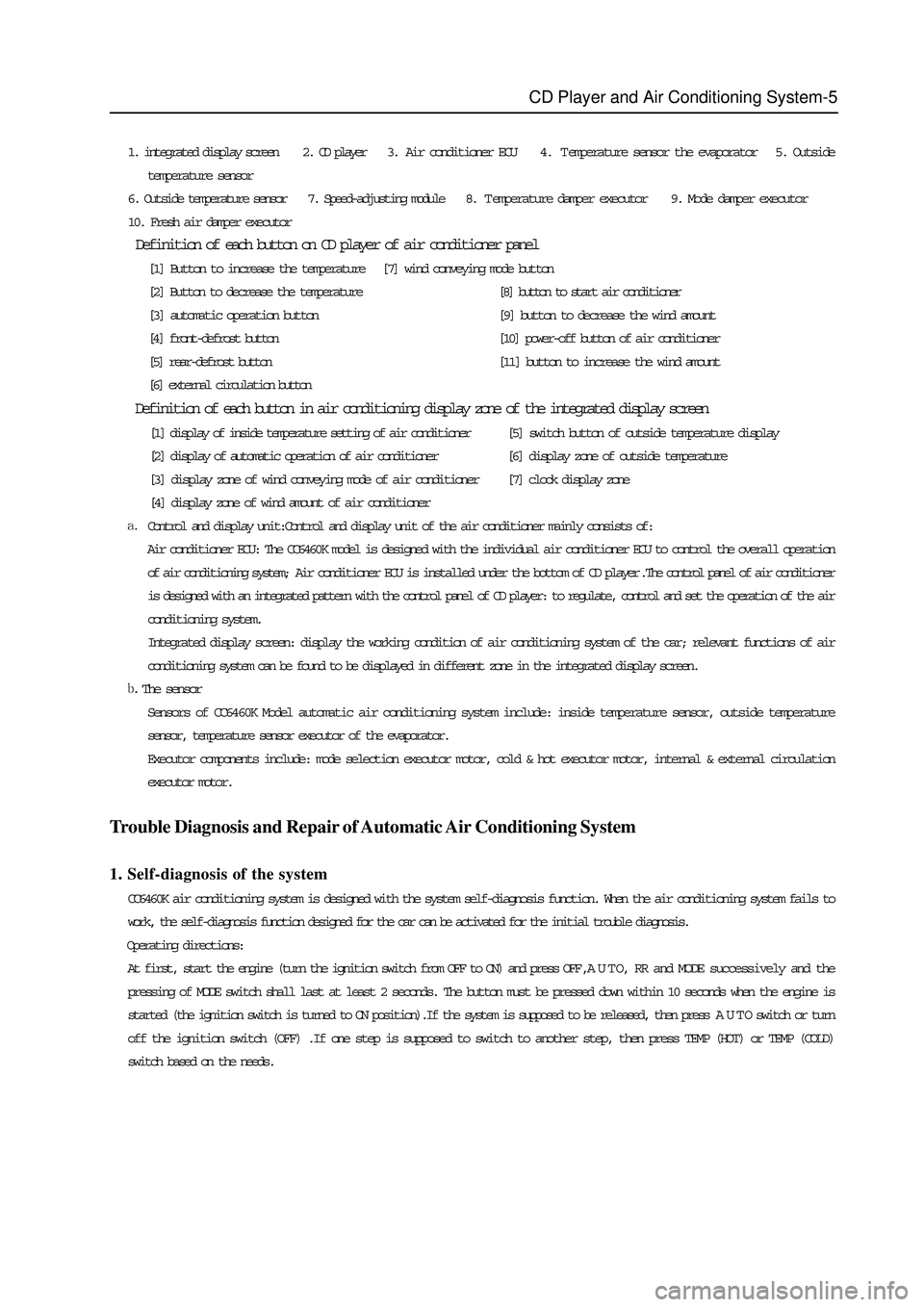
1. integrated display screen 2. CD player 3. Air conditioner ECU 4. Temperature sensor the evaporator 5. Outside
temperature sensor
6. Outside temperature sensor 7. Speed-adjusting module 8. Temperature damper executor 9. Mode damper executor
10. Fresh air damper executor
Definition of each button on CD player of air conditioner panel
[1] Button to increase the temperature [7] wind conveying mode button
[2] Button to decrease the temperature[8] button to start air conditioner
[3] automatic operation button[9] button to decrease the wind amount
[4] front-defrost button[10] power-off button of air conditioner
[5] rear-defrost button[11] button to increase the wind amount
[6] external circulation button
Definition of each button in air conditioning display zone of the integrated display screen
[1] display of inside temperature setting of air conditioner[5] switch button of outside temperature display
[2] display of automatic operation of air conditioner[6] display zone of outside temperature
[3] display zone of wind conveying mode of air conditioner[7] clock display zone
[4] display zone of wind amount of air conditioner
Control and display unit:Control and display unit of the air conditioner mainly consists of:
Air conditioner ECU: The CC6460K model is designed with the individual air conditioner ECU to control the overall operation
of air conditioning system; Air conditioner ECU is installed under the bottom of CD player.The control panel of air conditioner
is designed with an integrated pattern with the control panel of CD player: to regulate, control and set the operation of the air
conditioning system.
Integrated display screen: display the working condition of air conditioning system of the car; relevant functions of air
conditioning system can be found to be displayed in different zone in the integrated display screen.
The sensor
Sensors of CC6460K Model automatic air conditioning system include: inside temperature sensor, outside temperature
sensor, temperature sensor executor of the evaporator.
Executor components include: mode selection executor motor, cold & hot executor motor, internal & external circulation
executor motor.
Trouble Diagnosis and Repair of Automatic Air Conditioning System
1. Self-diagnosis of the system
CC6460K air conditioning system is designed with the system self-diagnosis function. When the air conditioning system fails to
work, the self-diagnosis function designed for the car can be activated for the initial trouble diagnosis.
Operating directions:
At first, start the engine (turn the ignition switch from OFF to ON) and press OFF , A U T O, RR and MODE successively and the
pressing of MODE switch shall last at least 2 seconds. The button must be pressed down within 10 seconds when the engine is
started (the ignition switch is turned to ON position).If the system is supposed to be released, then press A U T O switch or turn
off the ignition switch (OFF) .If one step is supposed to switch to another step, then press TEMP (HOT) or TEMP (COLD)
switch based on the needs.
Page 372 of 425
Safety airbag-2
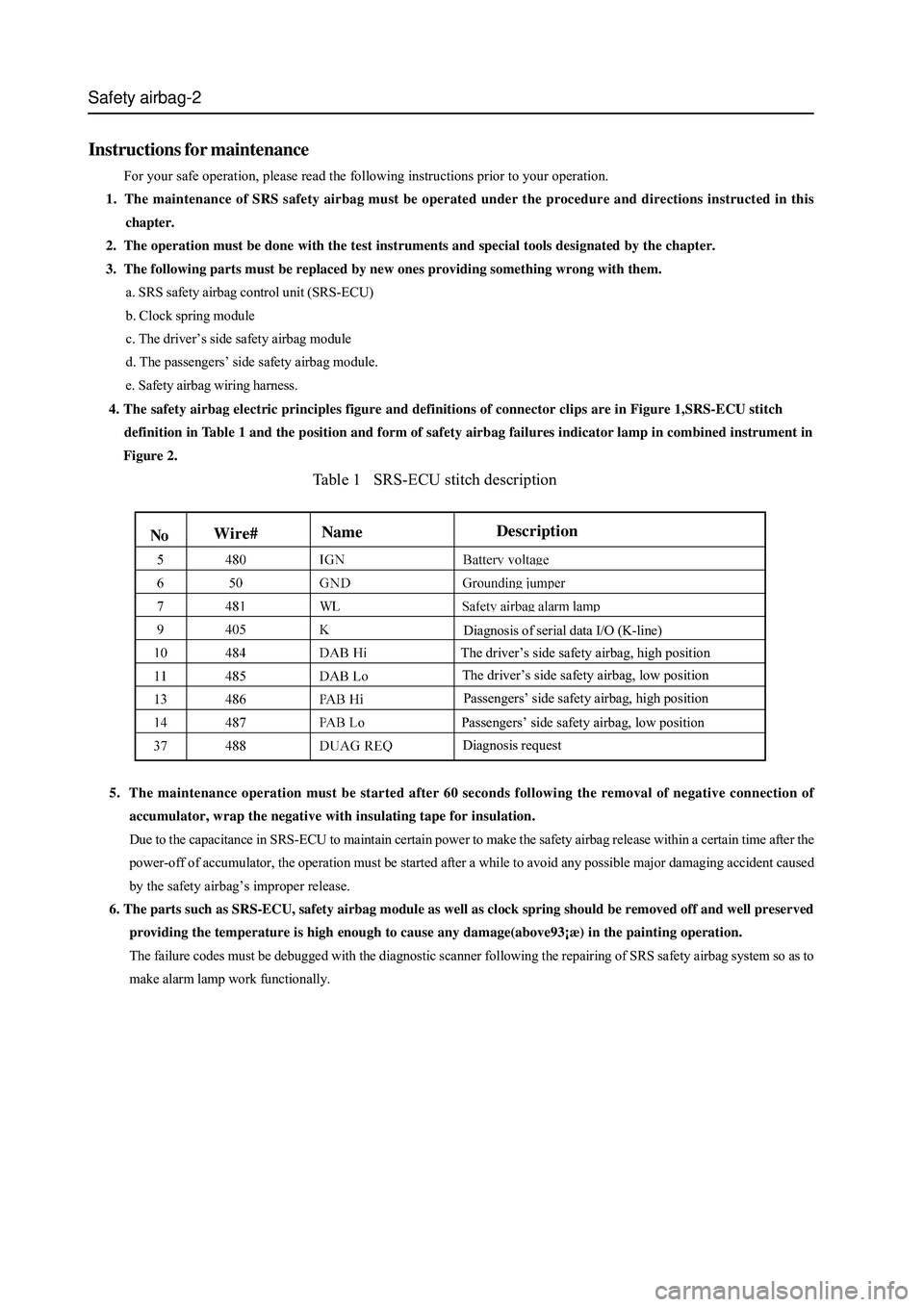
Table 1 SRS-ECU stitch description
5. The maintenance operation must be started after 60 seconds following the removal of negative connection of
accumulator, wrap the negative with insulating tape for insulation.
Due to the capacitance in SRS-ECU to maintain certain power to make the safety airbag release within a certain time after the
power-off of accumulator, the operation must be started after a while to avoid any possible major damaging accident caused
by the safety airbag’s improper release.
6. The parts such as SRS-ECU, safety airbag module as well as clock spring should be removed off and well preserved
providing the temperature is high enough to cause any damage(above93¡æ) in the painting operation.
The failure codes must be debugged with the diagnostic scanner following the repairing of SRS safety airbag system so as to
make alarm lamp work functionally.
Instructions for maintenance
For your safe operation, please read the following instructions prior to your operation.
1. The maintenance of SRS safety airbag must be operated under the procedure and directions instructed in this
chapter.
2. The operation must be done with the test instruments and special tools designated by the chapter.
3. The following parts must be replaced by new ones providing something wrong with them.
a. SRS safety airbag control unit (SRS-ECU)
b. Clock spring module
c. The driver’s side safety airbag module
d. The passengers’ side safety airbag module.
e. Safety airbag wiring harness.
4. The safety airbag electric principles figure and definitions of connector clips are in Figure 1,SRS-ECU stitch
definition in Table 1 and the position and form of safety airbag failures indicator lamp in combined instrument in
Figure 2.
The driver’s side safety airbag, low position
Wire#Description
Name
Diagnosis request
The driver’s side safety airbag, high position
Passengers’ side safety airbag, high position
Passengers’ side safety airbag, low position
Diagnosis of serial data I/O (K-line)