towing HONDA ACCORD 2013 9.G User Guide
[x] Cancel search | Manufacturer: HONDA, Model Year: 2013, Model line: ACCORD, Model: HONDA ACCORD 2013 9.GPages: 595, PDF Size: 20.67 MB
Page 427 of 595
426
uuTowing a Trailer uTowing Your Vehicle
Driving
• Monitor your temperature gauge. If it nears the red (Hot) mark, turn off the
heating and cooling system
*/climate control system
* and reduce speed. Pull to the
side of the road safely to cool down the engine if necessary.
• Shift to the
(S position if the transmission shifts frequently.
Towing Your VehicleYour vehicle is not designed to be towed behind a motor home. If your vehicle needs
to be towed in an emergency, refer to the emergency towing information.2 Emergency Towing P. 567■Driving in Hilly TerrainAutomatic transmission models* Not available on all models
Page 442 of 595
441
uuWhen Driving uShifting
Continued
Driving
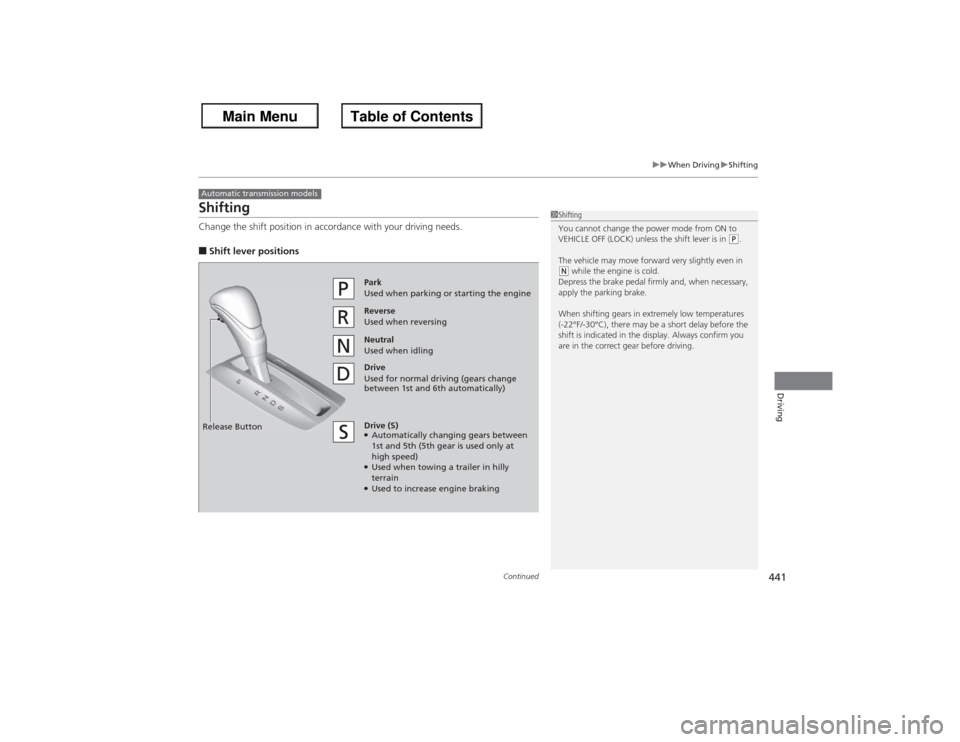
ShiftingChange the shift position in accordance with your driving needs.■Shift lever positionsAutomatic transmission models
1Shifting
You cannot change the power mode from ON to
VEHICLE OFF (LOCK) unless the shift lever is in
(P.
The vehicle may move forward very slightly even in
(N while the engine is cold.
Depress the brake pedal firmly and, when necessary,
apply the parking brake.
When shifting gears in extremely low temperatures
(-22°F/-30°C), there may be a short delay before the
shift is indicated in the display. Always confirm you
are in the correct gear before driving.
Reverse
Used when reversingDrive
Used for normal driving (gears change
between 1st and 6th automatically)Park
Used when parking or starting the engine
Neutral
Used when idling
Release ButtonDrive (S)●Automatically changing gears between
1st and 5th (5th gear is used only at
high speed)●Used when towing a trailer in hilly
terrain●Used to increase engine braking
Page 462 of 595
461
uuWhen Driving uForward Collision Warning (FCW)
*
Driving
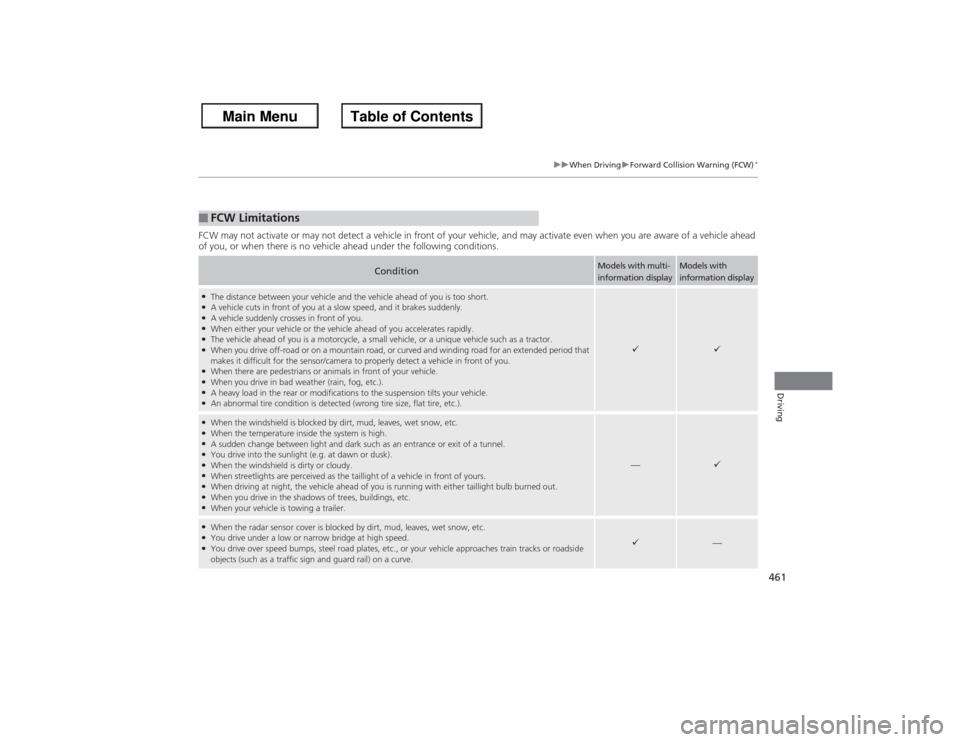
FCW may not activate or may not detect a vehicle in front of your vehicle, and may activate even when you are aware of a vehicl e ahead
of you, or when there is no vehicle ahead under the following conditions.■FCW Limitations
Condition
Models with multi-
information display
Models with
information display
●The distance between your vehicle and the vehicle ahead of you is too short.●A vehicle cuts in front of you at a slow speed, and it brakes suddenly.●A vehicle suddenly crosses in front of you.●When either your vehicle or the vehicle ahead of you accelerates rapidly.●The vehicle ahead of you is a motorcycle, a small vehicle, or a unique vehicle such as a tractor.●When you drive off-road or on a mountain road, or curved and winding road for an extended period that
makes it difficult for the sensor/camera to properly detect a vehicle in front of you.●When there are pedestrians or animals in front of your vehicle.●When you drive in bad weather (rain, fog, etc.).●A heavy load in the rear or modifications to the suspension tilts your vehicle.●An abnormal tire condition is detected (wrong tire size, flat tire, etc.).
9
9
●When the windshield is blocked by dirt, mud, leaves, wet snow, etc.●When the temperature inside the system is high.●A sudden change between light and dark such as an entrance or exit of a tunnel.●You drive into the sunlight (e.g. at dawn or dusk).●When the windshield is dirty or cloudy.●When streetlights are perceived as the taillight of a vehicle in front of yours.●When driving at night, the vehicle ahead of you is running with either taillight bulb burned out.●When you drive in the shadows of trees, buildings, etc.●When your vehicle is towing a trailer.
—
9
●When the radar sensor cover is blocked by dirt, mud, leaves, wet snow, etc.●You drive under a low or narrow bridge at high speed.●You drive over speed bumps, steel road plates, etc ., or your vehicle approaches train tracks or roadside
objects (such as a traffic sign and guard rail) on a curve.
9
—
Page 465 of 595
464
uuWhen Driving uLane Departure Warning (LDW)
*
Driving
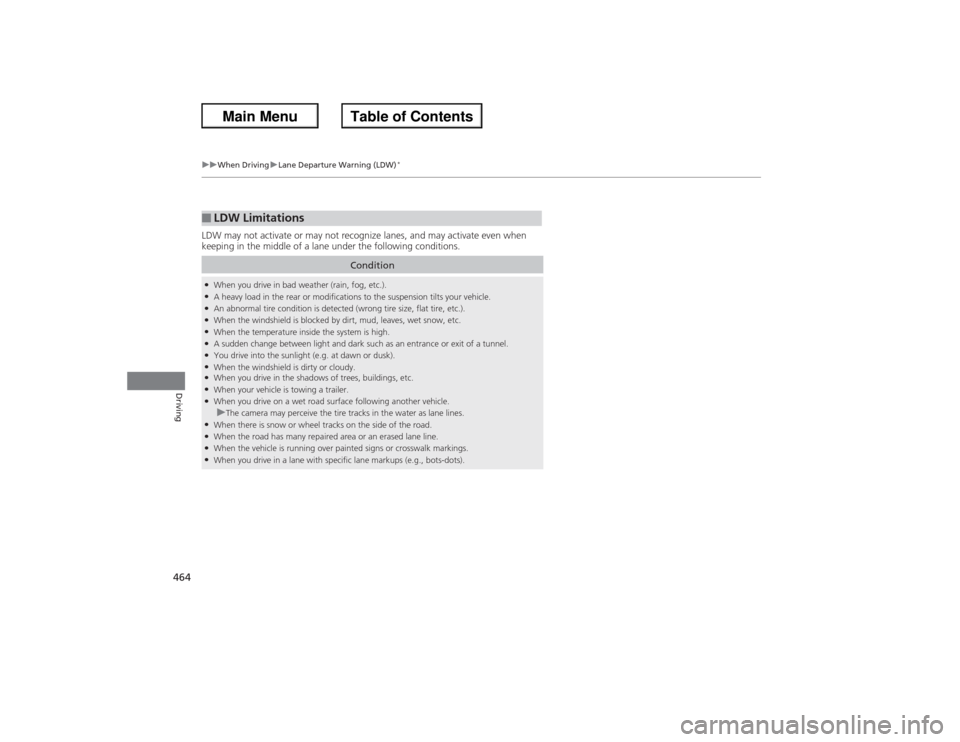
LDW may not activate or may not recognize lanes, and may activate even when
keeping in the middle of a lane under the following conditions.■LDW Limitations
Condition
●When you drive in bad weather (rain, fog, etc.).●A heavy load in the rear or modifications to the suspension tilts your vehicle.●An abnormal tire condition is detected (wrong tire size, flat tire, etc.).●When the windshield is blocked by dirt, mud, leaves, wet snow, etc.●When the temperature inside the system is high.●A sudden change between light and dark such as an entrance or exit of a tunnel.●You drive into the sunlight (e.g. at dawn or dusk).●When the windshield is dirty or cloudy.●When you drive in the shadows of trees, buildings, etc.●When your vehicle is towing a trailer.●When you drive on a wet road surface following another vehicle.uThe camera may perceive the tire tracks in the water as lane lines.
●When there is snow or wheel tracks on the side of the road.●When the road has many repaired area or an erased lane line.●When the vehicle is running over painted signs or crosswalk markings.●When you drive in a lane with specific lane markups (e.g., bots-dots).
Page 470 of 595
469
uuWhen Driving uTPMS (Tire Pressure Monitoring System)
Continued
Driving
TPMS (Tire Pressure Monitoring System)Instead of directly measuring the pressure in each tire, the TPMS on this vehicle
monitors and compares the rolling radius and rotational characteristics of each
wheel and tire while you are driving to determine if one or more tires are
significantly under-infl ated. This will cause the low tire pressure/TPMS indicator to
come on and a message to appear on the multi-information display
*.
Calibrate the TPMS if you have:
• Adjusted the pressure in one or more tires.
• Rotated the tires.
• Replaced one or more tires.
u Before calibrating the TPMS, turn the ignition switch to ON
(w*1, and make
sure that the vehicle is at a complete stop.
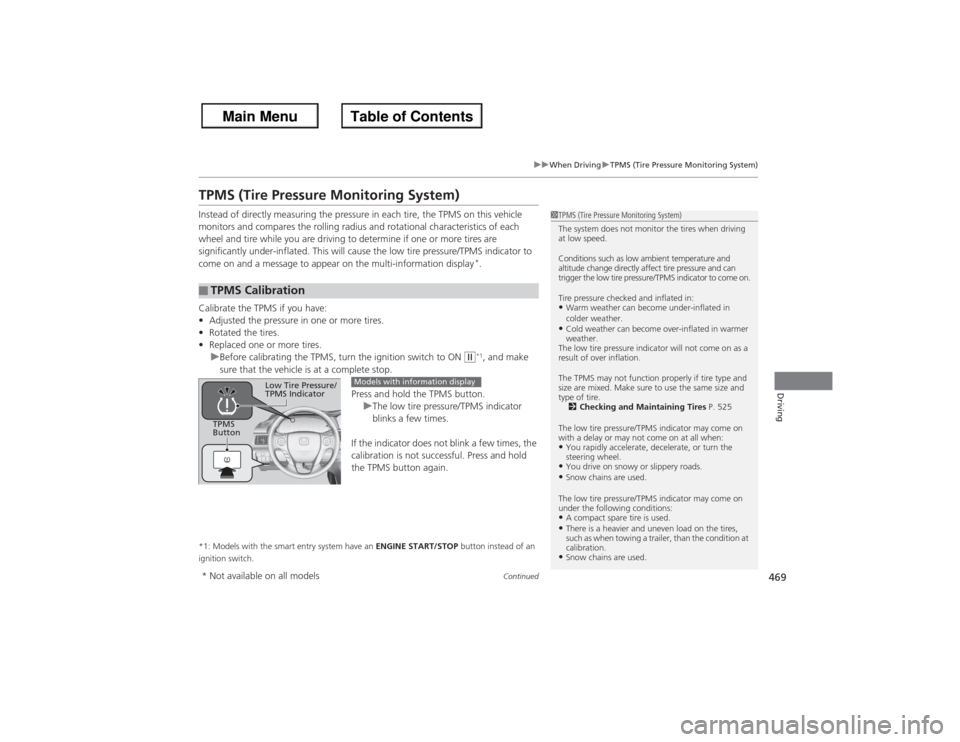
Press and hold the TPMS button.uThe low tire pressure/TPMS indicator
blinks a few times.
If the indicator does not blink a few times, the
calibration is not successful. Press and hold
the TPMS button again.
*1: Models with the smart entry system have an ENGINE START/STOP button instead of an
ignition switch.■TPMS Calibration
1 TPMS (Tire Pressure Monitoring System)
The system does not monitor the tires when driving
at low speed.
Conditions such as low ambient temperature and
altitude change directly affect tire pressure and can
trigger the low tire pressure/TPMS indicator to come on.
Tire pressure checked and inflated in:•Warm weather can become under-inflated in
colder weather.•Cold weather can become over-inflated in warmer
weather.
The low tire pressure indicator will not come on as a
result of over inflation.
The TPMS may not function properly if tire type and
size are mixed. Make sure to use the same size and
type of tire. 2 Checking and Maintaining Tires P. 525
The low tire pressure/TPMS indicator may come on
with a delay or may not come on at all when:•You rapidly accelerate, decelerate, or turn the
steering wheel.•You drive on snowy or slippery roads.•Snow chains are used.
The low tire pressure/TPMS indicator may come on
under the following conditions:•A compact spare tire is used.•There is a heavier and uneven load on the tires,
such as when towing a trailer, than the condition at
calibration.•Snow chains are used.
TPMS
Button
Low Tire Pressure/
TPMS Indicator
Models with information display
* Not available on all models
Page 492 of 595
491
uu Maintenance Minder
TMuTo Use Maintenance Minder
TM
Continued
Maintenance
■Maintenance Service Items
1Maintenance Service Items•Independent of the Maintenance Minder
information, replace the brake fluid every 3 years.•Inspect idle speed every 160,000 miles (256,000
km).•Adjust the valves during services A, B, 1, 2, or 3 if
they are noisy.
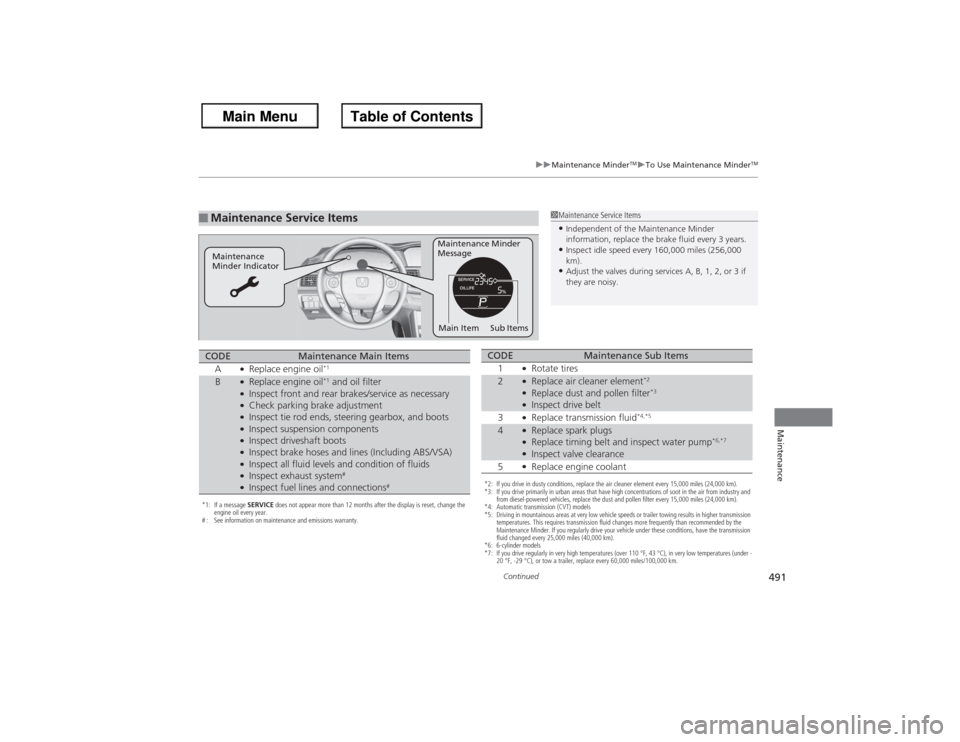
Maintenance Minder
Message
Maintenance
Minder Indicator
Sub Items
Main Item
*1: If a message SERVICE does not appear more than 12 months after the display is reset, change the
engine oil every year.
# : See information on maintenance and emissions warranty.CODE
Maintenance Main Items
A
●Replace engine oil
*1
B
●Replace engine oil
*1 and oil filter
●Inspect front and rear brakes/service as necessary●Check parking brake adjustment●Inspect tie rod ends, steering gearbox, and boots●Inspect suspension components●Inspect driveshaft boots●Inspect brake hoses and lines (Including ABS/VSA)●Inspect all fluid levels and condition of fluids●Inspect exhaust system
#
●Inspect fuel lines and connections
#
*2: If you drive in dusty conditions, replace the air cleaner element every 15,000 miles (24,000 km).
*3: If you drive primarily in urban areas that have high concentrations of soot in the air from industry and from diesel-powered vehicles, replace the dust and pollen filter every 15,000 miles (24,000 km).
*4: Automatic transmission (CVT) models
*5: Driving in mountainous areas at very low vehicle speeds or trailer towing results in higher transmission temperatures. This requires transmission fluid changes more frequently than recommended by the
Maintenance Minder. If you regularly drive your vehicle under these conditions, have the transmission
fluid changed every 25,000 miles (40,000 km).
*6: 6-cylinder models
*7: If you drive regularly in very high temperatures (over 110 °F, 43 °C), in very low temperatures (under - 20 °F, -29 °C), or tow a trailer, replace every 60,000 miles/100,000 km.CODE
Maintenance Sub Items
1
●Rotate tires
2
●Replace air cleaner element
*2
●Replace dust and pollen filter
*3
●Inspect drive belt
3●Replace transmission fluid
*4,*5
4
●Replace spark plugs●Replace timing belt and inspect water pump
*6,*7
●Inspect valve clearance
5●Replace engine coolant
Page 544 of 595
543
Handling the Unexpected
This chapter explains how to hand le unexpected troubles.
Tools
Types of Tools .................................. 544
If a Tire Goes Flat
Changing a Flat Tire ......................... 545
Engine Does Not Start Checking the Engine ........................ 551If the Smart Entry Remote Battery is Weak ..........................................552Emergency Engine Stop ................... 553
Jump Starting .................................... 554
Shift Lever Does Not Move .............. 557Overheating
How to Handle Overheating............. 558
Indicator, Coming On/Blinking
If the Low Oil Pressure Indicator Comes On ............................................. 560If the Charging System Indicator Comes
On ................................................. 560
If the Malfunction Indicator Lamp Comes
On or Blinks ................................... 561If the Brake System Indicator (Red) Comes On .................................. 562If the EPS System Indicator Comes On .. 562
If the Low Tire Pressure/TPMS Indicator
Comes On or Blinks ....................... 563
Fuses
Fuse Locations ................................. 564
Inspecting and Changing Fuses ........ 566
Emergency Towing ........................... 567
Page 552 of 595
551Handling the Unexpected
Engine Does Not StartChecking the EngineIf the engine does not start, check the starter.
Starter condition
Checklist
Starter doesn’t turn or turns
over slowly.
The battery may be dead. Check
each of the items on the right and
respond accordingly.
Check for a message on the multi-information display.●If the To Start, Hold Remote Near Start Button message appears
2 If the Smart Entry Remote Battery is Weak P. 552
uMake sure the smart entry remote is in its operating range.
2 ENGINE START/STOP Button Operating Range P. 132
Check brightness of the interior light.
Turn on interior lights and check brightness.●If the interior lights are dim or do not come on at all
2Battery P. 534
●If the interior lights come on normally
2 Fuses P. 564
The starter turns over normally
but the engine doesn’t start.
There may be a problem with the
fuse. Check each of the items on
the right and respond accordingly. Review the engine start procedure.
Follow its instructions, and try to start the engine again.
2
Starting the Engine P. 427
Check the immobilizer system indicator.
When the immobilizer system indicator is blinking, the engine cannot be started.2Immobilizer System P. 124Check the fuel level.
There should be enough fuel in the tank.
2 Fuel Gauge P. 89
Check the fuse.
Check all fuses, or have the vehicle checked by a dealer.2Inspecting and Changing Fuses P. 566If the problem continues:2Emergency Towing P. 567
1Checking the Engine
If you must start the vehicle immediately, use an
assisting vehicle to jump start it.
2 Jump Starting P. 554
Models with multi-information display
Page 568 of 595
567Handling the Unexpected
Emergency TowingCall a professional towing service if you need to tow your vehicle.■Flat bed equipment
The operator loads your vehicle on the back of a truck.
This is the best way to transport your vehicle.■Wheel lift equipment
The tow truck uses two pivoting arms that go under the front tires and lift them off
the ground. The rear tires remain on the ground. This is an acceptable way to
tow your vehicle.
1 Emergency TowingNOTICETrying to lift or tow your vehicle by the bumpers will
cause serious damage. The bumpers are not designed
to support the vehicle's weight.NOTICEImproper towing such as towing behind a
motorhome or other motor vehicle can damage the
transmission.
Never tow your vehicle with just a rope or chain.
It is very dangerous, since ropes or chains may shift
from side to side or break.
Page 594 of 595
593Index
TTachometer ................................................ 89
Temperature Outside Temperature Display .............. 92, 96
Temperature Sensor .................... 92, 96, 172
Time (Setting) ........................................... 106
Tire Pressure Monitoring System (TPMS) ..................................................... 469
Indicator ........................................... 75, 563
Tires .......................................................... 525
Air Pressure............................. 526, 571, 573
Checking and Maintaining ...................... 525
Inspection ............................................... 525
Labeling .................................................. 526
Puncture (Flat Tire) .................................. 545
Regulations ............................................. 528
Rotation.................................................. 532
Spare Tire ............................... 545, 571, 573
Summer .................................................. 533
Tire Chains.............................................. 533
Wear Indicators....................................... 530
Winter .................................................... 533
Tools ......................................................... 544
Towing a Trailer ....................................... 423
Equipment and Accessories ..................... 424
Load Limits ............................................. 423
Towing Your Vehicle ............................... 426
Emergency .............................................. 567
TPMS
(Tire Pressure Monitoring System) ........ 469
Indicator ........................................... 75, 563 Transmission
..................... 435, 437, 441, 443
Automatic ............................................... 441
Automatic (CVT) .............................. 435, 437
Fluid ................................................ 509, 510
Manual.................................................... 443
Number ................................................... 574
Shift Lever Position Indicator .......................... 70, 436, 438, 442
Trip Meter ............................................. 91, 95
Troubleshooting ....................................... 543
Blown Fuse ...................................... 564, 565
Brake Pedal Vibrates .................................. 22
Buzzer Sounds When Opening Door .......... 23
Emergency Towing .................................. 567
Engine Won’t Start .................................. 551
Noise When Braking .................................. 23
Overheating ............................................ 558
Puncture/Flat Tire..................................... 545
Rear Door Won’t Open ...................... 22, 118
Select Lever Won’t Move ......................... 557
Warning Indicators .................................... 68
Trunk ......................................................... 120
Lid ........................................................... 120
Light Bulb ........................................ 570, 572
Main Switch ............................................ 122
Turn Signals .............................................. 136
Indicators (Instrument Panel)...................... 76
UUnlocking the Doors ................................ 111 Unlocking the Front Doors
from the Inside ......................................... 11
USB Flash Drives ....................................... 298
USB Port .................................................... 175
Using the Smart Entry with Push Button
Start System ............................................ 113
VValet Key........................................... 109, 122
Vanity Mirrors ............................................... 5
Vehicle Identification Number ................ 574
Vehicle Stability Assist (VSA ®).................. 465
Off Button............................................... 466
Off Indicator.............................................. 73
System Indicator ........................................ 73
Ventilation ........................................ 166, 169
Viscosity (Oil) ............................ 501, 571, 573
VSA ® (Vehicle Stability Assist).................. 465WWarning and Information Messages... 82, 84
Warning Indicator On/Blinking ............... 560
Warning Labels ........................................... 65
Warranties (Warranty Manual provided separately) .............................................. 579
Watts ................................................. 570, 572
Wear Indicators (Tire) .............................. 530
Wheel Nut Wrench (Jack Handle) ........... 548
Window Washers ..................................... 140