parking HONDA ACCORD 2013 9.G Owners Manual
[x] Cancel search | Manufacturer: HONDA, Model Year: 2013, Model line: ACCORD, Model: HONDA ACCORD 2013 9.GPages: 595, PDF Size: 20.67 MB
Page 2 of 595
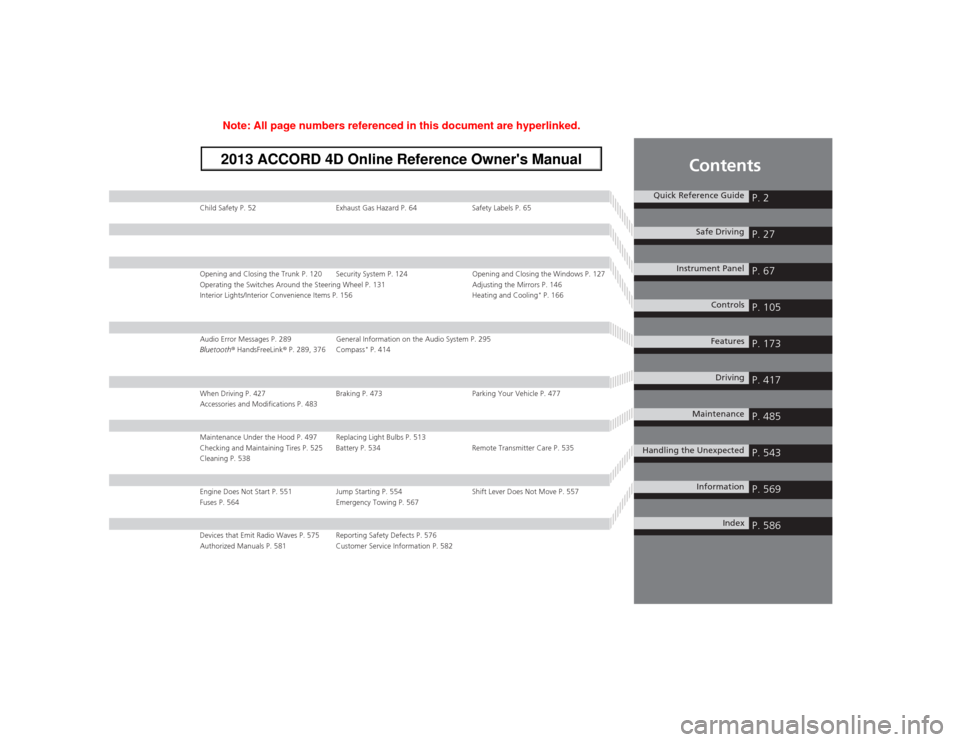
Contents
Child Safety P. 52Exhaust Gas Hazard P. 64 Safety Labels P. 65Opening and Closing the Trunk P. 120 Security System P. 124 Opening and Closing the Windows P. 127
Operating the Switches Around the Steering Wheel P. 131 Adjusting the Mirrors P. 146
Interior Lights/Interior Convenience Items P. 156 Heating and Cooling
* P. 166
Audio Error Messages P. 289General Information on the Audio System P. 295
Bluetooth ® HandsFreeLink ® P. 289, 376 Compass
* P. 414
When Driving P. 427 Braking P. 473 Parking Your Vehicle P. 477
Accessories and Modifications P. 483Maintenance Under the Hood P. 497 Replacing Light Bulbs P. 513
Checking and Maintaining Tires P. 525 Battery P. 534 Remote Transmitter Care P. 535
Cleaning P. 538Engine Does Not Start P. 551 Jump Starting P. 554 Shift Lever Does Not Move P. 557
Fuses P. 564 Emergency Towing P. 567Devices that Emit Radio Waves P. 575 Reporting Safety Defects P. 576
Authorized Manuals P. 581 Customer Service Information P. 582
Quick Reference Guide
P. 2
Safe Driving
P. 27
Instrument Panel
P. 67
Controls
P. 105
Features
P. 173
Driving
P. 417
Maintenance
P. 485
Handling the Unexpected
P. 543
Information
P. 569
Index
P. 586
Page 5 of 595
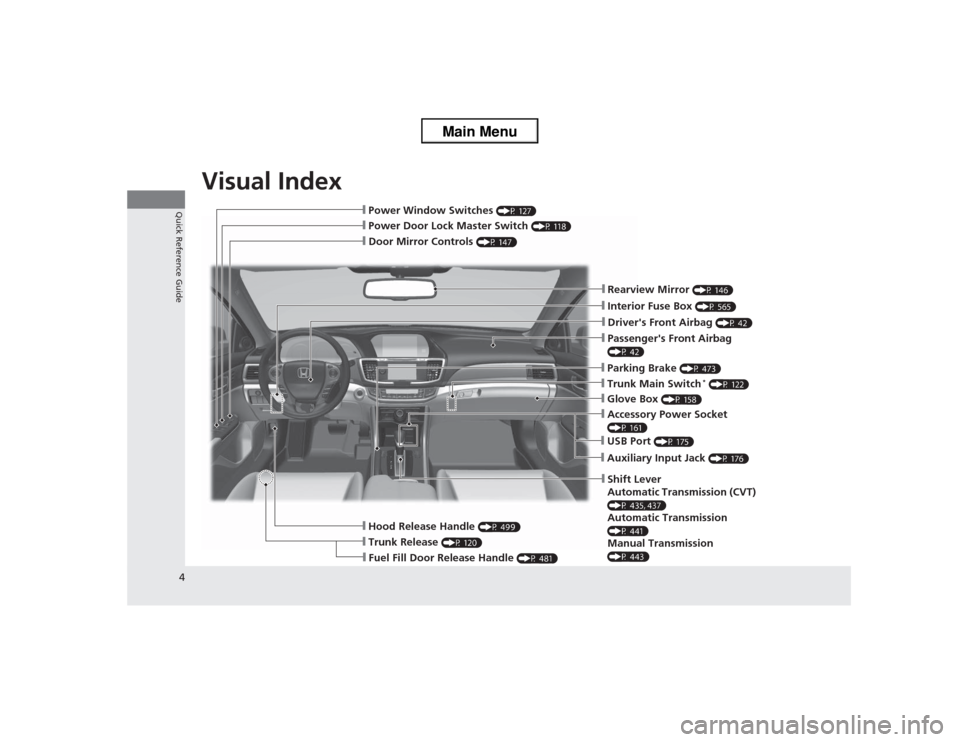
Visual Index
4Quick Reference Guide
❙Door Mirror Controls
(P 147)
❙Passenger's Front Airbag (P 42)❙Parking Brake
(P 473)
❙Glove Box
(P 158)
❙Rearview Mirror
(P 146)
❙Hood Release Handle
(P 499)
❙Power Door Lock Master Switch
(P 118)
❙Power Window Switches
(P 127)
❙Interior Fuse Box
(P 565)
❙Driver's Front Airbag
(P 42)
❙Trunk Main Switch
* (P 122)
❙Fuel Fill Door Release Handle
(P 481)
❙Trunk Release
(P 120)
❙Shift Lever
Automatic Transmission (CVT) (P 435, 437)Automatic Transmission (P 441)Manual Transmission (P 443)❙USB Port
(P 175)
❙Auxiliary Input Jack
(P 176)
❙Accessory Power Socket (P 161)
Page 7 of 595
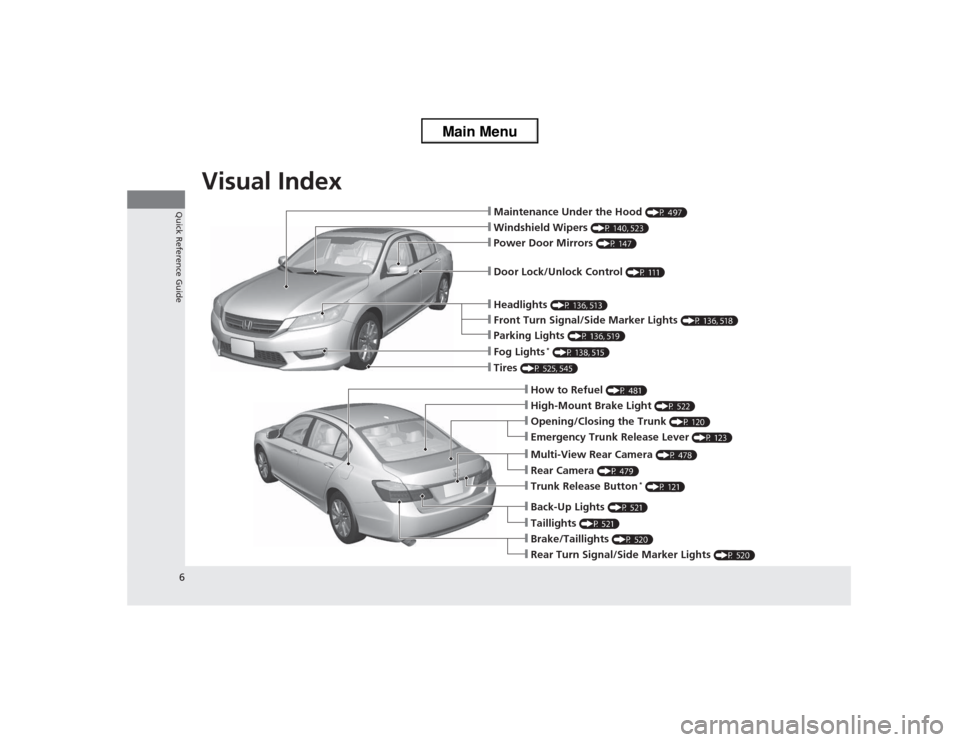
Visual Index
6Quick Reference Guide
❙Maintenance Under the Hood
(P 497)
❙Windshield Wipers
(P 140, 523)
❙Tires
(P 525, 545)
❙Door Lock/Unlock Control
(P 111)
❙Power Door Mirrors
(P 147)
❙Headlights
(P 136, 513)
❙How to Refuel
(P 481)
❙High-Mount Brake Light
(P 522)
❙Emergency Trunk Release Lever
(P 123)
❙Opening/Closing the Trunk
(P 120)
❙Parking Lights
(P 136, 519)
❙Front Turn Signal/Side Marker Lights
(P 136, 518)
❙Fog Lights
* (P 138, 515)
❙Multi-View Rear Camera
(P 478)
❙Trunk Release Button
* (P 121)
❙Back-Up Lights
(P 521)
❙Taillights
(P 521)
❙Brake/Taillights
(P 520)
❙Rear Turn Signal/Sid e Marker Lights
(P 520)
❙Rear Camera
(P 479)
Page 10 of 595
9Quick Reference Guide
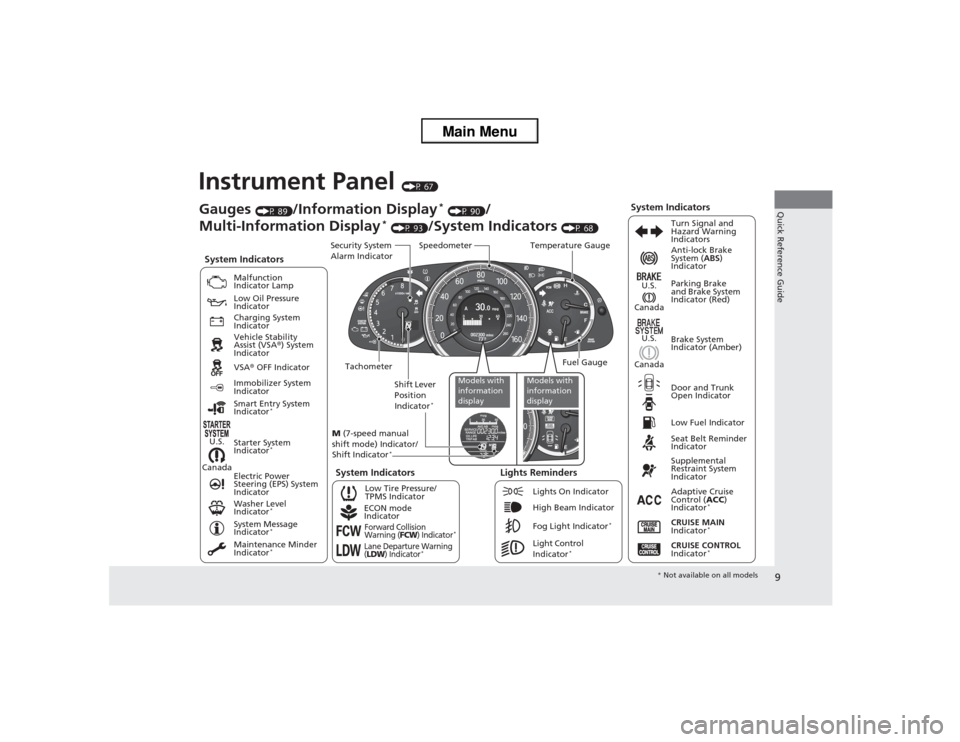
Instrument Panel
(P 67)
CanadaU.S.
Low Fuel IndicatorAnti-lock Brake
System (
ABS)
Indicator
Parking Brake
and Brake System
Indicator (Red)
Canada U.S.
Washer Level
Indicator
*
System Indicators
Malfunction
Indicator Lamp
Low Oil Pressure
Indicator
Charging System
Indicator
Vehicle Stability
Assist (VSA ®) System
Indicator
VSA ® OFF Indicator
Low Tire Pressure/
TPMS Indicator
Electric Power
Steering (EPS) System
Indicator
Lights Reminders
Lights On Indicator
High Beam Indicator
Fog Light Indicator
*
Immobilizer System
Indicator
Seat Belt Reminder
Indicator
System Indicators
CRUISE CONTROL
Indicator
*
Adaptive Cruise
Control ( ACC)
Indicator
*
CRUISE MAIN
Indicator
*
Tachometer Speedometer
Fuel Gauge
Security System
Alarm Indicator
Shift Lever
Position
Indicator
*
Gauges
(P 89)
/Information Display
* (P 90)
/
Multi-Information Display
* (P 93)
/System Indicators
(P 68) Turn Signal and
Hazard Warning
Indicators
System Indicators
Temperature Gauge
M (7-speed manual
shift mode) Indicator/
Shift Indicator
*
Maintenance Minder
Indicator
*
Smart Entry System
Indicator
*
Starter System
Indicator
*
System Message
Indicator
*
ECON mode
IndicatorForward Collision
Warning (
FCW
) Indicator
*
Lane Departure Warning
(LDW
) Indicator
*
Light Control
Indicator
*
Door and Trunk
Open Indicator Brake System
Indicator (Amber)
Supplemental
Restraint System
Indicator
Canada U.S.
Models with
information
display
Models with
information
display
*
Not available on all models
Page 24 of 595
23Quick Reference Guide
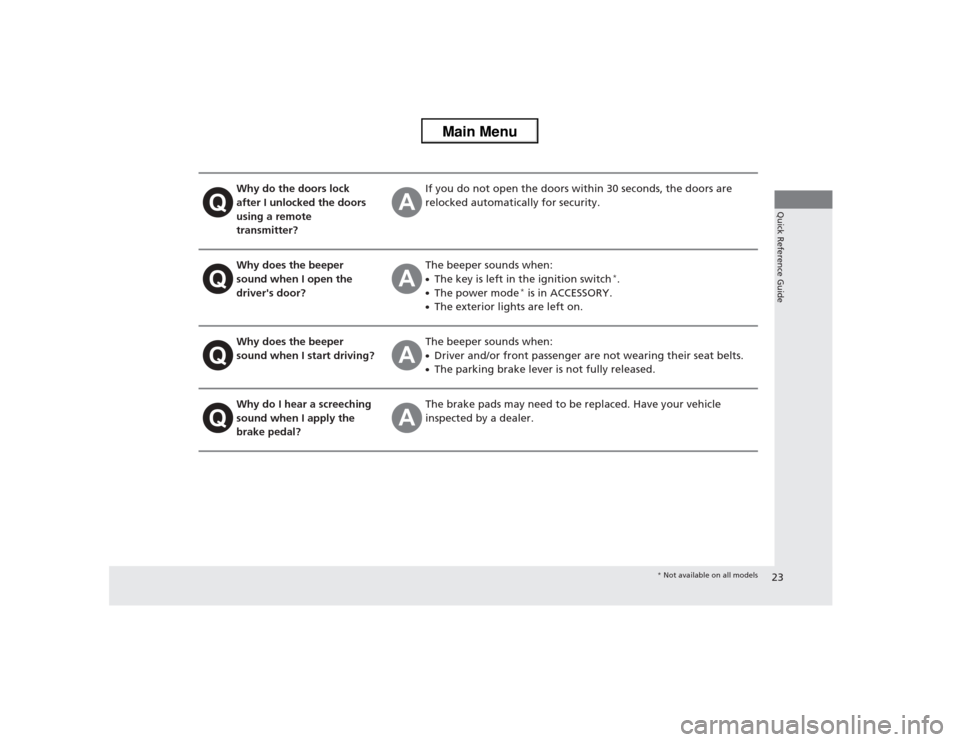
Why do the doors lock
after I unlocked the doors
using a remote
transmitter?
If you do not open the doors within 30 seconds, the doors are
relocked automatically for security.
Why does the beeper
sound when I open the
driver's door?
The beeper sounds when:●The key is left in the ignition switch
*.
●The power mode
* is in ACCESSORY.
●The exterior lights are left on.
Why does the beeper
sound when I start driving?
The beeper sounds when:●Driver and/or front passenger are not wearing their seat belts.●The parking brake lever is not fully released.
Why do I hear a screeching
sound when I apply the
brake pedal?
The brake pads may need to be replaced. Have your vehicle
inspected by a dealer.
* Not available on all models
Page 69 of 595
68Instrument Panel
Indicators*1:Models with the smart entry system have an ENGINE START/STOP button instead of an ignition switch.Indicator
Name
On/Blinking
Explanation
Message
*
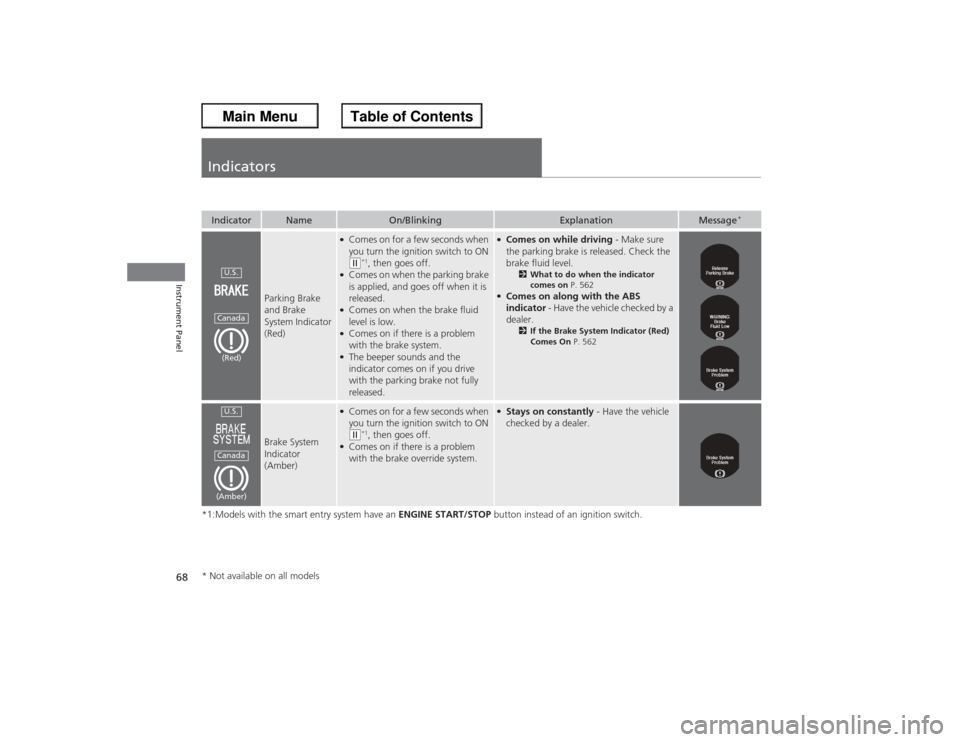
Parking Brake
and Brake
System Indicator
(Red)
●Comes on for a few seconds when
you turn the ignition switch to ON (w*1, then goes off.
●Comes on when the parking brake
is applied, and goes off when it is
released.●Comes on when the brake fluid
level is low.●Comes on if there is a problem
with the brake system.●The beeper sounds and the
indicator comes on if you drive
with the parking brake not fully
released.
●Comes on while driving - Make sure
the parking brake is released. Check the
brake fluid level.
2 What to do when the indicator
comes on P. 562
●Comes on along with the ABS
indicator - Have the vehicle checked by a
dealer.
2 If the Brake System Indicator (Red)
Comes On P. 562
Brake System
Indicator
(Amber)
●Comes on for a few seconds when
you turn the ignition switch to ON (w*1, then goes off.
●Comes on if there is a problem
with the brake override system.
●Stays on constantly - Have the vehicle
checked by a dealer.
U.S.Canada(Red)U.S.Canada(Amber)
* Not available on all models
Page 137 of 595
136
uuOperating the Switches Around the Steering Wheel uTurn Signals
Controls
Turn Signals
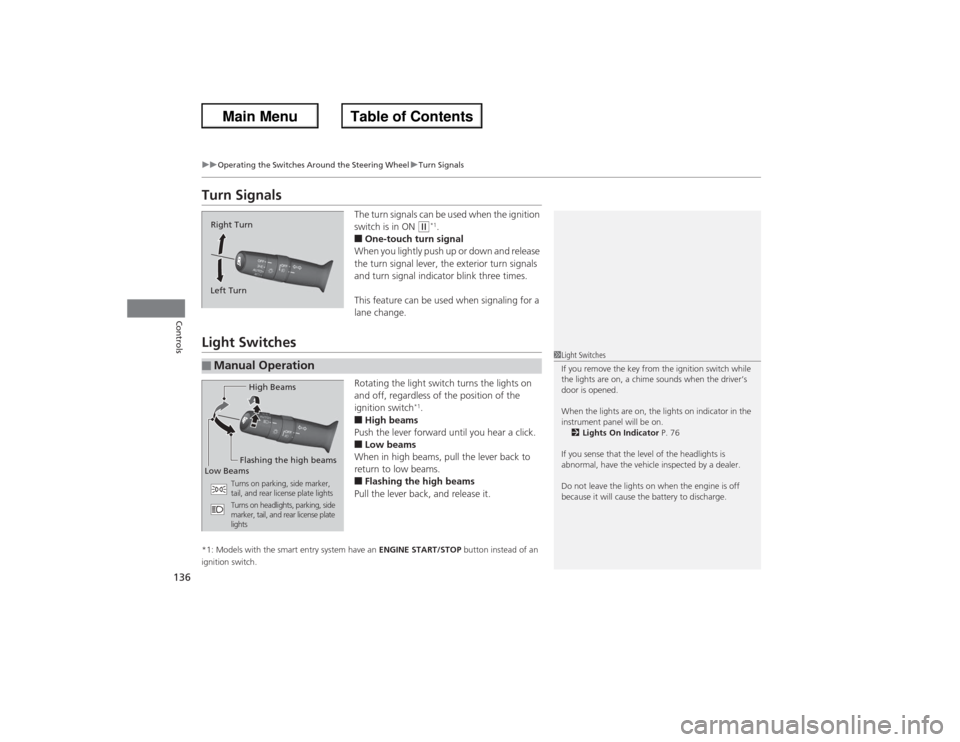
The turn signals can be used when the ignition
switch is in ON
(w*1.
■One-touch turn signal
When you lightly push up or down and release
the turn signal lever, the exterior turn signals
and turn signal indicator blink three times.
This feature can be used when signaling for a
lane change.
Light Switches
Rotating the light switch turns the lights on
and off, regardless of the position of the
ignition switch
*1.
■High beams
Push the lever forward until you hear a click.■Low beams
When in high beams, pull the lever back to
return to low beams.■Flashing the high beams
Pull the lever back, and release it.
*1: Models with the smart entry system have an ENGINE START/STOP button instead of an
ignition switch.Right Turn
Left Turn■Manual Operation
1 Light Switches
If you remove the key from the ignition switch while
the lights are on, a chime sounds when the driver’s
door is opened.
When the lights are on, the lights on indicator in the
instrument panel will be on.
2 Lights On Indicator P. 76
If you sense that the level of the headlights is
abnormal, have the vehicle inspected by a dealer.
Do not leave the lights on when the engine is off
because it will cause the battery to discharge.
High Beams
Flashing the high beams
Low Beams
Turns on parking, side marker,
tail, and rear license plate lights
Turns on headlights, parking, side
marker, tail, and rear license plate
lights
Page 138 of 595
Continued
137
uuOperating the Switches Around the Steering Wheel uLight Switches
Controls
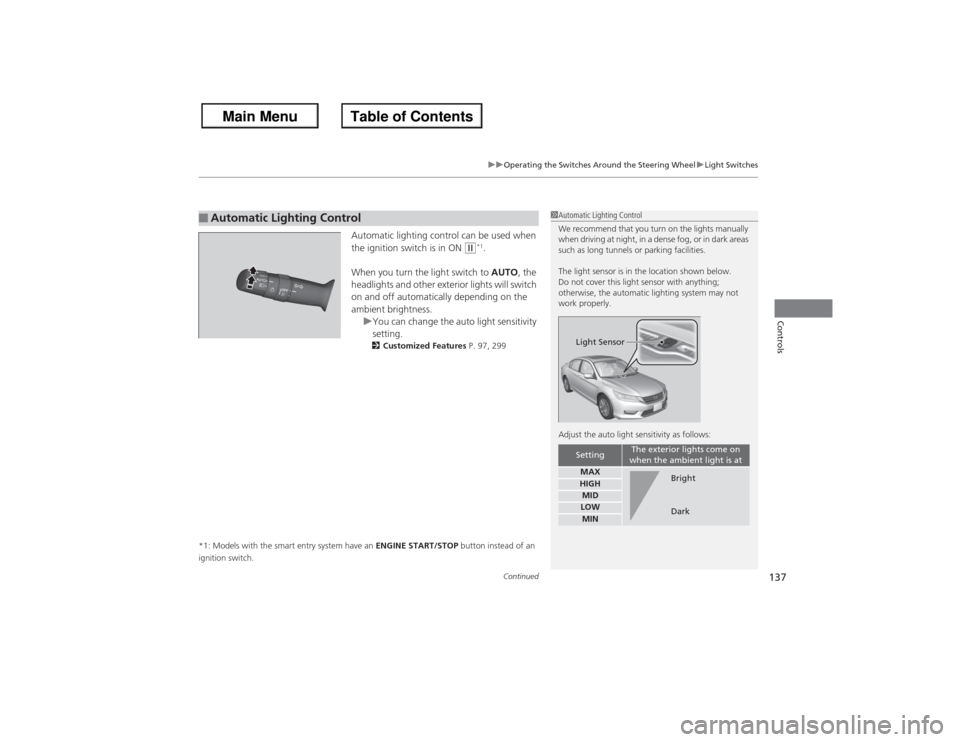
Automatic lighting control can be used when
the ignition switch is in ON
(w*1.
When you turn the light switch to AUTO, the
headlights and other exterior lights will switch
on and off automatically depending on the
ambient brightness. uYou can change the auto light sensitivity
setting.
2 Customized Features P. 97, 299
*1: Models with the smart entry system have an ENGINE START/STOP button instead of an
ignition switch.
■Automatic Lighting Control
1 Automatic Lighting Control
We recommend that you turn on the lights manually
when driving at night, in a dense fog, or in dark areas
such as long tunnels or parking facilities.
The light sensor is in the location shown below.
Do not cover this light sensor with anything;
otherwise, the automatic lighting system may not
work properly.
Adjust the auto light sensitivity as follows:
Setting
The exterior lights come on
when the ambient light is at
MAXHIGHMIDLOWMINLight Sensor
Bright
Dark
Page 140 of 595
139
uuOperating the Switches Around the Steering Wheel uDaytime Running Lights
Controls
Daytime Running LightsThe high beam headlights come on slightly dimmer than normal when the following
conditions have been met:
The parking/daytime running lights come on when the following conditions have
been met:
• The power mode is ON.
• The headlight switch is off, or in .
• The parking brake is released.
• The ignition switch is in ON
(w*1.
• The headlight switch is off.
• The parking brake is released.
The lights remain on even if you set the parking brake. Turning off the ignition switch
or setting the power mode to VEHICLE OFF will turn off the daytime running lights.
The high beam headlights return to the original brightness once the headlight
switch is turned on.
*1: Models with the smart entry system have an ENGINE START/STOP button instead of an
ignition switch.Models with bulb type parking lightsModels with LED type parking/daytime running lightsModels with LED low beam headlightsModels with halogen low beam headlightsModels with bulb type parking lights
Page 142 of 595
141
uuOperating the Switches Around the Steering Wheel uBrightness Control
Controls
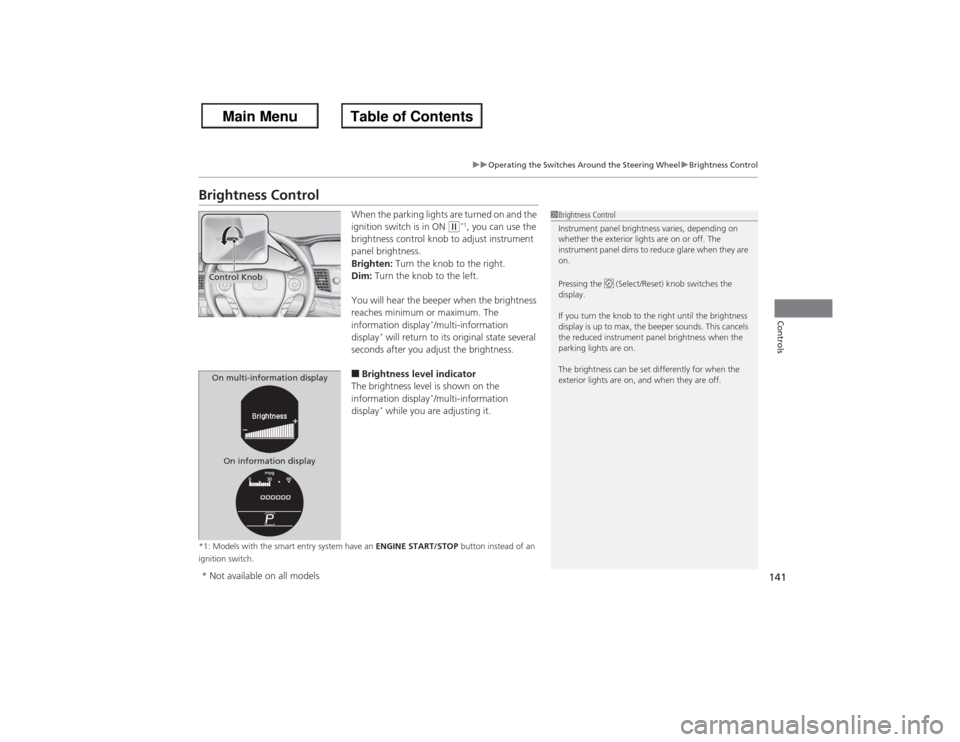
Brightness Control
When the parking lights are turned on and the
ignition switch is in ON
(w*1, you can use the
brightness control knob to adjust instrument
panel brightness.
Brighten: Turn the knob to the right.
Dim: Turn the knob to the left.
You will hear the beeper when the brightness
reaches minimum or maximum. The
information display
*/multi-information
display
* will return to its original state several
seconds after you adjust the brightness.
■Brightness level indicator
The brightness level is shown on the
information display
*/multi-information
display
* while you are adjusting it.
*1: Models with the smart entry system have an ENGINE START/STOP button instead of an
ignition switch.
1 Brightness Control
Instrument panel brightness varies, depending on
whether the exterior lights are on or off. The
instrument panel dims to reduce glare when they are
on.
Pressing the (Select/Reset) knob switches the
display.
If you turn the knob to the right until the brightness
display is up to max, the beeper sounds. This cancels
the reduced instrument panel brightness when the
parking lights are on.
The brightness can be set differently for when the
exterior lights are on, and when they are off.
Control KnobOn multi-information display
On information display* Not available on all models