reset HONDA ACCORD 2022 Owner's Manual
[x] Cancel search | Manufacturer: HONDA, Model Year: 2022, Model line: ACCORD, Model: HONDA ACCORD 2022Pages: 657, PDF Size: 11.42 MB
Page 286 of 657
uuAudio System Basic Operation uPlaying SiriusXM ® Radio*
284
Features
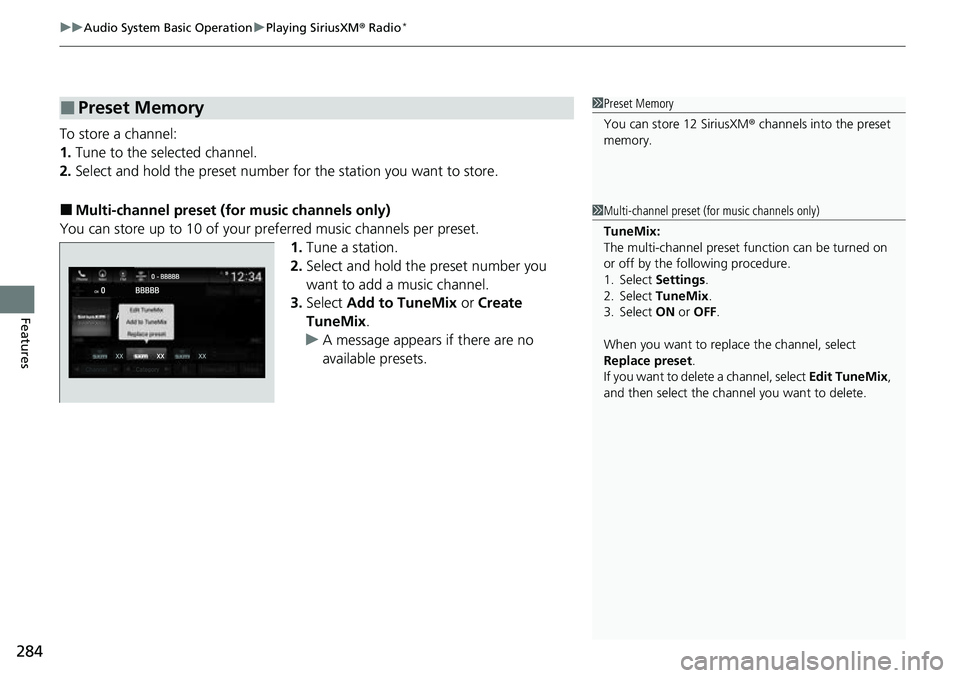
To store a channel:
1. Tune to the selected channel.
2. Select and hold the preset number fo r the station you want to store.
■Multi-channel preset (for music channels only)
You can store up to 10 of your pref erred music channels per preset.
1. Tune a station.
2. Select and hold the preset number you
want to add a music channel.
3. Select Add to TuneMix or Create
TuneMix .
u A message appears if there are no
available presets.
■Preset Memory1Preset Memory
You can store 12 SiriusXM ® channels into the preset
memory.
1 Multi-channel preset (for music channels only)
TuneMix:
The multi-channel preset function can be turned on
or off by the following procedure.
1. Select Settings .
2. Select TuneMix.
3. Select ON or OFF .
When you want to replac e the channel, select
Replace preset .
If you want to delete a channel, select Edit TuneMix,
and then select the channel you want to delete.
Page 288 of 657
uuAudio System Basic Operation uPlaying SiriusXM ® Radio*
286
Features
The system can record up to the last 60 minutes broadcast of your currently tuned
channel as well as the last 30 minutes br oadcast of preset channels, starting from
the moment you turn the vehicle on. If yo u tuned to preset channel, the system
records up to 60 minutes of a broadcast instead of up to 30 minutes. You can
rewind and replay the last 30 or 60 minutes of a broadcast.
Move the position you want to replay by selecting or .
To play or pause on playback m ode, select the play/pause icon.
■Returning to real-time broadcast
Select and hold .
■Replay Function1 Replay Function
The system starts storing broadcast in memory when
the power mode is turned ON. You can go back to
the program from that point.
You can no longer repl ay any program once the
power mode is turned off as it erases memory.
You can check how long the program has been
stored in memory from th e audio/information screen.
After 30 or 60 minutes of recording the system will
automatically start deleting the oldest data.
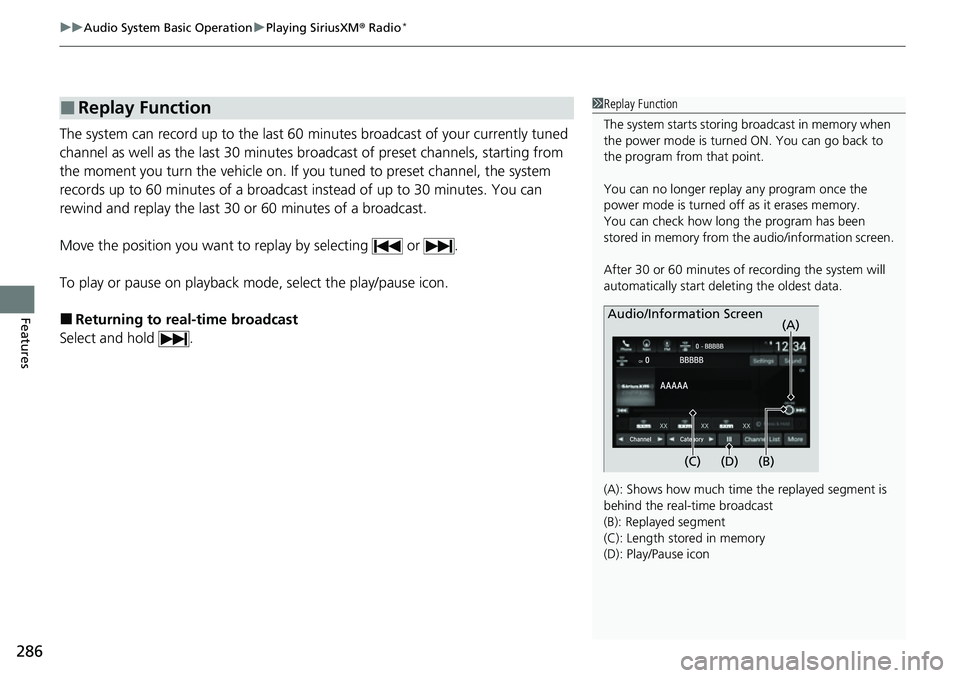
(A): Shows how much time the replayed segment is
behind the real-time broadcast
(B): Replayed segment
(C): Length stored in memory
(D): Play/Pause icon
Audio/Information Screen
(C) (B) (A)
(D)
Page 293 of 657
Continued291
uuAudio System Basic Operation uPlaying SiriusXM ® Radio*
Features
Sample each channel on the selected mode for 10 seconds.
1. Select More.
2. Select Scan.
You can change a scan mode by the following procedure.
1. Select Settings .
2. Select Scan Mode .
3. Select Channel or Preset .
To turn off scan, select Stop.
■Scan1Scan
The “Scan Songs in Preset s” function is based on
TuneScan
TM technology of SiriusXM ®.
The “Featured Channels ” function is based on
Featured Favorites
TM technology of SiriusXM ®.
TuneScan
TM and Featured FavoritesTM are registered
trademarks of SiriusXM ® Radio, Inc.
Page 294 of 657
292
uuAudio System Basic Operation uPlaying SiriusXM ® Radio*
Features
Change the SiriusXM ® settings.
1. Select Settings .
2. Select an option.
• TuneMix: Turns multiple channel mix preset on and off.
• Tune Mode: Choose whether to group by category or channel number when
changing channels.
2 To Change the Tune Mode P. 283
•Scan Mode: Select the scan mode fro m all channels or presets.
2Scan P. 291
•Tune Start: Start the currently playing song at the beginning when you switch to
a music channel preset.
2 Tune Start: P. 283
•Sports Notifi cations Setup: Set to receive sports alerts such as scores from your
favorite teams.
2 Live Sports Alert P. 287
•Traffic & Weather Now Setup: Set to receive traffic and weather information.
2Traffic and Weather Information P. 288
•Manage Program Alerts: Change settings for the alert function.
2Manage Program Alert P. 290
■SiriusXM® Settings
Page 311 of 657
309
uuAudio System Basic Operation uHondaLink® Service*
Features
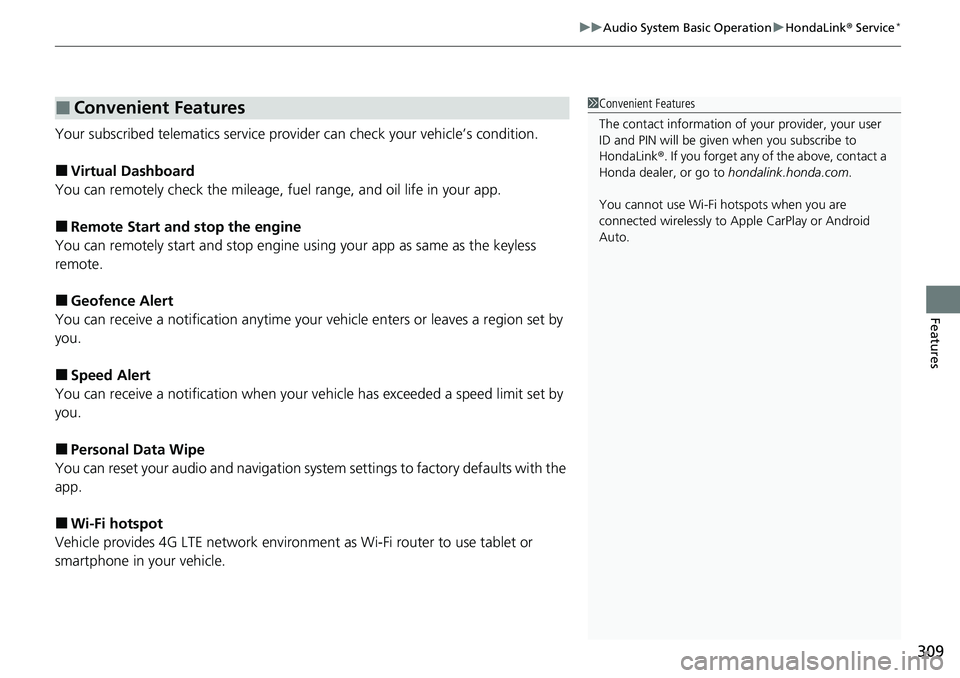
Your subscribed telematics service prov ider can check your vehicle’s condition.
■Virtual Dashboard
You can remotely check the mileage, fuel range, and oil life in your app.
■Remote Start and stop the engine
You can remotely start and stop engine using your app as same as the keyless
remote.
■Geofence Alert
You can receive a notification anytime your ve hicle enters or leaves a region set by
you.
■Speed Alert
You can receive a notification when your ve hicle has exceeded a speed limit set by
you.
■Personal Data Wipe
You can reset your audio and navigation system settings to factory defaults with the
app.
■Wi-Fi hotspot
Vehicle provides 4G LTE ne twork environment as Wi-Fi router to use tablet or
smartphone in your vehicle.
■Convenient Features1 Convenient Features
The contact information of your provider, your user
ID and PIN will be given when you subscribe to
HondaLink ®. If you forget any of the above, contact a
Honda dealer, or go to hondalink.honda.com.
You cannot use Wi-Fi hotspots when you are
connected wirelessly to Apple CarPlay or Android
Auto.
Page 330 of 657
328
uuAudio Error Messages uAndroid/Apps
Features
Android/Apps
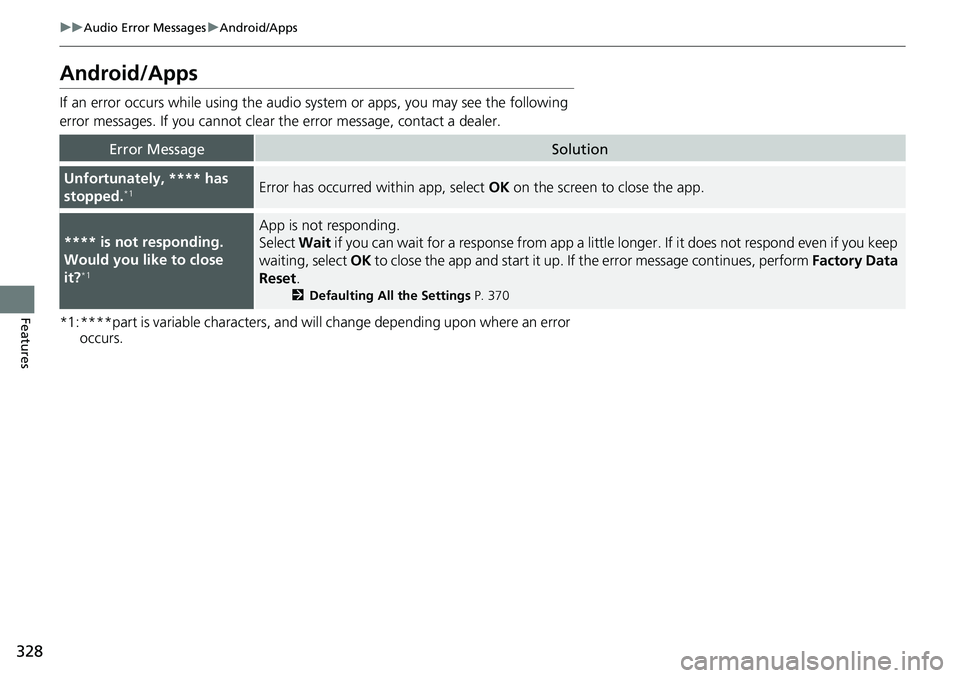
If an error occurs while using the audio system or apps, you may see the following
error messages. If you cannot clear the error message, contact a dealer.
*1:****part is variable characters, and will change depending upon where an error occurs.
Error MessageSolution
Unfortunately, **** has
stopped.*1Error has occurred within app, select OK on the screen to close the app.
**** is not responding.
Would you like to close
it?
*1
App is not responding.
Select Wait if you can wait for a response from app a littl e longer. If it does not respond even if you keep
waiting, select OK to close the app and start it up. If the error message continues, perform Factory Data
Reset .
2Defaulting All the Settings P. 370
Page 355 of 657
353
uuCustomized Features u
Continued
Features
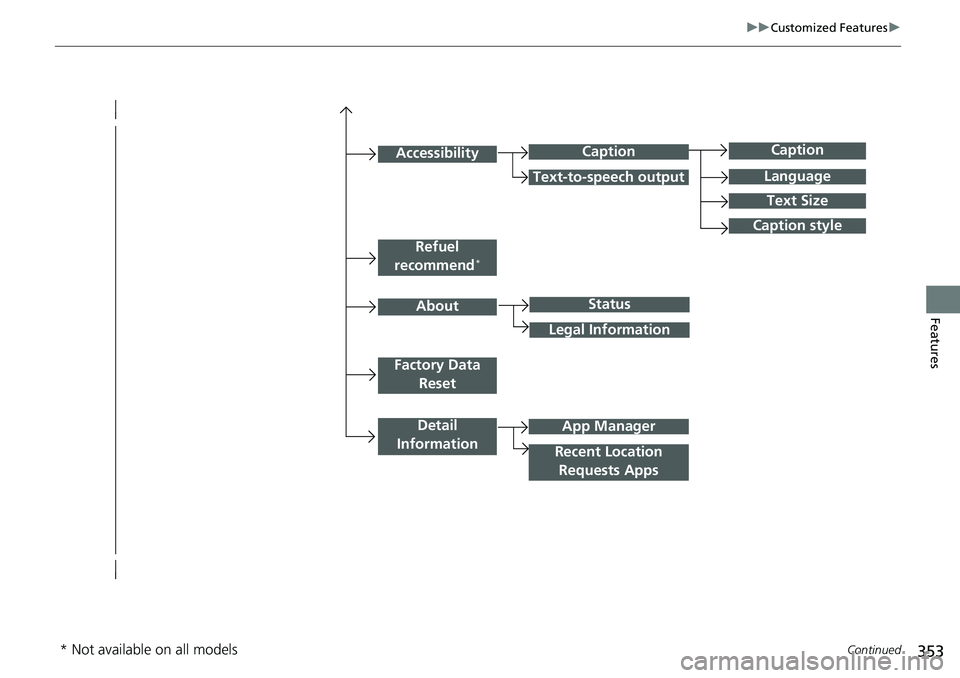
Caption
Language
Caption style
Detail
Information
Factory Data Reset
About
Refuel
recommend*
Accessibility
Status
Legal Information
App Manager
Recent Location Requests Apps
Caption
Text-to-speech output
Text Size
* Not available on all models
Page 357 of 657

355
uuCustomized Features u
Continued
Features
Vehicle
Meter Setup
Adjust Outside Temp. Display
“Trip A” Reset Timing
“Trip B” Reset Timing
Reverse Alert Tone*
Config. of Instrument Panel
Adjust Alarm Volume
Turn By Turn Auto Display
Fuel Efficiency Backlight
TPMS Calibration
Driver Assist
System SetupBlind Spot Info*
Head-up Warning*
Traffic Sign Recognition System
Forward Collision Warning Distance
ACC Forward Vehicle Detect Beep
Lane Keeping Assist Suspend Beep
Road Departure Mitigation Setting
Driver Attention Monitor
Speed/Distance Units
Tachometer
Language Selection
Auto Engine Idle Stop Guidance Screens*
Rear Seat Reminder*
* Not available on all models
Page 358 of 657
356
uuCustomized Features u
Features
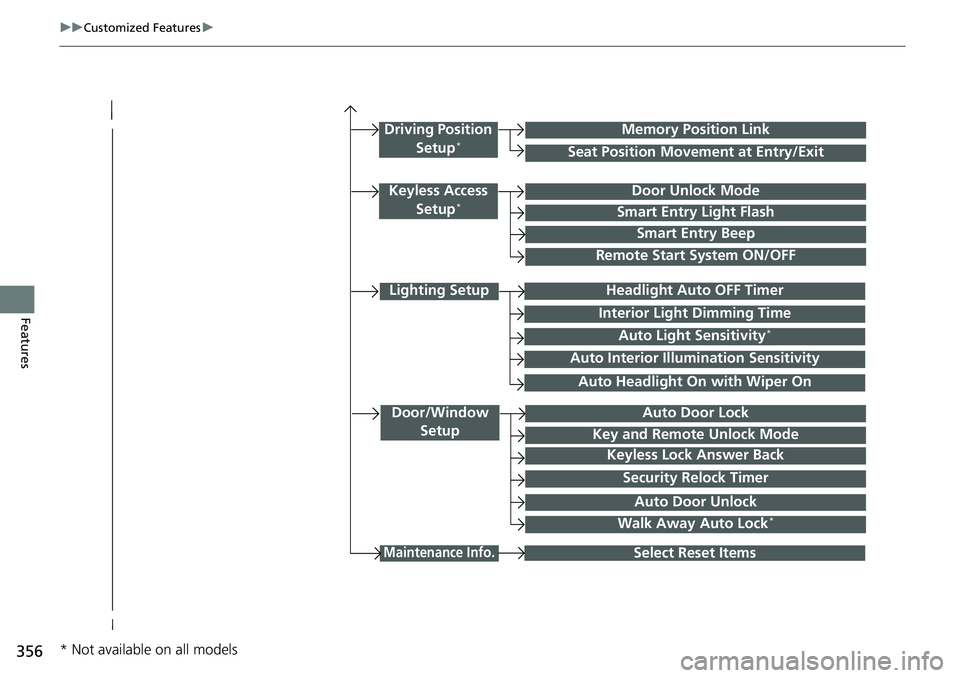
Lighting Setup
Interior Light Dimming Time
Headlight Auto OFF Timer
Auto Light Sensitivity*
Door/Window
SetupAuto Door Lock
Auto Door Unlock
Key and Remote Unlock Mode
Keyless Lock Answer Back
Security Relock Timer
Maintenance Info.Select Reset Items
Walk Away Auto Lock*
Driving Position
Setup*Seat Position Movement at Entry/Exit
Memory Position Link
Keyless Access Setup*Door Unlock Mode
Smart Entry Light Flash
Smart Entry Beep
Remote Start System ON/OFF
Auto Headlight On with Wiper On
Auto Interior Illu mination Sensitivity
* Not available on all models
Page 363 of 657
361
uuCustomized Features u
Continued
Features
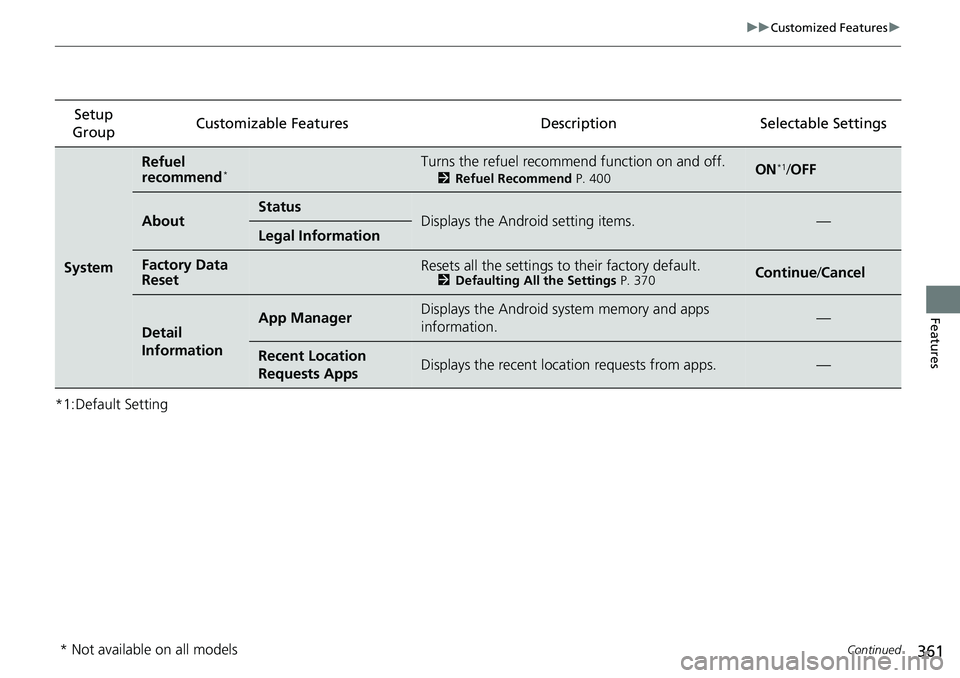
*1:Default SettingSetup
Group Customizable Features Desc
riptionSelectable Settings
System
Refuel
recommend*Turns the refuel recommend function on and off.
2Refuel Recommend P. 400ON*1/OFF
AboutStatusDisplays the Android setting items.—Legal Information
Factory Data
ResetResets all the settings to their factory default.2 Defaulting All the Settings P. 370Continue/Cancel
Detail
InformationApp ManagerDisplays the Android system memory and apps
information.—
Recent Location
Requests AppsDisplays the recent locati on requests from apps.—
* Not available on all models