engine HONDA ACCORD HYBRID 2014 9.G User Guide
[x] Cancel search | Manufacturer: HONDA, Model Year: 2014, Model line: ACCORD HYBRID, Model: HONDA ACCORD HYBRID 2014 9.GPages: 561, PDF Size: 20.3 MB
Page 92 of 561
91
uuIndicatorsuMulti-Information Display Warning and Information Messages
Instrument Panel
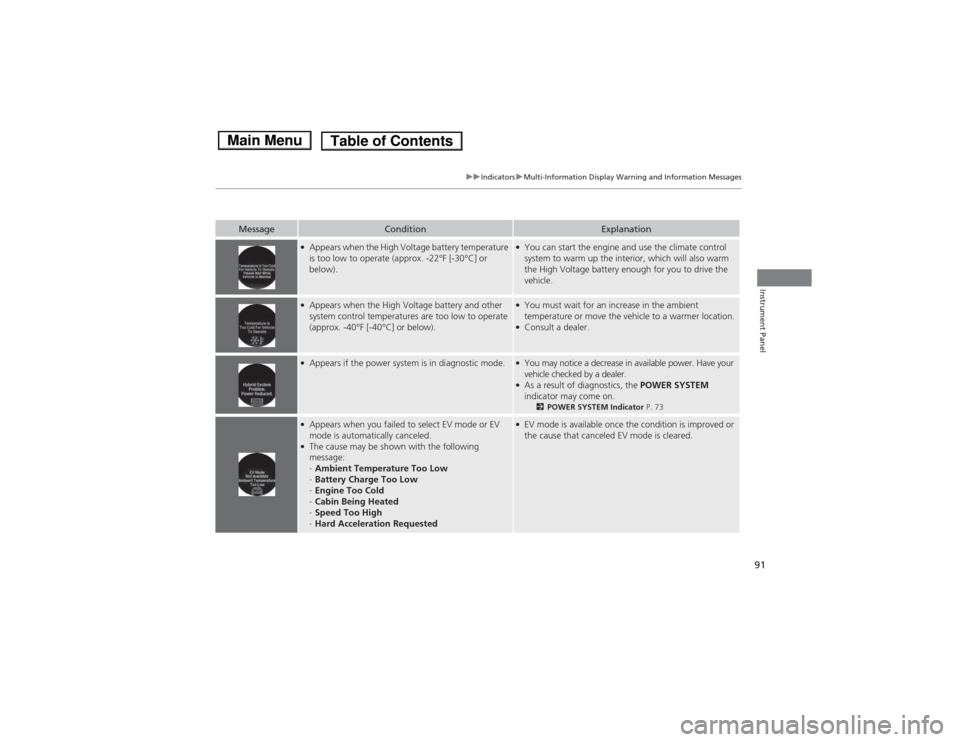
MessageConditionExplanation
●Appears when the High Voltage battery temperature
is too low to operate (approx. -22°F [-30°C] or
below).● You can start the engine and use the climate control
system to warm up the interior, which will also warm
the High Voltage battery enough for you to drive the vehicle.
●Appears when the High Voltage battery and other
system control temperatures are too low to operate
(approx. -40°F [-40°C] or below).● You must wait for an increase in the ambient
temperature or move the vehicle to a warmer location.
● Consult a dealer.
●
Appears if the power system is in diagnostic mode.● You may notice a decrease in availa ble power. Have your
vehicle checked by a dealer.
● As a result of diagnostics, the POWER SYSTEM
indicator may come on. 2POWER SYSTEM Indicator P. 73
●
Appears when you failed to select EV mode or EV
mode is automatically canceled.
● The cause may be shown with the following
message: -Ambient Temperature Too Low
- Battery Charge Too Low
- Engine Too Cold
- Cabin Being Heated
- Speed Too High
- Hard Acceleration Requested●
EV mode is available once the condition is improved or
the cause that canceled EV mode is cleared.
Main MenuTable of Contents
Page 93 of 561
92
Instrument Panel
Gauges and Multi-Information Display
Gauges
Gauges include the speedometer, fuel gauge, POWER/CHARGE gauge, High
Voltage battery charge level gauge, and related indicators. They are displayed when
the power mode is in ON.
Displays your driving speed in mph or km/h.
Displays the amount of fuel left in the fuel tank.
■Speedometer
■Fuel Gauge1Fuel Gauge
NOTICEYou should refuel when the reading approaches .
Running out of fuel can cause the engine to misfire,
damaging the catalytic converter.
The actual amount of remaining fuel may differ from
the fuel gauge reading.E
Main MenuTable of Contents
Page 95 of 561
94
uuGauges and Multi-Information DisplayuMulti-Information Display
Instrument Panel
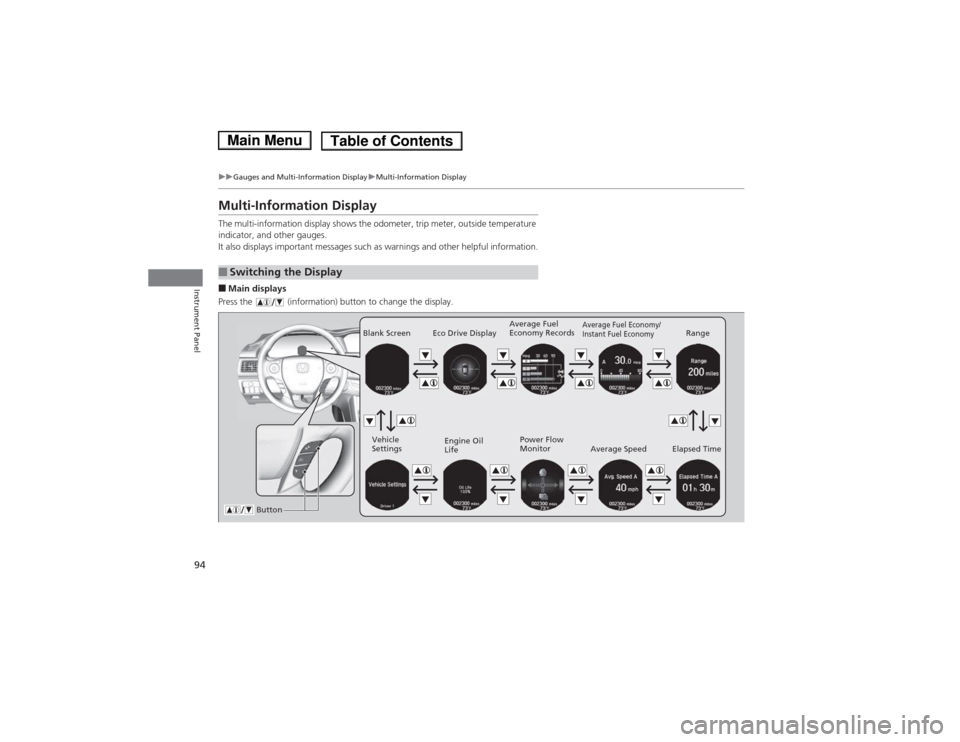
Multi-Information Display
The multi-information display shows the odometer, trip meter, outside temperature
indicator, and other gauges.
It also displays important messages such as warnings and other helpful information. ■Main displays
Press the (information) button to change the display.
■Switching the Display
Average Fuel Economy/
Instant Fuel EconomyRange
Elapsed Time
Average Speed
Blank Screen
Vehicle
Settings Engine Oil
Life
ButtonAverage Fuel
Economy Records
Eco Drive Display
Power Flow
Monitor
Main MenuTable of Contents
Page 98 of 561
Continued97
uuGauges and Multi-Information DisplayuMulti-Information Display
Instrument Panel
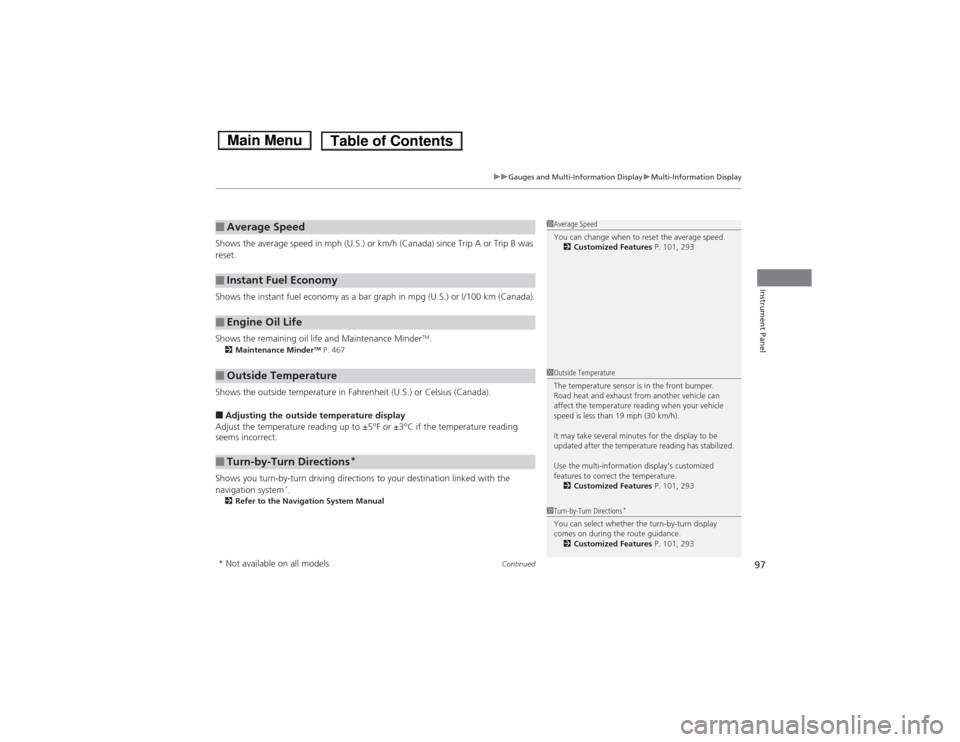
Shows the average speed in mph (U.S.) or km/h (Canada) since Trip A or Trip B was
reset.
Shows the instant fuel economy as a bar graph in mpg (U.S.) or l/100 km (Canada).
Shows the remaining oil life and Maintenance MinderTM
.
2 Maintenance Minder TM
P. 467
Shows the outside temperature in Fahrenheit (U.S.) or Celsius (Canada). ■ Adjusting the outside temperature display
Adjust the temperature reading up to ±5°F or ±3°C if the temperature reading seems incorrect.
Shows you turn-by-turn driving directions to your destination linked with the
navigation system *
.
2 Refer to the Navigation System Manual
■Average Speed
■Instant Fuel Economy
■Engine Oil Life
■Outside Temperature
■Turn-by-Turn Directions *
1Average Speed
You can change when to reset the average speed.
2 Customized Features P. 101, 293
1Outside Temperature
The temperature sensor is in the front bumper.
Road heat and exhaust from another vehicle can
affect the temperature reading when your vehicle
speed is less than 19 mph (30 km/h).
It may take several minutes for the display to be
updated after the temperature reading has stabilized.
Use the multi-information display's customized
features to correct the temperature.
2 Customized Features P. 101, 293
1Turn-by-Turn Directions*
You can select whether the turn-by-turn display
comes on during the route guidance. 2 Customized Features P. 101, 293
* Not available on all models
Main MenuTable of Contents
Page 101 of 561
uuGauges and Multi-Information DisplayuMulti-Information Display
100
Instrument Panel
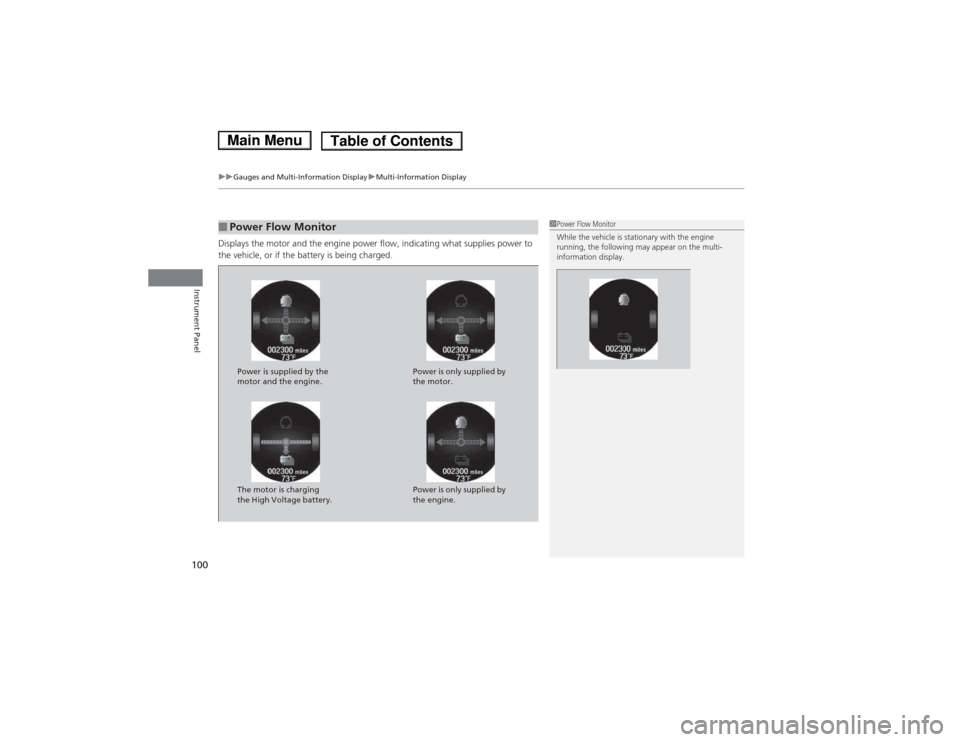
Displays the motor and the engine power flow, indicating what supplies power to
the vehicle, or if the battery is being charged.
■Power Flow Monitor1Power Flow Monitor
While the vehicle is stationary with the engine
running, the following may appear on the multi-
information display.
Power is supplied by the
motor and the engine. Power is only supplied by
the motor.
The motor is charging
the High Voltage battery. Power is only supplied by
the engine.
Main MenuTable of Contents
Page 107 of 561
106
uuGauges and Multi-Information DisplayuMulti-Information Display
Instrument Panel
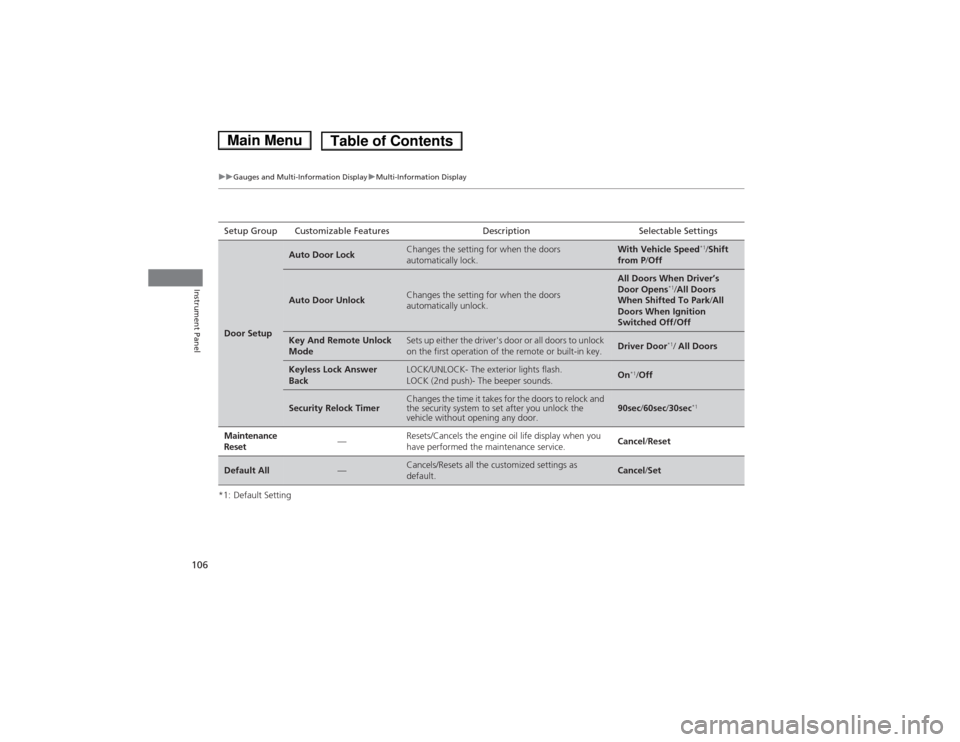
*1: Default SettingSetup Group Customizable Features Description Selectable Settings
Door Setup
Auto Door LockChanges the setting for when the doors
automatically lock.With Vehicle Speed
*1
/Shift
from P /Off
Auto Door UnlockChanges the setting for when the doors
automatically unlock.
All Doors When Driver’s
Door Opens *1
/All Doors
When Shifted To Park /All
Doors When Ignition Switched Off/Off
Key And Remote Unlock
ModeSets up either the driver's door or all doors to unlock
on the first operation of the remote or built-in key.Driver Door *1
/ All Doors
Keyless Lock Answer
BackLOCK/UNLOCK- The exterior lights flash.
LOCK (2nd push)- The beeper sounds.On *1
/Off
Security Relock TimerChanges the time it takes for the doors to relock and
the security system to set after you unlock the
vehicle without opening any door.90sec /60sec /30sec *1
Maintenance Reset—Resets/Cancels the engine oil life display when you
have performed the maintenance service. Cancel
/Reset
Default All—Cancels/Resets all the customized settings as default.Cancel /Set
Main MenuTable of Contents
Page 134 of 561
133
Continued
Controls
Operating the Switches Around the Steering Wheel
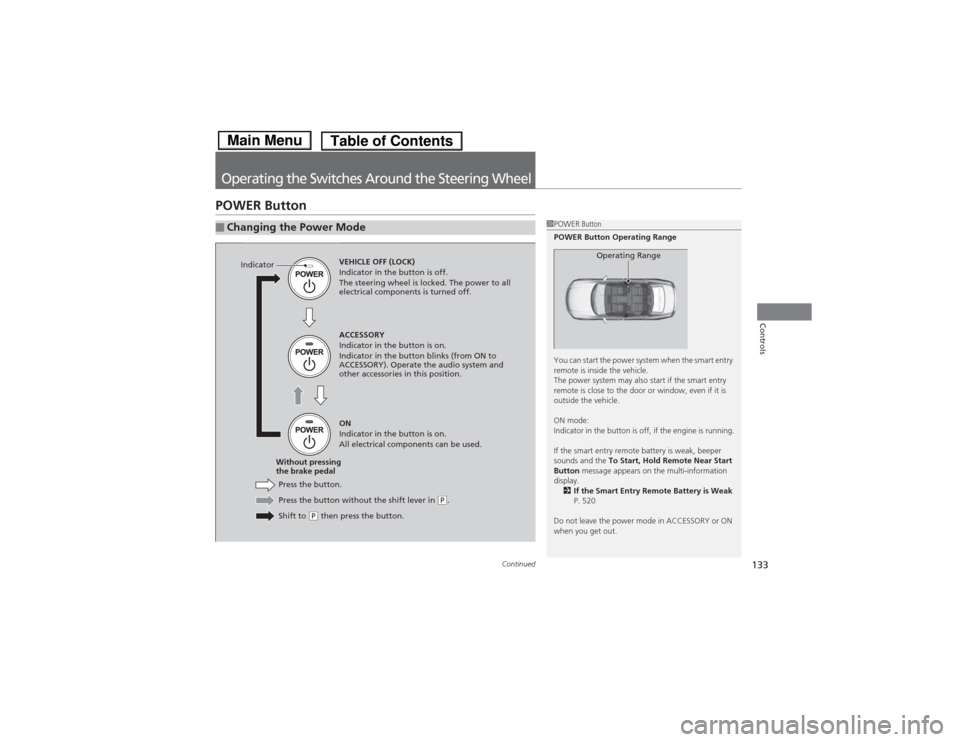
POWER Button
■Changing the Power Mode1POWER
Button
POWER Button Operating Range
You can start the power system when the smart entry
remote is inside the vehicle.
The power system may also start if the smart entry
remote is close to the door or window, even if it is
outside the vehicle.
ON mode:
Indicator in the button is off, if the engine is running.
If the smart entry remote battery is weak, beeper
sounds and the To Start, Hold Remote Near Start
Button message appears on the multi-information
display.
2 If the Smart Entry Remote Battery is Weak
P. 520
Do not leave the power mode in ACCESSORY or ON
when you get out.
Operating RangeVEHICLE OFF (LOCK)
Indicator in the button is off.
The steering wheel is locked. The power to all
electrical components is turned off.
Press the button without the shift lever in
(P .
Shift to
(P then press the button.
Press the button.
Without pressing
the brake pedal ACCESSORY
Indicator in the button is on.
Indicator in the button blinks (from ON to
ACCESSORY). Operate the audio system and
other accessories in this position. ON
Indicator in the button is on.
All electrical components can be used.
Indicator
Main MenuTable of Contents
Page 259 of 561
uuAudio System Basic OperationuPlaying Hard Disc Drive (HDD) Audio
258
Features
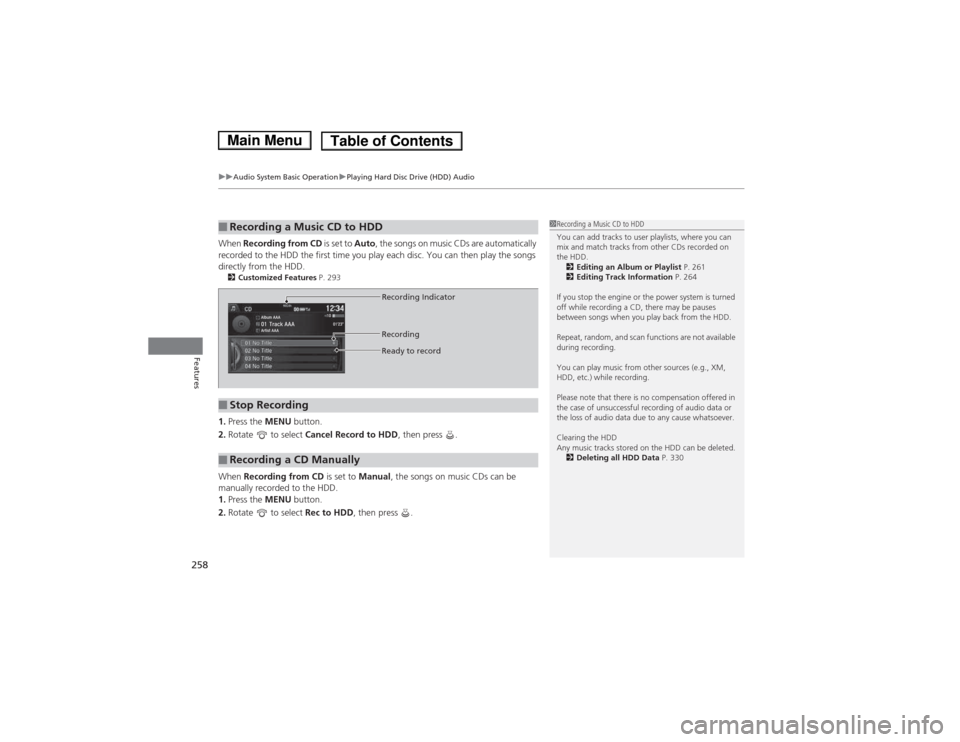
When Recording from CD is set to Auto, the songs on music CDs are automatically
recorded to the HDD the first time you play each disc. You can then play the songs
directly from the HDD. 2 Customized Features P. 293
1. Press the MENU button.
2. Rotate to select Cancel Record to HDD , then press .
When Recording from CD is set to Manual, the songs on music CDs can be
manually recorded to the HDD. 1. Press the MENU button.
2. Rotate to select Rec to HDD, then press .
■Recording a Music CD to HDD1Recording a Music CD to HDD
You can add tracks to user playlists, where you can
mix and match tracks from other CDs recorded on
the HDD.
2 Editing an Album or Playlist P. 261
2 Editing Track Information P. 264
If you stop the engine or the power system is turned
off while recording a CD, there may be pauses
between songs when you play back from the HDD.
Repeat, random, and scan functions are not available
during recording.
You can play music from other sources (e.g., XM,
HDD, etc.) while recording.
Please note that there is no compensation offered in
the case of unsuccessful recording of audio data or
the loss of audio data due to any cause whatsoever.
Clearing the HDD
Any music tracks stored on the HDD can be deleted. 2 Deleting all HDD Data P. 330
■Stop Recording
■Recording a CD Manually
Recording Indicator
Recording
Ready to record
Main MenuTable of Contents
Page 305 of 561
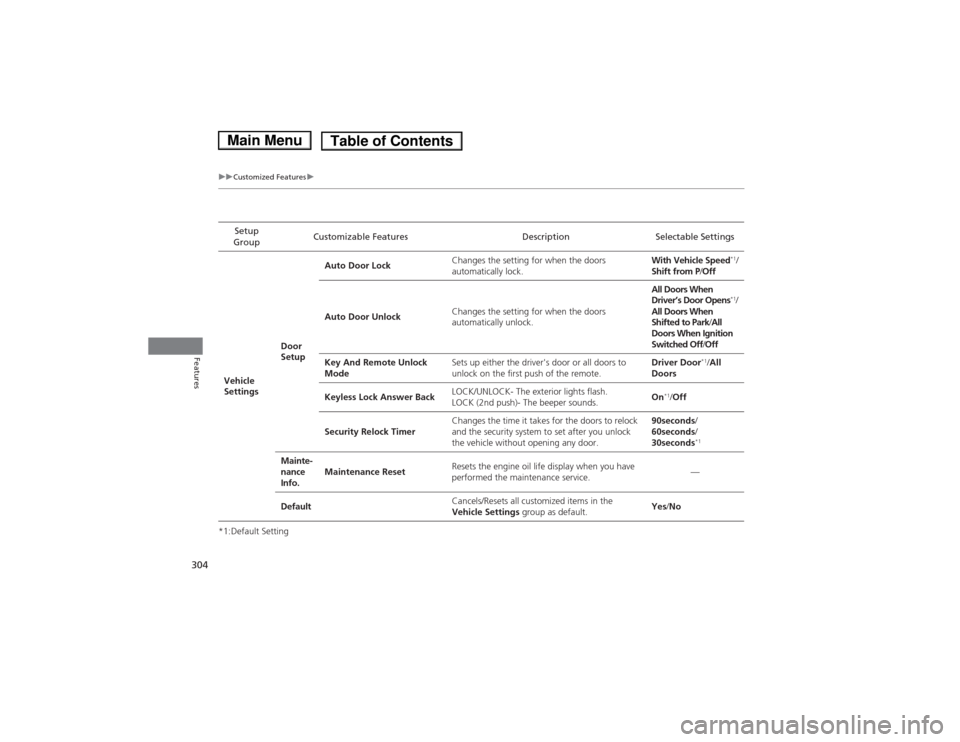
304
uuCustomized Featuresu
Features
*1:Default SettingSetup
Group Customizable Features Description Selectable Settings
Vehicle
Settings Door
SetupAuto Door Lock
Changes the setting for when the doors
automatically lock. With Vehicle Speed
*1
/
Shift from P /Off
Auto Door Unlock Changes the setting for when the doors
automatically unlock. All Doors When
Driver’s Door Opens
*1
/
All Doors When
Shifted to Park /All
Doors When Ignition
Switched Off /Off
Key And Remote Unlock
Mode Sets up either the driver's door or all doors to
unlock on the first push of the remote. Driver Door
*1
/All
Doors
Keyless Lock Answer Back LOCK/UNLOCK- The exterior lights flash.
LOCK (2nd push)- The beeper sounds.
On
*1
/Off
Security Relock Timer Changes the time it takes for the doors to relock
and the security system to set after you unlock
the vehicle without opening any door. 90seconds
/
60seconds /
30seconds *1
Mainte-
nance
Info. Maintenance Reset
Resets the engine oil life display when you have
performed the maintenance service. —
Default Cancels/Resets all customized items in the
Vehicle Settings
group as default. Yes
/No
Main MenuTable of Contents
Page 323 of 561
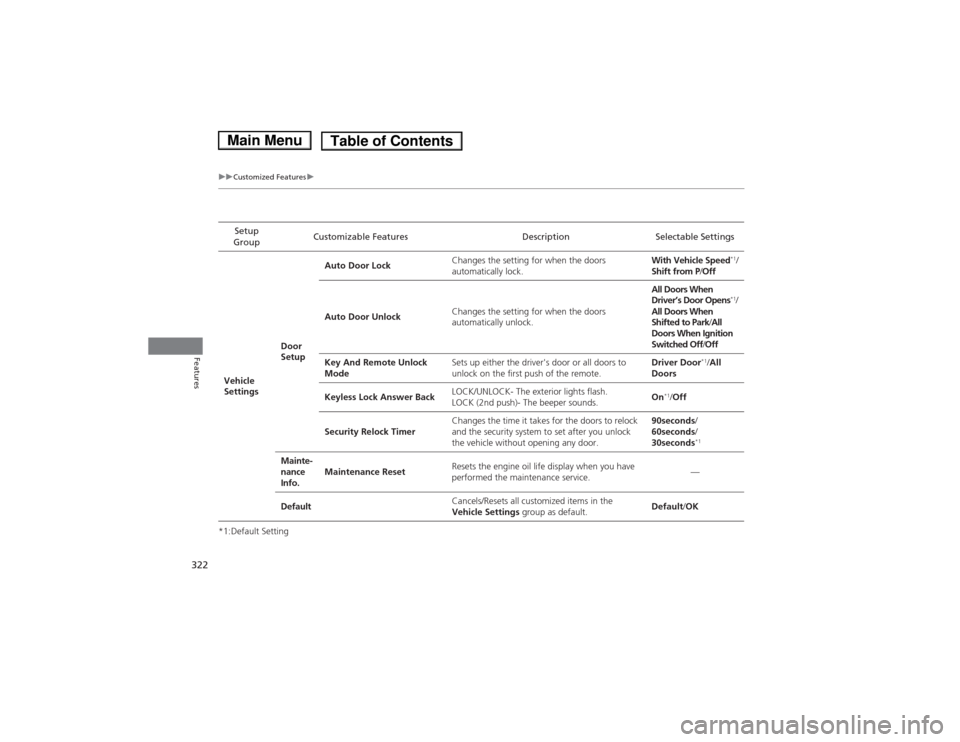
322
uuCustomized Featuresu
Features
*1:Default SettingSetup
Group Customizable Features Description Selectable Settings
Vehicle
Settings Door
SetupAuto Door Lock
Changes the setting for when the doors
automatically lock. With Vehicle Speed
*1
/
Shift from P /Off
Auto Door Unlock Changes the setting for when the doors
automatically unlock. All Doors When
Driver’s Door Opens
*1
/
All Doors When
Shifted to Park /All
Doors When Ignition
Switched Off /Off
Key And Remote Unlock
Mode Sets up either the driver's door or all doors to
unlock on the first push of the remote. Driver Door
*1
/All
Doors
Keyless Lock Answer Back LOCK/UNLOCK- The exterior lights flash.
LOCK (2nd push)- The beeper sounds.
On
*1
/Off
Security Relock Timer Changes the time it takes for the doors to relock
and the security system to set after you unlock
the vehicle without opening any door. 90seconds
/
60seconds /
30seconds *1
Mainte-
nance
Info. Maintenance Reset
Resets the engine oil life display when you have
performed the maintenance service. —
Default Cancels/Resets all customized items in the
Vehicle Settings
group as default. Default
/OK
Main MenuTable of Contents