ABS HONDA ACCORD HYBRID 2014 9.G Owners Manual
[x] Cancel search | Manufacturer: HONDA, Model Year: 2014, Model line: ACCORD HYBRID, Model: HONDA ACCORD HYBRID 2014 9.GPages: 561, PDF Size: 20.3 MB
Page 17 of 561
16
Quick Reference Guide
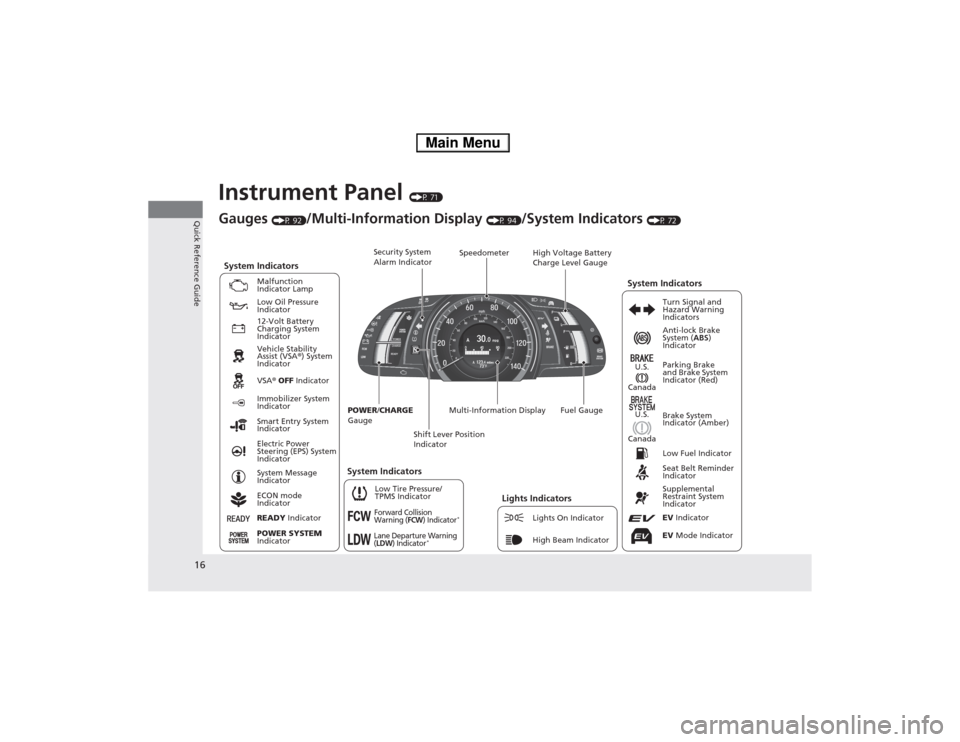
Instrument Panel (P 71)
CanadaU.S.
Low Fuel Indicator
Anti-lock Brake
System ( ABS)
Indicator
Parking Brake
and Brake System
Indicator (Red)
Canada U.S.
READY Indicator
System Indicators
Malfunction
Indicator Lamp
Low Oil Pressure
Indicator
12-Volt Battery
Charging System
Indicator
Vehicle Stability
Assist (VSA ®) System
Indicator VSA ® OFF Indicator
Low Tire Pressure/
TPMS Indicator
Electric Power
Steering (EPS) System
Indicator
Lights IndicatorsLights On Indicator
High Beam Indicator
Immobilizer System
Indicator
Seat Belt Reminder
Indicator EV Indicator
POWER
/CHARGE
Gauge Speedometer
Fuel Gauge
Security System
Alarm Indicator
Shift Lever Position
Indicator
Gauges
(P 92)/Multi-Information Display (P 94)/System Indicators (P 72)
Turn Signal and
Hazard Warning
Indicators
System Indicators High Voltage Battery
Charge Level Gauge
POWER SYSTEM
Indicator
Smart Entry System
Indicator System Message
Indicator
ECON mode
Indicator
Forward Collision
Warning (FCW) Indicator*
Lane Departure Warning (LDW) Indicator* Brake System
Indicator (Amber)
Supplemental
Restraint System
IndicatorEV
Mode Indicator
System Indicators
Multi-Information Display
Main Menu
Page 28 of 561
27
Quick Reference Guide
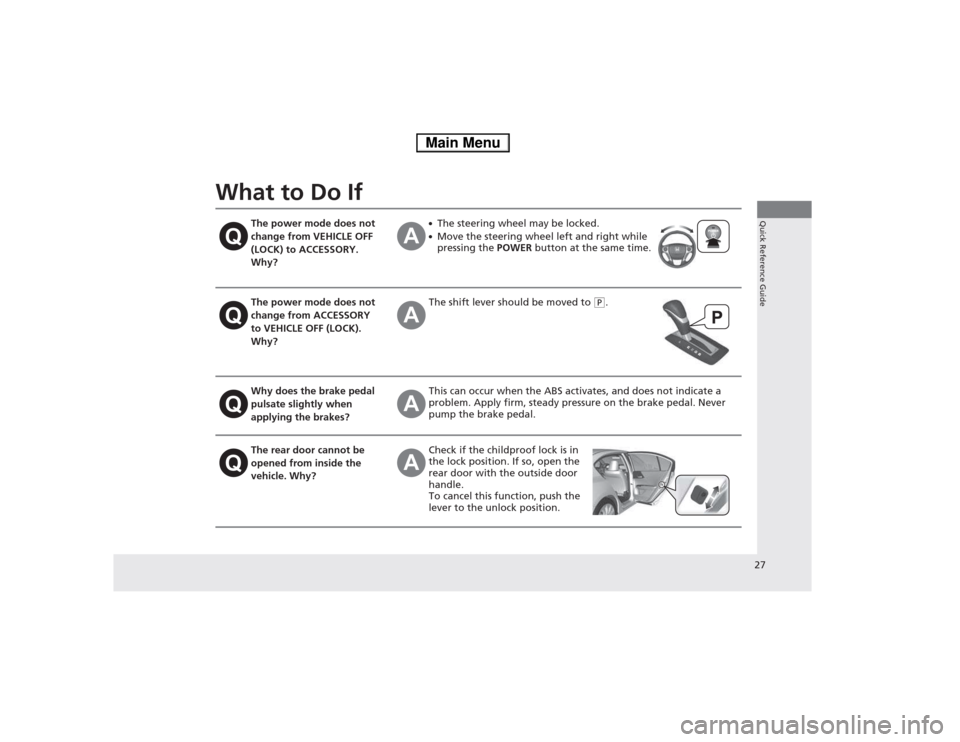
What to Do If
The power mode does not
change from VEHICLE OFF
(LOCK) to ACCESSORY.
Why?●The steering wheel may be locked.
● Move the steering wheel left and right while pressing the POWER button at the same time.
The power mode does not
change from ACCESSORY
to VEHICLE OFF (LOCK).
Why?The shift lever should be moved to (P.
Why does the brake pedal pulsate slightly when
applying the brakes?This can occur when the ABS activates, and does not indicate a
problem. Apply firm, steady pressure on the brake pedal. Never
pump the brake pedal.
The rear door cannot be
opened from inside the
vehicle. Why?Check if the childproof lock is in
the lock position. If so, open the
rear door with the outside door
handle.
To cancel this function, push the
lever to the unlock position.
Main Menu
Page 49 of 561

48
uuAirbagsuFront Airbags (SRS)
Safe Driving
■When front airbags should not deploy
Minor frontal crashes: Front airbags were designed to supplement seat belts and
help save lives, not to prevent minor scrapes, or even broken bones that might occur
during a less than moderate-to-severe frontal crash.
Side impacts: Front airbags can provide protection when a sudden deceleration
causes a driver or front passenger to move towards the front of the vehicle. Side
airbags and side curtain airbags have been specifically designed to help reduce the
severity of injuries that can occur during a moderate-to-severe side impact which
can cause the driver or passenger to move towards the side of the vehicle.
Rear impacts: Head restraints and seat belts are your best protection during a rear
impact. Front airbags cannot provide any significant protection and are not designed
to deploy in such collisions.
Rollovers: Seat belts and, in vehicles equipped with a rollover sensor, side airbags
and side curtain airbags offer the best protection in a rollover. Because front airbags
could provide little if any protection, they are not designed to deploy during a
rollover. ■ When front airbags deploy with little or no visible damage
Because the airbag system senses sudden deceleration, a strong impact to the
vehicle framework or suspension might cause one or more of the airbags to deploy.
Examples include running into a curb, the edge of a hole, or other low fixed object
that causes a sudden deceleration in the vehicle chassis. Since the impact is
underneath the vehicle, damage may not be readily apparent. ■ When front airbags may not deploy, even though exterior damage
appears severe
Since crushable body parts absorb crash energy during an impact, the amount of
visible damage does not always indicate proper airbag operation. In fact, some
collisions can result in severe damage but no airbag deployment because the airbags
would not have been needed or would not have provided protection even if they
had deployed.
Table of ContentsMain Menu
Page 52 of 561

51
uuAirbagsuSide Airbags
Safe Driving
■When a side airbag deploys wi th little or no visible damage
Because the airbag systems senses sudden acceleration, a strong impact to the side
of the vehicle's framework can cause a side airbag to deploy. In such cases, there
may be little or no damage, but the side impact sensors detected a severe enough
impact to deploy the airbag. ■ When a side airbag may not deploy, even though visible damage appears
severe
It is possible for a side airbag to not deploy during an impact that results in
apparently severe damage. This can occur when the point of impact was towards
the far front or rear of the vehicle, or when the vehicle's crushable body parts
absorbed most of the crash energy. In either case, the side airbag would not have
been needed nor provided protection even if it had deployed.
Table of ContentsMain Menu
Page 73 of 561
72
Instrument Panel
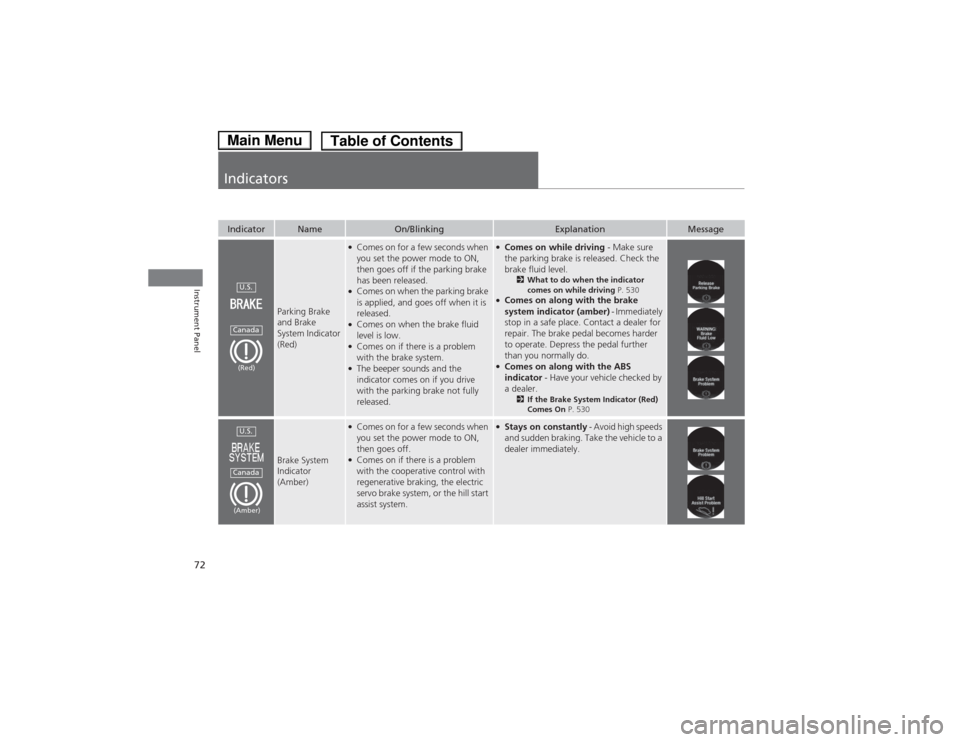
Indicators
IndicatorNameOn/BlinkingExplanationMessage
Parking Brake and Brake
System Indicator (Red)
●Comes on for a few seconds when
you set the power mode to ON,
then goes off if the parking brake
has been released.
● Comes on when the parking brake
is applied, and goes off when it is released.
● Comes on when the brake fluid
level is low.
● Comes on if there is a problem
with the brake system.
● The beeper sounds and the
indicator comes on if you drive
with the parking brake not fully released.● Comes on while driving - Make sure
the parking brake is released. Check the
brake fluid level. 2What to do when the indicator
comes on while driving P. 530
● Comes on along with the brake
system indicator (amber) - Immediately
stop in a safe place. Contact a dealer for
repair. The brake pedal becomes harder
to operate. Depress the pedal further
than you normally do.
● Comes on along with the ABS
indicator - Have your vehicle checked by
a dealer. 2If the Brake System Indicator (Red)
Comes On P. 530
Brake System Indicator (Amber)
●
Comes on for a few seconds when
you set the power mode to ON,
then goes off.
● Comes on if there is a problem
with the cooperative control with
regenerative braking, the electric
servo brake system, or the hill start
assist system.● Stays on constantly - Avoid high speeds
and sudden braking. Take the vehicle to a dealer immediately.
U.S.
Canada
(Red)
U.S.
Canada
(Amber)
Table of ContentsMain Menu
Page 77 of 561
76
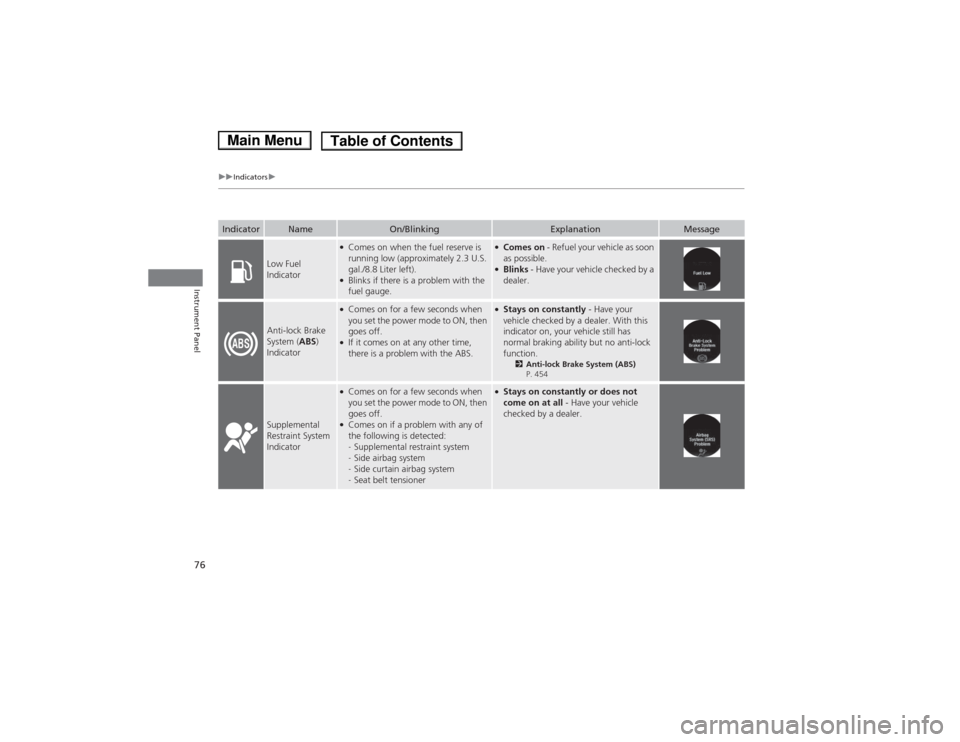
uuIndicatorsu
Instrument Panel
IndicatorNameOn/BlinkingExplanationMessage
Low Fuel
Indicator
●Comes on when the fuel reserve is
running low (approximately 2.3 U.S.
gal./8.8 Liter left).
● Blinks if there is a problem with the
fuel gauge.●Comes on - Refuel your vehicle as soon
as possible.
● Blinks - Have your vehicle checked by a
dealer.
Anti-lock Brake System ( ABS)
Indicator
● Comes on for a few seconds when
you set the power mode to ON, then goes off.
● If it comes on at any other time,
there is a problem with the ABS.●Stays on constantly - Have your
vehicle checked by a dealer. With this
indicator on, your vehicle still has
normal braking ability but no anti-lock function. 2Anti-lock Brake System (ABS)
P. 454
Supplemental Restraint System
Indicator
● Comes on for a few seconds when
you set the power mode to ON, then goes off.
● Comes on if a problem with any of
the following is detected: -Supplemental restraint system
- Side airbag system
- Side curtain airbag system
- Seat belt tensioner●
Stays on constantly or does not
come on at all - Have your vehicle
checked by a dealer.
Main MenuTable of Contents
Page 410 of 561
409
Driving
This chapter discusses driving, refueling, and information on items such as accessories.
Before Driving Driving Preparation .......................... 410
Maximum Load Limit........................ 413
Towing a Trailer Towing Your Vehicle ........................ 415
When Driving Turning on the Power ...................... 416
Precautions While Driving................. 419
Transmission .................................... 419
Shifting ............................................ 420
ECON Button ................................... 422
Acoustic Vehicle Alerting System ...... 423
Cruise Control *
................................ 424 Adaptive Cruise Control (ACC)
*
....... 427
Forward Collision Warning (FCW) *
.. 435
Lane Departure Warning (LDW) *
..... 439
Vehicle Stability Assist (VSA®), aka Electronic
Stability Control (ESC), System ............... 443
LaneWatchTM....................................... 445Tire Pressure Monitoring System (TPMS) ... 447Tire Pressure Monitoring System (TPMS) -
Required Federal Explanation ......... 449
High Voltage Battery ........................ 451
Braking
Brake System ................................... 452
Anti-lock Brake System (ABS) ........... 454 Brake Assist System ......................... 455
Parking Your Vehicle
When Stopped ................................ 456
Multi-View Rear Camera .................. 457
Rearview Camera ............................. 458
Refueling Fuel Information .............................. 459
How to Refuel ................................. 460
Fuel Economy Improving Fuel Economy .................. 461
Accessories and Modifications ........ 462
* Not available on all models
Main Menu
Page 434 of 561
Continued433
uuWhen DrivinguAdaptive Cruise Control (ACC)*
Driving
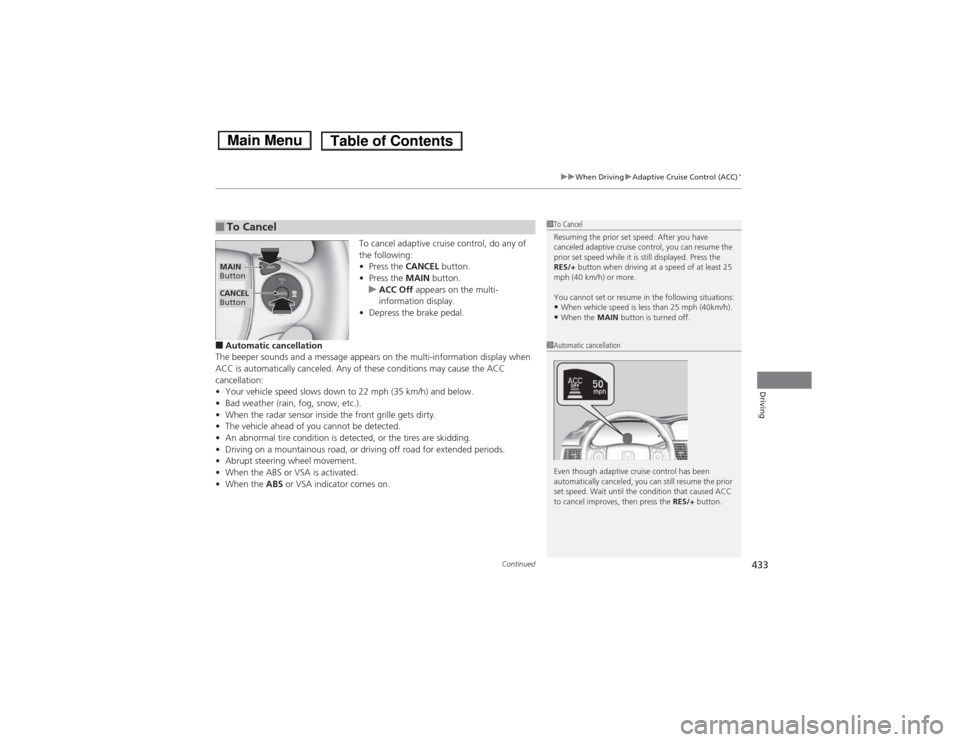
To cancel adaptive cruise control, do any of
the following: •
Press the CANCEL button.
• Press the MAIN button.
uACC Off appears on the multi-
information display.
• Depress the brake pedal.
■ Automatic cancellation
The beeper sounds and a message appears on the multi-information display when
ACC is automatically canceled. Any of these conditions may cause the ACC
cancellation:• Your vehicle speed slows down to 22 mph (35 km/h) and below.
• Bad weather (rain, fog, snow, etc.).
• When the radar sensor inside the front grille gets dirty.
• The vehicle ahead of you cannot be detected.
• An abnormal tire condition is detected, or the tires are skidding.
• Driving on a mountaino us road, or driving off road for extended periods.
• Abrupt steering wheel movement.
• When the ABS or VSA is activated.
• When the ABS or VSA indicator comes on.
■To Cancel1To Cancel
Resuming the prior set speed: After you have
canceled adaptive cruise control, you can resume the
prior set speed while it is still displayed. Press the
RES/+ button when driving at a speed of at least 25
mph (40 km/h) or more.
You cannot set or resume in the following situations: • When vehicle speed is less than 25 mph (40km/h).
• When the MAIN button is turned off.
CANCEL
Button
MAIN
Button
1Automatic cancellation
Even though adaptive cruise control has been
automatically canceled, you can still resume the prior
set speed. Wait until the condition that caused ACC
to cancel improves, then press the RES/+ button.
Main MenuTable of Contents
Page 454 of 561
453
uuBrakinguBrake System
Driving
Your vehicle is equipped with disc brakes at all four wheels. The brake assist system
increases the stopping force when you depress the brake pedal hard in an
emergency situation. The anti-lock brake system (ABS) helps you retain steering
control when braking very hard.2 Brake Assist System P. 455
2 Anti-lock Brake System (ABS) P. 454
■Foot Brake1Foot Brake
Check the brakes after driving through deep water,
or if there is a buildup of road surface water. If
necessary, dry the brakes by lightly depressing the
pedal several times.
If you hear a continuous metallic friction sound when
applying the brakes, the brake pads need to be
replaced. Have your vehicle checked by a dealer.
Constantly using the brake pedal while going down a
long hill builds up heat, which reduces the brake
effectiveness. Apply regenerative braking by taking
your foot off the accelerator pedal and shifting to .
Do not rest your foot on the brake pedal while
driving, as it will lightly apply the brakes and cause
them to lose effectiveness over time and reduce pad
life. It will also confuse drivers behind you.
When you depress the brake pedal, you may hear a
motor sound coming from the engine compartment
while the brake system activates. This is normal.
B
Main MenuTable of Contents
Page 455 of 561
454
uuBrakinguAnti-lock Brake System (ABS)
Driving
Anti-lock Brake System (ABS)
Helps prevent the wheels from locking up, and helps you retain steering control by
pumping the brakes rapidly, much faster than you.
The electronic brake distribution (EBD) system, which is part of the ABS, also
balances the front-to-rear braking distribution according to vehicle loading.
You should never pump the brake pedal. Let the ABS work for you by always
keeping firm, steady pressure on the brake pedal. This is sometimes referred to as “stomp and steer.” ■ABS operation
The brake pedal may pulsate slightly when the ABS is working. Keep holding the
pedal firmly down. On dry pavement, you will need to press on the brake pedal very
hard before the ABS activates. However, you may feel the ABS activate immediately
if you are trying to stop on snow or ice.
When the vehicle speed goes under 6 mph (10 km/h), the ABS stops.
■ABS1Anti-lock Brake System (ABS)
NOTICEThe ABS may not function correctly if you use an
incorrect tire type and size.
When the ABS indicator comes on while driving,
there may be a problem with the system.
While normal braking is not affected, there is a
possibility of the ABS not operating. Have your
vehicle checked by a dealer immediately.
The ABS does not reduce the time or distance it takes
to stop the vehicle. It only helps with steering control
during hard braking.
In the following cases, your vehicle may need more
stopping distance than a vehicle without the ABS: • When driving on rough road surfaces, including
when driving on uneven surfaces, such as gravel or
snow.
• When snow chains are installed.
You may hear a motor sound coming from the
engine compartment while system checks are being
performed immediately after turning the power
system on or while driving. This is normal.
Main MenuTable of Contents