engine HONDA ACCORD HYBRID 2019 Owner's Manual
[x] Cancel search | Manufacturer: HONDA, Model Year: 2019, Model line: ACCORD HYBRID, Model: HONDA ACCORD HYBRID 2019Pages: 727, PDF Size: 24.78 MB
Page 114 of 727
112 uu Indicators u Driver Information Interface Wa rning and Information Messages
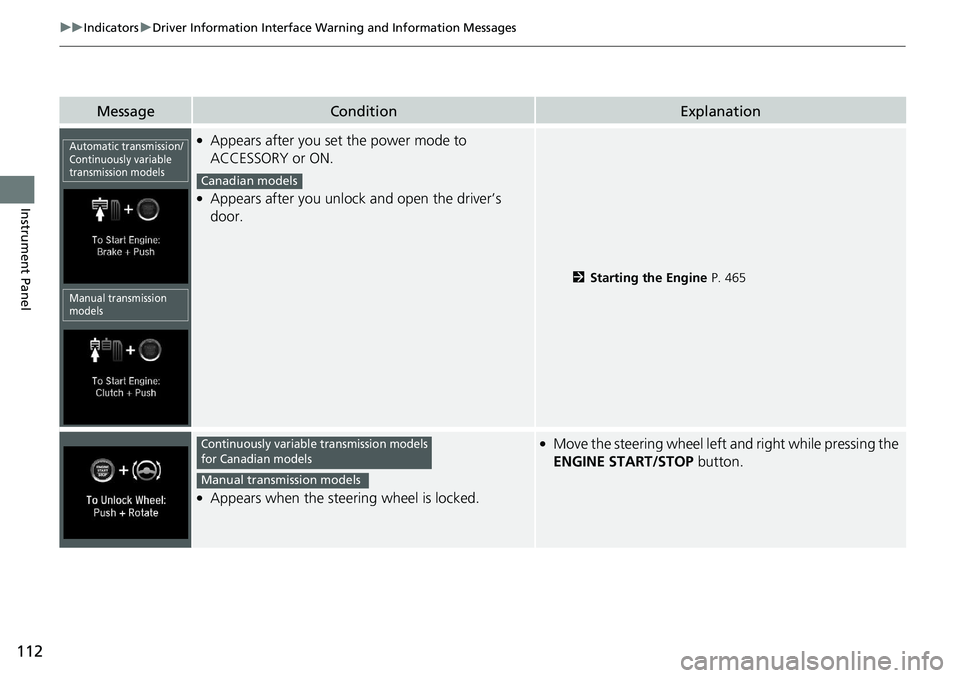
Instrument Panel Message Condition Explanation●
Appears after you set the power mode to
ACCESSORY or ON. ●
Appears after you unlock and open the driver’s
door.
2 Starting the Engine P. 465
●
Appears when the steering wheel is locked. ●
Move the steering wheel left and right while pressing the
ENGINE START/STOP button.Automatic transmission/
Continuously variable
transmission models
Manual transmission
models Canadian models
Continuously variable transmission models
for Canadian models
Manual transmission models
Page 115 of 727
113uu Indicators u Driver Information Interface Wa rning and Information Messages
Continued
Instrument Panel
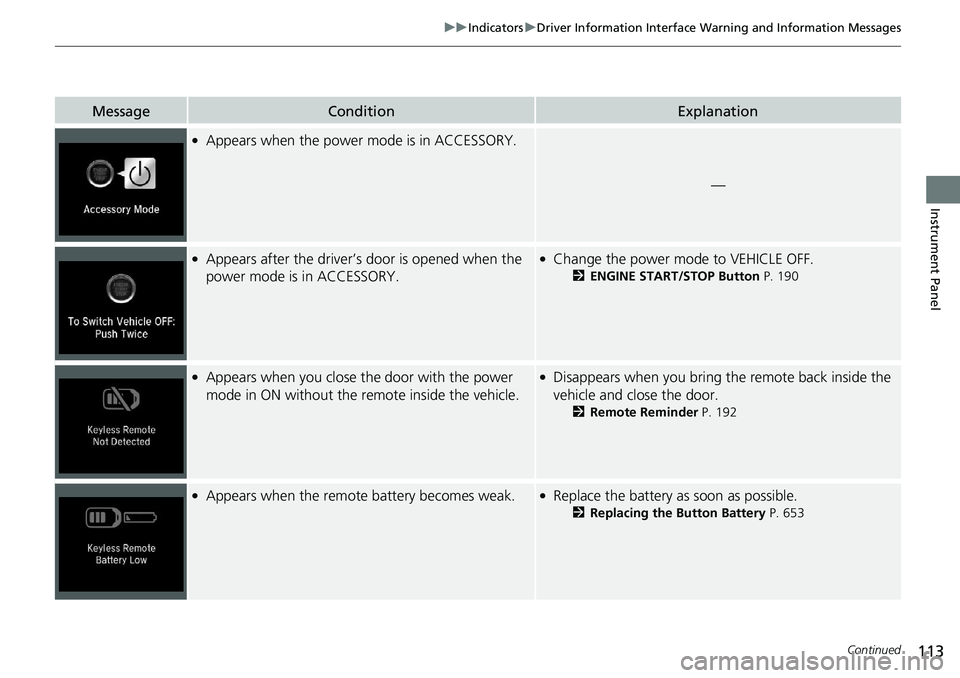
Message Condition Explanation●
Appears when the power mode is in ACCESSORY.
—●
Appears after the driver’s door is opened when the
power mode is in ACCESSORY. ●
Change the power mode to VEHICLE OFF. 2 ENGINE START/STOP Button P. 190●
Appears when you close th e door with the power
mode in ON without the re mote inside the vehicle. ●
Disappears when you bring the remote back inside the
vehicle and close the door. 2 Remote Reminder P. 192●
Appears when the remote battery becomes weak. ●
Replace the battery as soon as possible. 2 Replacing the Button Battery P. 653
Page 116 of 727
114 uu Indicators u Driver Information Interface Wa rning and Information Messages
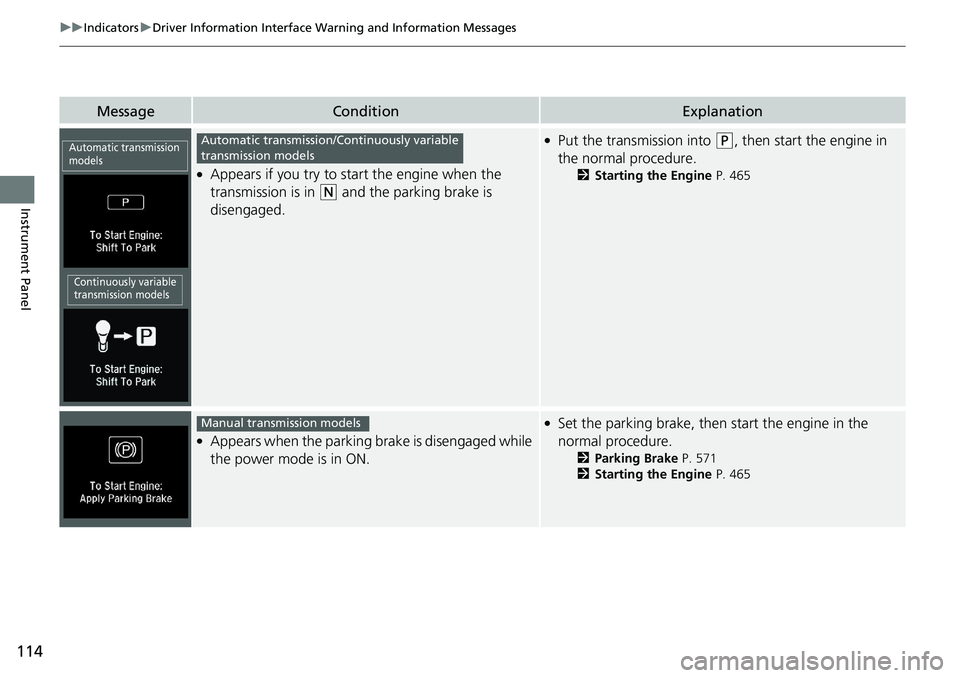
Instrument Panel Message Condition Explanation●
Appears if you try to start the engine when the
transmission is in ( N
and the parking brake is
disengaged. ●
Put the transmission into ( P
, then start the engine in
the normal procedure. 2 Starting the Engine P. 465
●
Appears when the parking brake is disengaged while
the power mode is in ON. ●
Set the parking brake, then start the engine in the
normal procedure. 2 Parking Brake P. 571
2 Starting the Engine P. 465Automatic transmission
models
Continuously variable
transmission models Automatic transmission/Continuously variable
transmission models
Manual transmission models
Page 117 of 727
115uu Indicators u Driver Information Interface Wa rning and Information Messages
Continued
Instrument Panel
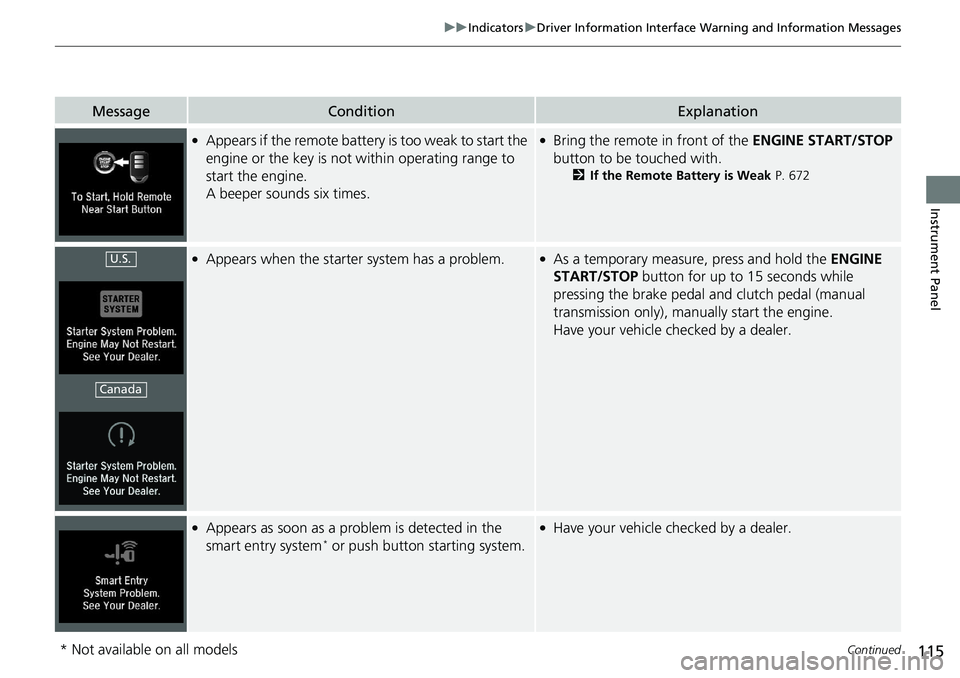
Message Condition Explanation●
Appears if the remote battery is too weak to start the
engine or the key is not within operating range to
start the engine.
A beeper sounds six times. ●
Bring the remote in front of the ENGINE START/STOP
button to be touched with. 2 If the Remote Battery is Weak P. 672●
Appears when the starter system has a problem. ●
As a temporary measure, press and hold the ENGINE
START/STOP button for up to 15 seconds while
pressing the brake pedal and clutch pedal (manual
transmission only), manual ly start the engine.
Have your vehicle checked by a dealer.
●
Appears as soon as a problem is detected in the
smart entry system *
or push button starting system. ●
Have your vehicle checked by a dealer.U.S.
Canada
* Not available on all models
Page 118 of 727
116 uu Indicators u Driver Information Interface Wa rning and Information Messages
Instrument Panel Message Condition Explanation
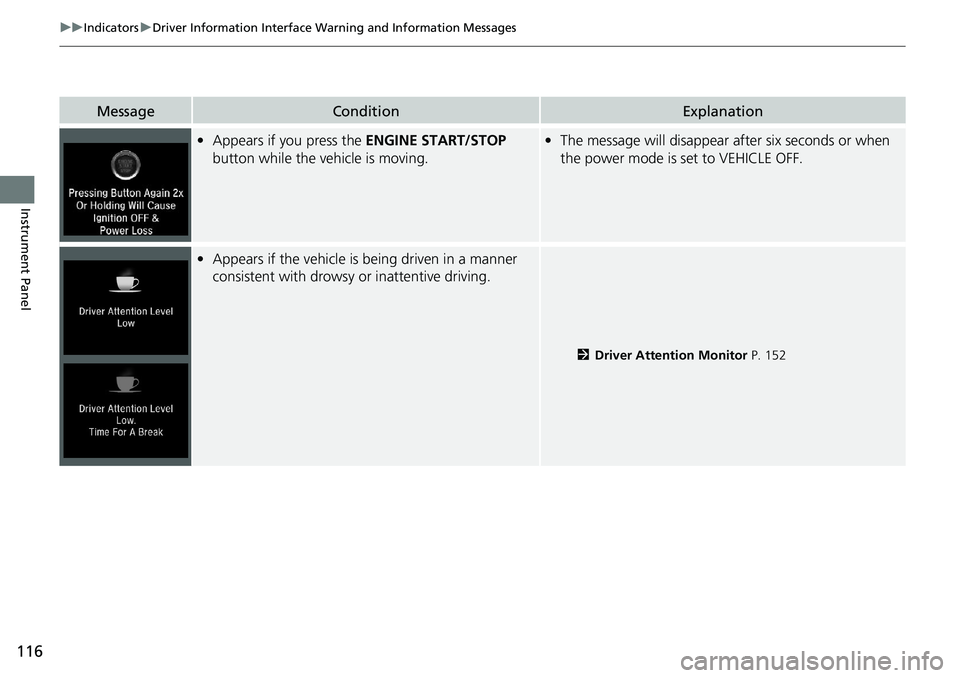
• Appears if you press the ENGINE START/STOP
button while the vehicle is moving. • The message will disappear after six seconds or when
the power mode is set to VEHICLE OFF.
• Appears if the vehicle is being driven in a manner
consistent with drowsy or inattentive driving.
2 Driver Attention Monitor P. 152
Page 119 of 727
117uu Indicators u Driver Information Interface Wa rning and Information Messages
Continued
Instrument Panel
Message Condition Explanation
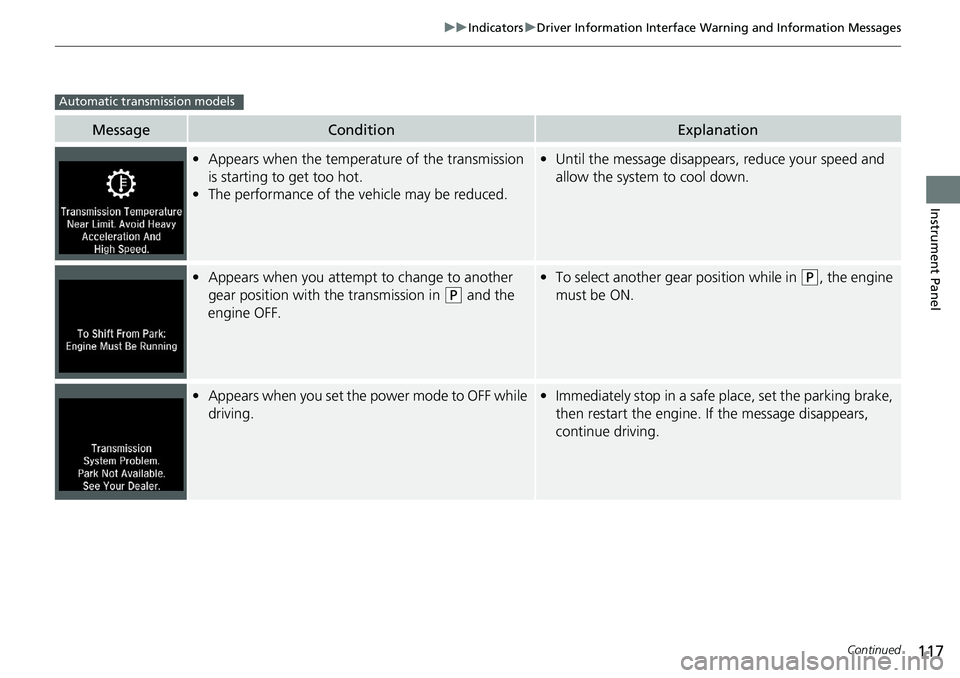
• Appears when the temperature of the transmission
is starting to get too hot.
• The performance of the vehicle may be reduced. • Until the message disappears, reduce your speed and
allow the system to cool down.
• Appears when you attempt to change to another
gear position with the transmission in ( P
and the
engine OFF. • To select another gear position while in ( P
, the engine
must be ON.
• Appears when you set the power mode to OFF while
driving. • Immediately stop in a safe place, set the parking brake,
then restart the engine. If the message disappears,
continue driving.Automatic transmission models
Page 120 of 727
118 uu Indicators u Driver Information Interface Wa rning and Information Messages
Instrument Panel Message Condition Explanation
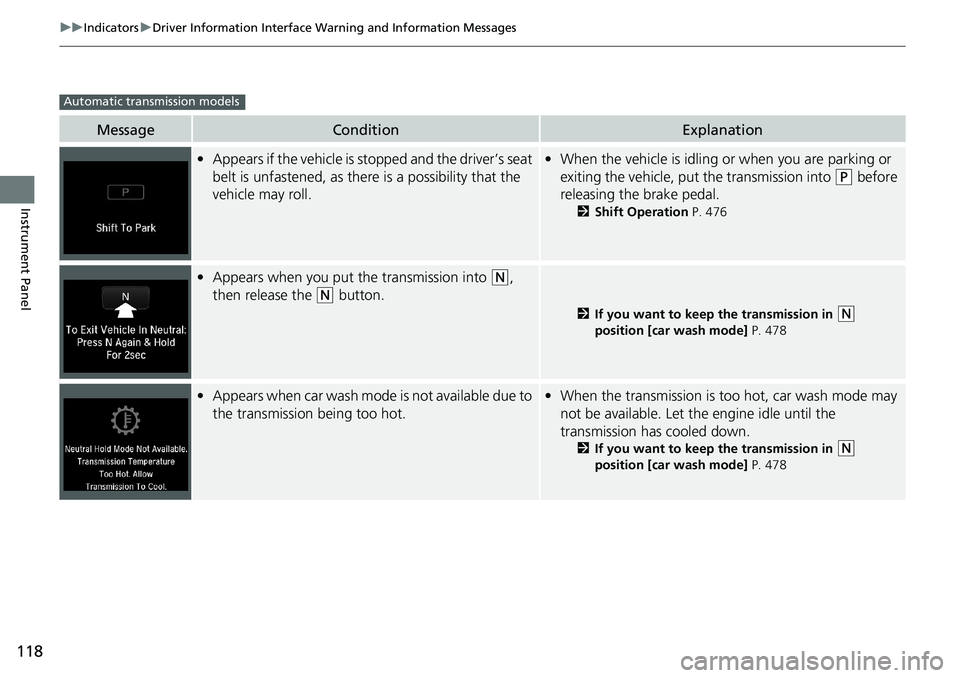
• Appears if the vehicle is stopped and the driver’s seat
belt is unfastened, as ther e is a possibility that the
vehicle may roll. • When the vehicle is idling or when you are parking or
exiting the vehicle, put the transmission into ( P
before
releasing the brake pedal. 2 Shift Operation P. 476
• Appears when you put the transmission into ( N
,
then release the ( N
button. 2 If you want to keep the transmission in
( N
position [car wash mode] P. 478
• Appears when car wash mode is not available due to
the transmission being too hot. • When the transmission is t oo hot, car wash mode may
not be available. Let the engine idle until the
transmission has cooled down. 2 If you want to keep the transmission in
( N
position [car wash mode] P. 478Automatic transmission models
Page 122 of 727
120 uu Indicators u Driver Information Interface Wa rning and Information Messages
Instrument Panel Message Condition Explanation
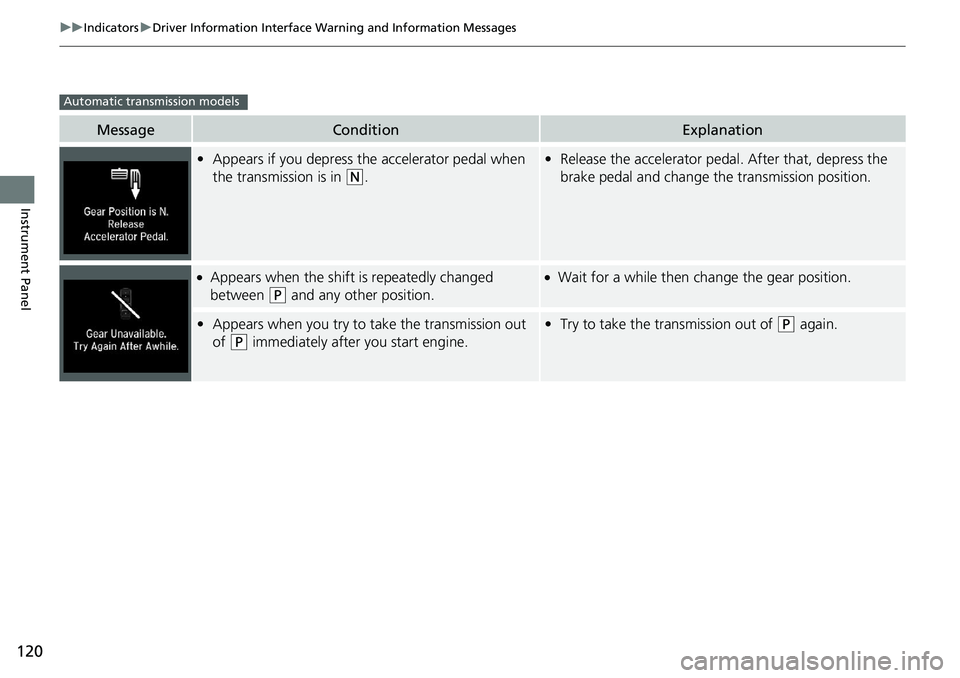
• Appears if you depress the accelerator pedal when
the transmission is in ( N
. • Release the accelerator peda l. After that, depress the
brake pedal and change the transmission position.●
Appears when the shift is repeatedly changed
between ( P
and any other position. ●
Wait for a while then ch ange the gear position.
• Appears when you try to take the transmission out
of ( P
immediately after you start engine. • Try to take the transmission out of ( P
again.Automatic transmission models
Page 123 of 727
121uu Indicators u Driver Information Interface Wa rning and Information Messages
Continued
Instrument Panel
Message Condition Explanation
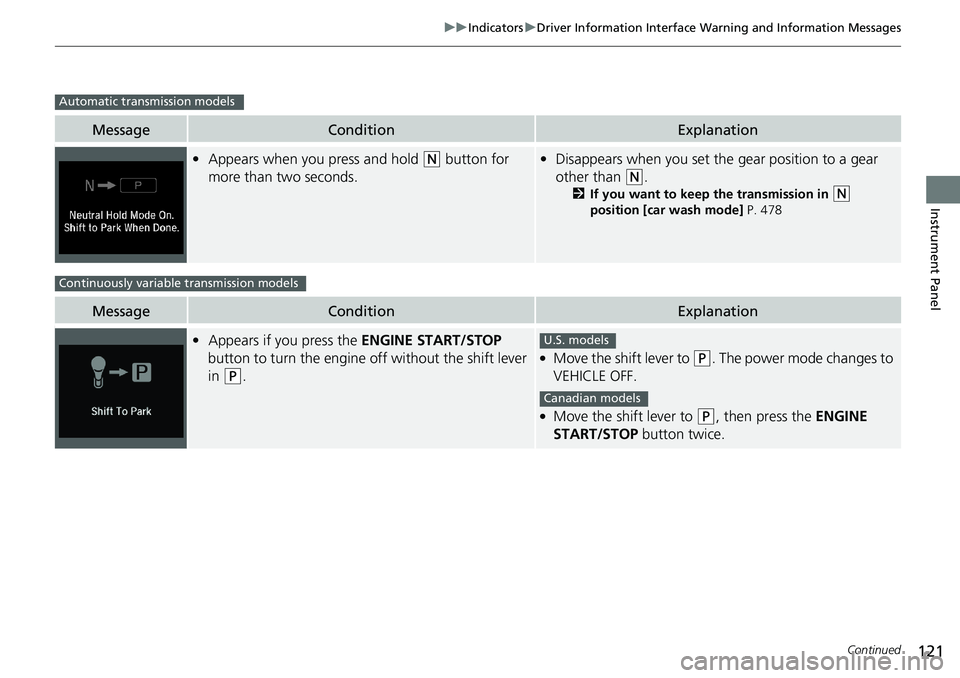
• Appears when you press and hold ( N
button for
more than two seconds. • Disappears when you set the gear position to a gear
other than ( N
. 2 If you want to keep the transmission in
( N
position [car wash mode] P. 478
Message Condition Explanation
• Appears if you press the ENGINE START/STOP
button to turn the engine off without the shift lever
in ( P
. ●
Move the shift lever to ( P
. The power mode changes to
VEHICLE OFF. ●
Move the shift lever to ( P
, then press the ENGINE
START/STOP button twice.Automatic transmission models
Continuously variable transmission models
U.S. models
Canadian models
Page 138 of 727
136 uu Indicators u Driver Information Interface Wa rning and Information Messages
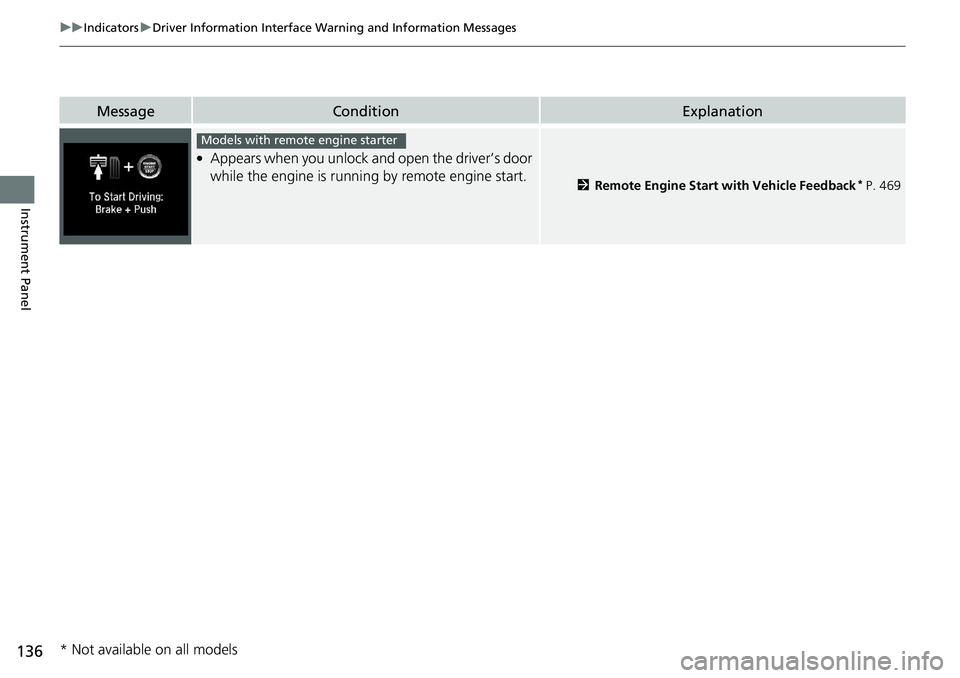
Instrument Panel Message Condition Explanation●
Appears when you unlock an d open the driver’s door
while the engine is running by remote engine start. 2 Remote Engine Start with Vehicle Feedback *
P. 469Models with remote engine starter
* Not available on all models