engine HONDA ACCORD HYBRID 2019 Workshop Manual
[x] Cancel search | Manufacturer: HONDA, Model Year: 2019, Model line: ACCORD HYBRID, Model: HONDA ACCORD HYBRID 2019Pages: 727, PDF Size: 24.78 MB
Page 238 of 727
uu Interior Lights/Interior Convenience Items u Interior Convenience Items
236
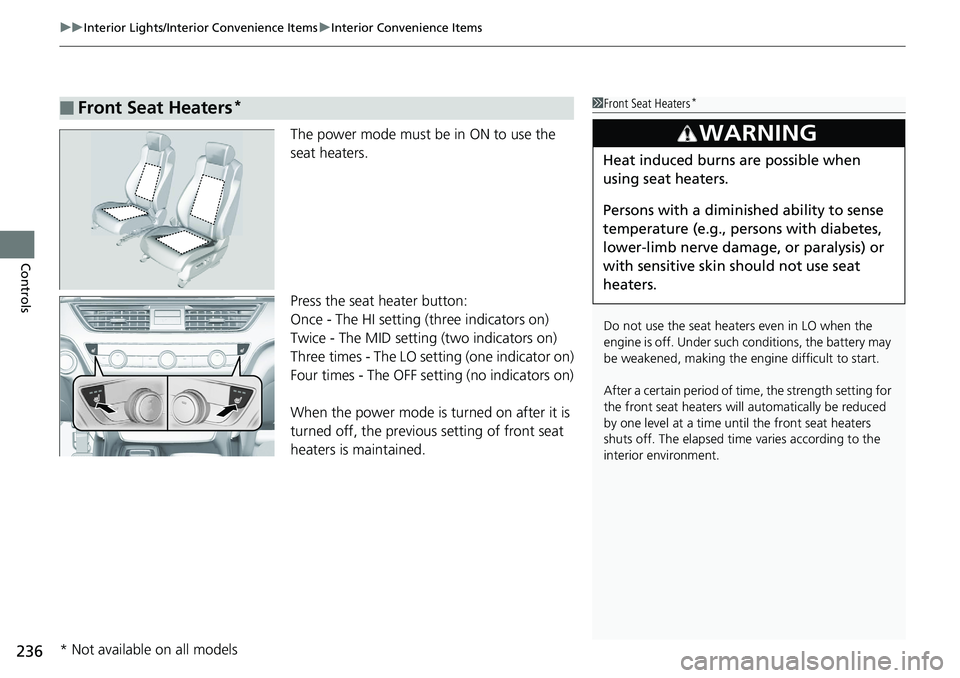
Controls The power mode must be in ON to use the
seat heaters.
Press the seat heater button:
Once - The HI setting (three indicators on)
Twice - The MID setting (two indicators on)
Three times - The LO setting (one indicator on)
Four times - The OFF se tting (no indicators on)
When the power mode is turned on after it is
turned off, the previous setting of front seat
heaters is maintained.■ Front Seat Heaters * 1 Front Seat Heaters *
Do not use the seat heaters even in LO when the
engine is off. Under such conditions, the battery may
be weakened, making the engine difficult to start.
After a certain period of time, the strength setting for
the front seat heaters will automatically be reduced
by one level at a time unt il the front seat heaters
shuts off. The elapsed time varies according to the
interior environment.3
WARNING Heat induced burns are possible when
using seat heaters.
Persons with a diminished ability to sense
temperature (e.g., persons with diabetes,
lower-limb nerve damage, or paralysis) or
with sensitive skin should not use seat
heaters.
* Not available on all models
Page 239 of 727
Continued
237uu Interior Lights/Interior Convenience Items u Interior Convenience Items
Controls
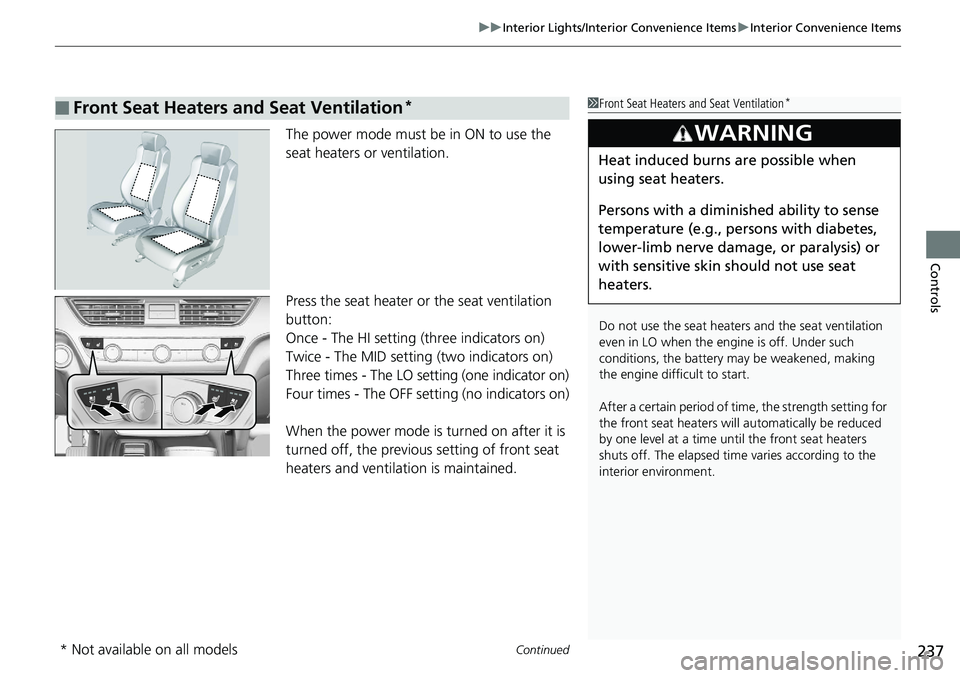
The power mode must be in ON to use the
seat heaters or ventilation.
Press the seat heater or the seat ventilation
button:
Once - The HI setting (three indicators on)
Twice - The MID setting (two indicators on)
Three times - The LO setting (one indicator on)
Four times - The OFF setting (no indicators on)
When the power mode is turned on after it is
turned off, the previous setting of front seat
heaters and ventilation is maintained.■ Front Seat Heaters and Seat Ventilation * 1 Front Seat Heaters and Seat Ventilation *
Do not use the seat heater s and the seat ventilation
even in LO when the engine is off. Under such
conditions, the battery ma y be weakened, making
the engine difficult to start.
After a certain period of time, the strength setting for
the front seat heaters will automatically be reduced
by one level at a time unt il the front seat heaters
shuts off. The elapsed time varies according to the
interior environment.3
WARNING Heat induced burns are possible when
using seat heaters.
Persons with a diminished ability to sense
temperature (e.g., persons with diabetes,
lower-limb nerve damage, or paralysis) or
with sensitive skin should not use seat
heaters.
* Not available on all models
Page 240 of 727
uu Interior Lights/Interior Convenience Items u Interior Convenience Items
238
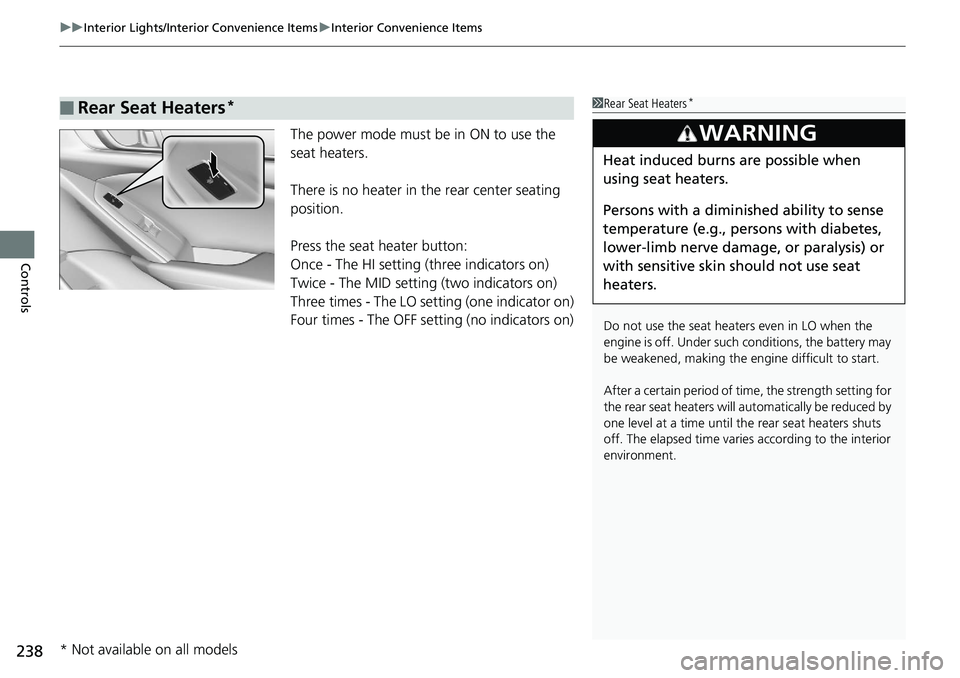
Controls The power mode must be in ON to use the
seat heaters.
There is no heater in the rear center seating
position.
Press the seat heater button:
Once - The HI setting (three indicators on)
Twice - The MID setting (two indicators on)
Three times - The LO setting (one indicator on)
Four times - The OFF se tting (no indicators on)■ Rear Seat Heaters * 1 Rear Seat Heaters *
Do not use the seat heaters even in LO when the
engine is off. Under such conditions, the battery may
be weakened, making the engine difficult to start.
After a certain period of time, the strength setting for
the rear seat heaters will automatically be reduced by
one level at a time until the rear seat heaters shuts
off. The elapsed time varies according to the interior
environment.3
WARNING Heat induced burns are possible when
using seat heaters.
Persons with a diminished ability to sense
temperature (e.g., persons with diabetes,
lower-limb nerve damage, or paralysis) or
with sensitive skin should not use seat
heaters.
* Not available on all models
Page 241 of 727
239Continued
Controls
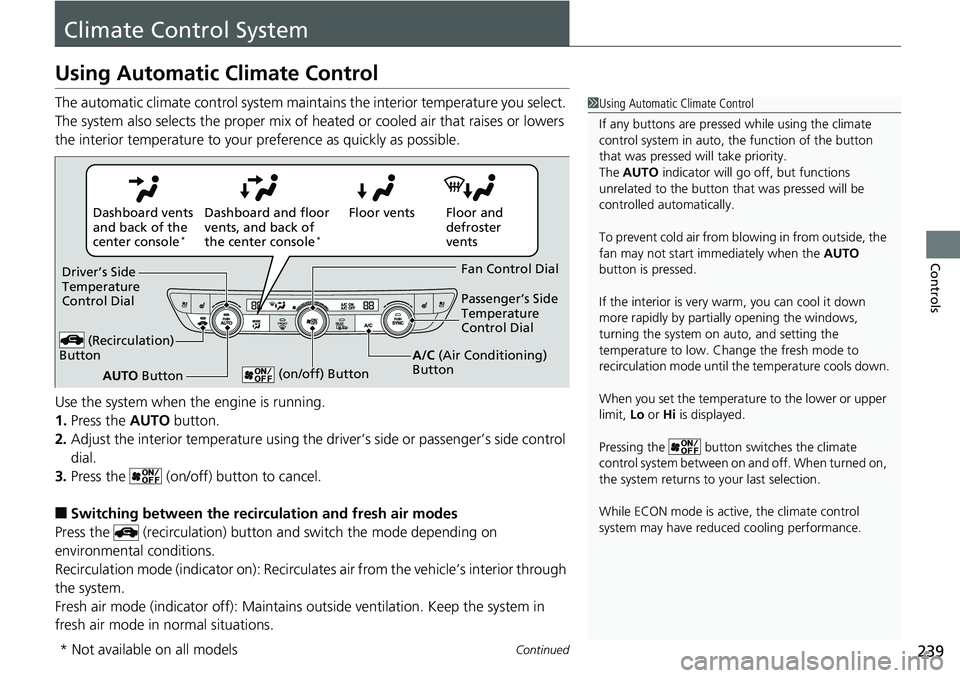
Climate Control SystemUsing Automatic Climate Control The automatic climate control system maintains the interior temperature you select.
The system also selects the proper mix of heat ed or cooled air that raises or lowers
the interior temperature to your pr eference as quickly as possible.
Use the system when the engine is running.
1. Press the AUTO button.
2. Adjust the interior temperature using the dr iver’s side or passenger’s side control
dial.
3. Press the (on/off) button to cancel.
■ Switching between the recirc ulation and fresh air modes
Press the (recirculation) button and switch the mode depending on
environmental conditions.
Recirculation mode (indicator on): Recirculat es air from the vehicle’s interior through
the system.
Fresh air mode (indicator off): Maintains outside ventilation. Keep the system in
fresh air mode in normal situations. 1 Using Automatic Climate Control
If any buttons are presse d while using the climate
control system in auto, the function of the button
that was pressed will take priority.
The AUTO indicator will go off, but functions
unrelated to the button th at was pressed will be
controlled automatically.
To prevent cold air from bl owing in from outside, the
fan may not start i mmediately when the AUTO
button is pressed.
If the interior is very warm, you can cool it down
more rapidly by partial ly opening the windows,
turning the system on auto, and setting the
temperature to low. Change the fresh mode to
recirculation mode until the temperature cools down.
When you set the temperature to the lower or upper
limit, Lo or Hi is displayed.
Pressing the button sw itches the climate
control system between on and off. When turned on,
the system returns to your last selection.
While ECON mode is active, the climate control
system may have reduced cooling performance.Floor and
defroster
ventsFloor ventsDashboard and floor
vents, and back of
the center console *
Dashboard vents
and back of the
center console *
AUTO ButtonDriver’s Side
Temperature
Control Dial
(Recirculation)
Button Fan Control Dial
A/C (Air Conditioning)
Button Passenger’s Side
Temperature
Control Dial
(on/off) Button
* Not available on all models
Page 326 of 727
uu Audio System Basic Operation u HondaLink ®
324
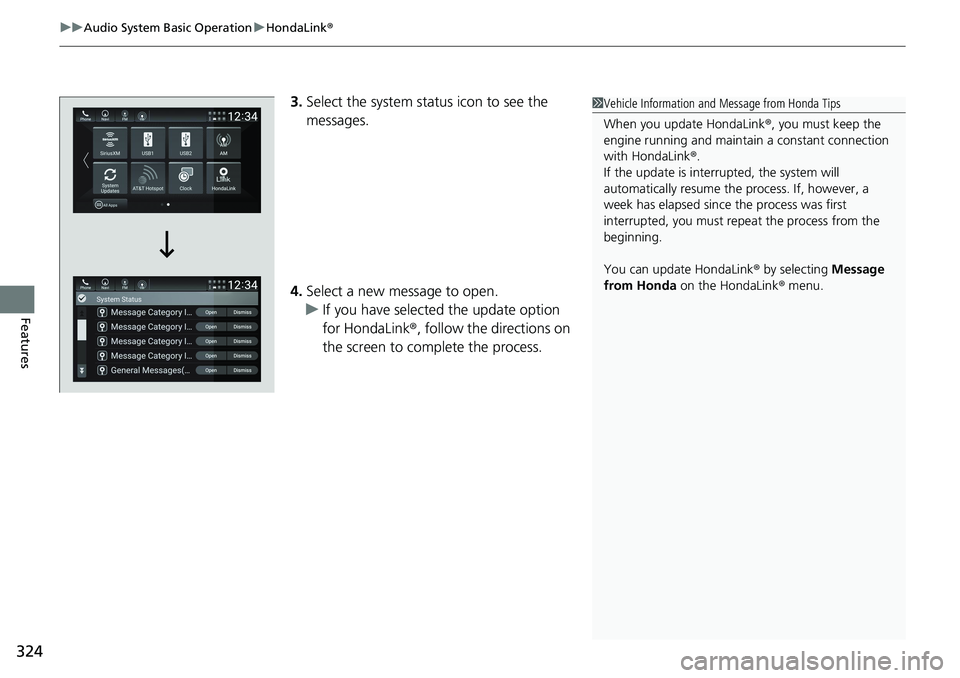
Features 3. Select the system status icon to see the
messages.
4. Select a new message to open.
u If you have selected the update option
for HondaLink ® , follow the directions on
the screen to complete the process. 1 Vehicle Information and Message from Honda Tips
When you update HondaLink ® , you must keep the
engine running and maintain a constant connection
with HondaLink ® .
If the update is interr upted, the system will
automatically resume the process. If, however, a
week has elapsed since the process was first
interrupted, you must repeat the process from the
beginning.
You can update HondaLink ® by selecting Message
from Honda on the HondaLink ® menu.
Page 331 of 727
329uu Audio System Basic Operation u HondaLink ® Service *
Features
Your subscribed telematics service provid er can check your vehicle’s condition.
■ Virtual Dashboard
You can remotely check the mileage, fu el range, and oil life in your app.
■ Remote Start and stop the engine
You can remotely start and stop engine usin g your app as same as the smart entry
key.
■ Geofence Alert
You can receive a notification anytime your ve hicle enters or leaves a region set by
you.
■ Speed Alert
You can receive a notification when your ve hicle has exceeded a speed limit set by
you.
■ Personal Data Wipe
You can reset your audio and navigation system settings to factory defaults with the
app.
■ Wi-Fi hotspot
Vehicle provides 4G LTE ne twork environment as Wi-Fi router to use tablet or
smartphone in your vehicle.■ Convenient Features 1 Convenient Features
The contact information of your provider, your user
ID and PIN will be given when you subscribe to
HondaLink ® . If you forget any of the above, contact a
Honda dealer, or go to hondalink.honda.com .
Page 354 of 727
352 uu General Information on the Audio System u Honda App License Agreement
Features (b) Restrictions on Use. The licenses granted under this AGREEMENT do not perm it you to use the SOFTWARE or SERVICES on a device
other than your VEHICLE. As a condition of using the SOFT WARE and SERVICES, you agree that you may not and will not:
6. Intellectual Property Rights. All title and intellectual property rights in and to the SOFTWARE and SERVI CES, the accompanying
DOCUMENTATION, and all copies of the SOFTWARE or SERVICES are ow ned by HONDA, PROVIDERS, or thei r suppliers or licensors. This
AGREEMENT does not grant you any rights in connection with any trademarks or service marks of HONDA, PROVIDERS, or their licens ors,
affiliates, or suppliers. (1) copy, download, distribute, mo dify, publish, sell, rent, lease, lend, license , sublicense, reuse, or create derivative work s of the
SOFTWARE or SERVICES or any of the content or other material within the SOFTWARE or SERVICES, including without limitation,
HONDA or PROVIDER names, logos, or any othe r trademarks of HONDA or PROVIDERS or us ed in association wi th the SOFTWARE or
any SERVICES, except as required to use the SOFTWARE or SERVICES in accordance with this AGREEM ENT, any applicable PROVIDER
TERMS, and the DOCUMENTATION;
(2) access or use the SOFTWARE or SERVICES in any manner intended to damage or impair the operation of the SOFTWARE or SERVICES
or interfere with anyone else’s use a nd enjoyment of the SOFTWARE or SERVICES;
(3) access or attempt to access any system or server on which the SOFTWARE or SERVICES is hosted or modify or alter the SOFTWAR E
or SERVICES in any way;
(4) use the SOFTWARE or SERVICES for any unlawful pu rpose, or in violation of any third party rights;
(5) use the SOFTWARE or SERVICES in violatio n of any applicable traffic regulations, rules or laws, including but not limited t o any driver
distraction laws, rules or regulations;
(6) violate the terms of this AGREEMENT, any HONDA TERMS, any PROV IDER TERMS or other applicable third-party terms, conditions,
and privacy policies; or
(7) reverse engineer, decompile, disassemble, attempt to derive the source code of, no r permit others to reverse engineer, deco mpile,
or disassemble, or attempt to derive the source code of the SOFT WARE or SERVICES, except and only to the extent that such activ ity is
expressly permitted (a) by applicable law notwithstanding this li mitation or (b) the terms of applicable free or opensource sof tware
licenses.
Page 358 of 727
356 uu General Information on the Audio System u Honda App License Agreement
Features E. Information Collection and Storage
1. Information Collection , Use, Transmission and Storage of Data. Consent to Use of Data: You agree that HONDA and PROVIDERS may
collect and use your information gathered in any manner as part of product support services rela ted to the SOFTWARE or related services.
HONDA may share such information with third parties, including, wi thout limitation, PROVIDERS, th ird party software and service s
suppliers, their affiliates and/or their desi gnated agents, solely to im prove their products or to provide services or technolo gies to you.
HONDA, third party software and systems supp liers, their affiliates and/or their designat ed agent may disclose this information to others,
but not in a form that pe rsonally identifies you.
2. Information Storage.
Depending on the type of multimedia system you have in your VEHICLE, certain inform ation may be stored for ease
of use of the SOFTWARE including, without limitation, search hi story, location history in certain applications, previous and sa ved
destinations, map locations within certain applicat ions, and device numbers and contact information.
(a) Vehicle Health Information.
Your VEHICLE may remotely trans mit information regarding the stat us and health of your VEHICLE
(“VEHICLE INFORMATION”) to HONDA without notification to you. VEHICLE INFORMATIO N may contain VEHICLE maintenance and
malfunction status that is derived from VEHICLE diagnostic data and includes, but is not limited to, status of powered doors an d windows,
battery life data, battery charging data, VEHICLE speed, coolant temperat ure, air compressor revolution, output power, warning codes,
diagnostic trouble codes, fuel injection volume, and engine rotati ons per minute. VEHICLE HEALTH IN FORMATION may be used by HON DA
for research and development, to deliver HO NDA SERVICES and information to you, and to contact you, and is retained only for a period
of time necessary to fulfill these goals.
(b) VEHICLE Geolocation Data (non-navigation/map based).
If you opt-in to geolocation-based SERVICES, your vehicle’s geolocation data
(latitude and longitude) will be automatically se nt from your VEHICLE to HONDA and PROVIDERS.
(c) You understand that the inputting or uploading of information to your VEHICLE’s multimedia sy stem or the SOFTWARE or SERVIC ES is
at your own risk and that HONDA is not responsible for unauthorized access to or use of any personal or other information. All information
uploaded to the SOFTWARE and SERVICES may be stored on your VEHI CLES’s multimedia system and you understand that the security a nd
safety of your VEHICLE’s multimedia system is your sole responsibility.
Page 392 of 727
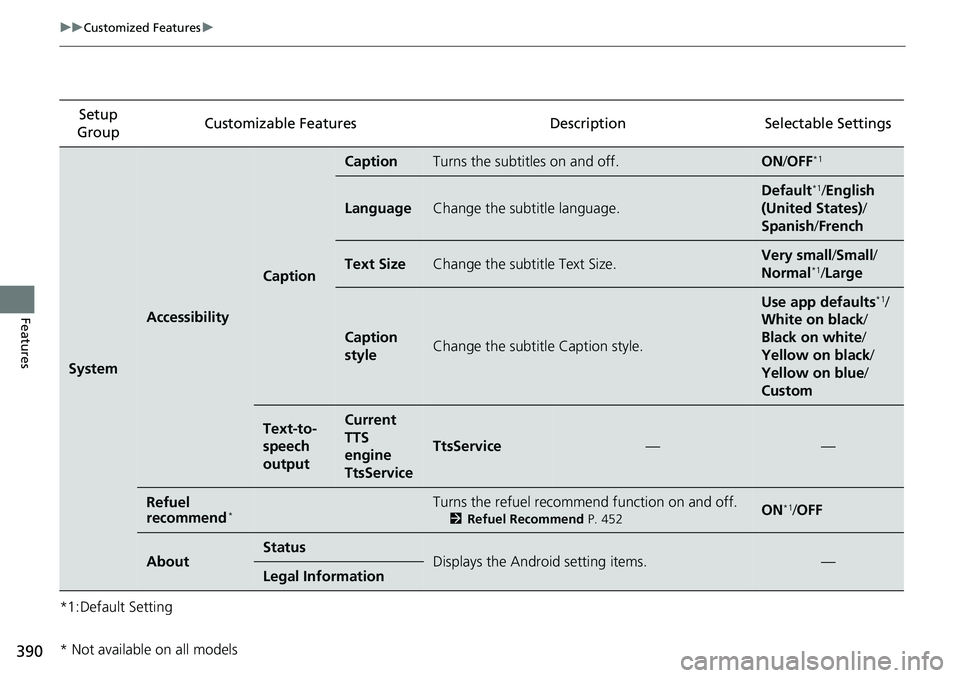
390 uu Customized Features u
Features *1:Default Setting Setup
Group Customizable Features Desc ription Selectable Settings
System Accessibility Caption Caption Turns the subtitles on and off. ON / OFF *1
Language Change the subtitle language. Default *1
/ English
(United States) /
Spanish / French
Text Size Change the subtitle Text Size. Very small / Small /
Normal *1
/ Large
Caption
style Change the subtitle Caption style. Use app defaults *1
/
White on black /
Black on white /
Yellow on black /
Yellow on blue /
Custom
Text-to-
speech
output Current
TTS
engine
TtsService TtsService — —
Refuel
recommend *
Turns the refuel recommend function on and off. 2 Refuel Recommend P. 452
ON *1
/ OFF
About Status
Displays the Android setting items. —
Legal Information
* Not available on all models
Page 397 of 727
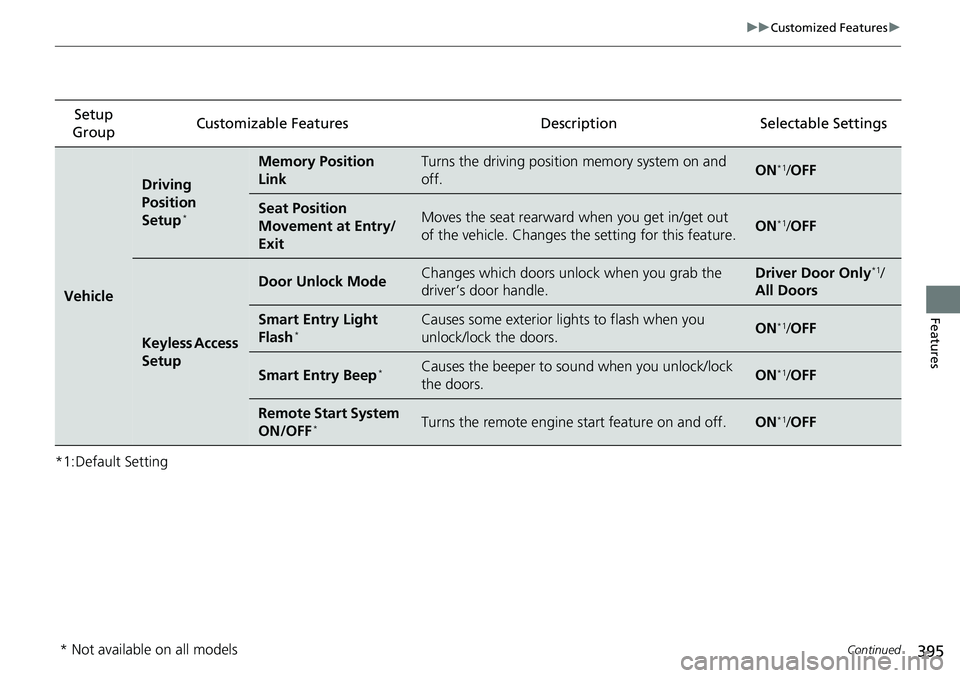
395 uu Customized Features u
Continued
Features
*1:Default Setting Setup
Group Customizable Features Description Selectable Settings
Vehicle Driving
Position
Setup *
Memory Position
Link Turns the driving position memory system on and
off. ON *1
/ OFF
Seat Position
Movement at Entry/
Exit Moves the seat rearward when you get in/get out
of the vehicle. Changes the setting for this feature. ON *1
/ OFF
Keyless Access
Setup Door Unlock Mode Changes which doors unloc k when you grab the
driver’s door handle. Driver Door Only *1
/
All Doors
Smart Entry Light
Flash *
Causes some exterior lights to flash when you
unlock/lock the doors. ON *1
/ OFF
Smart Entry Beep *
Causes the beeper to so und when you unlock/lock
the doors. ON *1
/ OFF
Remote Start System
ON/OFF *
Turns the remote engine start feature on and off. ON *1
/ OFF
* Not available on all models