navigation update HONDA ACCORD HYBRID 2019 Owners Manual
[x] Cancel search | Manufacturer: HONDA, Model Year: 2019, Model line: ACCORD HYBRID, Model: HONDA ACCORD HYBRID 2019Pages: 727, PDF Size: 24.78 MB
Page 166 of 727
164
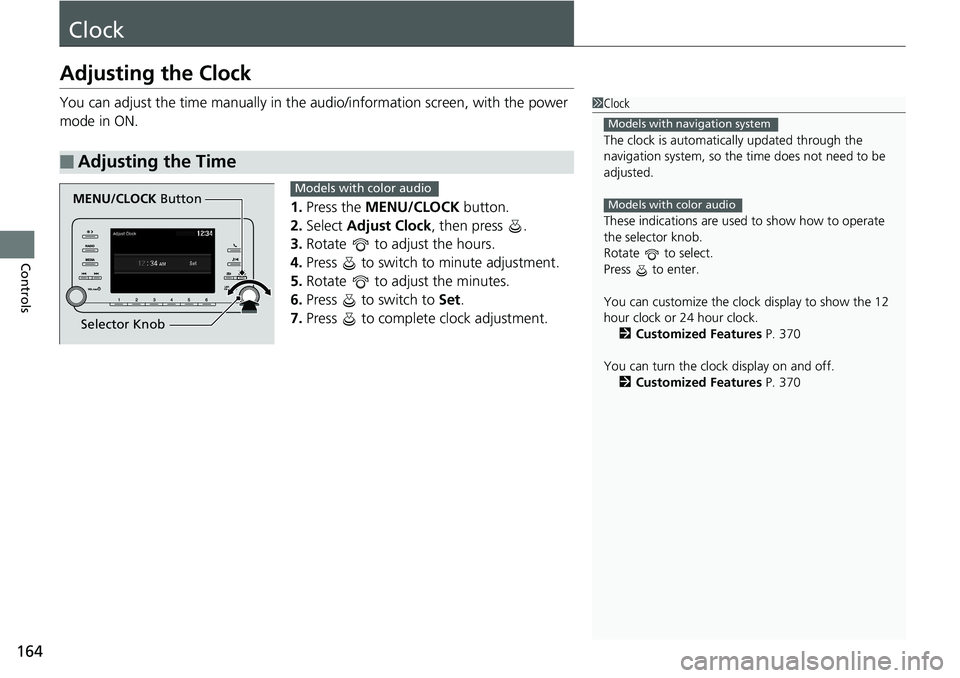
Controls ClockAdjusting the Clock You can adjust the time manually in the audio/information scr een, with the power
mode in ON.
1. Press the MENU/CLOCK button.
2. Select Adjust Clock , then press .
3. Rotate to adjust the hours.
4. Press to switch to minute adjustment.
5. Rotate to adjust the minutes.
6. Press to switch to Set .
7. Press to complete clock adjustment.■ Adjusting the Time 1 Clock
The clock is automatica lly updated through the
navigation system, so the ti me does not need to be
adjusted.
These indications are used to show how to operate
the selector knob.
Rotate to select.
Press to enter.
You can customize the clock display to show the 12
hour clock or 24 hour clock.
2 Customized Features P. 370
You can turn the clock display on and off.
2 Customized Features P. 370Models with navigation system
Models with color audio
MENU/CLOCK Button
Selector Knob Models with color audio
Page 243 of 727
241uu Climate Control System u Using Automatic Climate Control
Controls
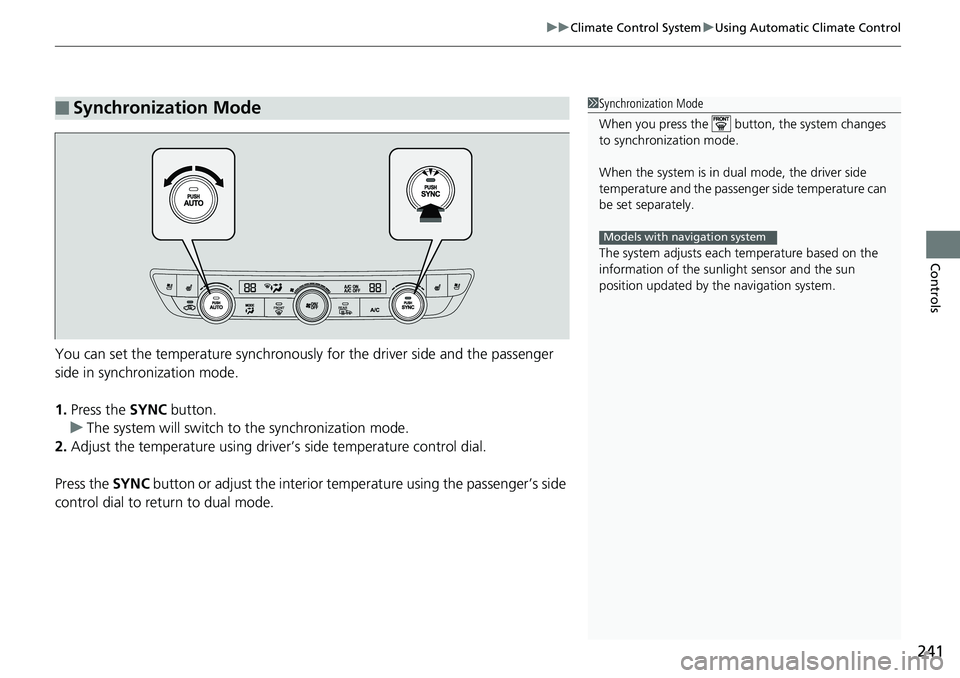
You can set the temperature synchronously for the driver side and the passenger
side in synchronization mode.
1. Press the SYNC button.
u The system will switch to the synchronization mode.
2. Adjust the temperature using driver ’s side temperat ure control dial.
Press the SYNC button or adjust the interior temp erature using the passenger’s side
control dial to return to dual mode.■ Synchronization Mode 1 Synchronization Mode
When you press the button, the system changes
to synchronization mode.
When the system is in dua l mode, the driver side
temperature and the passenger side temperature can
be set separately.
The system adjusts each temperature based on the
information of the sunli ght sensor and the sun
position updated by the navigation system.Models with navigation system
Page 277 of 727
275uu Audio System Basic Operation u Audio/Information Screen
Continued
Features
■ Trip Computer
Displays the trip computer information.
• Current Drive tab: Displays the current trip information.
• Trip A / Trip B tab: Displays information for the current and three previous drives.
The information is stored every time you reset Trip A/B.
To reset the Trip A/B, select Settings , then select Delete Trip History .
To change the setting of how to reset Trip A/B, select OK .
■ Clock
Displays the clock.
■ System Updates
Updates the software version of the audio system. 2 System Updates P. 286
■ FM/AM/SiriusXM *
/USB1/USB2 *
/Bluetooth Audio/Smartphone Connection
Displays the each audio information.
■ Settings
Enters the customizing menu screen. 2 Customized Features P. 381
■ Navigation *
Displays the navigation screen.
2 Refer to the Navigation System Manual
* Not available on all models
Page 356 of 727
354 uu General Information on the Audio System u Honda App License Agreement
Features 5. Unauthorized Use and Abuse. You are responsible for ensuring your (and any authorized third parties’) use of the SOFTWARE and
SERVICES remains in compliance with this AGREEMENT and all other applicable HONDA TERMS and PROVIDER TERMS. You acknowledge
and agree that any use of the SOFTWARE or SERVICES occurring th rough your VEHICLE will be deemed your actions and that HONDA an d
PROVIDERS may rely upon such actions. You ag ree to immediately notify us if you susp ect fraudulent or abusive activity involvin g the
SOFTWARE or SERVICES. If you so notify us or if we otherwise suspect fraudulent or abusive acti vity, you agree to cooperate wit h us in any
fraud investigation and to use any fraud prevention measures we pres cribe. Your failure to immediat ely notify us or cooperate t o use such
measures will result in your liability for all fraudulent us age or abusive activity asso ciated with your VEHICLE.
6. SOFTWARE Updates.
The SOFTWARE and SERVICES may be updated when your VEHICLE is serviced by a DEALER or remotely, over-the-
air, by HONDA from time to time; such update s may occur with or without further notice or your future consent. The SOFTWARE may be
updated at HONDA’s discretion and for any pu rpose including, without limit ation, to patch or otherwis e improve the SOFTWARE or
SERVICES functionality, se curity, or stability. All updates to the SOFTWARE and SERVICES are su bject to this AGREEMENT and any other
applicable HONDA TERMS and PROVIDER TERMS.
7. Uninstalling, Removing, and Replacing the SOFTWARE.
Replacing SOFTWARE or HONDA SERVICES with software or firmware not
provided and installed by HONDA or a DEALER will render all representations and warranties for the SOFTWARE, HONDA SERVICES, an d
VEHICLE functionality reliant upon the SOFTWARE or HONDA SERVICES null and void.
D. SOFTWARE Operationa l Notices and Warnings
1. Vehicle Geolocation Information.
You acknowledge that your VEHICLE may be equi pped with certain traffic and map features. The
traffic feature will automatically collect an d transmit, through GPS technology, your Ve hicle’s current location (longitude and latitude),
travel direction and speed (“VEHICLE GEOLOCATION INFORMAT ION”) to HONDA and PROVIDERS. The VEHICLE GEOLOCATION
INFORMATION is used by HONDA and PROVIDERS to provide traffic and navigation-related info rmation to you, but may also be used t o
provide other SERVICES or offers to you. HONDA will not use such VEHICLE GEOLOCATION INFORMATION for its own marketing efforts,
or provide such information to unaffiliated third parties for their own purp oses, without your express consent.