rear view mirror HONDA ACCORD HYBRID 2019 Owners Manual
[x] Cancel search | Manufacturer: HONDA, Model Year: 2019, Model line: ACCORD HYBRID, Model: HONDA ACCORD HYBRID 2019Pages: 727, PDF Size: 24.78 MB
Page 8 of 727
Visual Index
6
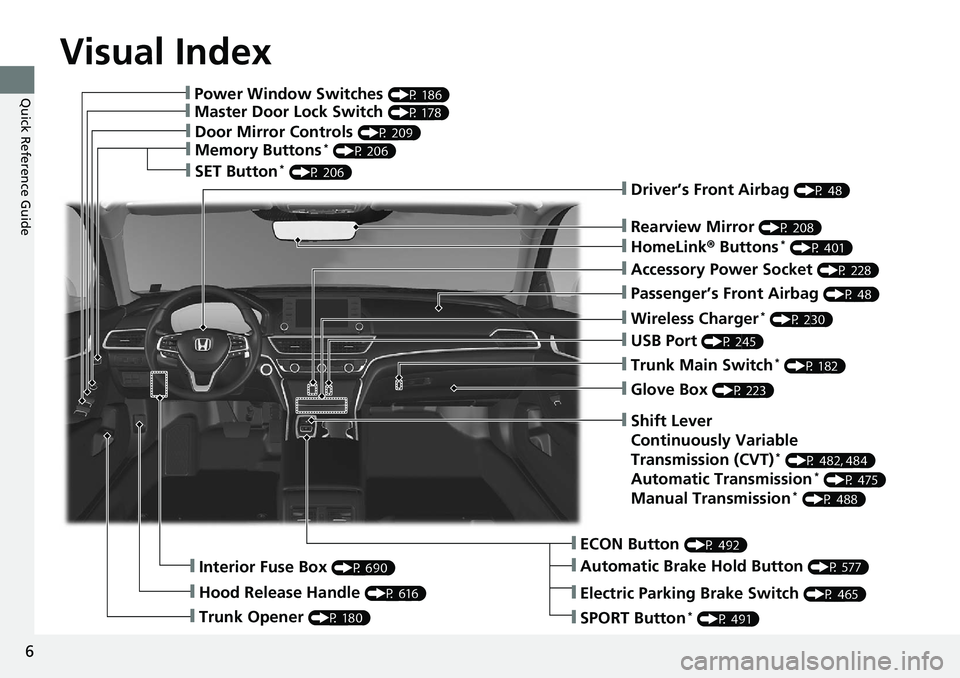
Quick Reference Guide ❙ Power Window Switches (P 186)
❙ Master Door Lock Switch (P 178)
❙ Door Mirror Controls (P 209)
❙ Memory Buttons *
(P 206)
❙ SET Button *
(P 206)
❙ Trunk Opener (P 180)❙ Interior Fuse Box (P 690)
❙ Hood Release Handle (P 616) ❙ Driver’s Front Airbag (P 48)
❙ Rearview Mirror (P 208)
❙ HomeLink ® Buttons *
(P 401)
❙ Accessory Power Socket (P 228)
❙ Passenger’s Front Airbag (P 48)
❙ Wireless Charger *
(P 230)
❙ USB Port (P 245)
❙ Trunk Main Switch *
(P 182)
❙ Glove Box (P 223)
❙ ECON Button (P 492)
❙ Automatic Brake Hold Button (P 577)❙ Shift Lever
Continuously Variable
Transmission (CVT) *
(P 482, 484)
Automatic Transmission *
(P 475)
Manual Transmission *
(P 488)
❙ Electric Parking Brake Switch (P 465)
❙ SPORT Button *
(P 491)
Page 10 of 727
Visual Index
8
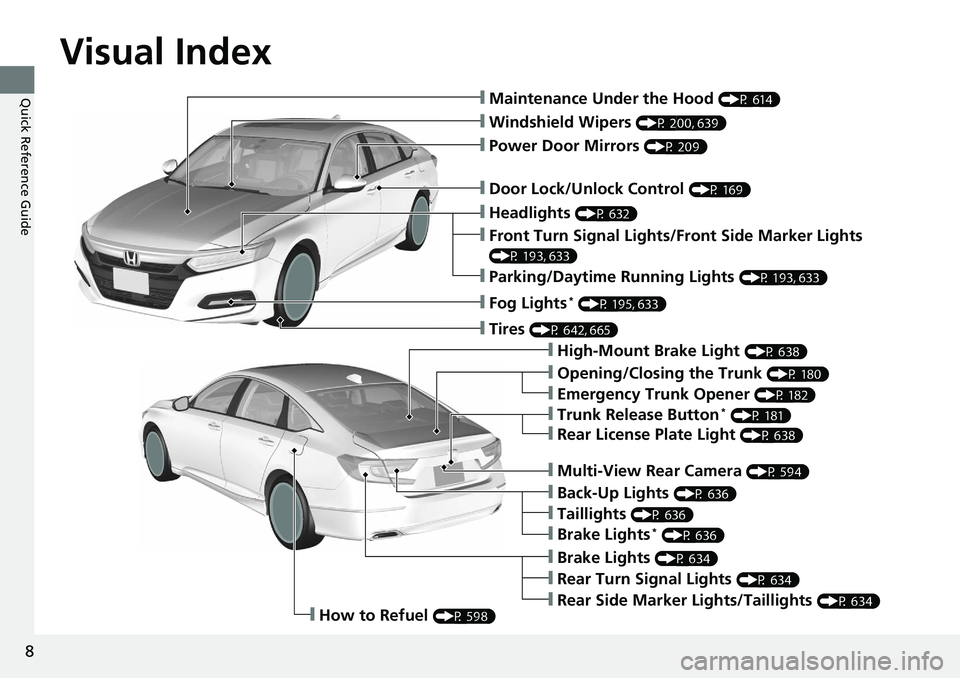
Quick Reference Guide ❙ Maintenance Under the Hood (P 614)
❙ Windshield Wipers (P 200, 639)
❙ Door Lock/Unlock Control (P 169)
❙ Power Door Mirrors (P 209)
❙ Headlights (P 632)
❙ High-Mount Brake Light (P 638)
❙ Emergency Trunk Opener (P 182)
❙ Opening/Closing the Trunk (P 180)
❙ Parking/Daytime Running Lights (P 193, 633)
❙ Front Turn Signal Lights/Front Side Marker Lights (P 193, 633)
❙ Fog Lights *
(P 195, 633)
❙ Trunk Release Button *
(P 181)
❙ Brake Lights (P 634)
❙ Rear Side Marker Lights/Taillights (P 634)
❙ Rear Turn Signal Lights (P 634)❙ Back-Up Lights (P 636)
❙ How to Refuel (P 598)❙ Tires (P 642, 665)
❙ Brake Lights *
(P 636)
❙ Taillights (P 636)
❙ Multi-View Rear Camera (P 594)
❙ Rear License Plate Light (P 638)
Page 27 of 727
25
Quick Reference Guide
Honda Sensing ® (P 507)
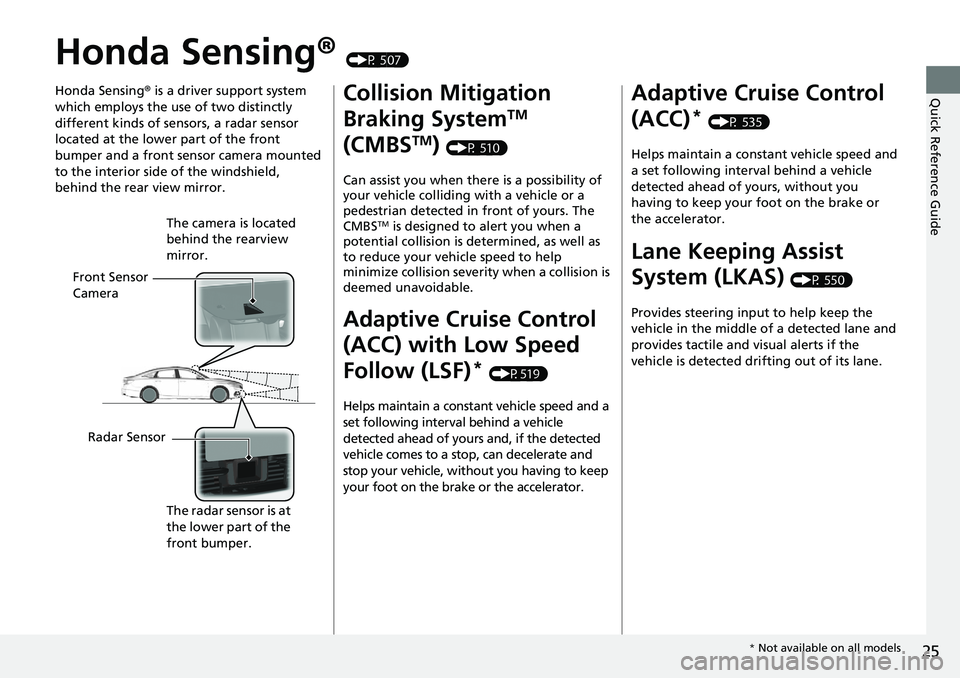
Honda Sensing ® is a driver support system
which employs the use of two distinctly
different kinds of sensors, a radar sensor
located at the lower part of the front
bumper and a front sensor camera mounted
to the interior side of the windshield,
behind the rear view mirror.
Front Sensor
Camera The camera is located
behind the rearview
mirror.
Radar Sensor
The radar sensor is at
the lower part of the
front bumper. Collision Mitigation
Braking System TM
(CMBS TM
) (P 510)
Can assist you when there is a possibility of
your vehicle colliding with a vehicle or a
pedestrian detected in front of yours. The
CMBS TM
is designed to alert you when a
potential collision is determined, as well as
to reduce your vehicle speed to help
minimize collision severity when a collision is
deemed unavoidable.
Adaptive Cruise Control
(ACC) with Low Speed
Follow (LSF) *
(P519)
Helps maintain a constant vehicle speed and a
set following interval behind a vehicle
detected ahead of yours and, if the detected
vehicle comes to a stop, can decelerate and
stop your vehicle, without you having to keep
your foot on the brake or the accelerator. Adaptive Cruise Control
(ACC) *
(P 535)
Helps maintain a constant vehicle speed and
a set following interval behind a vehicle
detected ahead of yours, without you
having to keep your foot on the brake or
the accelerator.
Lane Keeping Assist
System (LKAS) (P 550)
Provides steering input to help keep the
vehicle in the middle of a detected lane and
provides tactile and visual alerts if the
vehicle is detected drifting out of its lane.
* Not available on all models
Page 165 of 727
163Controls This chapter explains how to operate th e various controls necessary for driving.
Clock .................................................. 164
Locking and Unlocking the Doors
Key Types and Functions .................. 166
Low Remote Signal Strength ............ 168
Locking/Unlocking the Doors from the
Outside .......................................... 169
Locking/Unlocking the Doors from the
Inside ............................................. 176
Childproof Door Locks ..................... 178
Auto Door Locking/Unlocking .......... 179
Opening and Closing the Trunk ....... 180
Security System
Immobilizer System .......................... 183
Security System Alarm ...................... 184
Opening and Closing the Windows ..... 186 Opening and Closing the Moonroof *
..... 189
Operating the Switches Around the
Steering Wheel
ENGINE START/STOP Button............. 190
Turn Signals ..................................... 193
Light Switches.................................. 193
Fog Lights *
...................................... 195
Daytime Running Lights ................... 196
Auto High-Beam .............................. 197
Wipers and Washers ........................ 200
Rear Defogger/Heat ed Door Mirror *
Button ........................................... 202 Heated Windshield Button ............... 202
Brightness Control ........................... 203
Driving Position Memory System *
.... 205
Adjusting the Steering Wheel .......... 207
Adjusting the Mirrors
Interior Rearview Mirror ................... 208
Power Door Mirrors ......................... 209
Adjusting the Seats .......................... 210
Interior Lights/Interior Convenience
Items ................................................ 221
Climate Control System
Using Automatic Climate Control .... 239
Automatic Climate Control Sensors ... 242 Canadian models
* Not available on all models
Page 210 of 727
208
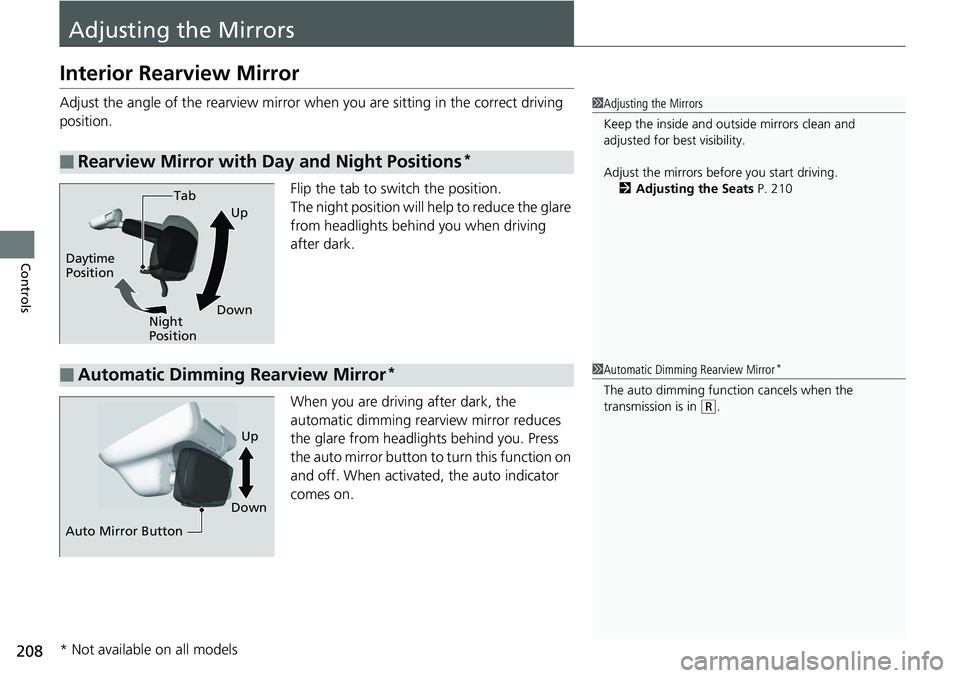
Controls Adjusting the MirrorsInterior Rearview Mirror Adjust the angle of the rearview mirror wh en you are sitting in the correct driving
position.
Flip the tab to switch the position.
The night position will help to reduce the glare
from headlights behind you when driving
after dark.
When you are driving after dark, the
automatic dimming rearview mirror reduces
the glare from headlights behind you. Press
the auto mirror button to turn this function on
and off. When activated, the auto indicator
comes on.■ Rearview Mirror with Day and Night Positions * 1 Adjusting the Mirrors
Keep the inside and out side mirrors clean and
adjusted for best visibility.
Adjust the mirrors befo re you start driving.
2 Adjusting the Seats P. 210
Tab
Daytime
Position
Night
Position Up
Down
■ Automatic Dimming Rearview Mirror * 1 Automatic Dimming Rearview Mirror *
The auto dimming function cancels when the
transmission is in ( R
.
Auto Mirror Button Down Up
* Not available on all models
Page 457 of 727
Continued
455uu Before Driving u Driving Preparation
Driving
• Store or secure all items on board properly.
u Carrying too much cargo, or improperly storing it, can affect your vehicle’s
handling, stability, sto pping distance, and tires, and make it unsafe.2 Maximum Load Limit P. 457
• Do not pile items higher than the seat height.
u They can block your view and may be thrown forward in the event of sudden
braking.
• Do not place anything in the front seat footwells. Make sure to secure the floor
mat.
u An object or unsecured floor mat can in terfere with your brake and accelerator
pedal operation while driving.
• If you have any animals on board, do no t let them move around in the vehicle.
u They may interfere with driv ing and a crash could occur.
• Securely close and lock all doors and the trunk.2 Locking/Unlocking the Doors from the Inside P. 176
• Adjust your seating position properly.
u Adjust the head restraint, too.2 Adjusting the Seats P. 210
2 Adjusting the Front and Rear Outer *
Head Restraint Positions P. 216
• Adjust the mirrors and steering wh eel properly for your driving.
u Adjust them while sitting in the proper driving position. 2 Adjusting the Mirrors P. 208
2 Adjusting the Steering Wheel P. 207■ Interior Checks 1 Interior Checks
The headlight aim is set by the factory, and does not
need to be adjusted. Howeve r, if you regularly carry
heavy items in the tr unk or tow a trailer *
, have the
aiming readjusted at a de aler or by a qualified
technician.
* Not available on all models
Page 505 of 727
Continued
503uu When Driving u Blind spot information System *
Driving
■ When the system detects a vehicle
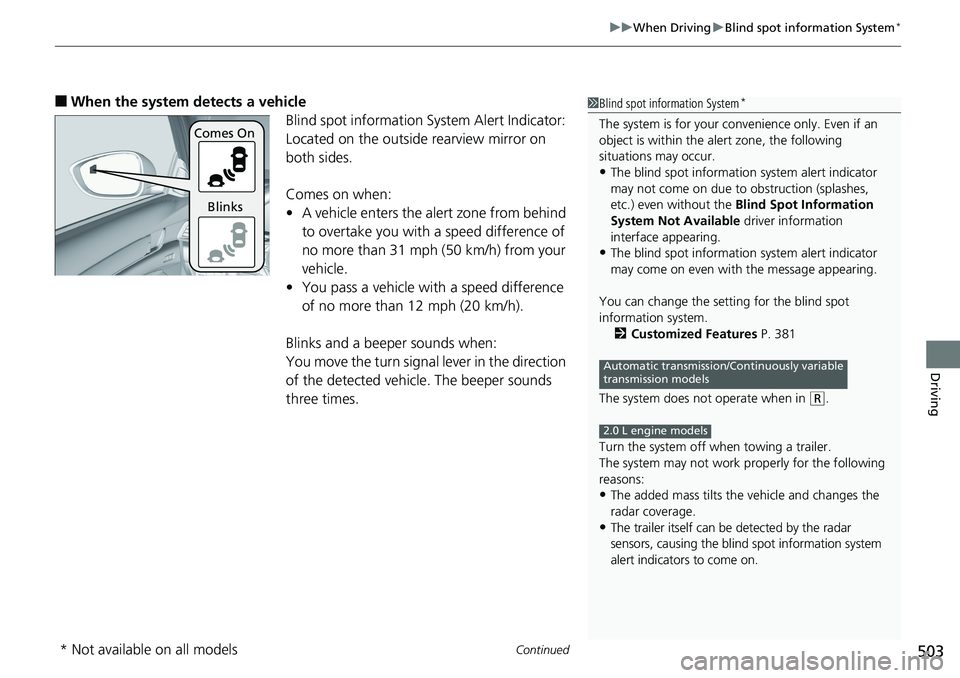
Blind spot information System Alert Indicator:
Located on the outside rearview mirror on
both sides.
Comes on when:
• A vehicle enters the alert zone from behind
to overtake you with a speed difference of
no more than 31 mph (50 km/h) from your
vehicle.
• You pass a vehicle with a speed difference
of no more than 12 mph (20 km/h).
Blinks and a beeper sounds when:
You move the turn signal lever in the direction
of the detected vehicle. The beeper sounds
three times. 1 Blind spot information System *
The system is for your convenience only. Even if an
object is within the alert zone, the following
situations may occur.
• The blind spot informatio n system alert indicator
may not come on due to obstruction (splashes,
etc.) even without the Blind Spot Information
System Not Available driver information
interface appearing.
• The blind spot informatio n system alert indicator
may come on even with the message appearing.
You can change the setting for the blind spot
information system.
2 Customized Features P. 381
The system does not operate when in ( R
.
Turn the system off when towing a trailer.
The system may not work properly for the following
reasons:
• The added mass tilts the vehicle and changes the
radar coverage.
• The trailer itself can be detected by the radar
sensors, causing the blind spot information system
alert indicators to come on. Automatic transmission/Continuously variable
transmission models
2.0 L engine modelsComes On
Blinks
* Not available on all models
Page 507 of 727
505 uu When Driving u LaneWatch TM
*
Continued
Driving
LaneWatch TM
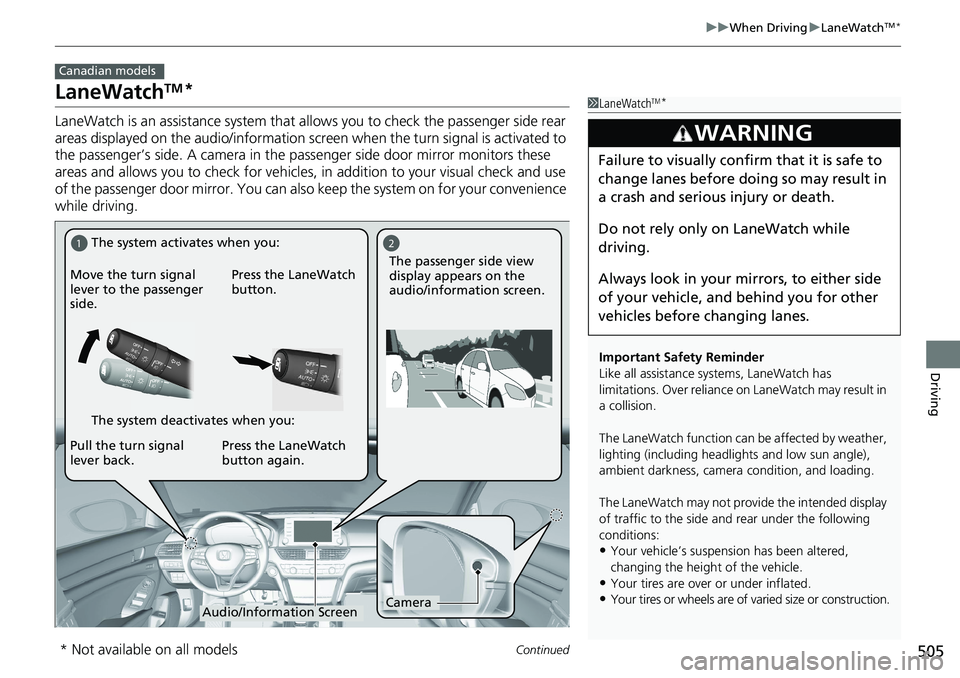
*LaneWatch is an assistance system that al lows you to check the passenger side rear
areas displayed on the audio/information screen when the turn signal is activated to
the passenger’s side. A camera in the pa ssenger side door mirror monitors these
areas and allows you to check for vehicles, in addition to your visual check and use
of the passenger door mirror. You can also keep the system on for your convenience
while driving. Canadian models
1 LaneWatch TM
*
Important Safety Reminder
Like all assistance systems, LaneWatch has
limitations. Over reliance on LaneWatch may result in
a collision.
The LaneWatch func tion can be affect ed by weather,
lighting (including headli ghts and low sun angle),
ambient darkness, camera condition, and loading.
The LaneWatch may not prov ide the intended display
of traffic to the side a nd rear under the following
conditions:
• Your vehicle’s suspension has been altered,
changing the height of the vehicle.
• Your tires are over or under inflated.
• Your tires or wheels are of varied size or construction.3
WARNING Failure to visually confirm that it is safe to
change lanes before doing so may result in
a crash and serious injury or death.
Do not rely only on LaneWatch while
driving.
Always look in your mi rrors, to either side
of your vehicle, and behind you for other
vehicles before changing lanes.1 2
Camera
Audio/Information ScreenMove the turn signal
lever to the passenger
side. Press the LaneWatch
button.
Pull the turn signal
lever back. Press the LaneWatch
button again. The passenger side view
display appears on the
audio/information screen.The system activates when you:
The system deactivates when you:
* Not available on all models
Page 508 of 727
uu When Driving u LaneWatch TM
*
506
Driving ■ Customizing the LaneWatch settings
You can customize the following items using the audio/information screen.
• Show with turn signal : Selects whether LaneWatc h monitor comes on when
you operate the turn signal light lever.
• Show Reference Line : Selects whether the reference lines appear on the
LaneWatch monitor.
• Display Time after Turn Signal Off: Changes the remaining LaneWatch
display time after you pull the turn signal lever back.
• Display : Adjusts display settings.2 Customized Features P. 381
2 Audio Remote Controls P. 248
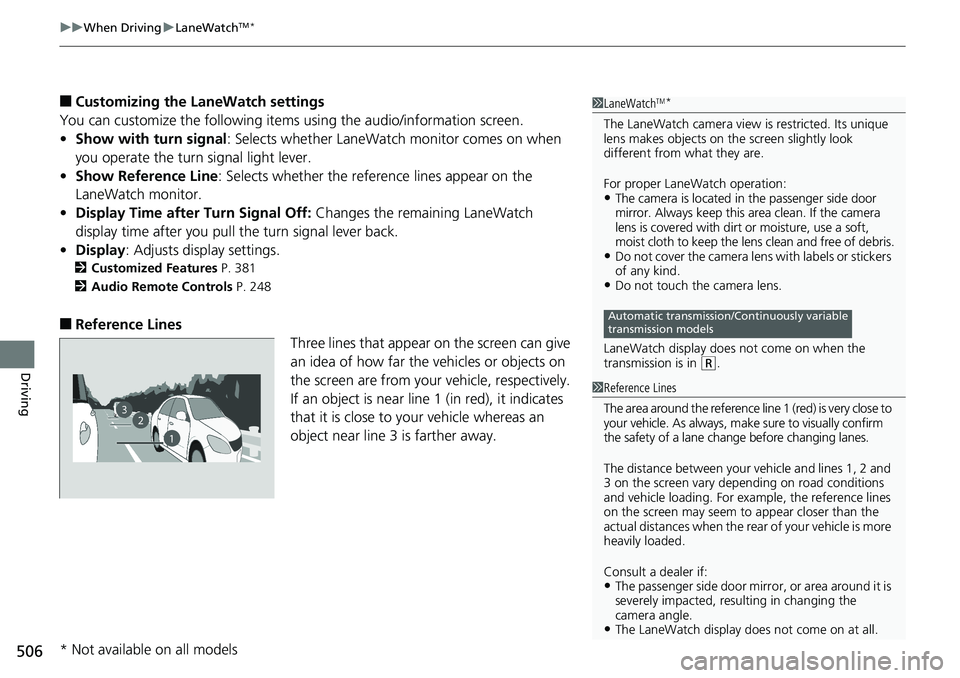
■ Reference Lines
Three lines that appear on the screen can give
an idea of how far the vehicles or objects on
the screen are from your vehicle, respectively.
If an object is near line 1 (in red), it indicates
that it is close to yo ur vehicle whereas an
object near line 3 is farther away. 1 LaneWatch TM
*
The LaneWatch camera view is restricted. Its unique
lens makes objects on the screen slightly look
different from what they are.
For proper LaneWatch operation:
• The camera is located in the passenger side door
mirror. Always keep this area clean. If the camera
lens is covered with dirt or moisture, use a soft,
moist cloth to keep the lens clean and free of debris.
• Do not cover the camera lens with labels or stickers
of any kind.
• Do not touch the camera lens.
LaneWatch display does not come on when the
transmission is in ( R
.Automatic transmission/Continuously variable
transmission models
23
1 1 Reference Lines
The area around the reference line 1 (red) is very close to
your vehicle. As always, m ake sure to visually confirm
the safety of a lane chan ge before changing lanes.
The distance betwee n your vehicle and lines 1, 2 and
3 on the screen vary depending on road conditions
and vehicle loading. For ex ample, the reference lines
on the screen may seem to appear closer than the
actual distances when the rear of your vehicle is more
heavily loaded.
Consult a dealer if:
• The passenger side door mirr or, or area around it is
severely impacted, resulting in changing the
camera angle.
• The LaneWatch display doe s not come on at all.
* Not available on all models
Page 509 of 727
507Continued
Driving
Honda Sensing ®Honda Sensing ® is a driver support system which employs the use of two distinctly
different kinds of sensors: a radar sensor located in the front lo wer grille and a front
sensor camera mounted to the interior side of the windshield, behind the rearview
mirror.
Honda Sensing ® has following functions.
■ The functions which do not require switch operations to activate
• Collision Mitigation Braking System TM
(CMBS TM
) 2 P. 510
• Road Departure Mitigation (RDM) System 2 P. 558
• Traffic Sign Recognition System 2 P. 562
■ The functions wh ich require switch ope rations to activate
• Adaptive Cruise Control (ACC) with Low Speed Follow (LSF) *
2 P. 519
• Adaptive Cruise Control (ACC) *
2 P. 535
• Lane Keeping Assist System (LKAS) 2 P. 550
* Not available on all models