change wheel HONDA CIVIC 2022 Owner's Guide
[x] Cancel search | Manufacturer: HONDA, Model Year: 2022, Model line: CIVIC, Model: HONDA CIVIC 2022Pages: 700, PDF Size: 13.98 MB
Page 517 of 700
516
uuHonda Sensing ®u Lane Keeping Assist System (LKAS)
Driving
Lane Keeping Assist System (LKAS)
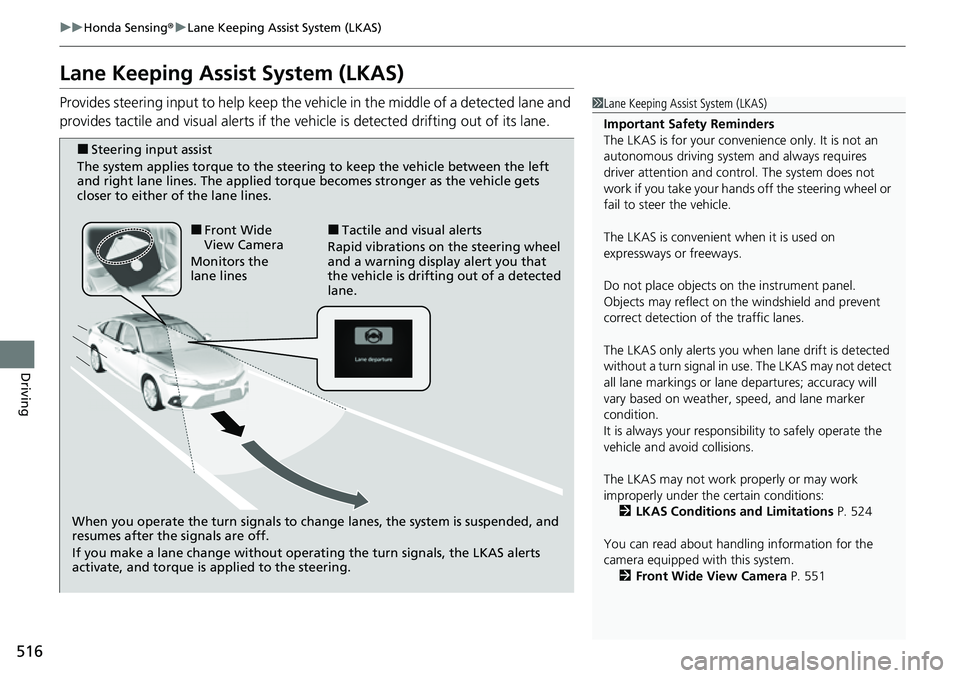
Provides steering input to help keep the vehicle in the middle of a detected lane and
provides tactile and visual alerts if the ve hicle is detected drifting out of its lane.1Lane Keeping Assist System (LKAS)
Important Safety Reminders
The LKAS is for your convenience only. It is not an
autonomous driving system and always requires
driver attention and control. The system does not
work if you take your hands off the steering wheel or
fail to steer the vehicle.
The LKAS is convenient when it is used on
expressways or freeways.
Do not place objects on the instrument panel.
Objects may reflect on th e windshield and prevent
correct detection of the traffic lanes.
The LKAS only alerts you when lane drift is detected
without a turn signal in use. The LKAS may not detect
all lane markings or lane departures; accuracy will
vary based on weather, speed, and lane marker
condition.
It is always your responsibility to safely operate the
vehicle and avoid collisions.
The LKAS may not work properly or may work
improperly under the certain conditions:
2 LKAS Conditions and Limitations P. 524
You can read about handling information for the
camera equipped with this system. 2 Front Wide View Camera P. 551
When you operate the turn signals to chan ge lanes, the system is suspended, and
resumes after the signals are off.
If you make a lane change without operating the turn signals, the LKAS alerts
activate, and torque is applied to the steering.
■Front Wide
View Camera
Monitors the
lane lines■Tactile and visual alerts
Rapid vibrations on the steering wheel
and a warning display alert you that
the vehicle is drifting out of a detected
lane.
■Steering input assist
The system applies torque to the steering to keep the vehicle between the left
and right lane lines. The applied torque becomes stronger as the vehicle gets
closer to either of the lane lines.
Page 529 of 700
528
uuHonda Sensing ®u Traffic Jam Assist
Driving
Traffic Jam Assist
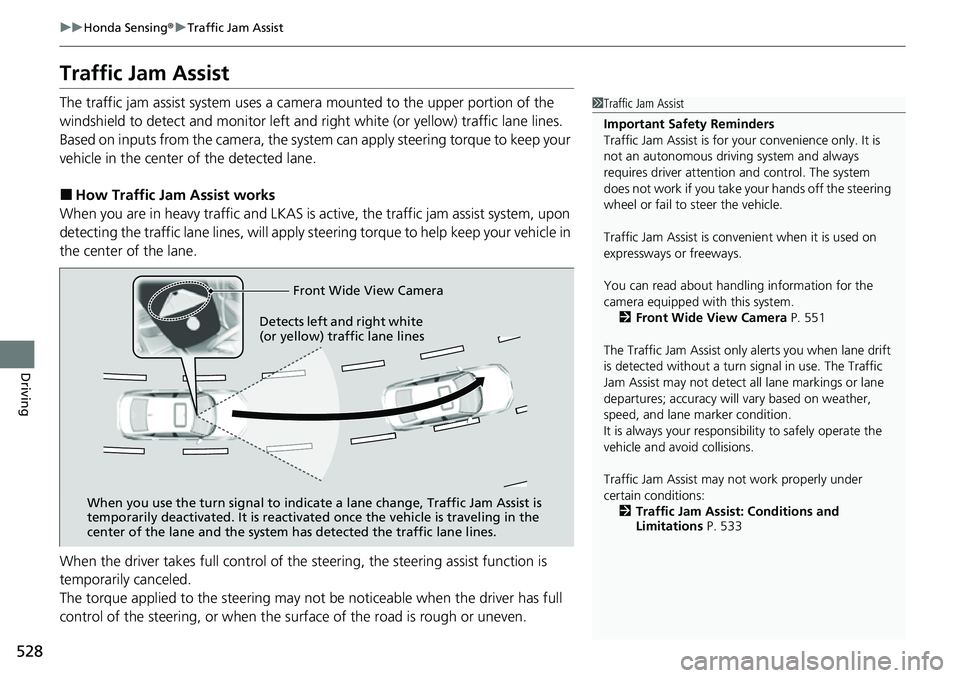
The traffic jam assist system uses a came ra mounted to the upper portion of the
windshield to detect and monitor left and right white (or yellow) traffic lane lines.
Based on inputs from the camera, the system can apply steering torque to keep your
vehicle in the center of the detected lane.
■How Traffic Jam Assist works
When you are in heavy traffic and LKAS is active, the traffic jam assist system, upon
detecting the traffic lane lines, will apply steering torque to help keep your vehicle in
the center of the lane.
When the driver takes full control of the steering, the steering assist function is
temporarily canceled.
The torque applied to the steering may not be noticeable when the driver has full
control of the steering, or when the su rface of the road is rough or uneven.
1Traffic Jam Assist
Important Safety Reminders
Traffic Jam Assist is for your convenience only. It is
not an autonomous driving system and always
requires driver at tention and control. The system
does not work if you take y our hands off the steering
wheel or fail to steer the vehicle.
Traffic Jam Assist is conven ient when it is used on
expressways or freeways.
You can read about handling information for the
camera equipped with this system. 2 Front Wide View Camera P. 551
The Traffic Jam Assist only alerts you when lane drift
is detected without a turn signal in use. The Traffic
Jam Assist may not detect all lane markings or lane
departures; accuracy will vary based on weather,
speed, and lane marker condition.
It is always your responsibility to safely operate the
vehicle and avoid collisions.
Traffic Jam Assist may not work properly under
certain conditions: 2 Traffic Jam Assist: Conditions and
Limitations P. 533
Front Wide View Camera
When you use the turn signal to indica te a lane change, Traffic Jam Assist is
temporarily deactivated. It is reactivated once the vehicle is traveling in the
center of the lane and the system has detected the traffic lane lines.
Detects left and right white
(or yellow) traffic lane lines
Page 531 of 700
uuHonda Sensing ®u Traffic Jam Assist
530
Driving
Traffic Jam Assist is activated when all of the following conditions exist:
• LKAS is activated.
• The lane in which you are driving has dete ctable lane markers on both sides, and
your vehicle is in the center of the lane.
• The vehicle is traveling between about 0 and 45mph (0 and 72km/h).
• You are driving on a straight or slightly curved road.
• The driver is gripping the steering wheel.
• The shift position is in
(D.
Do not use Traffic Jam Assist in any of the following situations:
• You are traveling on a ro ad with sharp curves.
u The system may not allow your vehicle to respond in a manner best suited for
the road conditions.
• You are entering a toll booth, interchange, service area, or parking area.
• You are driving in adverse weat her (rain, fog, snow, etc.).
• The surface of the road is slippery; for ex ample, it is icy or covered with snow.
u The tires may slip, causing you to lose control of the vehicle.
■Traffic Jam Assist Activation1Traffic Jam Assist Activation
Refer to the following pa ge for proper handling of
the Lane Keeping Assist System (LKAS):
2 Lane Keeping Assist System (LKAS) P. 516
Refer to the following page for steering buttons and
displays: 2 Operation Switches for the Adaptive
Cruise Control (ACC) with Low Speed
Follow/Lane Keeping Assist System
(LKAS)/Traffic Jam Assist P. 474
Page 532 of 700
Continued531
uuHonda Sensing ®u Traffic Jam Assist
Driving
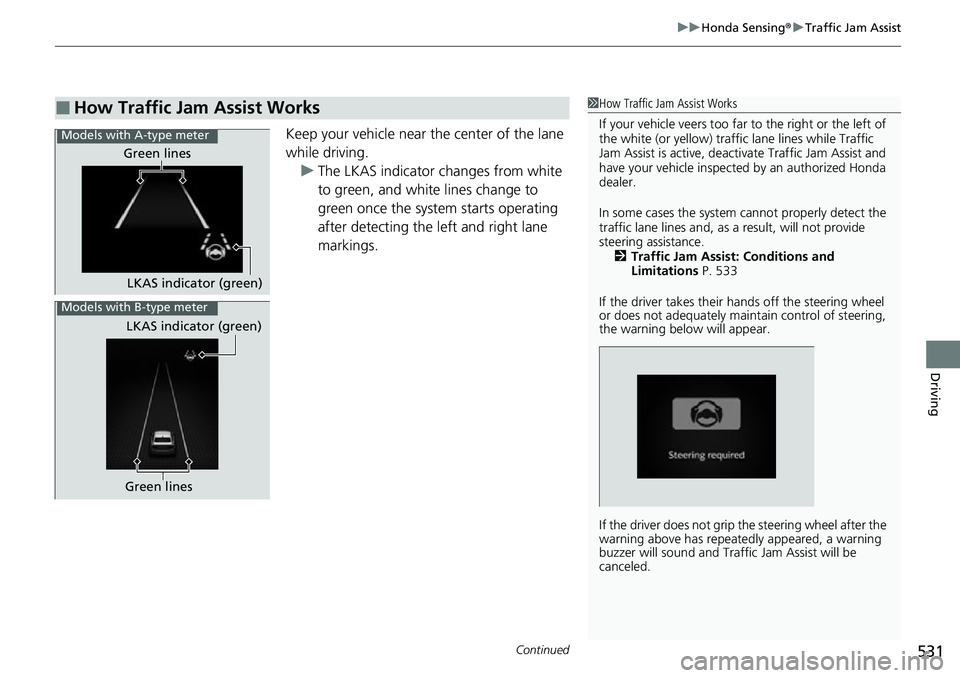
Keep your vehicle near the center of the lane
while driving.
u The LKAS indicator changes from white
to green, and white lines change to
green once the system starts operating
after detecting the left and right lane
markings.
■How Traffic Jam Assist Works1How Traffic Jam Assist Works
If your vehicle veers too far to the right or the left of
the white (or yellow) traffic lane lines while Traffic
Jam Assist is active, deactivate Traffic Jam Assist and
have your vehicle inspected by an authorized Honda
dealer.
In some cases the system cannot properly detect the
traffic lane lines and, as a result, will not provide
steering assistance. 2 Traffic Jam Assist: Conditions and
Limitations P. 533
If the driver takes their hands off the steering wheel
or does not adequately main tain control of steering,
the warning below will appear.
If the driver does not grip the steering wheel after the
warning above has repeatedly appeared, a warning
buzzer will sound and Traffi c Jam Assist will be
canceled.
Models with A-type meter
Green lines
LKAS indicator (green)
Models with B-type meter
LKAS indicator (green)
Green lines
Page 541 of 700
uuHonda Sensing ®u Road Departure Mitigation System
540
Driving
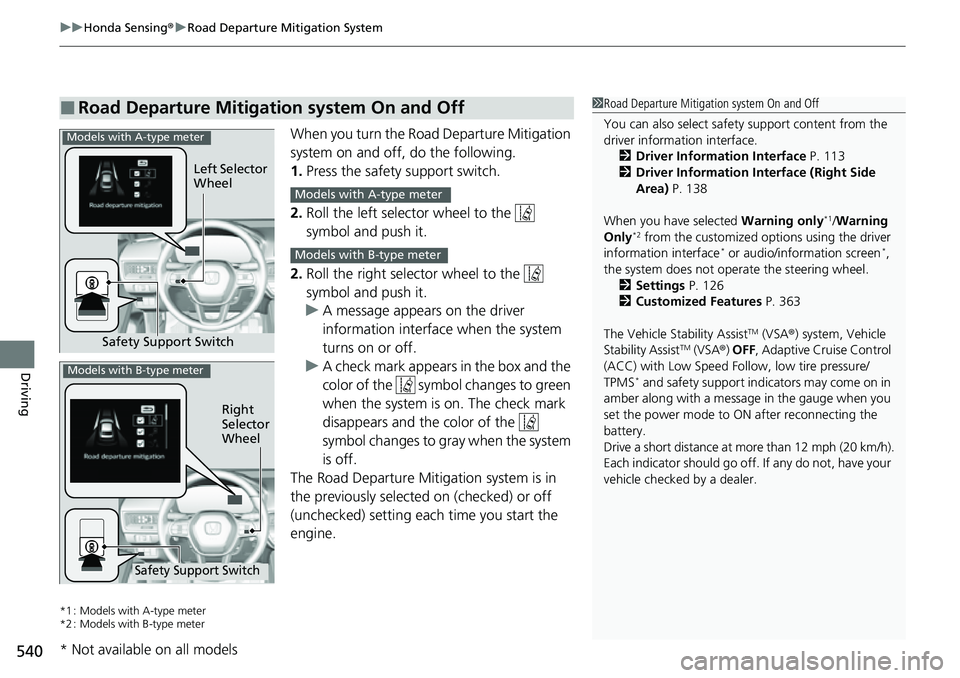
When you turn the Road Departure Mitigation
system on and off, do the following.
1. Press the safety support switch.
2. Roll the left selector wheel to the
symbol and push it.
2. Roll the right selector wheel to the
symbol and push it.
u A message appears on the driver
information interface when the system
turns on or off.
u A check mark appears in the box and the
color of the symbol changes to green
when the system is on. The check mark
disappears and the color of the
symbol changes to gray when the system
is off.
The Road Departure Mitigation system is in
the previously selected on (checked) or off
(unchecked) setting each time you start the
engine.
*1 : Models with A-type meter
*2 : Models with B-type meter
■Road Departure Mitigation system On and Off1 Road Departure Mitigation system On and Off
You can also sele ct safety support content from the
driver information interface.
2 Driver Information Interface P. 113
2 Driver Information Interface (Right Side
Area) P. 138
When you have selected Warning only
*1/Warning
Only*2 from the customized options using the driver
information interface* or audio/information screen*,
the system does not opera te the steering wheel.
2 Settings P. 126
2 Customized Features P. 363
The Vehicle Stability Assist
TM (VSA ®) system, Vehicle
Stability AssistTM (VSA ®) OFF , Adaptive Cruise Control
(ACC) with Low Speed Follow, low tire pressure/
TPMS
* and safety support indicators may come on in
amber along with a message in the gauge when you
set the power mode to ON after reconnecting the
battery.
Drive a short distance at more than 12 mph (20 km/h).
Each indicator should go off. If any do not, have your
vehicle checked by a dealer.
Safety Support Switch Left Selector
Wheel
Models with A-type meter
Models with A-type meter
Models with B-type meter
Right
Selector
Wheel
Safety Support Switch
Models with B-type meter
* Not available on all models
Page 548 of 700
Continued547
uuHonda Sensing ®u Traffic Sign Recognition System
Driving
The traffic sign recognition system may not be able to recognize a traffic sign in the
following cases.
■Environmental conditions
• Driving into low sunlight (e.g., at dawn or dusk).
• Strong light is reflec ted onto the roadway.
• Driving at night, in dark areas such as long tunnels.
• Driving in bad weather (rain, fog, snow, etc.).
• Sudden changes between light and dark, such as the entrance or exit of a tunnel
or the shadows of trees, buildings, etc.
• Water is sprayed by or snow blown from a vehicle ahead.
■Roadway conditions
• Your vehicle is strongly shaken on uneven road surfaces.
■Vehicle conditions
• When lighting is weak due to dirt covering the headlight lenses, or there is poor
visibility in a dark place due to the headlights being improperly adjusted.
• The front of the camera is covered by dirt, fog, rain, mud, wet snow, seals,
accessories, stickers, or film on the windshield.
• There is residue on the windshi eld from the windshield wipers.
• An abnormal tire or wheel condition (inco rrect sizes, varied sizes or construction,
improperly inflated, co mpact spare tire, etc.).
• The vehicle is tilted due to heavy load in the trunk or rear seats.
• The suspension has been modified.
• Tire chains are installed.
• Driving at night or in a dark place (e.g., a tunnel) with the headlights off.
■Traffic Sign Recognition System Conditions and Limitations1Traffic Sign Recognition System Conditions and Limitations
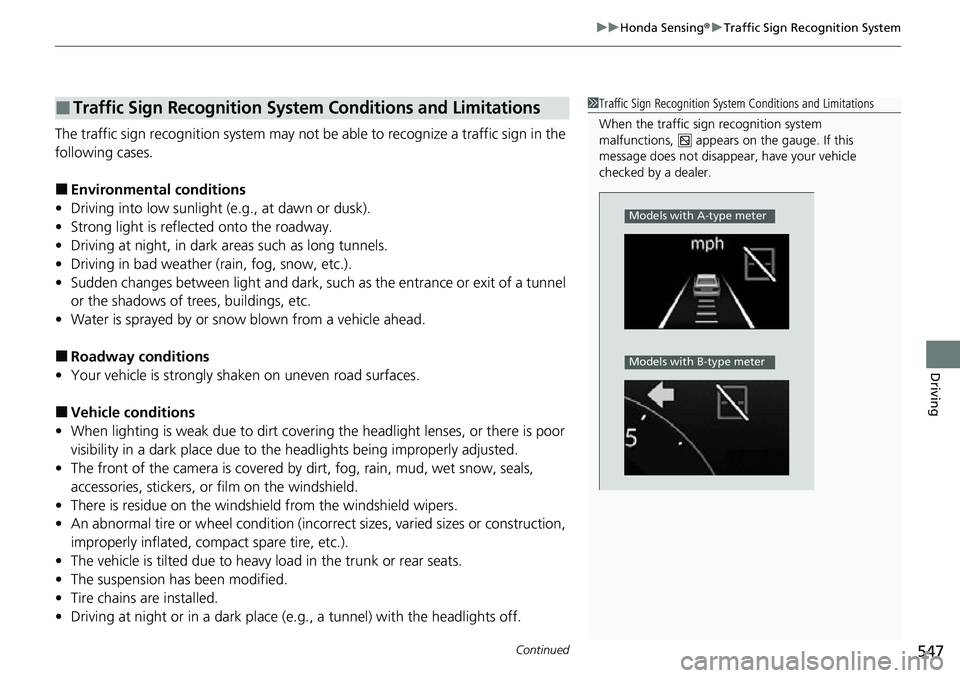
When the traffic sign recognition system
malfunctions, appears on the gauge. If this
message does not disappear, have your vehicle
checked by a dealer.
Models with A-type meter
Models with B-type meter
Page 574 of 700
573Continued
Driving
Multi-View Rear Camera
About Your Multi-View Rear Camera
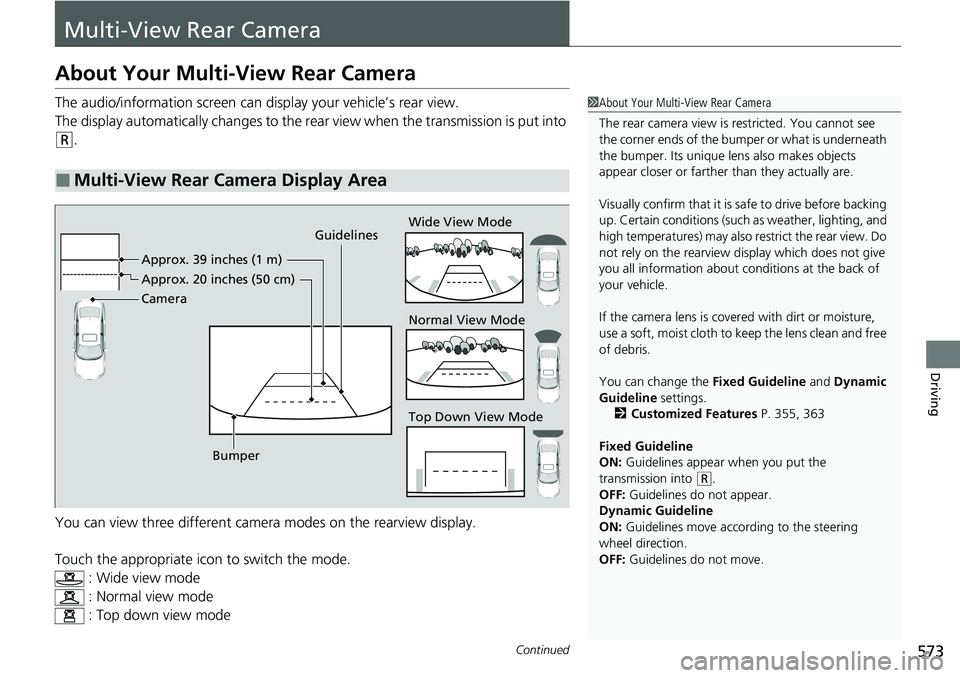
The audio/information screen can display your vehicle’s rear view.
The display automatically changes to the rear view when the transmission is put into
(R.
You can view three different camera modes on the rearview display.
Touch the appropriate icon to switch the mode. : Wide view mode
: Normal view mode
: Top down view mode
■Multi-View Rear Camera Display Area
1About Your Multi-View Rear Camera
The rear camera view is restricted. You cannot see
the corner ends of the bumper or what is underneath
the bumper. Its unique le ns also makes objects
appear closer or farther than they actually are.
Visually confirm that it is safe to drive before backing
up. Certain conditions (such as weather, lighting, and
high temperatures) may also restrict the rear view. Do
not rely on the rearview display which does not give
you all information about conditions at the back of
your vehicle.
If the camera lens is cove red with dirt or moisture,
use a soft, moist cloth to keep the lens clean and free
of debris.
You can change the Fixed Guideline and Dynamic
Guideline settings. 2 Customized Features P. 355, 363
Fixed Guideline
ON: Guidelines appear when you put the
transmission into
( R.
OFF: Guidelines do not appear.
Dynamic Guideline
ON: Guidelines move according to the steering
wheel direction.
OFF: Guidelines do not move.
Guidelines
Bumper Wide View Mode
Normal View Mode
Top Down View Mode
Camera Approx. 39 inches (1 m)
Appr
ox. 20 inc
hes (50 cm)
Page 589 of 700
588
uuMaintenance MinderTMuTo Use Maintenance MinderTM
Maintenance
*1:Models with A-type meter
*2:Models with B-type meter
■Maintenance Minder Messages on the Driver Information
Interface
Maintenance MessageOil Life DisplayExplanationInformation
-
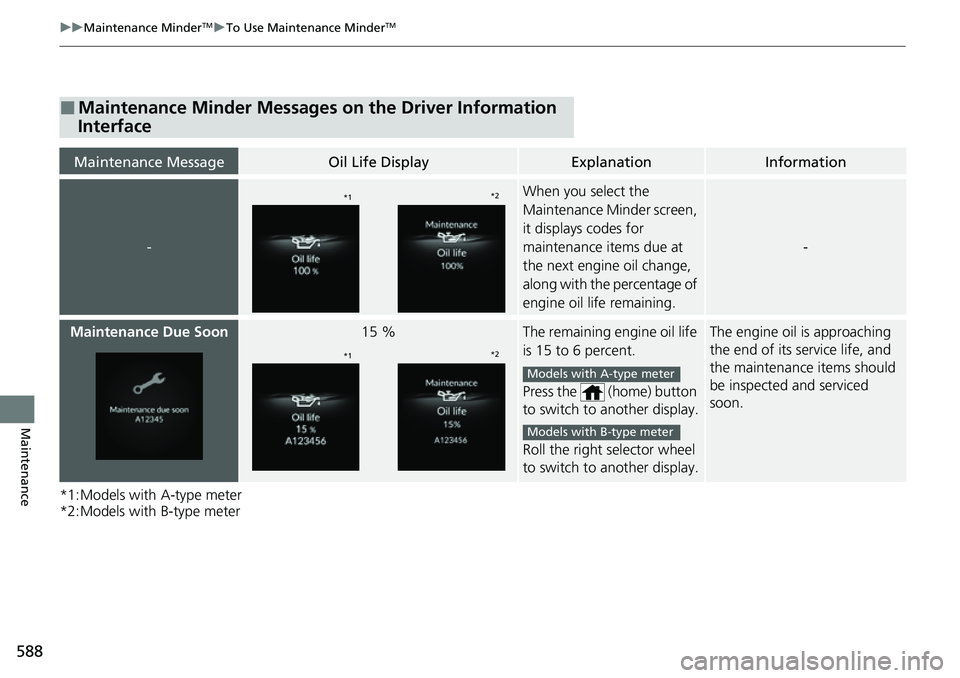
When you select the
Maintenance Minder screen,
it displays codes for
maintenance items due at
the next engine oil change,
along with the percentage of
engine oil life remaining.
-
Maintenance Due Soon15 %The remaining engine oil life
is 15 to 6 percent.
Press the (home) button
to switch to another display.
Roll the right selector wheel
to switch to another display.The engine oil is approaching
the end of its service life, and
the maintenance items should
be inspected and serviced
soon.
*1*2
*1*2
Models with A-type meter
Models with B-type meter
Page 645 of 700
uuIf a Tire Goes Flat uChanging a Flat Tire
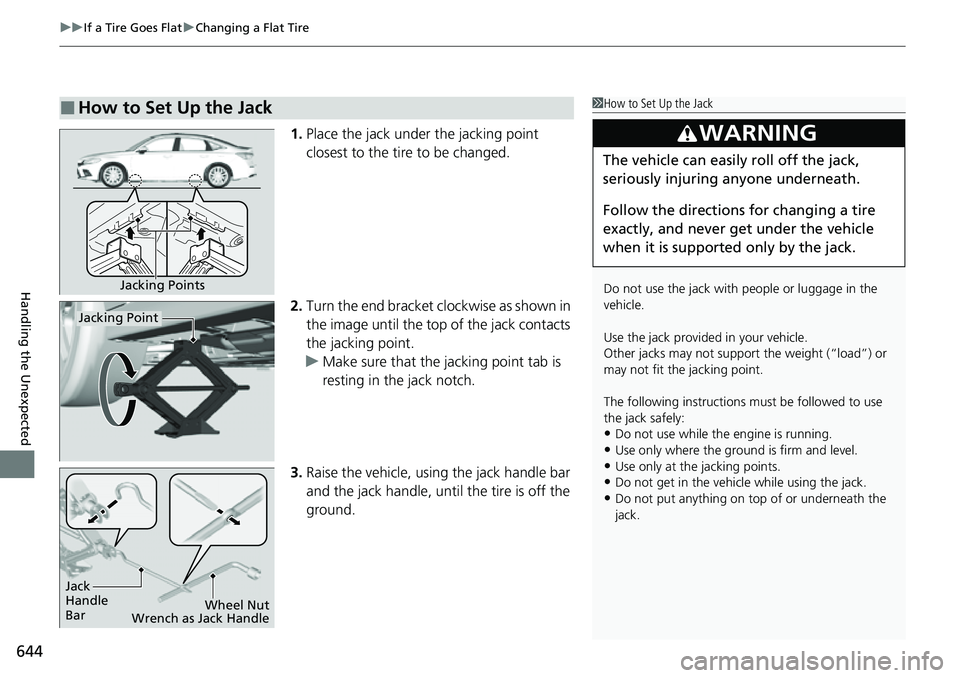
644
Handling the Unexpected
1. Place the jack under the jacking point
closest to the tire to be changed.
2. Turn the end bracket cl ockwise as shown in
the image until the top of the jack contacts
the jacking point.
u Make sure that the jacking point tab is
resting in the jack notch.
3. Raise the vehicle, using the jack handle bar
and the jack handle, until the tire is off the
ground.
■How to Set Up the Jack1How to Set Up the Jack
Do not use the jack with people or luggage in the
vehicle.
Use the jack provided in your vehicle.
Other jacks may not support the weight (“load”) or
may not fit the jacking point.
The following instructions must be followed to use
the jack safely:
•Do not use while the engine is running.
•Use only where the ground is firm and level.
•Use only at the jacking points.•Do not get in the vehicl e while using the jack.
•Do not put anything on top of or underneath the
jack.
3WARNING
The vehicle can easily roll off the jack,
seriously injuring anyone underneath.
Follow the directions for changing a tire
exactly, and never get under the vehicle
when it is supported only by the jack.
Jacking Points
Jacking Point
Jack
Handle
Bar Wheel Nut
Wrench as Jack Handle
Page 652 of 700
651
uuEngine Does Not StartuEmergency Engine Stop
Handling the Unexpected
Emergency Engine Stop
The ENGINE START/STOP button may be used to stop the engine due to an
emergency situation even while driving. If you must stop the engine, do either of the
following operations:
• Press and hold the ENGINE START/STOP button for about two seconds.
• Firmly press the ENGINE START/STOP button three times.
The steering wheel will not lock. However, because turning off the engine disables
the power assist the engine provides to the steering and braking systems, it will
require significantly more physical effort an d time to steer and slow the vehicle. Use
both feet on the brake pedal to slow down the vehicle and stop immediately in a
safe place.
The power mode is in ACCESSORY when the engine is stopped.
To change the mode to VEHICLE OFF, put the transmission into
(P after the vehicle
comes to a complete stop.
1 Emergency Engine Stop
Do not press the ENGINE START/STOP button while
driving unless it is absolute ly necessary for the engine
to be turned off.
If you press the ENGINE START/STOP button while
driving, the beeper sounds.