change wheel HONDA CIVIC 2023 Owner's Manual
[x] Cancel search | Manufacturer: HONDA, Model Year: 2023, Model line: CIVIC, Model: HONDA CIVIC 2023Pages: 840, PDF Size: 26.53 MB
Page 215 of 840
213
uuOperating the Switches Around the Steering Wheel uWipers and Washers
Continued
Controls
Wipers and Washers
The windshield wipers and washers can be
used when the power mode is in ON.
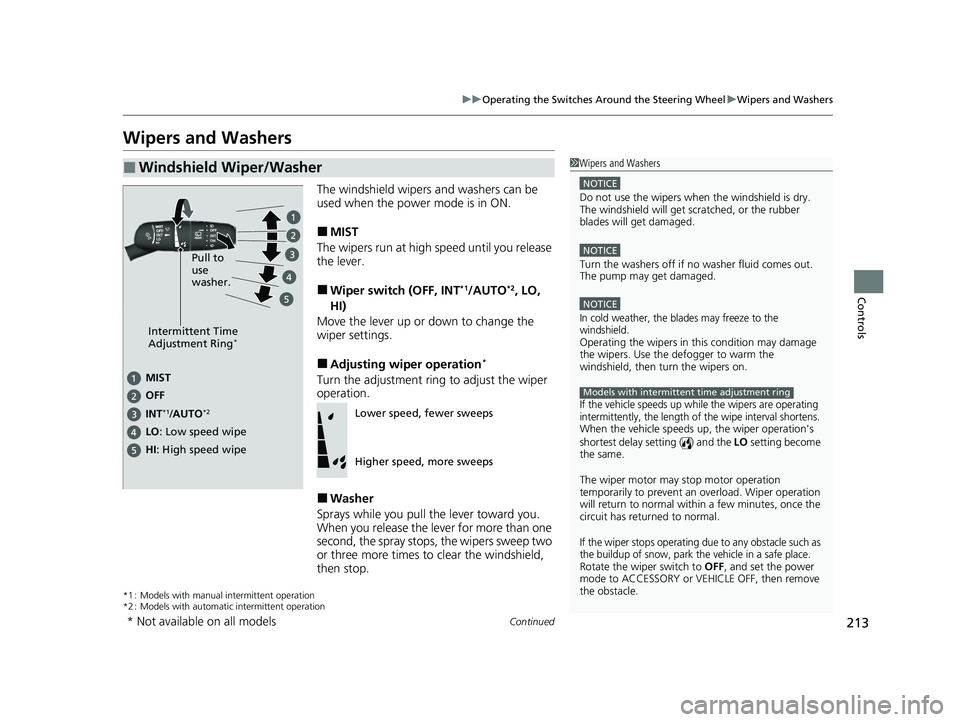
■MIST
The wipers run at high speed until you release
the lever.
■Wiper switch (OFF, INT*1/AUTO*2, LO,
HI)
Move the lever up or down to change the
wiper settings.
■Adjusting wiper operation*
Turn the adjustment ring to adjust the wiper
operation.
■Washer
Sprays while you pull the lever toward you.
When you release the le ver for more than one
second, the spray stops, the wipers sweep two
or three more times to clear the windshield,
then stop.
*1 : Models with manual intermittent operation
*2 : Models with automati c intermittent operation
■Windshield Wiper/Washer1Wipers and Washers
NOTICE
Do not use the wipers when the windshield is dry.
The windshield will get sc ratched, or the rubber
blades will get damaged.
NOTICE
Turn the washers off if no washer fluid comes out.
The pump may get damaged.
NOTICE
In cold weather, the blades may freeze to the
windshield.
Operating the wipers in th is condition may damage
the wipers. Use the defogger to warm the
windshield, then turn the wipers on.
If the vehicle speeds up while the wipers are operating
intermittently, the length of the wipe interval shortens.
When the vehicle speeds up, the wiper operation's
shortest delay setting ( ) and the LO setting become
the same.
The wiper motor may stop motor operation
temporarily to prevent an overload. Wiper operation
will return to normal within a few minutes, once the
circuit has returned to normal.
If the wiper stops operating due to any obstacle such as
the buildup of snow, park the vehicle in a safe place.
Rotate the wiper switch to OFF, and set the power
mode to ACCESSORY or VEHICLE OFF, then remove
the obstacle.
Models with intermittent time adjustment ring
Intermittent Time
Adjustment Ring*
MIST
INT
*1/AUTO*2
OFF
LO : Low speed wipe
HI: High speed wipe Pull to
use
washer.
Lower speed, fewer sweeps
Higher speed, more sweeps
* Not available on all models
23 CIVIC HATCHBACK TYPE R-31T406100_03.book 213 ページ 2022年6月23日 木曜日 午後9時28分
Page 217 of 840
215
uuOperating the Switches Around the Steering Wheel uWipers and Washers
Controls
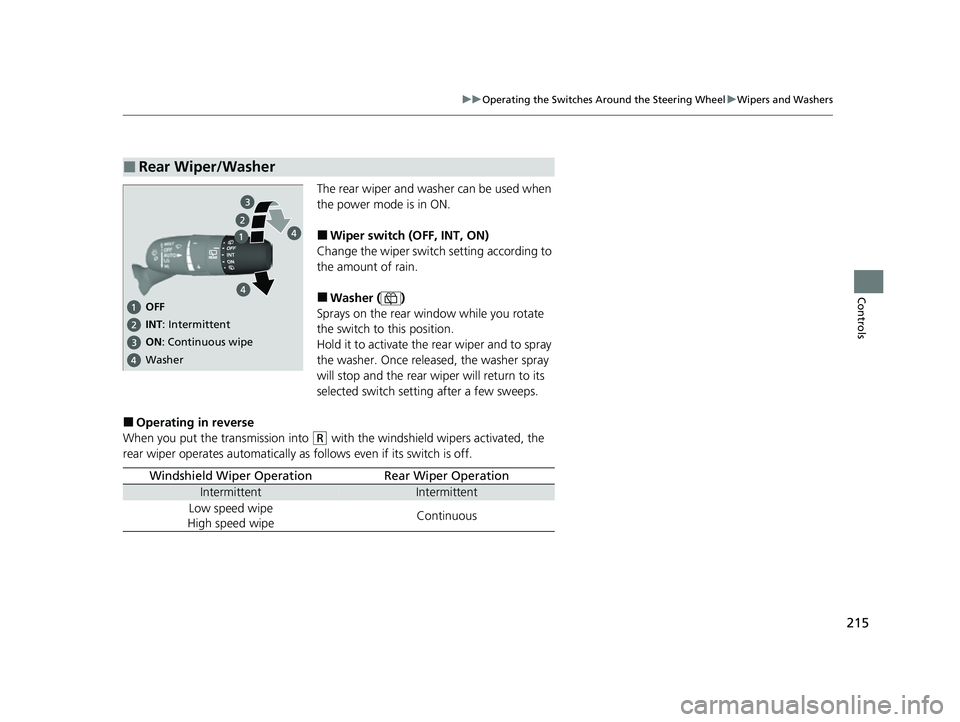
The rear wiper and washer can be used when
the power mode is in ON.
■Wiper switch (OFF, INT, ON)
Change the wiper switch setting according to
the amount of rain.
■Washer ( )
Sprays on the rear window while you rotate
the switch to this position.
Hold it to activate the rear wiper and to spray
the washer. Once released, the washer spray
will stop and the rear wiper will return to its
selected switch setting after a few sweeps.
■Operating in reverse
When you put the transmission into
(R with the windshield wipers activated, the
rear wiper operates automatically as follows even if its switch is off.
■Rear Wiper/Washer
OFF
ON: Continuous wipe
Washer
INT: Intermittent
Windshield Wiper OperationRear Wiper Operation
IntermittentIntermittent
Low speed wipe
High speed wipeContinuous
23 CIVIC HATCHBACK TYPE R-31T406100_03.book 215 ページ 2022年6月23日 木曜日 午後9時28分
Page 220 of 840
218
uuOperating the Switches Around the Steering Wheel uBrightness Control
Controls
Brightness Control
The brightness of the gauge is automatically
adjusted depending on the ambient
brightness.
• The brightness becomes darker when the
ambient light is dark.
• The brightness become s brighter when the
ambient light is bright.
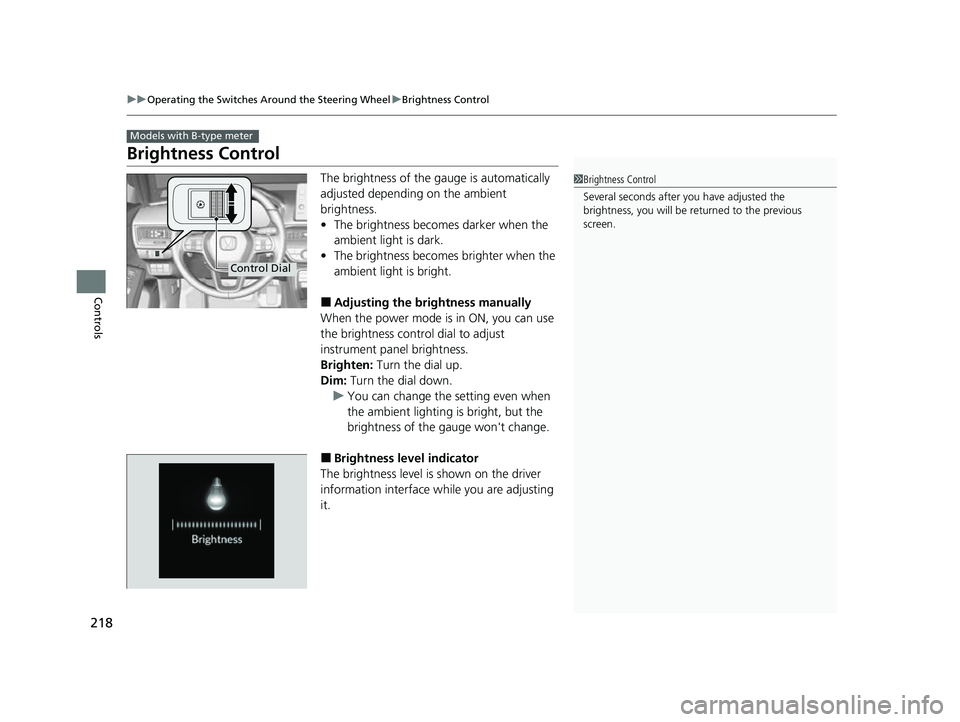
■Adjusting the brightness manually
When the power mode is in ON, you can use
the brightness control dial to adjust
instrument panel brightness.
Brighten: Turn the dial up.
Dim: Turn the dial down.
u You can change the setting even when
the ambient lighting is bright, but the
brightness of the gauge won't change.
■Brightness level indicator
The brightness level is shown on the driver
information interface wh ile you are adjusting
it.
Models with B-type meter
1 Brightness Control
Several seconds after you have adjusted the
brightness, you will be re turned to the previous
screen.
Control Dial
23 CIVIC HATCHBACK TYPE R-31T406100_03.book 218 ページ 2022年6月23日 木曜日 午後9時28分
Page 266 of 840
264
Features
Audio System Basic Operation
To use the audio system, the power mode must be in ACCESSORY or ON.
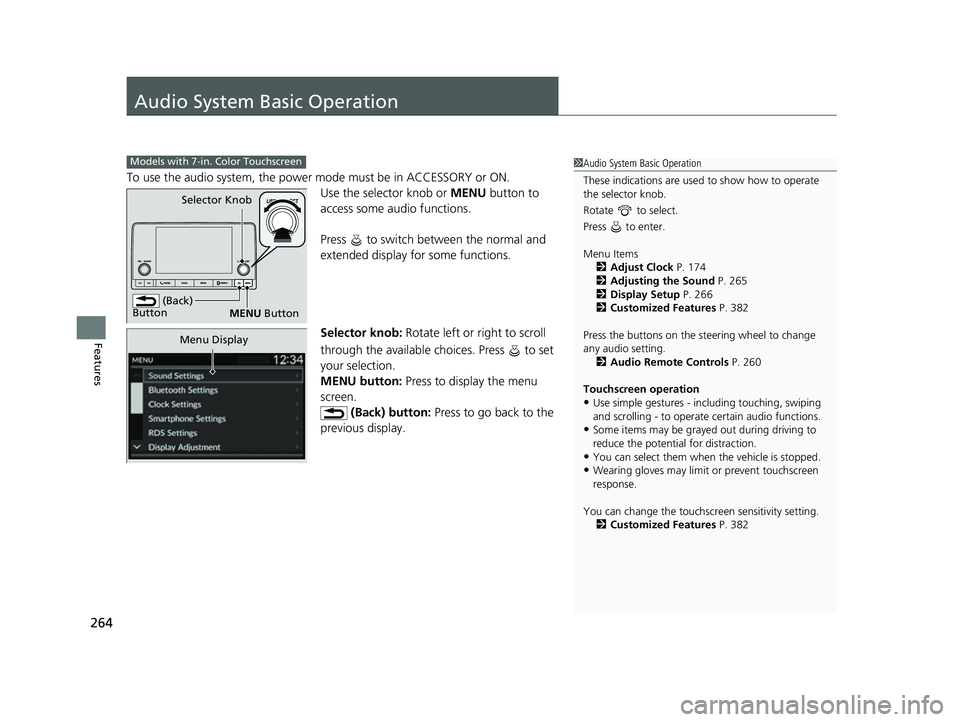
Use the selector knob or MENU button to
access some audio functions.
Press to switch between the normal and
extended display fo r some functions.
Selector knob: Rotate left or right to scroll
through the available choices. Press to set
your selection.
MENU button: Press to display the menu
screen. (Back) button: Press to go back to the
previous display.
Models with 7-in. Color Touchscreen1 Audio System Basic Operation
These indications are used to show how to operate
the selector knob.
Rotate to select.
Press to enter.
Menu Items 2 Adjust Clock P. 174
2 Adjusting the Sound P. 265
2 Display Setup P. 266
2 Customized Features P. 382
Press the buttons on the steering wheel to change
any audio setting. 2 Audio Remote Controls P. 260
Touchscreen operation
•Use simple gestures - in cluding touching, swiping
and scrolling - to operate certain audio functions.
•Some items may be grayed out during driving to
reduce the potential for distraction.
•You can select them when the vehicle is stopped.•Wearing gloves may limit or prevent touchscreen
response.
You can change the touchs creen sensitivity setting.
2 Customized Features P. 382
(Back)
Button
Selector Knob
MENU Button
Menu Display
23 CIVIC HATCHBACK TYPE R-31T406100_03.book 264 ページ 2022年6月23日 木曜日 午後9時28分
Page 281 of 840
279
uuAudio System Basic Operation uSiri Eyes Free
Features
Siri Eyes Free
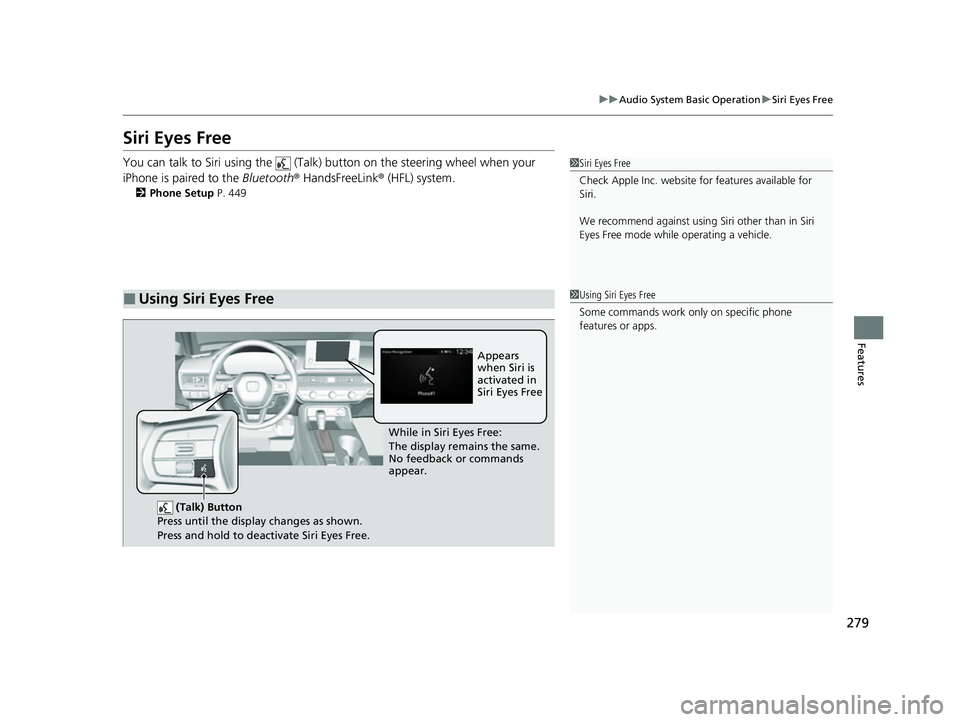
You can talk to Siri using the (Talk) button on the steering wheel when your
iPhone is paired to the Bluetooth® HandsFreeLink ® (HFL) system.
2Phone Setup P. 449
■Using Siri Eyes Free
1Siri Eyes Free
Check Apple Inc. website for features available for
Siri.
We recommend against using Si ri other than in Siri
Eyes Free mode whil e operating a vehicle.
1Using Siri Eyes Free
Some commands work only on specific phone
features or apps.
(Talk) Button
Press until the display changes as shown.
Press and hold to deactivate Siri Eyes Free.
While in Siri Eyes Free:
The display remains the same.
No feedback or commands
appear. Appears
when Siri is
activated in
Siri Eyes Free
23 CIVIC HATCHBACK TYPE R-31T406100_03.book 279 ページ 2022年6月23日 木曜日 午後9時28分
Page 320 of 840
uuAudio System Basic Operation uPlaying SiriusXM ® Radio
318
Features
1. Select Settings .
2. Select Tune Mode .
3. Select Channel or Category .
■To Change the Tune Mode1Playing SiriusXM ® Radio
In the channel mode, all available channels are
selectable. In the category mode, you can select a
channel within a ca tegory (Jazz, Rock, Classical, etc.).
There may be instances when SiriusXM ® Radio does
not broadcast all the data fi elds (artist name, title).
This does not indicate a problem with your audio
system.
SiriusXM ® Radio stations load in ascending order,
which can take about a minute. Once they have
loaded you will be able to scroll up or down to make
your selections.
Switching the Audio Mode
Roll the left selector wheel or select Audio Source
on the screen.
2 Audio Remote Controls P. 260
Tune Start:
When you change to a preset channel, a song being
played on that channel restarts from the beginning
with this function. This can be turned on or off by the
following procedure.
1. Select Settings.
2. Select Tune Start .
3. Select ON or OFF .
To change a category, select Category icons, or
select More and then select Category List.
23 CIVIC HATCHBACK TYPE R-31T406100_03.book 318 ページ 2022年6月23日 木曜日 午後9時28分
Page 363 of 840
361
Features
General Information on the Audio System
SiriusXM® Radio Service*
1.You need your radio ID ready before registering for subscription. To see the ID on
the screen, select Channel 0.
2. Have your radio ID ready, and either call or visit the SiriusXM® website to
subscribe.
Switch to the SiriusXM ® mode by using the audio remote controls on the steering
wheel, or through the audio/information sc reen, and stay in this mode for about 30
minutes until the service is activated. Make su re your vehicle is in an open area with
good reception.
Channel **** is not subscribed. Call SiriusXM to subscribe.
*1
You are not subscribed to the channel selected.
Subscription Updated:
SiriusXM ® radio is receiving informat ion update from the network.
Channel Not Available:
No such channel exists, or the artist or title information is unavailable.
No Signal:
The signal is too weak in the current location.
Check Tuner:
There is a problem with the SiriusXM ® tuner. Contact a dealer.
Antenna Disconnected, Antenna Shorted:
There is a problem with the SiriusXM ® antenna. Contact a dealer.
*1 : ****part is variable characters, and will change depending upon the channel selected.
■Subscribing to SiriusXM® Radio
■Receiving SiriusXM ® Radio
■SiriusXM ® Radio Display Messages
1 Subscribing to SiriusXM ® Radio
Contact Information for SiriusXM ® Radio:
•U.S.: SiriusXM ® Radio at www.siriusxm.com/
subscribenow , or 1-866-635-2349
•Canada: SiriusXM ® Canada at www.siriusxm.ca/
subscribe-now , or 1-877-209-0079
1Receiving SiriusXM ® Radio
The SiriusXM ® satellites are in orbit over the equator;
therefore, objects south of the vehicle may cause
satellite rece ption interruptions. Sa tellite signals are
more likely to be blocked by tall buildings and
mountains the farther north you travel from the
equator.
You may experience rece ption problems under the
following circumstances:
•In a location with an obstruction to the south of
your vehicle.
•In tunnels
•On the lower level of a multi-tiered road
•Large items carried on the roof rack
* Not available on all models
23 CIVIC HATCHBACK TYPE R-31T406100_03.book 361 ページ 2022年6月23日 木曜日 午後9時28分
Page 389 of 840
387
uuCustomized Features u
Continued
Features
*1:Default Setting
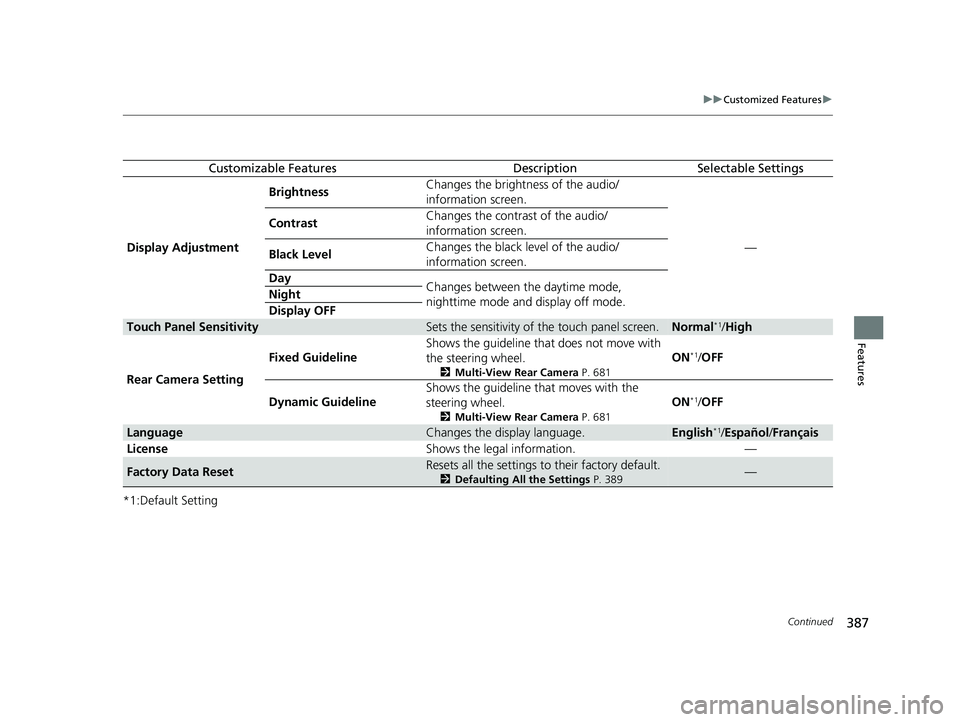
Customizable FeaturesDescriptionSelectable Settings
Display Adjustment Brightness
Changes the brightness of the audio/
information screen.
—
Contrast
Changes the contrast of the audio/
information screen.
Black Level Changes the black level of the audio/
information screen.
Day Changes between the daytime mode,
nighttime mode and display off mode.
Night
Display OFF
Touch Panel SensitivitySets the sensitivity of the touch panel screen.Normal*1/
High
Rear Camera Setting Fixed Guideline
Shows the guideline that
does not move with
the steering wheel.
2 Multi-View Rear Camera P. 681
ON*1/OFF
Dynamic Guideline Shows the guideline th
at moves with the
steering wheel.
2 Multi-View Rear Camera P. 681
ON*1/OFF
LanguageChanges the display language.English*1/Español /Français
License Shows the legal information. —
Factory Data ResetResets all the settings to their factory default.
2Defaulting All the Settings P. 389—
23 CIVIC HATCHBACK TYPE R-31T406100_03.book 387 ページ 2022年6月23日 木曜日 午後9時28分
Page 466 of 840
464
Features
Bluetooth® HandsFreeLink ®
Bluetooth® HandsFreeLink ® (HFL) allows you to place and receive phone calls using
your vehicle's audio system, without handling your cell phone.
Using HFL
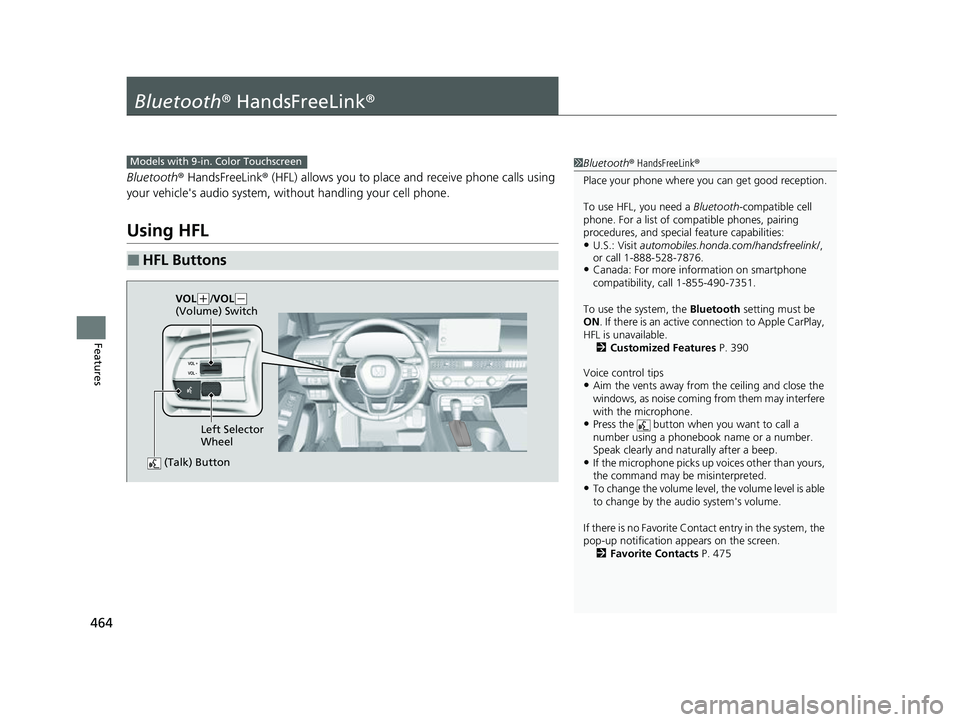
■HFL Buttons
1 Bluetooth ® HandsFreeLink ®
Place your phone where y ou can get good reception.
To use HFL, you need a Bluetooth-compatible cell
phone. For a list of compatible phones, pairing
procedures, and special feature capabilities:
•U.S.: Visit automobiles.honda.com /handsfreelink/,
or call 1-888-528-7876.
•Canada: For more info rmation on smartphone
compatibility, call 1-855-490-7351.
To use the system, the Bluetooth setting must be
ON . If there is an active c onnection to Apple CarPlay,
HFL is unavailable. 2 Customized Features P. 390
Voice control tips
•Aim the vents away from the ceiling and close the
windows, as noise coming from them may interfere
with the microphone.
•Press the button when you want to call a
number using a phonebook name or a number.
Speak clearly and naturally after a beep.
•If the microphone picks up vo ices other than yours,
the command may be misinterpreted.
•To change the volume level, the volume level is able
to change by the audio system's volume.
If there is no Favorite Contact entry in the system, the
pop-up notification appears on the screen. 2 Favorite Contacts P. 475
Models with 9-in. Color Touchscreen
(Talk) Button
Left Selector
Wheel
VOL
(
+/VOL(-
(Volume) Switch
23 CIVIC HATCHBACK TYPE R-31T406100_03.book 464 ページ 2022年6月23日 木曜日 午後9時28分
Page 509 of 840
Continued507
uuWhen Driving uShifting
Driving
Use the paddle shifters to change betw een 1st and 7th speeds without releasing
your hands from the steering wheel. The transmission switches to the 7-speed
manual shift mode when you pull a paddle shifter while driving. This mode is useful
when engine braking is needed.
■When the transmi ssion is in (D:
The shift mode goes into the 7-speed ma nual shift mode temporarily, and the
number is displayed in the shift indicator.
The 7-speed manual shift mode is canceled automatically if you drive at constant
speed or accelerate, and the number in the shift indicator goes off.
You can cancel this mode by pulling the
(+ paddle shifter for a few seconds.
The 7-speed manual shift mode is especially useful when reducing the vehicle speed
temporarily before making a turn.
■When the transmi ssion is in (D with SPORT mode:
The shift mode goes into the 7-speed manual shift mode. The M indicator and the
speed number are displayed in the shift indicator. As the vehicle speed slows down,
the transmission automatically shifts down accordingly. When the vehicle comes to
a stop, it automatically shifts down into 1st.
If the vehicle speed increases and the engi ne speed reaches near the tachometer red
zone, the transmission au tomatically shifts up.
You can only pull away in 1st speed.
When canceling the 7-speed manual shift mode, use the DRIVE MODE switch to
select other than SPORT mode or pull the
(+ paddle shifter for a few seconds.
When the 7-speed manual shift mode is canceled, the M indicator and shift
indicator will turn off.
■7-Speed Manual Shift Mode1 7-Speed Manual Shift Mode
In the 7-speed manual shif t mode, the transmission
shifts up or down by operating either paddle shifter
under the following conditions:
Shift Up: The engine sp eed reaches the lowest
threshold of the hi gher speed position.
Shift Down: The engine sp eed reaches the highest
threshold of the lower speed position.
When the engine speed reaches near the tachometer
red zone, the transmission shifts up automatically.
When the engine speed reaches the lowest threshold
of the selected speed positi on, the transmission shifts
down automatically.
Operating the paddle shifte rs on slippery surfaces
may cause the tires to lock up. In this case, the 7-
speed manual shift mode is canceled and goes back
to the normal
( D driving mode.
23 CIVIC HATCHBACK TYPE R-31T406100_03.book 507 ページ 2022年6月23日 木曜日 午後9時28分