lock HONDA CIVIC 2023 Manual PDF
[x] Cancel search | Manufacturer: HONDA, Model Year: 2023, Model line: CIVIC, Model: HONDA CIVIC 2023Pages: 840, PDF Size: 26.53 MB
Page 297 of 840
Continued295
uuAudio System Basic Operation uAudio/Information Screen
Features
■Select wallpaper
1. Press the button.
2. Select Clock.
3. Select Settings .
4. Select Clock Faces.
5. Select a desired picture to set.
u The preview is displayed on the screen.
6. Select Save.
u The clock screen which the wallpa per has been set is displayed.
■To view wallpaper once it is set
1. Press the button.
2. Select Clock.
■Delete wallpaper
1. Press the button.
2. Select Clock.
3. Select Settings .
4. Select Clock Faces.
5. Select Delete Photos .
6. Select a desired picture to delete.
u Multiple pictures can be selected at the same time.
7. Select OK.
u The selected pictures are displayed.
8. Select Delete .
u It will return to the cloc k wallpaper setting screen.
1Wallpaper Setup
You cannot delete the initial imported wallpapers.
23 CIVIC HATCHBACK TYPE R-31T406100_03.book 295 ページ 2022年6月23日 木曜日 午後9時28分
Page 363 of 840
361
Features
General Information on the Audio System
SiriusXM® Radio Service*
1.You need your radio ID ready before registering for subscription. To see the ID on
the screen, select Channel 0.
2. Have your radio ID ready, and either call or visit the SiriusXM® website to
subscribe.
Switch to the SiriusXM ® mode by using the audio remote controls on the steering
wheel, or through the audio/information sc reen, and stay in this mode for about 30
minutes until the service is activated. Make su re your vehicle is in an open area with
good reception.
Channel **** is not subscribed. Call SiriusXM to subscribe.
*1
You are not subscribed to the channel selected.
Subscription Updated:
SiriusXM ® radio is receiving informat ion update from the network.
Channel Not Available:
No such channel exists, or the artist or title information is unavailable.
No Signal:
The signal is too weak in the current location.
Check Tuner:
There is a problem with the SiriusXM ® tuner. Contact a dealer.
Antenna Disconnected, Antenna Shorted:
There is a problem with the SiriusXM ® antenna. Contact a dealer.
*1 : ****part is variable characters, and will change depending upon the channel selected.
■Subscribing to SiriusXM® Radio
■Receiving SiriusXM ® Radio
■SiriusXM ® Radio Display Messages
1 Subscribing to SiriusXM ® Radio
Contact Information for SiriusXM ® Radio:
•U.S.: SiriusXM ® Radio at www.siriusxm.com/
subscribenow , or 1-866-635-2349
•Canada: SiriusXM ® Canada at www.siriusxm.ca/
subscribe-now , or 1-877-209-0079
1Receiving SiriusXM ® Radio
The SiriusXM ® satellites are in orbit over the equator;
therefore, objects south of the vehicle may cause
satellite rece ption interruptions. Sa tellite signals are
more likely to be blocked by tall buildings and
mountains the farther north you travel from the
equator.
You may experience rece ption problems under the
following circumstances:
•In a location with an obstruction to the south of
your vehicle.
•In tunnels
•On the lower level of a multi-tiered road
•Large items carried on the roof rack
* Not available on all models
23 CIVIC HATCHBACK TYPE R-31T406100_03.book 361 ページ 2022年6月23日 木曜日 午後9時28分
Page 364 of 840
362
uuGeneral Information on the Audio System uCompatible iPod, iPhone, and USB Flash Drives
Features
Compatible iPod, iPhone, and USB Flash Drives
• A USB flash drive of 256 MB or higher is recommended.
• Some digital audio players may not be compatible.
• Some USB flash drives (e.g., a device with security lockout) may not work.
• Some software files may not allow for audio play or text data display.
• Some versions of MP3, WMA, AAC, FLAC, or WAV formats may be unsupported.
*1: Models with 9-in. Color Touchscreen
*2: Models with 7-in. Color Touchscreen
■iPod and iPhone Model Compatibility
Model
Made for iPod touch (6th to 7th generation) released between 2015 and 2019
Made for iPhone 5s/iPhone 6/iPhone 6 Plus/iPhone 6S/iPhone 6S Plus/iPhone SE/
iPhone 7/iPhone 7 Plus/iPhone 8/iPhone 8 Plus/iPhone X/ iPhone XS/iPhone XS Max/
iPhone XR/iPhone 11/iPhone 11 Pro/iPhone 11 Pro Max /iPhone SE (2nd generation)
Model
Made for iPod touch (5th to 6th generation) released between 2012 and 2015
Made for iPhone 4s/iPhone 5/iPhone 5s/iPhone 5c/iPhone 6/iPhone 6 Plus/iPhone 6S/
iPhone 6S Plus/iPhone SE/iPh one 7/iPhone 7 Plus/iPhone 8/iPhone 8 Plus/iPhone X/
iPhone XS/iPhone XS Max/iPhone XR/iPhone 11/iPhone 11 Pro/iPhone 11 Pro Max
1 iPod and iPhone Model Compatibility
This system may not work with all software versions
of these devices.
The Lightning connector works with iPhone 5
*1,
iPhone 5s, iPhone 5c*1, iPhone 6, iPhone 6 Plus,
iPhone 6S, iPhone 6S Plus, iPhone SE, iPhone 7,
iPhone 7 Plus, iPhone 8, iPhone 8 Plus, iPhone X,
iPhone XS, iPhone XS Max, iPhone XR, iPhone 11,
iPhone 11 Pro, iPhone 11 Pr o Max, iPhone SE (2nd
generation)
*2, iPod touch (5th*1, 6th, 7th*2
generation).
The 30-pin connector works with iPhone 4s
*1.
USB works with iPhone 4s
*1, iPhone 5*1, iPhone 5s,
iPhone 5c*1, iPhone 6, iPhone 6 Plus, iPhone 6S,
iPhone 6S Plus, iPhone SE, iPhone 7, iPhone 7 Plus,
iPhone 8, iPhone 8 Plus, iP hone X, iPhone XS, iPhone
XS Max, iPhone XR, iPhone 11, iPhone 11 Pro, iPhone
11 Pro Max, iPhone SE (2nd generation)
*2, iPod touch
(5th*1, 6th, 7th*2 generation).
Models with 7-in. Color Touchscreen
Models with 9-in. Color Touchscreen
■USB Flash Drives1 USB Flash Drives
Files on the USB flash drive are played in their stored
order. This order may be different from the order
displayed on your PC or device.
23 CIVIC HATCHBACK TYPE R-31T406100_03.book 362 ページ 2022年6月23日 木曜日 午後9時28分
Page 385 of 840
383
uuCustomized Features u
Continued
Features
■Customization Flow
Press the MENU button.
Sound Settings
Bluetooth Settings
Bass / Treble
Balance / Fader
Speed Volume Compensation
Connect New Device
Change Device
Priority Device
Clock Settings
Smartphone Settings
Disconnect All Device
Delete Device
Automatic Time
Set Time
Time Zone
Apple CarPlay
Android Auto
Daylight Saving Time
23 CIVIC HATCHBACK TYPE R-31T406100_03.book 383 ページ 2022年6月23日 木曜日 午後9時28分
Page 388 of 840
386
uuCustomized Features u
Features
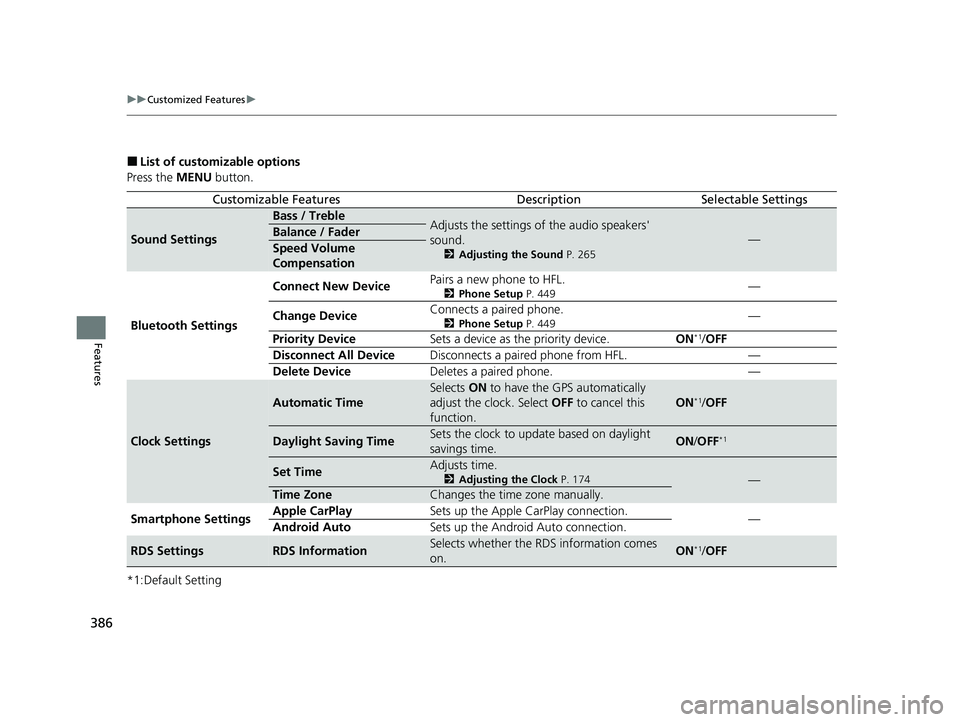
■List of customizable options
Press the MENU button.
*1:Default Setting
Customizable FeaturesDescriptionSelectable Settings
Sound Settings
Bass / TrebleAdjusts the settings of the audio speakers'
sound.
2 Adjusting the Sound P. 265
—Balance / Fader
Speed Volume
Compensation
Bluetooth Settings Connect New Device
Pairs a new phone to HFL.
2
Phone Setup P. 449—
Change Device Connects a paired phone.
2
Phone Setup P. 449—
Priority Device Sets a device as the priority device. ON
*1/OFF
Disconnect All Device Disconnects a paired phone from HFL. —
Delete Device Deletes a paired phone. —
Clock Settings
Automatic Time
Selects ON to have the GPS automatically
adjust the clock. Select OFF to cancel this
function.
ON*1/ OFF
Daylight Saving TimeSets the clock to update based on daylight
savings time.ON /OFF*1
Set TimeAdjusts time.
2 Adjusting the Clock P. 174—
Time ZoneChanges the time zone manually.
Smartphone Settings Apple CarPlay
Sets up the Apple CarPlay connection.
—
Android Auto Sets up the Android Auto connection.
RDS SettingsRDS InformationSelects whether the RDS information comes
on.ON*1/OFF
23 CIVIC HATCHBACK TYPE R-31T406100_03.book 386 ページ 2022年6月23日 木曜日 午後9時28分
Page 397 of 840
395
uuCustomized Features u
Continued
Features
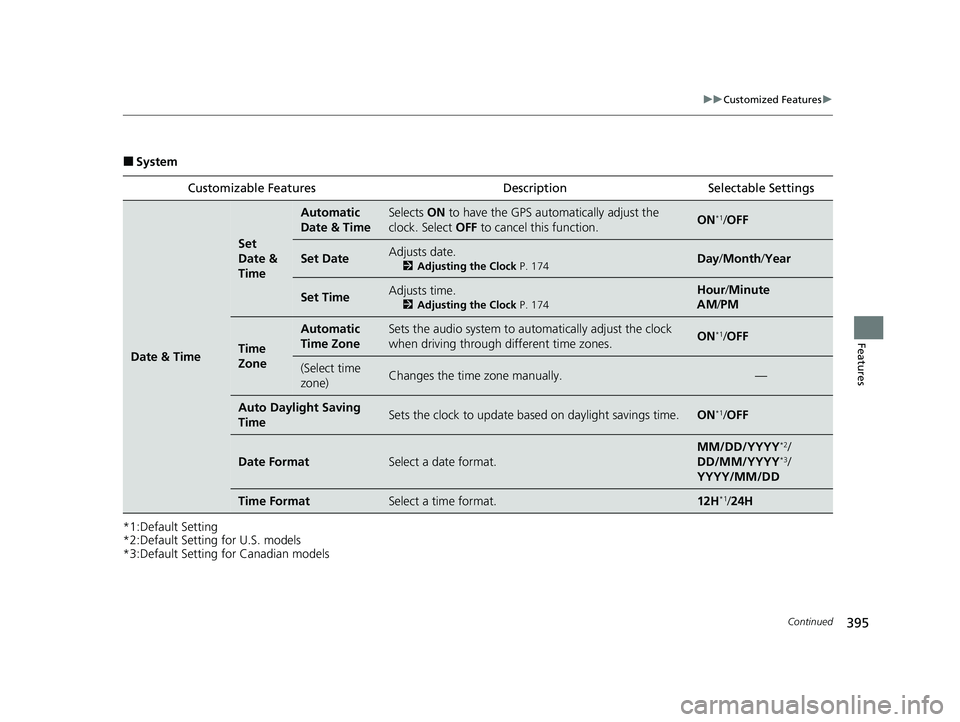
■System
*1:Default Setting
*2:Default Setting for U.S. models
*3:Default Setting for Canadian models Customizable Features Description Selectable Settings
Date & Time
Set
Date &
Time
Automatic
Date & TimeSelects
ON to have the GPS auto matically adjust the
clock. Select OFF to cancel this function.ON*1/OFF
Set DateAdjusts date.
2 Adjusting the Clock P. 174Day/Month/ Year
Set TimeAdjusts time.
2Adjusting the Clock P. 174
Hour/Minute
AM /PM
Time
Zone
Automatic
Time ZoneSets the audio system to au tomatically adjust the clock
when driving through different time zones.ON*1/ OFF
(Select time
zone)Changes the time zone manually.—
Auto Daylight Saving
TimeSets the clock to update based on daylight savings time.ON*1/OFF
Date FormatSelect a date format.
MM/DD/YYYY*2/
DD/MM/YYYY*3/
YYYY/MM/DD
Time FormatSelect a time format.12H*1/ 24H
23 CIVIC HATCHBACK TYPE R-31T406100_03.book 395 ページ 2022年6月23日 木曜日 午後9時28分
Page 406 of 840
404
uuCustomized Features u
Features
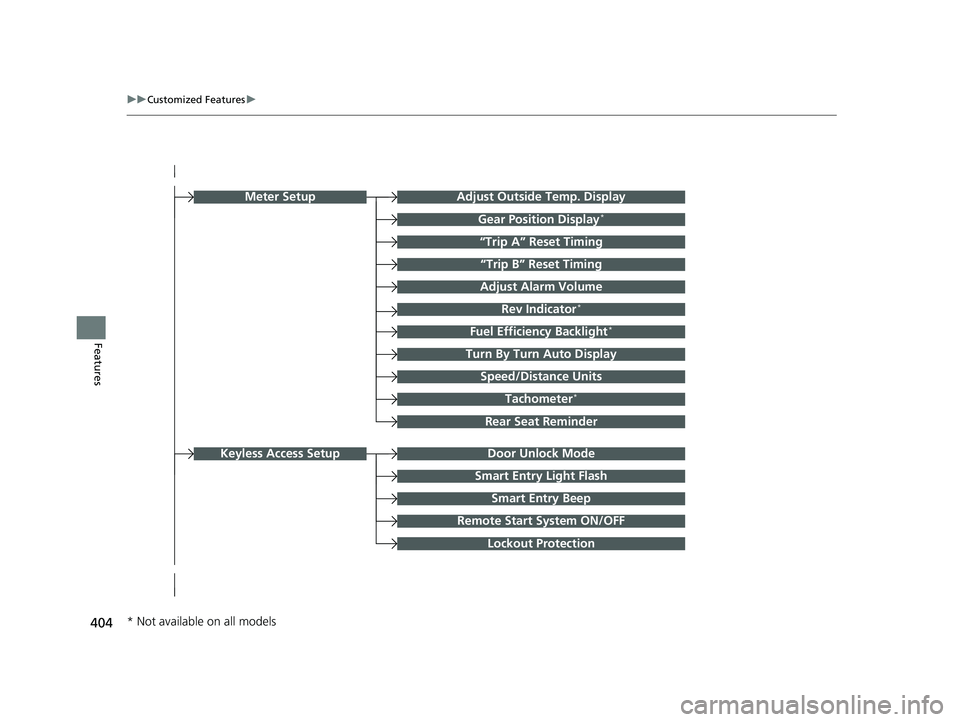
Turn By Turn Auto Display
Speed/Distance Units
Smart Entry Light Flash
Rear Seat Reminder
Door Unlock Mode
Smart Entry Beep
Remote Start System ON/OFF
Lockout Protection
Keyless Access Setup
Adjust Outside Temp. Display
“Trip A” Reset Timing
“Trip B” Reset Timing
Adjust Alarm Volume
Fuel Efficiency Backlight*
Rev Indicator*
Tachometer*
Gear Position Display*
Meter Setup
* Not available on all models
23 CIVIC HATCHBACK TYPE R-31T406100_03.book 404 ページ 2022年6月23日 木曜日 午後9時28分
Page 407 of 840
405
uuCustomized Features u
Continued
Features
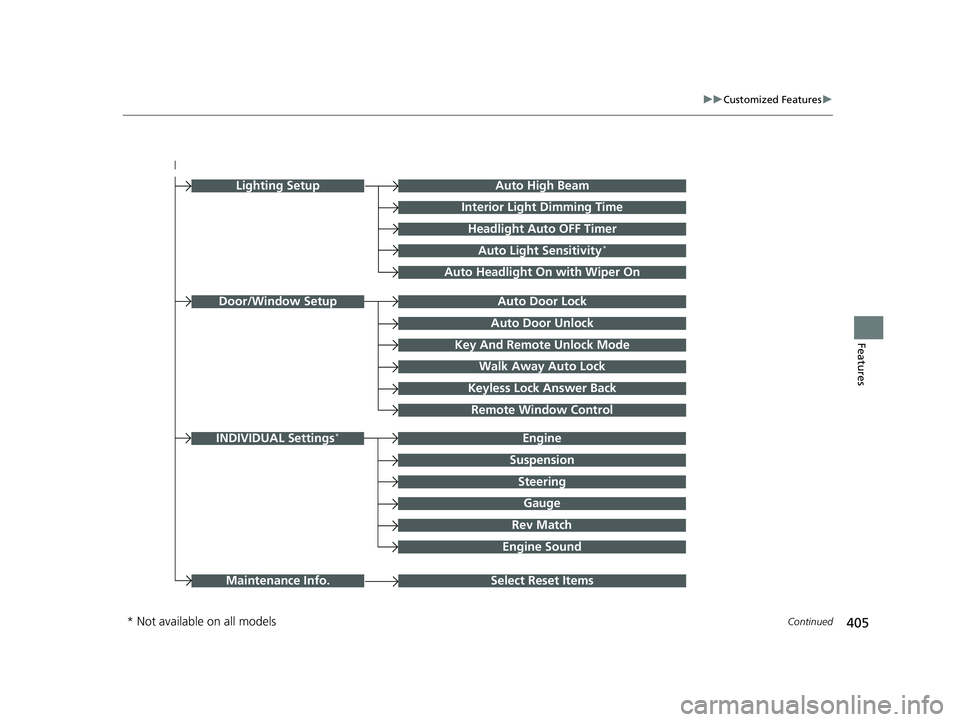
Auto Door Unlock
Auto Door Lock
Key And Remote Unlock Mode
Walk Away Auto Lock
Keyless Lock Answer Back
Door/Window Setup
Lighting SetupAuto High Beam
Interior Light Dimming Time
Headlight Auto OFF Timer
Auto Light Sensitivity*
Auto Headlight On with Wiper On
Remote Window Control
Select Reset ItemsMaintenance Info.
Suspension
Engine
Steering
Gauge
Rev Match
INDIVIDUAL Settings*
Engine Sound
* Not available on all models
23 CIVIC HATCHBACK TYPE R-31T406100_03.book 405 ページ 2022年6月23日 木曜日 午後9時28分
Page 411 of 840
409
uuCustomized Features u
Continued
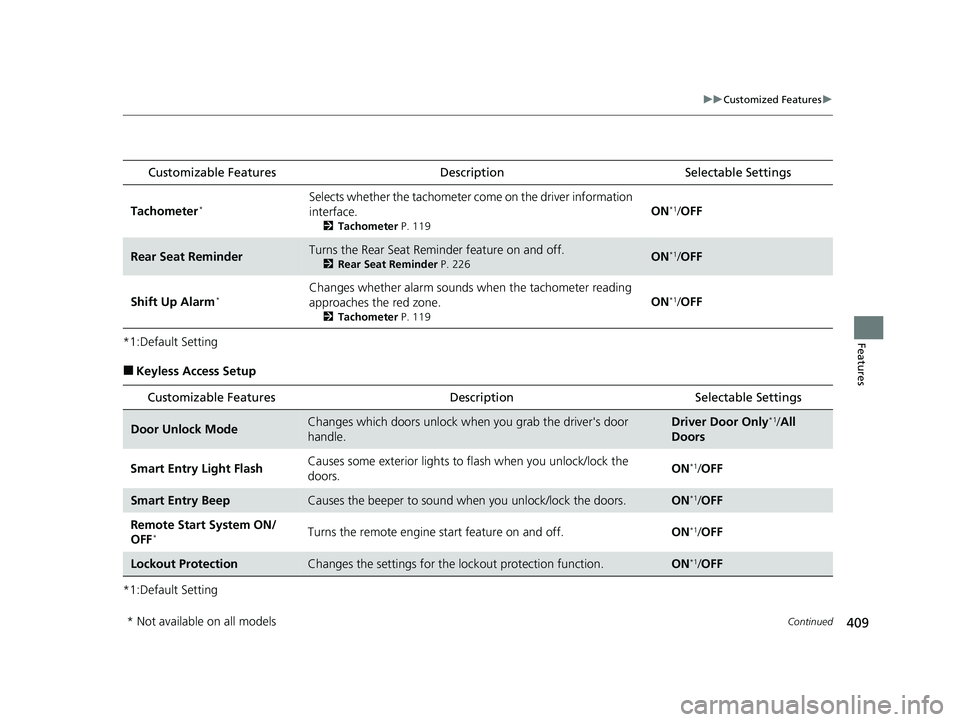
Features*1:Default Setting
■Keyless Access Setup
*1:Default Setting
Customizable Features DescriptionSelectable Settings
Tachometer*Selects whether the tachometer come on the driver information
interface.
2 Tachometer P. 119
ON*1/OFF
Rear Seat ReminderTurns the Rear Seat Reminder feature on and off.
2 Rear Seat Reminder P. 226ON*1/OFF
Shift Up Alarm*Changes whether alarm sounds when the tachometer reading
approaches the red zone.
2 Tachometer P. 119
ON*1/OFF
Customizable Features Description Selectable Settings
Door Unlock ModeChanges which doors unlock when you grab the driver's door
handle.Driver Door Only*1/All
Doors
Smart Entry Light Flash Causes some exterior lights to
flash when you unlock/lock the
doors. ON
*1/
OFF
Smart Entry BeepCauses the beeper to sound wh en you unlock/lock the doors.ON*1/OFF
Remote Start System ON/
OFF
*Turns the remote engine start feature on and off. ON*1/OFF
Lockout ProtectionChanges the settings for the lo ckout protection function.ON*1/OFF
* Not available on all models
23 CIVIC HATCHBACK TYPE R-31T406100_03.book 409 ページ 2022年6月23日 木曜日 午後9時28分
Page 413 of 840
411
uuCustomized Features u
Continued
Features
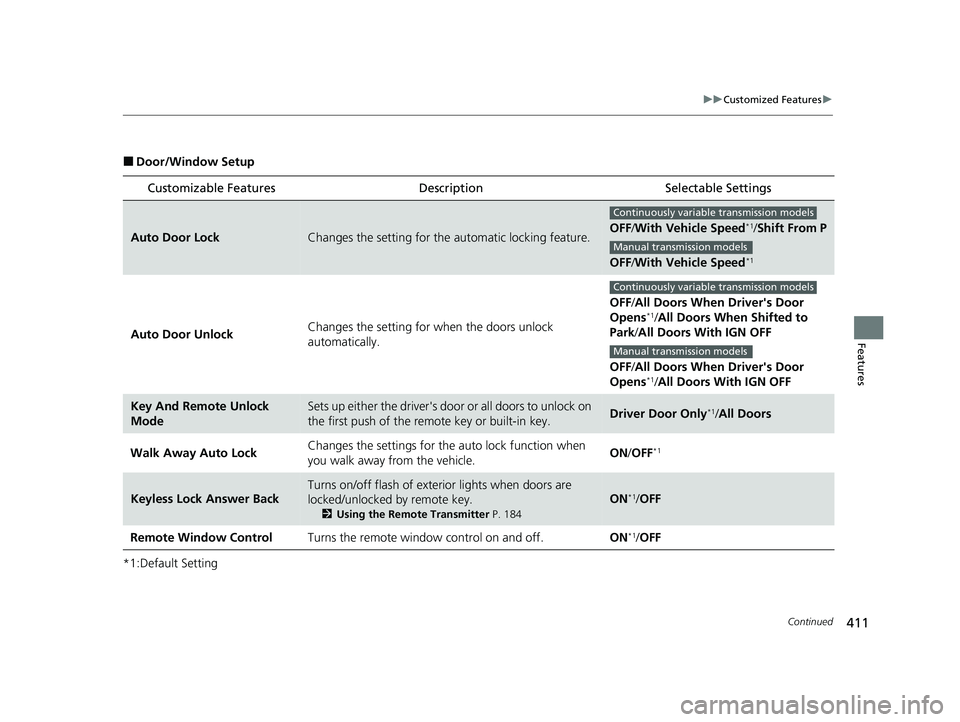
■Door/Window Setup
*1:Default Setting
Customizable Features Description Selectable Settings
Auto Door LockChanges the setting for the automatic locking feature.OFF/With Vehicle Speed*1/ Shift From P
OFF /With Vehicle Speed
*1
Auto Door Unlock Changes the setting for when the doors unlock
automatically. OFF
/All Doors When Driver's Door
Opens
*1/ All Doors When Shifted to
Park /All Doors With IGN OFF
OFF /All Doors When Driver's Door
Opens
*1/ All Doors With IGN OFF
Key And Remote Unlock
ModeSets up either the driver's door or all doors to unlock on
the first push of the remote key or built-in key.Driver Door Only*1/All Doors
Walk Away Auto Lock Changes the settings for the
auto lock function when
you walk away from the vehicle. ON
/OFF
*1
Keyless Lock Answer Back
Turns on/off flash of exte rior lights when doors are
locked/unlocked by remote key.
2 Using the Remote Transmitter P. 184
ON*1/OFF
Remote Window Control Turns the remote window control on and off. ON
*1/OFF
Continuously variable transmission models
Manual transmission models
Continuously variable transmission models
Manual transmission models
23 CIVIC HATCHBACK TYPE R-31T406100_03.book 411 ページ 2022年6月23日 木曜日 午後9時28分