ignition HONDA CIVIC COUPE 1999 Owner's Manual
[x] Cancel search | Manufacturer: HONDA, Model Year: 1999, Model line: CIVIC COUPE, Model: HONDA CIVIC COUPE 1999Pages: 269, PDF Size: 2.42 MB
Page 102 of 269
Audio System
Press the EJECT button to remove
the disc from the player.
If you eject the disc, but do not
remove it from the slot, the system
will automatically reload the disc after 15 seconds and put the CD
player in pause mode. To begin
playing the disc, press the CD button.
CD Changer
Using the instructions that came
with the changer, load the desired CDs in the magazine, and load the
magazine in the changer. Play only standard round discs. Odd-shaped
CDs may jam in the drive or cause
other problems.
Press the CD/TAPE button. You willsee "CD" in the display. The system
will start to play the first track of the
first disc. When that disc ends, the next disc in the magazine is loaded
and played. After the last disc
finishes, the system returns to disc 1. To select a different disc, press the
appropriate preset button (1 — 6). If
you select an empty slot in the magazine, the changer will, after
finding that slot empty, try to load the CD in the next slot. This
continues until it finds a CD to load
and play.
CD Player and Changer
You can use the TUNE/SEEK bar to select tracks within a disc. If you
press and release the TUNE/SEEK
bar, the system will move to the
beginning of a track. Press the side to move to the beginning
of the next track, and the side
to move to the beginning of the
current track.
If you press and hold the TUNE/SEEK bar, you will hear a beep and
the system will continue to move
across tracks. Release the bar when
you think it has reached the desired
place on the disc. REPEAT — When you activate the
Repeat feature by pressing the RPT
button, the system continuously
replays the current track. You will
see RPT in the display as a reminder.
Press the RPT button again to turn it
off.
To take the system out of CD mode, press the AM/FM button or insert acassette in the player. If a tape is
already in the cassette player, press
the CD/TAPE button. When you
return to CD mode, play will contin-
ue at the same point that it left off.
If you turn the system off while a CD is playing, either with the PWR/VOL
knob or the ignition switch, play will continue at the same point when you
turn it back on.
Comfort and Convenience FeaturesMain Menu Table of Contents s t
Page 105 of 269
Audio System
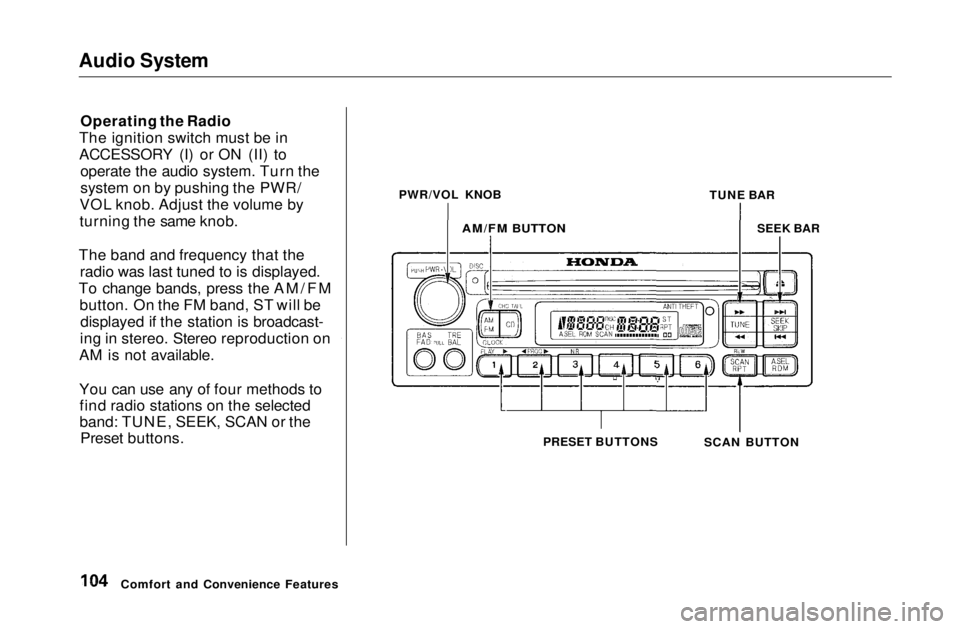
Operating the Radio
The ignition switch must be in
ACCESSORY (I) or ON (II) to operate the audio system. Turn the
system on by pushing the PWR/
VOL knob. Adjust the volume by
turning the same knob.
The band and frequency that the radio was last tuned to is displayed.
To change bands, press the AM/FM button. On the FM band, ST will bedisplayed if the station is broadcast-
ing in stereo. Stereo reproduction on
AM is not available.
You can use any of four methods to find radio stations on the selected
band: TUNE, SEEK, SCAN or the Preset buttons.
Comfort and Convenience Features PWR/VOL KNOB
TUNE BAR
AM/FM BUTTON
SEEK BAR
SCAN BUTTON
PRESET BUTTONSMain Menu Table of Contents s t
Page 109 of 269
Audio System
Audio System Lighting
You can use the instrument panelbrightness control dial to adjust the il-
lumination of the audio system (see
page 62). The audio system
illuminates when the parking lightsare on, even if the radio is turned off.
Digital Clock
The display of your audio system usually shows the time when the
ignition switch is in ACCESSORY (I)or ON (II). It shows operation mode
of radio, CD player, or optional CD
changer/cassette player when you
operate them, and goes back to the
time display after five seconds.
The display also goes back to the time display two seconds after you
turn the volume knob to adjust the
volume.
If an error occurs while operating
the CD player or optional CD changer, the display will show the
error code and will not switch to the time display until the error is
corrected (see page 133 and 134).
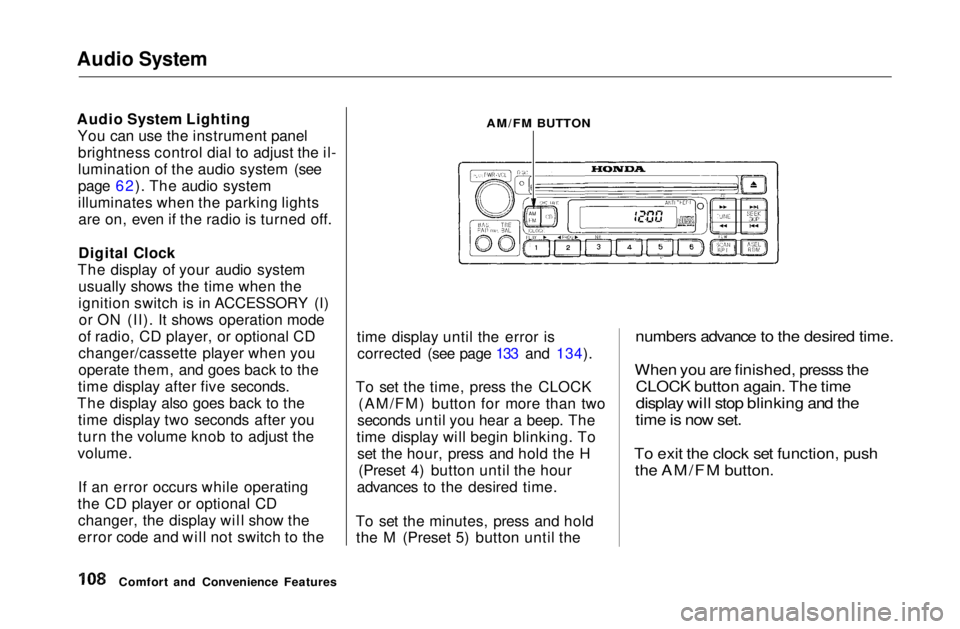
To set the time, press the CLOCK (AM/FM) button for more than two
seconds until you hear a beep. The
time display will begin blinking. To set the hour, press and hold the H (Preset 4) button until the hour
advances to the desired time.
To set the minutes, press and hold the M (Preset 5) button until the
numbers advance to the desired time.
When you are finished, presss the
CLOCK button again. The time
display will stop blinking and the
time is now set.
To exit the clock set function, push
the AM/FM button.
Comfort and Convenience Features
AM/FM BUTTONMain Menu Table of Contents s t
Page 110 of 269
Audio System
Operating the CD Player
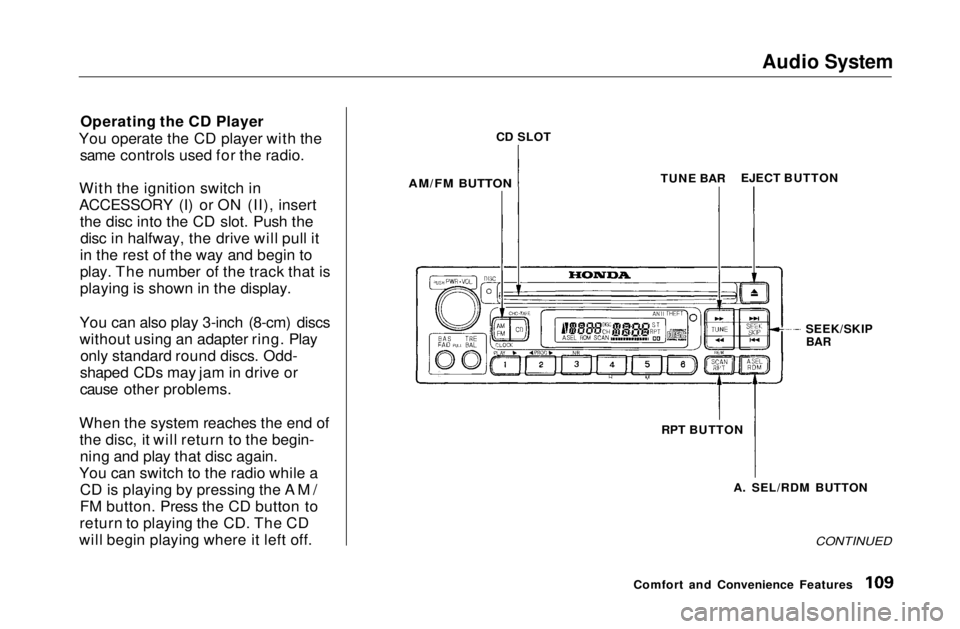
You operate the CD player with the same controls used for the radio.
With the ignition switch in
ACCESSORY (I) or ON (II), insert the disc into the CD slot. Push thedisc in halfway, the drive will pull it
in the rest of the way and begin to
play. The number of the track that is
playing is shown in the display.
You can also play 3-inch (8-cm) discs
without using an adapter ring. Play only standard round discs. Odd-
shaped CDs may jam in drive or
cause other problems.
When the system reaches the end of the disc, it will return to the begin-ning and play that disc again.
You can switch to the radio while a CD is playing by pressing the AM/
FM button. Press the CD button to
return to playing the CD. The CD
will begin playing where it left off.
CONTINUED
Comfort and Convenience Features
CD SLOT
AM/FM BUTTON
TUNE BAR
EJECT BUTTON
SEEK/SKIP
BAR
RPT BUTTON A. SEL/RDM BUTTONMain Menu Table of Contents s t
Page 111 of 269
Audio System
If you turn the system off while a CD
is playing, either with the PWR/VOL
knob or by turning off the ignition,
the disc will stay in the drive. When
you turn the system back on, the CD will begin playing where it left off.
Press the eject button to remove thedisc from the drive.
If you eject the disc, but do not
remove it from the slot, the system
will automatically reload the disc after 15 seconds and put the CD
player in pause mode. To begin
playing the disc, press the CD button. You can use the TUNE and SEEK/
SKIP bars while a disc is playing toselect passages and changers tracks.
To move rapidly within a track, press and hold the TUNE bar. Press the side to move forward. You will
see CUE in the display. Press the side to move backward. You
will see REW displayed. Release the bar when the system reaches the
point you want. Each time you press the side of
the SEEK/SKIP bar, the system skips forward to the beginning of the next track. Press the side to
skip backward to the beginning of
the current track. Press it again to skip to the beginning of the previous
track.
REPEAT — To activate the Repeat
feature, press and release the RPT
button. You will see RPT in the display. The system continuously replays the current track. Press the
RPT button again to turn it off.
RANDOM PLAY — This feature,
when activated, plays the tracks on the CD in random order, rather than
in the order they are recorded on theCD. To activate Random Play, press
and release the A. SEL/RDM button.
You will see RDM in the display. The system will then select and play
tracks randomly. This continues
until you deactivate Random Play by
pressing A. SEL/RDM again.
If the system is in Repeat mode, you
must turn it off by pressing RPT
button before selecting Random Play.
Comfort and Convenience FeaturesMain Menu Table of Contents s t
Page 117 of 269
Audio System
The tape direction indicator will light to show you which side of the cassette is playing. The indicates
the side you inserted facing upward
is now playing. If you want to play
the other side, press the PROG
button.
Dolby B noise reduction turns on
when you insert a cassette. If the tape was not recorded with Dolby Bnoise reduction, turn it off by
pressing the NR button.
Dolby remains off until you turn it on
by pressing the button again.
When the system reaches the end of the tape, it will automatically reversedirection and play the other side. If
you want to remove the cassette
from the drive, press the EJECT button on the cassette player. If you turn the system off while a
tape is playing, either with the PWR/
VOL knob or by turning off the ignition, the cassette will remain in
the drive. When you turn the system
back on, the cassette player will be in pause mode. To begin playing, pressthe PLAY button.
To switch to the radio or CD player while a tape is playing, press the
AM/FM, or CD button. To changeback to the cassette player, push the CD button.Tape Search Functions
With a cassett
e playing, you can use
the FF, REW, SKIP, or REPEAT
function to find a desired program.
FF/REW — Fast Forward andRewind move the tape rapidly. Press and release the side of the
TUNE bar to fast forward the tape, or the side to rewind. You will
see FF or REW flashing in the
display. To stop fast forward or
rewind, press either side of the
TUNE bar or the PLAY button. If the system reaches the end of the tape
while in fast forward or rewind, it automatically stops that function,
reverses direction, and begins to play.
Comfort and Convenience FeaturesMain Menu Table of Contents s t
Page 136 of 269
Preparing to Drive
You should do the following checks and adjustments every day before
you drive your car.
1. Make sure all windows, mirrors, and outside lights are clean and
unobstructed. Remove frost, snow,or ice.
2. Check that the hood and trunk are fully closed.
3. Visually check the tires. If a tire looks low, use a gauge to check its
pressure. 4. Check that any items you may be
carrying with you inside are stored
properly or fastened downsecurely.
5. Check the adjustment of the seat (see page 76).
6. Check the adjustment of the inside and outside mirrors (see
page 81).
7. Check the adjustment of the steering wheel (see page 65).
8. Make sure the doors are securely closed and locked. 9. Fasten your seat belt. Check that
your passengers have fastenedtheir seat belts (see page 8).
10.Turn the ignition switch ON (II). Check the indicator lights in the
instrument panel.
11.Start the engine (see page 137).
12. Check the gauges and indicator lights in the instrument panel (see
page 53).
DrivingMain Menu Table of Contents s t
Page 137 of 269
Starting the Engine
1. Apply the parking brake.
2. In cold weather, turn off all
electrical accessories to reduce
the drain on the battery.
3. Manual Transmission:
Push the clutch pedal down all the
way. START (III) does not function unless the clutch pedal is
depressed.
Automatic Transmission (Including
CVT):
Make sure the shift lever is in
Park. Press on the brake pedal.
4. Without touching the accelerator
pedal, turn the ignition key to the
START (III) position. If the enginedoes not start right away, do not
hold the key in START (III) for
more than 15 seconds at a time.
Pause for at least 10 seconds
before trying again.
5. If the engine does not start within
15 seconds, or starts but stalls
right away, repeat step 4 with the accelerator pedal pressed half-way
down. If the engine starts, release
pressure on the accelerator pedalso the engine does not race.
6. If the engine still does not start, press the accelerator pedal all the
way down and hold it there while starting in order to clear flooding.
As before, keep the ignition key in the START (III) position for nomore than 15 seconds. Return tostep 5 if the engine does not start.
If it starts, lift your foot off the
accelerator pedal so the engine does not race.
Starting in Cold Weather at High
Altitude (Above 8,000 feet/
2,400 meters)
An engine is harder to start in cold weather. The thinner air found at
high altitude above 8,000 feet (2,400 meters) adds to the problem.
Use the following procedure:
1. Turn off all electrical accessories to reduce the drain on the battery.
2. Push the accelerator pedal half- way to the floor and hold it there
while starting the engine. Do nothold the ignition key in START (III) for more than 15 seconds.
When the engine starts, release the accelerator pedal gradually as
the engine speeds up and smoothsout.
3. If the engine fails to start in step 2, push the accelerator pedal to the
floor and hold it there while you try to start the engine for no more
than 15 seconds. If the enginedoes not start, return to step 2.
DrivingMain Menu Table of Contents s t
Page 141 of 269
Automatic Transmission
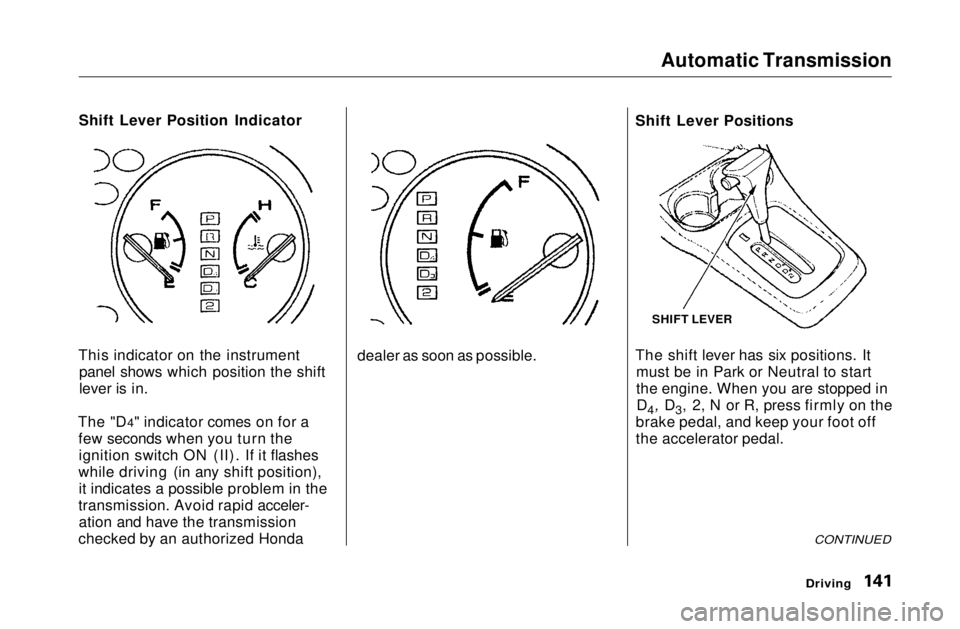
Shift Lever Position Indicator
This indicator on the instrument panel shows which position the shift
lever is in.
The "D4" indicator comes on for a few seconds when you turn theignition switch ON (II). If it flashes
while driving (in any shift position), it indicates a possible problem in the
transmission. Avoid rapid acceler- ation and have the transmission
checked by an authorized Honda dealer as soon as possible.Shift Lever Positions
The shift lever has six positions. It
must be in Park or Neutral to start
the engine. When you are stopped inD4, D3, 2, N or R, press firmly on the
brake pedal, and keep your foot off
the accelerator pedal.
CONTINUED
Driving
SHIFT LEVERMain Menu Table of Contents s t
Page 142 of 269
Automatic Transmission
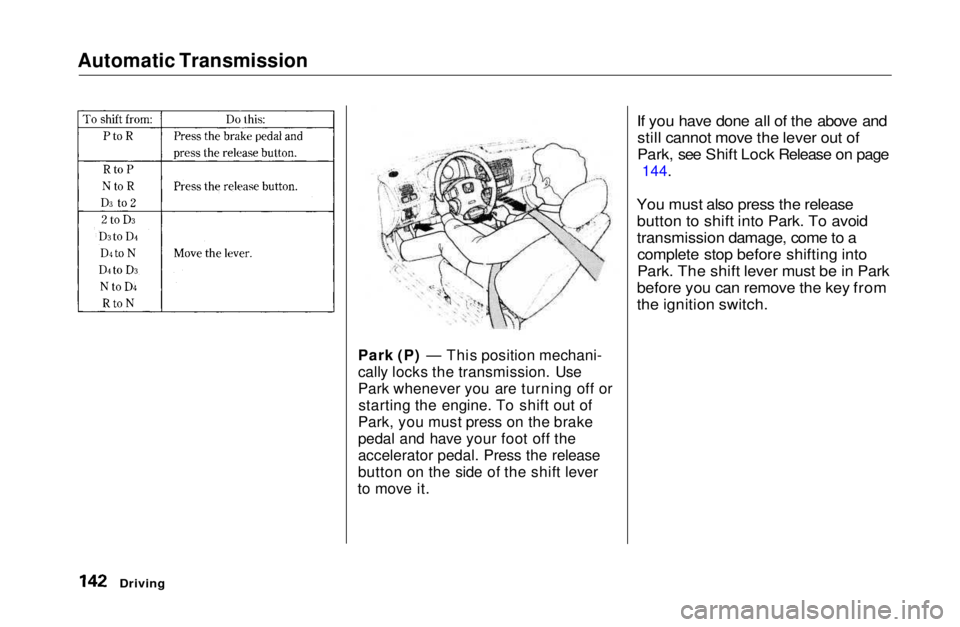
Park (P) — This position mechani-
cally locks the transmission. Use
Park whenever you are turning off orstarting the engine. To shift out of
Park, you must press on the brake
pedal and have your foot off the
accelerator pedal. Press the release
button on the side of the shift lever
to move it.
If you have done all of the above and
still cannot move the lever out of
Park, see Shift Lock Release on page
144.
You must also press the release button to shift into Park. To avoid
transmission damage, come to acomplete stop before shifting into
Park. The shift lever must be in Park
before you can remove the key from
the ignition switch.
DrivingMain Menu Table of Contents s t