phone HONDA CIVIC COUPE 2012 9.G Navigation Manual
[x] Cancel search | Manufacturer: HONDA, Model Year: 2012, Model line: CIVIC COUPE, Model: HONDA CIVIC COUPE 2012 9.GPages: 204, PDF Size: 7.9 MB
Page 169 of 204
168
Troubleshooting
Troubleshooting
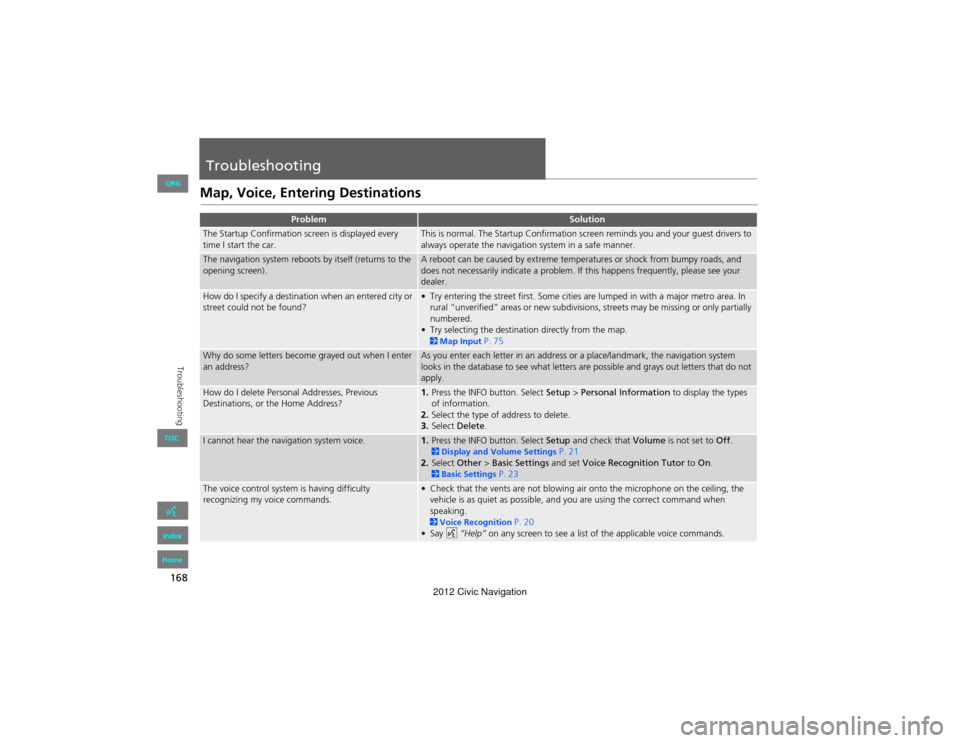
Map, Voice, Entering Destinations
ProblemSolution
The Startup Confirmation screen is displayed every
time I start the car.This is normal. The Startup Confirmation screen reminds you and your guest drivers to
always operate the navigation system in a safe manner.
The navigation system reboots by itself (returns to the
opening screen).A reboot can be caused by extreme temperatures or shock from bumpy roads, and
does not necessarily indicate a problem. If this happens frequently, please see your
dealer.
How do I specify a destination when an entered city or
street could not be found?• Try entering the street first. Some cities are lumped in with a major metro area. In rural “unverified” areas or new subdivisions, streets may be missing or only partially
numbered.
• Try selecting the destination directly from the map.
2 Map Input P. 75
Why do some letters become grayed out when I enter
an address?As you enter each letter in an address or a place/landmark, the navigation system
looks in the database to see what letters are possible and grays out letters that do not
apply.
How do I delete Personal Addresses, Previous
Destinations, or the Home Address?1. Press the INFO button. Select Setup > Personal Information to display the types
of information.
2. Select the type of address to delete.
3. Select Delete .
I cannot hear the navigation system voice.1.Press the INFO button. Select Setup and check that Volume is not set to Off. 2Display and Volu me Settings P. 21
2. Select Other > Basic Settings and set Voice Recognition Tutor to On.
2Basic Settings P. 23
The voice control system is having difficulty
recognizing my voice commands.• Check that the vents are not blowing air onto the microphone on the ceiling, the
vehicle is as quiet as possible, and you are using the correct command when
speaking.
2 Voice Recognition P. 20
•Say d “Help” on any screen to see a list of the applicable voice commands.
QRG
Index
Home
TOC
2012 Civic Navigation
Page 170 of 204
169
TroubleshootingMap, Voice, Entering Destinations
Troubleshooting
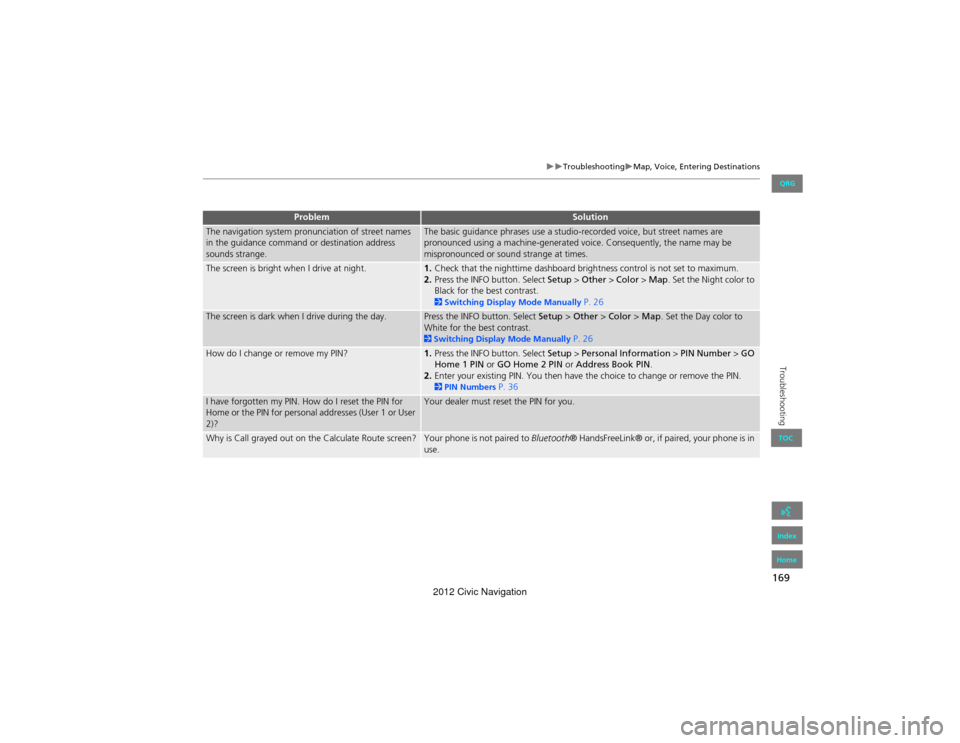
The navigation system pronunciation of street names
in the guidance command or destination address
sounds strange.The basic guidance phrases use a studio-recorded voice, but street names are
pronounced using a machine-generated voice. Consequently, the name may be
mispronounced or sound strange at times.
The screen is bright when I drive at night.1.Check that the nighttime dashboard brightness control is not set to maximum.
2. Press the INFO button. Select Setup > Other > Color > Map. Set the Night color to
Black for the best contrast.
2 Switching Display Mode Manually P. 26
The screen is dark when I drive during the day.Press the INFO button. Select Setup > Other > Color > Map . Set the Day color to
White for the best contrast.
2 Switching Display Mode Manually P. 26
How do I change or remove my PIN?1. Press the INFO button. Select Setup > Personal Information > PIN Number > GO
Home 1 PIN or GO Home 2 PIN or Address Book PIN.
2. Enter your existing PIN. You then have th e choice to change or remove the PIN.
2PIN Numbers P. 36
I have forgotten my PIN. How do I reset the PIN for
Home or the PIN for personal addresses (User 1 or User
2)?Your dealer must reset the PIN for you.
Why is Call grayed out on the Calculate Route screen?Your phone is not paired to Bluetooth® HandsFreeLink® or, if paired, your phone is in
use.
ProblemSolution
QRG
Index
Home
TOC
2012 Civic Navigation
Page 171 of 204
170
TroubleshootingTraffic
Troubleshooting
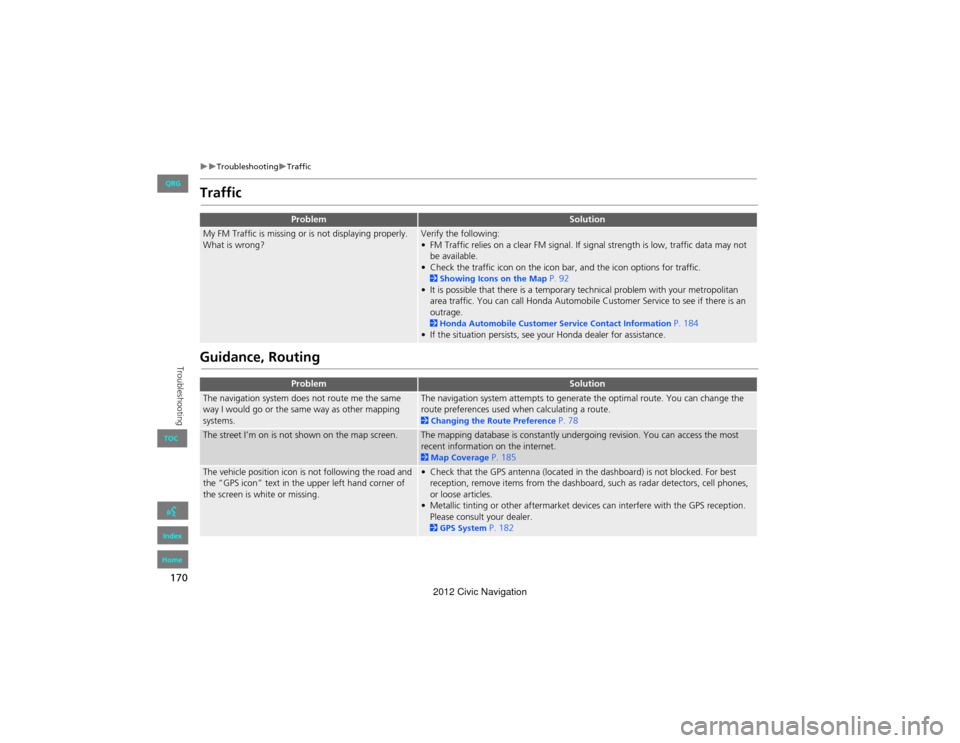
Traffic
Guidance, Routing
ProblemSolution
My FM Traffic is missing or is not displaying properly.
What is wrong?Verify the following:
• FM Traffic relies on a clear FM signal. If signal strength is low, traffic data may not be available.
• Check the traffic icon on the icon bar, and the icon options for traffic.
2 Showing Icons on the Map P. 92
• It is possible that there is a temporary technical problem with your metropolitan area traffic. You can call Honda Automobile Customer Service to see if there is an
outrage.
2 Honda Automobile Customer Service Contact Information P. 184
• If the situation persists, see your Honda dealer for assistance.
ProblemSolution
The navigation system does not route me the same
way I would go or the same way as other mapping
systems.The navigation system attempts to generate the optimal route. You can change the
route preferences used when calculating a route.
2 Changing the Route Preference P. 78
The street I’m on is not shown on the map screen.The mapping database is constantly undergoing revision. You can access the most
recent information on the internet.
2Map Coverage P. 185
The vehicle position icon is not following the road and
the “GPS icon” text in the upper left hand corner of
the screen is white or missing.• Check that the GPS antenna (located in the dashboard) is not blocked. For best
reception, remove items from the dashboard, such as radar detectors, cell phones,
or loose articles.
• Metallic tinting or other aftermarket devi ces can interfere with the GPS reception.
Please consult your dealer.
2 GPS System P. 182
QRG
Index
Home
TOC
2012 Civic Navigation
Page 183 of 204
182
Reference Information
System Limitations
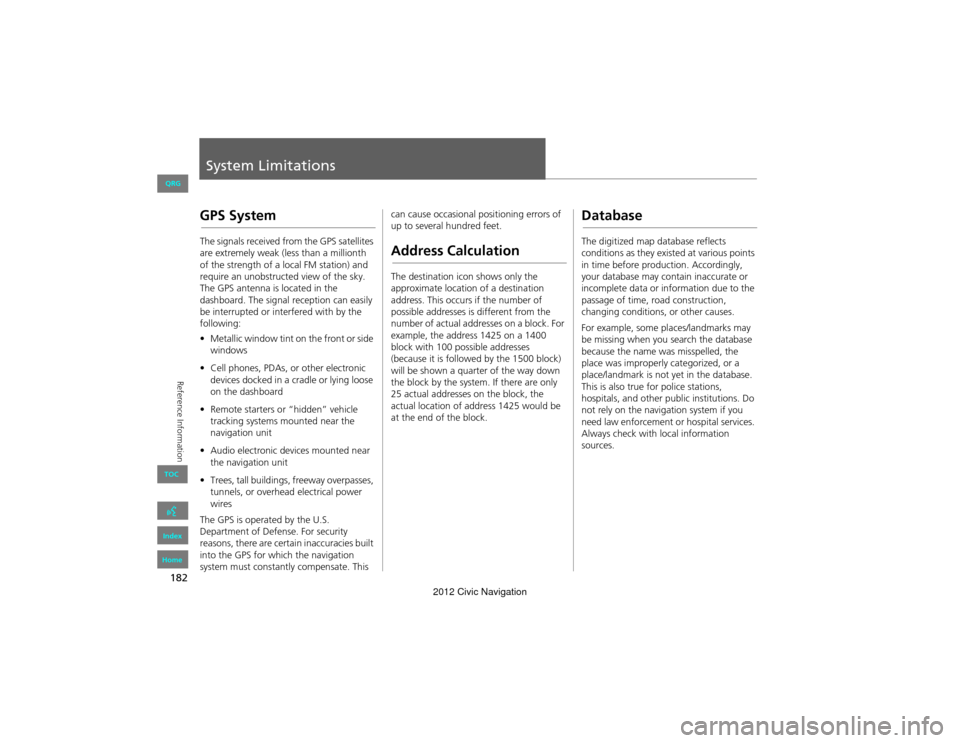
GPS System
The signals received from the GPS satellites
are extremely weak (less than a millionth
of the strength of a local FM station) and
require an unobstructed view of the sky.
The GPS antenna is located in the
dashboard. The signal reception can easily
be interrupted or interfered with by the
following:
• Metallic window tint on the front or side
windows
• Cell phones, PDAs, or other electronic
devices docked in a cradle or lying loose
on the dashboard
• Remote starters or “hidden” vehicle
tracking systems mounted near the
navigation unit
• Audio electronic devi ces mounted near
the navigation unit
• Trees, tall buildings, freeway overpasses,
tunnels, or overhead electrical power
wires
The GPS is operated by the U.S.
Department of Defense. For security
reasons, there are certain inaccuracies built
into the GPS for which the navigation
system must constantly compensate. This can cause occasional positioning errors of
up to several hundred feet.Address Calculation
The destination icon shows only the
approximate location of a destination
address. This occurs if the number of
possible addresses is different from the
number of actual addresses on a block. For
example, the addres
s 1425 on a 1400
block with 100 possible addresses
(because it is followed by the 1500 block)
will be shown a quarter of the way down
the block by the system. If there are only
25 actual addresses on the block, the
actual location of address 1425 would be
at the end of the block.
Database
The digitized map database reflects
conditions as they existed at various points
in time before production. Accordingly,
your database may contain inaccurate or
incomplete data or information due to the
passage of time, road construction,
changing conditions, or other causes.
For example, some places/landmarks may
be missing when you search the database
because the name was misspelled, the
place was improperly categorized, or a
place/landmark is not yet in the database.
This is also true for police stations,
hospitals, and other public institutions. Do
not rely on the navigation system if you
need law enforcement or hospital services.
Always check with local information
sources.
QRG
Index
Home
TOC
2012 Civic Navigation
Page 190 of 204
189
Voice Commands
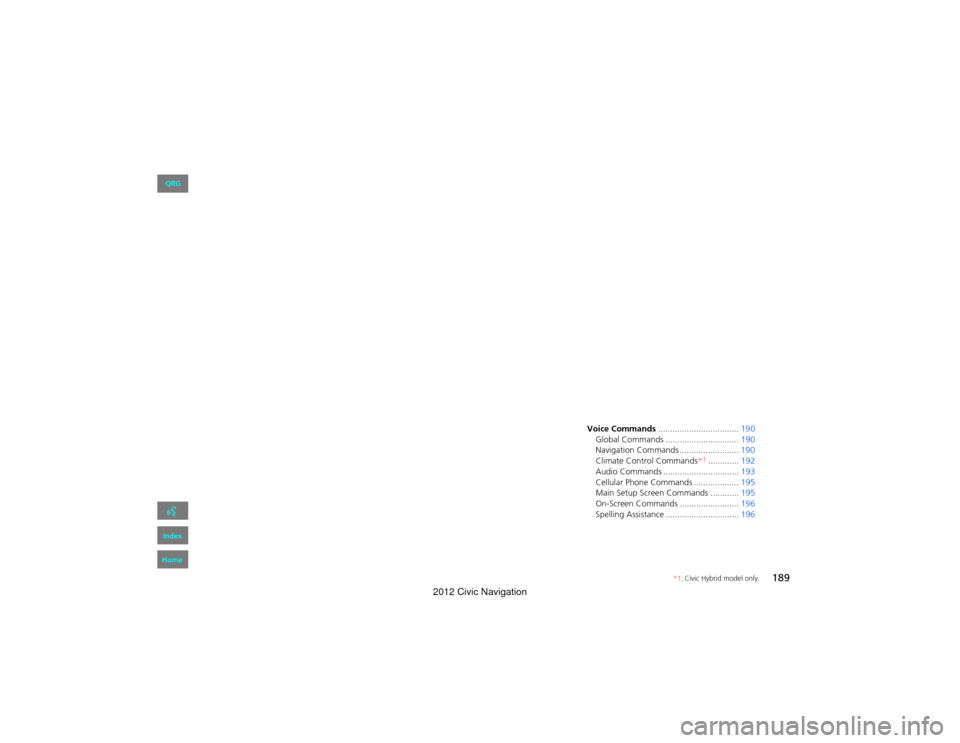
Voice Commands.................................. 190
Global Commands ............................... 190
Navigation Commands ......................... 190
Climate Control Commands*
1............. 192
Audio Commands ................................ 193
Cellular Phone Commands ................... 195
Main Setup Screen Commands ............ 195
On-Screen Commands ......................... 196
Spelling Assistance ........ .......................196
QRG
Index
Home
*1. Civic Hybrid model only.
2012 Civic Navigation
Page 196 of 204
195
Voice CommandsCellular Phone Commands
Voice Commands
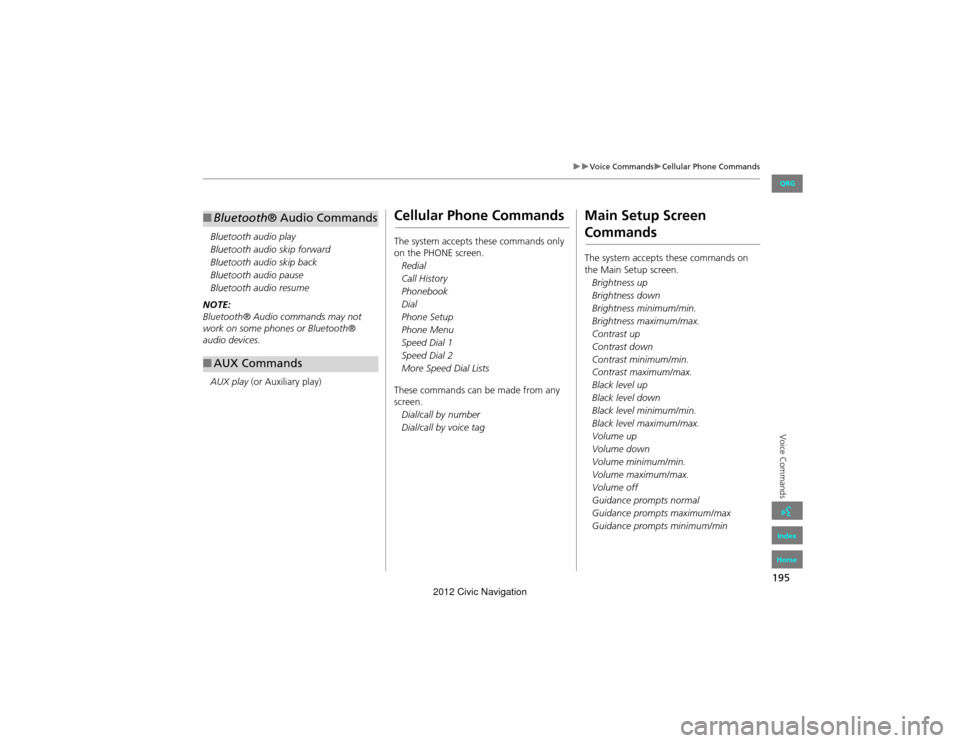
Bluetooth audio play
Bluetooth audio skip forward
Bluetooth audio skip back
Bluetooth audio pause
Bluetooth audio resume
NOTE:
Bluetooth® Audio commands may not
work on some phones or Bluetooth®
audio devices.
AUX play (or Auxiliary play)
■Bluetooth ® Audio Commands
■AUX Commands
Cellular Phone Commands
The system accepts these commands only
on the PHONE screen.
Redial
Call History
Phonebook
Dial
Phone Setup
Phone Menu
Speed Dial 1
Speed Dial 2
More Speed Dial Lists
These commands can be made from any
screen. Dial/call by number
Dial/call by voice tag
Main Setup Screen
Commands
The system accepts these commands on
the Main Setup screen.Brightness up
Brightness down
Brightness minimum/min.
Brightness maximum/max.
Contrast up
Contrast down
Contrast minimum/min.
Contrast maximum/max.
Black level up
Black level down
Black level minimum/min.
Black level maximum/max.
Volume up
Volume down
Volume minimum/min.
Volume maximum/max.
Volume off
Guidance prompts normal
Guidance prompts maximum/max
Guidance prompts minimum/min
QRG
Index
Home
2012 Civic Navigation
Page 197 of 204
196
Voice CommandsOn-Screen Commands
Voice Commands
On-Screen Commands
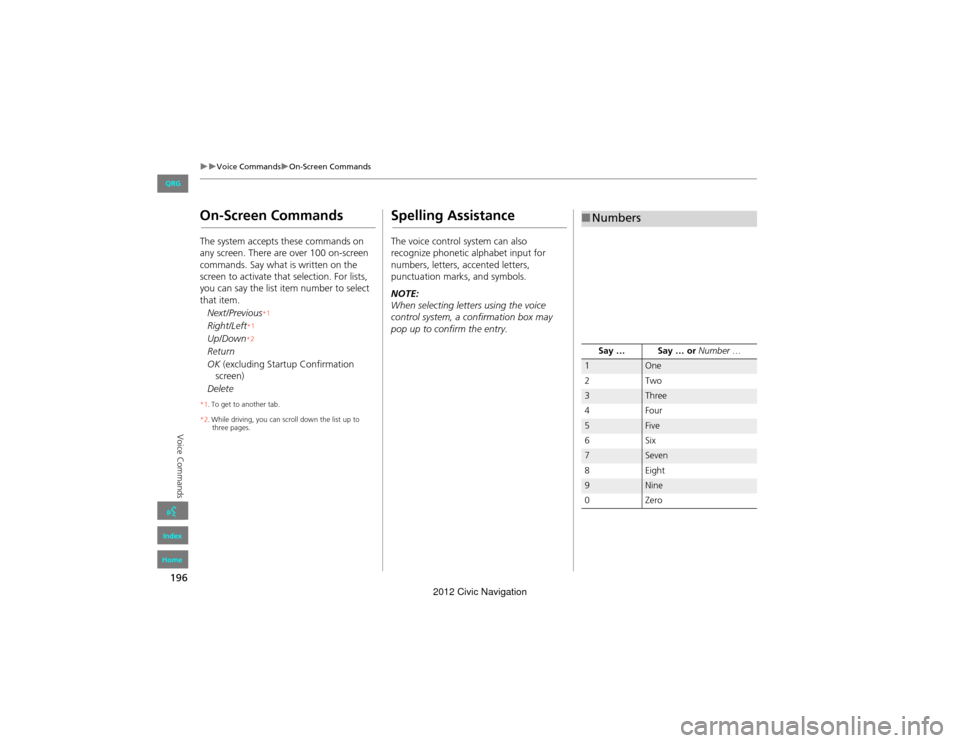
The system accepts these commands on
any screen. There are over 100 on-screen
commands. Say what is written on the
screen to activate that selection. For lists,
you can say the list item number to select
that item.
Next/Previous
*1
Right/Left* 1
Up/Down*2
Return
OK
(excluding Startup Confirmation
Delete
*1 . To get to another tab.
*2 . While driving, you can scroll down the list up to
three pages.
Spelling Assistance
The voice control system can also
recognize phonetic alphabet input for
numbers, letters, accented letters,
punctuation marks, and symbols.
NOTE:
When selecting letters using the voice
control system, a confirmation box may
pop up to confirm the entry.
■ Numbers
Say … Say … or Number …
1One
2T wo
3Three
4F our
5Five
6S ix
7Seven
8E ig h t
9Nine
0Z ero
screen)
QRG
Index
Home
2012 Civic Navigation
Page 201 of 204

200
Index
Symbols
bn (Channel) Button ............................142a (Display Mode) Button ......................26! (Display/Information) Button ....5, 142J (Hang-Up/Back) Button ....... 5, 19, 159h (Pick-Up) Button ...................... 5, 159, 160d (Talk) Button ......................................5, 19NB (Volume) Button .............................142
A
A.SEL (Auto Select) ....................................117Add to Address Book ..........................77, 112Add to Dest. List .......... 77, 106, 110, 111, 112Address
Editing Address Book .................................32Editing Avoid Area ......................................44Setting Destination .....................................58Address BookEditing Address Book .................................30Setting Destination .....................................63Address Book PIN .........................................36Adjust Time ...................................................47Advanced (Place Category) ........................67Audio ...........................................................113Basic Operation .............................................6Remote Control ........................................141Sound Setup .............................................140Voice Commands List ...............................193AUDIO Button ................................................4Audio Menu
Bluetooth ® Audio ....................................139FM/AM Radio ............................................118XM® Radio ...............................................123
Auto Answer .............................................. 155Auto Daylight .............................................. 46Auto Service (Place Category) ................... 67Auto Time Zone .......................................... 46Auto Transfer ............................................ 155AUX
Input Jack ................................................. 114Voice Commands List .............................. 195Avoid Streets .............................................. 102
B
Banking (Place Category) ........................... 67Basic Settings ......................................... 23, 24Black Level .................................................... 21Bluetooth Setup ........................................ 155Bluetooth Connection .............................. 155Bluetooth® Audio
Playing ...................................................... 137Voice Commands List .............................. 195Bluetooth ® HandsFreeLink® .................. 143Editing Phone Info ................................... 154Making a Call ........................................... 155Pairing a Phone ........................................ 146Phone Setup ............................................. 155Receiving a Call ........................................ 159Setting Speed Dials .................................. 151Brightness ............................................... 21, 26
C
Call
Calculate Route Screen ...................... 77, 112Call History ................................................. 158Cancel Route .............................................. 102
Category
Editing Address Book ................................. 32Place Category List ................................... 199Setting Destination ..................................... 67CD/XM Button ....... 6, 121, 125, 130, 134, 137Change Language ....................................... 18Change Route Preference .......................... 78Change State ................................................ 59Channel List ................................................ 122City ................................................................ 60City Vicinity
Setting Destination ..................................... 68Clear All Speed Dial .................................... 53Clock Adjustment ........................................ 46Adjust Time ................................................ 47Auto Daylight ............................................. 46Auto Time Zone .......................................... 46Clock Format .............................................. 46Resetting .................................................... 47Clock Format ................................................ 46Clock Type .................................................... 48Color .............................................................. 24Map Color .................................................. 25Menu Color ................................................ 25Community (Place Category) ..................... 67Connect (Phone) ........................................ 154Continue Trip ............................................. 112Contrast ........................................................ 21Coordinate ................................................... 73Correct Vehicle Position ............................. 51Current Location .......................................... 98Current Position
Editing Address Book ................................. 32Setting Destination ..................................... 75
A B C D E F G H I J K L M N O P Q R S T U V W X Y Z
QRG
Index
Home
2012 Civic Navigation
Page 202 of 204

201
D
Day ModeMap Color .................................................. 25Menu Color ................................................ 25Switching Display Mode ............................. 26Delete this Phone ...................................... 149DEST Button
Changing Route ....................................... 101Entering a Destination ................................ 56DEST Menu 1 ................................................ 56DEST Menu 2 ................................................ 56Destination Map .......................................... 79Detour ......................................................... 102Dial .............................................................. 157Directions ...................................................... 88Disc
Playing ...................................................... 125Voice Commands List ............................... 194Display Voice Command Tips ..................... 23
E
Edit Avoid Area ........................................... 43Edit Speed Dial ........................................... 151Edit Waypoint Search Area ........................ 45Emergency (Place Category) ...................... 67Error Messages ........................................... 174Disc Player ................................................ 175iPod® ........................................................ 176Navigation System .................................... 174USB Flash Drive ......................................... 177Exit Info. ....................................................... 89
F
Favorite Subcategory .................................. 69Find Nearest... ............................................108FM/AM Button .......................................6, 116FM/AM Radio
Playing ......................................................116Voice Commands List ...............................193Folder ListDisc ...........................................................127USB Flash Drive .........................................136
G
Go Home 1 .................................................... 10Go Home 1 PIN ............................................. 36Go Home 2 .................................................... 10Go Home 2 PIN ............................................. 36Guidance Menu ............................................ 87Directions .................................................... 88Exit Info .......................................................89Guidance Mode ..........................................90Guidance Mode ............................................ 90Guidance Prompts ....................................... 22
H
Heading-up ................................................... 97Home Address 1 .....................................10, 35Home Address 2 .....................................10, 35Honda Customer Services .........................184
I
Icon Option .................................................. 93Intersection .................................................. 74iPod®
Connecting, Disconnecting ............. 129, 133Playing ...................................................... 129Voice Commands List .............................. 194
K
keyboard Layout ......................................... 23
L
Language ..................................................... 28Leisure (Place Category) ............................. 67Lodging (Place Category) ........................... 67
M
Map Color .................................................... 25Map Input
Editing Avoid Area ..................................... 44Setting Destination .................................... 75Map Legend ............................................. 7, 94Map Menu ................................................... 85Map Screen .................................................. 80Icon .................................................. 7, 92, 96Orientation ................................................. 97Scale ........................................................... 95Map Update
Checking Version ..................................... 165Obtaining Update Data ............................ 185Viewing Update Status ............................ 165
IndexA B C D E F G H I J K L M N O P Q R S T U V W X Y Z
QRG
Index
Home
2012 Civic Navigation
Page 203 of 204

202
MAP/GUIDE Button ..................................8, 90Menu (DEST Menu 1) ..................................56Menu (DEST Menu 2) ..................................56Menu (Route) .............................................101Menu Color ...................................................25Mode ...........................................................123Music Search
iPod® ........................................................132Mute ............................................................159My Destination
Adding Waypoint .....................................103Editing .......................................................107
N
Night ModeMap Color ...................................................25Menu Color ................................................25Switching Display Mode .............................26North-up .......................................................97
O
Off-road Tracking
Driving ........................................................83Setting ........................................................50
P
Pair Phone ...................................................146Pairing Code ...............................................148Personal Information ..................................29Phone
Voice Commands List ...............................195PHONE Button ................................................4
Phone Setup ............................................... 144Phonebook
Making a Call ........................................... 157PIN NumbersPersonal Info .............................................. 36Phone ....................................................... 154Place CategoryEditing Address Book ................................. 32Place Category List ................................... 199Setting Destination .................................... 67Place NameEditing Address Book ................................. 32Setting Destination .............................. 65, 68Place Phone No.Editing Address Book ................................. 32Setting Destination .................................... 72Previous De stination
Deleting ...................................................... 38Editing Address Book ................................. 32Setting Destination .................................... 64
R
Radio FM/AM ..................................................... 116XM® ........................................................ 121Random (Pairing Code) ............................ 148RDS Search ................................................. 119Read Radio Text ........................................ 120Recalculation ......................................... 40, 83Repeat
iPod® ....................................................... 131USB Flash Drive ........................................ 136Replace this Phone .................................... 154Rerouting ..................................................... 40
Reset Clock Settings .................................... 47Reset Factory Default .................................. 52Restaurant (Place Category) ...................... 67Route (Menu) ............................................. 101Route Pref. ................................................... 78Routing & Guidance .................................... 39
S
Scan
Disc ........................................................... 126FM/AM Radio ........................................... 117USB Flash Drive ......................................... 135Scan Category ............................................ 122Scan Channel .............................................. 122Search by Keyword ...................................... 68Security PIN Code ...................................... 180SEEK/SKIP Button ........................................... 4Shopping (Place Category) ......................... 67Show Icon on Map ...................................... 92Single Screen ................................................ 90Sort by Distance to Travel .......................... 68Sound Setup ............................................... 140SOURCE Button .......................................... 141Speed Dial
Making a Call ........................................... 158Registering ................................................ 151Split Screen ................................................... 91Street ............................................................. 61System/Device Information ...................... 165
IndexA B C D E F G H I J K L M N O P Q R S T U V W X Y Z
QRG
Index
Home
2012 Civic Navigation