display HONDA CIVIC COUPE 2016 10.G Owners Manual
[x] Cancel search | Manufacturer: HONDA, Model Year: 2016, Model line: CIVIC COUPE, Model: HONDA CIVIC COUPE 2016 10.GPages: 585, PDF Size: 17.41 MB
Page 477 of 585
476
uuMaintenance MinderTMuTo Use Maintenance Minder TM
Maintenance
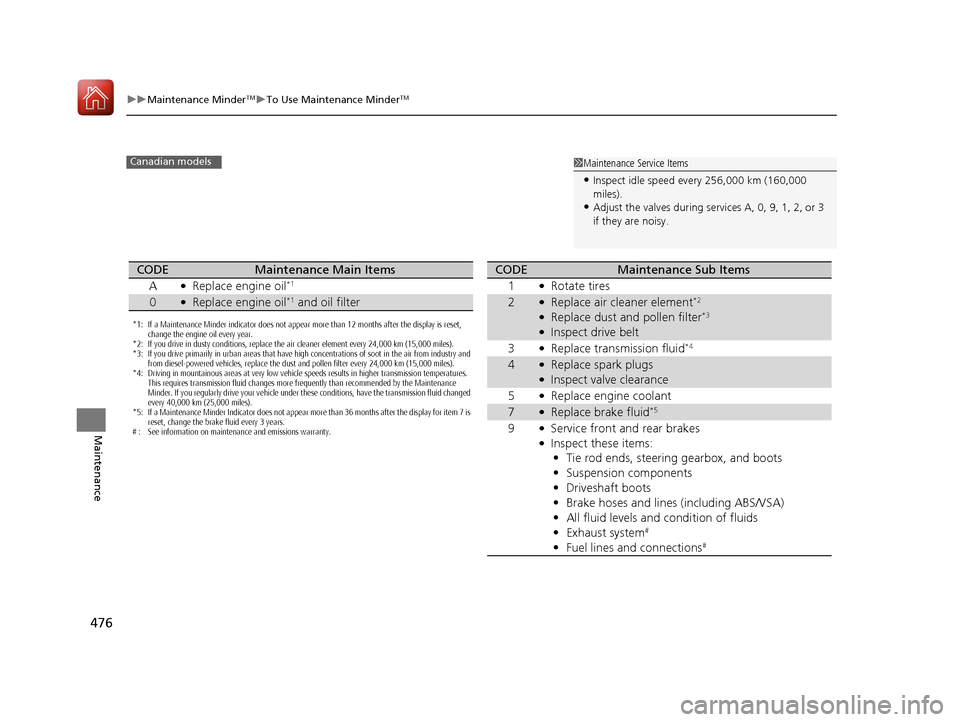
1Maintenance Service Items
• Inspect idle speed every 256,000 km (160,000
miles).
• Adjust the valves during services A, 0, 9, 1, 2, or 3
if they are noisy.Canadian models
*1: If a Maintenance Minder indicator does not appear more than 12 months after the display is reset,
change the engine oil every year.
*2: If you drive in dusty conditions, replace the air cleaner element every 24,000 km (15,000 miles).
*3: If you drive primarily in urban areas that have high concentrations of soot in the air from industry and from diesel-powered vehicles, replace the dust and pollen filter every 24,000 km (15,000 miles).
*4: Driving in mountainous areas at very low vehicle speeds results in higher transmission temperatures. This requires transmission fluid changes more frequently than recommended by the Maintenance
Minder. If you regularly drive your vehicle under these conditions, have the transmission fluid changed
every 40,000 km (25,000 miles).
*5: If a Maintenance Minder Indicator does not appear more than 36 months after the display for item 7 is
reset, change the brake fluid every 3 years.
# : See information on maintenance and emissions warranty.
CODEMaintenance Main Items
A ●
Replace engine oil *1
0●
Replace engine oil *1
and oil filter
CODEMaintenance Sub Items
1 ●
Rotate tires
2●Replace air cleaner element *2
● Replace dust and pollen filter *3
● Inspect drive belt
3 ●
Replace transmission fluid *4
4●
Replace spark plugs
● Inspect valve clearance
5 ●
Replace engine coolant
7●Replace brake fluid *5
9 ●
Service front and rear brakes
● Inspect these items:
• Tie rod ends, steering gearbox, and boots
• Suspension components
• Driveshaft boots
• Brake hoses and lines (including ABS/VSA)
• All fluid levels and condition of fluids
• Exhaust system #
• Fuel lines and connections #
16 CIVIC 2D HC2 (0A 01 0C)-31TBG6000.book 476 ページ >0>.>/6年>0月>/>0日
金曜日 午後4時>/6分
Page 478 of 585
477
uuMaintenance MinderTMuTo Use Maintenance Minder TM
Maintenance
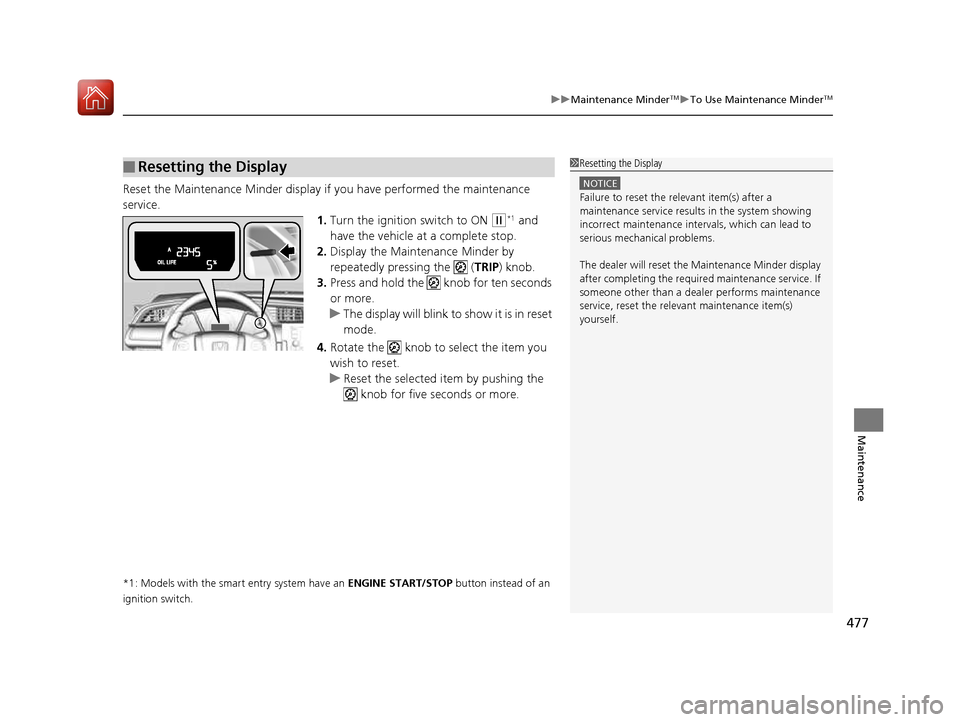
Reset the Maintenance Minder display if you have performed the maintenance
service.
1.Turn the ignition switch to ON
(w *1
and
have the vehicle at a complete stop.
2. Display the Maintenance Minder by
repeatedly pressing the ( TRIP) knob.
3. Press and hold the knob for ten seconds or more.
uThe display will blink to show it is in reset mode.
4. Rotate the knob to select the item you wish to reset.
uReset the selected item by pushing the
knob for five seconds or more.
*1: Models with the smart entry system have an ENGINE START/STOP button instead of an
ignition switch.
■Resetting the Display1Resetting the Display
NOTICE
Failure to reset the relevant item(s) after a
maintenance service results in the system showing
incorrect maintenance interv als, which can lead to
serious mechanical problems.
The dealer will reset the Maintenance Minder display
after completing the required maintenance service. If
someone other than a deal er performs maintenance
service, reset the relevant maintenance item(s)
yourself.
16 CIVIC 2D HC2 (0A 01 0C)-31TBG6000.book 477 ページ >0>.>/6年>0月>/>0日 金曜日 午後4時>/6分
Page 479 of 585
478
uuMaintenance MinderTMuTo Use Maintenance Minder TM
Maintenance
To Use Maintenance Minder TM
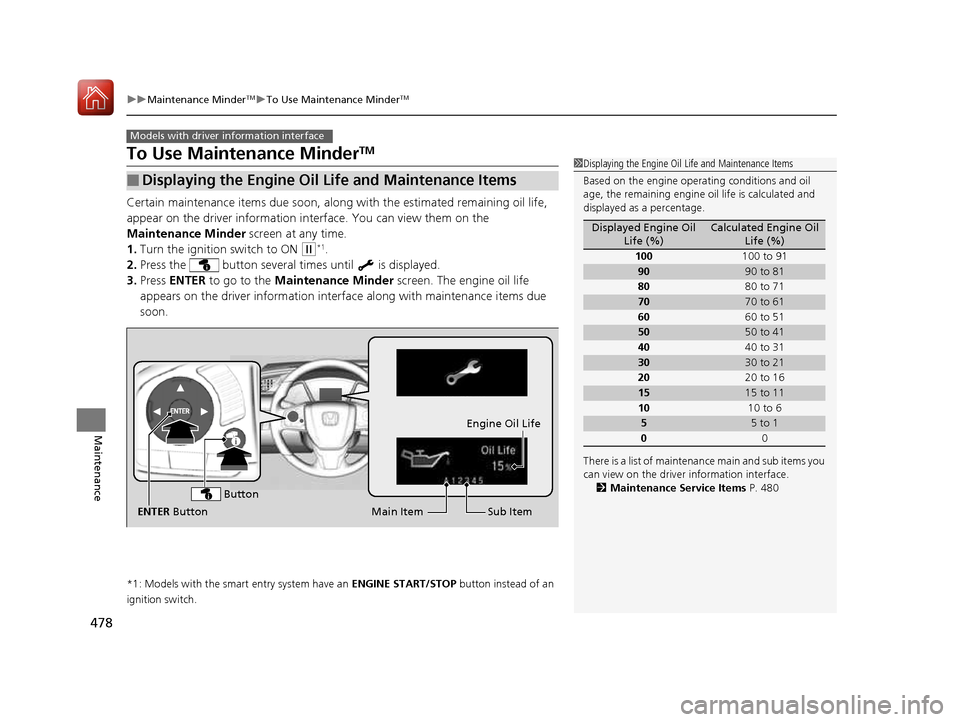
Certain maintenance items due soon, along with the estimated remaining oil life,
appear on the driver information in terface. You can view them on the
Maintenance Minder screen at any time.
1. Turn the ignition switch to ON
(w*1
.
2. Press the button several times until is displayed.
3. Press ENTER to go to the Maintenance Minder screen. The engine oil life
appears on the driver info rmation interface along with maintenance items due
soon.
*1: Models with the smart entry system have an ENGINE START/STOP button instead of an
ignition switch.
■Displaying the Engine Oil Life and Maintenance Items
Models with driver information interface
1Displaying the Engine Oil Life and Maintenance Items
Based on the engine opera ting conditions and oil
age, the remaining engine oi l life is calculated and
displayed as a percentage.
There is a list of maintena nce main and sub items you
can view on the driver information interface.
2 Maintenance Service Items P. 480
Displayed Engine Oil
Life (%)Calculated Engine Oil Life (%)
100 100 to 91
9090 to 81
80 80 to 71
7070 to 61
60 60 to 51
5050 to 41
40 40 to 31
3030 to 21
20 20 to 16
1515 to 11
10 10 to 6
55 to 1
0 0
Sub Item
Engine Oil Life
Main Item
ENTER Button
Button
16 CIVIC 2D HC2 (0A 01 0C)-31TBG6000.book 478 ページ >0>.>/6年>0月>/>0日 金曜日 午後4時>/6分
Page 480 of 585
479
uuMaintenance MinderTMuTo Use Maintenance Minder TM
Continued
Maintenance
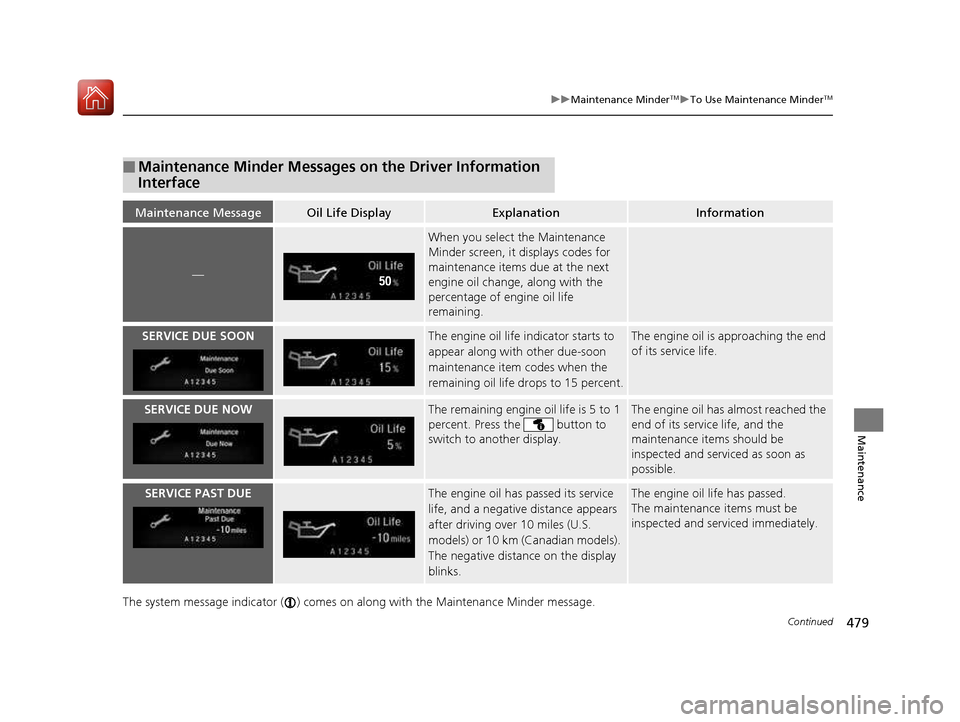
The system message indicator ( ) comes on
along with the Maintenance Minder message.
■Maintenance Minder Messages on the Driver Information
Interface
Maintenance MessageOil Life DisplayExplanationInformation
—
When you select the Maintenance
Minder screen, it displays codes for
maintenance items due at the next
engine oil change, along with the
percentage of engine oil life
remaining.
SERVICE DUE SOONThe engine oil life indicator starts to
appear along with other due-soon
maintenance item codes when the
remaining oil life drops to 15 percent.The engine oil is approaching the end
of its service life.
SERVICE DUE NOWThe remaining engine oil life is 5 to 1
percent. Press the button to
switch to another display.The engine oil has almost reached the
end of its service life, and the
maintenance items should be inspected and serviced as soon as
possible.
SERVICE PAST DUEThe engine oil has passed its service
life, and a negative distance appears
after driving over 10 miles (U.S.
models) or 10 km (Canadian models).
The negative distance on the display blinks.The engine oil life has passed.
The maintenance items must be inspected and serviced immediately.
16 CIVIC 2D HC2 (0A 01 0C)-31TBG6000.book 479 ページ >0>.>/6年>0月>/>0日 金曜日 午後4時>/6分
Page 481 of 585
480
uuMaintenance MinderTMuTo Use Maintenance Minder TM
Maintenance
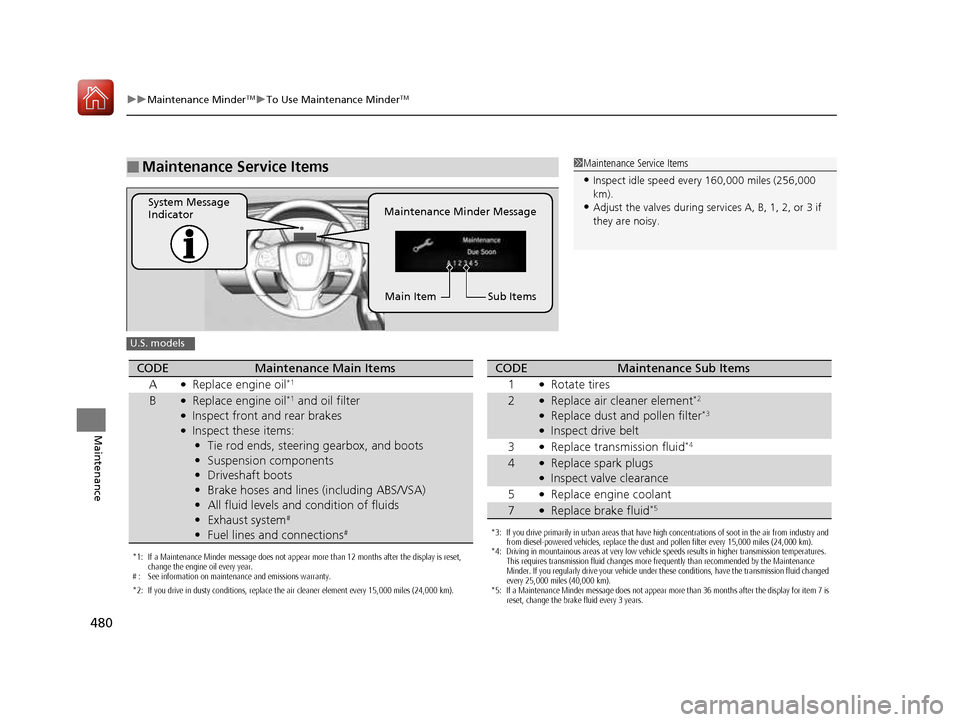
■Maintenance Service Items1Maintenance Service Items
• Inspect idle speed every 160,000 miles (256,000 km).
• Adjust the valves during services A, B, 1, 2, or 3 if
they are noisy.
Maintenance Minder Message
System Message
Indicator
Sub Items
Main Item
U.S. models
*1: If a Maintenance Minder message does not appear more than 12 months after the display is reset,
change the engine oil every year.
# : See information on maintenance and emissions warranty.
*2: If you drive in dusty conditions, replace the air cleaner element every 15,000 miles (24,000 km).
CODEMaintenance Main Items
A ●
Replace engine oil *1
B●
Replace engine oil *1
and oil filter
● Inspect front and rear brakes
● Inspect these items:
• Tie rod ends, steering gearbox, and boots
• Suspension components
• Driveshaft boots
• Brake hoses and lines (including ABS/VSA)
• All fluid levels and condition of fluids
• Exhaust system #
• Fuel lines and connections #
*3: If you drive primarily in urban areas that have high concentrations of soot in the air from industry and
from diesel-powered vehicles, replace the dust and pollen filter every 15,000 miles (24,000 km).
*4: Driving in mountainous areas at very low vehicle speeds results in higher transmission temperatures.
This requires transmission fluid changes more frequently than recommended by the Maintenance
Minder. If you regularly drive your vehicle under these conditions, have the transmission fluid changed
every 25,000 miles (40,000 km).
*5: If a Maintenance Minder message does not appear more than 36 months after the display for item 7 is reset, change the brake fluid every 3 years.
CODEMaintenance Sub Items
1 ●
Rotate tires
2●Replace air cleaner element *2
● Replace dust and pollen filter *3
● Inspect drive belt
3 ●
Replace transmission fluid *4
4●
Replace spark plugs
● Inspect valve clearance
5 ●
Replace engine coolant
7●Replace brake fluid *5
16 CIVIC 2D HC2 (0A 01 0C)-31TBG6000.book 480 ページ >0>.>/6年>0月>/>0日
金曜日 午後4時>/6分
Page 482 of 585
481
uuMaintenance MinderTMuTo Use Maintenance Minder TM
Continued
Maintenance
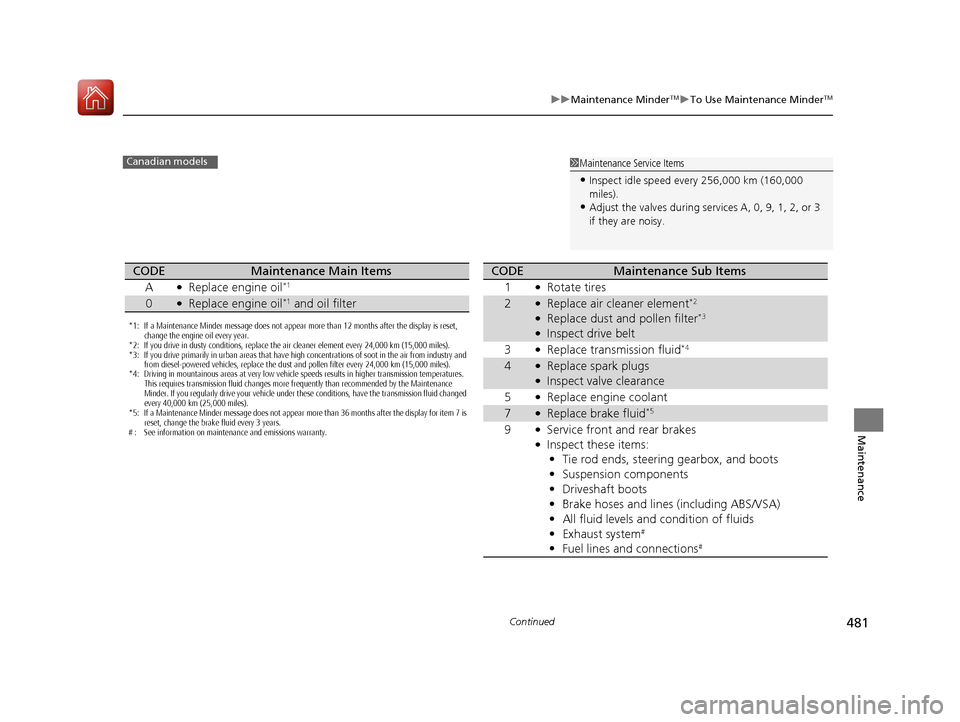
1Maintenance Service Items
• Inspect idle speed every 256,000 km (160,000
miles).
• Adjust the valves during services A, 0, 9, 1, 2, or 3
if they are noisy.Canadian models
*1: If a Maintenance Minder message does not appear more than 12 months after the display is reset,
change the engine oil every year.
*2: If you drive in dusty conditions, replace the air cleaner element every 24,000 km (15,000 miles).
*3: If you drive primarily in urban areas that have high concentrations of soot in the air from industry and from diesel-powered vehicles, replace the dust and pollen filter every 24,000 km (15,000 miles).
*4: Driving in mountainous areas at very low vehicle speeds results in higher transmission temperatures.
This requires transmission fluid changes more frequently than recommended by the Maintenance
Minder. If you regularly drive your vehicle under these conditions, have the transmission fluid changed
every 40,000 km (25,000 miles).
*5: If a Maintenance Minder message does not appear more than 36 months after the display for item 7 is reset, change the brake fluid every 3 years.
# : See information on maintenance and emissions warranty.
CODEMaintenance Main Items
A ●
Replace engine oil *1
0●
Replace engine oil *1
and oil filter
CODEMaintenance Sub Items
1 ●
Rotate tires
2●Replace air cleaner element *2
● Replace dust and pollen filter *3
● Inspect drive belt
3 ●
Replace transmission fluid *4
4●
Replace spark plugs
● Inspect valve clearance
5 ●
Replace engine coolant
7●Replace brake fluid *5
9 ●
Service front and rear brakes
● Inspect these items:
• Tie rod ends, steering gearbox, and boots
• Suspension components
• Driveshaft boots
• Brake hoses and lines (including ABS/VSA)
• All fluid levels and condition of fluids
• Exhaust system #
• Fuel lines and connections #
16 CIVIC 2D HC2 (0A 01 0C)-31TBG6000.book 481 ページ >0>.>/6年>0月>/>0日
金曜日 午後4時>/6分
Page 483 of 585
uuMaintenance MinderTMuTo Use Maintenance Minder TM
482
Maintenance
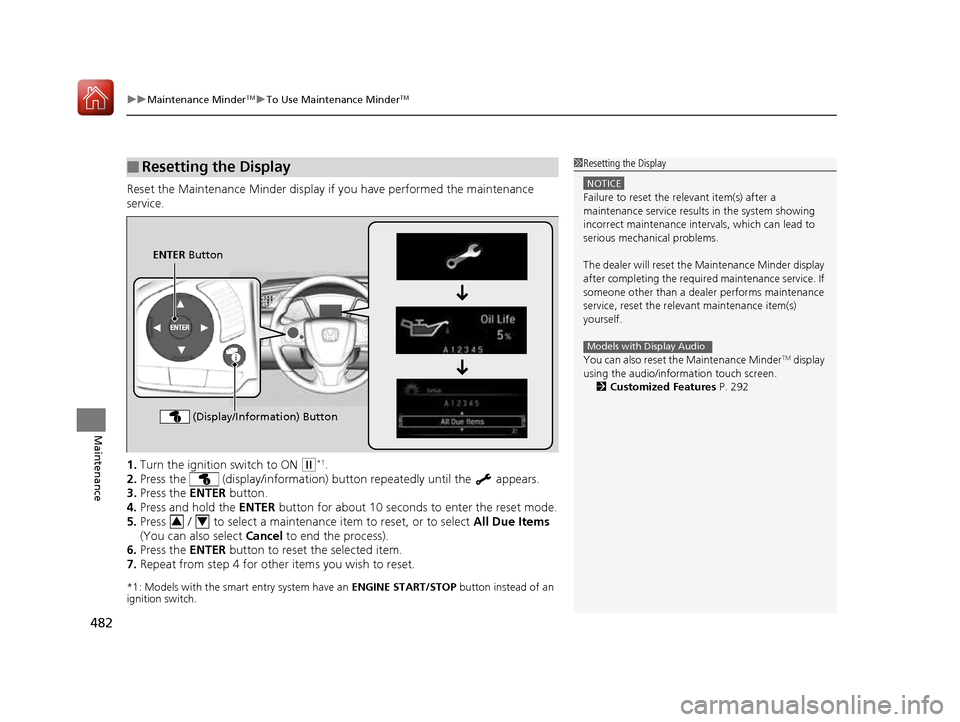
Reset the Maintenance Minder display if you have performed the maintenance service. 1. Turn the ignition switch to ON
(w*1
.
2. Press the (display/information) bu tton repeatedly until the appears.
3. Press the ENTER button.
4. Press and hold the ENTER button for about 10 seconds to enter the reset mode.
5. Press / to select a maintenance item to reset, or to select All Due Items
(You can also select Cancel to end the process).
6. Press the ENTER button to reset the selected item.
7. Repeat from step 4 for other items you wish to reset.
*1: Models with the smart entry system have an ENGINE START/STOP button instead of an
ignition switch.
■Resetting the Display1Resetting the Display
NOTICE
Failure to reset the relevant item(s) after a
maintenance service results in the system showing
incorrect maintenance interv als, which can lead to
serious mechanical problems.
The dealer will reset the Maintenance Minder display
after completing the required maintenance service. If
someone other than a deal er performs maintenance
service, reset the relevant maintenance item(s)
yourself.
You can also reset the Maintenance Minder TM
display
using the audio/information touch screen.
2 Customized Features P. 292
Models with Display Audio
ENTER Button
(Display/Information) Button
34
16 CIVIC 2D HC2 (0A 01 0C)-31TBG6000.book 482 ページ >0>.>/6年>0月>/>0日 金曜日 午後4時>/6分
Page 491 of 585
490
uuMaintenance Under the HooduChanging the Engine Oil and Oil Filter
Maintenance
Changing the Engine Oil and Oil Filter
You must change the engine oil and oil filter regularly in order to maintain the
engine’s lubrication. The engine may be damaged if they are not changed regularly.
Change the oil and filter in accordan ce with the maintenance message on the
information display *
/driver information interface *
.
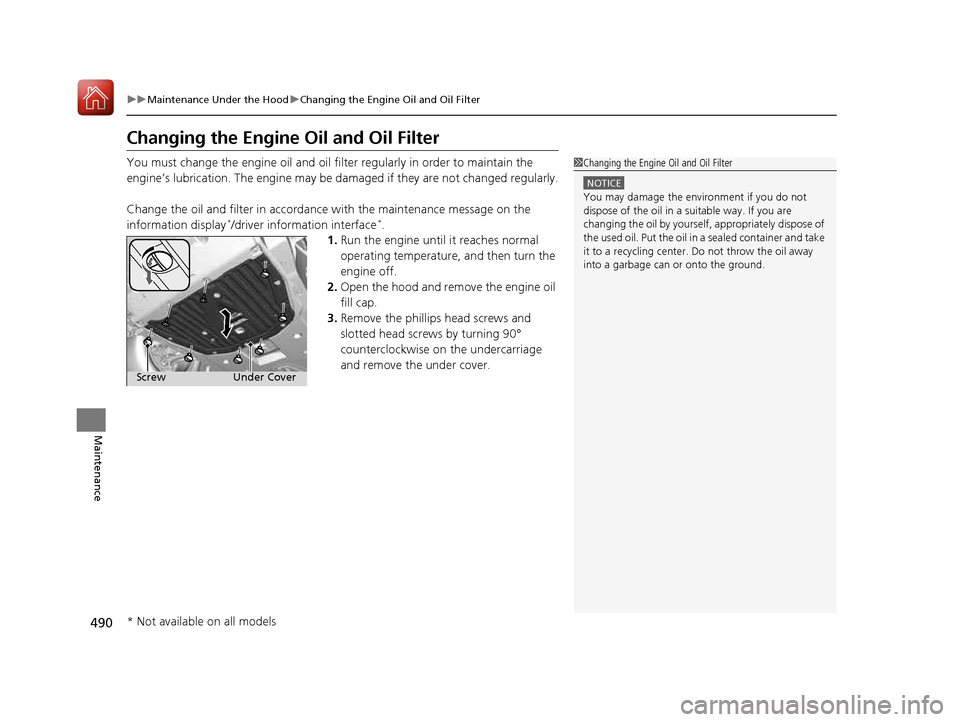
1. Run the engine until it reaches normal
operating temperature, and then turn the
engine off.
2. Open the hood and remove the engine oil
fill cap.
3. Remove the phillips head screws and
slotted head screws by turning 90°
counterclockwise on the undercarriage
and remove the under cover.
1Changing the Engine Oil and Oil Filter
NOTICE
You may damage the environment if you do not
dispose of the oil in a suitable way. If you are
changing the oil by yourself , appropriately dispose of
the used oil. Put the oil in a sealed container and take
it to a recycling center. Do not throw the oil away
into a garbage can or onto the ground.
Under Cover
Screw
* Not available on all models
16 CIVIC 2D HC2 (0A 01 0C)-31TBG6000.book 490 ページ >0>.>/6年>0月>/>0日 金曜日 午後4時>/6分
Page 518 of 585
517
uuChecking and Maintaining TiresuTire Rotation
Maintenance
Tire Rotation
Rotating tires according to the maintenance messages on the information display *
/
driver information interface *
helps to distribute wear mo re evenly and increase tire
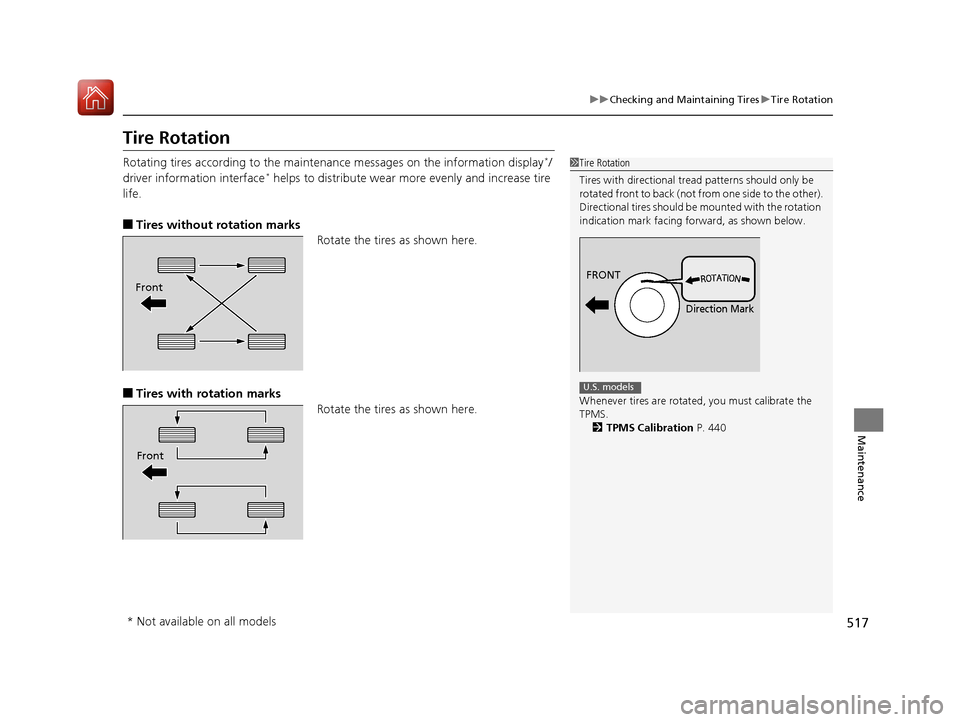
life. ■ Tires without rotation marks
Rotate the tires as shown here.
■ Tires with rotation marks
Rotate the tires as shown here.
1Tire Rotation
Tires with directional tread patterns should only be
rotated front to back (not fr om one side to the other).
Directional tires should be mounted with the rotation
indication mark facing forward, as shown below.
Whenever tires are rotated, you must calibrate the
TPMS. 2 TPMS Calibration P. 440
FRONT
Direction Mark
U.S. models
Front
Front
* Not available on all models
16 CIVIC 2D HC2 (0A 01 0C)-31TBG6000.book 517 ページ >0>.>/6年>0月>/>0日 金曜日 午後4時>/6分
Page 576 of 585
Index
575
Index
Index
Numbers
7-Speed Manual Shift Mode................... 399
Operation ............................................... 400
A
ABS (Anti-lock Brake System) .................. 451
Accessories and Modifications ................ 468
Accessory Power Socket ........................... 174
Adaptive Cruise Control (ACC) with Low
Speed Follow (LSF) ........................... 88, 410
Adding the Coolant ................................. 494
Additives
Coolant .................................................. 493
Engine Oil ............................................... 486
Washer ................................................... 497
Additives, Engine Oil ............................... 486
Adjusting
Armrest .................................................. 167
Clock ...................................................... 114
Front Head Restraints .............................. 162
Front Seats.............................................. 160
Mirrors.................................................... 157
Rear Seats ............................................... 166
Steering Wheel ....................................... 156
Temperature ................................... 108, 112
Adjusting the Clock ................................. 114
Adjusting the Sound ................................ 200
Agile Handling Assist System .................. 437
Aha TM
........................................................ 262 Air Conditioning System (Climate Control
System) .................................................... 179
Changing the Mode ................................ 181
Defrosting the Windshield and Windows ............................................... 182
Dust and Pollen Filter ............................... 523
Recirculation/Fresh Air Mode ................... 181
Sensor ..................................................... 185
Synchronized Mode ................................. 184
Using Automatic Climate Control ............ 179
Air Pressure ............................... 511, 563, 565
Airbags ........................................................ 44
Advanced Airbags ..................................... 50
After a Collision ......................................... 47
Airbag Care ............................................... 57
Event Data Recorder .................................... 0
Front Airbags (SRS) .................................... 47
Indicator .............................................. 55, 79
Passenger Airbag Off Indicator .................. 56
Sensors ...................................................... 44
Side Airbags .............................................. 51
Side Curtain Airbags .................................. 53
AM/FM Radio ............................................ 242
Android Auto ............................................ 279
Anti-lock Brake System (ABS) .................. 451
Indicator .................................................... 79
Apple CarPlay ........................................... 276
Armrest ..................................................... 167
Audio Remote Controls ............................ 191
Audio System .................................... 188, 213
Adjusting the Sound ........................ 200, 235 Audio/Information Screen........................ 214
Changing the Home Screen Icon
Layout ................................................... 218
Changing the Screen Interface ................ 232
Closing Apps ........................................... 234
Customizing the Meter............................ 219
Display Setup .......................................... 236
Error Messages ........................................ 283
General Information ................................ 286
Home Screen........................................... 225
iPod ........................................................ 204
Limitations for Manual Operation ............ 237
Menu Customize ..................................... 233
MP3/WMA/AAC .............................. 207, 263
Reactivating ............................................ 190
Recommended Devices............................ 287
Remote Controls ..................................... 191
Security Code .......................................... 190
Selecting an Audio Source ....................... 237
Status Area ............................................. 231
Theft Protection ...................................... 190
USB Flash Drives ...................................... 287
USB Port(s) .............................................. 189
Wallpaper Setup...................................... 223
Audio/Information Screen ............... 196, 214
Authorized Manuals ................................ 573
Auto Door Locking/Unlocking ................. 129
Customize ............................................... 130
Automatic Brake Hold ............................. 448
Indicator............................................ 76, 448
16 CIVIC 2D HC2 (0A 01 0C)-31TBG6000.book 575 ページ >0>.>/6年>0月>/>0日 金曜日 午後4時>/6分