display HONDA CIVIC COUPE 2016 10.G Owners Manual
[x] Cancel search | Manufacturer: HONDA, Model Year: 2016, Model line: CIVIC COUPE, Model: HONDA CIVIC COUPE 2016 10.GPages: 585, PDF Size: 17.41 MB
Page 375 of 585
374
uuBluetooth® HandsFreeLink ®uHFL Menus
Features
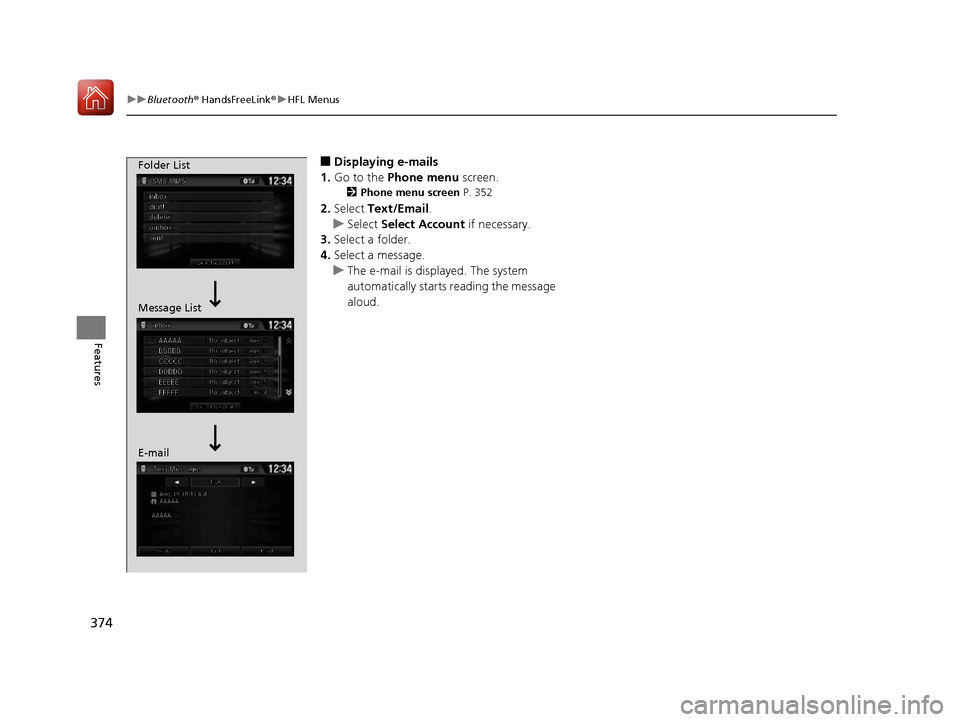
■Displaying e-mails
1. Go to the Phone menu screen.
2 Phone menu screen P. 352
2. Select Text/Email .
uSelect Select Account if necessary.
3. Select a folder.
4. Select a message.
uThe e-mail is displayed. The system
automatically starts reading the message
aloud.
Folder List
Message List
E-mail
16 CIVIC 2D HC2 (0A 01 0C)-31TBG6000.book 374 ページ >0>.>/6年>0月>/>0日 金曜日 午後4時>/6分
Page 376 of 585

Continued375
uuBluetooth® HandsFreeLink ®uHFL Menus
Features
■Read or Stop reading a message
1. Go to the text or e-mail message screen.
uThe system automatica lly starts reading
the message aloud.
2 Displaying Messages P. 373
2. Select Stop to stop reading.
Select Read again to start reading the
message from the beginning.
■ Reply to a message
1. Go to the text or e-mail message screen.
uThe system automatica lly starts reading
the message aloud.
2 Displaying Messages P. 373
2. Select Reply.
3. Select the reply message.
uThe pop-up menu appears on the screen.
4. Select Send to send the message.
uComplete appears on the screen when
the reply message was successfully sent.
1Reply to a message
The available fixed reply messages are as follows: • Talk to you later, I’m driving.
• I’m on my way.
• I’m running late.
• OK
• Yes
• No
You cannot add, edit, or delete reply messages.
16 CIVIC 2D HC2 (0A 01 0C)-31TBG6000.book 375 ページ >0>.>/6年>0月>/>0日 金曜日 午後4時>/6分
Page 397 of 585
uuWhen DrivinguShifting
396
Driving
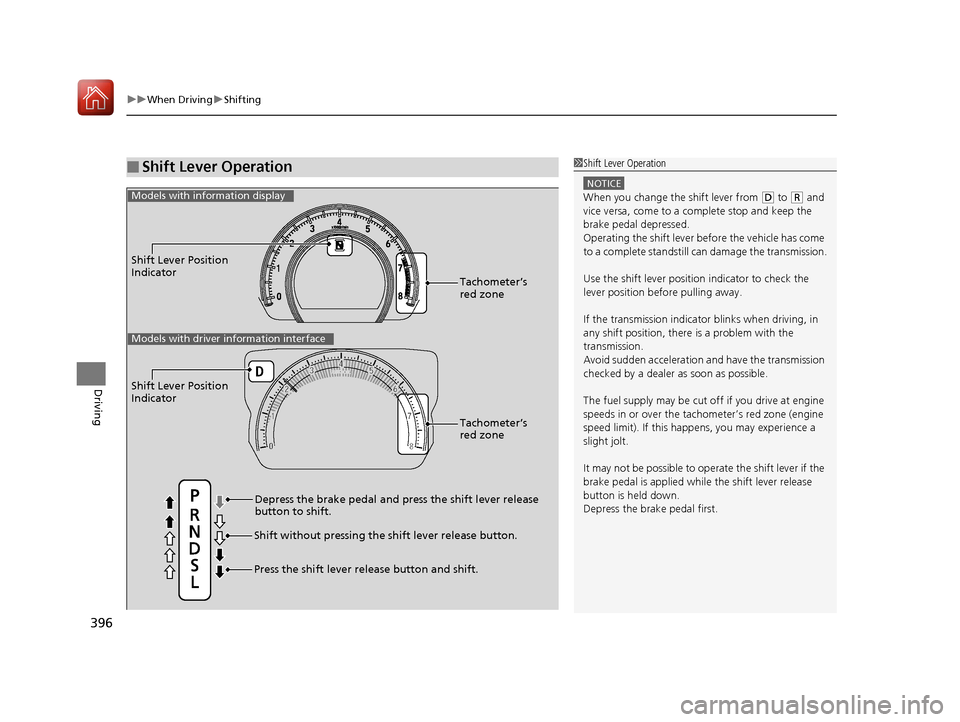
■Shift Lever Operation1Shift Lever Operation
NOTICE
When you change the shift lever from (D to (R and
vice versa, come to a complete stop and keep the brake pedal depressed.
Operating the shift lever be fore the vehicle has come
to a complete standstill can damage the transmission.
Use the shift lever position indicator to check the
lever position befo re pulling away.
If the transmission indicator blinks when driving, in
any shift position, there is a problem with the
transmission.
Avoid sudden acceleration and have the transmission
checked by a dealer as soon as possible.
The fuel supply may be cut of f if you drive at engine
speeds in or over the tac hometer’s red zone (engine
speed limit). If this happe ns, you may experience a
slight jolt.
It may not be possible to operate the shift lever if the
brake pedal is applied while the shift lever release
button is held down. Depress the brake pedal first.
Shift Lever Position
Indicator
Depress the brake pedal and press the shift lever release button to shift.
Shift without pressing the shift lever release button.
Press the shift lever re lease button and shift.Tachometer’s red zone
Models with info
rmation display
Shift Lever Position
Indicator
Tachometer’s red zone
Models with driver information interface
16 CIVIC 2D HC2 (0A 01 0C)-31TBG6000.book 396 ページ >0>.>/6年>0月>/>0日 金曜日 午後4時>/6分
Page 398 of 585
397
uuWhen DrivinguShifting
Continued
Driving
Shifting
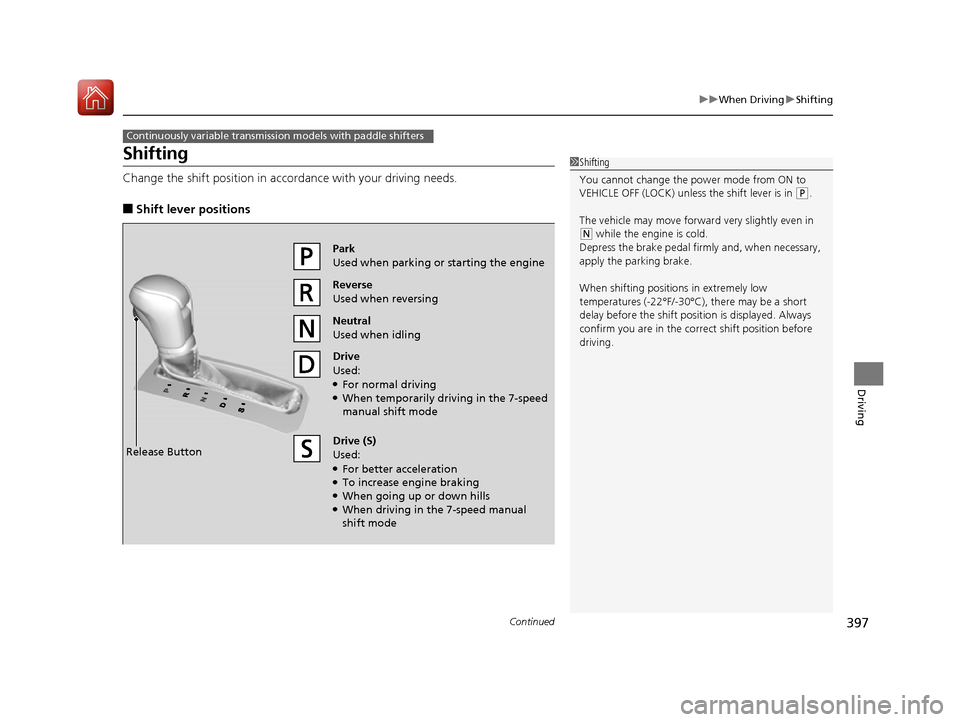
Change the shift position in accordance with your driving needs. ■Shift lever positions
Continuously variable transmission models with paddle shifters
1Shifting
You cannot change the pow er mode from ON to
VEHICLE OFF (LOCK) unless the shift lever is in
(P .
The vehicle may move forwar d very slightly even in
(N while the engine is cold.
Depress the brake pedal firm ly and, when necessary,
apply the parking brake.
When shifting positions in extremely low
temperatures (-22°F/-30°C), there may be a short delay before the shift posit ion is displayed. Always
confirm you are in the corr ect shift position before
driving.
Reverse
Used when reversing
Drive
Used: ● For normal driving
● When temporarily driving in the 7-speed manual shift mode
Park
Used when parking or starting the engine
Neutral
Used when idling
Release Button Drive (S)
Used: ●
For better acceleration
● To increase engine braking
● When going up or down hills
● When driving in the 7-speed manual
shift mode
16 CIVIC 2D HC2 (0A 01 0C)-31TBG6000.book 397 ページ >0>.>/6年>0月>/>0日 金曜日 午後4時>/6分
Page 400 of 585
Continued399
uuWhen DrivinguShifting
Driving
Use the paddle shifters to change between 1st and 7th speeds without removing
your hands from the steering wheel. The transmission switches to the 7-speed
manual shift mode when you pull a paddle shifter while driving. This mode is useful
when engine braking is needed. ■ When the shift lever is in
(D :
The shift mode goes into the 7-speed ma nual shift mode temporarily, and the
number is displayed in the shift indicator.
The 7-speed manual shift mode is canceled automatically if you drive at constant
speed or accelerate, and the number in the shift indicator goes off.
You can cancel this mode by pulling the
(+ paddle shifter for a few seconds.
The 7-speed manual shift mode is especial ly useful when reducing the vehicle speed
temporarily before making a turn.
■ When the shift lever is in
(S :
The shift mode goes into the 7-speed manual shift mode. The M indicator and the
speed number are displayed in the shift indicator. As the vehicle speed slows down,
the transmission automatically shifts down accordingly. When the vehicle comes to
a stop, it automatically shifts down into 1st.
If the vehicle speed increases and the engi ne speed reaches near the tachometer’s
red zone, the transmission automatically shifts up.
You can only pull away in 1st speed.
When canceling the 7-speed manual sh ift mode, move the shift lever from
(S to
(D . When the 7-speed manual sh ift mode is canceled, the M indicator and shift
indicator go off.
■7-Speed Manual Shift Mode17-Speed Manual Shift Mode
To improve fuel economy, the transmission may shift
up to a higher speed than the seventh under certain
circumstances. In this case, the number in the shift
indicator remains as 7.
In the 7-speed manual shif t mode, the transmission
shifts up or down by opera ting either paddle shifter
under the following conditions:
Shift Up: The engine speed reaches the lowest
threshold of the higher speed position.
Shift Down: The engine sp eed reaches the highest
threshold of the lower speed position.
When the engine speed reaches near the
tachometer’s red zone, the transmission shifts up
automatically.
When the engine speed reaches the lowest threshold of the selected speed positi on, the transmission shifts
down automatically.
Operating the paddle shifte rs on slippery surfaces
may cause the tires to lock up. In this case, the 7-
speed manual shift mode is canceled and goes back
to the normal D driving mode.
16 CIVIC 2D HC2 (0A 01 0C)-31TBG6000.book 399 ページ >0>.>/6年>0月>/>0日 金曜日 午後4時>/6分
Page 405 of 585
404
uuWhen DrivinguECON Button
Driving
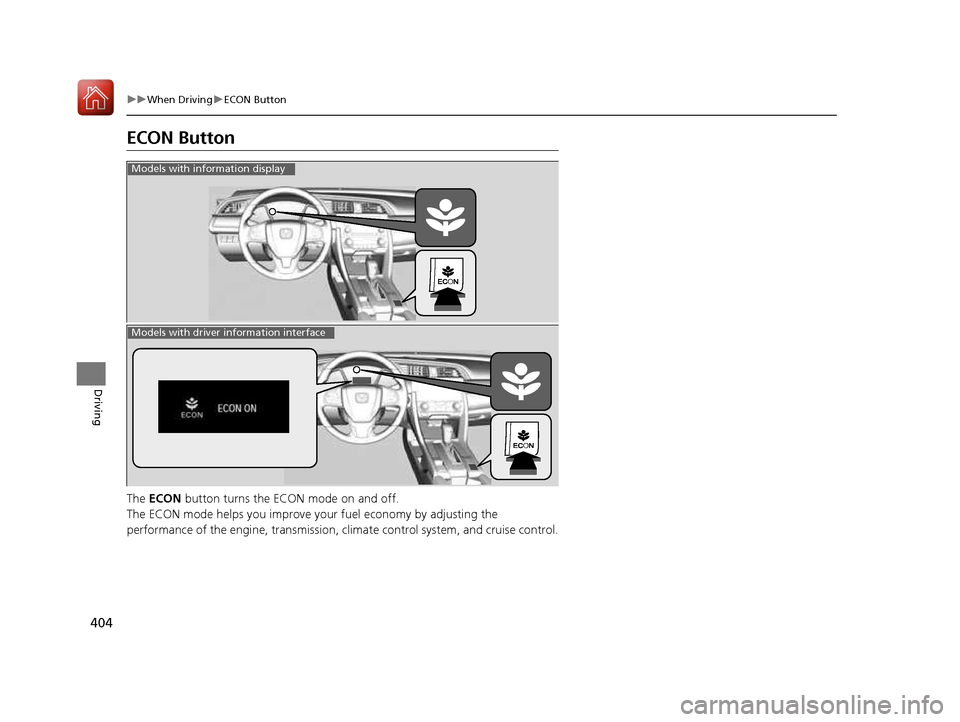
ECON Button The ECON button turns the ECON mode on and off.
The ECON mode helps you improve your fuel economy by adjusting the
performance of the engine, tra nsmission, climate control system, and cruise control.
Models with information display
Models with driver information interface
16 CIVIC 2D HC2 (0A 01 0C)-31TBG6000.book 404 ページ >0>.>/6年>0月>/>0日 金曜日 午後4時>/6分
Page 413 of 585
uuWhen DrivinguAdaptive Cruise Control (ACC) with Low Speed Follow (LSF)*
412
Driving
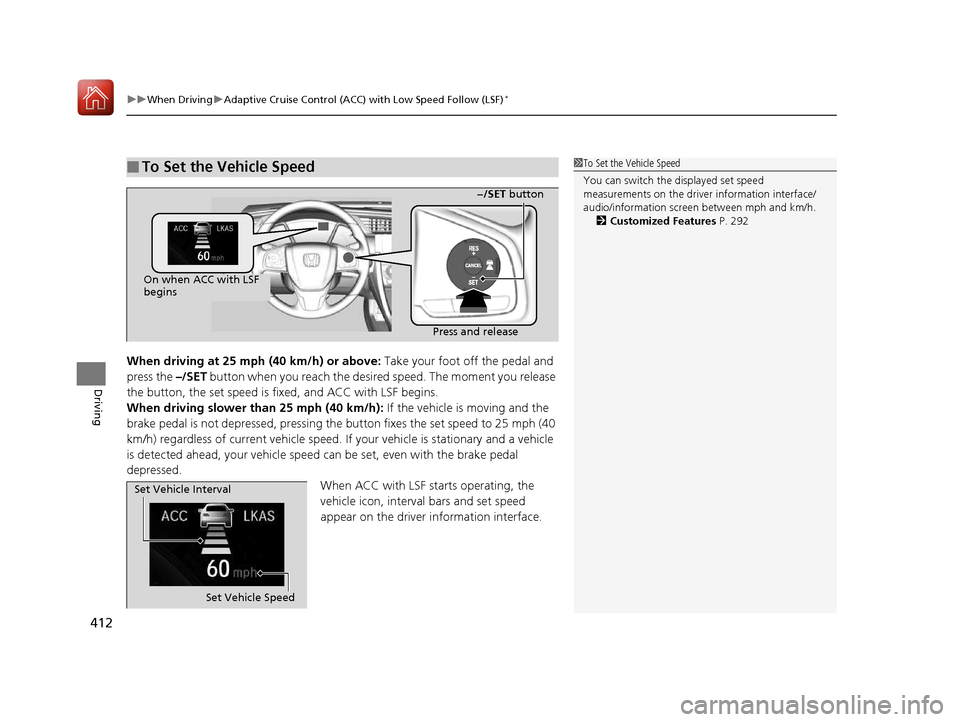
When driving at 25 mph (40 km/h) or above: Take your foot off the pedal and
press the –/SET button when you reach the desire d speed. The moment you release
the button, the set speed is fi xed, and ACC with LSF begins.
When driving slower than 25 mph (40 km/h): If the vehicle is moving and the
brake pedal is not depressed, pressing the button fixes the set speed to 25 mph (40
km/h) regardless of current vehicle speed. If your vehicle is stationary and a vehicle
is detected ahead, your vehicle speed can be set, even with the brake pedal
depressed.
When ACC with LSF starts operating, the
vehicle icon, interval bars and set speed
appear on the driver information interface.
■To Set the Vehicle Speed1To Set the Vehicle Speed
You can switch the displayed set speed
measurements on the driver information interface/
audio/information screen between mph and km/h.
2 Customized Features P. 292
On when ACC with LSF
begins
Press and release−/SET
button
Set Vehicle Speed
Set Vehicle Interval
16 CIVIC 2D HC2 (0A 01 0C)-31TBG6000.book 412 ページ >0>.>/6年>0月>/>0日
金曜日 午後4時>/6分
Page 421 of 585
uuWhen DrivinguAdaptive Cruise Control (ACC) with Low Speed Follow (LSF)*
420
Driving
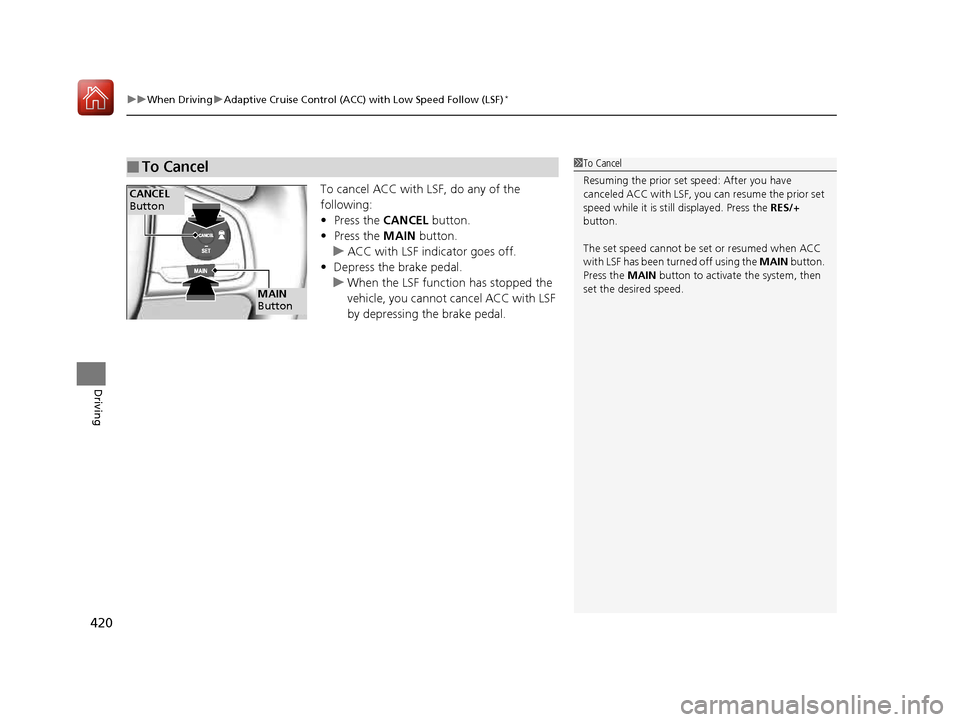
To cancel ACC with LSF, do any of the
following:• Press the CANCEL button.
• Press the MAIN button.
uACC with LSF indicator goes off.
• Depress the brake pedal.
uWhen the LSF function has stopped the
vehicle, you cannot cancel ACC with LSF
by depressing the brake pedal.
■To Cancel1To Cancel
Resuming the prior set speed: After you have
canceled ACC with LSF, you can resume the prior set
speed while it is still displayed. Press the RES/+
button.
The set speed cannot be set or resumed when ACC
with LSF has been turned off using the MAIN button.
Press the MAIN button to activate the system, then
set the desired speed.
CANCEL
Button
MAIN
Button
16 CIVIC 2D HC2 (0A 01 0C)-31TBG6000.book 420 ページ >0>.>/6年>0月>/>0日 金曜日 午後4時>/6分
Page 429 of 585
428
uuWhen DrivinguLane Keeping Assist System (LKAS)*
Driving
Lane Keeping Assist System (LKAS) *
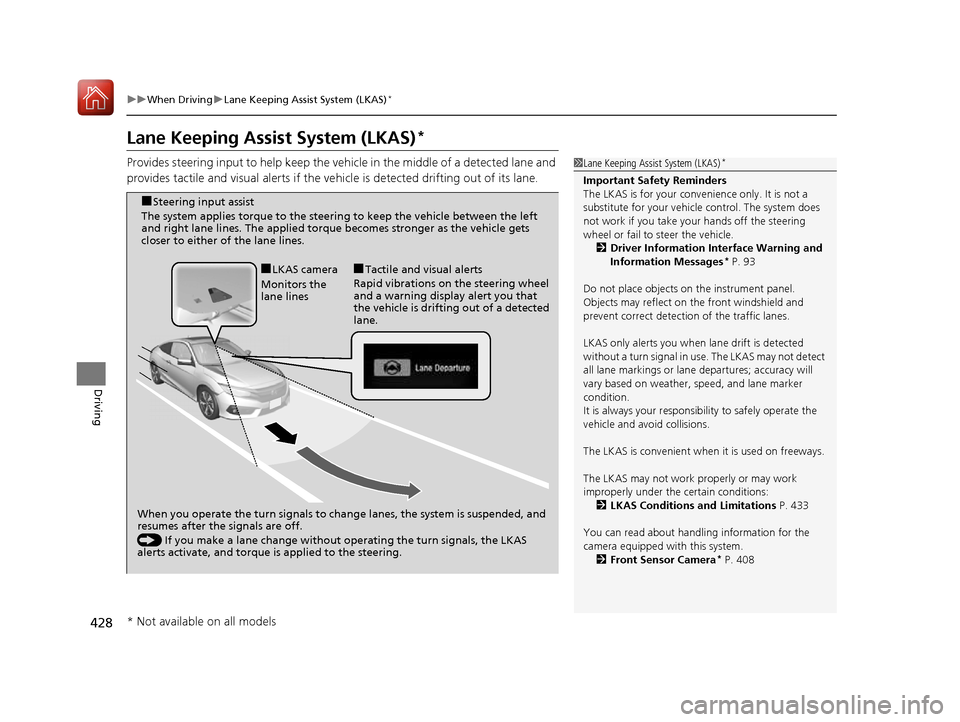
Provides steering input to help keep the vehicle in the middle of a detected lane and
provides tactile and visual alerts if the ve hicle is detected drifting out of its lane.
1Lane Keeping Assist System (LKAS)*
Important Safety Reminders
The LKAS is for your convenience only. It is not a
substitute for your vehicl e control. The system does
not work if you take y our hands off the steering
wheel or fail to steer the vehicle.
2 Driver Information Interface Warning and
Information Messages *
P. 93
Do not place objects on the instrument panel.
Objects may reflect on th e front windshield and
prevent correct detectio n of the traffic lanes.
LKAS only alerts you when lane drift is detected
without a turn signal in us e. The LKAS may not detect
all lane markings or lane departures; accuracy will
vary based on weather, speed, and lane marker
condition.It is always your responsibility to safely operate the
vehicle and avoid collisions.
The LKAS is convenient when it is used on freeways.
The LKAS may not work properly or may work
improperly under the certain conditions:
2 LKAS Conditions and Limitations P. 433
You can read about handling information for the
camera equipped with this system. 2 Front Sensor Camera *
P. 408
When you operate the turn signals to chan ge lanes, the system is suspended, and
resumes after the signals are off.
() If you make a lane change without operating the turn signals, the LKAS
alerts activate, and torque is applied to the steering.
■
LKAS camera
Monitors the
lane lines ■
Tactile and visual alerts
Rapid vibrations on the steering wheel
and a warning display alert you that
the vehicle is drifting out of a detected lane.
■
Steering input assist
The system applies torque to the steering to keep the vehicle between the left
and right lane lines. The applied torque becomes stronger as the vehicle gets
closer to either of the lane lines.
* Not available on all models
16 CIVIC 2D HC2 (0A 01 0C)-31TBG6000.book 428 ページ >0>.>/6年>0月>/>0日 金曜日 午後4時>/6分
Page 430 of 585
Continued429
uuWhen DrivinguLane Keeping Assist System (LKAS)*
Driving
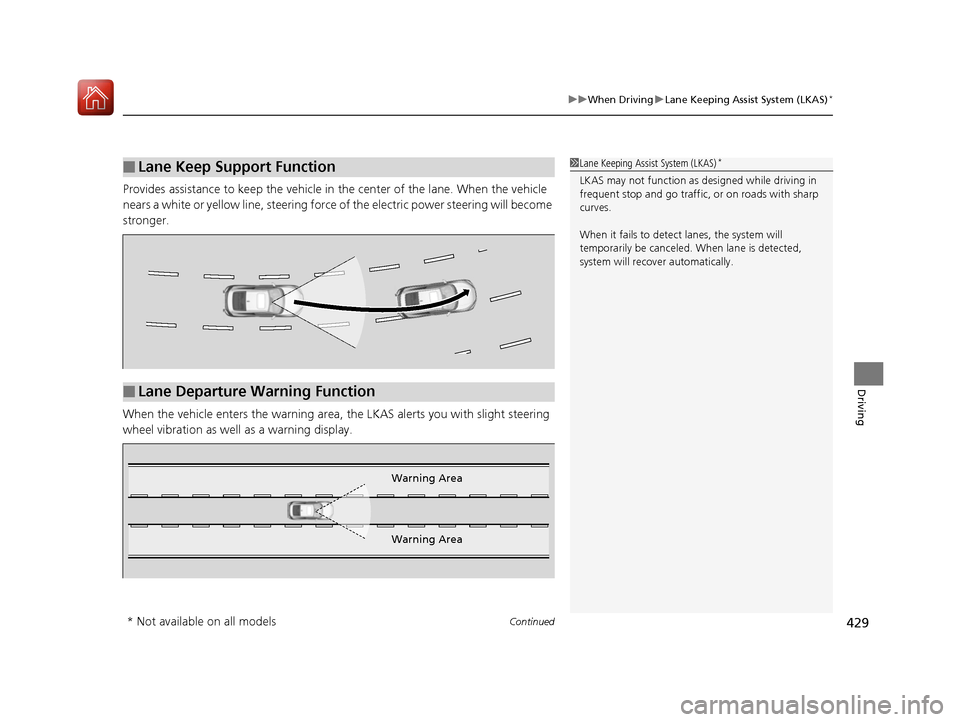
Provides assistance to keep the vehicle in the center of the lane. When the vehicle
nears a white or yellow line, steering force of the electric power steering will become
stronger.
When the vehicle enters the warning area,
the LKAS alerts you with slight steering
wheel vibration as well as a warning display.
■Lane Keep Support Function1Lane Keeping Assist System (LKAS) *
LKAS may not function as designed while driving in
frequent stop and go traffic, or on roads with sharp
curves.
When it fails to detect lanes, the system will
temporarily be canceled. When lane is detected,
system will recover automatically.
■Lane Departure Warning Function
Warning Area
Warning Area
* Not available on all models
16 CIVIC 2D HC2 (0A 01 0C)-31TBG6000.book 429 ページ >0>.>/6年>0月>/>0日 金曜日 午後4時>/6分