display HONDA CIVIC COUPE 2016 10.G Owners Manual
[x] Cancel search | Manufacturer: HONDA, Model Year: 2016, Model line: CIVIC COUPE, Model: HONDA CIVIC COUPE 2016 10.GPages: 585, PDF Size: 17.41 MB
Page 310 of 585
309
uuCustomized Featuresu
Continued
Features
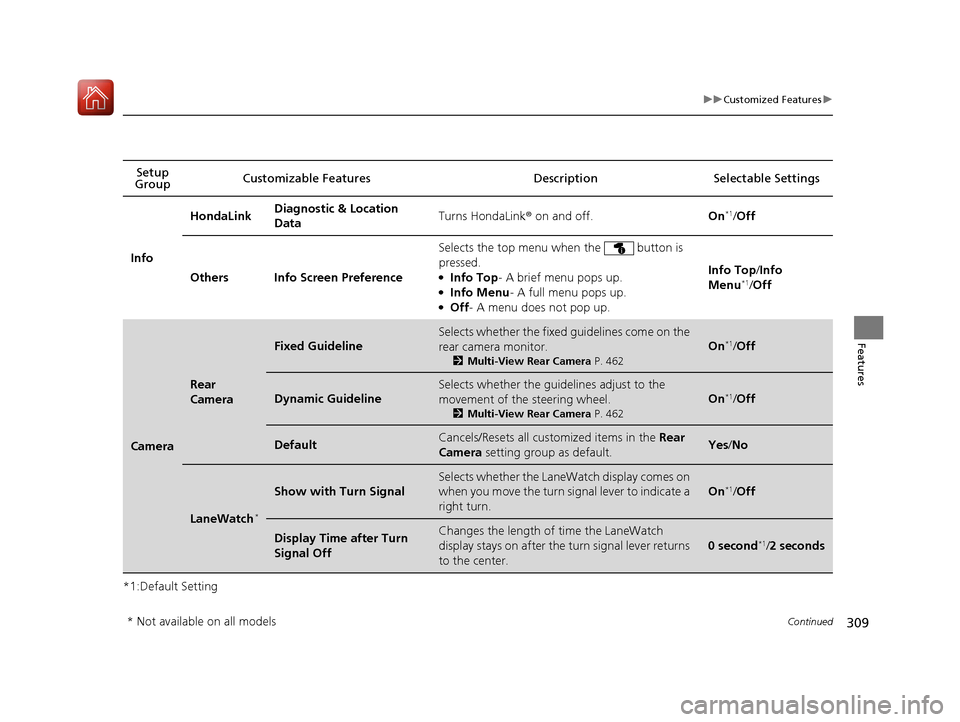
*1:Default SettingSetup
Group Customizable Features Desc
ription Selectable Settings
Info HondaLink
Diagnostic & Location
Data
Turns HondaLink
® on and off. On*1
/Off
Others Info Screen Preference Selects the top menu when the button is pressed. ●
Info Top - A brief menu pops up.
● Info Menu - A full menu pops up.
● Off - A menu does not pop up. Info Top
/Info
Menu *1
/Off
Camera
Rear
Camera
Fixed Guideline
Selects whether the fixed guidelines come on the
rear camera monitor.
2Multi-View Rear Camera P. 462
On*1
/Off
Dynamic Guideline
Selects whether the guidelines adjust to the
movement of the steering wheel.
2Multi-View Rear Camera P. 462
On*1
/Off
DefaultCancels/Resets all cust omized items in the Rear
Camera setting group as default.Yes/No
LaneWatch *
Show with Turn Signal
Selects whether the LaneWatch display comes on
when you move the turn signal lever to indicate a
right turn.
On*1
/Off
Display Time after Turn Signal OffChanges the length of time the LaneWatch
display stays on after the turn signal lever returns
to the center.
0 second *1
/2 seconds
* Not available on all models
16 CIVIC 2D HC2 (0A 01 0C)-31TBG6000.book 309 ページ >0>.>/6年>0月>/>0日 金曜日 午後4時>/6分
Page 314 of 585
313
uuCustomized Featuresu
Continued
Features
*1:Default Setting
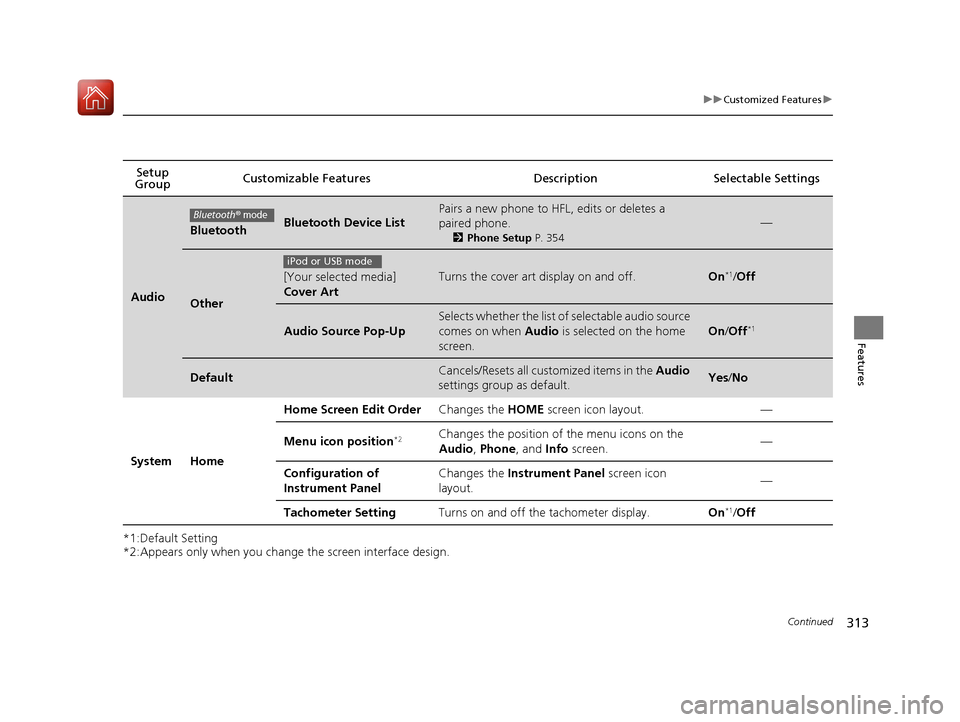
*2:Appears only when you change the screen interface design.Setup
Group Customizable Features Descri
ption Selectable Settings
Audio
BluetoothBluetooth Device List
Pairs a new phone to HFL, edits or deletes a paired phone.
2Phone Setup P. 354
—
Other
[Your selected media] Cover ArtTurns the cover art display on and off.On*1
/Off
Audio Source Pop-Up
Selects whether the list of selectable audio source
comes on when Audio is selected on the home
screen.
On /Off *1
DefaultCancels/Resets all customized items in the
Audio
settings group as default.Yes /No
System Home Home Screen Edit Order
Changes the HOME screen icon layout. —
Menu icon position *2Changes the position of the menu icons on the
Audio
, Phone , and Info screen. —
Configuration of
Instrument Panel Changes the
Instrument Panel screen icon
layout. —
Tachometer Setting Turns on and off the tachometer display. On*1
/Off
Bluetooth® mode
iPod or USB mode
16 CIVIC 2D HC2 (0A 01 0C)-31TBG6000.book 313 ページ >0>.>/6年>0月>/>0日 金曜日 午後4時>/6分
Page 315 of 585
314
uuCustomized Featuresu
Features
*1:Default Setting
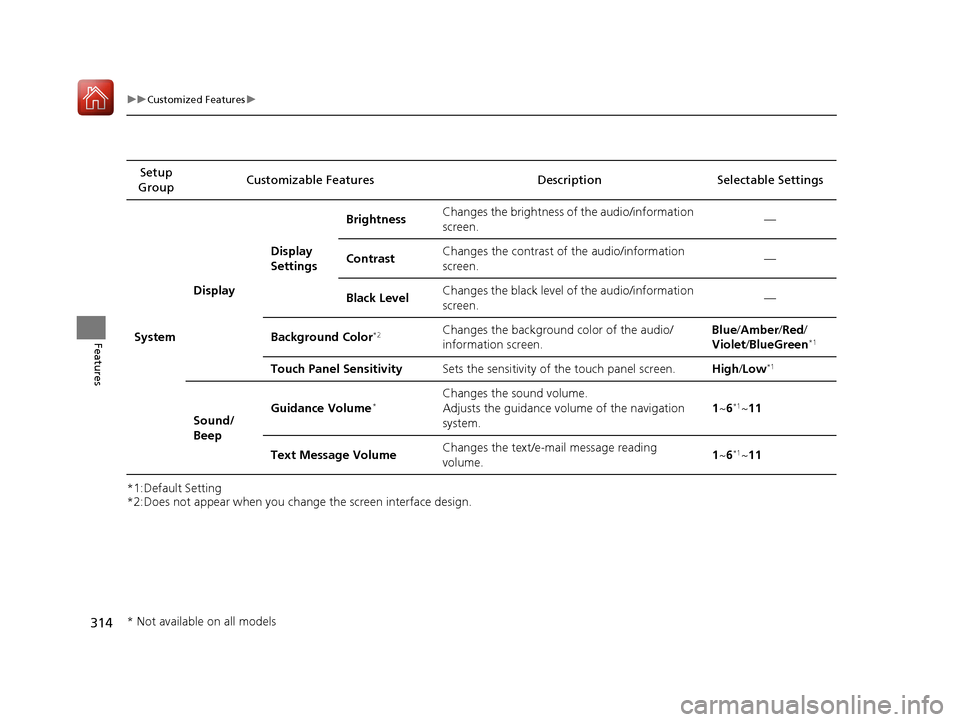
*2:Does not appear when you change the screen interface design.Setup
Group Customizable Features Descri
ption Selectable Settings
System Display
Display
SettingsBrightness
Changes the brightness of the audio/information
screen. —
Contrast Changes the contrast of the audio/information
screen.
—
Black Level Changes the black level of the audio/information
screen.
—
Background Color *2Changes the background color of the audio/ information screen. Blue
/Amber /Red /
Violet /BlueGreen *1
Touch Panel Sensitivity Sets the sensitivity of the touch panel screen. High/Low *1
Sound/
Beep Guidance Volume
*Changes the sound volume.
Adjusts the guidance volume of the navigation system. 1
~ 6*1
~11
Text Message Volume Changes the text/e-mail message reading
volume. 1
~ 6*1
~11
* Not available on all models
16 CIVIC 2D HC2 (0A 01 0C)-31TBG6000.book 314 ページ >0>.>/6年>0月>/>0日 金曜日 午後4時>/6分
Page 317 of 585
316
uuCustomized Featuresu
Features
*1:Default Setting
*2:Does not appear when you change the screen interface design.
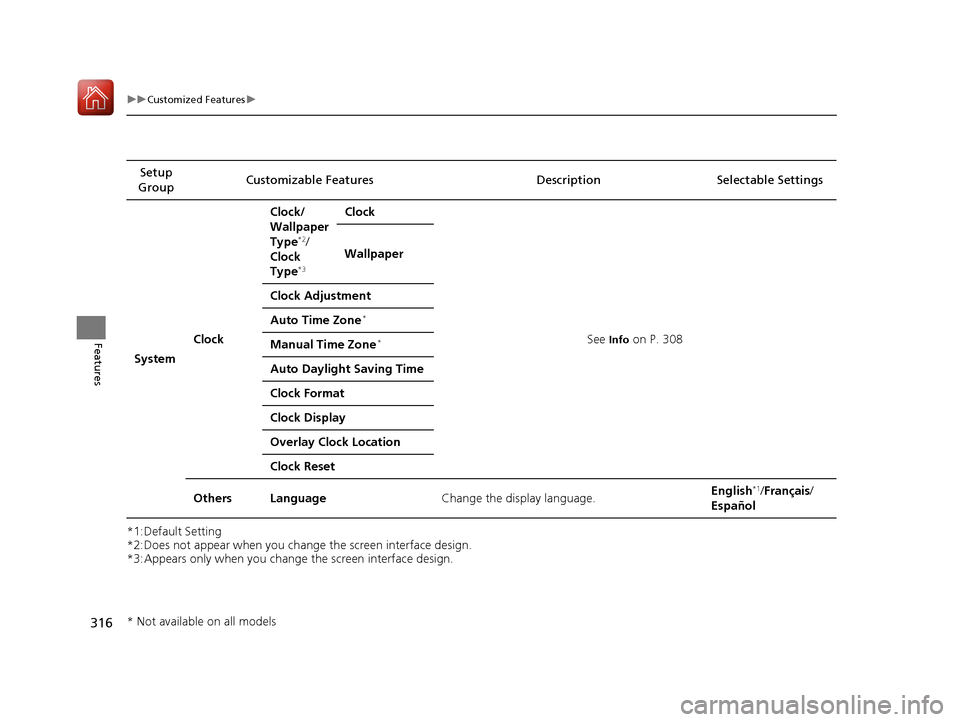
*3:Appears only when you change the screen interface design.Setup
Group Customizable Features Description Selectable Settings
System Clock Clock/
Wallpaper Type
*2
/
Clock Type *3 Clock
See Info on P. 308
Wallpaper
Clock Adjustment Auto Time Zone *
Manual Time Zone *
Auto Daylight Saving Time
Clock Format
Clock Display
Overlay Clock Location
Clock Reset
Others Language Change the display language. English
*1
/Français /
Español
* Not available on all models
16 CIVIC 2D HC2 (0A 01 0C)-31TBG6000.book 316 ページ >0>.>/6年>0月>/>0日 金曜日 午後4時>/6分
Page 319 of 585
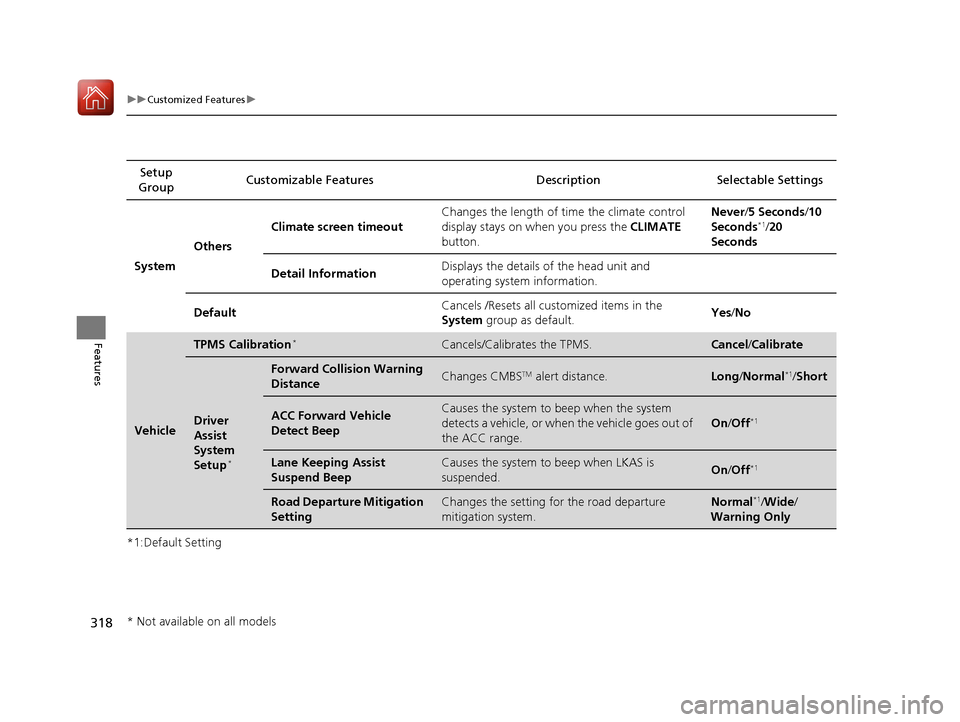
318
uuCustomized Featuresu
Features
*1:Default SettingSetup
Group Customizable Features Desc
ription Selectable Settings
System Others Climate screen timeout
Changes the length of time the climate control
display stays on when you press the
CLIMATE
button. Never
/5 Seconds /10
Seconds *1
/20
Seconds
Detail Information Displays the details of the head unit and
operating system information.
Default Cancels /Resets all cust
omized items in the
System group as default. Yes
/No
Vehicle
TPMS Calibration *Cancels/Calibrates the TPMS.Cancel
/Calibrate
Driver
Assist
System
Setup *
Forward Collision Warning
DistanceChanges CMBS
TM
alert distance.Long /Normal *1
/Short
ACC Forward Vehicle
Detect BeepCauses the system to beep when the system
detects a vehicle, or when the vehicle goes out of
the ACC range.
On /Off *1
Lane Keeping Assist
Suspend BeepCauses the system to
beep when LKAS is
suspended.On /Off *1
Road Departure Mitigation
SettingChanges the setting for the road departure
mitigation system.Normal *1
/Wide /
Warning Only
* Not available on all models
16 CIVIC 2D HC2 (0A 01 0C)-31TBG6000.book 318 ページ >0>.>/6年>0月>/>0日 金曜日 午後4時>/6分
Page 320 of 585
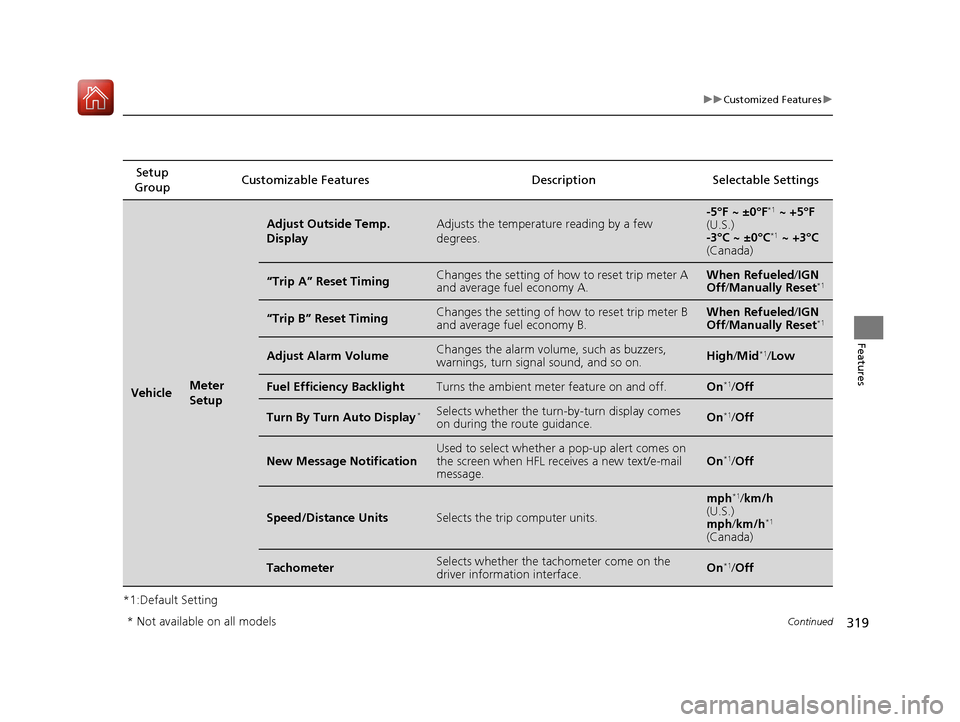
319
uuCustomized Featuresu
Continued
Features
*1:Default SettingSetup
Group Customizable Features Description Selectable Settings
VehicleMeter
Setup
Adjust Outside Temp. DisplayAdjusts the temperature reading by a few degrees.-5°F ~ ±0°F
*1
~ +5°F
(U.S.)
-3°C ~ ±0°C *1
~ +3°C
(Canada)
“Trip A” Reset TimingChanges the setting of how to reset trip meter A and average fuel economy A.When Refueled /IGN
Off /Manually Reset *1
“Trip B” Reset TimingChanges the setting of how to reset trip meter B and average fuel economy B.When Refueled
/IGN
Off /Manually Reset *1
Adjust Alarm VolumeChanges the alarm volu
me, such as buzzers,
warnings, turn signal sound, and so on.High /Mid *1
/Low
Fuel Efficiency BacklightTurns the ambient meter feature on and off.On *1
/Off
Turn By Turn Auto Display *Selects whether the turn
-by-turn display comes
on during the route guidance.On *1
/Off
New Message NotificationUsed to select whether a pop-up alert comes on
the screen when HFL receives a new text/e-mail message.On *1
/Off
Speed/Distance UnitsSelects the trip computer units.
mph *1
/km/h
(U.S.) mph /km/h *1
(Canada)
TachometerSelects whether the tach ometer come on the
driver information interface.On *1
/Off
* Not available on all models
16 CIVIC 2D HC2 (0A 01 0C)-31TBG6000.book 319 ページ >0>.>/6年>0月>/>0日 金曜日 午後4時>/6分
Page 322 of 585
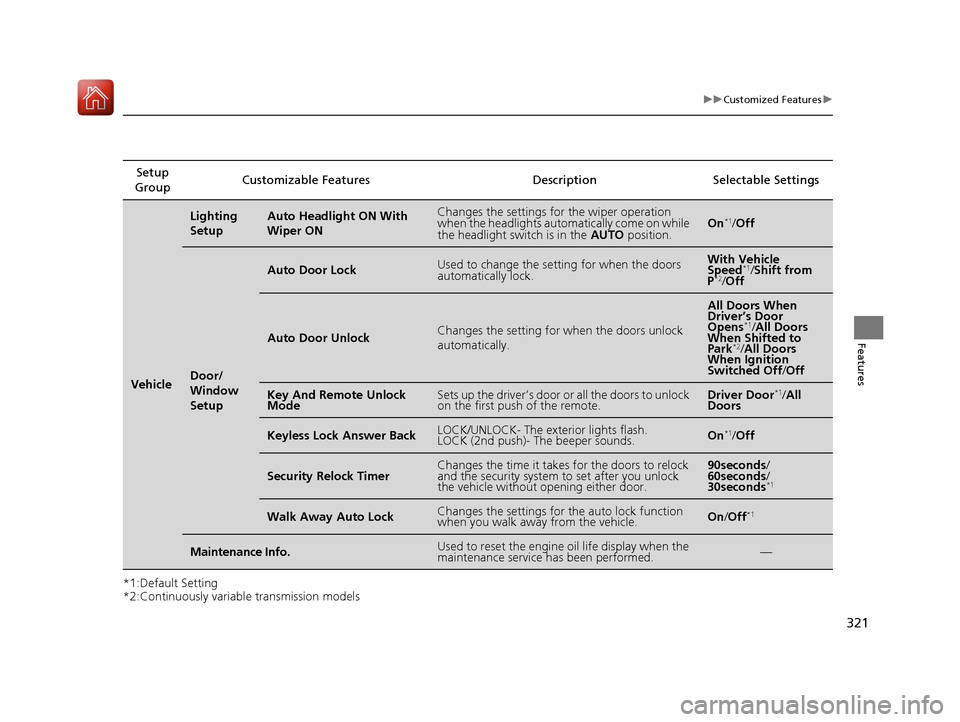
321
uuCustomized Featuresu
Features
*1:Default Setting
*2:Continuously variable transmission modelsSetup
Group Customizable Features Description Selectable Settings
Vehicle
Lighting
SetupAuto Headlight ON With Wiper ONChanges the settings for the wiper operation
when the headlights automa
tically come on while
the headlight switch is in the AUTO position.On*1
/Off
Door/
Window
Setup
Auto Door LockUsed to change the sett ing for when the doors
automatically lock.With Vehicle
Speed *1
/Shift from
P *2
/Off
Auto Door UnlockChanges the setting for when the doors unlock
automatically.
All Doors When
Driver’s Door
Opens *1
/All Doors
When Shifted to Park *2
/All Doors
When Ignition
Switched Off /Off
Key And Remote Unlock
ModeSets up the driver’s door or all the doors to unlock
on the first push of the remote.Driver Door *1
/All
Doors
Keyless Lock Answer BackLOCK/UNLOCK- The exterior lights flash.
LOCK (2nd push)- The beeper sounds.On *1
/Off
Security Relock TimerChanges the time it takes for the doors to relock
and the security system to set after you unlock
the vehicle without opening either door.90seconds /
60seconds /
30seconds *1
Walk Away Auto LockChanges the settings for the auto lock function
when you walk away from the vehicle.On
/Off *1
Maintenance Info.Used to reset the engine
oil life display when the
maintenance service has been performed.—
16 CIVIC 2D HC2 (0A 01 0C)-31TBG6000.book 321 ページ >0>.>/6年>0月>/>0日 金曜日 午後4時>/6分
Page 323 of 585
322
uuCustomized FeaturesuDefaulting All the Settings
Features
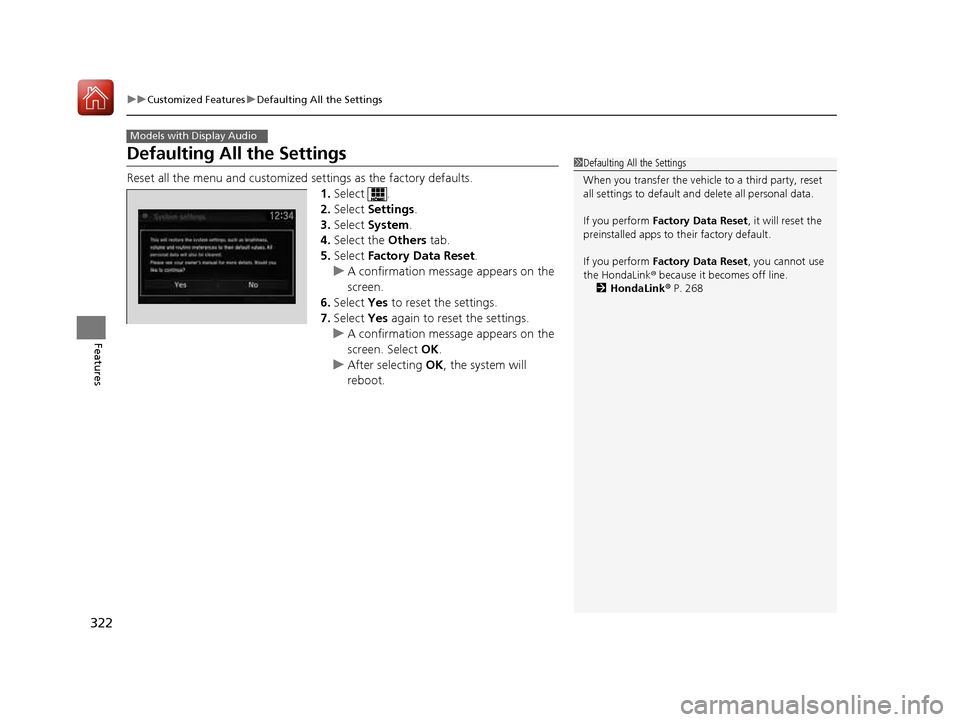
Defaulting All the Settings
Reset all the menu and customized settings as the factory defaults.
1. Select .
2. Select Settings .
3. Select System .
4. Select the Others tab.
5. Select Factory Data Reset .
uA confirmation message appears on the screen.
6. Select Yes to reset the settings.
7. Select Yes again to reset the settings.
uA confirmation message appears on the
screen. Select OK.
uAfter selecting OK, the system will
reboot.
Models with Display Audio
1Defaulting All the Settings
When you transfer the vehicle to a third party, reset all settings to default a nd delete all personal data.
If you perform Factory Data Reset , it will reset the
preinstalled apps to their factory default.
If you perform Factory Data Reset , you cannot use
the HondaLink ® because it becomes off line.
2 HondaLink ® P. 268
16 CIVIC 2D HC2 (0A 01 0C)-31TBG6000.book 322 ページ >0>.>/6年>0月>/>0日 金曜日 午後4時>/6分
Page 325 of 585
uuBluetooth® HandsFreeLink ®uUsing HFL
324
Features
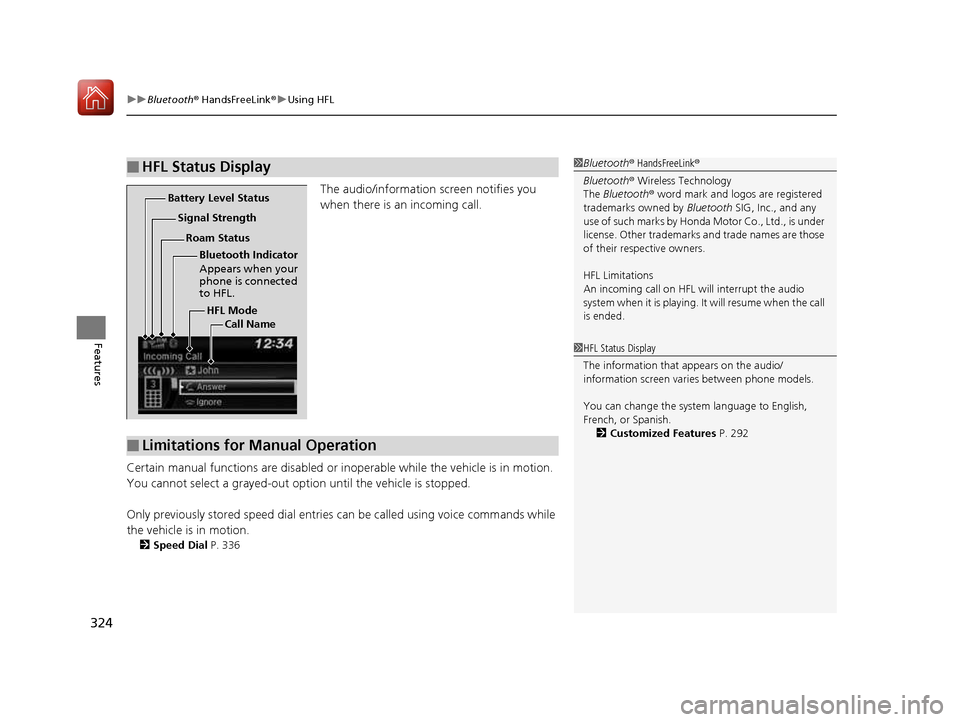
The audio/information screen notifies you
when there is an incoming call.
Certain manual functions are disabled or i noperable while the vehicle is in motion.
You cannot select a grayed-out option until the vehicle is stopped. Only previously stored speed dial entries can be called using voice commands while
the vehicle is in motion. 2 Speed Dial P. 336
■HFL Status Display1Bluetooth® HandsFreeLink ®
Bluetooth ® Wireless Technology
The Bluetooth ® word mark and logos are registered
trademarks owned by Bluetooth SIG, Inc., and any
use of such marks by Honda Motor Co., Ltd., is under license. Other trademarks and trade names are those
of their respective owners.
HFL Limitations
An incoming call on HFL will interrupt the audio
system when it is playing. It will resume when the call is ended.
HFL Mode
Battery Level Status
Signal Strength
Bluetooth Indicator
Appears when your
phone is connected
to HFL.
Roam Status
Call Name
■Limitations for Manual Operation
1HFL Status Display
The information that appears on the audio/
information screen vari es between phone models.
You can change the system language to English,
French, or Spanish. 2 Customized Features P. 292
16 CIVIC 2D HC2 (0A 01 0C)-31TBG6000.book 324 ページ >0>.>/6年>0月>/>0日 金曜日 午後4時>/6分
Page 326 of 585
325
uuBluetooth® HandsFreeLink ®uHFL Menus
Continued
Features
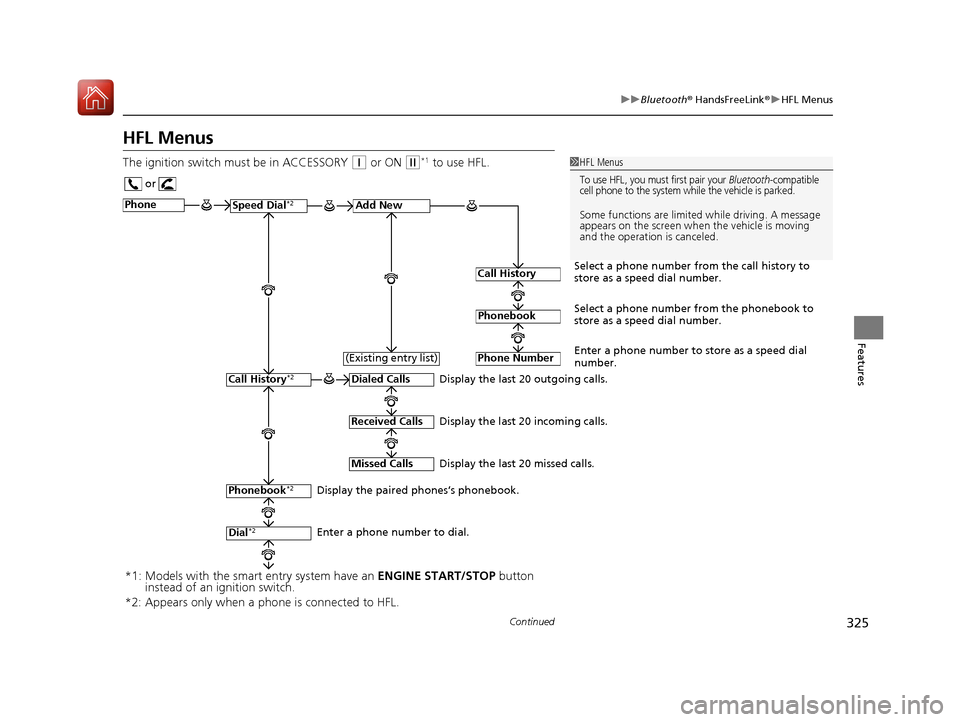
HFL Menus
The ignition switch mu st be in ACCESSORY
(q or ON (w*1
to use HFL.1HFL Menus
To use HFL, you must first pair your Bluetooth-compatible
cell phone to the system while the vehicle is parked.
Some functions are limited while driving. A message
appears on the screen when the vehicle is moving
and the operation is canceled.
or
Display the last 20 outgoing calls.
Display the last 20 incoming calls.
Display the last 20 missed calls.
Phone
Speed Dial
*2Add New
Select a phone number from the call history to
store as a speed dial number.
Call History
PhonebookSelect a phone number from the phonebook to
store as a speed dial number.
Phone Number
Enter a phone number to store as a speed dial
number.
Dialed Calls
Received Calls
Missed Calls
Phonebook *2
Dial*2
Call History *2
Display the paired phones’s phonebook.
Enter a phone number to dial.(Existing entry list)
*1: Models with the smart entry system have an
ENGINE START/STOP button
instead of an ignition switch.
*2: Appears only when a pho ne is connected to HFL.
16 CIVIC 2D HC2 (0A 01 0C)-31TBG6000.book 325 ページ >0>.>/6年>0月>/>0日 金曜日 午後4時>/6分