bluetooth HONDA CIVIC HATCHBACK 2021 (in English) Owner's Guide
[x] Cancel search | Manufacturer: HONDA, Model Year: 2021, Model line: CIVIC HATCHBACK, Model: HONDA CIVIC HATCHBACK 2021Pages: 711, PDF Size: 37.1 MB
Page 315 of 711
313
uuAudio System Basic Operation uApple CarPlay
Continued
Features
Apple CarPlay
If you connect an Apple CarPlay-compatible iPhone to the system via the 1.5A USB
port, you can use the audio/information scr een, instead of the iPhone display, to
make a phone call, listen to music, view maps (navigation), and access messages.
2USB Port(s) P. 227
■Phone
Access the contact list, make phone ca lls, or listen to voice mail.
■Messages
Check and reply to text messages, or have messages read to you.
■Music
Play music stored on your iPhone.
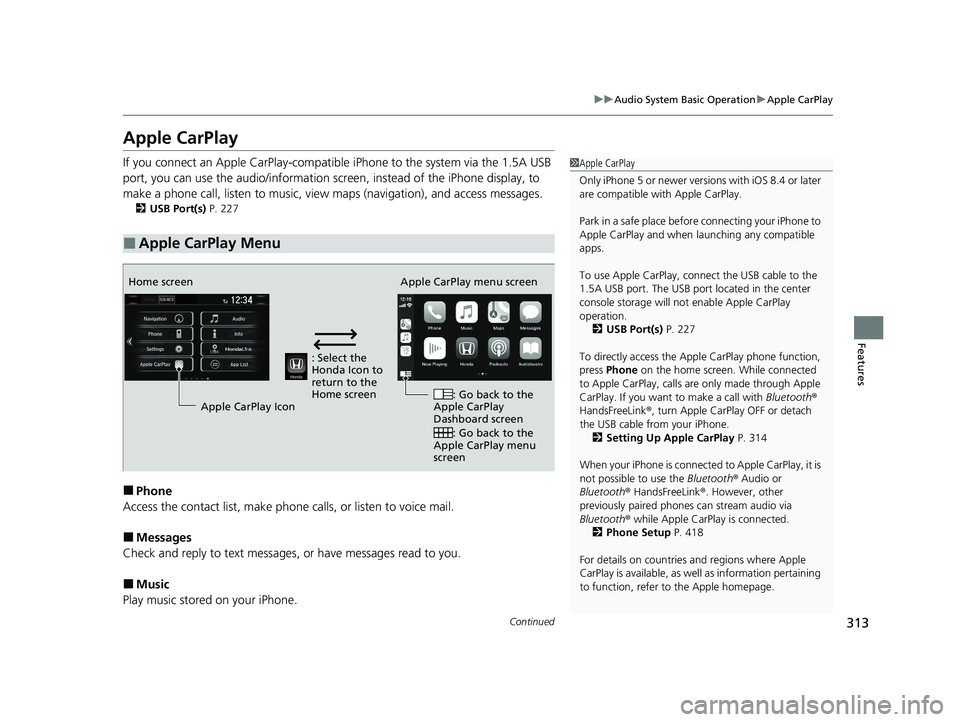
■Apple CarPlay Menu
1 Apple CarPlay
Only iPhone 5 or newer versi ons with iOS 8.4 or later
are compatible with Apple CarPlay.
Park in a safe place before connecting your iPhone to
Apple CarPlay and when launching any compatible
apps.
To use Apple CarPlay, connect the USB cable to the
1.5A USB port. The USB port located in the center
console storage will not enable Apple CarPlay
operation.
2 USB Port(s) P. 227
To directly access the Appl e CarPlay phone function,
press Phone on the home screen. While connected
to Apple CarPlay, calls are only made through Apple
CarPlay. If you want to make a call with Bluetooth®
HandsFreeLink ®, turn Apple CarPlay OFF or detach
the USB cable from your iPhone. 2 Setting Up Apple CarPlay P. 314
When your iPhone is connected to Apple CarPlay, it is
not possible to use the Bluetooth® Audio or
Bluetooth ® HandsFreeLink ®. However, other
previously paired phones can stream audio via
Bluetooth ® while Apple CarPlay is connected.
2 Phone Setup P. 418
For details on c ountries and regions where Apple
CarPlay is available, as well as information pertaining
to function, refer to the Apple homepage.
: Select the
Honda Icon to
return to the
Home screen
Home screen
Apple CarPlay Icon Apple CarPlay menu screen
: Go back to the
Apple CarPlay
Dashboard screen
: Go back to the
Apple CarPlay menu
screen
21 CIVIC 5D HUM-31TGG6400_01.book 313 ページ 2020年8月28日 金曜日 午後1時 48分
Page 318 of 711
316
uuAudio System Basic Operation uAndroid Auto
Features
Android Auto
When you connect an Android phone to the Display Audio system via the 1.5A USB
port, Android Auto is automatically initiated. When connected via Android Auto,
you can use the audio/information screen to access the Phone, Google Maps
(Navigation), Google Play Music, and Google Now functions. When you first use
Android Auto, a tutorial w ill appear on the screen.
We recommend that you complete this tuto rial while safely parked before using
Android Auto.
2 USB Port(s) P. 227
2 Auto Pairing Connection P. 318
1Android Auto
To use Android Auto, you need to download the
Android Auto app from Google Play to your
smartphone.
Only Android 5.0 (Lollipop) or later versions are
compatible with Android Auto.
Bluetooth A2DP cannot be used with Android Auto
phone.
Park in a safe place befo re connecting your Android
phone to Android Auto and when launching any
compatible apps.
To use Android Auto, connect the USB cable to the
1.5A USB port. The USB port in the center console
storage will not enable Android Auto operation.
2 USB Port(s) P. 227
When your Android phone is connected to Android
Auto, it is not possible to use the Bluetooth® Audio.
However, other previously paired phones can stream
audio via Bluetooth ® while Android Auto is
connected.
2 Phone Setup P. 418
21 CIVIC 5D HUM-31TGG6400_01.book 316 ページ 2020年8月28日 金曜日 午後1時 48分
Page 346 of 711
344
uuCustomized Features u
Features
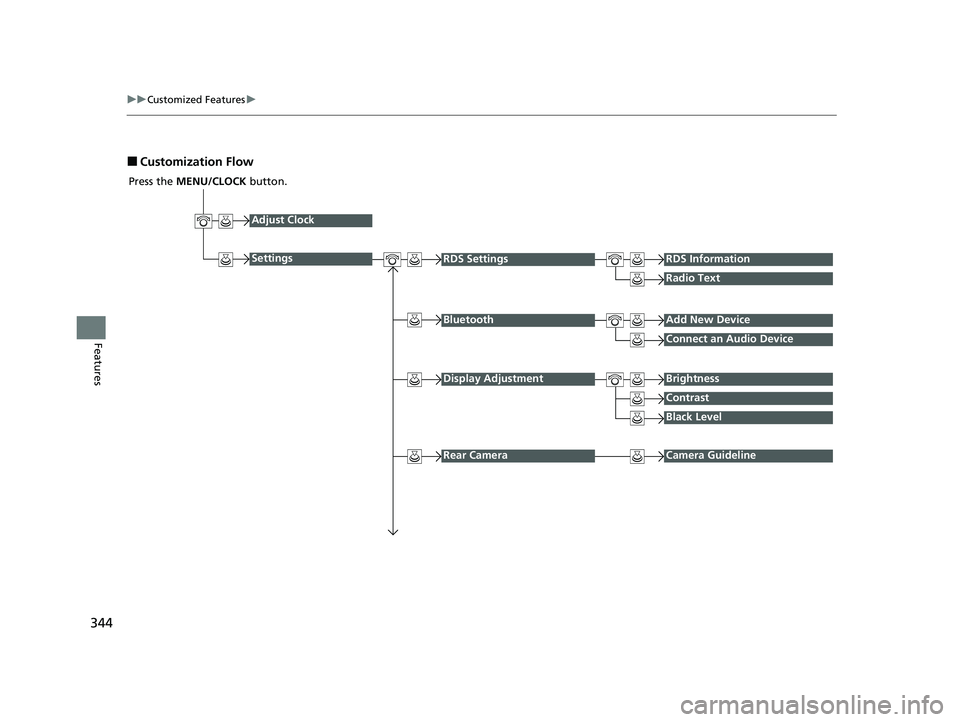
■Customization Flow
Press the MENU/CLOCK button.
Adjust Clock
SettingsRDS SettingsRDS Information
Radio Text
Display AdjustmentBrightness
Contrast
Black Level
Rear CameraCamera Guideline
BluetoothAdd New Device
Connect an Audio Device
21 CIVIC 5D HUM-31TGG6400_01.book 344 ページ 2020年8月28日 金曜日 午後1時 48分
Page 348 of 711
346
uuCustomized Features u
Features
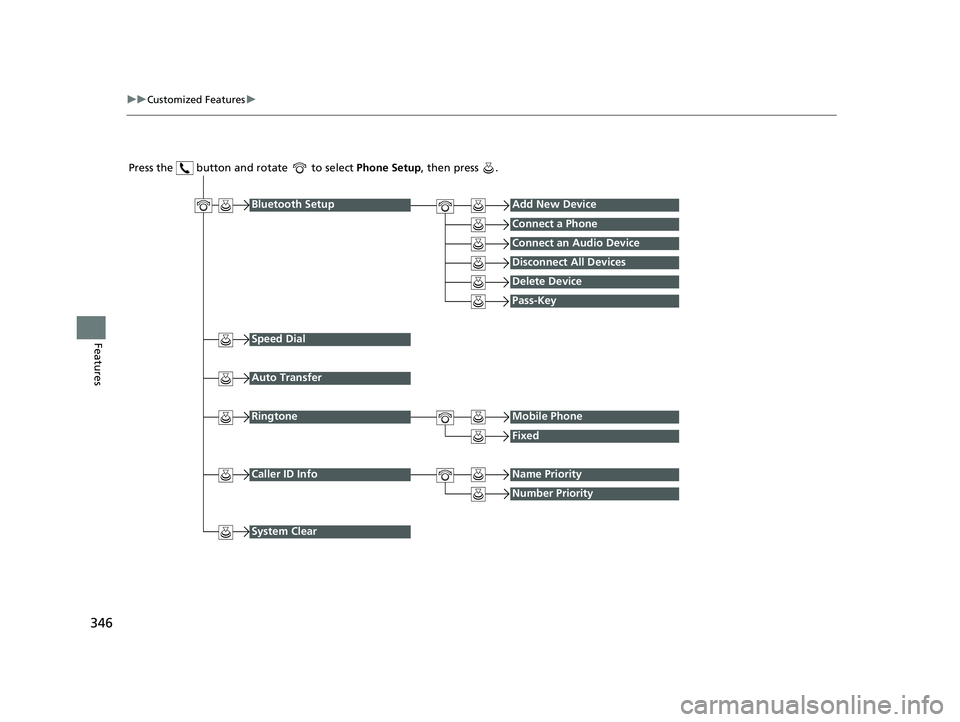
Press the button and rotate to select Phone Setup, then press .
Ringtone
Fixed
Mobile Phone
Bluetooth SetupAdd New Device
Connect a Phone
Connect an Audio Device
Disconnect All Devices
Delete Device
Pass-Key
Speed Dial
Caller ID InfoName Priority
Number Priority
System Clear
Auto Transfer
21 CIVIC 5D HUM-31TGG6400_01.book 346 ページ 2020年8月28日 金曜日 午後1時 48分
Page 349 of 711
347
uuCustomized Features u
Continued
Features
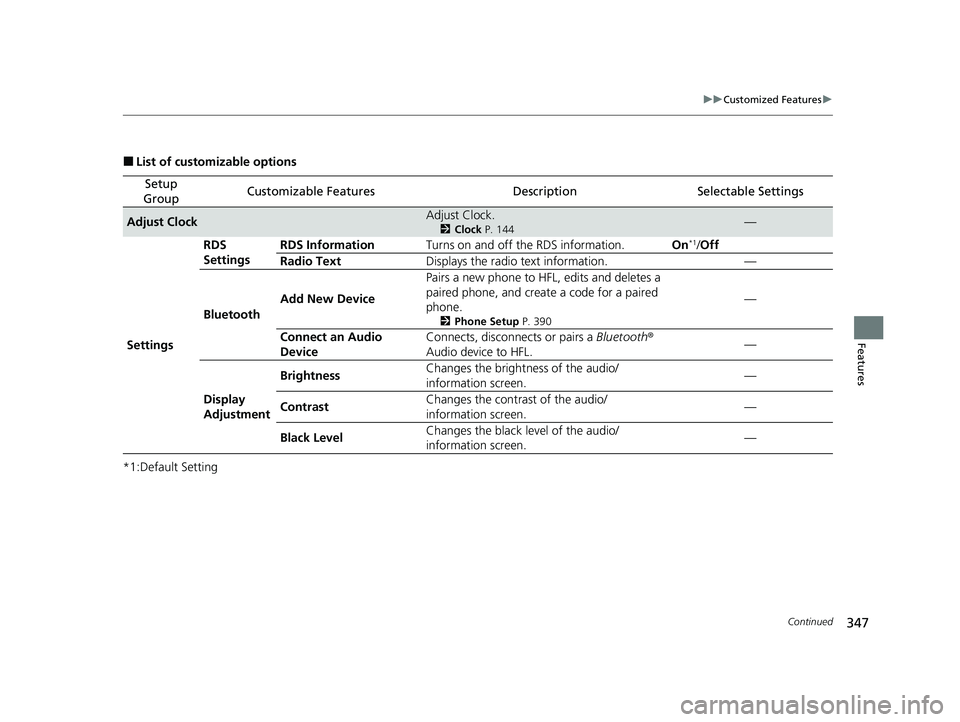
■List of customizable options
*1:Default Setting
Setup
GroupCustomizable FeaturesDescriptionSelectable Settings
Adjust ClockAdjust Clock.
2 Clock P. 144—
Settings RDS
Settings
RDS Information
Turns on and off the RDS information. On
*1/Off
Radio Text Displays the radio text information. —
Bluetooth Add New Device Pairs a new phone to HFL, edits and deletes a
paired phone, and creat
e a code for a paired
phone.
2 Phone Setup P. 390
—
Connect an Audio
Device Connects, disconnects or pairs a
Bluetooth®
Audio device to HFL. —
Display
Adjustment Brightness
Changes the brightness of the audio/
information screen.
—
Contrast Changes the contrast of the audio/
information screen. —
Black Level Changes the black level of the audio/
information screen. —
21 CIVIC 5D HUM-31TGG6400_01.book 347 ページ 2020年8月28日 金曜日 午後1時
48分
Page 351 of 711
349
uuCustomized Features u
Features
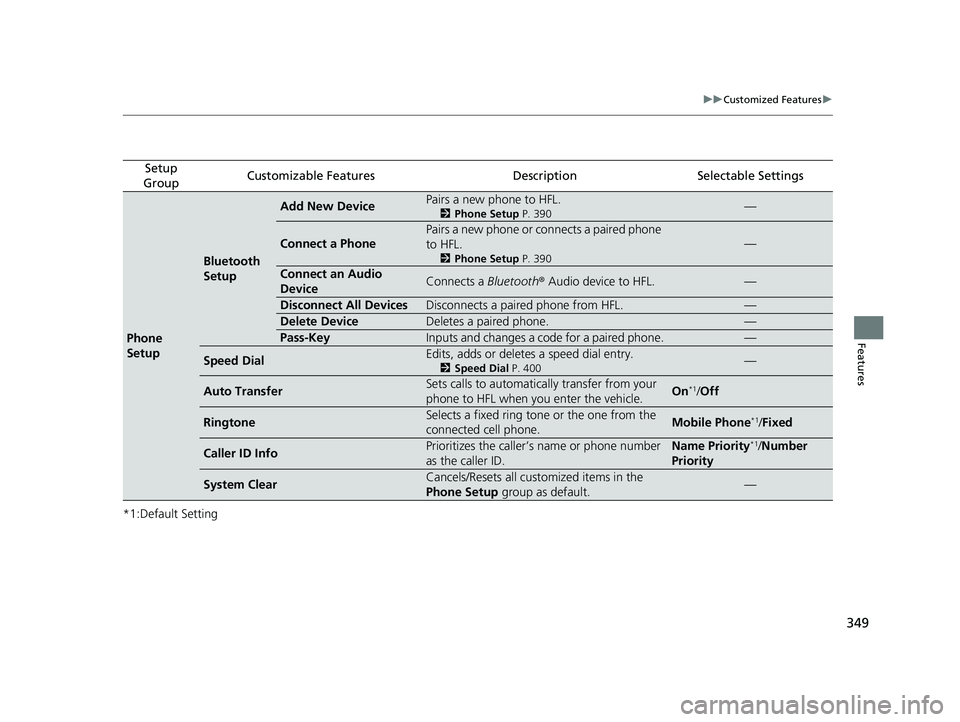
*1:Default Setting
Setup
GroupCustomizable FeaturesDescriptionSelectable Settings
Phone
Setup
Bluetooth
Setup
Add New DevicePairs a new phone to HFL.
2 Phone Setup P. 390—
Connect a Phone
Pairs a new phone or connects a paired phone
to HFL.
2Phone Setup P. 390
—
Connect an Audio
DeviceConnects a Bluetooth® Audio device to HFL.—
Disconnect All DevicesDisconnects a paired phone from HFL.—
Delete DeviceDeletes a paired phone.—
Pass-KeyInputs and changes a code for a paired phone.—
Speed DialEdits, adds or deletes a speed dial entry.
2Speed Dial P. 400—
Auto TransferSets calls to automatically transfer from your
phone to HFL when you enter the vehicle.On*1/Off
RingtoneSelects a fixed ring tone or the one from the
connected cell phone.Mobile Phone*1/Fixed
Caller ID InfoPrioritizes the caller’s name or phone number
as the caller ID.Name Priority*1/Number
Priority
System ClearCancels/Resets all customized items in the
Phone Setup group as default.—
21 CIVIC 5D HUM-31TGG6400_01.book 349 ページ 2020年8月28日 金曜日 午後1時 48分
Page 354 of 711
352
uuCustomized Features u
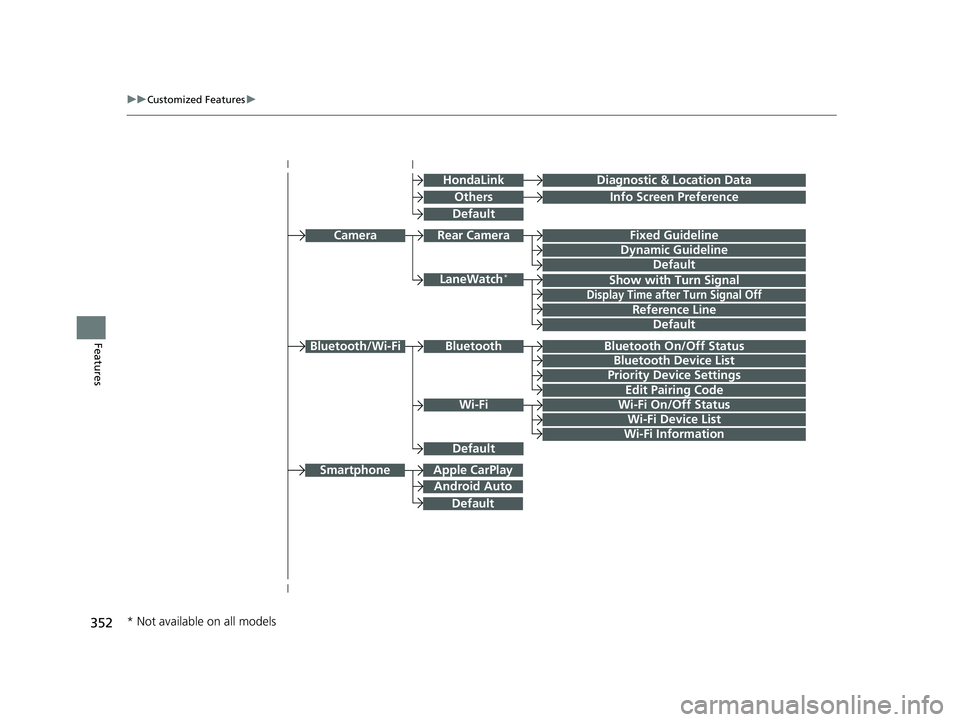
FeaturesBluetooth On/Off Status
Bluetooth Device List
Edit Pairing Code
Wi-Fi On/Off Status
Wi-Fi Device List
Wi-Fi
BluetoothBluetooth/Wi-Fi
Wi-Fi Information
LaneWatch*
Fixed Guideline
Dynamic Guideline
Show with Turn Signal
Rear CameraCamera
Display Time after Turn Signal Off
Reference Line
Apple CarPlay
Android Auto
Smartphone
OthersInfo Screen Preference
HondaLinkDiagnostic & Location Data
Default
Default
Default
Default
Default
Priority Device Settings
* Not available on all models
21 CIVIC 5D HUM-31TGG6400_01.book 352 ページ 2020年8月28日 金曜日 午後1時 48分
Page 355 of 711
353
uuCustomized Features u
Continued
Features
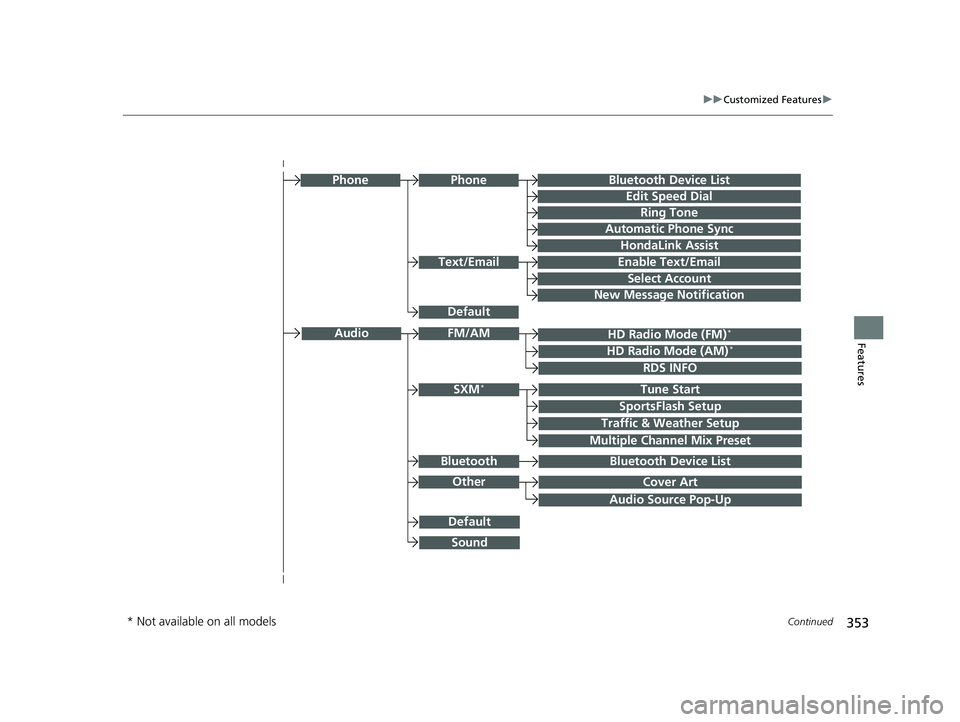
Audio Source Pop-Up
Cover Art
Tune Start
SportsFlash Setup
Traffic & Weather Setup
Other
SXM*
Default
Bluetooth Device ListBluetooth
Multiple Channel Mix Preset
Text/Email
Bluetooth Device List
Edit Speed Dial
Ring Tone
Phone
Automatic Phone Sync
HondaLink Assist
Enable Text/Email
Select Account
New Message Notification
Phone
HD Radio Mode (FM)*
RDS INFO
AudioFM/AM
HD Radio Mode (AM)*
Default
Sound
* Not available on all models
21 CIVIC 5D HUM-31TGG6400_01.book 353 ページ 2020年8月28日 金曜日 午後1時 48分
Page 365 of 711
363
uuCustomized Features u
Continued
Features
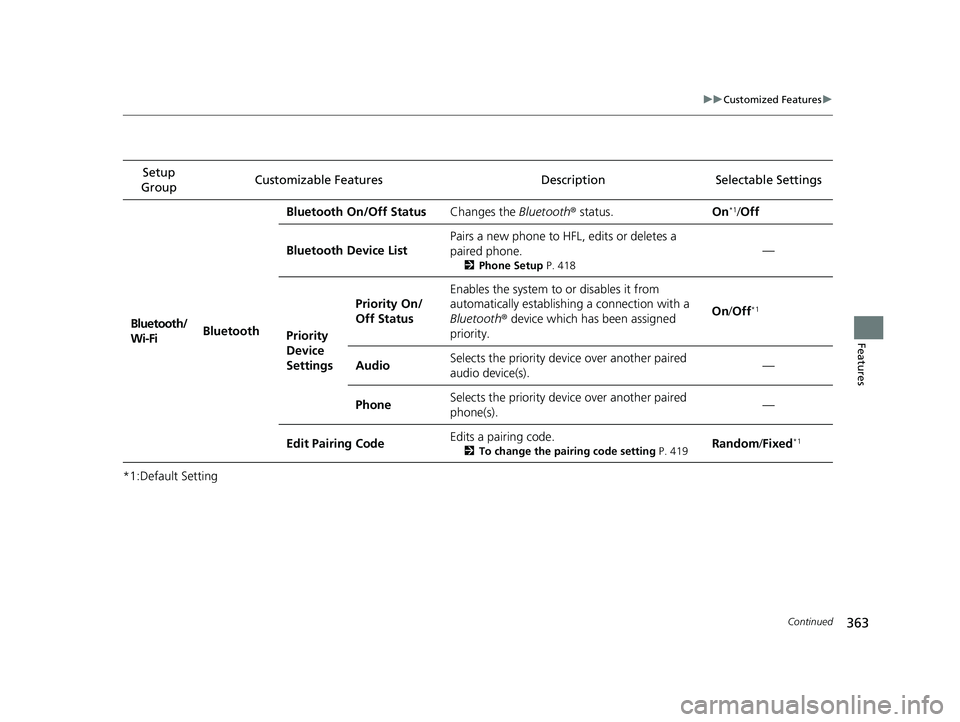
*1:Default SettingSetup
Group Customizable Features Descri
ption Selectable Settings
Bluetooth/
Wi-Fi Bluetooth Bluetooth On/Off Status
Changes the Bluetooth® status. On
*1/Off
Bluetooth Device List Pairs a new phone to HF
L, edits or deletes a
paired phone.
2 Phone Setup P. 418
—
Priority
Device
Settings Priority On/
Off Status
Enables the system to or disables it from
automatically establishi
ng a connection with a
Bluetooth ® device which has been assigned
priority. On
/Off
*1
Audio Selects the priority devi
ce over another paired
audio device(s). —
Phone Selects the priority devi
ce over another paired
phone(s). —
Edit Pairing Code Edits a pairing code.
2
To change the pairing code setting P. 419Random/Fixed*1
21 CIVIC 5D HUM-31TGG6400_01.book 363 ページ 2020年8月28日 金曜日 午後1時 48分
Page 366 of 711
364
uuCustomized Features u
Features
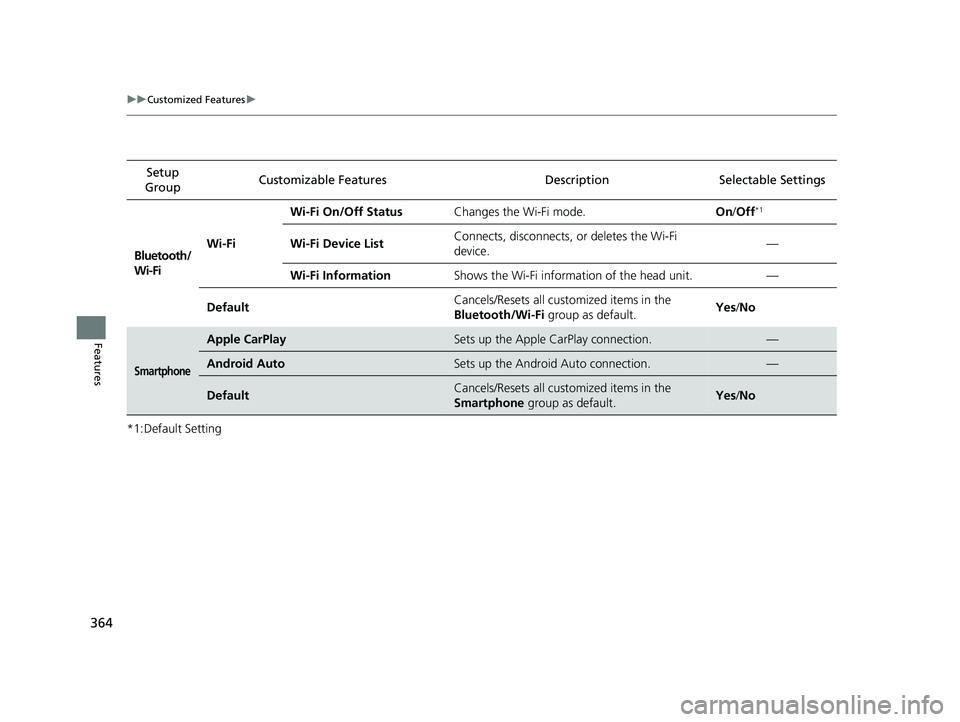
*1:Default SettingSetup
Group Customizable Featur
es Description Sel ectable Settings
Bluetooth/
Wi-FiWi-Fi Wi-Fi On/Off Status
Changes the Wi-Fi mode. On/Off
*1
Wi-Fi Device List Connects, disconnects, or deletes the Wi-Fi
device. —
Wi-Fi Information Shows the Wi-Fi information of the head unit. —
Default Cancels/Resets all customized items in the
Bluetooth/Wi-Fi
group as default. Yes
/No
Smartphone
Apple CarPlaySets up the Apple CarPlay connection.—
Android AutoSets up the Android Auto connection.—
DefaultCancels/Resets all customized items in the
Smartphone group as default.Yes/No
21 CIVIC 5D HUM-31TGG6400_01.book 364 ページ 2020年8月28日 金曜日 午後1時 48分