park assist HONDA CIVIC HATCHBACK 2021 Owner's Manual (in English)
[x] Cancel search | Manufacturer: HONDA, Model Year: 2021, Model line: CIVIC HATCHBACK, Model: HONDA CIVIC HATCHBACK 2021Pages: 711, PDF Size: 37.1 MB
Page 15 of 711
13
Quick Reference Guide
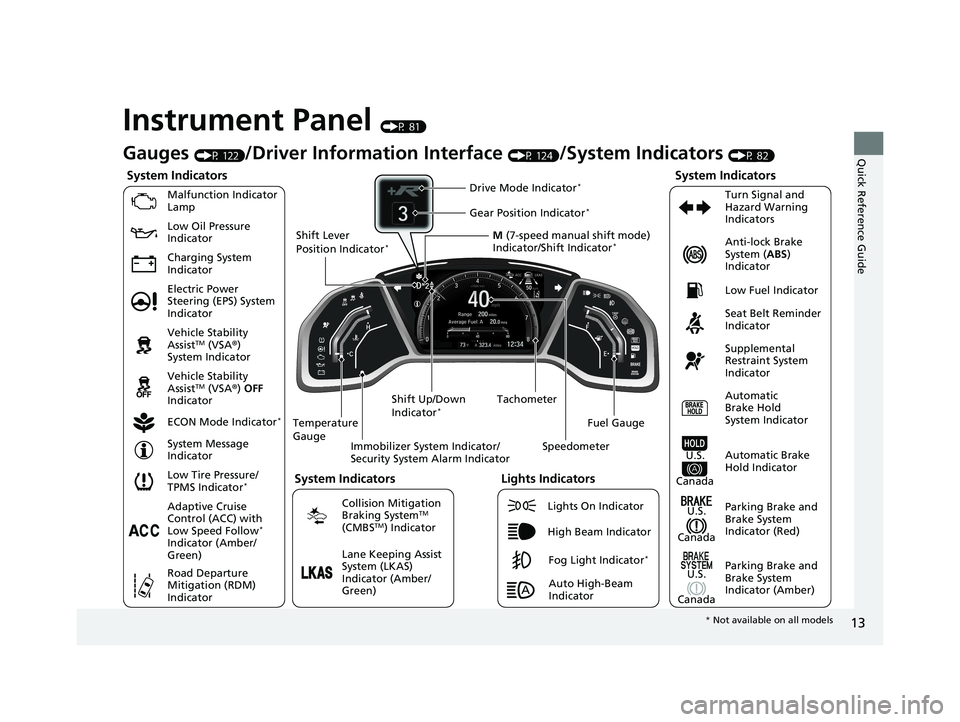
Instrument Panel (P 81)
System Indicators
Malfunction Indicator
Lamp
Charging System
IndicatorAnti-lock Brake
System (
ABS)
Indicator
Vehicle Stability
Assist
TM (VSA ®)
System Indicator
Vehicle Stability
Assist
TM (VSA ®) OFF
Indicator
Low Tire Pressure/
TPMS Indicator
*
Electric Power
Steering (EPS) System
Indicator Seat Belt Reminder
Indicator
System Indicators
Parking Brake and
Brake System
Indicator (Red) Supplemental
Restraint System
Indicator
Tachometer
Immobilizer System Indicator/
Security System Alarm Indicator
Shift Lever
Position Indicator
*
Low Fuel Indicator
ECON Mode Indicator
*
Turn Signal and
Hazard Warning
Indicators
Parking Brake and
Brake System
Indicator (Amber)
System Indicators
U.S.
Canada
U.S.
Canada Automatic
Brake Hold
System Indicator
Automatic Brake
Hold IndicatorU.S.
Canada
Temperature
Gauge
Lights Indicators
Lights On Indicator
High Beam Indicator
Fog Light Indicator*
Adaptive Cruise
Control (ACC) with
Low Speed Follow
*
Indicator (Amber/
Green)
System Message
Indicator
Collision Mitigation
Braking System
TM
(CMBSTM) Indicator
Road Departure
Mitigation (RDM)
Indicator
Lane Keeping Assist
System (LKAS)
Indicator (Amber/
Green) M
(7-speed manual shift mode)
Indicator/Shift Indicator
*
Auto High-Beam
Indicator
Shift Up/Down
Indicator
*
Drive Mode Indicator*
Speedometer
Fuel Gauge
Gear Position Indicator*
Gauges (P 122)/Driver Informat
ion Interface (P 124)/System Indicators (P 82)
Low Oil Pressure
Indicator
* Not available on all models
21 CIVIC 5D HUM-31TGG6400_01.book 13 ページ 2020年8月28日 金曜日 午後1時4 8分
Page 185 of 711
183
uuOperating the Switches Around the Steering Wheel uAuto High-Beam
Controls
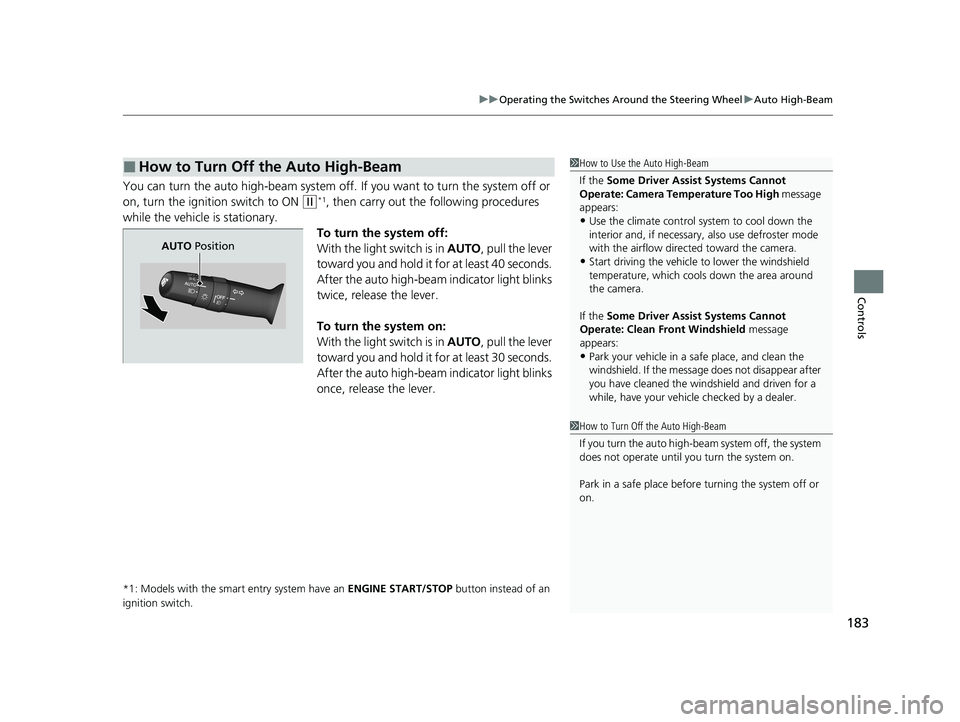
You can turn the auto high-beam system off. If you want to turn the system off or
on, turn the ignition switch to ON
(w*1, then carry out the following procedures
while the vehicle is stationary.
To turn the system off:
With the light switch is in AUTO, pull the lever
toward you and hold it for at least 40 seconds.
After the auto high-beam indicator light blinks
twice, release the lever.
To turn the system on:
With the light switch is in AUTO, pull the lever
toward you and hold it for at least 30 seconds.
After the auto high-beam indicator light blinks
once, release the lever.
*1: Models with the smart entry system have an ENGINE START/STOP button instead of an
ignition switch.
■How to Turn Off the Auto High-Beam1 How to Use the Auto High-Beam
If the Some Driver Assist Systems Cannot
Operate: Camera Temperature Too High message
appears:
•Use the climate control system to cool down the
interior and, if necessary, also use defroster mode
with the airflow directed toward the camera.
•Start driving the vehicle to lower the windshield
temperature, which cool s down the area around
the camera.
If the Some Driver Assist Systems Cannot
Operate: Clean Front Windshield message
appears:
•Park your vehicle in a sa fe place, and clean the
windshield. If the message does not disappear after
you have cleaned the winds hield and driven for a
while, have your vehicle checked by a dealer.
1 How to Turn Off the Auto High-Beam
If you turn the au to high-beam system off, the system
does not operate until you turn the system on.
Park in a safe place before turning the system off or
on.
AUTO Position
21 CIVIC 5D HUM-31TGG6400_01.book 183 ページ 2020年8月28日 金曜日 午後1時 48分
Page 445 of 711
443
Driving
This chapter discusses driving and refueling.
Before Driving................................... 444
Towing a Trailer ................................ 450
When Driving
Starting the Engine .................. 451, 454
Precautions While Driving................. 459
Continuously Variable Transmission
*... 460
Shifting ............................ 461, 463, 468
ECON Mode
*................................... 472
Drive Mode Switch ........................... 473
Vehicle Stability AssistTM (VSA®), aka Electronic
Stability Control (ESC), System ................ 475
Agile Handling Assist ....................... 478
Limited Slip Differe ntial (LSD) ........... 479
2.0 L engine models
2.0 L engine models
LaneWatchTM*.................................. 480Tire Pressure Monitoring System
(TPMS)*...................................... 482Tire Pressure Monitoring System (TPMS) -
Required Federal Explanation*......... 486
Honda Sensing ®................................ 488
Collision Mitigati on Braking System
TM
(CMBSTM) ....................................... 491
Adaptive Cruise Control (ACC) with Low
Speed Follow
*............................... 501
Adaptive Cruise Control (ACC)*....... 518
Lane Keeping Assist System (LKAS) .. 533
Road Departure Mitigation (RDM)
System ....................................... 541
Front Sensor Camera ....................... 546 Radar Sensor ................................... 548
Braking Brake System ................................... 549
Anti-lock Brake System (ABS) ........... 556
Brake Assist System ......................... 557
Parking Your Vehicle ........................ 558
Multi-View Rear Camera .................. 560
Refueling Fuel Information .............................. 562
How to Refuel ................................. 564
Fuel Economy and CO
2 Emissions
Improving Fuel Economy and Reducing
CO
2 Emissions ................................ 566
Turbo Engine Vehicle ....................... 567
* Not available on all models
21 CIVIC 5D HUM-31TGG6400_01.book 443 ページ 2020年8月28日 金曜日 午後1時 48分
Page 455 of 711
453
uuWhen Driving uStarting the Engine
Driving
■Hill start assist system
Hill start assist keeps the brake engaged br iefly to help prevent the vehicle from
rolling on inclines as you move your foot from the brake pedal to the accelerator.
Put the transmission into
(D, (S, or (L* when facing uphill, or (R when facing
downhill, then release the brake pedal.
Depress the clutch pedal, and shift to on e of the forward gears when facing uphill,
or
(R when facing downhill, th en release the brake pedal.
Continuously variable transmission models
Manual transmission models
1Hill start assist system
Hill start assist may not prevent the vehicle from
rolling downhill on a very steep or slippe ry slope, and
will not operate on small inclines.
Hill start assist is not a replacement for the parking brake.
Hill start assist will operate even when VSA ® is
switched off.
* Not available on all models
21 CIVIC 5D HUM-31TGG6400_01.book 453 ページ 2020年8月28日 金曜日 午後1時 48分
Page 460 of 711
uuWhen Driving uStarting the Engine
458
Driving
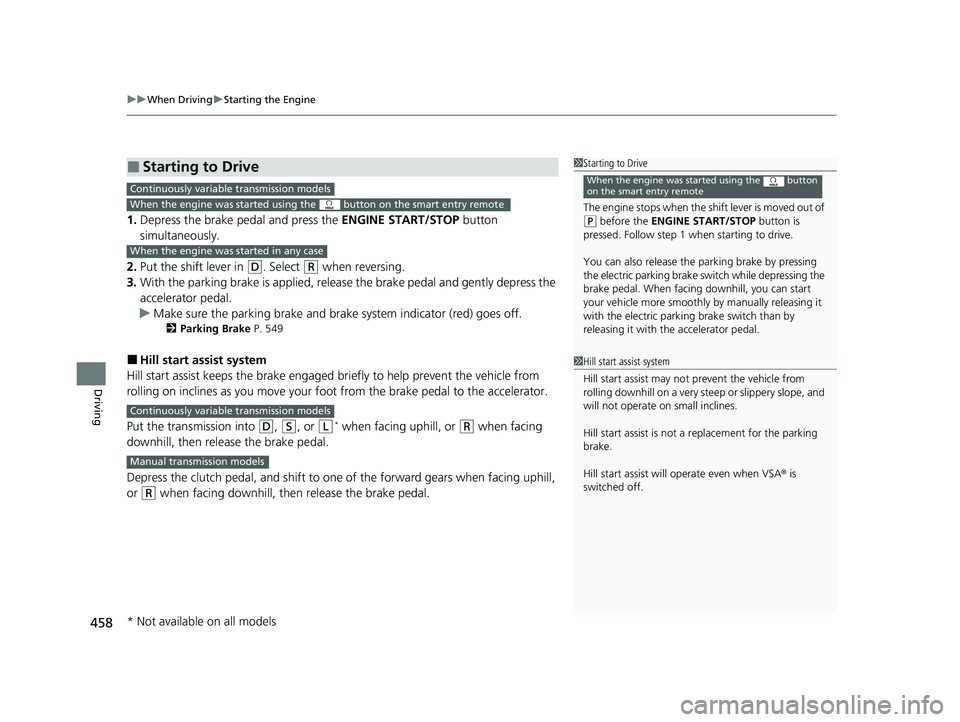
1. Depress the brake pedal and press the ENGINE START/STOP button
simultaneously.
2. Put the shift lever in
(D. Select (R when reversing.
3. With the parking brake is applied, releas e the brake pedal and gently depress the
accelerator pedal.
u Make sure the parking brake and brake system indicator (red) goes off.
2 Parking Brake P. 549
■Hill start assist system
Hill start assist keeps the brake engaged br iefly to help prevent the vehicle from
rolling on inclines as you move your fo ot from the brake pedal to the accelerator.
Put the transmission into
(D, (S, or (L* when facing uphill, or (R when facing
downhill, then release the brake pedal.
Depress the clutch pedal, and shift to on e of the forward gears when facing uphill,
or
(R when facing downhill, then release the brake pedal.
■Starting to Drive1 Starting to Drive
The engine stops when the sh ift lever is moved out of
(P before the ENGINE START/STOP button is
pressed. Follow step 1 when starting to drive.
You can also release the parking brake by pressing
the electric parking brake sw itch while depressing the
brake pedal. When facing downhill, you can start
your vehicle more smoothly by manually releasing it
with the electric parki ng brake switch than by
releasing it with th e accelerator pedal.
When the engine was started using the button
on the smart entry remoteContinuously variable transmission models
When the engine was started using the button on the smart entry remote
When the engine was started in any case
1Hill start assist system
Hill start assist may not prevent the vehicle from
rolling downhill on a very steep or slippe ry slope, and
will not operate on small inclines.
Hill start assist is not a replacement for the parking
brake.
Hill start assist will operate even when VSA ® is
switched off.
Continuously variable transmission models
Manual transmission models
* Not available on all models
21 CIVIC 5D HUM-31TGG6400_01.book 458 ページ 2020年8月28日 金曜日 午後1時 48分
Page 505 of 711
Continued503
uuHonda Sensing ®u Adaptive Cruise Control (ACC) with Low Speed Follow*
Driving
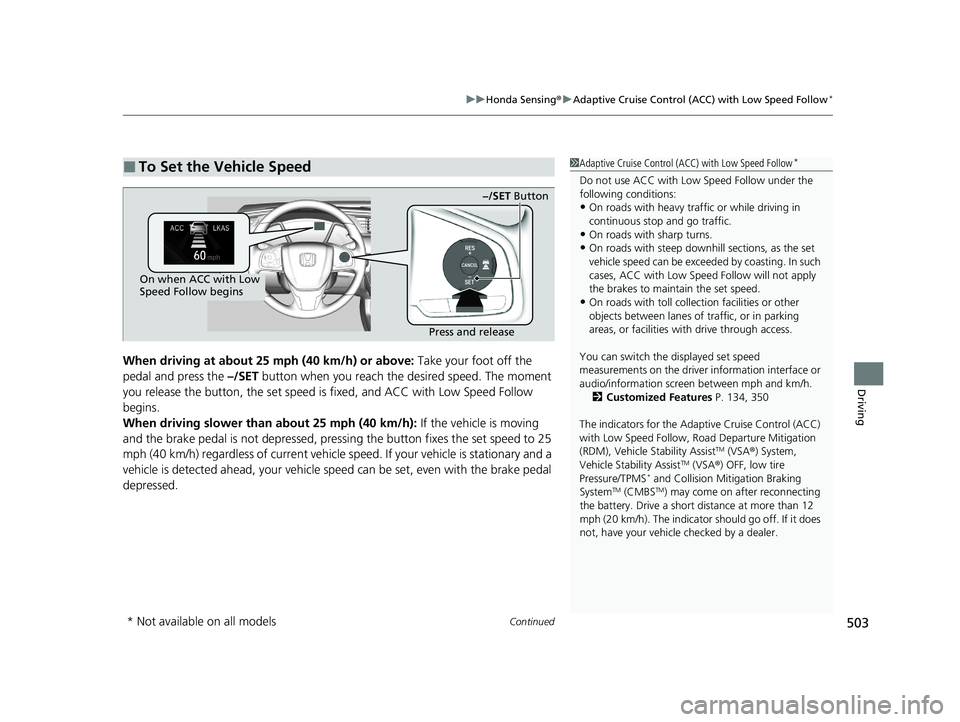
When driving at about 25 mph (40 km/h) or above: Take your foot off the
pedal and press the –/SET button when you reach the desired speed. The moment
you release the button, th e set speed is fixed, and ACC with Low Speed Follow
begins.
When driving slower than about 25 mph (40 km/h): If the vehicle is moving
and the brake pedal is not depressed, pressi ng the button fixes the set speed to 25
mph (40 km/h) regardless of current vehicle speed. If your vehicle is stationary and a
vehicle is detected ahead, your vehicle sp eed can be set, even with the brake pedal
depressed.
■To Set the Vehicle Speed1 Adaptive Cruise Control (ACC) with Low Speed Follow*
Do not use ACC with Low Speed Follow under the
following conditions:
•On roads with heavy traf fic or while driving in
continuous stop and go traffic.
•On roads with sharp turns.
•On roads with steep downhill sections, as the set
vehicle speed can be exceeded by coasting. In such
cases, ACC with Low Speed Follow will not apply
the brakes to maintain the set speed.
•On roads with toll collection facilities or other
objects between lanes of traffic, or in parking
areas, or faci lities with driv e through access.
You can switch the displayed set speed
measurements on the driver information interface or
audio/information screen between mph and km/h. 2 Customized Features P. 134, 350
The indicators for the Adaptive Cruise Control (ACC)
with Low Speed Follow, Road Departure Mitigation
(RDM), Vehicle Stability Assist
TM (VSA ®) System,
Vehicle Stability AssistTM (VSA ®) OFF, low tire
Pressure/TPMS* and Collision Mitigation Braking
SystemTM (CMBSTM) may come on after reconnecting
the battery. Drive a short distance at more than 12
mph (20 km/h). The indicator should go off. If it does
not, have your vehicle checked by a dealer.
On when ACC with Low
Speed Follow begins
Press and release−/SET Button
* Not available on all models
21 CIVIC 5D HUM-31TGG6400_01.book 503 ページ 2020年8月28日 金曜日 午後1時
48分
Page 521 of 711
Continued519
uuHonda Sensing ®u Adaptive Cruise Control (ACC)*
Driving
■How to activate the system1Adaptive Cruise Control (ACC)*
The radar sensor for ACC is shared with the collision
mitigation braking systemTM (CMBSTM).
2 Collision Mitigation Braking SystemTM
(CMBSTM) P. 491
ACC may not work properly under certain conditions.
2 ACC Conditions and Limitations P. 523
When the engine speed slows down, try to
downshift. You can maintain the set speed if you
change gear within five seconds.
When not using ACC: Turn off adaptive cruise by
pressing the MAIN button. This also will turn off the
Lane Keeping Assist System (LKAS).
When the MAIN button is pressed, both ACC and
the Lane Keeping Assist System (LKAS) are either
turned on or off.
Do not use ACC under the following conditions:
•On roads with heavy traf fic or while driving in
continuous stop and go traffic.
•On roads with sharp turns.
•On roads with steep downhill sections, as the set
vehicle speed can be exceeded by coasting. In such
cases, ACC will not apply the brakes to maintain
the set speed.
•On roads with toll collection facilities or other
objects between lanes of traffic, or in parking
areas, or faci lities with driv e through access.
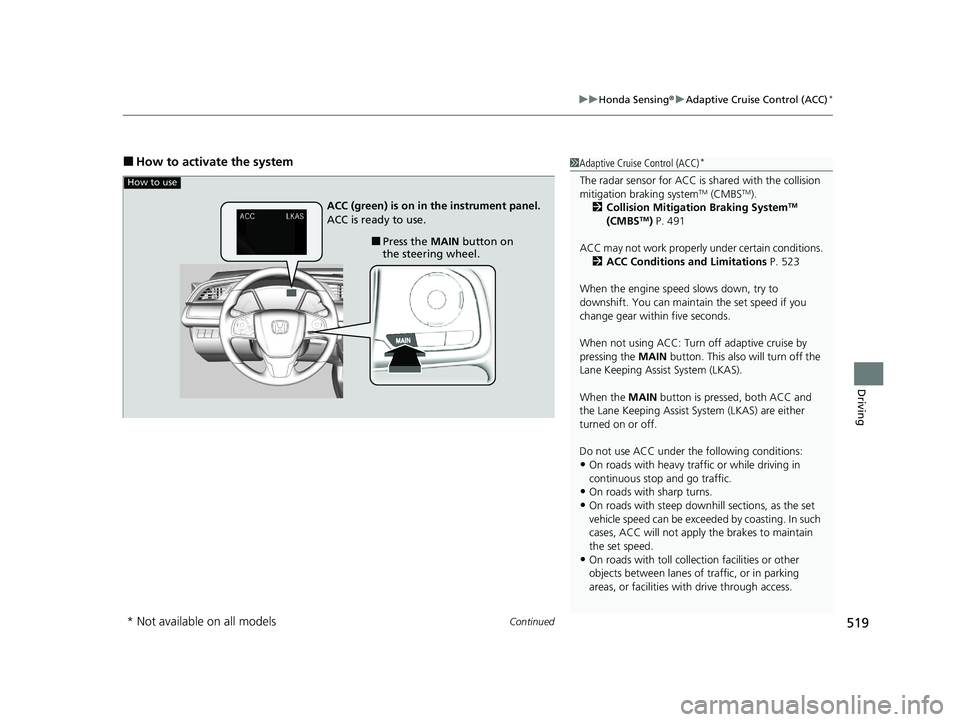
How to use
■Press the MAIN button on
the steering wheel.
ACC (green) is on in the instrument panel.
ACC is ready to use.
* Not available on all models
21 CIVIC 5D HUM-31TGG6400_01.book 519 ページ 2020年8月28日 金曜日 午後1時
48分
Page 549 of 711
547
uuHonda Sensing ®u Front Sensor Camera
Driving
1Front Sensor Camera
If the Some Driver Assist Systems Cannot
Operate: Camera Temperature Too High message
appears:
•Use the climate control system to cool down the
interior and, if necessary, also use defroster mode
with the airflow directed towards the camera.
•Start driving the vehicle to lower the windshield
temperature, which cool s down the area around
the camera.
If the Some Driver Assist Systems Cannot
Operate: Clean Front Windshield message
appears:
•Park your vehicle in a sa fe place, and clean the
windshield. If the message does not disappear after
you have cleaned the winds hield and driven for a
while, have your vehicle checked by a dealer.
21 CIVIC 5D HUM-31TGG6400_01.book 547 ページ 2020年8月28日 金曜日 午後1時 48分
Page 637 of 711
635Continued
Handling the Unexpected
If a Tire Goes Flat
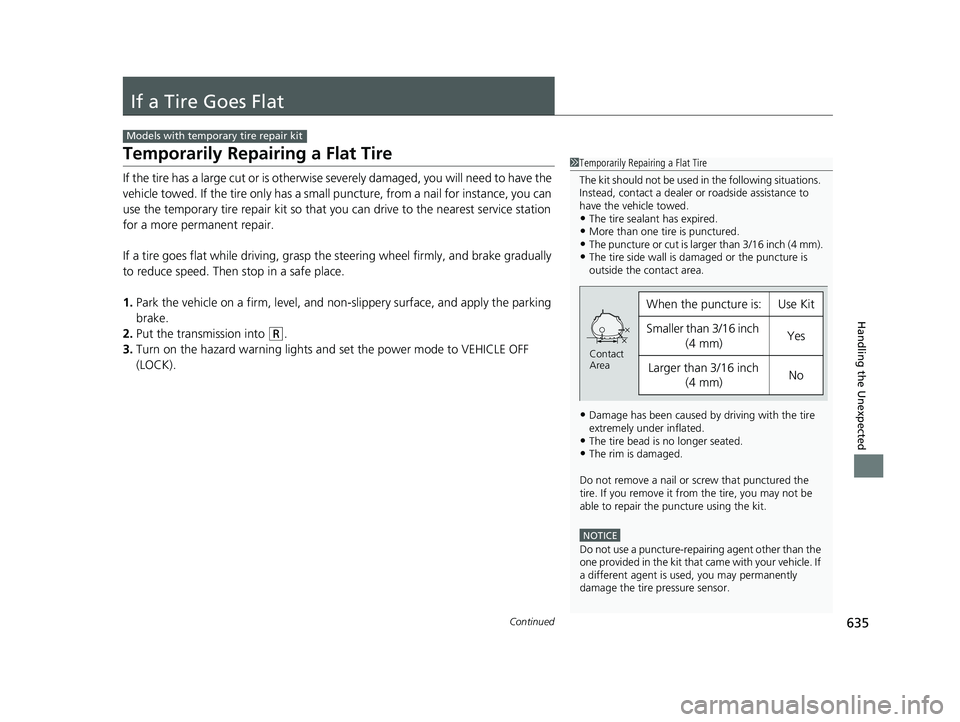
Temporarily Repairing a Flat Tire
If the tire has a large cut or is otherwise severely damaged, you will need to have the
vehicle towed. If the tire only has a small puncture, from a nail for instance, you can
use the temporary tire repair kit so that you can drive to the nearest service station
for a more permanent repair.
If a tire goes flat while driving, grasp the steering wheel firmly, and brake gradually
to reduce speed. Then stop in a safe place.
1. Park the vehicle on a firm, level, and n on-slippery surface, and apply the parking
brake.
2. Put the transmission into
(R.
3. Turn on the hazard warning lights an d set the power mode to VEHICLE OFF
(LOCK).
Models with temporary tire repair kit
1 Temporarily Repairing a Flat Tire
The kit should not be used in the following situations.
Instead, contact a dealer or roadside assistance to
have the vehicle towed.
•The tire sealant has expired.•More than one tire is punctured.•The puncture or cut is larger than 3/16 inch (4 mm).•The tire side wall is da maged or the puncture is
outside the contact area.
•Damage has been caused by driving with the tire
extremely under inflated.
•The tire bead is no longer seated.•The rim is damaged.
Do not remove a nail or screw that punctured the
tire. If you remove it from the tire, you may not be
able to repair the puncture using the kit.
NOTICE
Do not use a puncture-repairing agent other than the
one provided in the kit that came with your vehicle. If
a different agent is used, you may permanently
damage the tire pressure sensor.
When the puncture is:Use Kit
Smaller than 3/16 inch
(4 mm)Yes
Larger than 3/16 inch (4 mm)No
Contact
Area
21 CIVIC 5D HUM-31TGG6400_01.book 635 ページ 2020年8月28日 金曜日 午後1時 48分
Page 701 of 711
699
Index
Wi-Fi Connection .................................... 310
Audio/Information Screen ............... 234, 252
Authorized Manuals ................................ 695
Auto Door Locking/Unlocking ................ 159
Customize .............................................. 140
Auto High-Beam ...................................... 181
Automatic Brake Hold ............................. 553
Indicator ........................................... 84, 553
Automatic Brake Hold System Indicator ........................................... 84, 553
Automatic Lighting .................................. 178
Average Fuel Economy ............................ 128
Average Speed ......................................... 128
B
Battery...................................................... 620
Charging System Indicator ................ 85, 668
If the Battery Is Dead............................... 662
Maintenance (Checking the Battery) ....... 620
Maintenance (Replacing) ......................... 622
Belts (Seat) .................................................. 40
Beverage Holders ..................................... 205
Bluetooth ® Audio ..................................... 303
Bluetooth ® HandsFreeLink ®........... 383, 410
Booster Seats (For Children) ...................... 78
Brake System ............................................ 549
Anti-lock Brake System (ABS) .................. 556
Automatic Brake Hold ............................. 553
Brake Assist System................................. 557
Fluid ....................................................... 592 Foot Brake ............................................... 552
Indicator (Red) ........................... 82, 670, 671
Parking Brake .......................................... 549
Braking Pressure Meter ............................ 131
Brightness Control (Instrument Panel) .... 187
Bulb Replacement .................................... 594
Brake Light, Rear Tu rn Signal Light and
Back-Up Light ........................................ 602
Fog Lights ................................................ 596
Front Side Marker Lights .......................... 599
Front Turn Signal Lights ........................... 598
Headlights ............................................... 594
High-Mount Brake Light .......................... 603
Parking/Daytime Running Lights .............. 601
Rear License Plate Light ........................... 603
Side Turn Signal/Em ergency Indicator
Lights .................................................... 601
Taillights .................................................. 603
Taillights/Rear Side Marker Lights ............. 603
Bulb Specifications ................................... 684
C
Carbon Monoxide Gas ................................ 79
Cargo Area Cover ..................................... 213
Cargo Hook ............................................... 212
Carrying Cargo .................................. 445, 447
Certification Label .................................... 686
Changing Bulbs ......................................... 594
Charging System Indicator ................. 85, 668Child Safety
................................................. 64
Childproof Door Locks............................. 158
Child Seat .................................................... 64
Booster Seats ............................................ 78
Child Seat for Infants................................. 66
Child Seat for Small Children ..................... 67
Installing a Child Seat with a Lap/Shoulder
Seat Belt .................................................. 72
Larger Children ......................................... 77
Rear-facing Child Seat ............................... 66
Selecting a Child Seat ................................ 68
Using a Tether ........................................... 74
Childproof Door Locks ............................. 158
Cleaning the Exterior ............................... 628
Cleaning the Interior ................................ 625
Climate Control System ............................ 217
Changing the Mode ................................ 217
Defrosting the Windshield and Windows ............................................... 221
Dust and Pollen Filter............................... 624
Recirculation/Fresh Air Mode ................... 220
Sensors ................................................... 224
Using Automatic Climate Control ............ 217
CMBSTM (Collision Mitigation Braking
SystemTM) ................................................. 491
Coat Hooks ............................................... 211
Collision Mitigation Braking System
TM
(CMBSTM) ................................................. 491
Compact Spare Tire .......................... 648, 685
Console Compartment ............................. 204
21 CIVIC 5D HUM-31TGG6400_01.book 699 ページ 2020年8月28日 金曜日 午後1時 48分