length HONDA CIVIC HATCHBACK 2021 Owner's Manual (in English)
[x] Cancel search | Manufacturer: HONDA, Model Year: 2021, Model line: CIVIC HATCHBACK, Model: HONDA CIVIC HATCHBACK 2021Pages: 711, PDF Size: 37.1 MB
Page 141 of 711
139
uuGauges and Driver Information Interface uDriver Information Interface
Continued
Instrument Panel
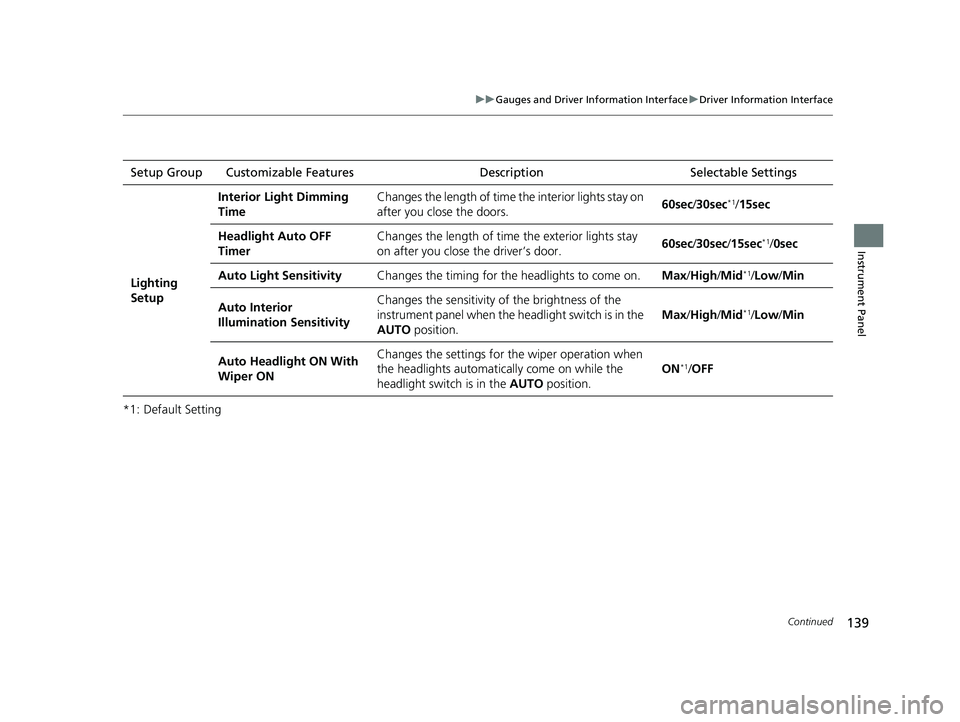
*1: Default SettingSetup Group Customizable Features
Description Selectable Settings
Lighting
Setup
Interior Light Dimming
TimeChanges the length of time the interior lights stay on
after you close the doors.60sec/30sec*1/15sec
Headlight Auto OFF
TimerChanges the length of time the exterior lights stay
on after you close the driver’s door.60sec /30sec /15sec*1/ 0sec
Auto Light SensitivityChanges the timing for th e headlights to come on.Max/High /Mid*1/Low /Min
Auto Interior
Illumination SensitivityChanges the sensitivity of the brightness of the
instrument panel when the headlight switch is in the
AUTO position.
Max/High /Mid*1/Low /Min
Auto Headlight ON With
Wiper ONChanges the settings for th e wiper operation when
the headlights automatica lly come on while the
headlight switch is in the AUTO position.
ON*1/OFF
21 CIVIC 5D HUM-31TGG6400_01.book 139 ページ 2020年8月28日 金曜日 午後1時 48分
Page 186 of 711
184
uuOperating the Switches Around the Steering Wheel uWipers and Washers
Controls
Wipers and Washers
The windshield wipers and washers can be
used when the ignition switch is in ON
(w*1.
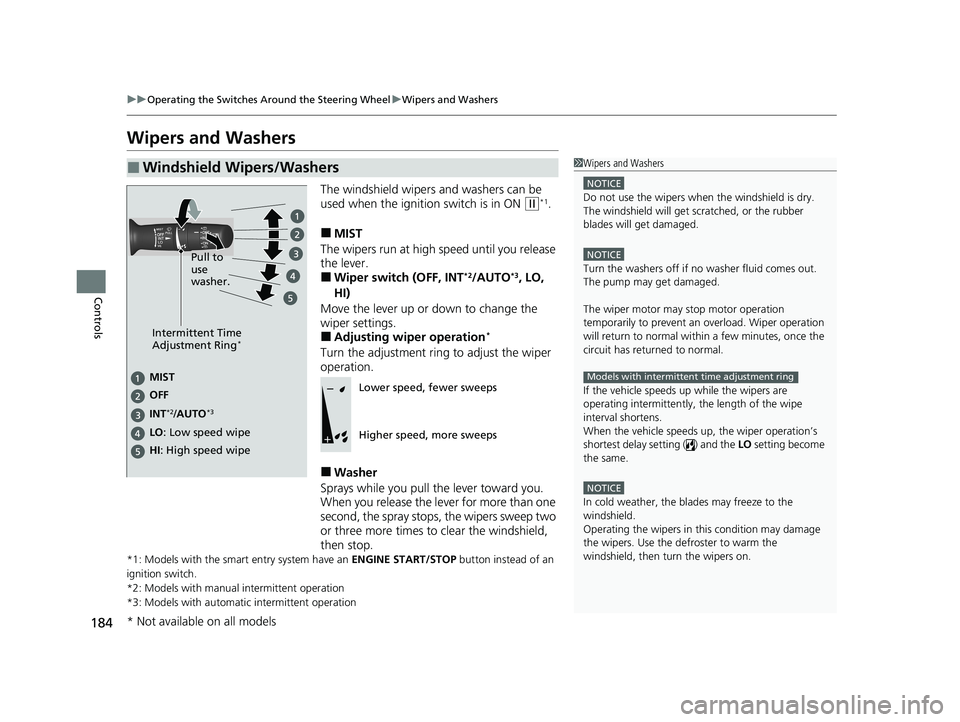
■MIST
The wipers run at high speed until you release
the lever.
■Wiper switch (OFF, INT*2/AUTO*3, LO,
HI)
Move the lever up or down to change the
wiper settings.
■Adjusting wiper operation*
Turn the adjustment ring to adjust the wiper
operation.
■Washer
Sprays while you pull the lever toward you.
When you release the lever for more than one
second, the spray stops, the wipers sweep two
or three more times to clear the windshield,
then stop.
*1: Models with the smart entry system have an ENGINE START/STOP button instead of an
ignition switch.
*2: Models with manual intermittent operation
*3: Models with automati c intermittent operation
■Windshield Wipers/Washers1Wipers and Washers
NOTICE
Do not use the wipers when the windshield is dry.
The windshield will get sc ratched, or the rubber
blades will get damaged.
NOTICE
Turn the washers off if no washer fluid comes out.
The pump may get damaged.
The wiper motor may stop motor operation
temporarily to prevent an overload. Wiper operation
will return to normal within a few minutes, once the
circuit has returned to normal.
If the vehicle speeds up while the wipers are
operating intermittently, the length of the wipe
interval shortens.
When the vehicle speeds up, the wiper operation’s
shortest delay setting ( ) and the LO setting become
the same.
NOTICE
In cold weather, the blades may freeze to the
windshield.
Operating the wipers in th is condition may damage
the wipers. Use the defroster to warm the
windshield, then turn the wipers on.
Models with intermittent time adjustment ring
Intermittent Time
Adjustment Ring*
MIST
INT
*2/AUTO*3
OFF
LO: Low speed wipe
HI: High speed wipe Pull to
use
washer.Lower speed, fewer sweeps
Higher speed, more sweeps
* Not available on all models
21 CIVIC 5D HUM-31TGG6400_01.book 184 ページ 2020年8月28日 金曜日 午後1時
48分
Page 203 of 711
201Continued
Controls
Interior Lights/Interior Convenience Items
Interior Lights
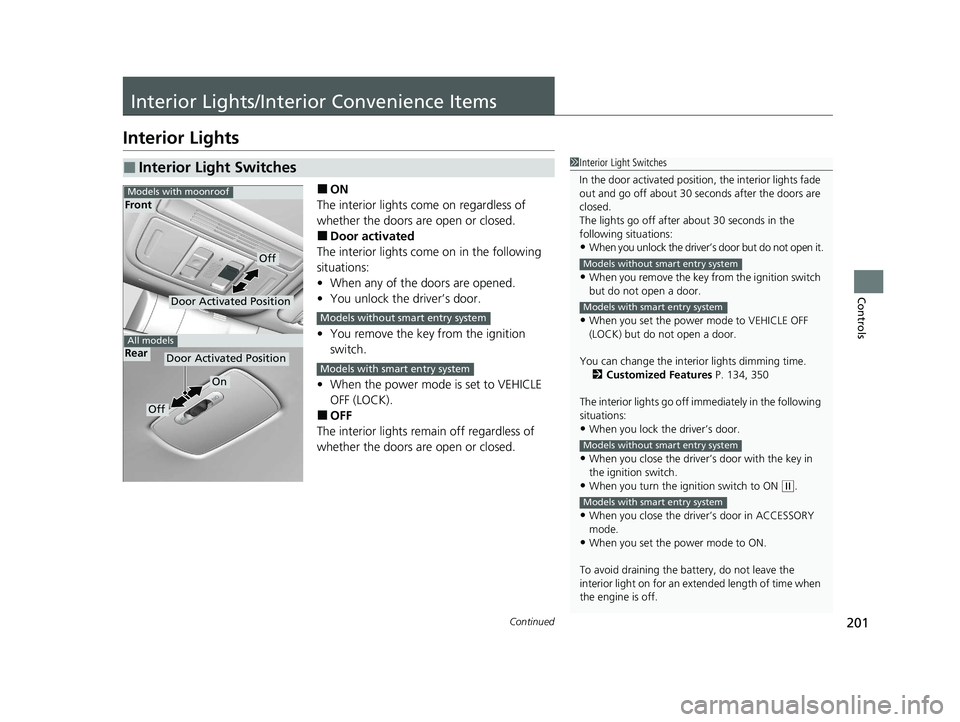
■ON
The interior lights come on regardless of
whether the doors are open or closed.
■Door activated
The interior lights come on in the following
situations:
• When any of the doors are opened.
• You unlock the driver’s door.
• You remove the key from the ignition
switch.
• When the power mode is set to VEHICLE
OFF (LOCK).
■OFF
The interior lights remain off regardless of
whether the doors are open or closed.
■Interior Light Switches1 Interior Light Switches
In the door activated position, the interior lights fade
out and go off about 30 se conds after the doors are
closed.
The lights go off after about 30 seconds in the
following situations:
•When you unlock the driver’s door but do not open it.
•When you remove the key from the ignition switch
but do not open a door.
•When you set the power mode to VEHICLE OFF
(LOCK) but do not open a door.
You can change the interi or lights dimming time.
2 Customized Features P. 134, 350
The interior lights go off im mediately in the following
situations:
•When you lock the driver’s door.
•When you close the driver’s door with the key in
the ignition switch.
•When you turn the ignition switch to ON ( w.
•When you close the driver’s door in ACCESSORY
mode.
•When you set the power mode to ON.
To avoid draining the ba ttery, do not leave the
interior light on for an extended length of time when
the engine is off.
Models without smart entry system
Models with smart entry system
Models without smart entry system
Models with smart entry system
Door Activated Position
On
Off
Rear
Door Activated Position
Off
Front
Models with moonroof
All models
Models without smart entry system
Models with smart entry system
21 CIVIC 5D HUM-31TGG6400_01.book 201 ページ 2020年8月28日 金曜日 午後1時 48分
Page 289 of 711
Continued287
uuAudio System Basic Operation uPlaying SiriusXM ® Radio*
Features
The system can record up to the last 60 minutes of your currently tuned channel’s
broadcast, as well as the last 30 minutes of your preset channel’s broadcast, starting
from the moment you turn the vehicle on. If you tuned to a preset channel, the
system records up to 60 minutes of a broadcast instead of up to 30 minutes. You
can rewind and replay the last 30 or 60 minutes of a broadcast.
1. Select MENU .
2. Select Playback.
3. Move the time marker to the position you want to replay.
The following items are availa ble on the pop-up screen:
(Skip Down): Skips to the previously stored channel. Select and hold to fast-
rewind the current selection. (Skip Up): Skips to the next channel. Select and hold to fast-forward the
current selection. (15sec Back): Select to skip back 15 se conds in the current selection. Select and
hold to fast-rewind th e current selection.
(15sec Skip): Select to skip forward 15 seconds in the current selection. Select
and hold to fast-forward the current selection.
u Select OK to close the pop-up menu. Replay in playback mode continues.
To play or pause on playback mode:
1. Select MENU .
2. Select Play/Pause .
■Replay Function1Replay Function
The system starts storing broadcast in memory when
the power mode is turned ON. You can go back to
the program from that point.
You can no longer repl ay any program once the
power mode is turned off as it erases memory.
You can check how long the program has been
stored in memory from th e audio/information screen.
After 30 or 60 minutes of recording the system will
automatically start deleting the oldest data.
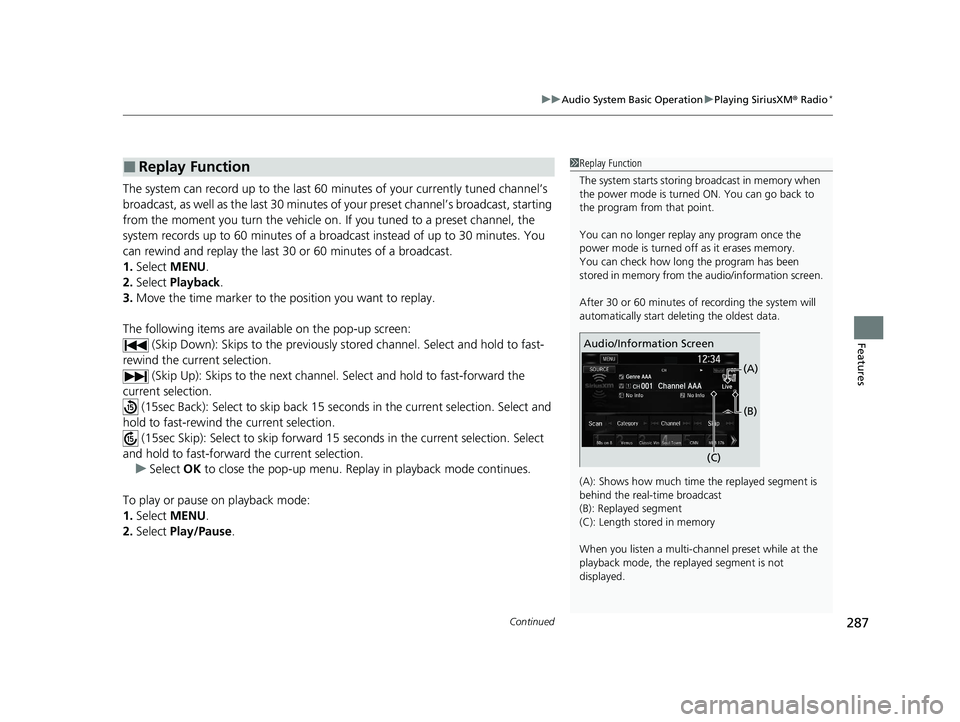
(A): Shows how much time the replayed segment is
behind the real-time broadcast
(B): Replayed segment
(C): Length stored in memory
When you listen a multi-channel preset while at the
playback mode, the repl ayed segment is not
displayed.
Audio/Information Screen
(C)(B)
(A)
21 CIVIC 5D HUM-31TGG6400_01.book 287 ページ 2020年8月28日 金曜日 午後1時
48分
Page 337 of 711
335
uuGeneral Information on the Audio System uHonda App License Agreement
Continued
Features
2. Limitation on HONDA and PROVIDER liability. Neither HONDA nor PROVIDERS wi ll be liable to you or any other party for consequential,
indirect, incidental, special, or punitive damages (including withou t limitation lost profits) in connection with your use of the SOFTWARE
or SERVICES, even if HONDA or PROVIDERS are aware of the possib ility of such damages. These limitations apply to all claims, including,
without limitation, claims in contract and tort (such as neglig ence, product liability and strict liability). To the extent that a jurisdiction does
not permit the exclusion or limitation of liability as set forth herein our liability is limited to the maximum extent permitte d by law in such
states. If HONDA or PROVIDERS are found liable to you for any reas on, you agree that the aggregate liability of all these parties to you for
any claim is limited to ten U.S. dollars (U S $10.00). Neither HONDA nor any PROVIDER wo uld have agreed to provide the SOFTWARE or
SERVICES to you if you did not agree to this limitation. This amount is the sole and exclusive liability of HONDA and PROVIDERS to you,
and is payable as liquidated damages and not as a penalty. Except where prohibited by law, you may not bring any claim against HONDA
or any third-party beneficiary more than two (2) years after th e claim arises. We do not have any liability for SOFTWARE or SER VICES
interruptions of any length.
(a) Release of HONDA and PROVIDERS
For yourself and anyone else claiming under you, you agree to release and discharge HONDA,
PROVIDERS, their respective officers, dire ctors, and employees, and each third-party beneficiary from all claims, liabilities a nd losses in
connection with the SOFTWARE or SERVICES, including, but not limited to claims for person al injury or property damage arising from the
total or partial failure of performance of the SOFTWARE or SERVICES, even if caused by or based upon the negligence, gross negligence,
strict products liability, Deceptive Trade Practices Act violations, bad faith, or breach of warranty of us or the malfunction of the SOFTWARE
or SOFTWARE SERVICES. YOU AGREE TO WAIVE TO THE FULL EST EXTENT ALLOWED BY LAW, ANY CLAIM FOR DAMAGES OTHER THAN
DIRECT, COMPENSATORY DAMAGES AS LIMITED IN THIS AGRE EMENT. YOU HEREBY RELEASE AND DISCHARGE HONDA AND ITS
LICENSORS AND CONTRACTORS (INCLUDING ANY THIRD PARTIES PROVID ING ALL OR PART OF THE SOFTWARE OR SERVICES) FROM AND
AGAINST ANY CLAIMS, DAMAGES, EXPENSES AND LI ABILITY ARISING FROM OR RELATED TO ANY INJURIES, DAMAGES, OR LOSSES TO
ANY PERSON (INCLUDING DEATH) OR PROPERTY OF ANY KIND RESULTING IN WHOLE OR PART, DIRECTLY OR INDIRECTLY, FROM YOUR
USE OF THE SOFTWARE OR SERVICES.
H. Survival. You agree that the limitations of liability and indemnities in this AGREEMENT will survive even after the AGREEMENT has
ended. These limitations of liability apply not only to you, but to anyone using the SOFTWARE or SERVICES via your VEHICLE, to anyone
making a claim on your behalf, and to any claims made by your fa mily, employees, customers, or others arising out of or relating to your
VEHICLE, the SOFTWARE, or SERVICES.
21 CIVIC 5D HUM-31TGG6400_01.book 335 ページ 2020年8月28日 金曜日 午後1時 48分
Page 364 of 711
362
uuCustomized Features u
Features
*1:Default SettingSetup
Group Customizable Featur
es Description Sel ectable Settings
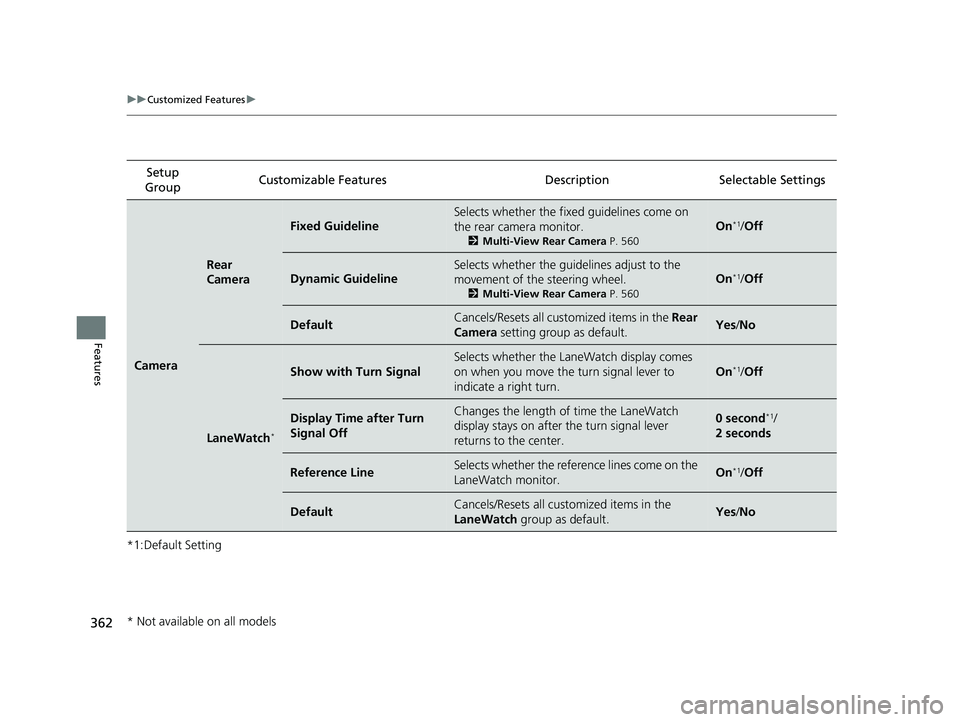
Camera
Rear
Camera
Fixed Guideline
Selects whether the fixed guidelines come on
the rear camera monitor.
2 Multi-View Rear Camera P. 560
On*1/Off
Dynamic Guideline
Selects whether the guidelines adjust to the
movement of the steering wheel.
2 Multi-View Rear Camera P. 560
On*1/Off
DefaultCancels/Resets all cust omized items in the Rear
Camera setting group as default.Yes/No
LaneWatch*
Show with Turn Signal
Selects whether the LaneWatch display comes
on when you move the turn signal lever to
indicate a right turn.
On*1/Off
Display Time after Turn
Signal OffChanges the length of time the LaneWatch
display stays on after the turn signal lever
returns to the center.0 second*1/
2 seconds
Reference LineSelects whether the reference lines come on the
LaneWatch monitor.On*1/ Off
DefaultCancels/Resets all customized items in the
LaneWatch group as default.Yes/No
* Not available on all models
21 CIVIC 5D HUM-31TGG6400_01.book 362 ページ 2020年8月28日 金曜日 午後1時 48分
Page 374 of 711
372
uuCustomized Features u
Features
*1:Default SettingSetup
Group Customizable Features Description Selectable Settings
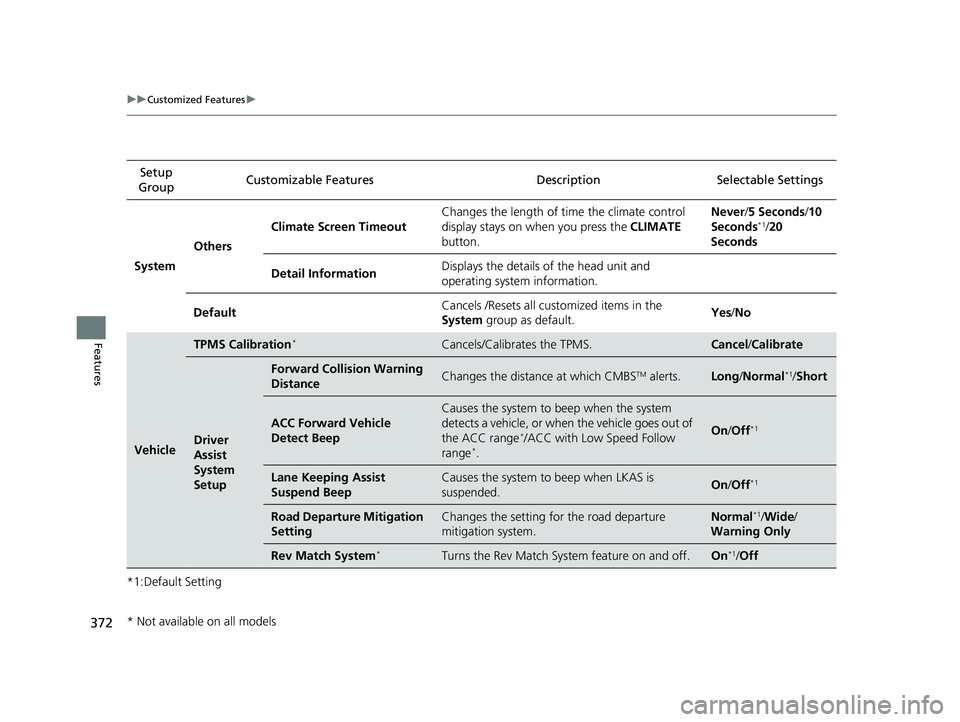
System Others Climate Screen Timeout
Changes the length of time the climate control
display stays on when you press the
CLIMATE
button. Never/
5 Seconds /10
Seconds
*1/ 20
Seconds
Detail Information Displays the details of the head unit and
operating system information.
Default Cancels /Resets all cust
omized items in the
System group as default. Yes
/No
Vehicle
TPMS Calibration*Cancels/Calibrates the TPMS.Cancel /Calibrate
Driver
Assist
System
Setup
Forward Collision Warning
DistanceChanges the distance at which CMBSTM alerts.Long /Normal*1/Short
ACC Forward Vehicle
Detect Beep
Causes the system to beep when the system
detects a vehicle, or when the vehicle goes out of
the ACC range
*/ACC with Low Speed Follow
range*.
On /Off*1
Lane Keeping Assist
Suspend BeepCauses the system to beep when LKAS is
suspended.On /Off*1
Road Departure Mitigation
SettingChanges the setting for the road departure
mitigation system.Normal*1/Wide /
Warning Only
Rev Match System*Turns the Rev Match System feature on and off.On*1/ Off
* Not available on all models
21 CIVIC 5D HUM-31TGG6400_01.book 372 ページ 2020年8月28日 金曜日 午後1時 48分
Page 378 of 711
376
uuCustomized Features u
Features
*1:Default SettingSetup
Group Customizable Features Desc
ription Selectable Settings
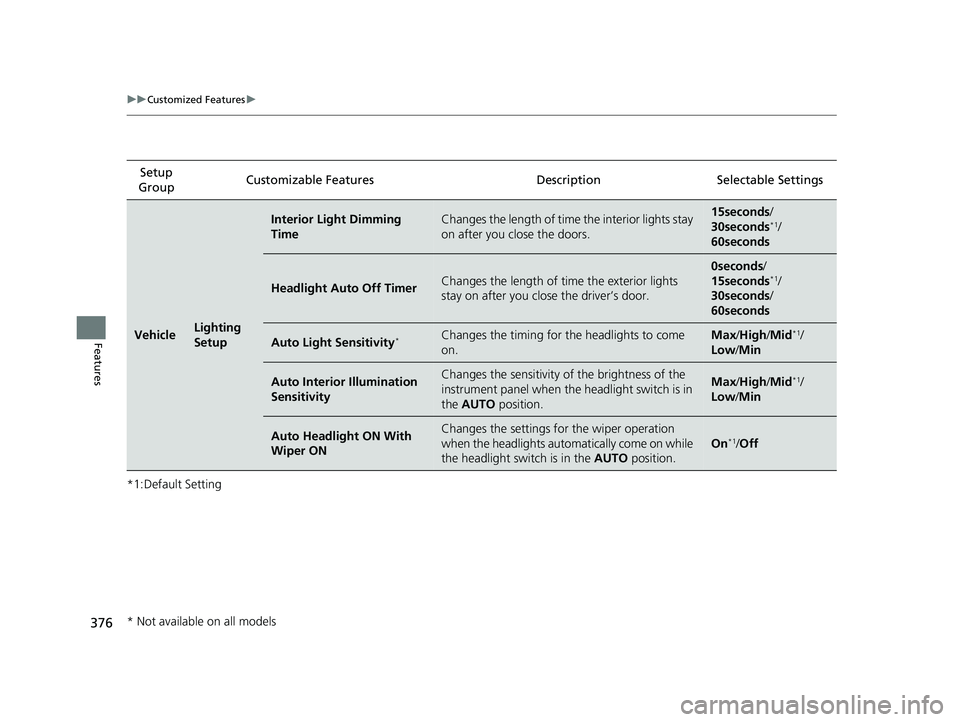
VehicleLighting
Setup
Interior Light Dimming
TimeChanges the length of time the interior lights stay
on after you close the doors.15seconds/
30seconds*1/
60seconds
Headlight Auto Off TimerChanges the length of ti me the exterior lights
stay on after you close the driver’s door.
0seconds /
15seconds*1/
30seconds/
60seconds
Auto Light Sensitivity*Changes the timing for the headlights to come
on.Max /High/ Mid*1/
Low/ Min
Auto Interior Illumination
SensitivityChanges the sensitivity of the brightness of the
instrument panel when the headlight switch is in
the AUTO position.Max/High/ Mid*1/
Low/ Min
Auto Headlight ON With
Wiper ONChanges the settings fo r the wiper operation
when the headlights auto matically come on while
the headlight switch is in the AUTO position.
On*1/Off
* Not available on all models
21 CIVIC 5D HUM-31TGG6400_01.book 376 ページ 2020年8月28日 金曜日 午後1時 48分
Page 483 of 711
481
uuWhen Driving uLaneWatchTM*
Driving
■Customizing the La neWatch settings
You can customize the following items using the audio/information screen.
• Show with Turn Signal : Selects whether LaneWatch monitor comes on when
you operate the tu rn signal lever.
• Display Time after Turn Signal Off : Changes the length of time the LaneWatch
display stays on after you pull the turn signal lever back.
• Reference Line : Selects whether the reference lines appear on the LaneWatch
monitor.
• Display: Allows for display adjust ments of items, such as brightness, contrast and
black level. This setting is part of the System setup group.
2Customized Features P. 350
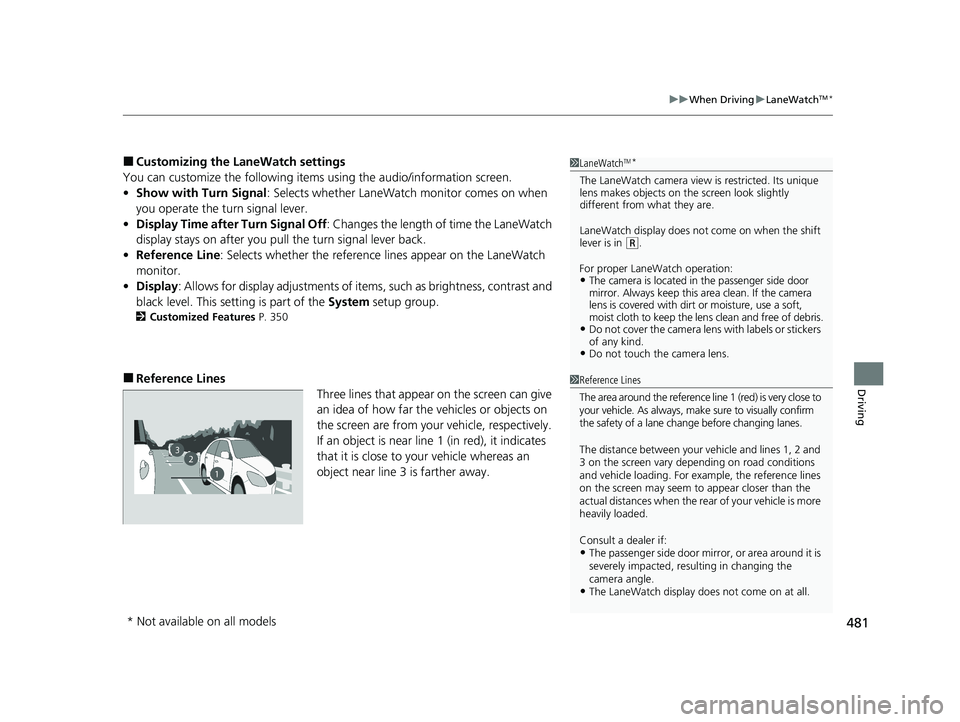
■Reference Lines
Three lines that appear on the screen can give
an idea of how far the vehicles or objects on
the screen are from your vehicle, respectively.
If an object is near line 1 (in red), it indicates
that it is close to your vehicle whereas an
object near line 3 is farther away.
1LaneWatchTM*
The LaneWatch camera view is restricted. Its unique
lens makes objects on the screen look slightly
different from what they are.
LaneWatch display does not come on when the shift
lever is in
( R.
For proper LaneWatch operation:
•The camera is located in the passenger side door
mirror. Always keep this area clean. If the camera
lens is covered with dirt or moisture, use a soft,
moist cloth to keep the lens clean and free of debris.
•Do not cover the camera lens with labels or stickers
of any kind.
•Do not touch the camera lens.
23
1
1Reference Lines
The area around the reference line 1 (red) is very close to
your vehicle. As always, m ake sure to visually confirm
the safety of a lane chan ge before changing lanes.
The distance betwee n your vehicle and lines 1, 2 and
3 on the screen vary depending on road conditions
and vehicle loading. For ex ample, the reference lines
on the screen may seem to appear closer than the
actual distances when the rear of your vehicle is more
heavily loaded.
Consult a dealer if:
•The passenger side door mirr or, or area around it is
severely impacted, resulting in changing the
camera angle.
•The LaneWatch display doe s not come on at all.
* Not available on all models
21 CIVIC 5D HUM-31TGG6400_01.book 481 ページ 2020年8月28日 金曜日 午後1時 48分