language HONDA CIVIC HYBRID 2015 9.G Owners Manual
[x] Cancel search | Manufacturer: HONDA, Model Year: 2015, Model line: CIVIC HYBRID, Model: HONDA CIVIC HYBRID 2015 9.GPages: 377, PDF Size: 18.05 MB
Page 96 of 377
95
uuGauges and intelligent Multi- Information Display (i-MID)uintelligent Multi-Information Display (i-MID)
Continued
Instrument Panel
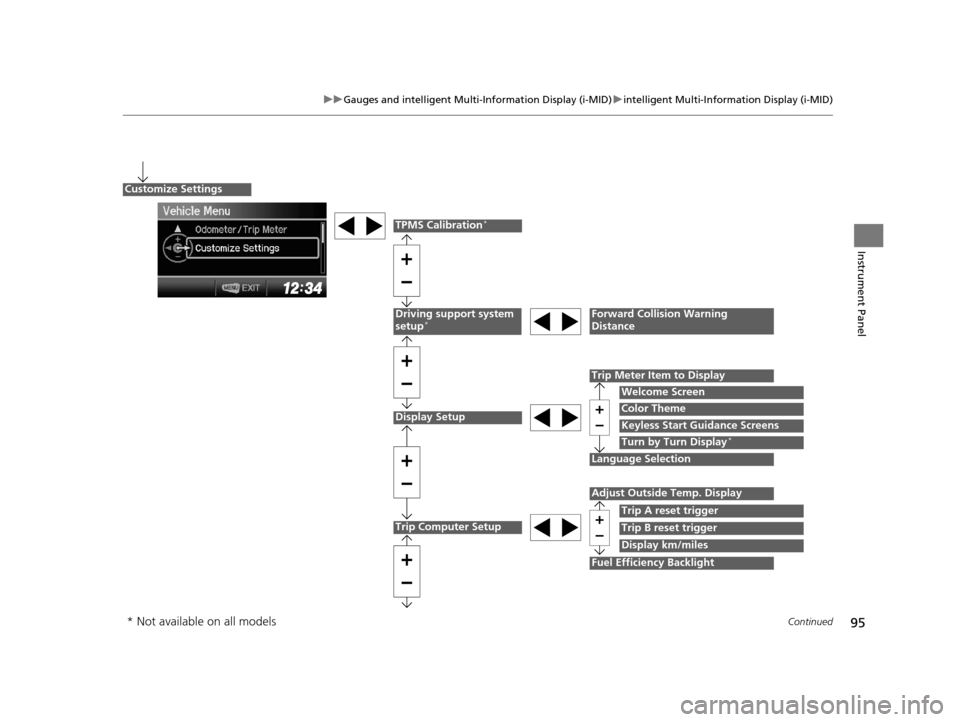
Display Setup
Language Selection
Trip Meter Item to Display
Welcome Screen
Color Theme
Customize Settings
Turn by Turn Display*
Driving support system
setup*Forward Collision Warning
Distance
Trip Computer Setup
Adjust Outside Temp. Display
Trip A reset trigger
Display km/miles
Fuel Efficiency Backlight
Trip B reset trigger
TPMS Calibration*
Keyless Start Guidance Screens
* Not available on all models
15 CIVIC IMA-31TR26300.book 95 ページ 2014年9月9日 火曜日 午後12時20分
Page 99 of 377
98
uuGauges and intelligent Multi- Information Display (i-MID)uintelligent Multi-Information Display (i-MID)
Instrument Panel
*1: Models with navigation system
*2: Default Setting
*3: Refer to the Navigation System Manual for complete details.Setup Group Customizabl
e Features Description Selectable settings
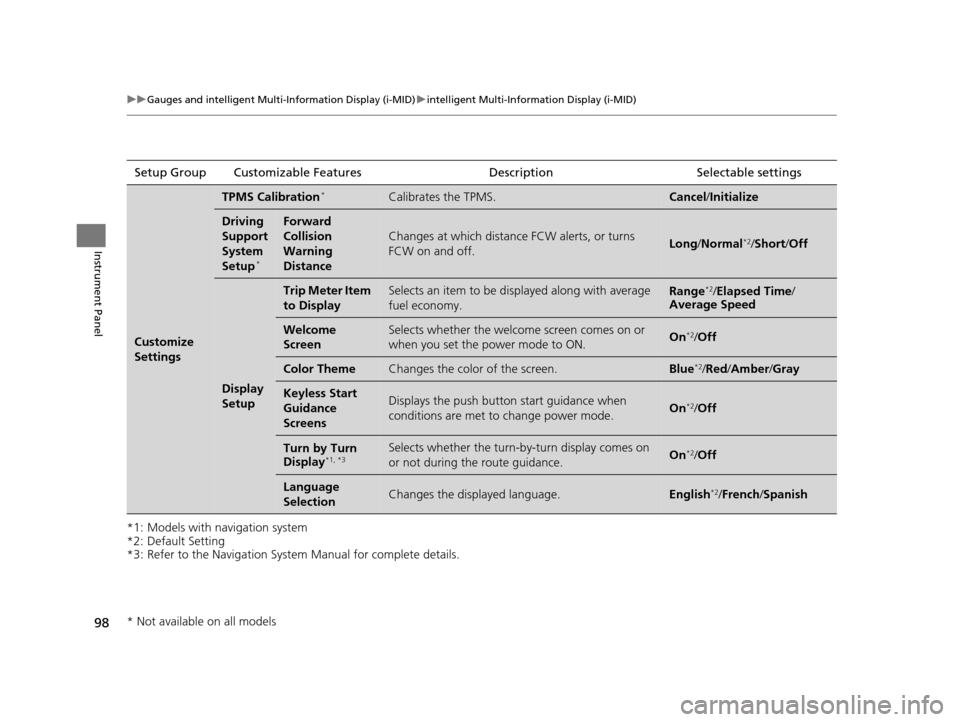
Customize
Settings
TPMS Calibration*Calibrates the TPMS.Cancel/Initialize
Driving
Support
System
Setup
*
Forward
Collision
Warning
Distance
Changes at which distance FCW alerts, or turns
FCW on and off.Long /Normal*2/Short /Off
Display
Setup
Trip Meter Item
to DisplaySelects an item to be di splayed along with average
fuel economy.Range*2/ Elapsed Time /
Average Speed
Welcome
ScreenSelects whether the welcome screen comes on or
when you set the power mode to ON.On*2/ Off
Color ThemeChanges the color of the screen.Blue*2/Red /Amber /Gray
Keyless Start
Guidance
ScreensDisplays the push button start guidance when
conditions are met to change power mode.On*2/Off
Turn by Turn
Display*1, *3Selects whether the turn-b y-turn display comes on
or not during the route guidance.On*2/ Off
Language
SelectionChanges the displayed language.English*2/ French /Spanish
* Not available on all models
15 CIVIC IMA-31TR26300.book 98 ページ 2014年9月9日 火曜日 午後12時20分
Page 194 of 377
193
uuCustomized Features u
Continued
Features
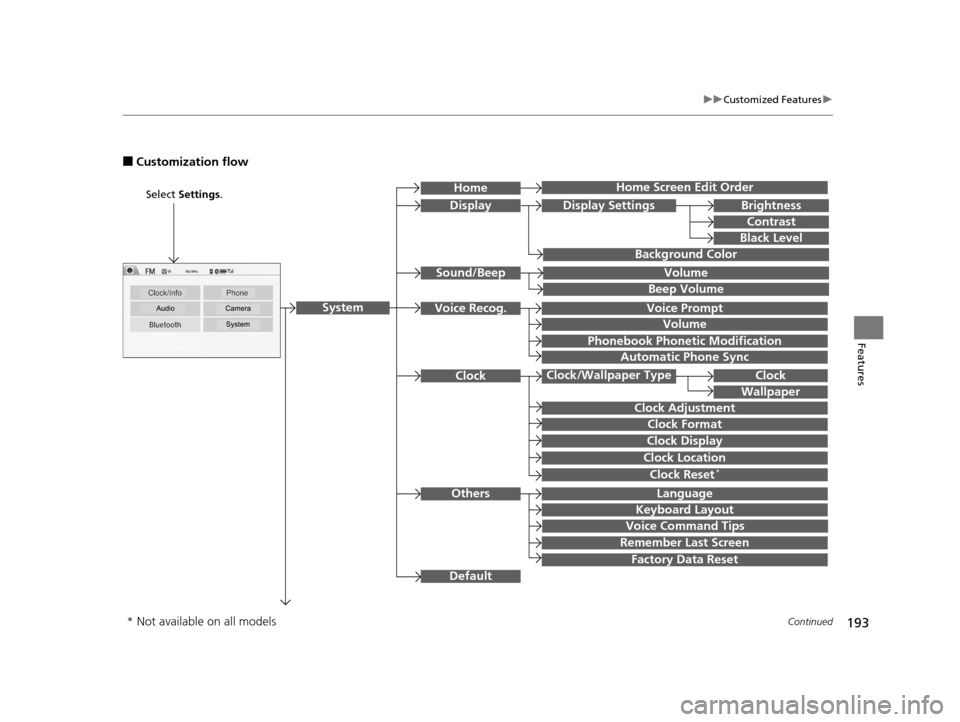
■Customization flow
Clock Format
Remember Last Screen
Factory Data Reset
Clock Adjustment
Select Settings .
Language
Default
Brightness
Contrast
Black Level
Clock
Wallpaper
Display
Home Screen Edit Order
Background Color
Volume
Clock Location
Clock Display
Beep Volume
Keyboard Layout
Home
Sound/Beep
Display Settings
ClockClock/Wallpaper Type
System
Clock Reset*
Others
Phonebook Phonet ic Modification
Automatic Phone Sync
Voice Prompt
Volume
Voice Recog.
Voice Command Tips
* Not available on all models
15 CIVIC IMA-31TR26300.book 193 ページ 2014年9月9日 火曜日 午後12時20分
Page 199 of 377
198
uuCustomized Features u
Features
*1:Default SettingSetup
Group Customizable Features Description Selectable Settings
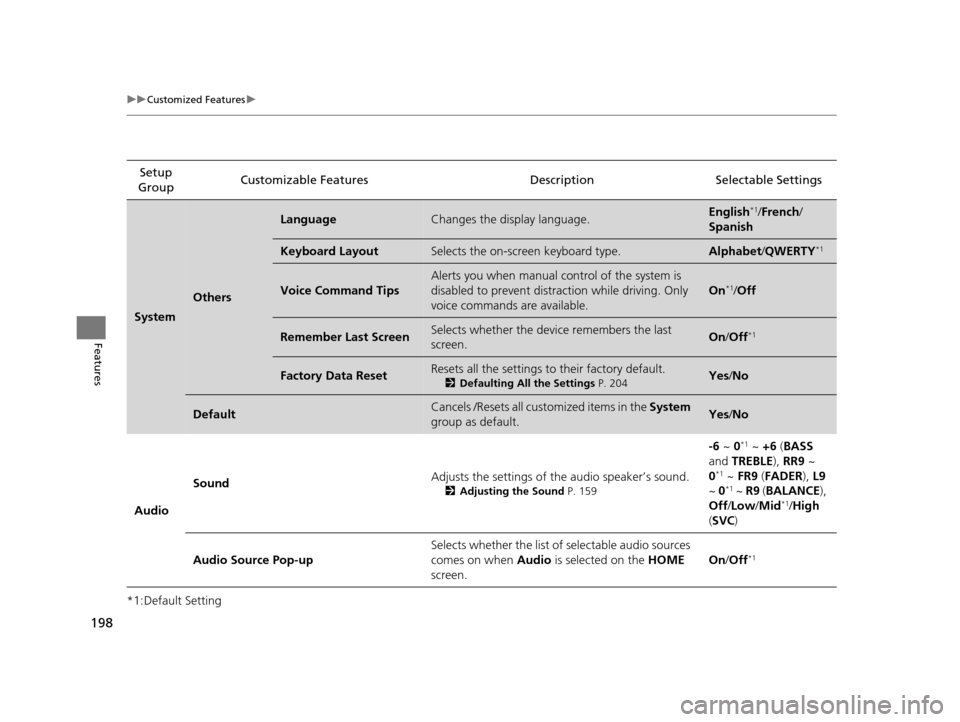
System
Others
LanguageChanges the display language.English*1/
French /
Spanish
Keyboard LayoutSelects the on-screen keyboard type. Alphabet /QWERTY*1
Voice Command Tips
Alerts you when manual co ntrol of the system is
disabled to prevent distraction while driving. Only
voice commands are available.
On*1/ Off
Remember Last ScreenSelects whether the device remembers the last
screen.On /Off*1
Factory Data ResetResets all the settings to their factory default.
2 Defaulting All the Settings P. 204Yes/No
DefaultCancels /Resets all cust omized items in the System
group as default.Yes /No
Audio Sound
Adjusts the settings of the audio speaker’s sound.
2
Adjusting the Sound P. 159
-6 ~ 0*1 ~ +6 (BASS
and TREBLE ), RR9 ~
0
*1 ~ FR9 (FADER ), L9
~ 0*1 ~ R9 (BALANCE ),
Off /Low /Mid*1/High
( SVC )
Audio Source Pop-up Selects whether the list of selectable audio sources
comes on when
Audio is selected on the HOME
screen. On
/Off
*1
15 CIVIC IMA-31TR26300.book 198 ページ 2014年9月9日 火曜日 午後12時20分
Page 207 of 377
uuBluetooth ® HandsFreeLink ®u Using HFL
206
Features
(Pick-up) button: Press to go directly to the Phone screen, or to answer an
incoming call.
(Hang-up/back) button: Press to end a call, go back to the previous
command, or cancel a command.
(Talk) button: Press to call a number with a stored voice tag.
MENU button: Press and hold to display Speed Dial, Call History , or Redial on
the Phone screen.
button: Press to select an item displayed on the Phone screen.
SOURCE button: Press to call a number listed in the selected item on the Phone
screen.
To go to the Phone menu screen:
1. Select Phone to switch the display to the Phone screen.
2. Select MENU .
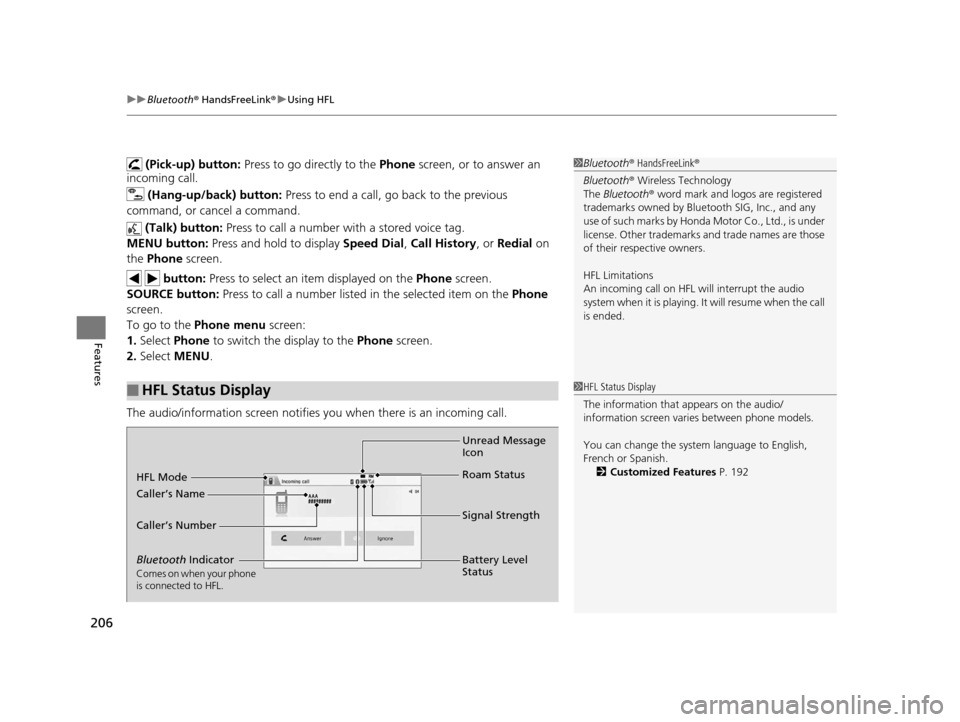
The audio/information screen notifies you when there is an incoming call.
■HFL Status Display
1Bluetooth ® HandsFreeLink ®
Bluetooth ® Wireless Technology
The Bluetooth ® word mark and logos are registered
trademarks owned by Blue tooth SIG, Inc., and any
use of such marks by Honda Motor Co., Ltd., is under
license. Other trademarks and trade names are those
of their respective owners.
HFL Limitations
An incoming call on HFL will interrupt the audio
s y s t e m wh e n it is p la y i n g . It wi ll r e s u m e w h en t h e c a l l
is ended.
1 HFL Status Display
The information that appears on the audio/
information screen vari es between phone models.
You can change the system language to English,
French or Spanish. 2 Customized Features P. 192
Bluetooth Indicator
Comes on when your phone
is connected to HFL.
Signal Strength
HFL Mode
Battery Level
Status
Caller’s Name
Caller’s Number
Unread Message
Icon
Roam Status
15 CIVIC IMA-31TR26300.book 206 ページ 2014年9月9日 火曜日 午後12時20分
Page 374 of 377
373
Index
Shift Lever Position.................................... 69
Smart Entry System ................................... 79
Supplemental Restraint System ........... 49, 71
System Message ....................................... 74
Transmission ............................................. 70
Trunk Open .............................................. 72
Turn Signal ............................................... 74
Vehicle Stability Assist (VSA®)
System ............................................ 71, 259
VSA ® OFF.......................................... 72, 260
Information .............................................. 357
Instant Fuel Economy ................................ 89
Instant Fuel Economy Gauge .................... 84
Instrument Panel ........................................ 67
Brightness Control .................................. 129
intelligent Multi-Information Display (i-MID) ....................................................... 85
Interior Lights ........................................... 139
Interior Rearview Mirror ......................... 132
J
Jack (Wheel Nut Wrench) ........................ 338
Jump Starting ........................................... 344
K
Key Number Tag ...................................... 104
Keyless Lockout Prevention ..................... 109
Keys Lockout Prevention ................................. 109 Number Tag ............................................ 104
Rear Door Won’t Open ............................ 112
Remote Transmitter ................................. 106
Types and Functions ................................ 103
Won’t Turn ................................................ 24
Kickdown .................................................. 242
L
Lane Departure Warning (LDW) .............. 256
LaneWatchTM............................................. 261
Language (HFL) ......................................... 206
LATCH (Child Seats) .................................... 57
Lights ................................................. 124, 300
Automatic ............................................... 125
Bulb Replacement .................................... 300
Daytime Running Lights ........................... 127
High Beam Indicator .................................. 75
Interior .................................................... 139
Light Switches ......................................... 124
Lights On Indicator .................................... 75
Turn Signals ............................................. 124
Load Limits ................................................ 235
Locking and Unlocking ............................ 103
Auto Door Locking/Unlocking .................. 113
Childproof Door Locks ............................. 112
From Inside .............................................. 110
From Outside ........................................... 106
Keys ........................................................ 103
Using a Key ............................................. 109
Lockout Prevention System ...................... 109Low Battery Charge (12 volt)
................... 349
Low Fuel Indicator ...................................... 70
Low Oil Pressure Indicator ................. 72, 349
Low Smart Entry Remote Signal Strength .................................................. 105
Low Temperature Indicator ....................... 76
Lower Anchor ............................................. 57
Lubricant Specifications Chart ................. 358
Luggage (Maximum Load Limit) ............. 235M
Maintenance............................................. 279
Battery .................................................... 317
Brake Fluid .............................................. 298
Cleaning ................................................. 320
Climate Control System ........................... 319
Coolant ................................................... 295
Maintenance Minder
TM............................ 283
Oil ........................................................... 290
Precautions ............................................. 280
Radiator .................................................. 296
Remote Transmitter ................................. 318
Replacing Light Bulbs .............................. 300
Safety...................................................... 281
Service Items ........................................... 286
Tires ........................................................ 308
Transmission Fluid ................................... 297
Under the Hood ...................................... 288
Maintenance Minder
TM............................ 283
Malfunction Indicator Lamp .............. 69, 350
15 CIVIC IMA-31TR26300.book 373 ページ 2014年9月9日 火曜日 午後12時20分