ad blue HONDA CIVIC SEDAN 2012 (in English) Owner's Guide
[x] Cancel search | Manufacturer: HONDA, Model Year: 2012, Model line: CIVIC SEDAN, Model: HONDA CIVIC SEDAN 2012Pages: 345, PDF Size: 53.95 MB
Page 189 of 345
uuBluetooth® HandsFreeLink®*uHFL Menus
188
Features
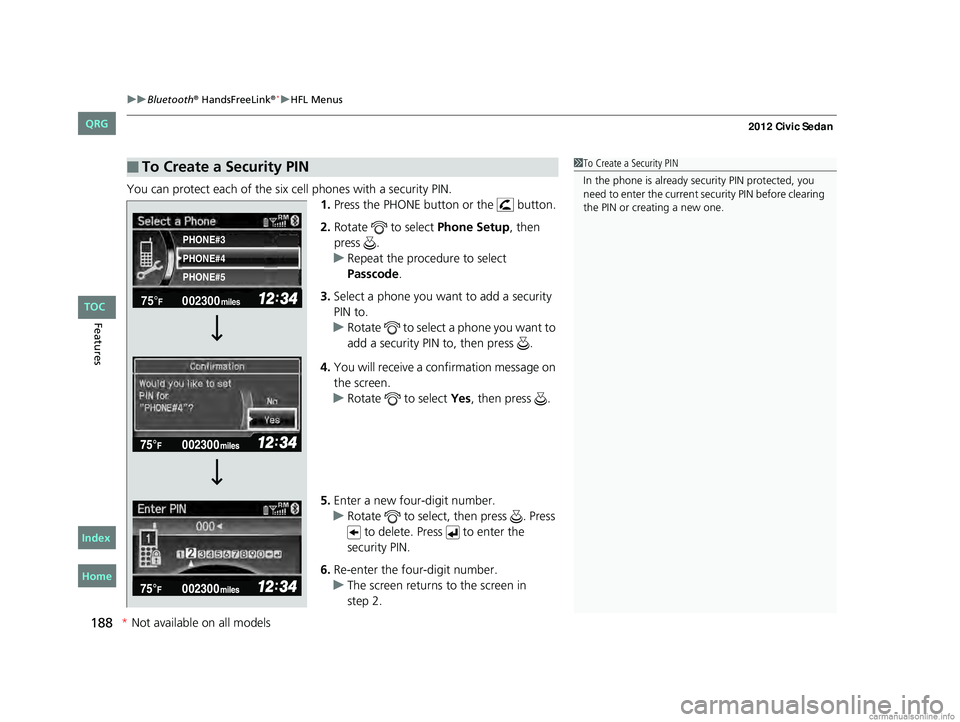
You can protect each of the six cell phones with a security PIN.
1.Press the PHONE button or the button.
2. Rotate to select Phone Setup, then
press .
u Repeat the procedure to select
Passcode .
3. Select a phone you want to add a security
PIN to.
u Rotate to select a phone you want to
add a security PIN to, then press .
4. You will receive a confirmation message on
the screen.
u Rotate to select Yes, then press .
5. Enter a new four-digit number.
u Rotate to select, then press . Press
to delete. Press to enter the
security PIN.
6. Re-enter the four-digit number.
u The screen returns to the screen in
■To Create a Security PIN1To Create a Security PIN
In the phone is already security PIN protected, you
need to enter the current security PIN before clearing
the PIN or creating a new one.
002300
75°F miles
PHONE#4 PHONE#3
PHONE#5
CIVIC 4D-31TR3600.book 188 ページ 2011年2月14日 月曜日 午後2時51分
*Not available on all models
TOC
Home
QRG
Index
step 2.
Page 190 of 345
Continued189
uuBluetooth® HandsFreeLink®*uHFL Menus
Features
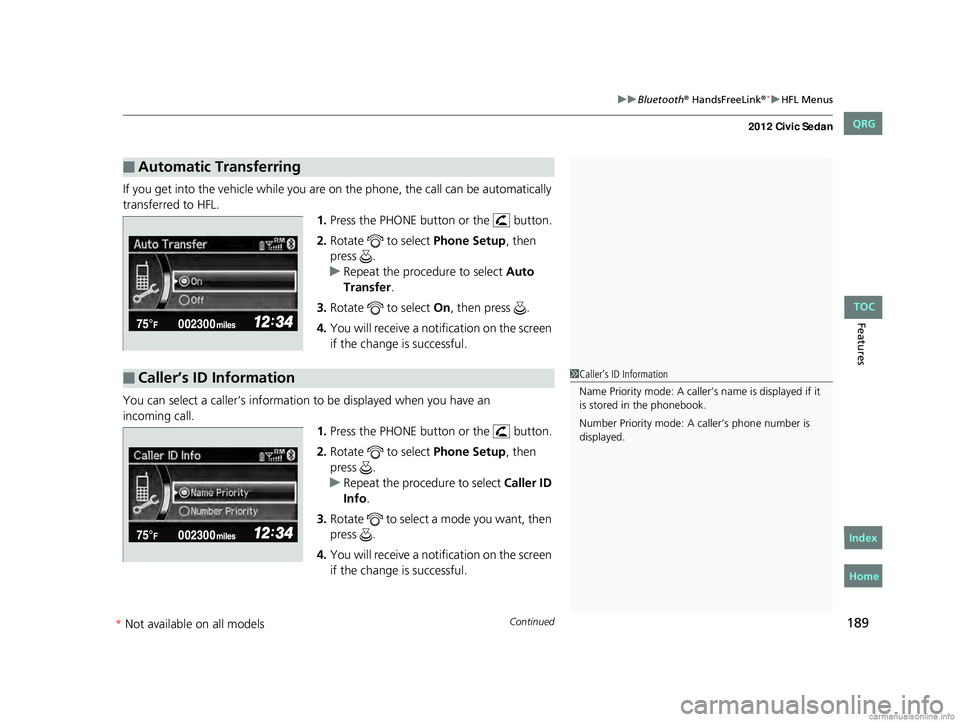
If you get into the vehicle while you are on the phone, the call can be automatically
transferred to HFL.
1.Press the PHONE button or the button.
2. Rotate to select Phone Setup, then
press .
u Repeat the procedure to select Auto
Transfer .
3. Rotate to select On, then press .
4. You will receive a notification on the screen
if the change is successful.
You can select a caller’s information to be displayed when you have an 1.Press the PHONE button or the button.
2. Rotate to select Phone Setup, then
press .
u Repeat the procedure to select Caller ID
Info .
3. Rotate to select a mode you want, then
press .
4. You will receive a notification on the screen
if the change is successful.
■Automatic Transferring
■Caller’s ID Information1Caller’s ID Information
Name Priority mode: A caller’s name is displayed if it
is stored in the phonebook.
Number Priority mode: A caller’s phone number is
displayed.
CIVIC 4D-31TR3600.book 189 ページ 2011年2月14日 月曜日 午後2時51分
* Not available on all models
TOC
Home
QRG
Index
incoming c all .
Page 191 of 345
190
uuBluetooth® HandsFreeLink®*uHFL Menus
Features
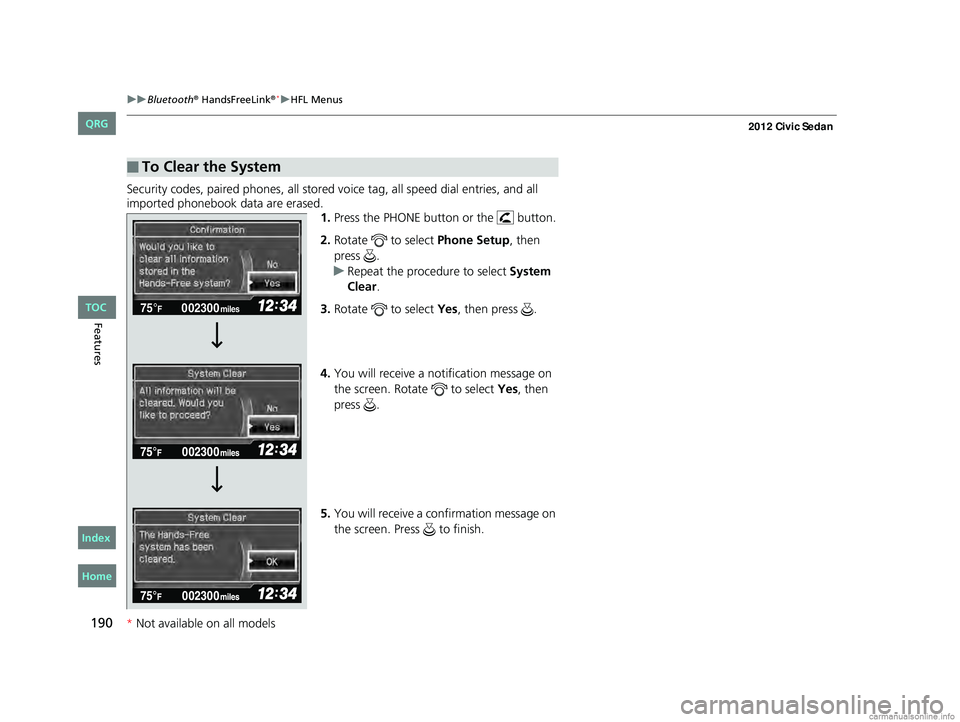
Security codes, paired phones, all stored vo ice tag, all speed dial entries, and all
imported phonebook data are erased. 1.Press the PHONE button or the button.
2. Rotate to select Phone Setup, then
press .
u Repeat the procedure to select System
Clear .
3. Rotate to select Yes, then press .
4. You will receive a notification message on
the screen. Rotate to select Yes, then
press .
5. You will receive a confirmation message on
the screen. Press to finish.
■To Clear the System
002300
75°F miles
CIVIC 4D-31TR3600.book 190 ページ 2011年2月14日 月曜日 午後2時51分
*Not available on all models
TOC
Home
QRG
Index
Page 192 of 345
Continued191
uuBluetooth® HandsFreeLink®*uHFL Menus
Features
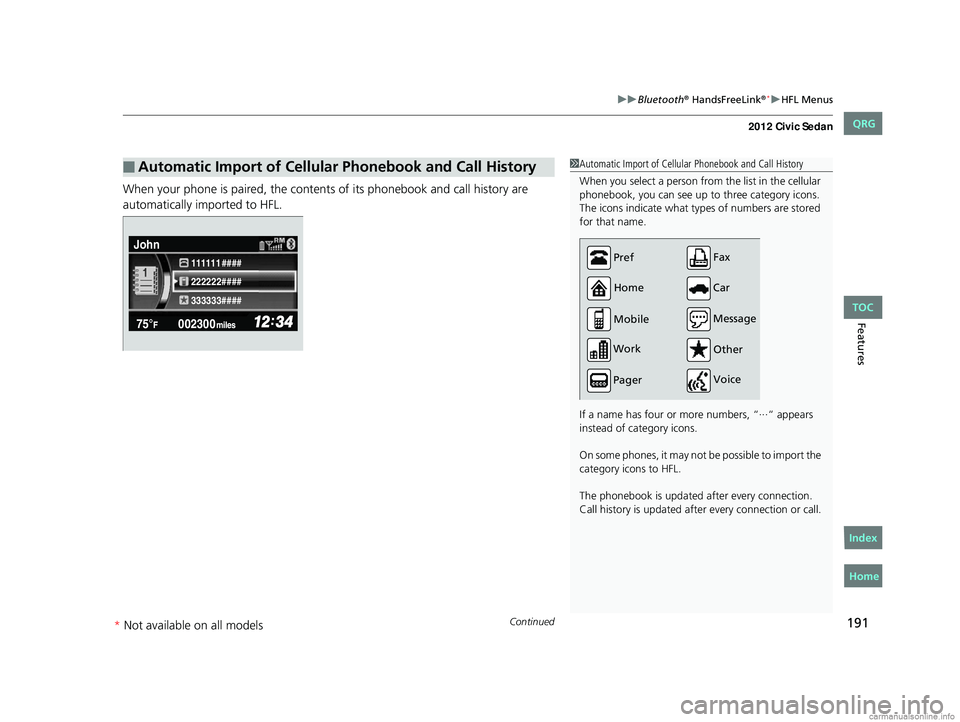
When your phone is paired, the contents of its phonebook and call history are
automatically imported to HFL.
■Automatic Import of Cellular Phonebook and Call History1Automatic Import of Cellular Phonebook and Call History
When you select a person from the list in the cellular
phonebook, you can see up to three category icons.
The icons indicate what types of numbers are stored
for that name.
If a name has four or more numbers, “∙∙∙“ appears
instead of category icons.
On some phones, it may not be possible to import the
category icons to HFL.
The phonebook is updated after every connection.
Call history is updated after every connection or call.
Pref
Home
Mobile
Work
Pager Car
Fax
Message Other
Voice
222222#### 111111 ####
333333####
John
CIVIC 4D-31TR3600.book 191 ページ 2011年2月14日 月曜日 午後2時51分
* Not available on all models
TOC
Home
QRG
Index
Page 193 of 345
uuBluetooth® HandsFreeLink®*uHFL Menus
192
Features
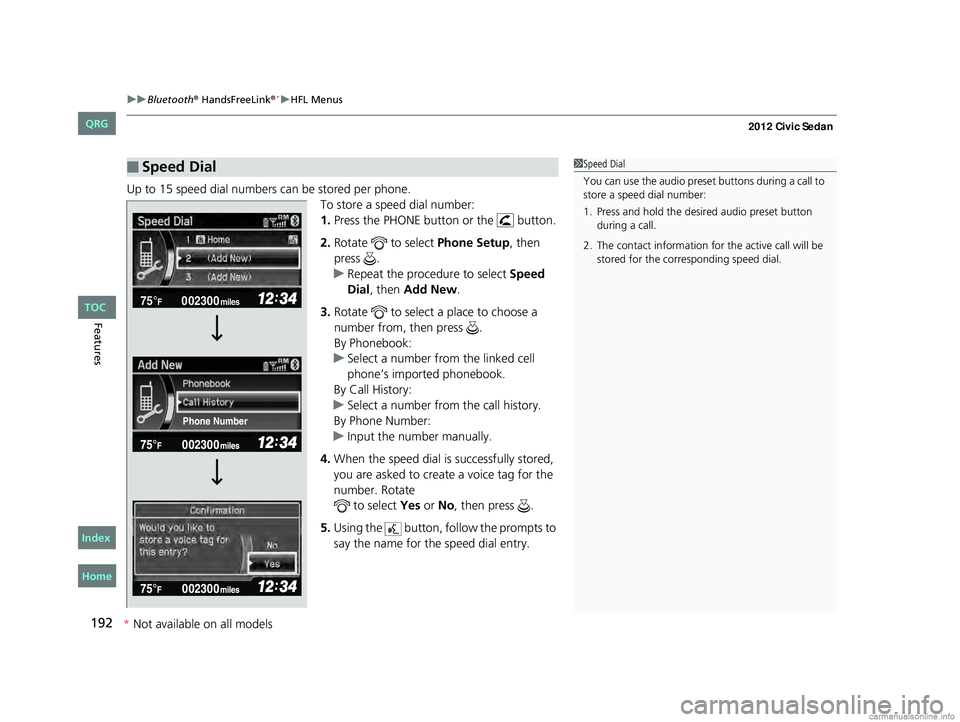
Up to 15 speed dial numbers can be stored per phone.
To store a speed dial number:
1.Press the PHONE button or the button.
2. Rotate to select Phone Setup, then
press .
u Repeat the procedure to select Speed
Dial, then Add New.
3. Rotate to select a place to choose a
number from, then press .
By Phonebook:
u Select a number from the linked cell
phone’s imported phonebook.
By Call History:
u Select a number from the call history.
By Phone Number:
u Input the number manually.
4. When the speed dial is successfully stored,
you are asked to create a voice tag for the
number. Rotate to select Yes or No, then press .
5. Using the button, fo llow the prompts to
say the name for the speed dial entry.
■Speed Dial1 Speed Dial
You can use the audio preset buttons during a call to
store a speed dial number:
1. Press and hold the desired audio preset button during a call.
2. The contact information for the active call will be stored for the corresponding speed dial.
002300
75°F miles
Phone Number
CIVIC 4D-31TR3600.book 192 ページ 2011年2月14日 月曜日 午後2時51分
*Not available on all models
TOC
Home
QRG
Index
Page 194 of 345
Continued193
uuBluetooth® HandsFreeLink®*uHFL Menus
Features
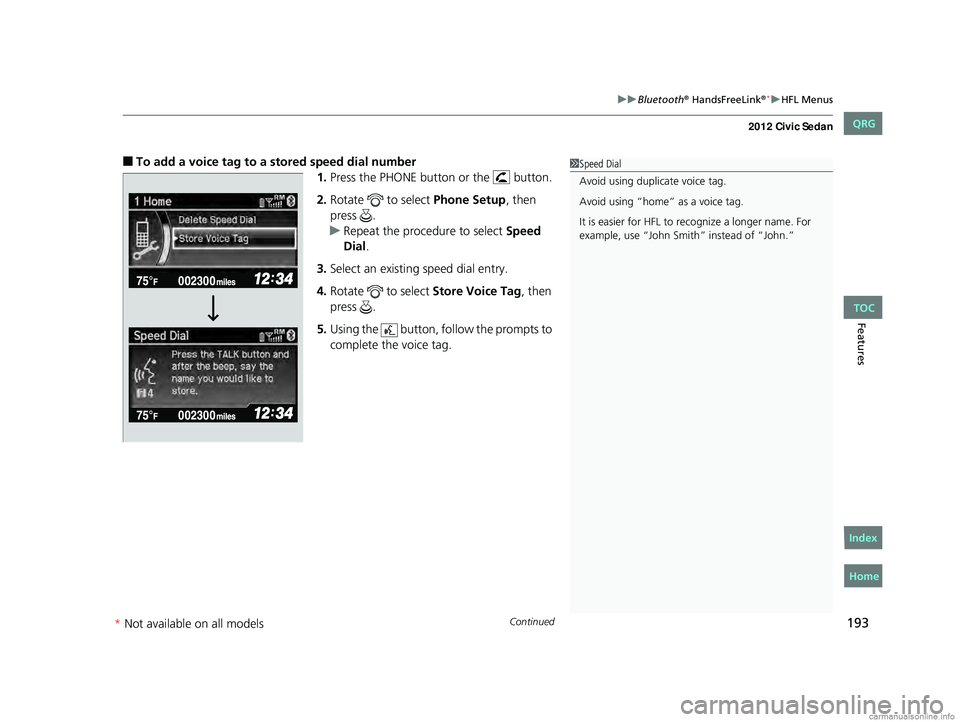
■To add a voice tag to a stored speed dial number
1.Press the PHONE button or the button.
2. Rotate to select Phone Setup, then
press .
u Repeat the procedure to select Speed
Dial .
3. Select an existing speed dial entry.
4. Rotate to select Store Voice Tag, then
press .
5. Using the button, follow the prompts to
complete the voice tag.1Speed Dial
Avoid using duplicate voice tag.
Avoid using “home” as a voice tag.
It is easier for HFL to re cognize a longer name. For
example, use “John Smit h” instead of “John.”
CIVIC 4D-31TR3600.book 193 ページ 2011年2月14日 月曜日 午後2時51分
*Not available on all models
TOC
Home
QRG
Index
Page 195 of 345
194
uuBluetooth® HandsFreeLink®*uHFL Menus
Features
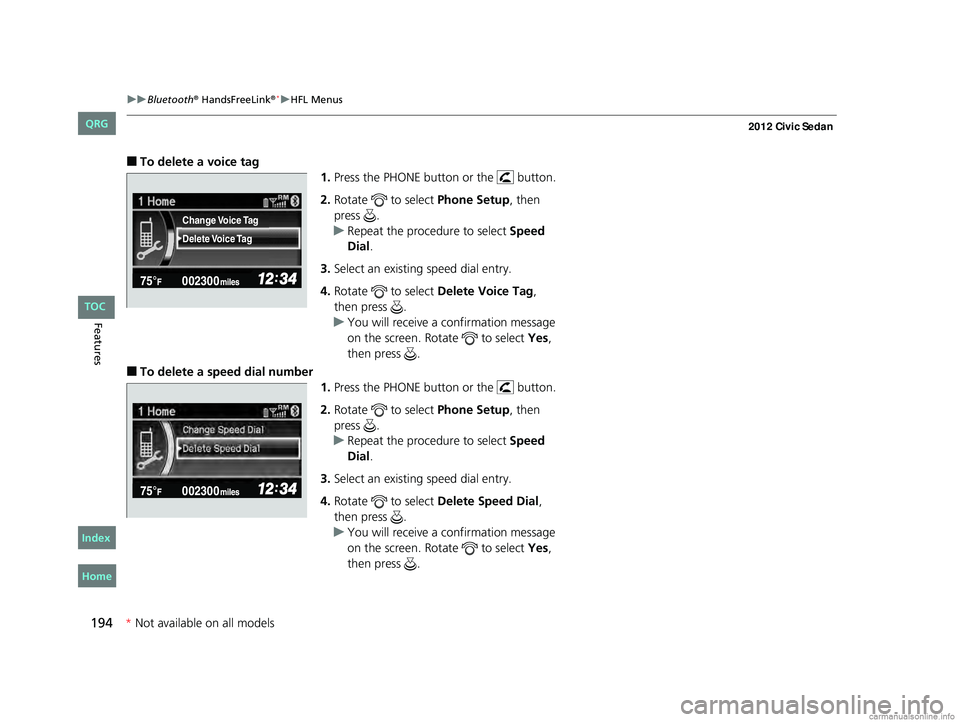
■To delete a voice tag
1.Press the PHONE button or the button.
2. Rotate to select Phone Setup, then
press .
u Repeat the procedure to select Speed
Dial.
3. Select an existing speed dial entry.
4. Rotate to select Delete Voice Tag,
then press .
u You will receive a confirmation message
on the screen. Rotate to select Yes,
then press .
■To delete a speed dial number 1.Press the PHONE button or the button.
2. Rotate to select Phone Setup, then
press .
u Repeat the procedure to select Speed
Dial.
3. Select an existing speed dial entry.
4. Rotate to select Delete Speed Dial,
then press .
u You will receive a confirmation message
on the screen. Rotate to select Yes,
then press .
Delete Voice Tag Change Voice Tag
CIVIC 4D-31TR3600.book 194 ページ 2011年2月14日 月曜日 午後2時51分
* Not available on all models
TOC
Home
QRG
Index
Page 196 of 345
Continued195
uuBluetooth® HandsFreeLink®*uHFL Menus
Features
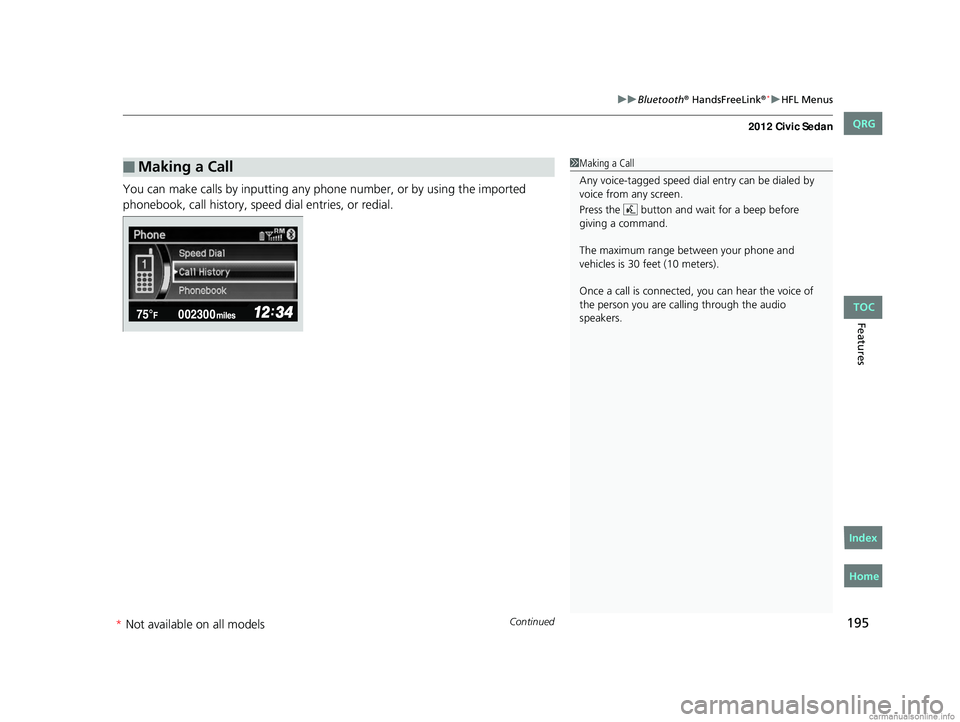
You can make calls by inputting any phone number, or by using the imported
phonebook, call history, speed dial entries, or redial.
■Making a Call1Making a Call
Any voice-tagged speed dial entry can be dialed by
voice from any screen.
Press the button and wait for a beep before
giving a command.
The maximum range be tween your phone and
vehicles is 30 fe et (10 meters).
Once a call is connected, you can hear the voice of
the person you are call ing through the audio
speakers.
CIVIC 4D-31TR3600.book 195 ページ 2011年2月14日 月曜日 午後2時51分
* Not available on all models
TOC
Home
QRG
Index
Page 197 of 345
196
uuBluetooth® HandsFreeLink®*uHFL Menus
Features
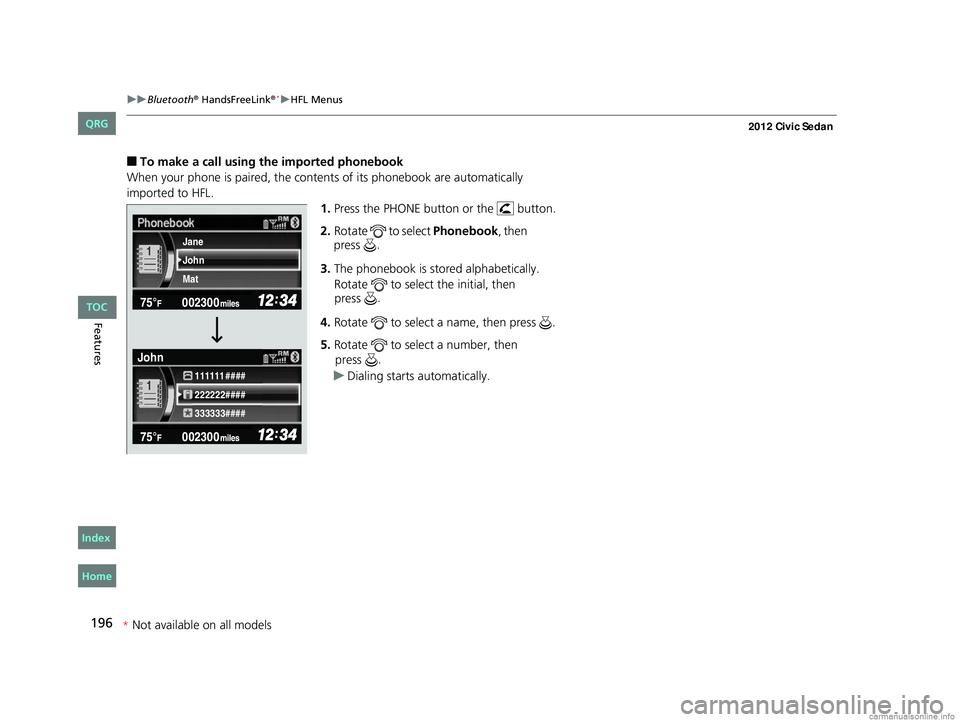
■To make a call using the imported phonebook
When your phone is paired, the contents of its phonebook are automatically
imported to HFL. 1.Press the PHONE button or the button.
2. Rotate to select Phonebook, then
3. The phonebook is stored alphabetically.
Rotate to select the initial, then
4. Rotate to select a name, then press .
5. Rotate to select a number, then
u Dialing starts automatically.
222222#### 111111 ####
333333####
John Jane
Mat
John
CIVIC 4D-31TR3600.book 196 ページ 2011年2月14日 月曜日 午後2時51分
*
Not available on all models
TOC
Home
QRG
Index
press
.
press .
press .
Page 198 of 345
197
uuBluetooth® HandsFreeLink®*uHFL Menus
Continued
Features
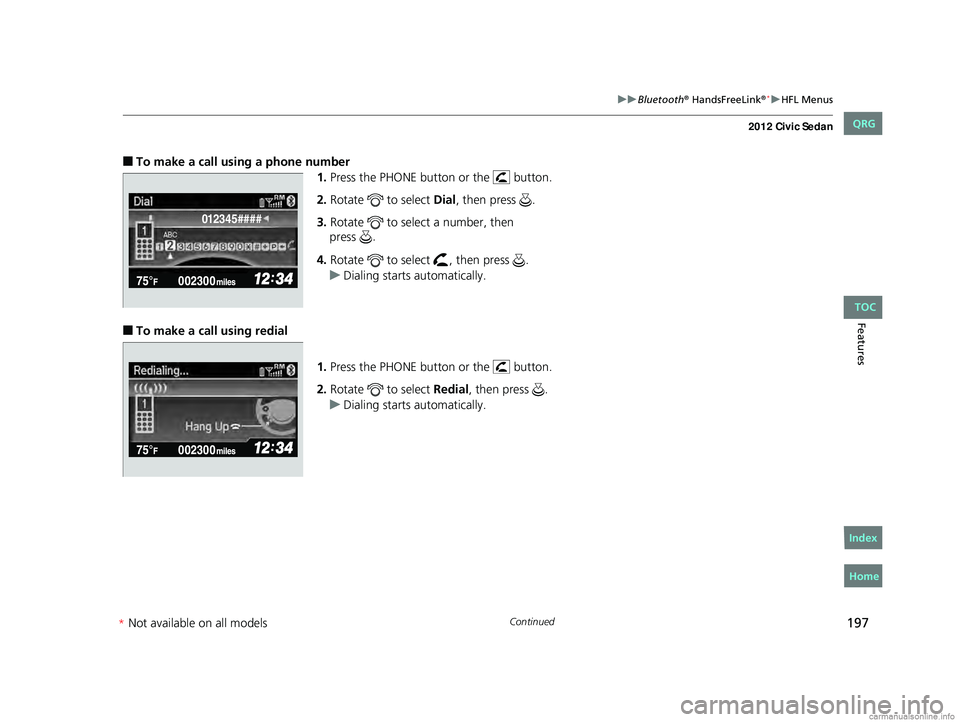
■To make a call using a phone number
1.Press the PHONE button or the button.
2. Rotate to select Dial, then press .
3. Rotate to select a number, then
4. Rotate to select , then press .
u Dialing starts automatically.
■To make a call using redial
1.Press the PHONE button or the button.
2. Rotate to select Redial, then press .
u Dialing starts automatically.
012345####
CIVIC 4D-31TR3600.book 197 ページ 2011年2月14日 月曜日 午後2時51分
*Not available on all models
TOC
Home
QRG
Index
press
.