pin HONDA CLARITY PLUG-IN 2018 Owner's Manual (in English)
[x] Cancel search | Manufacturer: HONDA, Model Year: 2018, Model line: CLARITY PLUG-IN, Model: HONDA CLARITY PLUG-IN 2018Pages: 591, PDF Size: 29.97 MB
Page 9 of 591
7
Quick Reference Guide
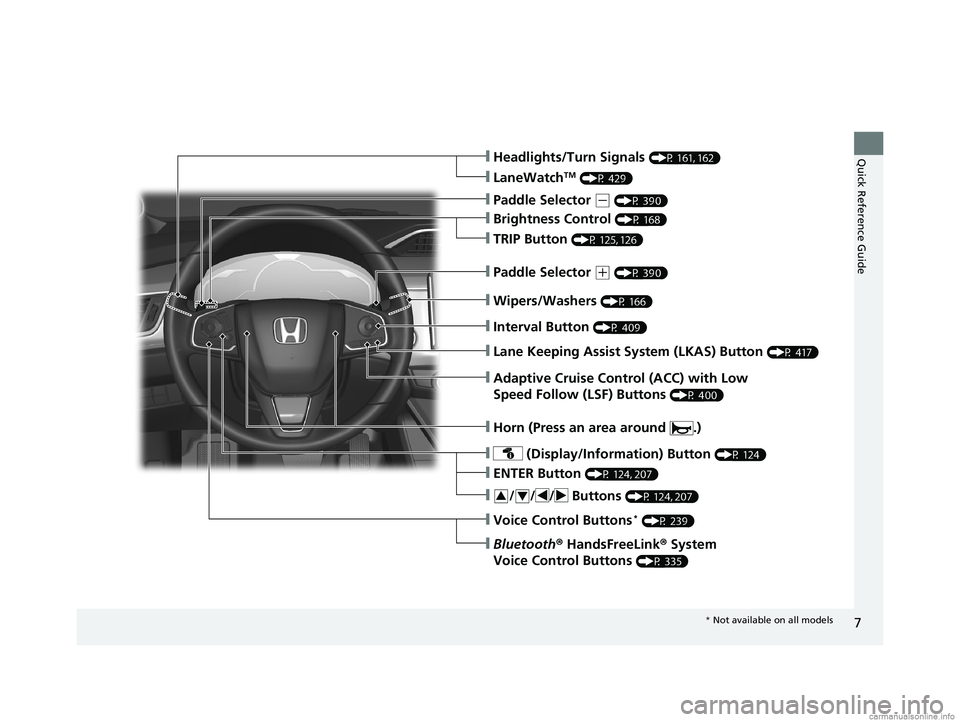
❙Wipers/Washers (P 166)
❙Headlights/Turn Signals (P 161, 162)
❙Brightness Control (P 168)
❙LaneWatchTM (P 429)
❙TRIP Button (P 125, 126)
❙Interval Button (P 409)
❙Lane Keeping Assist System (LKAS) Button (P 417)
❙Adaptive Cruise Control (ACC) with Low
Speed Follow (LSF) Buttons
(P 400)
❙ (Display/Information) Button (P 124)
❙/ / / Buttons (P 124, 207)34
❙ENTER Button (P 124, 207)
❙Voice Control Buttons* (P 239)
❙Bluetooth® HandsFreeLink ® System
Voice Control Buttons
(P 335)
❙Horn (Press an area around .)
❙Paddle Selector (- (P 390)
❙Paddle Selector (+ (P 390)
* Not available on all models
18 CLARITY PHEV CSS-31TRW6000.book 7 ページ 2017年12月25日 月曜日 午後2時22分
Page 23 of 591
21
Quick Reference Guide
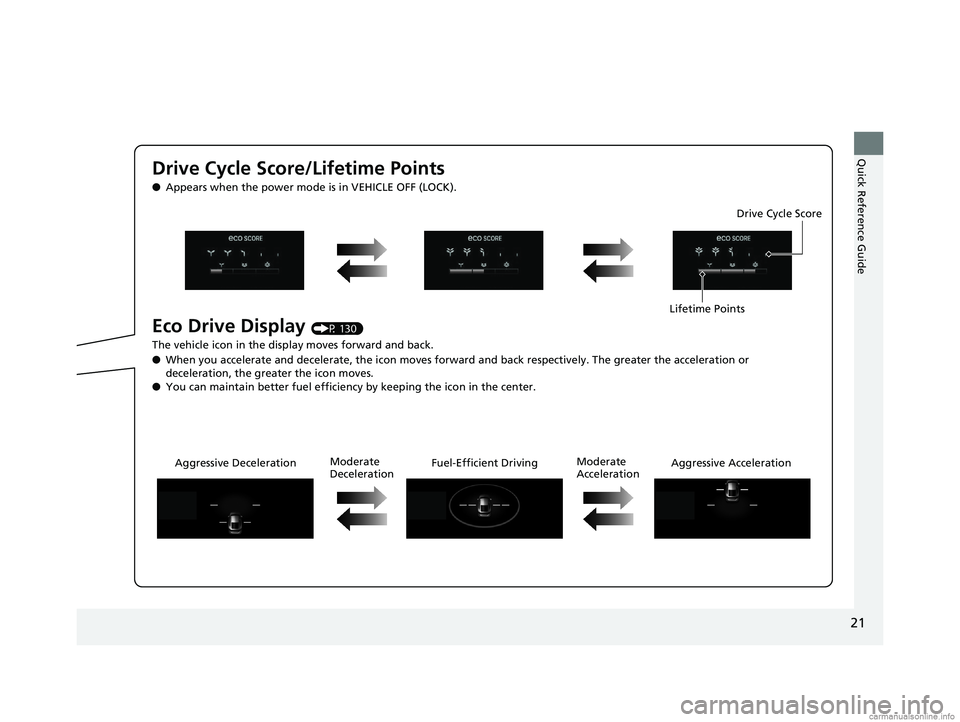
Drive Cycle Score/Lifetime Points
●Appears when the power mode is in VEHICLE OFF (LOCK).
Eco Drive Display (P 130)
The vehicle icon in the disp lay moves forward and back.
● When you accelerate and decelerate, the icon moves forward and back respectively. The greater the acceleration or
deceleration, the greater the icon moves.
● You can maintain better fuel efficiency by keeping the icon in the center. Drive Cycle Score
Lifetime Points
Aggressive Deceleration Fuel-Efficient DrivingAggressive Acceleration
Moderate
Deceleration Moderate
Acceleration
18 CLARITY PHEV CSS-31TRW6000.book 21 ページ 2017年12月25日 月曜日 午後2時22分
Page 25 of 591
23
Quick Reference Guide
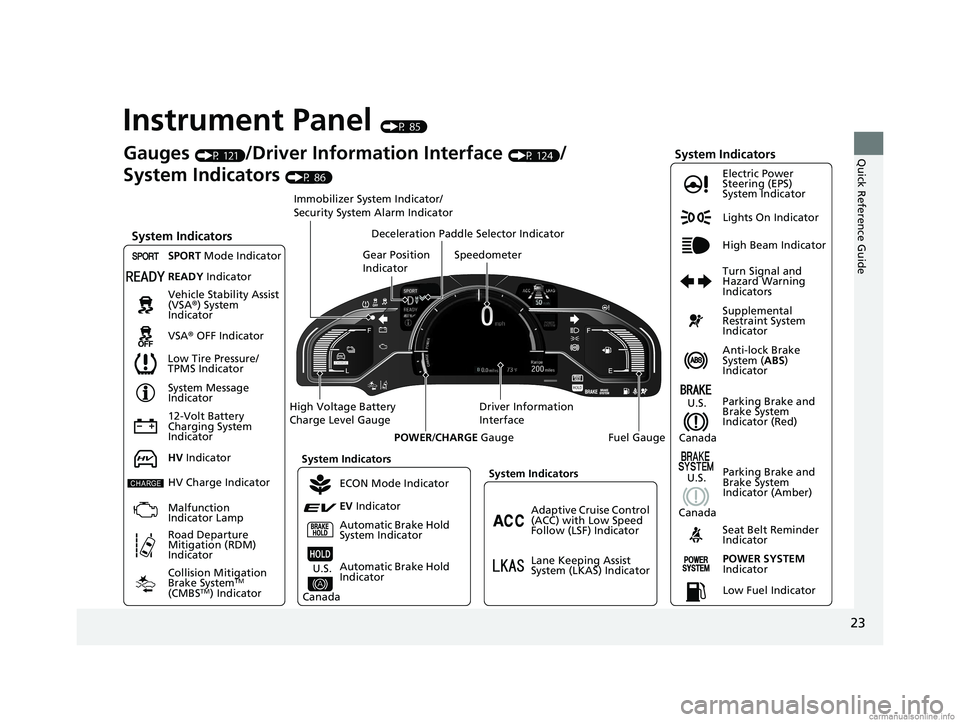
Instrument Panel (P 85)
Lights On Indicator
System Indicators
12-Volt Battery
Charging System
IndicatorAnti-lock Brake
System (
ABS)
Indicator
Vehicle Stability Assist
(VSA®
) System
Indicator
VSA ® OFF Indicator Electric Power
Steering (EPS)
System Indicator
System Indicators High Beam Indicator
Seat Belt Reminder
Indicator
System Indicators
System Message
Indicator
Parking Brake and
Brake System
Indicator (Red) Supplemental
Restraint System
Indicator
Gauges (P 121)/Driver Information Interface (P 124)/
System Indicators
(P 86)
Low Tire Pressure/
TPMS Indicator Turn Signal and
Hazard Warning
Indicators
Speedometer
Automatic Brake Hold
System Indicator Parking Brake and
Brake System
Indicator (Amber)SPORT
Mode Indicator
Collision Mitigation
Brake System
TM
(CMBSTM) Indicator
Road Departure
Mitigation (RDM)
Indicator
Immobilizer System Indicator/
Security System Alarm Indicator
Automatic Brake Hold
Indicator
READY Indicator
POWER SYSTEM
Indicator
Gear Position
Indicator
Fuel Gauge
Driver Information
Interface
High Voltage Battery
Charge Level Gauge
POWER/CHARGE Gauge
Low Fuel Indicator
Adaptive Cruise Control
(ACC) with Low Speed
Follow (LSF) Indicator
Lane Keeping Assist
System (LKAS) Indicator
Deceleration Paddle Selector Indicator
System Indicators
ECON Mode Indicator
EV Indicator
U.S.
Canada
HV Indicator
HV Charge Indicator
Malfunction
Indicator Lamp U.S.
Canada
U.S.
Canada
18 CLARITY PHEV CSS-31TRW6000.book 23 ページ 2017年12月25日 月曜日 午後2時22分
Page 36 of 591
34
Quick Reference Guide
Honda SensingTM
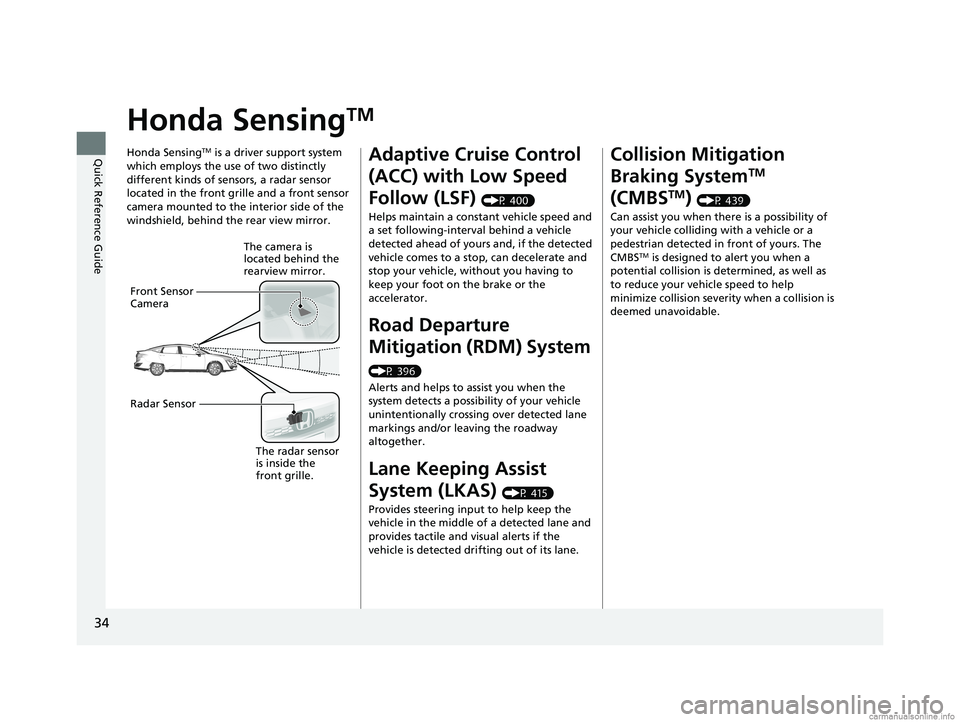
Honda SensingTM is a driver support system
which employs the use of two distinctly
different kinds of sensors, a radar sensor
located in the front grille and a front sensor
camera mounted to the interior side of the
windshield, behind the rear view mirror.
The camera is
located behind the
rearview mirror.
Front Sensor
Camera
Radar Sensor
The radar sensor
is inside the
front grille.
Adaptive Cruise Control
(ACC) with Low Speed
Follow (LSF)
(P 400)
Helps maintain a constant vehicle speed and
a set following-interval behind a vehicle
detected ahead of yours and, if the detected
vehicle comes to a stop, can decelerate and
stop your vehicle, wi thout you having to
keep your foot on the brake or the
accelerator.
Road Departure
Mitigation (RDM) System
(P 396)
Alerts and helps to assist you when the
system detects a possibility of your vehicle
unintentionally crossing over detected lane
markings and/or leaving the roadway
altogether.
Lane Keeping Assist
System (LKAS)
(P 415)
Provides steering input to help keep the
vehicle in the middle of a detected lane and
provides tactile and visual alerts if the
vehicle is detected drifting out of its lane.
Collision Mitigation
Braking System
TM
(CMBS
TM) (P 439)
Can assist you when there is a possibility of
your vehicle colliding with a vehicle or a
pedestrian detected in front of yours. The
CMBS
TM is designed to alert you when a
potential collision is determined, as well as
to reduce your vehicle speed to help
minimize collision severity when a collision is
deemed unavoidable.
18 CLARITY PHEV CSS-31TRW6000.book 34 ページ 2017年12月25日 月曜日 午後2時22分
Page 49 of 591
47Continued
Safe Driving
Seat Belts
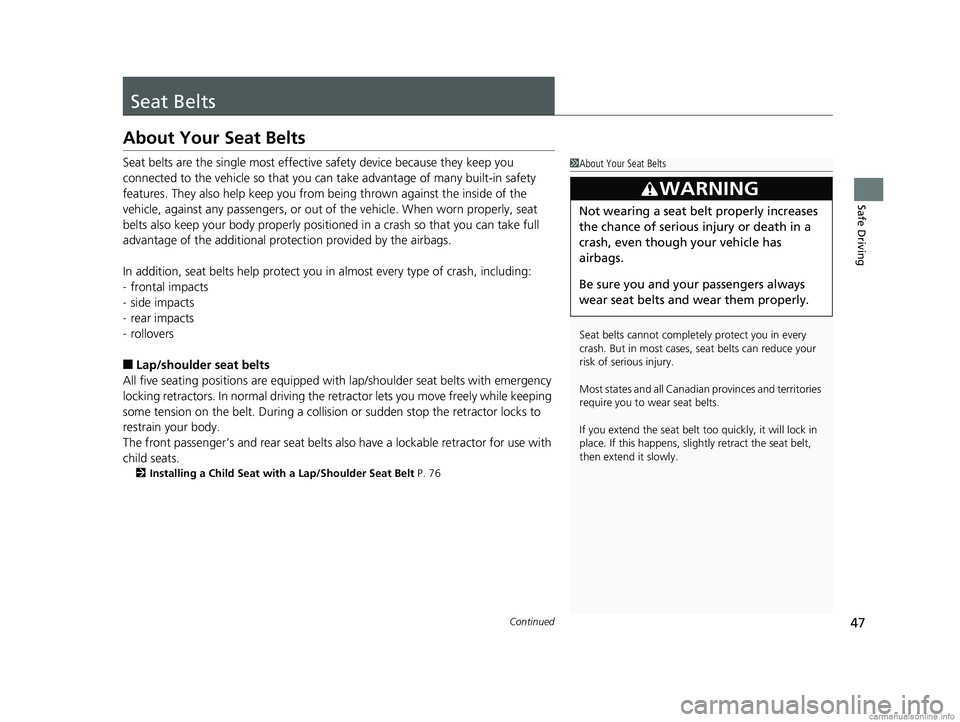
About Your Seat Belts
Seat belts are the single most effective safety device because they keep you
connected to the vehicle so that you can take advantage of many built-in safety
features. They also help keep you from be ing thrown against the inside of the
vehicle, against any passengers, or out of the vehicle. When worn properly, seat
belts also keep your body properly positioned in a crash so that you can take full
advantage of the additional protection provided by the airbags.
In addition, seat belts help protect you in almost every type of crash, including:
- frontal impacts
- side impacts
- rear impacts
- rollovers
■Lap/shoulder seat belts
All five seating positions are equipped with lap/shoulder seat belts with emergency
locking retractors. In normal driving the retractor lets you move freely while keeping
some tension on the belt. During a collision or sudden stop the retractor locks to
restrain your body.
The front passenger’s and rear seat belts al so have a lockable retractor for use with
child seats.
2 Installing a Child Seat with a Lap/Shoulder Seat Belt P. 76
1About Your Seat Belts
Seat belts cannot complete ly protect you in every
crash. But in most cases, seat belts can reduce your
risk of serious injury.
Most states and all Canadian provinces and territories
require you to w ear seat belts.
If you extend the seat belt t oo quickly, it will lock in
place. If this happens, sli ghtly retract the seat belt,
then extend it slowly.
3WARNING
Not wearing a seat belt properly increases
the chance of serious injury or death in a
crash, even though your vehicle has
airbags.
Be sure you and your passengers always
wear seat belts and wear them properly.
18 CLARITY PHEV CSS-31TRW6000.book 47 ページ 2017年12月25日 月曜日 午後2時22分
Page 103 of 591
101
uuIndicators u
Continued
Instrument Panel
IndicatorNameOn/BlinkingExplanationMessage
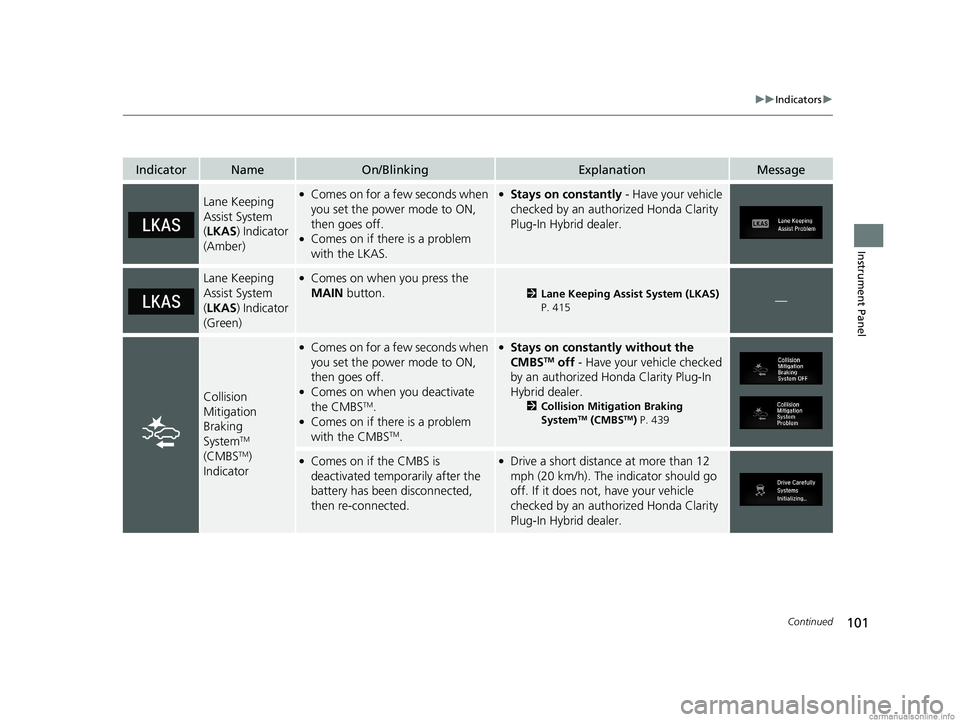
Lane Keeping
Assist System
(LKAS ) Indicator
(Amber)●Comes on for a fe w seconds when
you set the power mode to ON,
then goes off.
●Comes on if there is a problem
with the LKAS.
●Stays on constantly - Have your vehicle
checked by an authorized Honda Clarity
Plug-In Hybrid dealer.
Lane Keeping
Assist System
( LKAS ) Indicator
(Green)●Comes on when you press the
MAIN button.
2Lane Keeping Assist System (LKAS)
P. 415—
Collision
Mitigation
Braking
System
TM
(CMBSTM)
Indicator
●Comes on for a fe w seconds when
you set the power mode to ON,
then goes off.
●Comes on when you deactivate
the CMBSTM.●Comes on if there is a problem
with the CMBSTM.
●Stays on constantly without the
CMBSTM off - Have your vehicle checked
by an authorized Honda Clarity Plug-In
Hybrid dealer.
2 Collision Mitigation Braking
SystemTM (CMBSTM) P. 439
●Comes on if the CMBS is
deactivated temporarily after the
battery has been disconnected,
then re-connected.●Drive a short distance at more than 12
mph (20 km/h). The i ndicator should go
off. If it does not, have your vehicle
checked by an authorized Honda Clarity
Plug-In Hybrid dealer.
18 CLARITY PHEV CSS-31TRW6000.book 101 ページ 2017年12月25日 月曜日 午後2時22分
Page 121 of 591
119
uuIndicators uDriver Information Interface Wa rning and Information Messages
Continued
Instrument Panel
MessageConditionExplanation
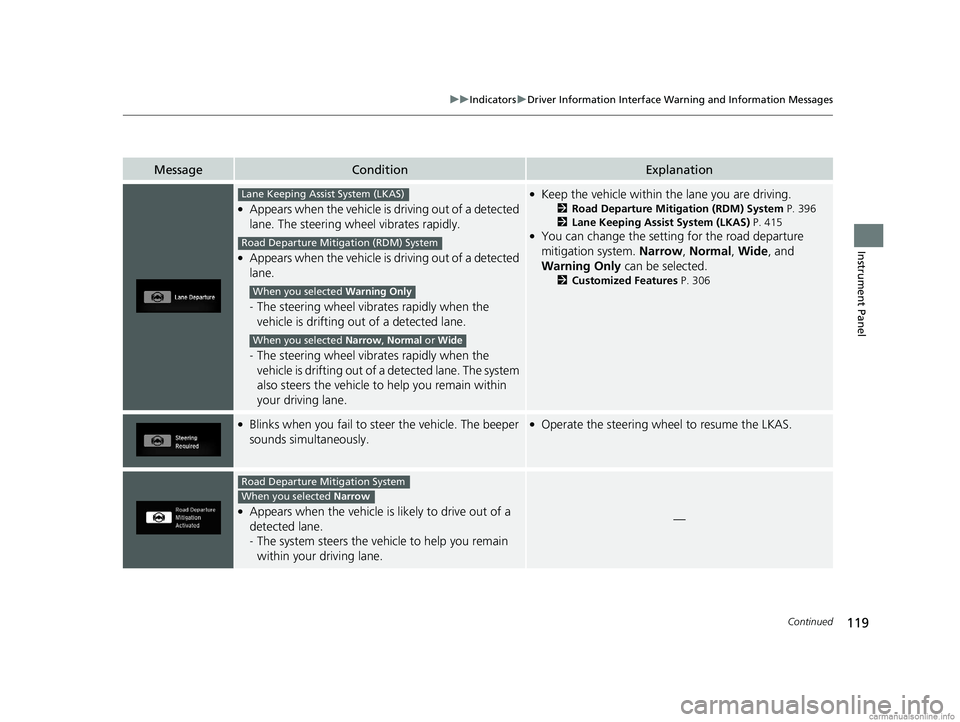
●Appears when the vehicle is driving out of a detected
lane. The steering wheel vibrates rapidly.
●Appears when the vehicle is driving out of a detected
lane.
- The steering wheel vibr ates rapidly when the
vehicle is drifting out of a detected lane.
- The steering wheel vibr ates rapidly when the
vehicle is drifting out of a detected lane. The system
also steers the vehicle to help you remain within
your driving lane.
●Keep the vehicle within the lane you are driving.
2Road Departure Mitigation (RDM) System P. 396
2 Lane Keeping Assist System (LKAS) P. 415
●You can change the setting for the road departure
mitigation system. Narrow, Normal, Wide, and
Warning Only can be selected.
2Customized Features P. 306
●Blinks when you fail to steer the vehicle. The beeper
sounds simultaneously.●Operate the steering wheel to resume the LKAS.
●Appears when the vehicle is likely to drive out of a
detected lane.
- The system steers the vehi cle to help you remain
within your driving lane.—
Lane Keeping Assist System (LKAS)
Road Departure Mitigation (RDM) System
When you selected Warning Only
When you selected Narrow, Normal or Wide
Road Departure Mitigation System
When you selected Narrow
18 CLARITY PHEV CSS-31TRW6000.book 119 ページ 2017年12月25日 月曜日 午後2時22分
Page 122 of 591
120
uuIndicators uDriver Information Interface Wa rning and Information Messages
Instrument Panel
MessageConditionExplanation
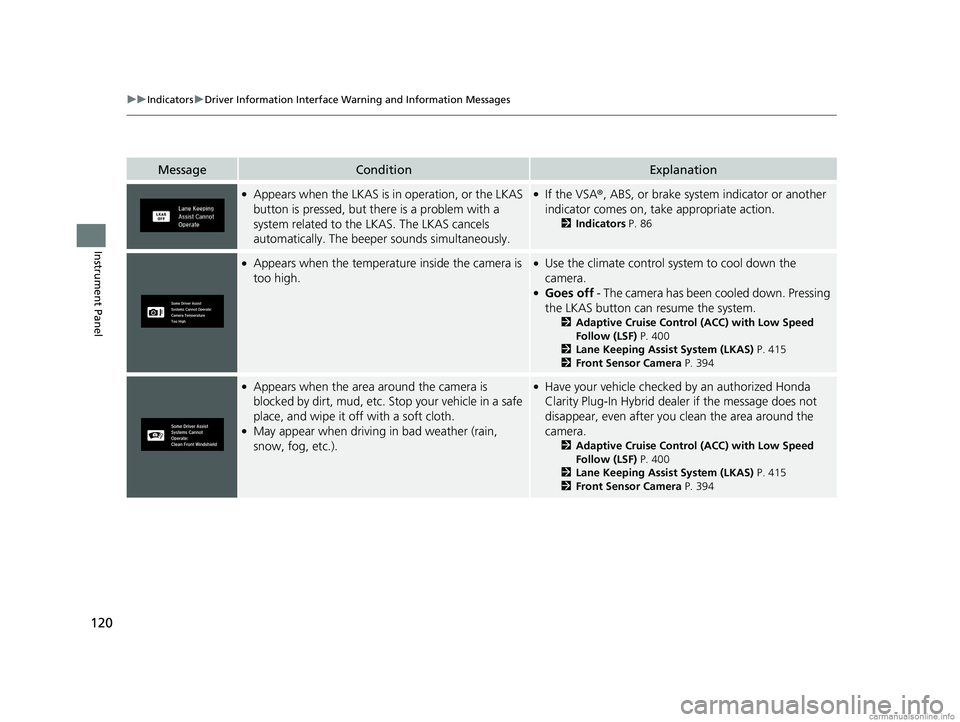
●Appears when the LKAS is in operation, or the LKAS
button is pressed, but there is a problem with a
system related to the LKAS. The LKAS cancels
automatically. The beeper sounds simultaneously.●If the VSA®, ABS, or brake system indicator or another
indicator comes on, take appropriate action.
2 Indicators P. 86
●Appears when the temperature inside the camera is
too high.●Use the climate control system to cool down the
camera.
●Goes off - The camera has been cooled down. Pressing
the LKAS button can resume the system.
2 Adaptive Cruise Control (ACC) with Low Speed
Follow (LSF) P. 400
2 Lane Keeping Assist System (LKAS) P. 415
2 Front Sensor Camera P. 394
●Appears when the area around the camera is
blocked by dirt, mud, etc. Stop your vehicle in a safe
place, and wipe it off with a soft cloth.
●May appear when driving in bad weather (rain,
snow, fog, etc.).
●Have your vehicle checked by an authorized Honda
Clarity Plug-In Hybrid dealer if the message does not
disappear, even after you clean the area around the
camera.
2 Adaptive Cruise Control (ACC) with Low Speed
Follow (LSF) P. 400
2 Lane Keeping Assist System (LKAS) P. 415
2 Front Sensor Camera P. 394
18 CLARITY PHEV CSS-31TRW6000.book 120 ページ 2017年12月25日 月曜日 午後2時22分
Page 144 of 591
uuLocking and Unlocking the Doors uLocking/Unlocking the Doors from the Outside
142
Controls
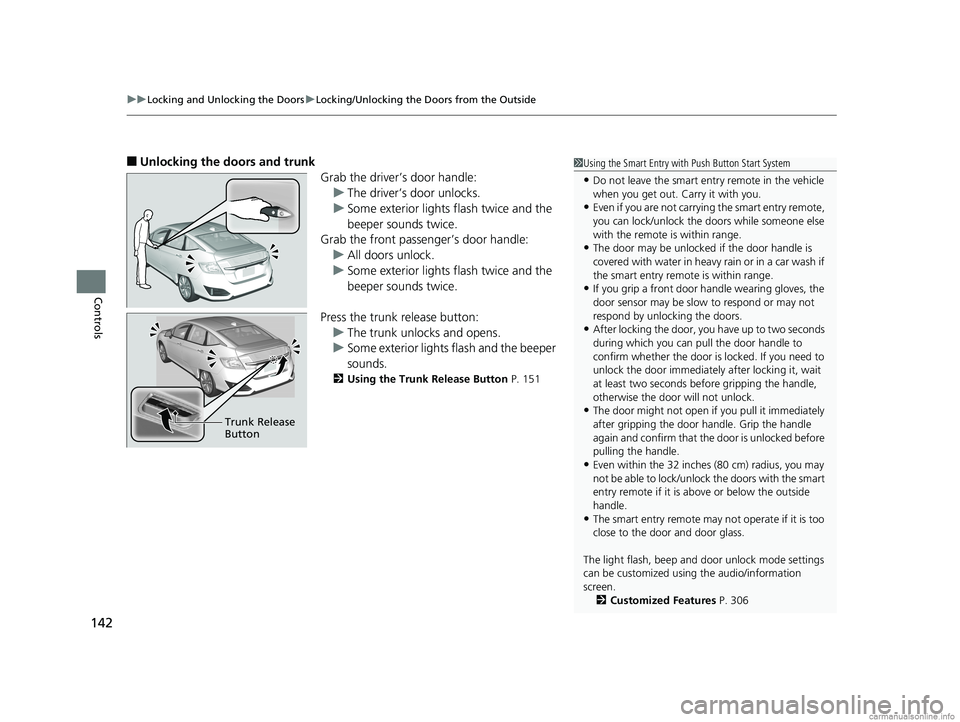
■Unlocking the doors and trunk
Grab the driver’s door handle:u The driver’s door unlocks.
u Some exterior lights flash twice and the
beeper sounds twice.
Grab the front passenger’s door handle:
u All doors unlock.
u Some exterior lights flash twice and the
beeper sounds twice.
Press the trunk release button: u The trunk unlocks and opens.
u Some exterior lights flash and the beeper
sounds.
2 Using the Trunk Release Button P. 151
Trunk Release
Button
1Using the Smart Entry with Push Button Start System
•Do not leave the smart entry remote in the vehicle
when you get out. Carry it with you.
•Even if you are not carrying the smart entry remote,
you can lock/unlock the doors while someone else
with the remote is within range.
•The door may be unlocked if the door handle is
covered with water in heavy rain or in a car wash if
the smart entry remote is within range.
•If you grip a front door handle wearing gloves, the
door sensor may be slow to respond or may not
respond by unlocking the doors.
•After locking the door, you have up to two seconds
during which you can pull the door handle to
confirm whether the door is locked. If you need to
unlock the door immediately after locking it, wait
at least two seconds befo re gripping the handle,
otherwise the door will not unlock.
•The door might not open if you pull it immediately
after gripping the door handle. Grip the handle
again and confirm that th e door is unlocked before
pulling the handle.
•Even within the 32 inches (80 cm) radius, you may
not be able to lock/unlock the doors with the smart
entry remote if it is a bove or below the outside
handle.
•The smart entry remote may not operate if it is too
close to the door and door glass.
The light flash, beep and door unlock mode settings
can be customized using the audio/information
screen.
2 Customized Features P. 306
18 CLARITY PHEV CSS-31TRW6000.book 142 ページ 2017年12月25日 月曜日 午後2時22分
Page 215 of 591
Continued213
uuAudio System Basic Operation uAudio/Information Screen
Features
■Info
Displays Trip Computer or Clock/Wallpaper . Select on the Info Menu screen
to see all available options: Trip Computer, Voice Info, Clock/Wallpaper ,
System/Device Information and Vehicle energy .
Trip Computer :
• Current Drive tab: Displays the current trip information.
• History of Trip A tab: Displays information for the three previous drives. The
information is stored every time you reset Trip A.
To delete the history manually, select Delete history on the History of Trip A
tab. The confirmation message appears on the screen, then select Yes.
Voice Info : Displays a list of all voice commands.
Clock/Wallpaper : Displays the clock and wallpaper.
System/Device Information :
• System Info : Displays the software version of the audio system.
• USB Info : Displays the memory usage of the USB device.
Vehicle energy :
Displays the ener gy flow screen.
2Energy flow screen P. 215
■Audio
Displays the current audio information.
1 Audio/Information Screen
Touchscreen operation
•Use simple gestures - in cluding touching, swiping
and scrolling - to operate certain audio functions.
•Some items may be grayed out during driving to
reduce the potential for distraction.
•You can select them when the vehicle is stopped or
use voice commands.
•Wearing gloves may limit or prevent touchscreen
response.
You can change the touchs creen sensitivity setting.
2 Customized Features P. 306
18 CLARITY PHEV CSS-31TRW6000.book 213 ページ 2017年12月25日 月曜日 午後2時22分