warning HONDA CR-V 2015 RM1, RM3, RM4 / 4.G Service Manual
[x] Cancel search | Manufacturer: HONDA, Model Year: 2015, Model line: CR-V, Model: HONDA CR-V 2015 RM1, RM3, RM4 / 4.GPages: 533, PDF Size: 24.82 MB
Page 195 of 533
uuInterior Lights/Interior Convenience Items uInterior Convenience Items
194
Controls
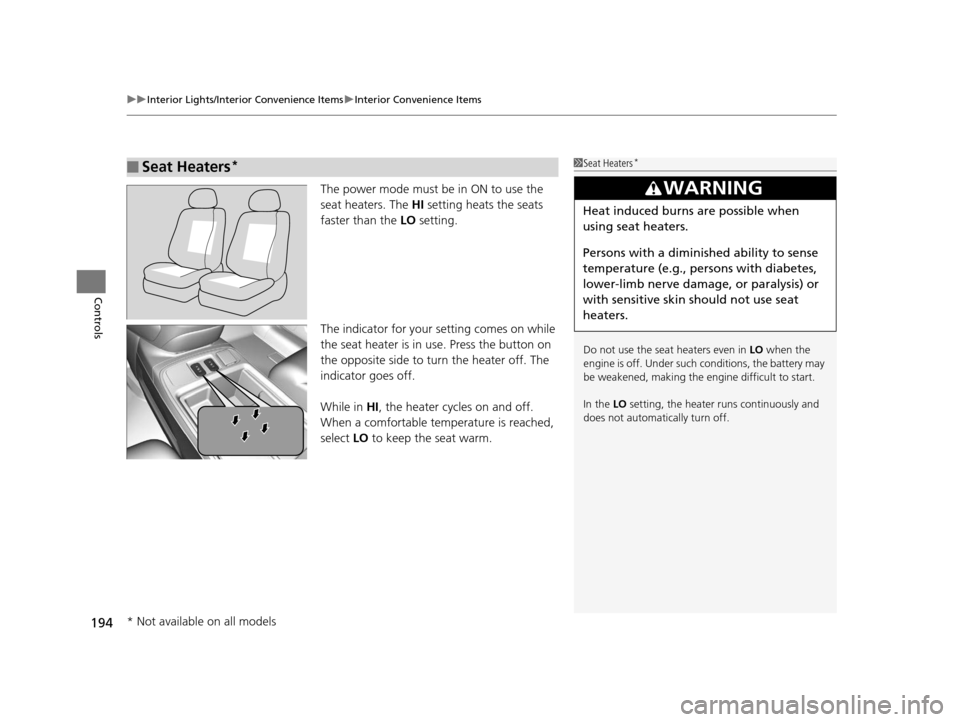
The power mode must be in ON to use the
seat heaters. The HI setting heats the seats
faster than the LO setting.
The indicator for your setting comes on while
the seat heater is in use. Press the button on
the opposite side to tu rn the heater off. The
indicator goes off.
While in HI, the heater cycles on and off.
When a comfortable temperature is reached,
select LO to keep the seat warm.
■Seat Heaters*1Seat Heaters*
Do not use the seat heaters even in LO when the
engine is off. Under such conditions, the battery may
be weakened, making the engine difficult to start.
In the LO setting, the heater runs continuously and
does not automatically turn off.
3WARNING
Heat induced burns are possible when
using seat heaters.
Persons with a diminished ability to sense
temperature (e.g., persons with diabetes,
lower-limb nerve damage, or paralysis) or
with sensitive skin should not use seat
heaters.
* Not available on all models
15 CR-V-31T0A6300.book 194 ページ 2015年2月2日 月曜日 午前10時35分
Page 348 of 533
347
Driving
This chapter discusses driving, refueling, and information on items such as accessories.
Before Driving................................... 348
Towing a Trailer
Towing Preparation .......................... 353
Driving Safely with a Trailer .............. 356
Towing Your Vehicle ........................ 357
Off-Highway Driving Guidelines General Information ......................... 358
Important Safety Precautions............ 358
Avoiding Trouble ............................. 359
When Driving
Starting the Engine .......................... 360
Starting the Engine .......................... 362
Models without smart entry system
Models with smart entry system
Precautions While Driving ................ 366
Continuously Variable Transmission... 367
Shifting ............................................ 368
ECON Button ................................... 370
Cruise Control
*............................... 371
Front Sensor Camera*..................... 374
Adaptive Cruise Control (ACC)*....... 375
Lane Departure Warning (LDW)*..... 386
Lane Keeping Assist System (LKAS)*.. 390Vehicle Stability Assist (VSA®), aka Electronic
Stability Control (ESC), System............. 396
Real Time AWD with Intelligent Control
SystemTM*...................................... 400Tire Pressure Monitoring System (TPMS) ... 401
Tire Pressure Monitoring System (TPMS) - Required Federal Explanation ......... 403
Braking Brake System ................................... 405
Anti-lock Brake System (ABS) ........... 407
Brake Assist System ......................... 408
Collision Mitigation Braking System
TM
(CMBSTM)*..................................... 409
Parking Your Vehicle When Stopped ................................ 416
Multi-View Rear Camera
*................ 417
Refueling ........................................... 420
Fuel Economy .................................... 423
Accessories and Modifications ........ 424
* Not available on all models
15 CR-V-31T0A6300.book 347 ページ 2015年2月2日 月曜日 午前10時35分
Page 352 of 533
351
uuBefore Driving uMaximum Load Limit
Continued
Driving
Maximum Load Limit
The maximum load for your ve hicle is 850 lbs (385 kg).
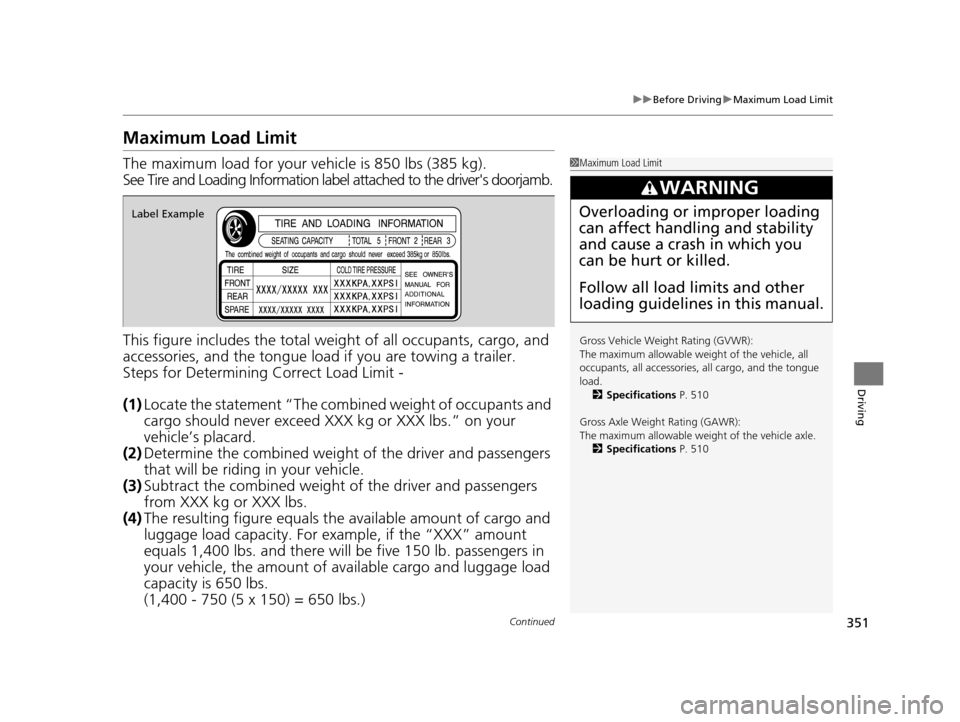
See Tire and Loading Information label attached to the driver's doorjamb.
This figure includes the total weig ht of all occupants, cargo, and
accessories, and the tongue load if you are towing a trailer.
Steps for Determining Correct Load Limit -
(1) Locate the statement “The comb ined weight of occupants and
cargo should never exceed XXX kg or XXX lbs.” on your
vehicle’s placard.
(2) Determine the combined weight of the driver and passengers
that will be riding in your vehicle.
(3) Subtract the combined weight of the driver and passengers
from XXX kg or XXX lbs.
(4) The resulting figure equals the available amount of cargo and
luggage load capacity. For example, if the “XXX” amount
equals 1,400 lbs. and there will be five 150 lb. passengers in
your vehicle, the am ount of available cargo and luggage load
capacity is 650 lbs.
(1,400 - 750 (5 x 150) = 650 lbs.)1 Maximum Load Limit
Gross Vehicle Weight Rating (GVWR):
The maximum allowable weight of the vehicle, all
occupants, all a ccessories, all cargo, and the tongue
load. 2 Specifications P. 510
Gross Axle Weight Rating (GAWR):
The maximum allowable weight of the vehicle axle. 2 Specifications P. 510
3WARNING
Overloading or improper loading
can affect handling and stability
and cause a crash in which you
can be hurt or killed.
Follow all load limits and other
loading guidelines in this manual.Label Example
15 CR-V-31T0A6300.book 351 ページ 2015年2月2日 月曜日 午前10時35分
Page 354 of 533
353Continued
Driving
Towing a Trailer
Towing Preparation
Your vehicle can tow a trailer if you carefully observe the load limits, use the proper
equipment, and follow the towing guidelin es. Check the load limits before driving.
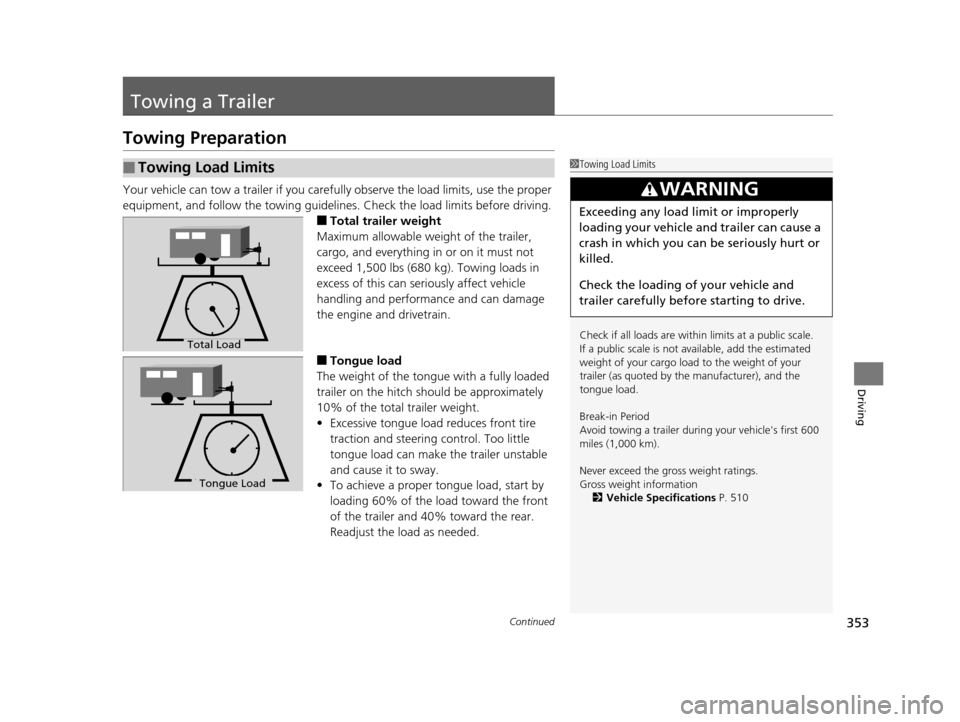
■Total trailer weight
Maximum allowable weight of the trailer,
cargo, and everything in or on it must not
exceed 1,500 lbs (680 kg). Towing loads in
excess of this can seriously affect vehicle
handling and performance and can damage
the engine and drivetrain.
■Tongue load
The weight of the tongue with a fully loaded
trailer on the hitch should be approximately
10% of the total trailer weight.
• Excessive tongue load reduces front tire
traction and steering control. Too little
tongue load can make the trailer unstable
and cause it to sway.
• To achieve a proper tongue load, start by
loading 60% of the load toward the front
of the trailer and 40% toward the rear.
Readjust the lo ad as needed.
■Towing Load Limits1Towing Load Limits
Check if all loads are within limits at a public scale.
If a public scale is not available, add the estimated
weight of your cargo load to the weight of your
trailer (as quoted by th e manufacturer), and the
tongue load.
Break-in Period
Avoid towing a trailer duri ng your vehicle's first 600
miles (1,000 km).
Never exceed the gross weight ratings.
Gross weight information 2 Vehicle Specifications P. 510
3WARNING
Exceeding any load limit or improperly
loading your vehicle and trailer can cause a
crash in which you can be seriously hurt or
killed.
Check the loading of your vehicle and
trailer carefully before starting to drive.
Total Load
To ngue LoadTongue Load
15 CR-V-31T0A6300.book 353 ページ 2015年2月2日 月曜日 午前10時35分
Page 359 of 533
358
Driving
Off-Highway Driving Guidelines
General Information
Your vehicle has been designed primarily for use on pavement, however, its higher
ground clearance allows you to occasionally travel on unpaved roads. It is not
designed for trail-blazing, or other challenging off-road activities.
If you decide to drive on unpaved roads, you will find that it requires somewhat
different driving skills and that your vehicle will handle somewhat differently than it
does on pavement. Pay attention to the precautions and tips in this section, and get
acquainted with your vehicle before leaving the pavement.
Important Safety Precautions
To avoid loss of control or rollover, be sure to follow all precautions and
recommendations:
• Be sure to store cargo properly and do not exceed your cargo load limits.
2 Maximum Load Limit P. 351
•Whenever you drive, make sure you and your passengers always wear seat belts.
• Keep your speed low, and never go faster than the conditions allow.
• It’s up to you to continually assess the situation and drive within the limits.
1Off-Highway Driving Guidelines
Failure to operate your vehi cle correctly might result
in a crash or a rollover.
2 Important Handling Information P. 30
2 Precautions While Driving P. 366
3WARNING
Improperly operating this vehicle on or off
pavement can cause a crash or rollover in
which you and your passengers can be
seriously injured or killed.
•Follow all instructions and guidelines in
this owner’s manual.
• Keep your speed low, and don’t drive
faster than conditions permit.
15 CR-V-31T0A6300.book 358 ページ 2015年2月2日 月曜日 午前10時35分
Page 372 of 533
371
uuWhen Driving uCruise Control*
Continued
Driving
Cruise Control*
Maintains a constant vehicle speed without having to keep your foot on the
accelerator pedal. Use cruise control on freeways or open roads where you can
travel at a constant speed with li ttle acceleration or deceleration.1Cruise Control*
It may not be possible to maintain a constant speed
when driving uphill or downhill.
When not using cruise control:
Turn off cruise control by pressing the CRUISE
button.
While in the ECON mode, it may take relatively more
time to accelerate to maintain the set speed.
3WARNING
Improper use of the cruise control can lead
to a crash.
Use the cruise control only when traveling
on open highways in good weather.
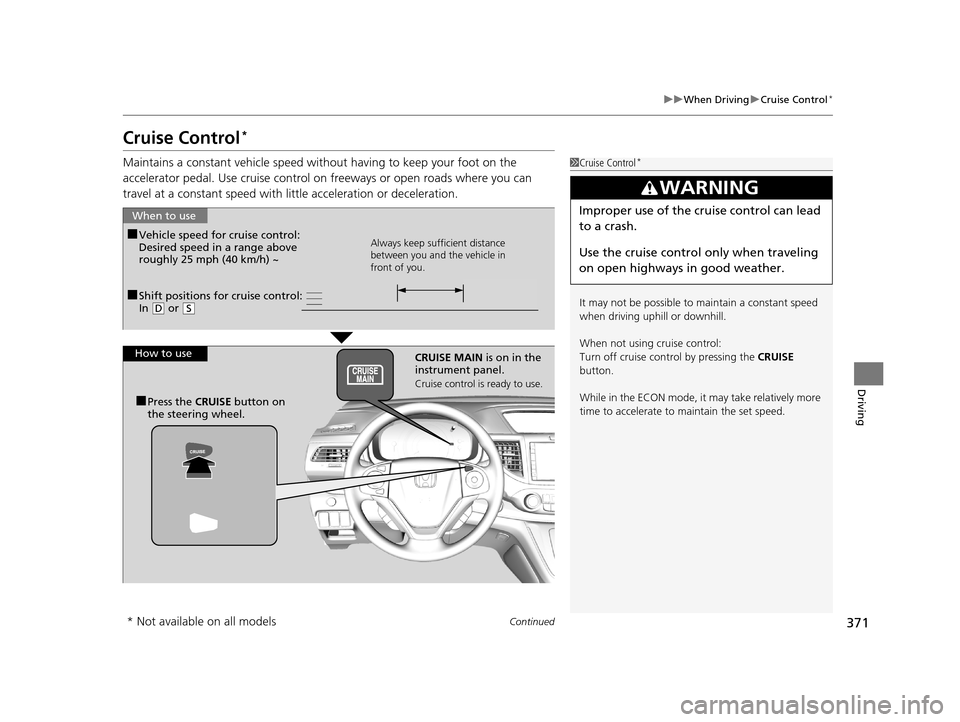
■Shift positions for cruise control:
In ( D or (S
When to use
Always keep sufficient distance
between you and the vehicle in
front of you.■Vehicle speed for cruise control:
Desired speed in a range above
roughly 25 mph (40 km/h) ~
How to use CRUISE MAIN is on in the
instrument panel.
Cruise control is ready to use.
■Press the CRUISE button on
the steering wheel.
* Not available on all models
15 CR-V-31T0A6300.book 371 ページ 2015年2月2日 月曜日 午前10時35分
Page 376 of 533
375
uuWhen Driving uAdaptive Cruise Control (ACC)*
Continued
Driving
Adaptive Cruise Control (ACC)*
Helps maintain a constant vehicle speed and a set follo wing distance behind a
vehicle detected ahead of yours, without you having to keep your foot on the brake
or the accelerator.1 Adaptive Cruise Control (ACC)*
3WARNING
Improper use of ACC can lead to a crash.
Use ACC only when traveling on open
highways in good weather.
3WARNING
ACC has limited braking capability.
When your vehicle speed drops below 22
mph, ACC will automatically cancel and no
longer will apply your vehicle's brakes.
Always be prepared to apply the brake
pedal when conditions require.
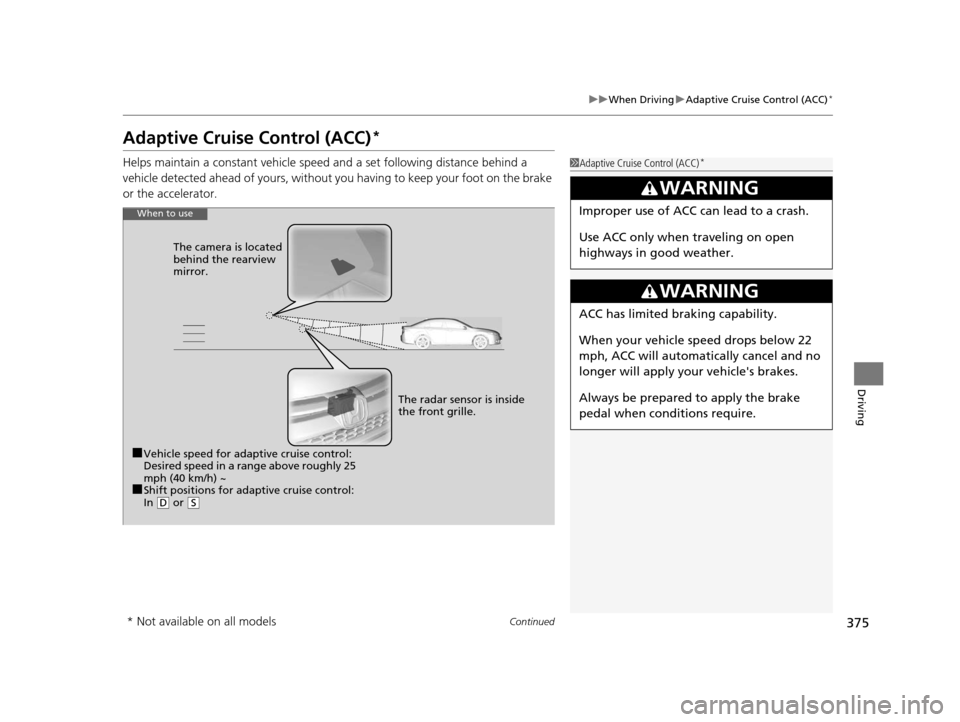
When to use
■Vehicle speed for adaptive cruise control:
Desired speed in a range above roughly 25
mph (40 km/h) ~
■Shift positions for adaptive cruise control:
In ( D or ( S
The radar sensor is inside
the front grille.
The camera is located
behind the rearview
mirror.
* Not available on all models
15 CR-V-31T0A6300.book 375 ページ 2015年2月2日 月曜日 午前10時35分
Page 387 of 533
386
uuWhen Driving uLane Departure Warning (LDW)*
Driving
Lane Departure Warning (LDW)*
Alerts you when the system determines a po ssibility of your vehicle unintentionally
crossing over detected lane markings.
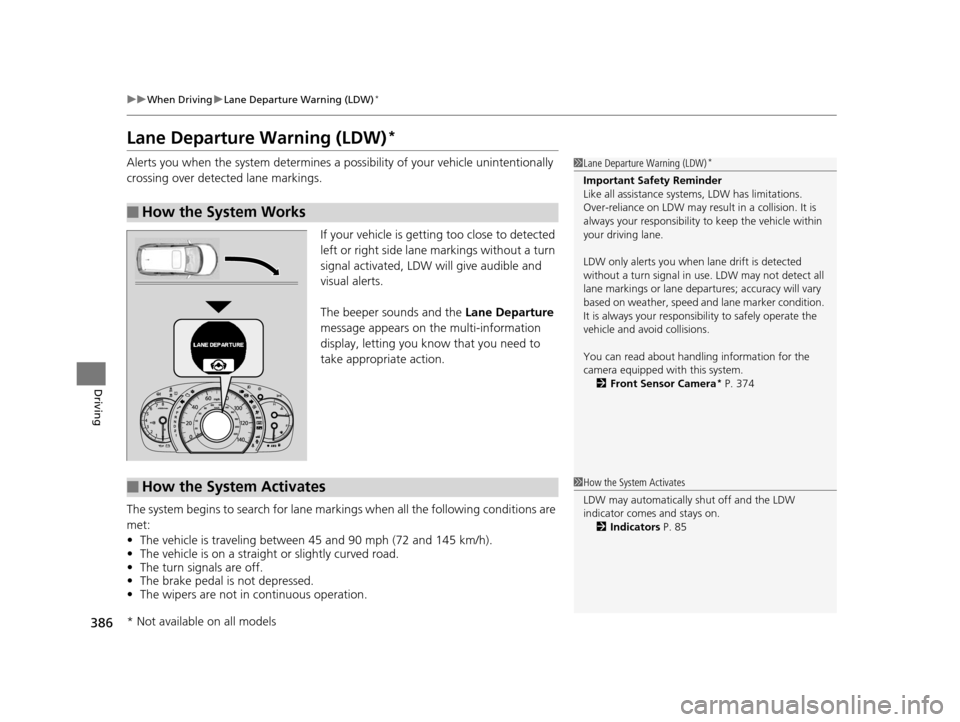
If your vehicle is getting too close to detected
left or right side lane markings without a turn
signal activated, LDW will give audible and
visual alerts.
The beeper sounds and the Lane Departure
message appears on the multi-information
display, letting you know that you need to
take appropriate action.
The system begins to search for lane mark ings when all the following conditions are
met:
• The vehicle is traveling between 45 and 90 mph (72 and 145 km/h).
• The vehicle is on a straight or slightly curved road.
• The turn signals are off.
• The brake pedal is not depressed.
• The wipers are not in continuous operation.
■How the System Works
1Lane Departure Warning (LDW)*
Important Safety Reminder
Like all assistance systems, LDW has limitations.
Over-reliance on LDW may result in a collision. It is
always your respons ibility to keep the vehicle within
your driving lane.
LDW only alerts you when lane drift is detected
without a turn signal in us e. LDW may not detect all
lane markings or lane departures; a ccuracy will vary
based on weather, speed and lane marker condition.
It is always your responsibility to safely operate the
vehicle and avoid collisions.
You can read about handling information for the
camera equipped with this system. 2 Front Sensor Camera
* P. 374
■How the System Activates1How the System Activates
LDW may automatically shut off and the LDW
indicator comes and stays on.
2 Indicators P. 85
* Not available on all models
15 CR-V-31T0A6300.book 386 ページ 2015年2月2日 月曜日 午前10時35分
Page 388 of 533
387
uuWhen Driving uLane Departure Warning (LDW)*
Continued
Driving
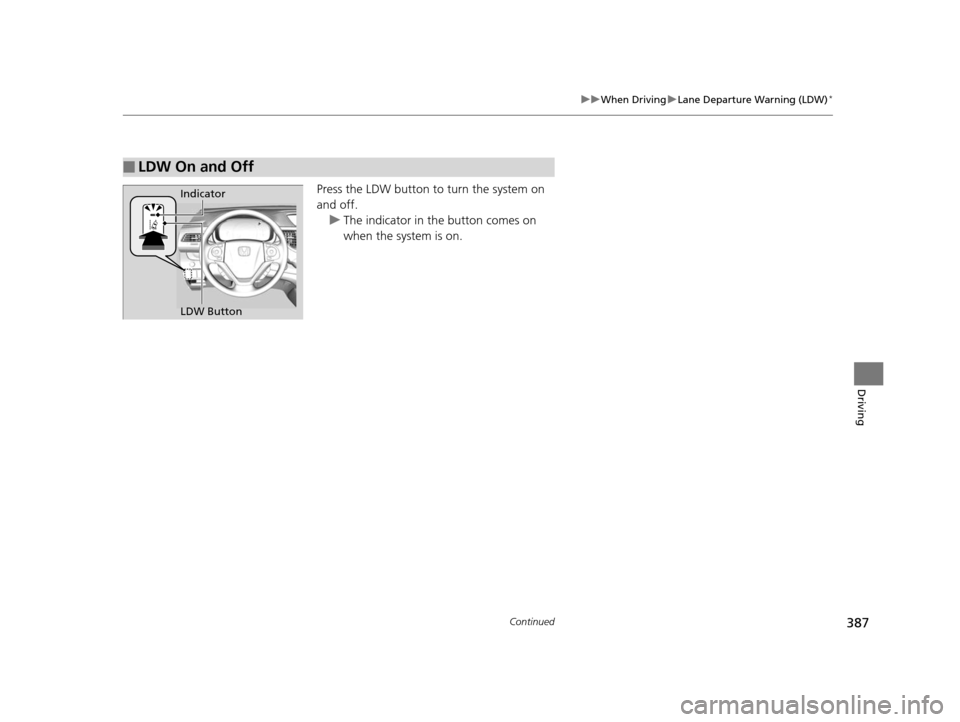
Press the LDW button to turn the system on
and off.
u The indicator in th e button comes on
when the system is on.
■LDW On and Off
LDW Button Indicator
15 CR-V-31T0A6300.book 387 ページ 2015年2月2日 月曜日 午前10時35分
Page 389 of 533
388
uuWhen Driving uLane Departure Warning (LDW)*
Driving
LDW may not activate or may not recogniz e lanes, and may activate even when
keeping in the middle of a lane, under certa in conditions. Some examples of these
conditions are listed below.
■Environmental conditions
• Driving in bad weather (rain, fog, snow, etc.).
• Sudden changes between light and dark, such as an entrance or exit of a tunnel.
• There is little contrast between la ne lines and the roadway surface.
• Driving into low sunlight (e.g., at dawn or dusk).
• Strong light is reflected onto the roadway.
• Driving in the shadows of trees, buildings, etc.
• Shadows of adjacent objects are parallel to lane markings.
• Roadway objects or structures are misinterpreted as lane markings.
• Reflections on the interior of the front windshield.
■Roadway conditions
• Driving on a snowy or wet roadway (obscured lane marking, vehicle tracks,
reflected lights, road spray, high contrast).
• Driving on a road with temporary lane markings.
• Faint, multiple, or varied lane markings are visible on the roadway due to road
repairs or old lane markings.
• The roadway has merging, split, or crossing lines (e.g., such as at an intersection
or crosswalk).
• The lane markings are extremely narrow, wide, or changing.
• The vehicle in front of you is driving near the lane lines.
• The road is hilly or the vehicle is approaching the crest of a hill.
• Driving over bumps.
■LDW Limitations
15 CR-V-31T0A6300.book 388 ページ 2015年2月2日 月曜日 午前10時35分