ECU HONDA CR-Z 2011 1.G User Guide
[x] Cancel search | Manufacturer: HONDA, Model Year: 2011, Model line: CR-Z, Model: HONDA CR-Z 2011 1.GPages: 333, PDF Size: 9.97 MB
Page 98 of 333
Controls
This chapter explains how to operate the various controls necessary for driving.
97
Setting the Clock
....................................... 98
Locking and Unlocking the Doors Key Types and Functions .......................... 99 Locking/Unlocking the Doors from
the Outside ........................................... 100Locking/Unlocking the Doors from
the Inside .............................................. 102
Auto Door Lock/Unlock .......................... 103
Opening and Closing the Hatch ............. 104
Security System ....................................... 105
Immobilizer System ................................ 105
Security Alarm System ............................ 105
Opening and Closing the Windows ....... 107Operating the Switches Around the Steering Wheel
Ignition Switch ....................................... 109
Turn Signals ........................................... 110
Light Switches ........................................ 110Fog Lights * ............................................ 112
Daytime Running Lights .......................... 112
Wipers and Washers ............................... 113
Brightness Control .................................. 115Rear Defogger/Heated Door Mirror *
Button ................................................... 116
Adjusting the Steering Wheel ................. 117 Adjusting the Mirror
Interior Rearview Mirror .......................... 118
Door Mirrors .......................................... 118
Adjusting the Seats Adjusting the Seat Position ..................... 119
Interior Lights/Interior Convenience Items Interior Lights ......................................... 123
Interior Convenience Items ..................... 125
Climate Control System Using Automatic Climate Control ........... 131
Automatic Climate Control Sensors ........ 133
* Not available on all models
Main Menu
Page 101 of 333
100
Controls
Locking and Unlocking the Doors Locking/Unlocking the Doors from Outside
Locking/Unlocking the Doors from the Outside
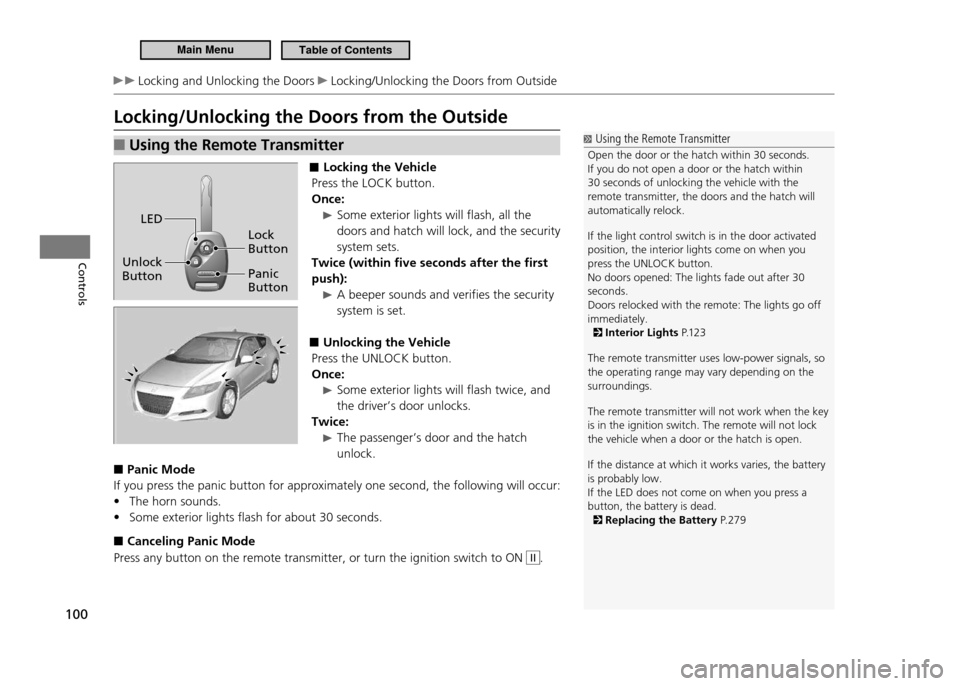
Using the Remote Transmitter
■
■ Locking the Vehicle
Press the LOCK button. Once:
Some exterior lights will flash, all the
doors and hatch will lock, and the security system sets.
Twice (within five seconds after the first push):
A beeper sounds and verifies the security system is set.
Unlocking the Vehicle
■
Press the UNLOCK button. Once:
Some exterior lights will flash twice, and
the driver’s door unlocks.
Twice:
The passenger’s door and the hatch unlock.
Panic Mode
■
If you press the panic button for approximately one second, the following will occur:
The horn sounds.
•
Some exterior lights flash for about 30 seconds.
•
Canceling Panic Mode
■
Press any button on the remote transmitter, or turn the ignition switch to ON
II.
Using the Remote Transmitter
Open the door or the hatch within 30 seconds. If you do not open a door or the hatch within 30 seconds of unlocking the vehicle with the remote transmitter, the doors and the hatch will automatically relock. If the light control switch is in the door activated position, the interior lights come on when you press the UNLOCK button.No doors opened: The lights fade out after 30 seconds.Doors relocked with the remote: The lights go off immediately.
Interior Lights P.12 3
The remote transmitter uses low-power signals, so the operating range may vary depending on the surroundings. The remote transmitter will not work when the key is in the ignition switch. The remote will not lock the vehicle when a door or the hatch is open. If the distance at which it works varies, the battery is probably low.If the LED does not come on when you press a button, the battery is dead.
Replacing the Battery P. 2 7 9
Lock Button
Panic Button
Unlock Button LED
Main MenuTable of Contents
Page 106 of 333
105
Controls
Security System
Immobilizer System
Immobilizer System
NOTICE Leaving the ignition key in the vehicle can result in theft or accidental movement of the vehicle.Always take the ignition key with you whenever you leave the vehicle unattended. Do not alter the system or add other devices to it. Doing so may damage the system and make your vehicle inoperable.
The immobilizer system prevents a key that has not been pre-registered from starting the engine. Each key contains electronic transmitters that use electronic signals to verify the key. Pay attention to the following when inserting the key to the ignition switch.Do not allow objects that emit strong radio waves near the ignition switch.
•
Make sure the key is not covered by or touching a metal object.
•
Do not bring a key from another vehicle’s immobilizer system near the ignition
•
switch.
Security Alarm System The security alarm system activates when the doors, hatch, or hood are opened without the key, or remote transmitter. It also activates if you turn the ignition switch to ON
II after locking the doors and the hatch with the remote transmitter.
When the Security Alarm System Activates
■
The horn beeps intermittently, and all of the exterior lights flash.
To Deactivate the Security Alarm System
■
Unlock the vehicle using the key, or remote transmitter. The system, along with the horn and flashing lights, are deactivated.
Security Alarm System
The security alarm continues for a maximum of two minutes until the security alarm system deactivates.
continued
Main MenuTable of Contents
Page 107 of 333
106
Controls
Security System Security Alarm System
Setting the Security Alarm System
■
The security alarm system automatically sets when the following conditions have been met:
The ignition switch is in LOCK
•
0, and the key has been removed from the
ignition switch. The hood is closed.
•
Both doors and the hatch are locked.
•
When the Security Alarm System Sets
■
The security system indicator in the instrument panel blinks. When the blinking interval changes after about 15 seconds, the security alarm system is set.
To Cancel the Security Alarm System
■
The security alarm system is canceled when the vehicle is unlocked using the key or remote transmitter. The security system indicator goes off at the same time.
Security Alarm System
Do not set the security alarm system when someone is in the vehicle or a window is open. The system can accidentally activate when unlocking the door with the lock tab or the master door lock switch. If the 12 volt battery goes dead after you have set the security alarm system, the security alarm may go off once the battery is recharged or replaced.If this occurs, deactivate the security alarm system by unlocking a door using the key or remote transmitter. Do not attempt to alter this system or add another device to it.
Main MenuTable of Contents
Page 118 of 333
117
Controls
Operating the Switches Around the Steering Wheel Adjusting the Steering Wheel
Adjusting the Steering Wheel
Adjusting the Steering Wheel
Make any steering wheel adjustments before you start driving.
WARNING
Adjusting the steering wheel position while driving may cause you to lose control of the vehicle and be seriously injured in a crash. Adjust the steering wheel only when the vehicle is stopped.
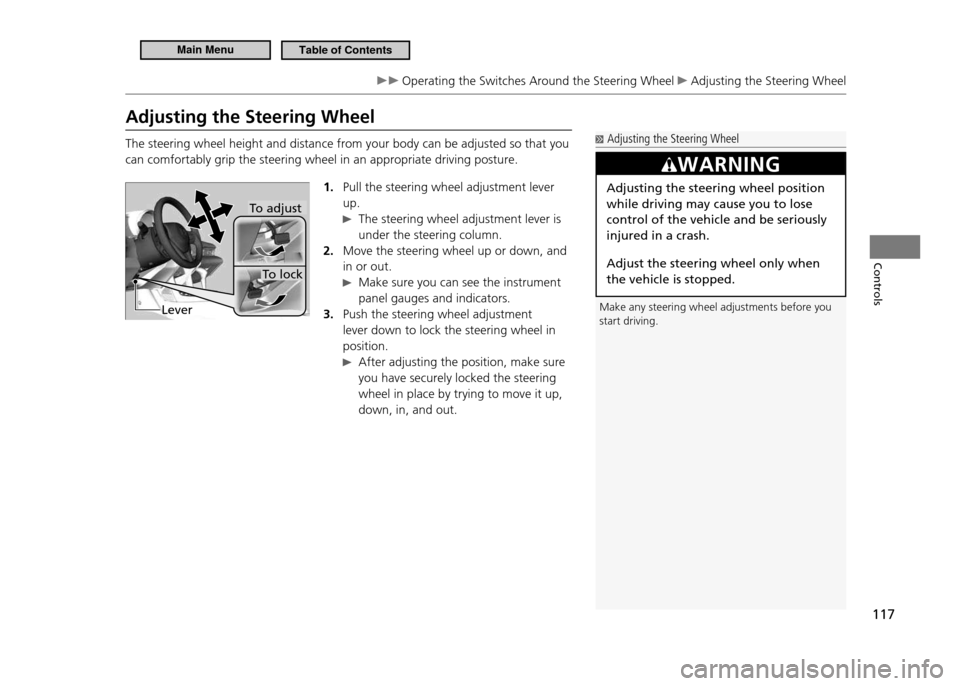
The steering wheel height and distance from your body can be adjusted so that you can comfortably grip the steering wheel in an appropriate driving posture. 1. Pull the steering wheel adjustment lever up.
The steering wheel adjustment lever is
under the steering column.
Move the steering wheel up or down, and
2.
in or out.
Make sure you can see the instrument panel gauges and indicators.
Push the steering wheel adjustment
3.
lever down to lock the steering wheel in position.
After adjusting the position, make sure you have securely locked the steering wheel in place by trying to move it up, down, in, and out.
To lock
To adjust
Lever
Main MenuTable of Contents
Page 123 of 333
122
Controls
Adjusting the Seats Adjusting the Seat Position
Maintain a Proper Sitting Position
■
After all occupants have adjusted their seats, and put on their seat belts, it is very important that they continue to sit upright, well back in their seats, with their feet on the floor, until the vehicle is safely parked and the engine is off. Sitting improperly can increase the chance of injury during a crash. For example, if an occupant slouches, lies down, turns sideways, sits forward, leans forward or sideways, or puts one or both feet up, the chance of injury during a crash is greatly increased. In addition, an occupant who is out of position in the seat can be seriously or fatally injured in a crash by striking interior parts of the vehicle or being struck by an inflating front airbag.
Active Head Restraints
■
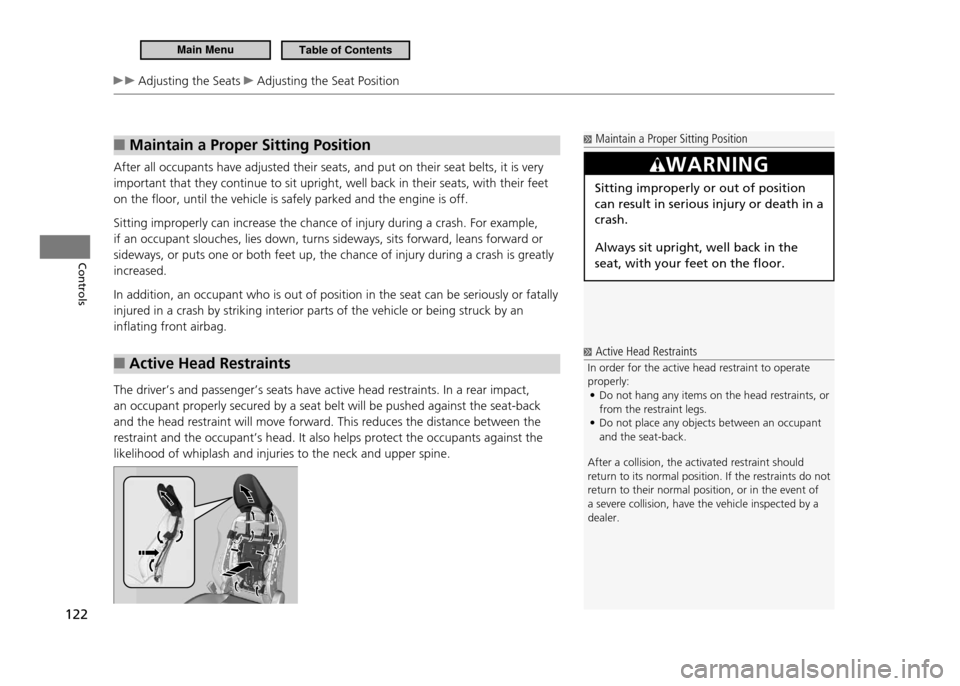
The driver’s and passenger’s seats have active head restraints. In a rear impact, an occupant properly secured by a seat belt will be pushed against the seat-back and the head restraint will move forward. This reduces the distance between the restraint and the occupant’s head. It also helps protect the occupants against the likelihood of whiplash and injuries to the neck and upper spine.
Maintain a Proper Sitting Position
WARNING
Sitting improperly or out of position can result in serious injury or death in a crash. Always sit upright, well back in the seat, with your feet on the floor.
Active Head Restraints
In order for the active head restraint to operate properly: Do not hang any items on the head restraints, or
•
from the restraint legs.Do not place any objects between an occupant
•
and the seat-back.
After a collision, the activated restraint should
return to its normal position. If the restraints do not
return to their normal position, or in the event of a severe collision, have the vehicle inspected by a dealer.
Main MenuTable of Contents
Page 129 of 333
128
Controls
Interior Lights/Interior Convenience Items Interior Convenience Items
Rear Cargo Console
■
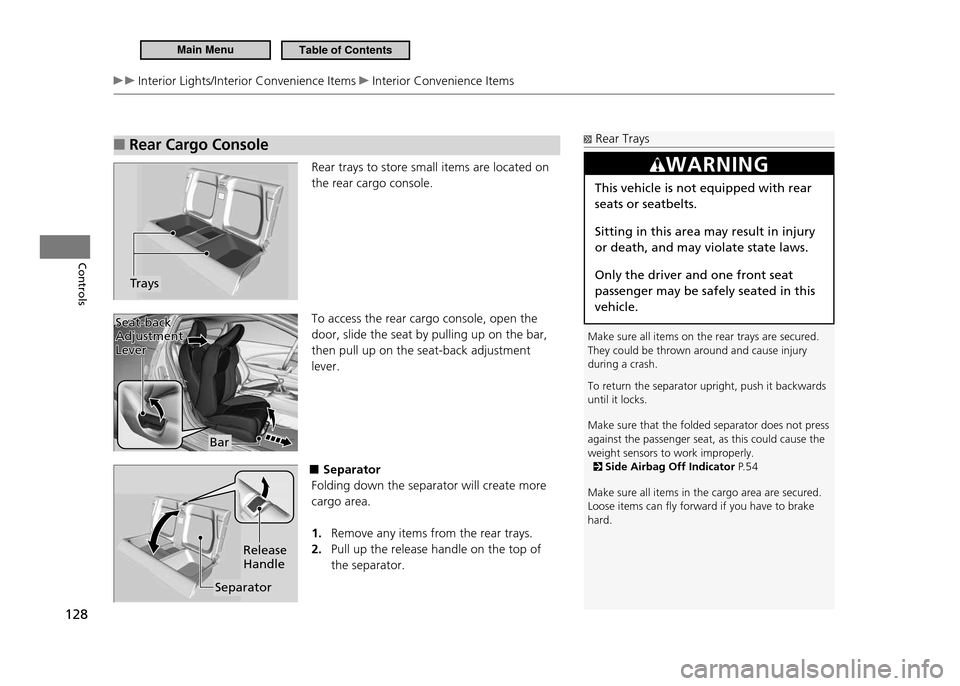
Rear trays to store small items are located on the rear cargo console. To access the rear cargo console, open the door, slide the seat by pulling up on the bar, then pull up on the seat-back adjustment lever.
■Separator
Folding down the separator will create more cargo area.
Remove any items from the rear trays.
1.
Pull up the release handle on the top of
2.
the separator.
Trays
Rear Trays
Make sure all items on the rear trays are secured. They could be thrown around and cause injury during a crash. To return the separator upright, push it backwards until it locks. Make sure that the folded separator does not press against the passenger seat, as this could cause the weight sensors to work improperly.
Side Airbag Off Indicator P. 5 4
Make sure all items in the cargo area are secured. Loose items can ly forward if you have to brake hard.
WARNING
This vehicle is not equipped with rear seats or seatbelts. Sitting in this area may result in injury or death, and may violate state laws. Only the driver and one front seat passenger may be safely seated in this vehicle.
Bar
Seat-back
Adjustment Lever
Seat-back Adjustment Lever
Separator Release Handle
Main MenuTable of Contents
Page 131 of 333

130
Controls
Interior Lights/Interior Convenience Items Interior Convenience Items
■ To Store:
The housing unit can be stored on the cargo area floor to make more space available. Push one end of the unit into the hole on one side panel, then insert the other end into the hole on the other side. After storing the unit, rock it up and down to make sure it is securely placed. Reverse this procedure to install the housing unit in place.
■To Separate the Cargo Area into two:
Pull out the tonneau cover from its housing
1.
while it is stored on the cargo area floor.Clip the mounting rods in the hooks at
2.
both sides of the hatch opening.
Main MenuTable of Contents
Page 137 of 333
136
Features
Audio System
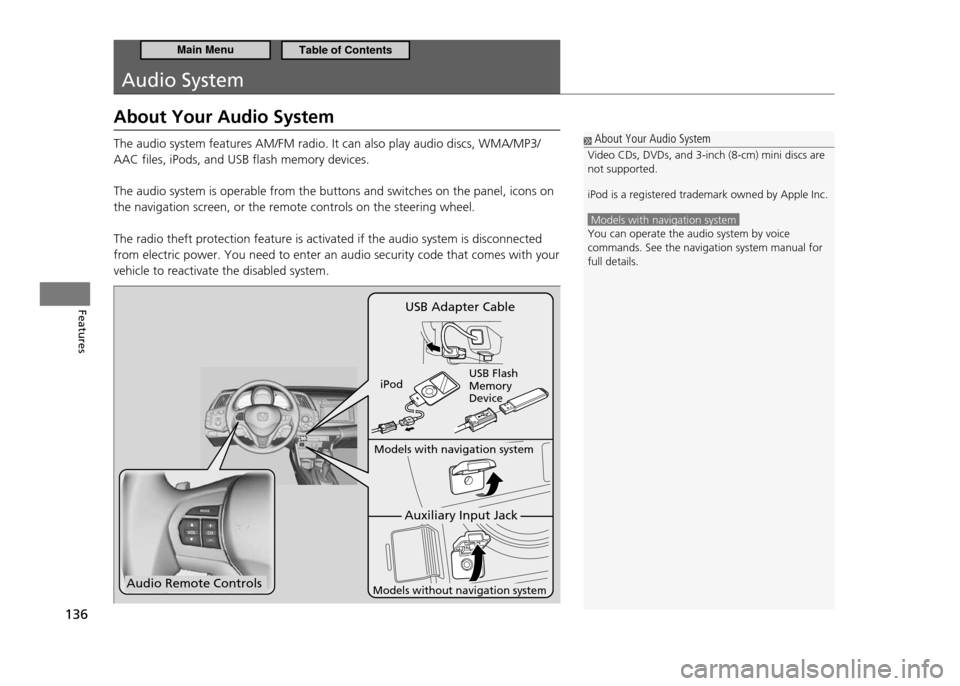
About Your Audio System The audio system features AM/FM radio. It can also play audio discs, WMA/MP3/ AAC files, iPods, and USB flash memory devices. The audio system is operable from the buttons and switches on the panel, icons on the navigation screen, or the remote controls on the steering wheel. The radio theft protection feature is activated if the audio system is disconnected from electric power. You need to enter an audio security code that comes with your vehicle to reactivate the disabled system.
About Your Audio System
Video CDs, DVDs, and 3-inch (8-cm) mini discs are not supported. iPod is a registered trademark owned by Apple Inc.
Models with navigation system You can operate the audio system by voice commands. See the navigation system manual for full details.
Audio Remote Controls
Auxiliary Input Jack
Models with navigation system
Models without navigation system
USB Adapter Cable
iPod USB Flash Memory Device
Main MenuTable of Contents
Page 138 of 333
137
Features
Audio System Compatible iPod and USB Flash Memory Devices
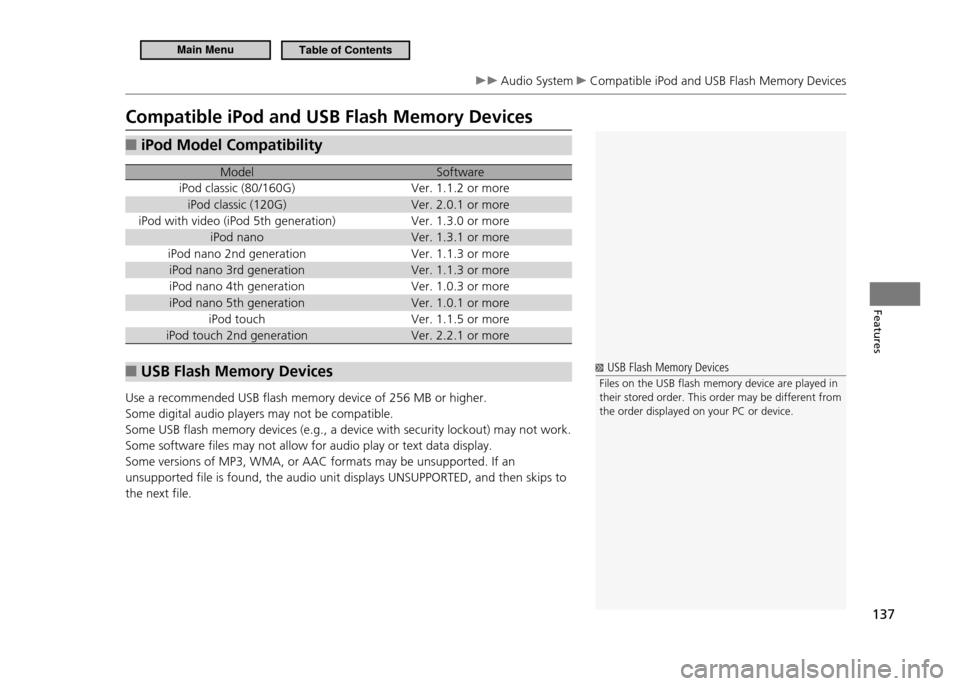
Compatible iPod and USB Flash Memory Devices
iPod Model Compatibility
■
Model Software
iPod classic (80/160G) Ver. 1.1.2 or more
iPod classic (120G) Ver. 2.0.1 or more
iPod with video (iPod 5th generation) Ver. 1.3.0 or more iPod nano Ver. 1.3.1 or more
iPod nano 2nd generation Ver. 1.1.3 or more iPod nano 3rd generation Ver. 1.1.3 or more
iPod nano 4th generation Ver. 1.0.3 or more
iPod nano 5th generation Ver. 1.0.1 or more iPod touch Ver. 1.1.5 or more
iPod touch 2nd generation Ver. 2.2.1 or more
USB Flash Memory Devices
■
Use a recommended USB flash memory device of 256 MB or higher. Some digital audio players may not be compatible.Some USB flash memory devices (e.g., a device with security lockout) may not work.Some software files may not allow for audio play or text data display.Some versions of MP3, WMA, or AAC formats may be unsupported. If an unsupported file is found, the audio unit displays UNSUPPORTED, and then skips to the next file.
USB Flash Memory Devices
Files on the USB lash memory device are played in their stored order. This order may be different from the order displayed on your PC or device.
Main MenuTable of Contents