warning light HONDA CR-Z 2011 1.G Owners Manual
[x] Cancel search | Manufacturer: HONDA, Model Year: 2011, Model line: CR-Z, Model: HONDA CR-Z 2011 1.GPages: 333, PDF Size: 9.97 MB
Page 15 of 333
Quick Reference Guide
14
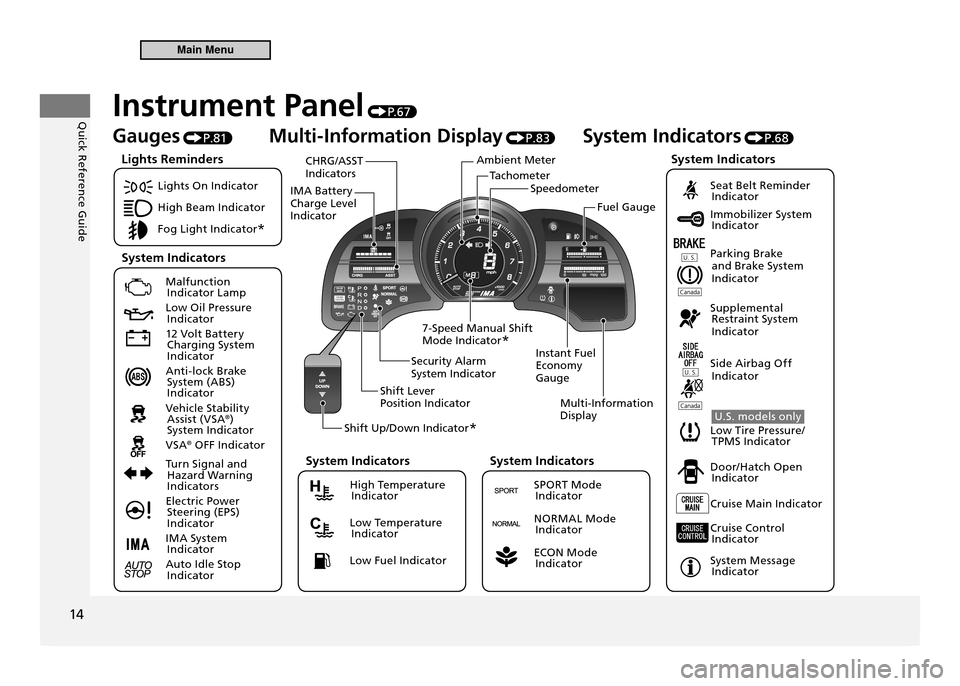
TachometerSpeedometer
Ambient Meter
IMA Battery Charge Level Indicator CHRG/ASST Indicators
Instant Fuel Economy GaugeMulti-Information Display
Security Alarm System Indicator
Shift Lever Position Indicator
Shift Up/Down Indicator *
7-Speed Manual Shift Mode Indicator
* Fuel Gauge
Instrument Panel
P. 6 7
Gauges P.81 Multi-Information Display
P.83 System Indicators
P.68
Lights On Indicator
High Beam Indicator
Fog Light Indicator *
Malfunction
Indicator Lamp
Low Oil Pressure Indicator
12 Volt Battery Charging System
Indicator
Anti-lock Brake System (ABS)
Indicator
Vehicle Stability Assist (VSA ®
)
System Indicator
VSA ®
OFF Indicator
Turn Signal and Hazard Warning
Indicators
Electric Power Steering (EPS)
Indicator
IMA System Indicator
Auto Idle Stop Indicator
Seat Belt Reminder Indicator
Immobilizer System Indicator
Parking Brake and Brake System
Indicator
Supplemental Restraint System
Indicator
Side Airbag Off Indicator
U.S. models only
Low Tire Pressure/ TPMS Indicator
Door/Hatch Open Indicator
Cruise Main Indicator
Cruise Control Indicator
System Message Indicator
Lights Reminders
System Indicators System Indicators
High Temperature
Indicator
Low Temperature Indicator
Low Fuel Indicator
System Indicators
SPORT Mode Indicator
NORMAL Mode Indicator
ECON Mode Indicator
System Indicators
Main Menu
Page 76 of 333
75
Instrument Panel
Indicators
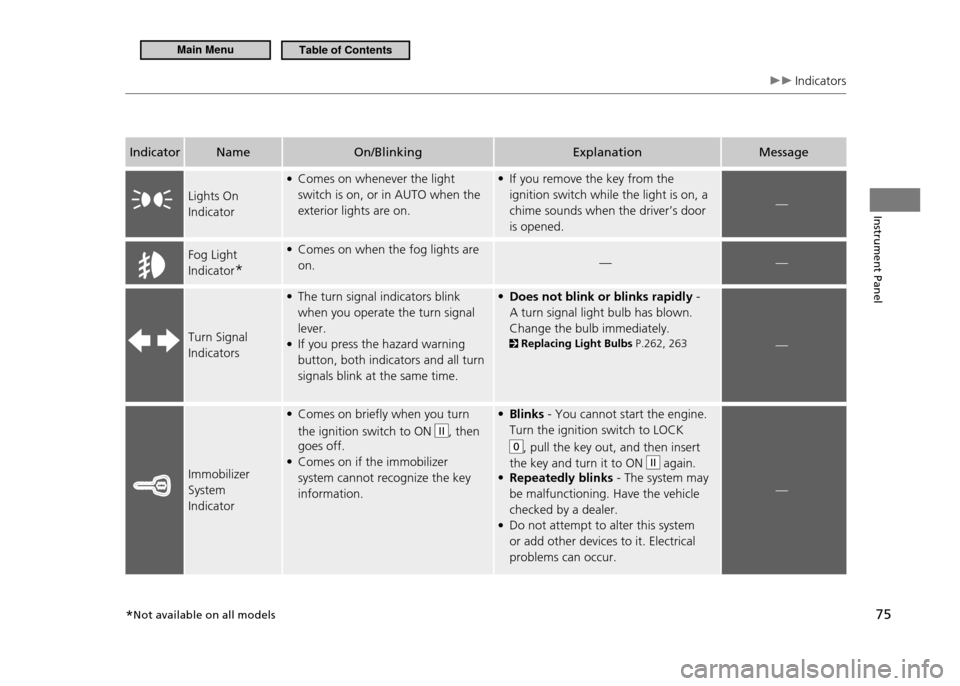
IndicatorName On/Blinking Explanation Message
Lights On Indicator Comes on whenever the light
•
switch is on, or in AUTO when the exterior lights are on. If you remove the key from the
•
ignition switch while the light is on, a chime sounds when the driver’s door is opened.
—
Fog Light Indicator * Comes on when the fog lights are
•
on. ——
Turn Signal IndicatorsThe turn signal indicators blink
•
when you operate the turn signal lever.If you press the hazard warning
•
button, both indicators and all turn signals blink at the same time. Does not blink or blinks rapidly
• -
A turn signal light bulb has blown. Change the bulb immediately. Replacing Light Bulbs P.262, 263—
Immobilizer System IndicatorComes on briefly when you turn
•
the ignition switch to ON
II, then
goes off. Comes on if the immobilizer
•
system cannot recognize the key information. Blinks
• - You cannot start the engine.
Turn the ignition switch to LOCK
0, pull the key out, and then insert
the key and turn it to ON
II again.
Repeatedly blinks
• - The system may
be malfunctioning. Have the vehicle checked by a dealer.Do not attempt to alter this system
•
or add other devices to it. Electrical problems can occur.
—
*Not available on all models
Main MenuTable of Contents
Page 79 of 333
78
Instrument Panel
Indicators Multi-Information Display Warning and Information Messages
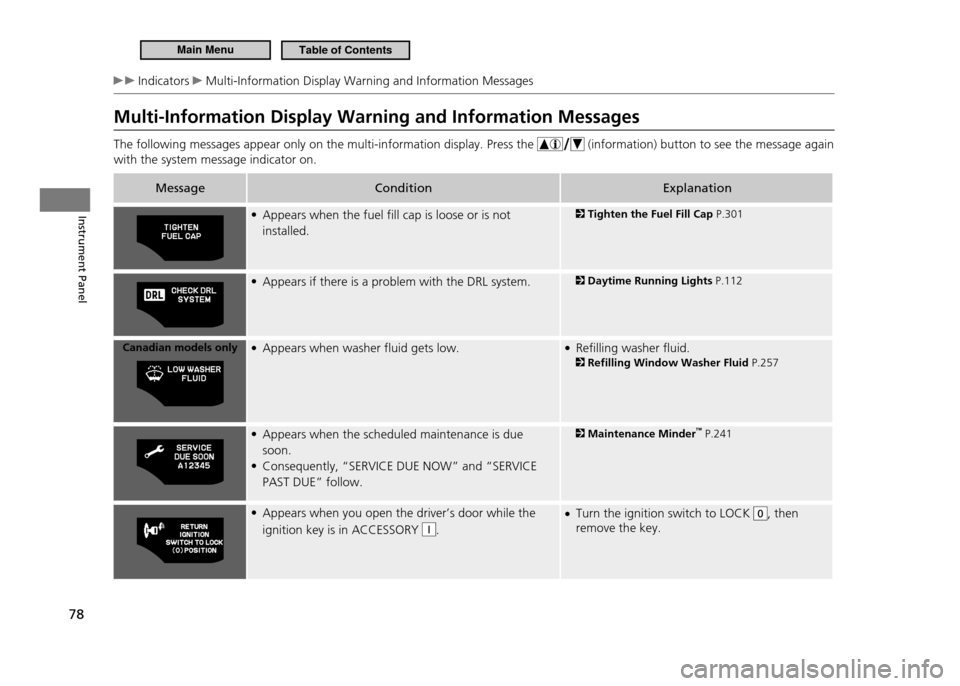
Multi-Information Display Warning and Information Messages The following messages appear only on the multi-information display. Press the
(information) button to see the message again
with the system message indicator on.
Message Condition Explanation
Appears when the fuel fill cap is loose or is not
•
installed.
Tighten the Fuel Fill Cap P.301
Appears if there is a problem with the DRL system.
•
Daytime Running Lights P.112
Canadian models only Appears when washer fluid gets low.
• Refilling washer fluid.
•
Refilling Window Washer Fluid P.257
Appears when the scheduled maintenance is due
•
soon. Consequently, “SERVICE DUE NOW” and “SERVICE
•
PAST DUE” follow.
Maintenance Minder ™
P.241
Appears when you open the driver’s door while the
•
ignition key is in ACCESSORY
I. Turn the ignition switch to LOCK
•
0, then
remove the key.
Main MenuTable of Contents
Page 108 of 333
107
Controls
Opening and Closing the Windows
Opening/Closing the Power Windows
Opening/Closing the Power Windows
The auto-reverse function stops sensing when the window is almost closed to ensure that it fully closes. The power windows can be operated for up to 10 minutes after you turn the ignition switch off.Opening either door cancels this function. Auto Reverse If a power window senses resistance when closing automatically, it will stop closing, and reverse direction. The driver’s window auto reverse function is disabled when you continuously pull up the switch.
WARNING
Closing a power window on someone’s hands or fingers can cause serious injury. Make sure your passenger is away from the window before closing it.
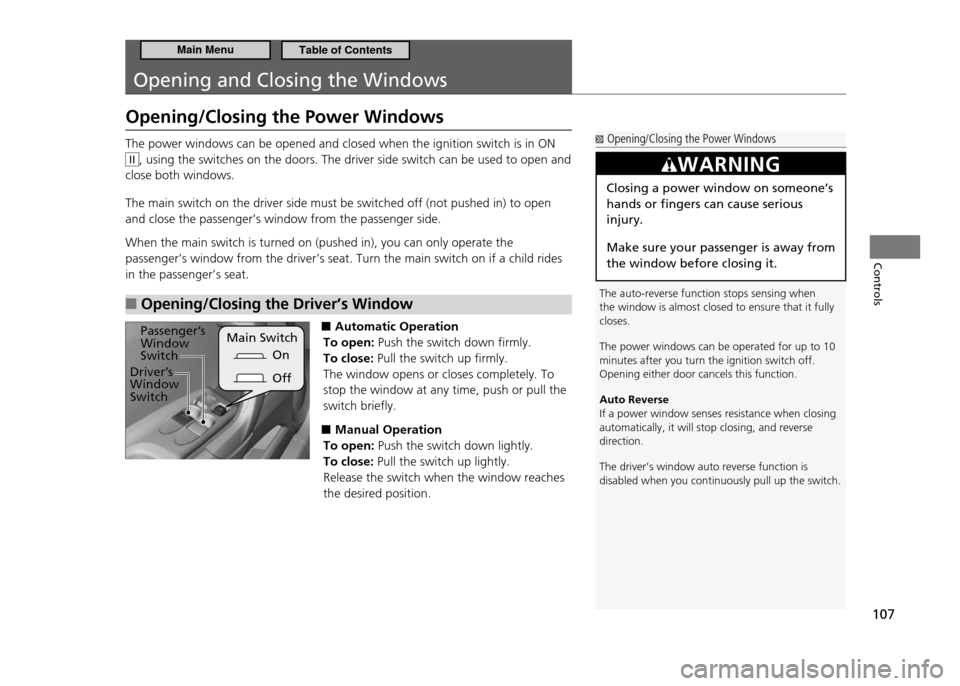
The power windows can be opened and closed when the ignition switch is in ON
II, using the switches on the doors. The driver side switch can be used to open and
close both windows. The main switch on the driver side must be switched off (not pushed in) to open and close the passenger’s window from the passenger side. When the main switch is turned on (pushed in), you can only operate the passenger’s window from the driver’s seat. Turn the main switch on if a child rides in the passenger’s seat.
Opening/Closing the Driver’s Window
■
■ Automatic Operation
To open: Push the switch down firmly.
To close: Pull the switch up firmly.
The window opens or closes completely. To stop the window at any time, push or pull the switch briefly.
Manual Operation
■
To open: Push the switch down lightly.
To close: Pull the switch up lightly.
Release the switch when the window reaches the desired position.
On
Main Switch
Passenger’s Window Switch
Driver’s Window Switch Off
Main MenuTable of Contents
Page 122 of 333
121
Controls
Adjusting the Seats Adjusting the Seat Position
Head Restraints
■
Your vehicle is equipped with head restraints in both seating positions. However, they are non-adjustable.Head restraints are effective for protection against whiplash and other rear-impact crash injuries.
Removing and Installing the Head Restraint for Cleaning
■
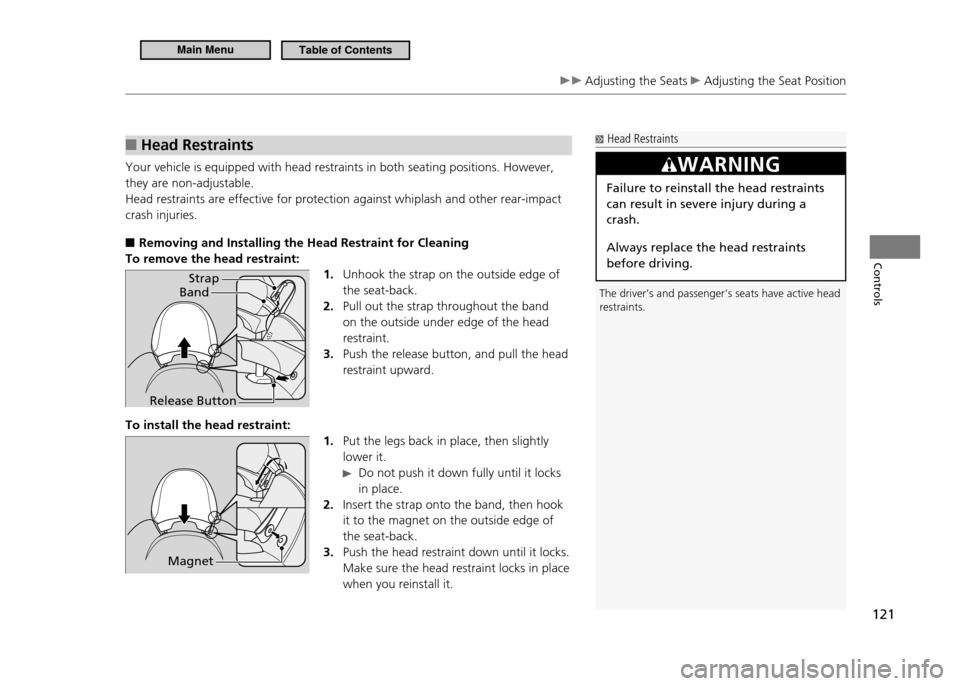
To remove the head restraint:
1. Unhook the strap on the outside edge of the seat-back.Pull out the strap throughout the band
2.
on the outside under edge of the head restraint.Push the release button, and pull the head
3.
restraint upward.
To install the head restraint: 1. Put the legs back in place, then slightly lower it.
Do not push it down fully until it locks
in place.
Insert the strap onto the band, then hook
2.
it to the magnet on the outside edge of the seat-back.Push the head restraint down until it locks.
3.
Make sure the head restraint locks in place when you reinstall it.
Head Restraints
The driver’s and passenger’s seats have active head restraints.
WARNING
Failure to reinstall the head restraints can result in severe injury during a crash. Always replace the head restraints before driving.
Band Strap
Release Button
Magnet
Main MenuTable of Contents
Page 126 of 333
125
Controls
Interior Lights/Interior Convenience Items Interior Convenience Items
Interior Convenience Items
Glove Box
■
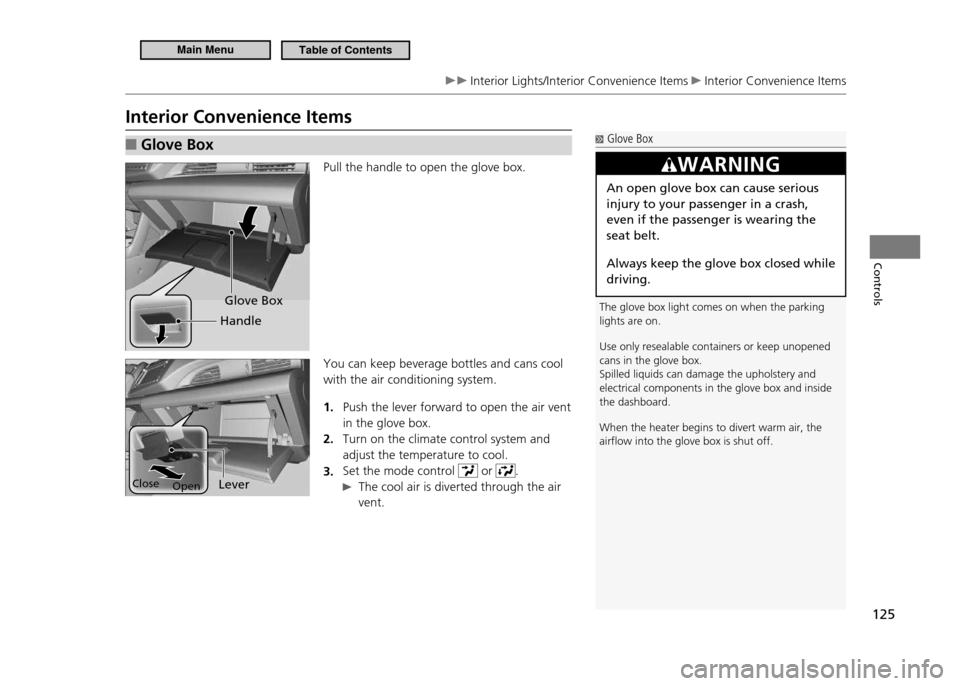
Pull the handle to open the glove box. You can keep beverage bottles and cans cool with the air conditioning system.
Push the lever forward to open the air vent
1.
in the glove box.Turn on the climate control system and
2.
adjust the temperature to cool.Set the mode control
3.
or .
The cool air is diverted through the air
vent.
Glove Box
The glove box light comes on when the parking lights are on. Use only resealable containers or keep unopened cans in the glove box.Spilled liquids can damage the upholstery and electrical components in the glove box and inside the dashboard. When the heater begins to divert warm air, the airlow into the glove box is shut off.
WARNING
An open glove box can cause serious injury to your passenger in a crash, even if the passenger is wearing the seat belt.
Always keep the glove box closed while driving.
Glove Box
Handle
Lever
Open
Close
Main MenuTable of Contents
Page 129 of 333
128
Controls
Interior Lights/Interior Convenience Items Interior Convenience Items
Rear Cargo Console
■
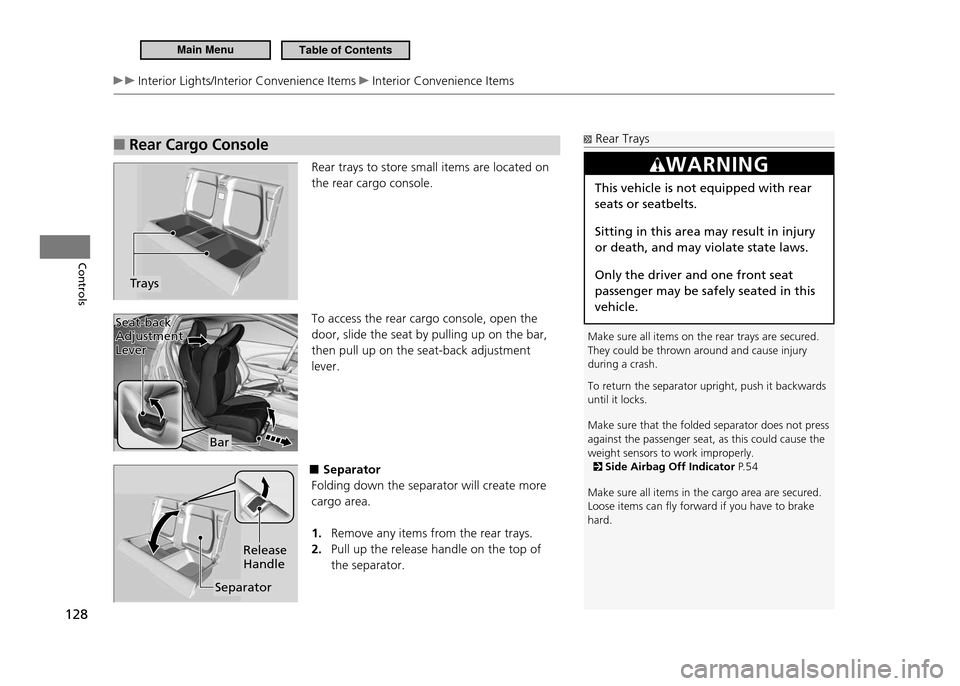
Rear trays to store small items are located on the rear cargo console. To access the rear cargo console, open the door, slide the seat by pulling up on the bar, then pull up on the seat-back adjustment lever.
■Separator
Folding down the separator will create more cargo area.
Remove any items from the rear trays.
1.
Pull up the release handle on the top of
2.
the separator.
Trays
Rear Trays
Make sure all items on the rear trays are secured. They could be thrown around and cause injury during a crash. To return the separator upright, push it backwards until it locks. Make sure that the folded separator does not press against the passenger seat, as this could cause the weight sensors to work improperly.
Side Airbag Off Indicator P. 5 4
Make sure all items in the cargo area are secured. Loose items can ly forward if you have to brake hard.
WARNING
This vehicle is not equipped with rear seats or seatbelts. Sitting in this area may result in injury or death, and may violate state laws. Only the driver and one front seat passenger may be safely seated in this vehicle.
Bar
Seat-back
Adjustment Lever
Seat-back Adjustment Lever
Separator Release Handle
Main MenuTable of Contents
Page 220 of 333
219
Driving
Braking
Brake System
Parking Brake
■
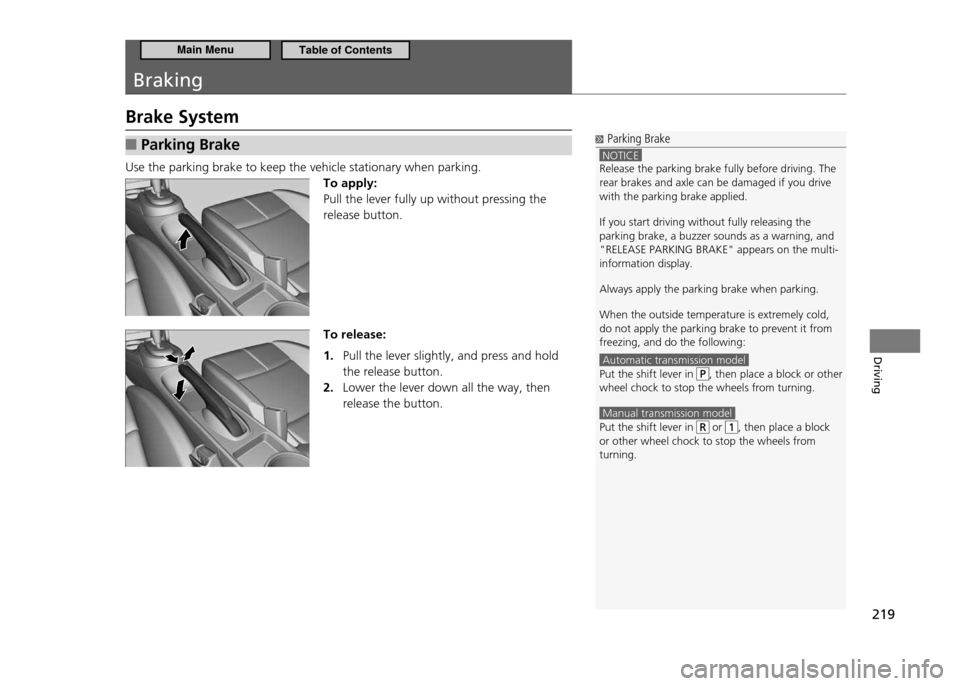
Use the parking brake to keep the vehicle stationary when parking.
To apply: Pull the lever fully up without pressing the release button. To release:
Pull the lever slightly, and press and hold
1.
the release button. Lower the lever down all the way, then
2.
release the button.
Parking Brake
NOTICE Release the parking brake fully before driving. The rear brakes and axle can be damaged if you drive with the parking brake applied. If you start driving without fully releasing the parking brake, a buzzer sounds as a warning, and "RELEASE PARKING BRAKE" appears on the multi-information display. Always apply the parking brake when parking.When the outside temperature is extremely cold, do not apply the parking brake to prevent it from freezing, and do the following:
Automatic transmission model Put the shift lever in , then place a block or other
wheel chock to stop the wheels from turning.
Manual transmission model Put the shift lever in or , then place a block
or other wheel chock to stop the wheels from turning.
Main MenuTable of Contents
Page 288 of 333
287
Handling the Unexpected
If a Tire Goes Flat
Changing a Flat Tire
Changing a Flat Tire
Periodically check the tire pressure of the compact spare. It should be set to the speciied pressure.Speciied Pressure: 60 psi (420 kPa, 4.2 kgf/cm 2
)
When driving with the compact spare tire, keep the vehicle speed under 50 mph (80 km/h).Replace with a full size tire as soon as possible. The compact spare tire and wheel in your vehicle are speciically for this model.Do not use them with another vehicle.Do not use another type of compact spare tire or wheel with your vehicle. Do not mount tire chains on a compact spare tire. If a chain-mounted front tire goes lat, remove one of the full-size rear tires and replace it with the compact spare tire. Remove the lat front tire and replace it will the full size tire that was removed from the rear. Mount the tire chains on the front tire.
If a tire goes flat while driving, grasp the steering wheel firmly, and brake gradually to reduce speed. Then, stop in a safe place. Replace the flat tire with the compact spare tire. Go to a dealer as soon as possible to have the full size tire repaired or replaced.
Park the vehicle on firm, level, and non-slippery ground.
1.
Put the shift lever in
2.
P (CVT).
Put the shift lever in
R (manual transmission).
Set the parking brake.
3.
Turn on the hazard warning lights and turn the ignition switch to LOCK
4.
0.
Main MenuTable of Contents
Page 295 of 333
294
Handling the Unexpected
Jump Starting
Jump Starting Procedure
■
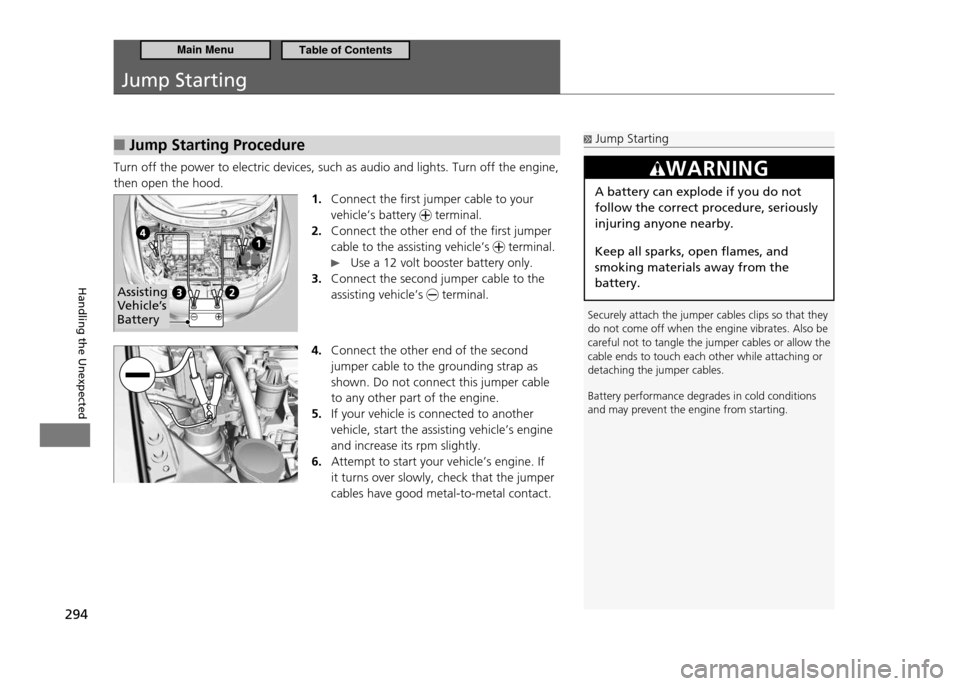
Turn off the power to electric devices, such as audio and lights. Turn off the engine, then open the hood.
1. Connect the first jumper cable to your vehicle’s battery
terminal.
Connect the other end of the first jumper
2.
cable to the assisting vehicle’s
terminal.
Use a 12 volt booster battery only.
Connect the second jumper cable to the
3.
assisting vehicle’s
terminal.
4. Connect the other end of the second jumper cable to the grounding strap as shown. Do not connect this jumper cable to any other part of the engine. If your vehicle is connected to another
5.
vehicle, start the assisting vehicle’s engine and increase its rpm slightly. Attempt to start your vehicle’s engine. If
6.
it turns over slowly, check that the jumper cables have good metal-to-metal contact.
Jump Starting
Securely attach the jumper cables clips so that they do not come off when the engine vibrates. Also be careful not to tangle the jumper cables or allow the cable ends to touch each other while attaching or detaching the jumper cables. Battery performance degrades in cold conditions and may prevent the engine from starting.
WARNING
A battery can explode if you do not follow the correct procedure, seriously injuring anyone nearby. Keep all sparks, open flames, and smoking materials away from the battery.
Assisting
Vehicle’s Battery
Main MenuTable of Contents