maintenance HONDA CR-Z 2011 1.G User Guide
[x] Cancel search | Manufacturer: HONDA, Model Year: 2011, Model line: CR-Z, Model: HONDA CR-Z 2011 1.GPages: 333, PDF Size: 9.97 MB
Page 235 of 333
234
Driving
Fuel Economy
Improving Fuel Economy
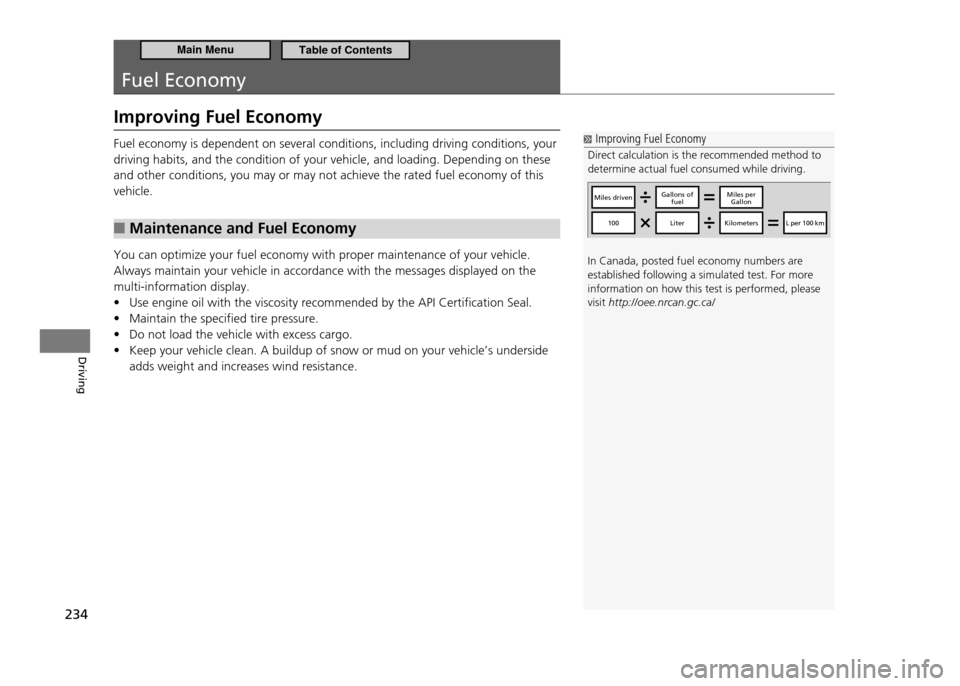
Improving Fuel Economy
Direct calculation is the recommended method to determine actual fuel consumed while driving. In Canada, posted fuel economy numbers are established following a simulated test. For more information on how this test is performed, please visit http://oee.nrcan.gc.ca/
Miles drivenGallons of
fuelMiles per Gallon
100LiterKilometersL per 100 km
Fuel economy is dependent on several conditions, including driving conditions, your driving habits, and the condition of your vehicle, and loading. Depending on these and other conditions, you may or may not achieve the rated fuel economy of this vehicle.
Maintenance and Fuel Economy
■
You can optimize your fuel economy with proper maintenance of your vehicle. Always maintain your vehicle in accordance with the messages displayed on the multi-information display.
Use engine oil with the viscosity recommended by the API Certification Seal.
•
Maintain the specified tire pressure.
•
Do not load the vehicle with excess cargo.
•
Keep your vehicle clean. A buildup of snow or mud on your vehicle’s underside
•
adds weight and increases wind resistance.
Main MenuTable of Contents
Page 238 of 333
Maintenance
This chapter discusses basic maintenance.
237
Before Performing Maintenance
Inspection and Maintenance ................... 238
Safety When Performing Maintenance ... 239Parts and Fluids Used in Maintenance
Service .................................................. 240
Maintenance Minder ™
............................ 241
Maintenance Under the Hood Maintenance Items Under the Hood ....... 245
Opening the Hood ................................. 246
Recommended Engine Oil ...................... 247
Oil Check ............................................... 248
Adding Engine Oil .................................. 249
Changing the Engine Oil and Oil Filter .... 250 Engine Coolant ...................................... 252
Transmission Fluid .................................. 254
Brake/Clutch Fluid .................................. 256
Refilling Window Washer Fluid ............... 257
Replacing Light Bulbs ............................. 258
Checking and Maintaining Wiper Blades Checking Wiper Blades ........................... 266
Changing the Front Wiper Blade Rubber 266
Changing the Rear Wiper Blade Rubber .. 268
Checking and Maintaining Tires Checking Tires ........................................ 269
Tire and Loading Information Label ........ 270
Tire Labeling ........................................... 270 DOT Tire Quality Grading (U.S. Vehicles)
.272
Wear Indicators ...................................... 274
Tire Service Life ...................................... 274
Tire and Wheel Replacement .................. 275
Tire Rotation .......................................... 276
Winter Tires ............................................ 277
12 Volt Battery ........................................ 278
Remote Transmitter Care ....................... 279
Replacing the Battery ............................. 279
Climate Control System Maintenance ... 280
Cleaning ................................................... 281
Interior Care ........................................... 281
Exterior Care .......................................... 283
Main Menu
Page 239 of 333
238
Maintenance
Before Performing Maintenance
Inspection and Maintenance
For your safety, perform all listed inspections and maintenance to keep your vehicle
in good condition. If you become aware of any abnormality (noise, smell, insufficient brake fluid, oil residue on the ground, etc.), have your vehicle inspected by a dealer. (Note, however, that service at a dealer is not mandatory to keep your warranties in effect.) Refer to the separate maintenance booklet for detailed maintenance and inspection information.Types of Inspection and Maintenance
■
Daily Inspections
■
Perform inspections before long distance trips, when washing the vehicle, or when refueling.
Periodic Inspections
■
Check the automatic transmission fluid level monthly.
•
Automatic Transmission Fluid P.254
Check the brake fluid level monthly.
•
Brake/Clutch Fluid P.256
Check the tire pressure monthly. Examine the tread for wear and foreign objects.
•
Checking and Maintaining Tires P.269
Check the operation of the headlights, parking lights, taillights, high-mount
•
brake light, and license plate lights monthly.
Replacing Light Bulbs P.258
Check the condition of the wiper blades at least every six months.
•
Checking and Maintaining Wiper Blades P.266
Inspection and Maintenance
U.S. models only Maintenance, replacement, or repair of emissions control devices and systems may be done by any automotive repair establishment or individual using parts that are "certiied" to EPA standards. According to state and federal regulations, failure to perform maintenance on the items marked with # will not void your emissions warranties. However, all maintenance services should be performed in accordance with the intervals indicated by the multi-information display.
Maintenance Service Items P. 2 4 3
If you want to perform complex maintenance tasks that require more skills and tools, purchase the service manual.
Authorized Manuals P. 3 1 9
If you want to perform maintenance yourself, make sure that you have the necessary tools and skills irst.After performing maintenance, complete the records in the separate maintenance booklet.
Main MenuTable of Contents
Page 240 of 333
239
Maintenance
Before Performing Maintenance Safety When Performing Maintenance
Safety When Performing Maintenance
Some of the most important safety precautions are given here. However, we cannot warn you of every conceivable hazard that can arise in performing maintenance. Only you can decide whether or not you should perform a given task.Maintenance Safety
■
To reduce the possibility of fire or explosion, keep cigarettes, sparks, and flames
•
away from the battery and all fuel related parts. To clean parts, use a commercially available degreaser or parts cleaner, not
•
gasoline.Wear eye protection and protective clothing when working with the 12 volt
•
battery or compressed air.Engine exhaust gasses contain carbon monoxide, which is poisonous and can kill
•
you.
Only operate the engine if there is sufficient ventilation.
Vehicle Safety
■
The vehicle must be in a stationary condition.
•
Make sure your vehicle is parked on level ground, the parking brake is set,
and the engine is off.
Be aware that hot parts can burn you.
•
Make sure to let the engine and exhaust system cool thoroughly before
touching vehicle parts.
Be aware that moving parts can injure you.
•
Do not start the engine unless instructed, and keep your hands and limbs
away from moving parts.
Do not touch the IMA battery and wirings (orange).
•
Safety When Performing Maintenance
WARNING
Improperly maintaining this vehicle or failing to correct a problem before driving can cause a crash in which you can be seriously hurt or killed. Always follow the inspection and maintenance recommendations according to the schedules in this owner’s manual.
WARNING
Failure to properly follow maintenance instructions and precautions can cause you to be seriously hurt or killed. Always follow the procedures and precautions in this owner’s manual.
Main MenuTable of Contents
Page 241 of 333
240
Maintenance
Before Performing Maintenance Parts and Fluids Used in Maintenance Service
Parts and Fluids Used in Maintenance Service The use of Honda genuine parts and fluids is recommended when maintaining and servicing your vehicle. Honda genuine parts are manufactured according to the same high quality standards used in Honda vehicles.
Main MenuTable of Contents
Page 242 of 333
241
Maintenance
Maintenance Minder™
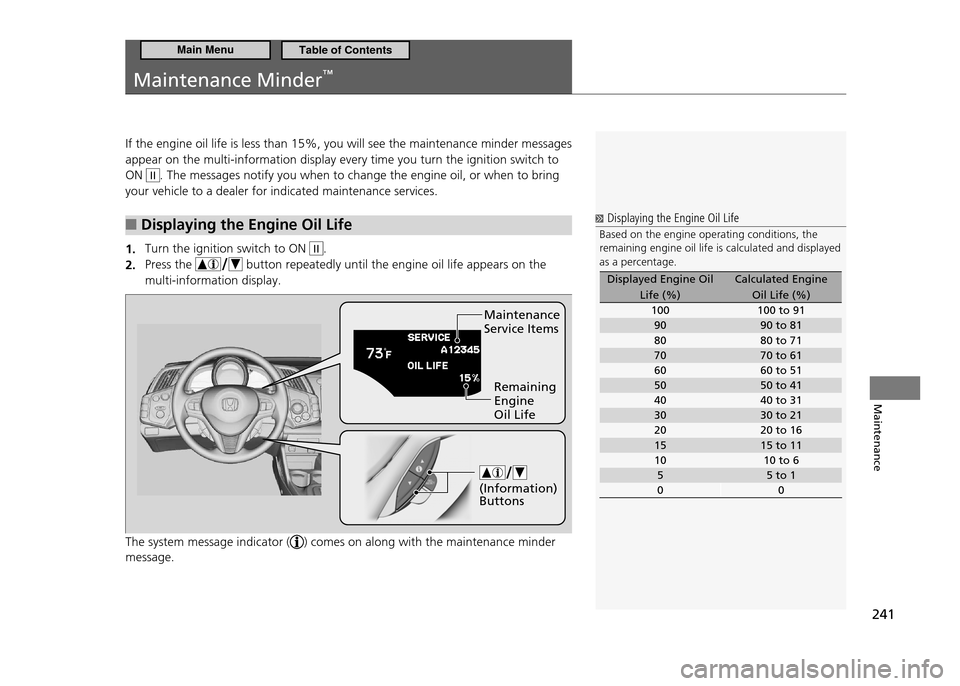
If the engine oil life is less than 15%, you will see the maintenance minder messages appear on the multi-information display every time you turn the ignition switch to ON
II. The messages notify you when to change the engine oil, or when to bring
your vehicle to a dealer for indicated maintenance services.
Displaying the Engine Oil Life
■
Turn the ignition switch to ON
1. II.
Press the
2.
button repeatedly until the engine oil life appears on the
multi-information display.
The system message indicator (
) comes on along with the maintenance minder
message.
Displaying the Engine Oil Life
Based on the engine operating conditions, the remaining engine oil life is calculated and displayed as a percentage.
Displayed Engine Oil
Life (%) Calculated Engine
Oil Life (%)
100 100 to 91 90 90 to 81
80 80 to 71
70 70 to 61
60 60 to 51
50 50 to 41
40 40 to 31
30 30 to 21
20 20 to 16
15 15 to 11
10 10 to 65 5 to 1
0 0
Maintenance Service Items
Remaining Engine Oil Life
(Information) Buttons
Main MenuTable of Contents
Page 243 of 333
242
Maintenance
Maintenance Minder™
Maintenance Minder Messages on the Multi-Information Display
■
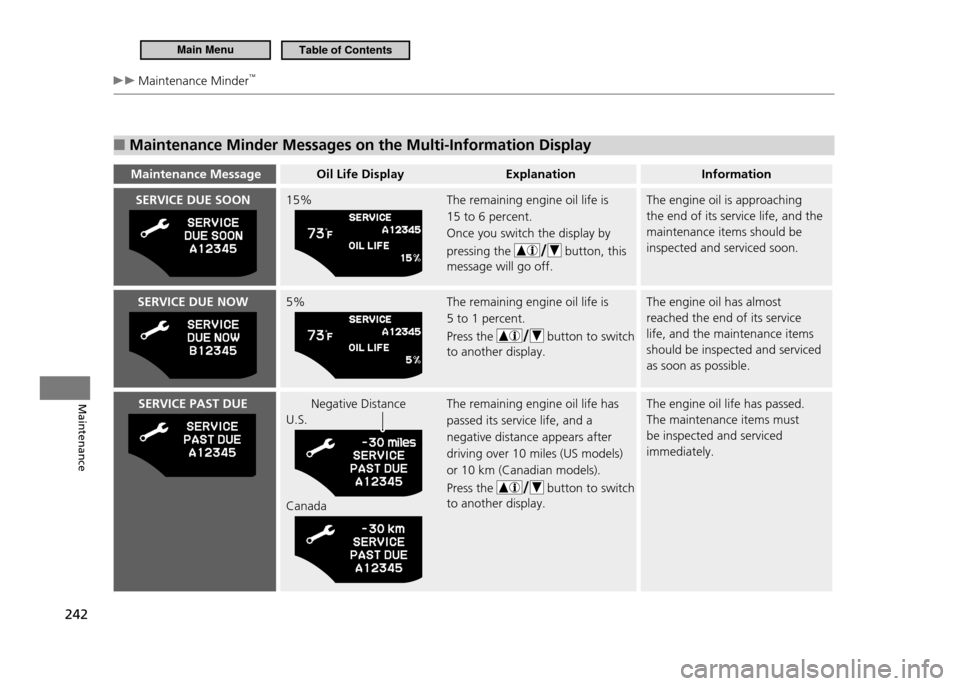
Maintenance MessageOil Life Display Explanation Information
SERVICE DUE SOON15% The remaining engine oil life is
15 to 6 percent. Once you switch the display by pressing the
button, this
message will go off. The engine oil is approaching the end of its service life, and the maintenance items should be inspected and serviced soon.
SERVICE DUE NOW5% The remaining engine oil life is
5 to 1 percent. Press the
button to switch
to another display. The engine oil has almost reached the end of its service life, and the maintenance items should be inspected and serviced as soon as possible.
SERVICE PAST DUENegative Distance
U.S. Canada The remaining engine oil life has passed its service life, and a negative distance appears after driving over 10 miles (US models) or 10 km (Canadian models). Press the
button to switch
to another display. The engine oil life has passed. The maintenance items must be inspected and serviced immediately.
Main MenuTable of Contents
Page 244 of 333
243
Maintenance
Maintenance Minder™
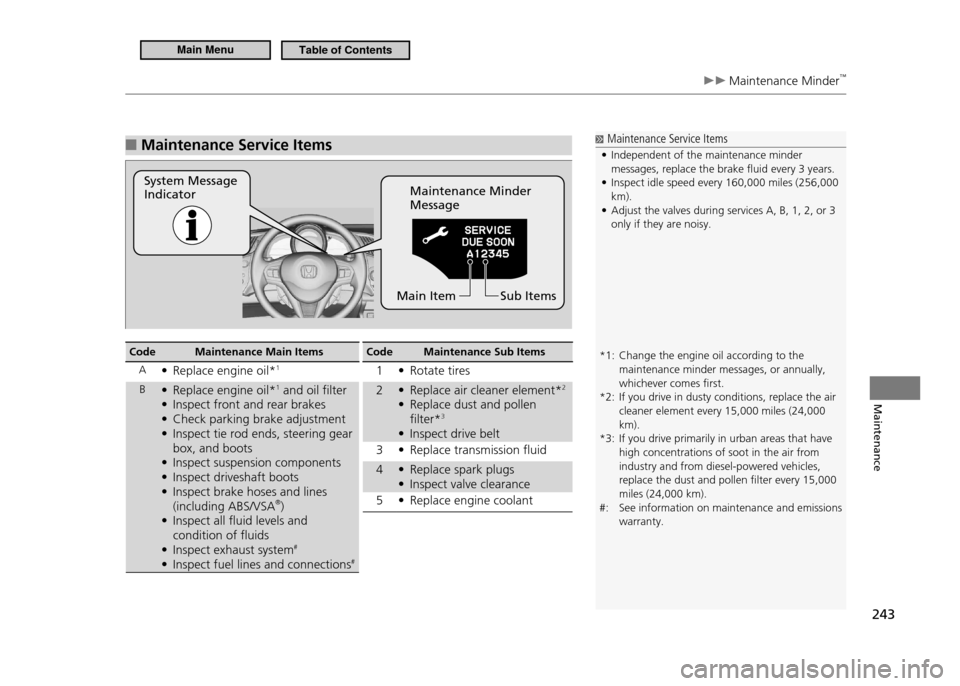
Maintenance Service Items
■
System Message Indicator Maintenance Minder Message
Sub Items
Main Item
Maintenance Service Items
Independent of the maintenance minder
•
messages, replace the brake luid every 3 years. Inspect idle speed every 160,000 miles (256,000
•
km).Adjust the valves during services A, B, 1, 2, or 3
•
only if they are noisy.
*1: Change the engine oil according to the maintenance minder messages, or annually, whichever comes irst.
*2: If you drive in dusty conditions, replace the air cleaner element every 15,000 miles (24,000 km).
*3: If you drive primarily in urban areas that have high concentrations of soot in the air from industry and from diesel-powered vehicles, replace the dust and pollen ilter every 15,000 miles (24,000 km).
#: See information on maintenance and emissions warranty.
Code Maintenance Main Items
A Replace engine oil*
• 1
B Replace engine oil*
• 1
and oil filter
Inspect front and rear brakes
•
Check parking brake adjustment
•
Inspect tie rod ends, steering gear
•
box, and boots
Inspect suspension components
•
Inspect driveshaft boots
•
Inspect brake hoses and lines
•
(including ABS/VSA ®
)
Inspect all fluid levels and
•
condition of fluids
Inspect exhaust system
• #
Inspect fuel lines and connections
• #Code Maintenance Sub Items
1 Rotate tires •
2 Replace air cleaner element* • 2
Replace dust and pollen
•
filter* 3
Inspect drive belt
•
3 Replace transmission fluid •
4 Replace spark plugs •
Inspect valve clearance
•
5 Replace engine coolant •
Main MenuTable of Contents
Page 245 of 333
244
Maintenance
Maintenance Minder™
Resetting the Display
■
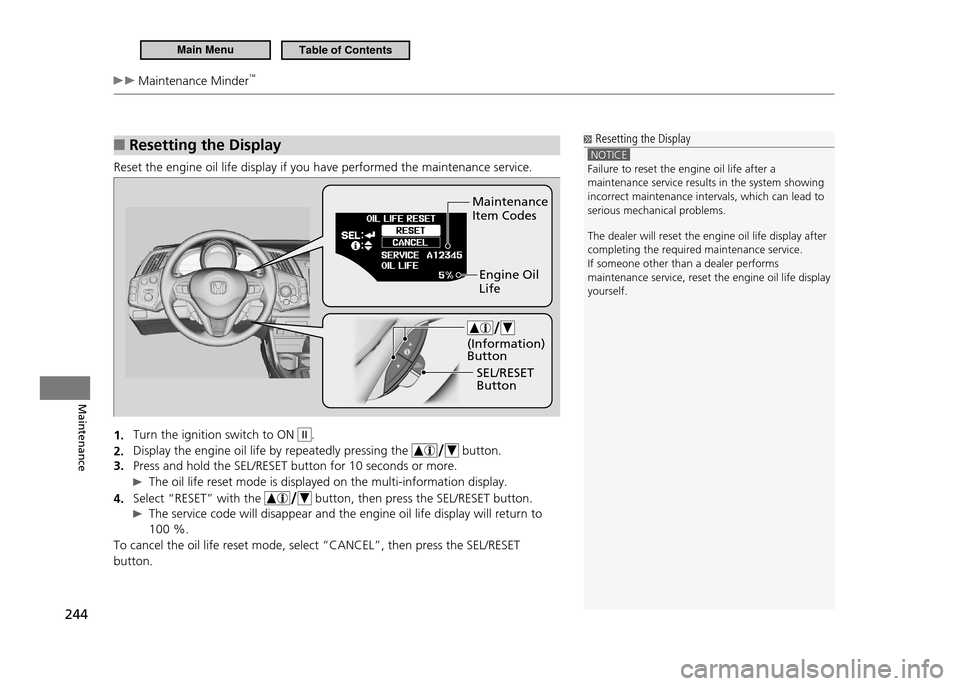
Reset the engine oil life display if you have performed the maintenance service.
Turn the ignition switch to ON
1.
II.
Display the engine oil life by repeatedly pressing the
2.
button.
Press and hold the SEL/RESET button for 10 seconds or more.
3.
The oil life reset mode is displayed on the multi-information display.
Select “RESET” with the
4.
button, then press the SEL/RESET button.
The service code will disappear and the engine oil life display will return to
100 %.
To cancel the oil life reset mode, select “CANCEL”, then press the SEL/RESET button.
Resetting the Display
NOTICE Failure to reset the engine oil life after a maintenance service results in the system showing incorrect maintenance intervals, which can lead to serious mechanical problems. The dealer will reset the engine oil life display after completing the required maintenance service.If someone other than a dealer performs
maintenance service, reset the engine oil life disp lay
yourself.
Maintenance Item Codes
Engine Oil Life
SEL/RESET Button
(Information) Button
Main MenuTable of Contents
Page 246 of 333
245
Maintenance
Maintenance Under the Hood
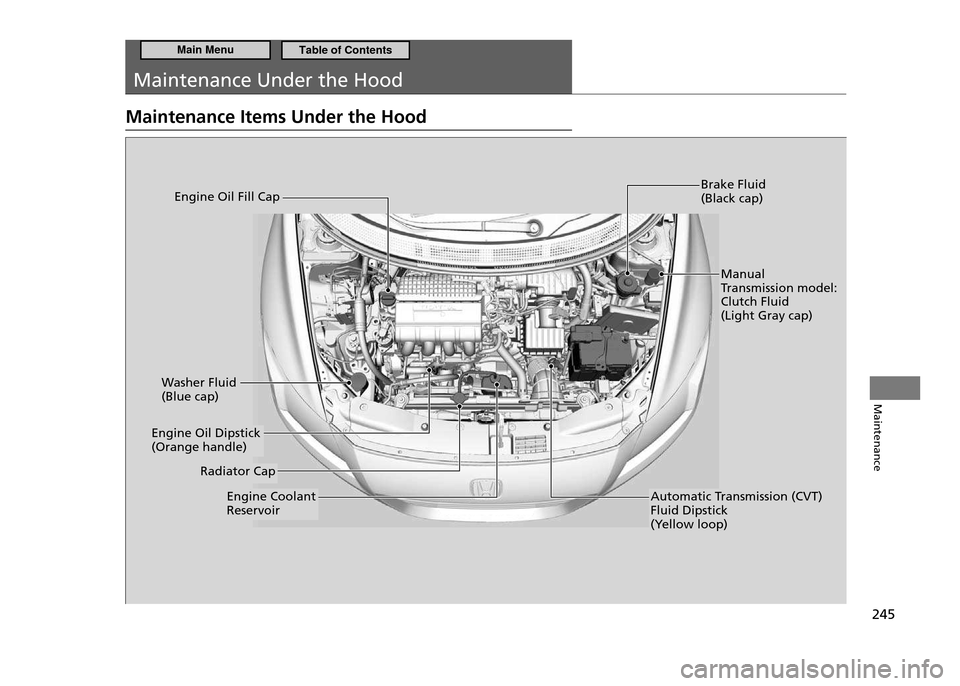
Maintenance Items Under the Hood
Brake Fluid (Black cap)
Washer Fluid (Blue cap)
Engine Coolant Reservoir
Engine Oil Fill Cap
Manual
Transmission model:Clutch Fluid(Light Gray cap)
Automatic Transmission (CVT) Fluid Dipstick
(Yellow loop)
Radiator Cap
Engine Oil Dipstick (Orange handle)
Main MenuTable of Contents