maintenance HONDA CR-Z 2011 1.G Workshop Manual
[x] Cancel search | Manufacturer: HONDA, Model Year: 2011, Model line: CR-Z, Model: HONDA CR-Z 2011 1.GPages: 333, PDF Size: 9.97 MB
Page 277 of 333

276
Maintenance
Checking and Maintaining Tires Tire Rotation
Tire Rotation Rotating tires according to the maintenance messages on the multi-information display helps to distribute wear more evenly and increase tire life.Tires without Rotation Marks
■
Rotate the tires as shown here.
Tires with Rotation Marks
■
Rotate the tires as shown here.
Tire Rotation
Tires with directional tread patterns should only be rotated front to back (not from one side to the other).Directional tires should be mounted with the rotation indication mark facing forward, as shown below.
Front
Direction Mark
Fr on t
Fron t
Main MenuTable of Contents
Page 278 of 333
277
Maintenance
Checking and Maintaining Tires Winter Tires
Winter Tires If driving on snowy or frozen roads, mount all season marked “M + S” tires, snow tires, or tire chains; reduce speed; and maintain sufficient distance between vehicles when driving. Be particularly careful when operating the steering wheel or brakes to prevent skidding. Use tire chains, snow tires, or all season tires when necessary or according to the law. When mounting, refer to the following points. For winter tires:Select the size and load ranges that are the same as the original tires.
•
Mount the tires to all four wheels.
•
For tire chains: Install them on the front tires only. Because your vehicle has limited tire
•
clearance, Honda strongly recommends using the chains listed below:
Cable-type: SCC Radial Chain SC1030
Follow the chain manufacturer’s instruction when installing. Mount them as
•
tightly as you can. Check that the chains do not touch the brake lines or suspension.
•
Drive slowly.
•
Winter Tires
NOTICE Traction devices that are the wrong size or improperly installed can damage your vehicle's brake lines, suspension, body, and wheels. Stop driving if they are hitting any part of the vehicle. When tire chains are mounted, follow the chain manufacturer's instructions regarding vehicle operational limits.
WARNING
Using the wrong chains, or not properly installing chains, can damage the brake lines and cause a crash in which you can be seriously injured or killed. Follow all instructions in this owner’s manual regarding the selection and use of tire chains.
Main MenuTable of Contents
Page 279 of 333
278
Maintenance
12 Volt Battery
Checking the 12 Volt Battery
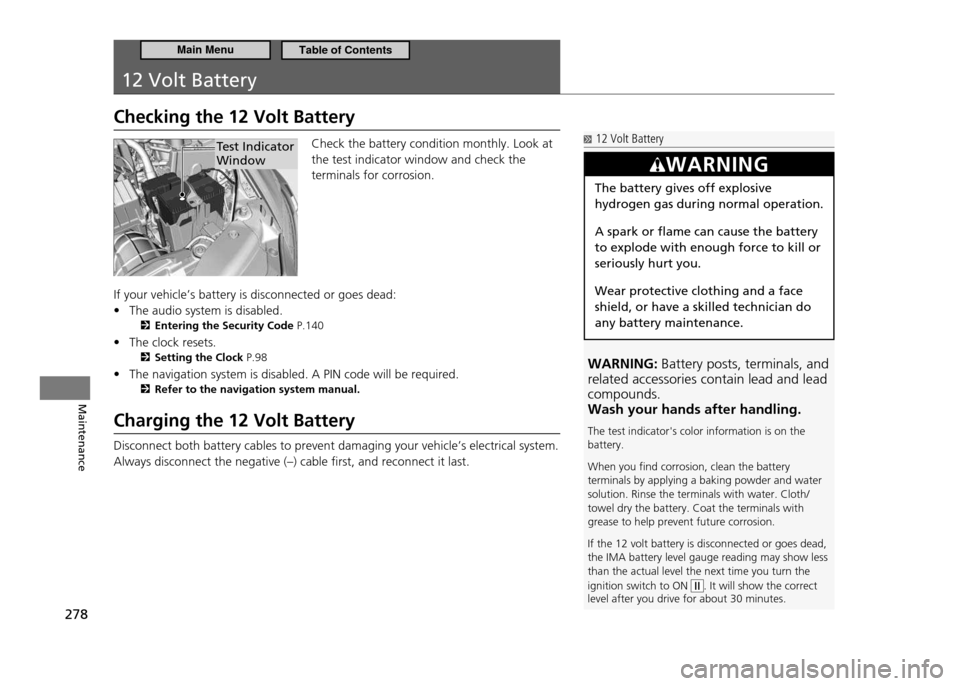
Check the battery condition monthly. Look at the test indicator window and check the terminals for corrosion.
If your vehicle’s battery is disconnected or goes dead: The audio system is disabled.
•
Entering the Security Code P.140
The clock resets.
•
Setting the Clock P.98
The navigation system is disabled. A PIN code will be required.
•
Refer to the navigation system manual.
Charging the 12 Volt Battery Disconnect both battery cables to prevent damaging your vehicle’s electrical system. Always disconnect the negative (–) cable first, and reconnect it last.
Test Indicator Window 12 Volt Battery
WARNING: Battery posts, terminals, and
related accessories contain lead and lead compounds.Wash your hands after handling. The test indicator's color information is on the battery. When you ind corrosion, clean the battery terminals by applying a baking powder and water solution. Rinse the terminals with water. Cloth/towel dry the battery. Coat the terminals with grease to help prevent future corrosion. If the 12 volt battery is disconnected or goes dead, the IMA battery level gauge reading may show less than the actual level the next time you turn the ignition switch to ON
. It will show the correct
level after you drive for about 30 minutes.
WARNING
The battery gives off explosive hydrogen gas during normal operation. A spark or flame can cause the battery to explode with enough force to kill or seriously hurt you. Wear protective clothing and a face shield, or have a skilled technician do any battery maintenance.
Main MenuTable of Contents
Page 280 of 333
279
Maintenance
Remote Transmitter Care
Replacing the Battery If the indicator does not come on when the button is pushed, replace the battery.
Battery type: CR1616
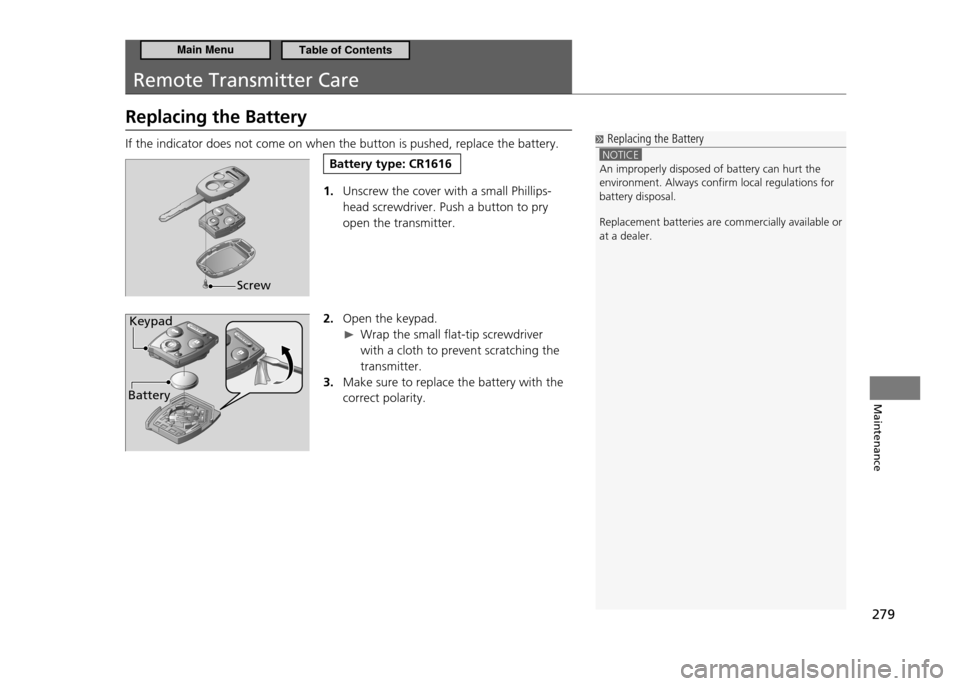
1. Unscrew the cover with a small Phillips- head screwdriver. Push a button to pry open the transmitter.
2. Open the keypad.
Wrap the small flat-tip screwdriver
with a cloth to prevent scratching the transmitter.
Make sure to replace the battery with the
3.
correct polarity.
Replacing the Battery
NOTICE An improperly disposed of battery can hurt the environment. Always conirm local regulations for battery disposal.
Replacement batteries are commercially available or at a dealer.
Screw
BatteryKeypad
Main MenuTable of Contents
Page 281 of 333
280
Maintenance
Climate Control System Maintenance
If You Don't Use the Climate Control System Regularly To insure oil is circulated in the system, occasionally turn on the A/C or set the defroster mode for several minutes with the engine idling. Dust and Pollen Filter The climate control system is equipped with a dust and pollen filter that collects pollen, dust, and other debris in the air, and removes odors such as diesel gas and tobacco. The maintenance minder messages will let you know when to replace the filter. We recommend that you replace the dust and pollen filter sooner when using your vehicle in areas with high concentrations of dust.
Dust and Pollen Filter
Using an air freshener may reduce the deodorizing effect of the dust and pollen ilter, and may reduce its life. If the airlow from the climate control system deteriorates noticeably, and the windows fog up easily, the ilter may need to be replaced. Please contact a dealer for replacement.
Main MenuTable of Contents
Page 282 of 333
281
Maintenance
Cleaning
Interior Care
Use a damp cloth with a mixture of mild detergent and warm water to remove dirt. Use a clean cloth to remove detergent residue.Cleaning Seat Belts
■
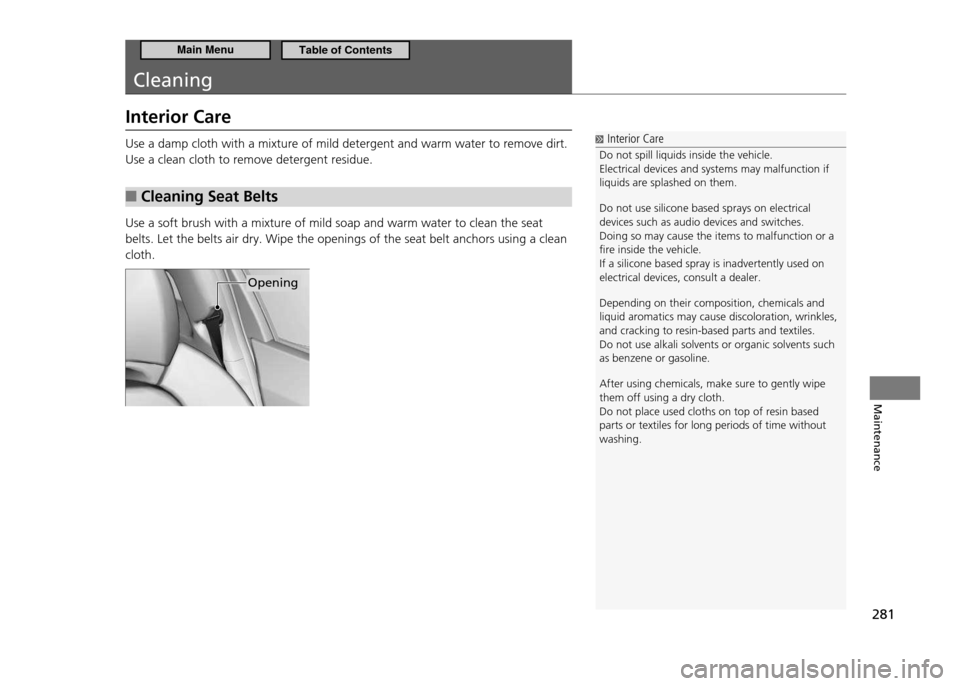
Use a soft brush with a mixture of mild soap and warm water to clean the seat belts. Let the belts air dry. Wipe the openings of the seat belt anchors using a clean cloth.
Interior Care
Do not spill liquids inside the vehicle. Electrical devices and systems may malfunction if liquids are splashed on them. Do not use silicone based sprays on electrical devices such as audio devices and switches.Doing so may cause the items to malfunction or a ire inside the vehicle.If a silicone based spray is inadvertently used on electrical devices, consult a dealer. Depending on their composition, chemicals and liquid aromatics may cause discoloration, wrinkles, and cracking to resin-based parts and textiles.Do not use alkali solvents or organic solvents such as benzene or gasoline. After using chemicals, make sure to gently wipe them off using a dry cloth.Do not place used cloths on top of resin based parts or textiles for long periods of time without washing.
Opening
Main MenuTable of Contents
Page 283 of 333
282
Maintenance
Cleaning Interior Care
Floor Mats
■
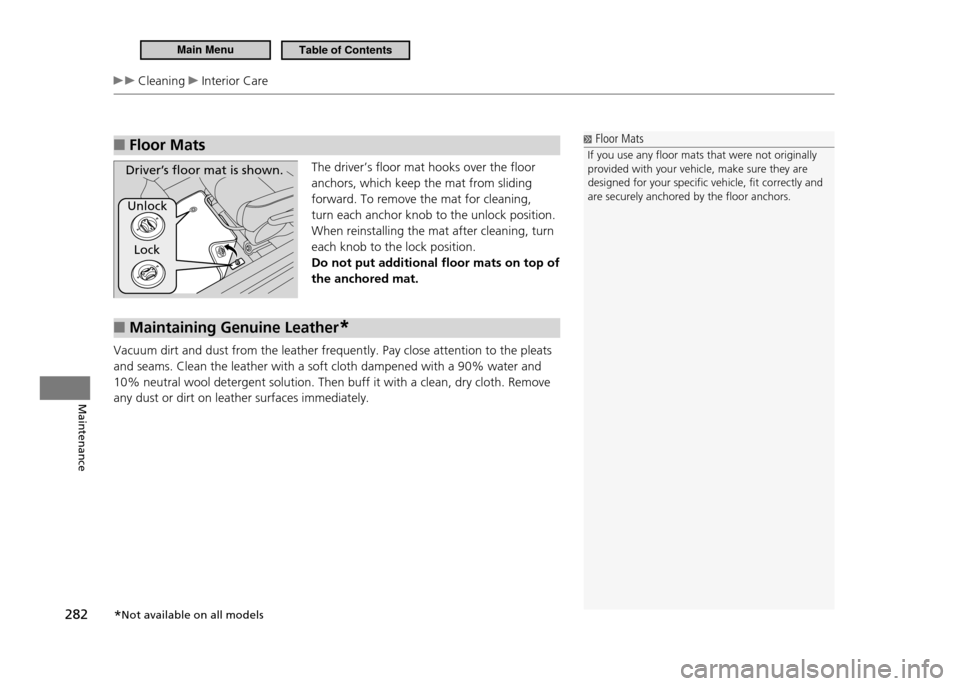
The driver’s floor mat hooks over the floor anchors, which keep the mat from sliding forward. To remove the mat for cleaning, turn each anchor knob to the unlock position. When reinstalling the mat after cleaning, turn each knob to the lock position. Do not put additional floor mats on top of the anchored mat.
Maintaining Genuine Leather
■*
Vacuum dirt and dust from the leather frequently. Pay close attention to the pleats and seams. Clean the leather with a soft cloth dampened with a 90% water and 10% neutral wool detergent solution. Then buff it with a clean, dry cloth. Remove any dust or dirt on leather surfaces immediately.
Floor Mats
If you use any loor mats that were not originally provided with your vehicle, make sure they are designed for your speciic vehicle, it correctly and are securely anchored by the loor anchors.
Driver’s loor mat is shown.
Unlock
Lock
* Not available on all models
Main MenuTable of Contents
Page 284 of 333
283
Maintenance
Cleaning Exterior Care
Exterior Care
Dust off the vehicle body after you drive. Regularly inspect your vehicle for scratches on painted surfaces. A scratch on a painted surface can result in body rust. If you find a scratch, promptly repair it.Washing the Vehicle
■
Wash the vehicle frequently. Also, make sure to wash the vehicle in the following circumstances:
If driving on roads with road salt.
•
If driving in coastal areas.
•
If tar, soot, bird droppings, insects, or tree sap are stuck to painted surfaces.
•
Using an Automated Vehicle Wash
■
Fold in the door mirrors. Make sure to follow the instructions indicated on the automated vehicle wash.
Using High Pressure Cleaners
■
Keep sufficient distance between the cleaning nozzle and the vehicle body.
•
Take particular care around the windows. Standing too close may cause water to
•
enter the vehicle interior. Do not spray water into the engine compartment.
Washing the Vehicle
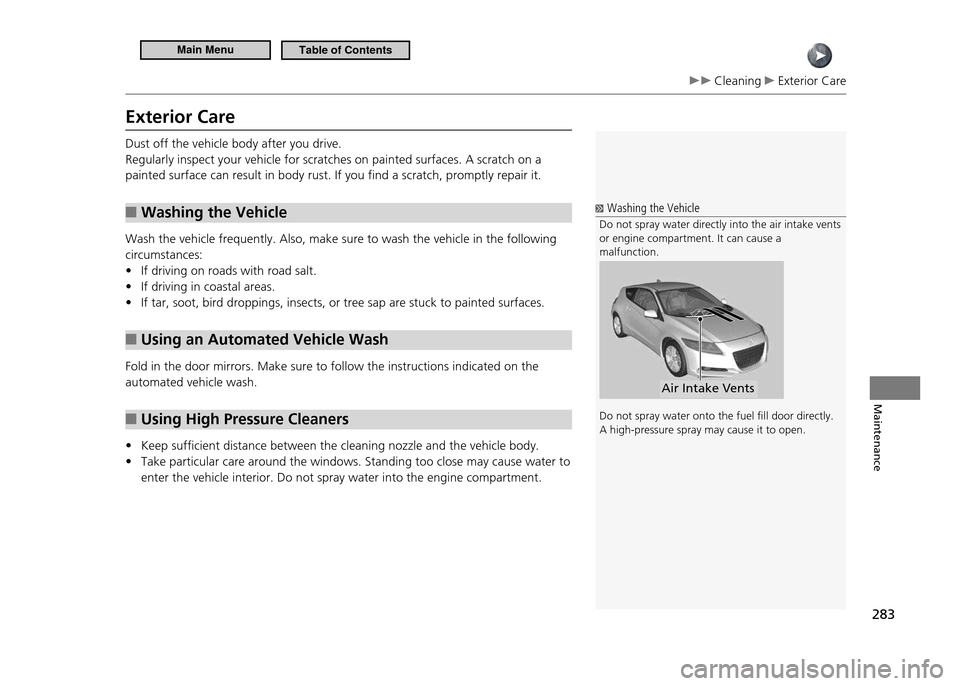
Do not spray water directly into the air intake vents or engine compartment. It can cause a malfunction. Do not spray water onto the fuel ill door directly. A high-pressure spray may cause it to open.
Air Intake Vents
Main MenuTable of Contents
Page 285 of 333
284
Maintenance
Cleaning Exterior Care
Applying Wax
■
A good coat of automotive body wax helps protect your vehicle’s paint from the elements. Wax will wear off over time and expose your vehicle’s paint to the elements, so reapply as necessary.
Maintaining the Bumpers and Other Resin Coated Parts
■
If you get gasoline, oil, engine coolant, or battery fluid on resin coated parts, they may be stained or the coating may peel. Promptly wipe it away using a soft cloth.
Cleaning the Window
■
Wipe using a glass cleaner.
Maintaining Aluminum Wheels
■
Aluminum is susceptible to deterioration caused by salt and dirt. Use a sponge and mild detergent to wipe away road dirt or salt water promptly.Be careful not to use harsh chemicals (including some commercial wheel cleaners) or a stiff brush. They can damage the clear coat of the aluminum alloy wheels that keeps the aluminum from corroding and tarnishing.
Applying Wax
NOTICE Chemical solvents and strong cleaners can damage the paint, metal, and plastic on your vehicle. Wipe up spills immediately.
Maintaining the Bumpers and Other Resin Coated
Parts
Ask a dealer about the correct coating material when you want to repair the painted surface of the parts made of resin.
Cleaning the Window
Wires are mounted to the inside of the rear window. Wipe along the same direction as the wires with a soft cloth so as not to damage them.
Main MenuTable of Contents
Page 294 of 333
293
Handling the Unexpected
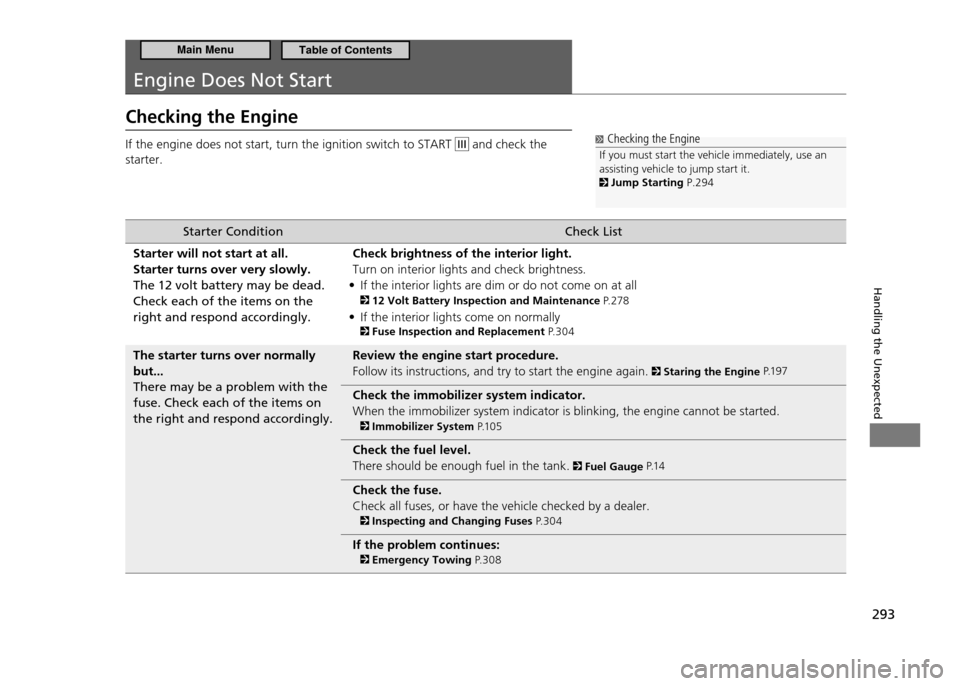
Engine Does Not Start
Checking the Engine If the engine does not start, turn the ignition switch to START
and check the
starter. Checking the Engine
If you must start the vehicle immediately, use an assisting vehicle to jump start it.
Jump Starting P.294
Starter Condition Check List
Starter will not start at all. Starter turns over very slowly.The 12 volt battery may be dead. Check each of the items on the right and respond accordingly. Check brightness of the interior light.Turn on interior lights and check brightness.
If the interior lights are dim or do not come on at all
•
12 Volt Battery Inspection and Maintenance P. 2 7 8
If the interior lights come on normally
•
Fuse Inspection and Replacement P. 3 0 4
The starter turns over normally but...There may be a problem with the fuse. Check each of the items on the right and respond accordingly. Review the engine start procedure.Follow its instructions, and try to start the engine again.
Staring the Engine
P.1 9 7
Check the immobilizer system indicator. When the immobilizer system indicator is blinking, the engine cannot be started.
Immobilizer System P.1 0 5
Check the fuel level. There should be enough fuel in the tank.
Fuel Gauge P.1 4
Check the fuse. Check all fuses, or have the vehicle checked by a dealer.
Inspecting and Changing Fuses P. 3 0 4
If the problem continues:
Emergency Towing P. 3 0 8
Main MenuTable of Contents