wipers HONDA CR-Z 2011 1.G Owners Manual
[x] Cancel search | Manufacturer: HONDA, Model Year: 2011, Model line: CR-Z, Model: HONDA CR-Z 2011 1.GPages: 333, PDF Size: 9.97 MB
Page 4 of 333
3
Quick Reference Guide
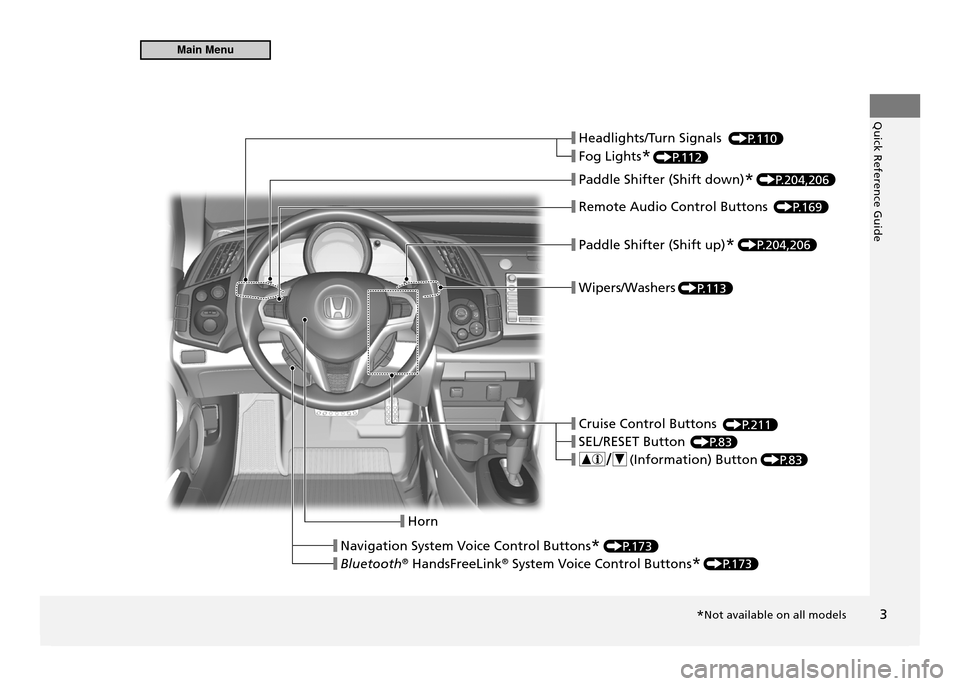
❙ Headlights/Turn Signals
❙ Fog Lights
*
❙ Paddle Shifter (Shift down)
*
❙ Remote Audio Control Buttons
❙ Paddle Shifter (Shift up)
*
❙ Wipers/Washers
❙ Cruise Control Buttons
❙ SEL/RESET Button
❙ ( Information) Button
❙ Horn
❙ Navigation System Voice Control Buttons
*
❙ Bluetooth ®
HandsFreeLink ®
System Voice Control Buttons *
P.110
P.112
P.204,206
P.204,206
P.169
P.113
P.211
P.83
P.83
P.173
P.173
*Not available on all models
Main Menu
Page 7 of 333
6
Quick Reference GuideVisual Index
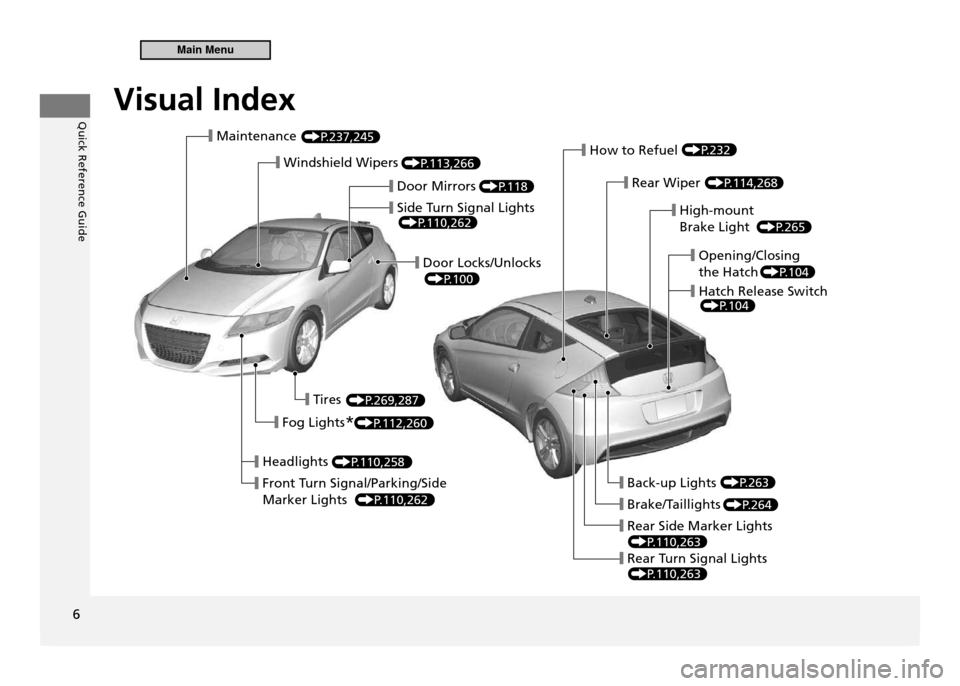
■ Maintenance
■ Windshield Wipers
■ Headlights
■ Front Turn Signal/Parking/Side Marker Lights■ Back-up Lights
■ Brake/Taillights
■ Rear Side Marker Lights
■ Rear Turn Signal Lights
■ Door Mirrors
■ Side Turn Signal Lights
■ Door Locks/Unlocks
■ Tires
■ Fog Lights
*
■ How to Refuel
■ Rear Wiper
■ Opening/Closing the Hatch
■ Hatch Release Switch
■ High-mount Brake Light
P.237,245
P.113,266
P.118
P.110,262
P.100
P.269,287
P.112,260
P.110,258
P.110,262
P.263
P.264
P.110,263
P.110,263
P.232
P.114,268
P.104
P.104
P.265
Visual Index
Main Menu
Page 16 of 333
Quick Reference Guide
15
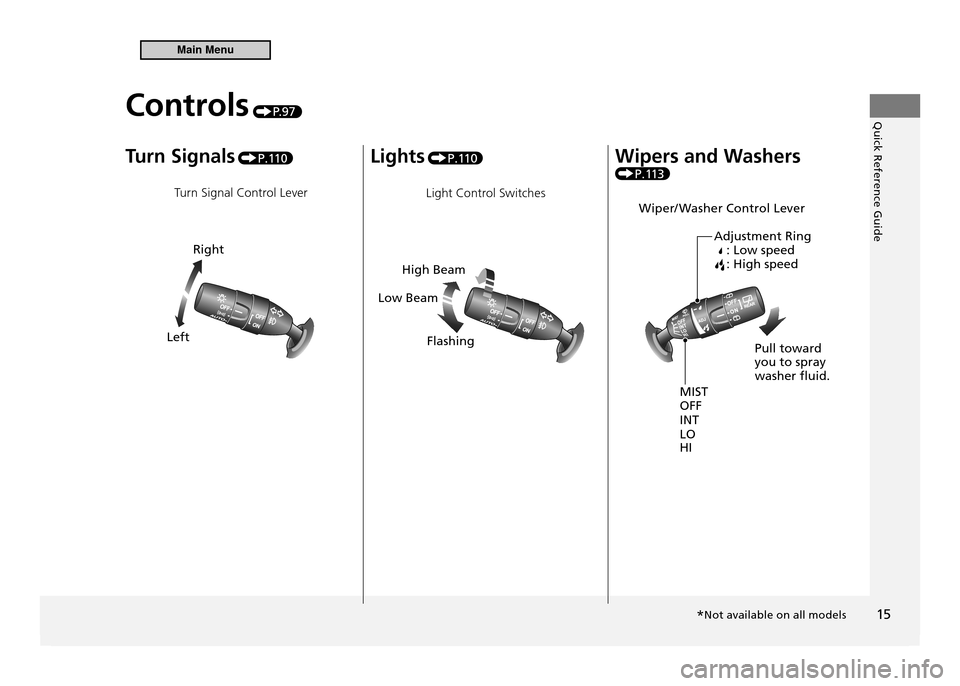
Turn Signals P.11 0
Turn Signal Control Lever Lights
P.11 0
Light Control Switches Wipers and Washers
P.113
Wiper/ Washer Control Lever
Right
Left
High Beam
Low Beam
Flashing
MIST INT LO HI
OFF Pull toward you to spray washer luid.
Adjustment Ring
: Low speed: High speed
Controls P. 9 7
*Not available on all models
Main Menu
Page 98 of 333
Controls
This chapter explains how to operate the various controls necessary for driving.
97
Setting the Clock
....................................... 98
Locking and Unlocking the Doors Key Types and Functions .......................... 99 Locking/Unlocking the Doors from
the Outside ........................................... 100Locking/Unlocking the Doors from
the Inside .............................................. 102
Auto Door Lock/Unlock .......................... 103
Opening and Closing the Hatch ............. 104
Security System ....................................... 105
Immobilizer System ................................ 105
Security Alarm System ............................ 105
Opening and Closing the Windows ....... 107Operating the Switches Around the Steering Wheel
Ignition Switch ....................................... 109
Turn Signals ........................................... 110
Light Switches ........................................ 110Fog Lights * ............................................ 112
Daytime Running Lights .......................... 112
Wipers and Washers ............................... 113
Brightness Control .................................. 115Rear Defogger/Heated Door Mirror *
Button ................................................... 116
Adjusting the Steering Wheel ................. 117 Adjusting the Mirror
Interior Rearview Mirror .......................... 118
Door Mirrors .......................................... 118
Adjusting the Seats Adjusting the Seat Position ..................... 119
Interior Lights/Interior Convenience Items Interior Lights ......................................... 123
Interior Convenience Items ..................... 125
Climate Control System Using Automatic Climate Control ........... 131
Automatic Climate Control Sensors ........ 133
* Not available on all models
Main Menu
Page 114 of 333
113
Controls
Operating the Switches Around the Steering Wheel Wipers and Washers
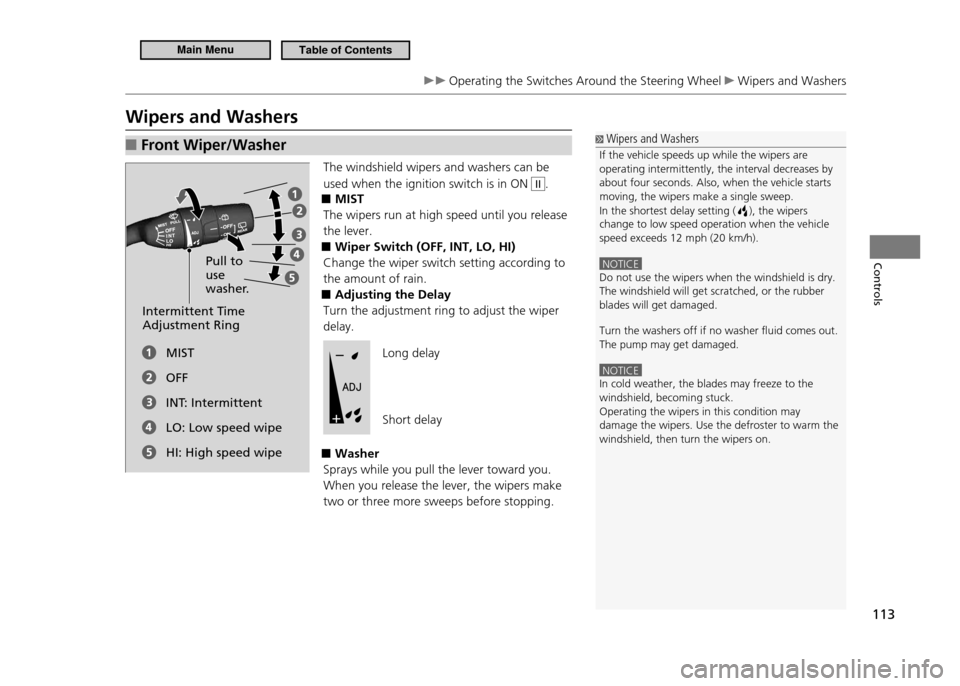
Wipers and Washers
Wipers and Washers
If the vehicle speeds up while the wipers are operating intermittently, the interval decreases by about four seconds. Also, when the vehicle starts moving, the wipers make a single sweep. In the shortest delay setting (
), the wipers
change to low speed operation when the vehicle speed exceeds 12 mph (20 km/h).
NOTICE Do not use the wipers when the windshield is dry. The windshield will get scratched, or the rubber blades will get damaged. Turn the washers off if no washer luid comes out. The pump may get damaged.
NOTICE In cold weather, the blades may freeze to the windshield, becoming stuck.Operating the wipers in this condition may damage the wipers. Use the defroster to warm the windshield, then turn the wipers on.
Front Wiper/Washer
■
The windshield wipers and washers can be used when the ignition switch is in ON
II.
MIST
■
The wipers run at high speed until you release the lever.
Wiper Switch (OFF, INT, LO, HI)
■
Change the wiper switch setting according to the amount of rain.
Adjusting the Delay
■
Turn the adjustment ring to adjust the wiper delay.
Washer
■
Sprays while you pull the lever toward you. When you release the lever, the wipers make two or three more sweeps before stopping.
Pull to use
washer.
Intermittent Time Adjustment Ring
MIST OFF
INT: IntermittentLO: Low speed wipeHI: High speed wipeLong delay Short delay
Main MenuTable of Contents
Page 115 of 333
114
Controls
Operating the Switches Around the Steering Wheel Wipers and Washers
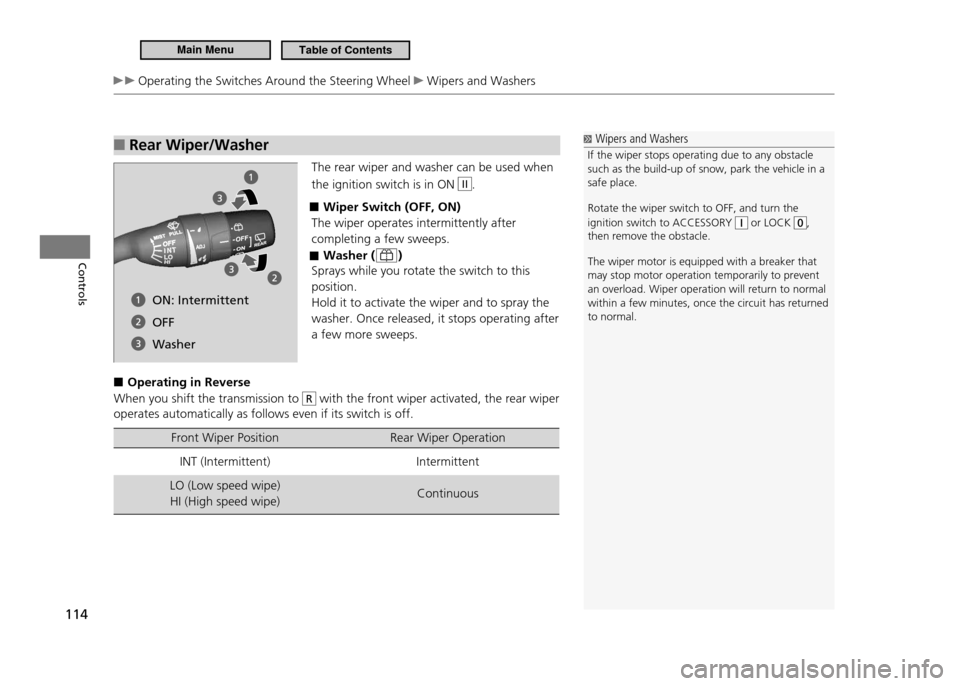
Rear Wiper/Washer
■
The rear wiper and washer can be used when the ignition switch is in ON
II.
Wiper Switch (OFF, ON)
■
The wiper operates intermittently after completing a few sweeps.
Washer (
■
)
Sprays while you rotate the switch to this position.Hold it to activate the wiper and to spray the washer. Once released, it stops operating after a few more sweeps.
Operating in Reverse
■
When you shift the transmission to
R with the front wiper activated, the rear wiper
operates automatically as follows even if its switch is off.
Front Wiper Position Rear Wiper Operation
INT (Intermittent) Intermittent
LO (Low speed wipe) HI (High speed wipe) Continuous
Wipers and Washers
If the wiper stops operating due to any obstacle such as the build-up of snow, park the vehicle in a safe place. Rotate the wiper switch to OFF, and turn the ignition switch to ACCESSORY
or LOCK ,
then remove the obstacle. The wiper motor is equipped with a breaker that may stop motor operation temporarily to prevent an overload. Wiper operation will return to normal within a few minutes, once the circuit has returned to normal.
ON: Intermittent OFF
Washer
Main MenuTable of Contents
Page 225 of 333
224
Driving
Parking Your Vehicle Auto Idle Stop (Automatic Transmission - CVT)
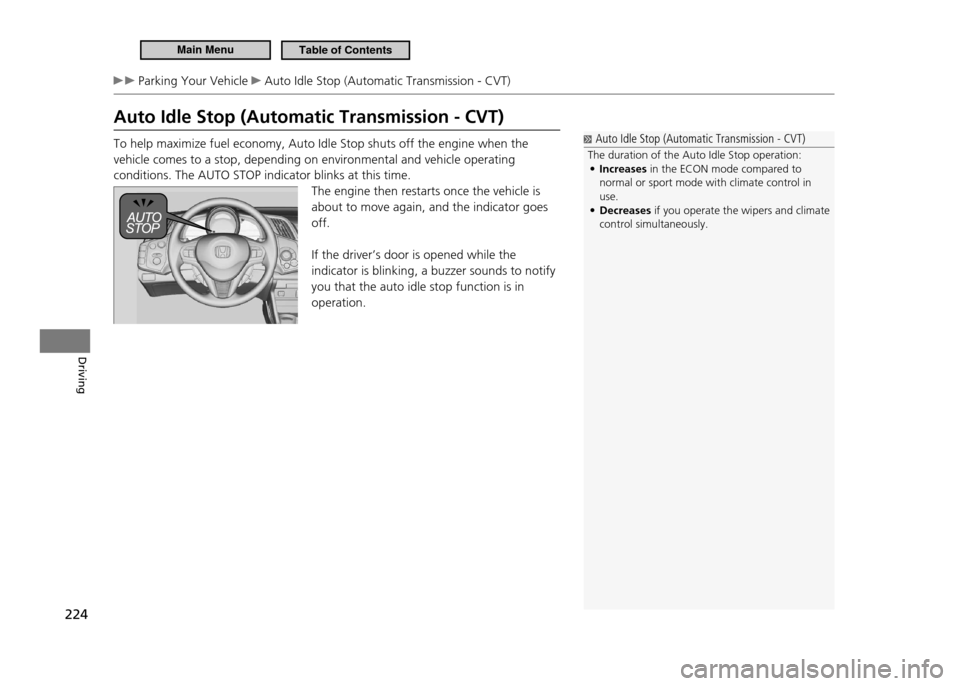
Auto Idle Stop (Automatic Transmission - CVT) To help maximize fuel economy, Auto Idle Stop shuts off the engine when the vehicle comes to a stop, depending on environmental and vehicle operating conditions. The AUTO STOP indicator blinks at this time.The engine then restarts once the vehicle is about to move again, and the indicator goes off. If the driver’s door is opened while the indicator is blinking, a buzzer sounds to notify you that the auto idle stop function is in operation.
Auto Idle Stop (Automatic Transmission - CVT)
The duration of the Auto Idle Stop operation: Increases
• in the ECON mode compared to
normal or sport mode with climate control in use.Decreases
• if you operate the wipers and climate
control simultaneously.
Main MenuTable of Contents
Page 228 of 333
227
Driving
Parking Your Vehicle Auto Idle Stop (Manual Transmission)
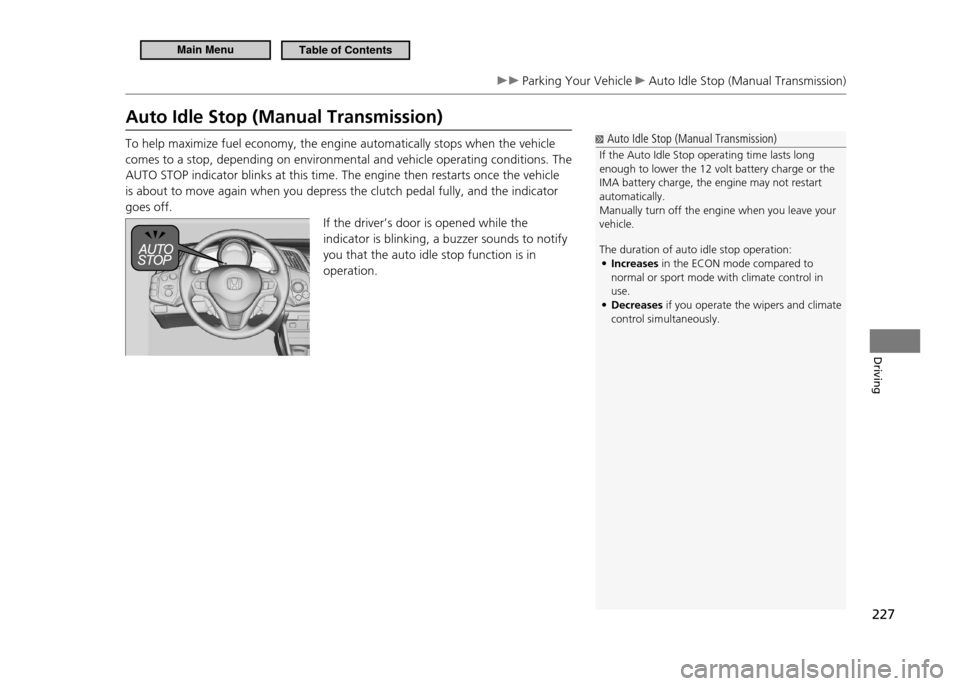
Auto Idle Stop (Manual Transmission) To help maximize fuel economy, the engine automatically stops when the vehicle comes to a stop, depending on environmental and vehicle operating conditions. The AUTO STOP indicator blinks at this time. The engine then restarts once the vehicle is about to move again when you depress the clutch pedal fully, and the indicator goes off.If the driver’s door is opened while the indicator is blinking, a buzzer sounds to notify you that the auto idle stop function is in operation.
Auto Idle Stop (Manual Transmission)
If the Auto Idle Stop operating time lasts long enough to lower the 12 volt battery charge or the IMA battery charge, the engine may not restart automatically.Manually turn off the engine when you leave your vehicle. The duration of auto idle stop operation: Increases
• in the ECON mode compared to
normal or sport mode with climate control in use.Decreases
• if you operate the wipers and climate
control simultaneously.
Main MenuTable of Contents
Page 247 of 333
246
Maintenance
Maintenance Under the Hood Opening the Hood
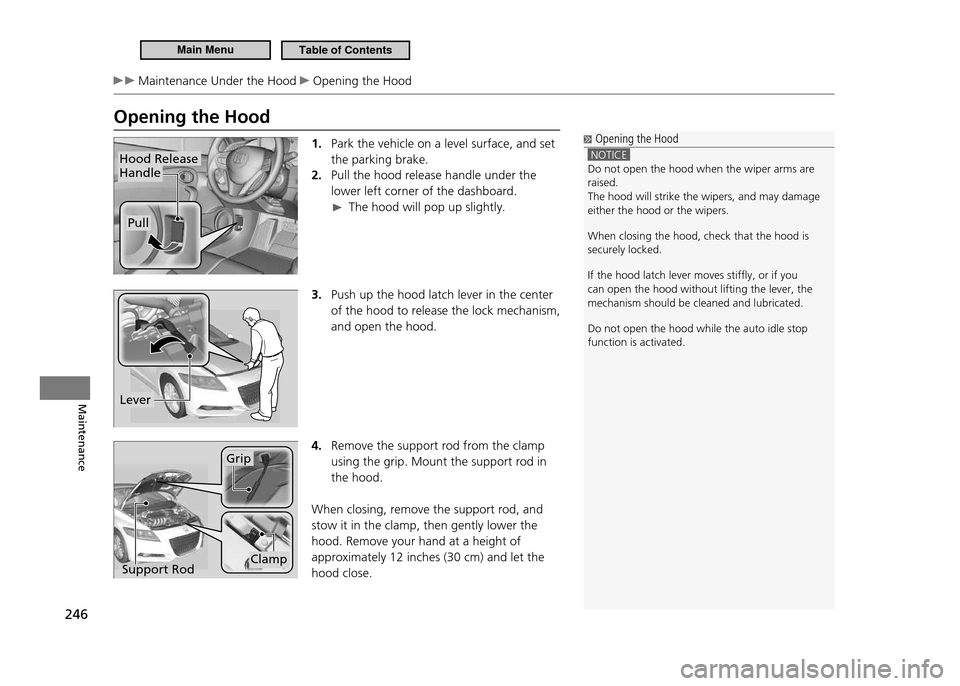
Opening the Hood1. Park the vehicle on a level surface, and set the parking brake.Pull the hood release handle under the
2.
lower left corner of the dashboard.
The hood will pop up slightly.
3. Push up the hood latch lever in the center
of the hood to release the lock mechanism, and open the hood.
4. Remove the support rod from the clamp using the grip. Mount the support rod in the hood.
When closing, remove the support rod, and stow it in the clamp, then gently lower the hood. Remove your hand at a height of approximately 12 inches (30 cm) and let the hood close.
Hood Release Handle
Pull
Opening the Hood
NOTICE Do not open the hood when the wiper arms are raised.The hood will strike the wipers, and may damage either the hood or the wipers. When closing the hood, check that the hood is securely locked. If the hood latch lever moves stifly, or if you can open the hood without lifting the lever, the mechanism should be cleaned and lubricated. Do not open the hood while the auto idle stop function is activated.
Lever
Support Rod
Grip
Clamp
Main MenuTable of Contents
Page 332 of 333
331
Index
Index U to W
Trip Meter .........................................................................84
Troubleshooting
........................................................285
Blown Fuse ..................................................................
307
Brake Pedal Vibrates ..................................................
24
Buzzer Sounds When Opening Door ..............
25
Emergency Towing ................................................
308
Engine Won’t Start .................................................
293
Noise When Braking .................................................
25
Overheating ................................................................
297
Puncture/Flat Tire .....................................................
287
Regular Gasoline ............................................
231,312
Shift Lever Won’t Move ......................................
296
Warning Indicators ....................................................
68
Turn signals
....................................................................11 0
Indicators (Instrument Panel) ...............................
75
U
USB Adapter .......................................................13 6 ,13 8
USB Device
......................................................................137
Unlocking the Doors
................................................99
V
Vanity Mirrors ...................................................................5
Vehicle Identification Numbers
.....................314
Vehicle Stability Assist (VSA ®
)
.........................214
Off Indicator ........................................................
71, 215
Off Switch ....................................................................
215
System Indicator ................................................
71, 215
Ventilation
.....................................................................131
Viscosity (Oil)
.......................................................2 4 7, 3 13
VSA ®
(Vehicle Stability Assist)
.........................214
W
Warning and Information Message .............78
Warning Indicator On/Blinking
......................299
Warning Labels
.............................................................65
Warranties (Warranty Manual provided separately)
...................................................................321
Wat ts
..................................................................................312
Wear Indicators (Tire)
..........................................274
Wheel Nut Wrench (Jack Handle)
...............290
Windows (Opening and Closing)
..................107
Window Washers
......................................................113
Adding/Refilling Fluid ............................................
257
Switch .............................................................................
113Windshield
.....................................................................113
Cleaning .......................................................................
284
Defrosting/Defogging ...........................................
132
Wipers and Washers ..............................................
113
Washer Fluid ......................................................
2 5 7, 3 12
Wiper Blades ..............................................................
266
Winter Tires
...................................................................277
Snow Tires ...................................................................
277
Tire Chains ...................................................................
277
Wipers and Washers
...............................................113
Checking and Replacing Wiper Blades ........
266
WMA
.............................................14 5 ,14 9 ,15 6 ,15 8 ,16 5
Worn Tires
.....................................................................269
Main Menu