buttons HONDA CR-Z 2012 1.G Owners Manual
[x] Cancel search | Manufacturer: HONDA, Model Year: 2012, Model line: CR-Z, Model: HONDA CR-Z 2012 1.GPages: 333, PDF Size: 10.43 MB
Page 4 of 333
3
Quick Reference Guide
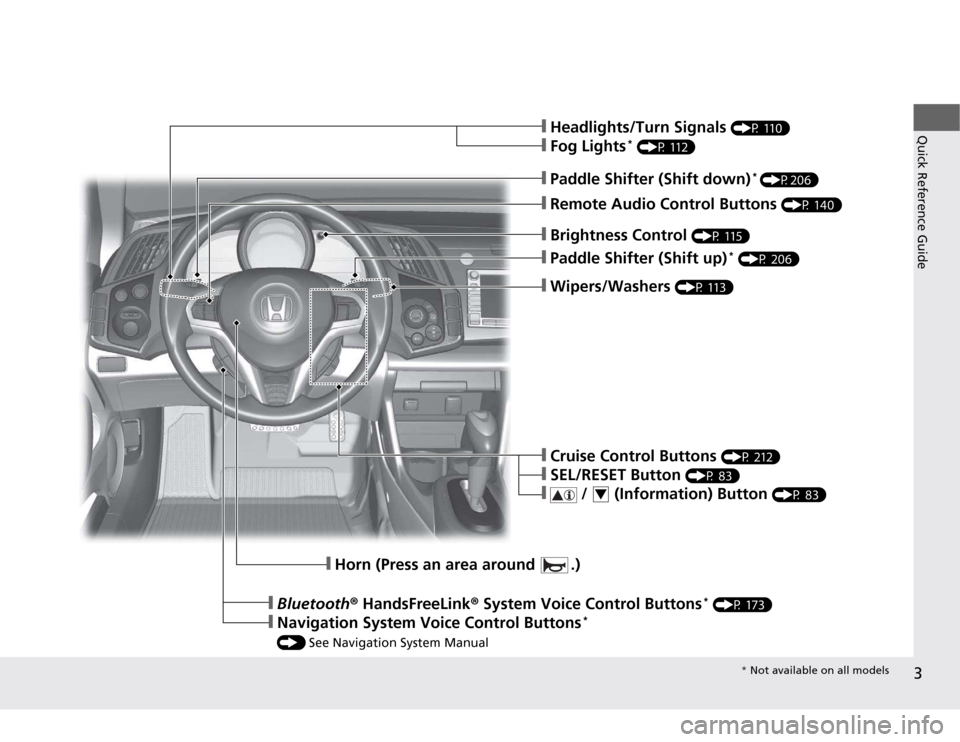
❙Wipers/Washers (P 113)
❙Paddle Shifter (Shift up) *
(P 206)
❙Brightness Control (P 115)
❙Headlights/Turn Signals (P 110)
❙Fog Lights*
(P 112)
❙Remote Audio Control Buttons (P 140)
❙Paddle Shifter (Shift down)*
(P206)
❙Cruise Control Buttons (P 212)
❙SEL/RESET Button (P 83)
❙ / (Information) Button (P 83)4
❙Horn (Press an area around .)
❙Bluetooth® HandsFreeLink ® System Voice Control Buttons *
(P 173)
❙Navigation System Voice Control Buttons *
() See Navigation System Manual
* Not available on all models
Page 8 of 333
7
Quick Reference Guide
3-Mode Drive System
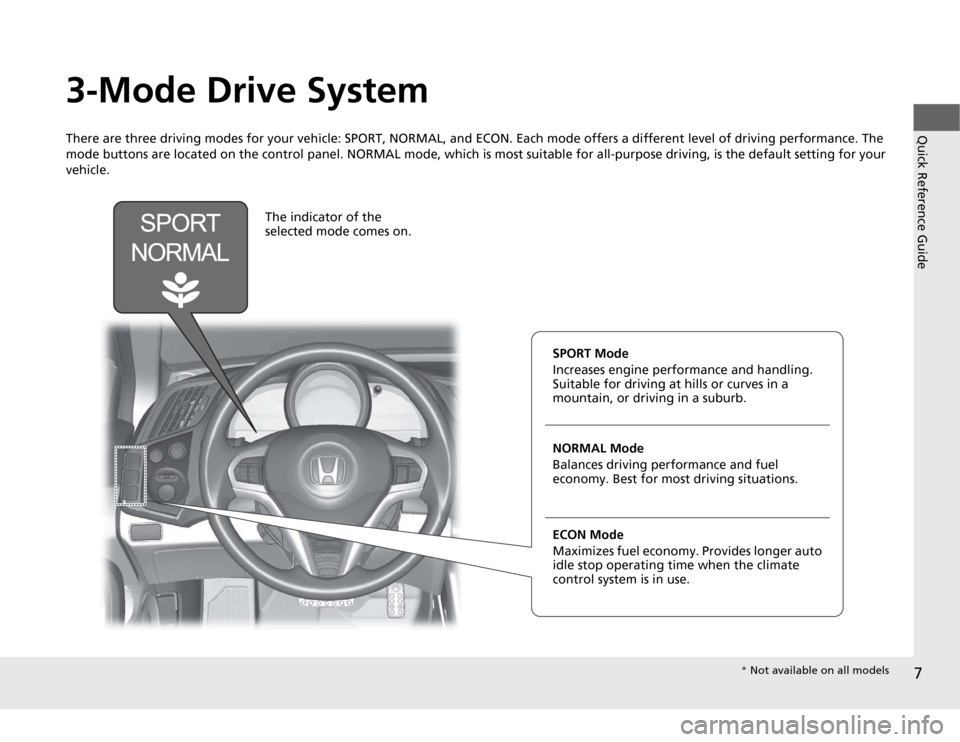
There are three driving modes for your vehicle: SPORT, NORMAL, and ECON. Each mode offers a different level of driving performance. The
mode buttons are located on the control panel. NORMAL mode, which is most suitable for all-purpose driving, is the default sett ing for your
vehicle.
The indicator of the
selected mode comes on.
SPORT Mode
Increases engine performance and handling.
Suitable for driving at h ills or curves in a
mountain, or driving in a suburb. NORMAL Mode
Balances driving performance and fuel
economy. Best for most driving situations. ECON Mode
Maximizes fuel econom y. Provides longer auto
idle stop operating time when the climate
control system is in use.
* Not available on all models
Page 19 of 333
18
Quick Reference Guide
Features (P135)
Audio System (P136)
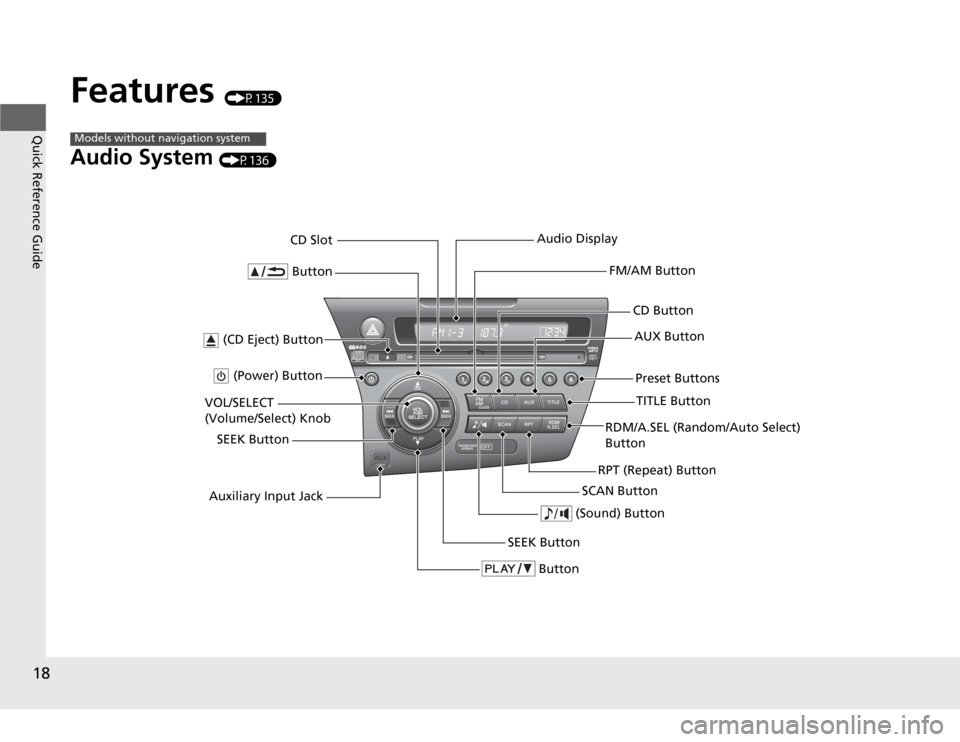
Models without navigation system
Button
TITLE Button
FM/AM Button
(Power) Button
CD Button AUX Button
CD Slot
(CD Eject) Button
SCAN Button
(Sound) Button
VOL/SELECT
(Volume/Select) Knob
SEEK ButtonPreset Buttons
Button
SEEK Button
Auxiliary Input Jack Audio Display
RDM/A.SEL (Random/Auto Select) Button
RPT (Repeat) Button
Page 20 of 333
19
Quick Reference Guide
Audio System (P136)
For navigation system operation () See Navigation System Manual
Models with navigation system
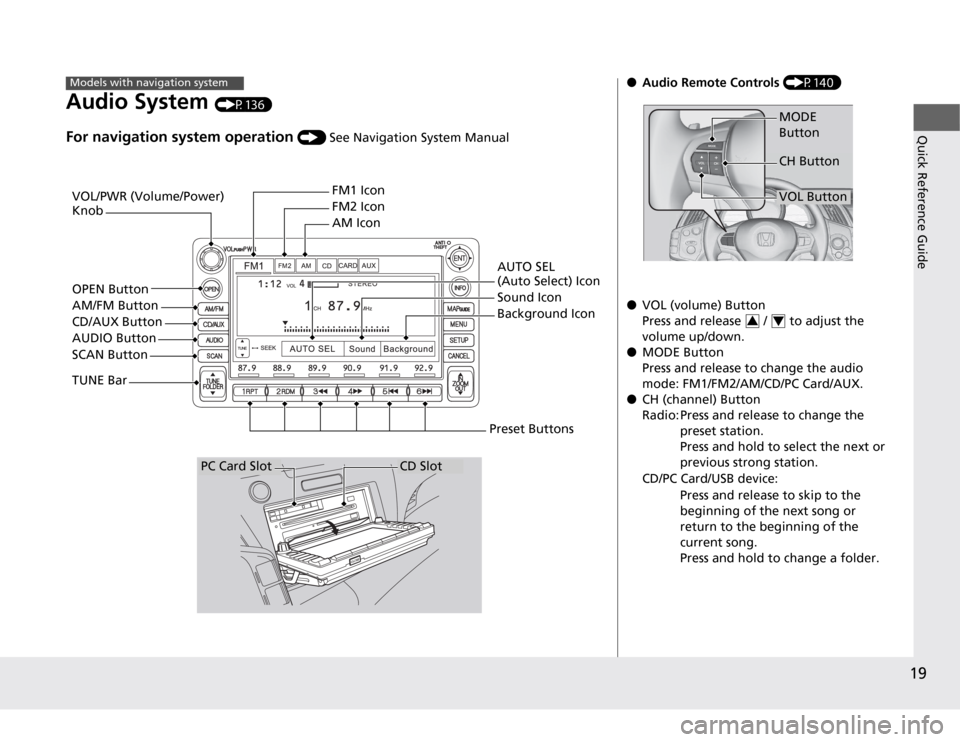
VOL/PWR (Volume/Power) Knob FM1 Icon
FM2 Icon AM Icon
OPEN Button
AM/FM Button CD/AUX Button
AUDIO Button
SCAN Button
TUNE Bar AUTO SEL
(Auto Select) Icon
Sound Icon
Background Icon
Preset Buttons
CD SlotPC Card Slot
● Audio Remote Controls (P140)
● VOL (volume) Button
Press and release / to adjust the
volume up/down.
● MODE ButtonPress and release to ch ange the audio
mode: FM1/FM2/AM/CD/PC Card/AUX.
● CH (channel) Button
Radio: Press and release to change the
preset station.
Press and hold to select the next or
previous strong station.
CD/PC Card/USB device:
Press and release to skip to the
beginning of the next song or
return to the beginning of the
current song.
Press and hold to change a folder.
MODE Button
VOL Button
CH Button
34
Page 21 of 333
20
Quick Reference Guide
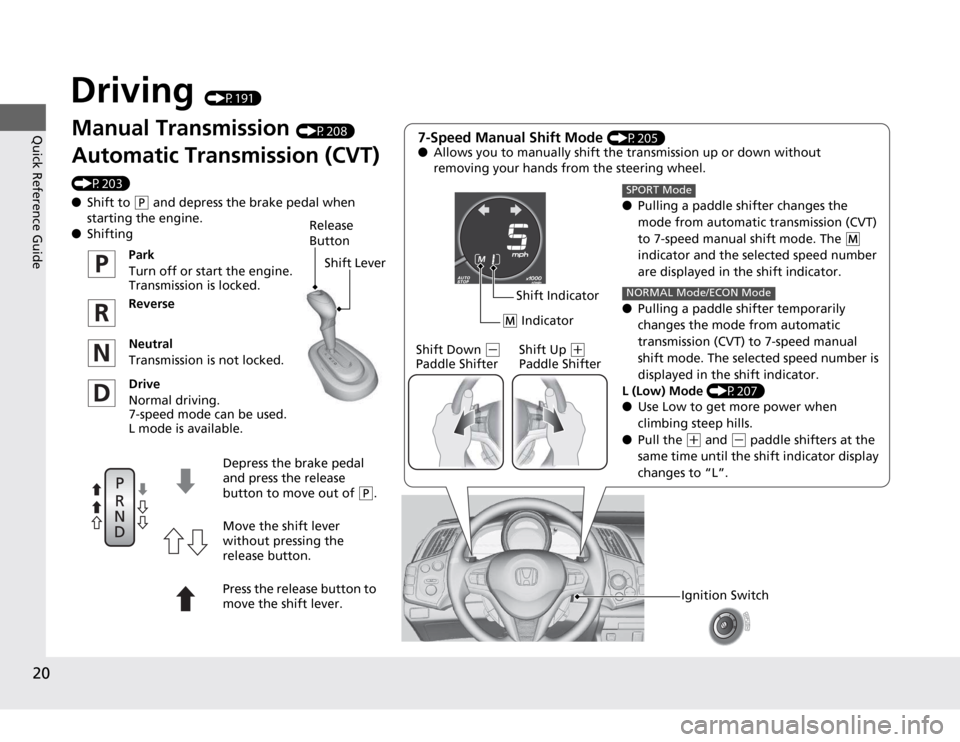
Driving (P191)
Manual Transmission (P208)
Automatic Transmission (CVT)
(P203) ● Shift to
(P and depress the brake pedal when
starting the engine.
● Shifting 7-Speed Manual Shift Mode
(P205)
● Allows you to manually shift the transmission up or down without
removing your hands from the steering wheel.
●Pulling a paddle shifter changes the
mode from automatic transmission (CVT)
to 7-speed manual shift mode. The
(M
indicator and the selected speed number
are displayed in the shift indicator.
● Pulling a paddle shifter temporarily
changes the mode from automatic
transmission (CVT) to 7-speed manual
shift mode. The selected speed number is
displayed in the shift indicator.
L (Low) Mode (P207)
● Use Low to get more power when
climbing steep hills.
● Pull the
(+ and (- paddle shifters at the
same time until the shift indicator display
changes to “L”.
SPORT Mode
NORMAL Mode/ECON Mode
(
M Indicator
Shift Indicator
Shift Down
(-
Paddle Shifter Shift Up (+
Paddle Shifter
Ignition Switch
Release
ButtonShift Lever
Park
Turn off or start the engine.
Transmission is locked.
Reverse
Neutral
Transmission is not locked.
Drive
Normal driving.
7-speed mode can be used.
L mode is available.
Depress the brake pedal
and press the release button to move out of
(P.
Move the shift lever
without pressing the
release button.
Press the release button to
move the shift lever.
Page 133 of 333
132
Controls
Climate Control System
Using Automatic Climate Control
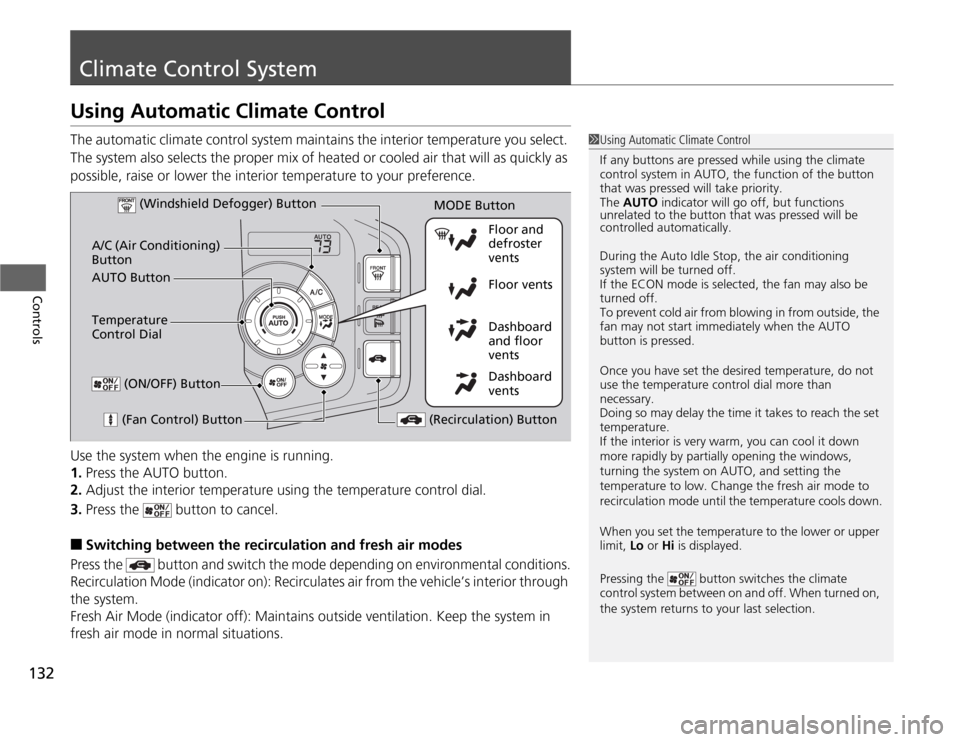
The automatic climate control system maintains the interior temperature you select.
The system also selects the proper mix of heated or cooled air that will as quickly as
possible, raise or lower the interior temperature to your preference.
Use the system when the engine is running. 1.Press the AUTO button.
2. Adjust the interior temperature using the temperature control dial.
3. Press the button to cancel.
■ Switching between the recirculation and fresh air modes
Press the button and sw itch the mode depending on environmental conditions.
Recirculation Mode (indicator on): Recirculates air from the vehicle’s interior through
the system.
Fresh Air Mode (indicator off): Maintains outside ventilation. Keep the system in
fresh air mode in normal situations.
1Using Automatic Climate Control
If any buttons are pressed while using the climate
control system in AUTO, the function of the button
that was pressed will take priority.
The AUTO indicator will go off, but functions
unrelated to the button that was pressed will be
controlled automatically.
During the Auto Idle Stop, the air conditioning
system will be turned off.
If the ECON mode is selected, the fan may also be
turned off.
To prevent cold air from blowing in from outside, the
fan may not start immediately when the AUTO
button is pressed.
Once you have set the desired temperature, do not use the temperature control dial more than necessary.
Doing so may delay the time it takes to reach the set temperature.
If the interior is very warm, you can cool it down
more rapidly by partially opening the windows,
turning the system on AUTO, and setting the
temperature to low. Change the fresh air mode to
recirculation mode until the temperature cools down.
When you set the temperature to the lower or upper
limit, Lo or Hi is displayed.
Pressing the button switches the climate
control system between on and off. When turned on,
the system returns to your last selection.
Dashboard
vents
Dashboard
and floor
vents
Floor vents
Floor and defroster
vents
AUTO Button
A/C (Air Conditioning) Button
(Fan Control) Button
(Recirculation) Button
Temperature
Control Dial (Windshield Defogger) Button
(ON/OFF) Button
MODE Button
Page 137 of 333
136
Features
Audio System
About Your Audio System
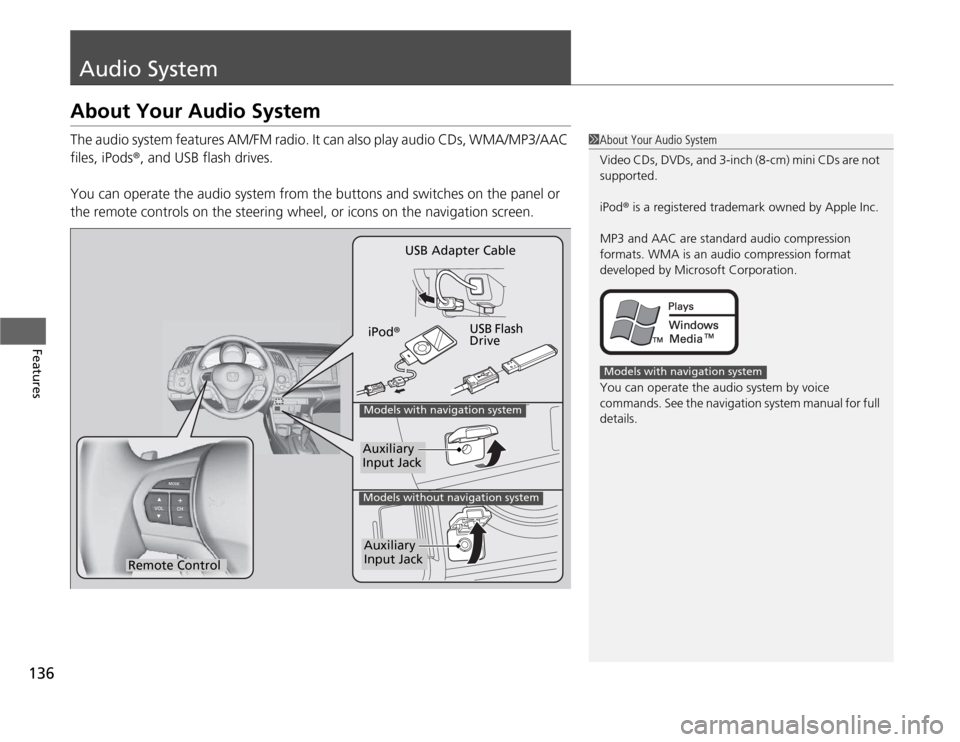
The audio system features AM/FM radio. It can also play audio CDs, WMA/MP3/AAC files, iPods®, and USB flash drives.
You can operate the audio system from the buttons and switches on the panel or
the remote controls on the steering wheel, or icons on the navigation screen.
1About Your Audio System
Video CDs, DVDs, and 3-inch (8-cm) mini CDs are not
supported.
iPod® is a registered trademark owned by Apple Inc.
MP3 and AAC are standard audio compression
formats. WMA is an audio compression format
developed by Microsoft Corporation.
You can operate the audio system by voice
commands. See the navigation system manual for full details.
Models with navigation system
Remote Control iPod
® USB Flash Drive
USB Adapter Cable
Models with navigation system
Models without navigation system
Auxiliary Input Jack
Auxiliary Input Jack
Page 139 of 333
138
uuAudio SystemuAuxiliary Input Jack
Features
Auxiliary Input Jack
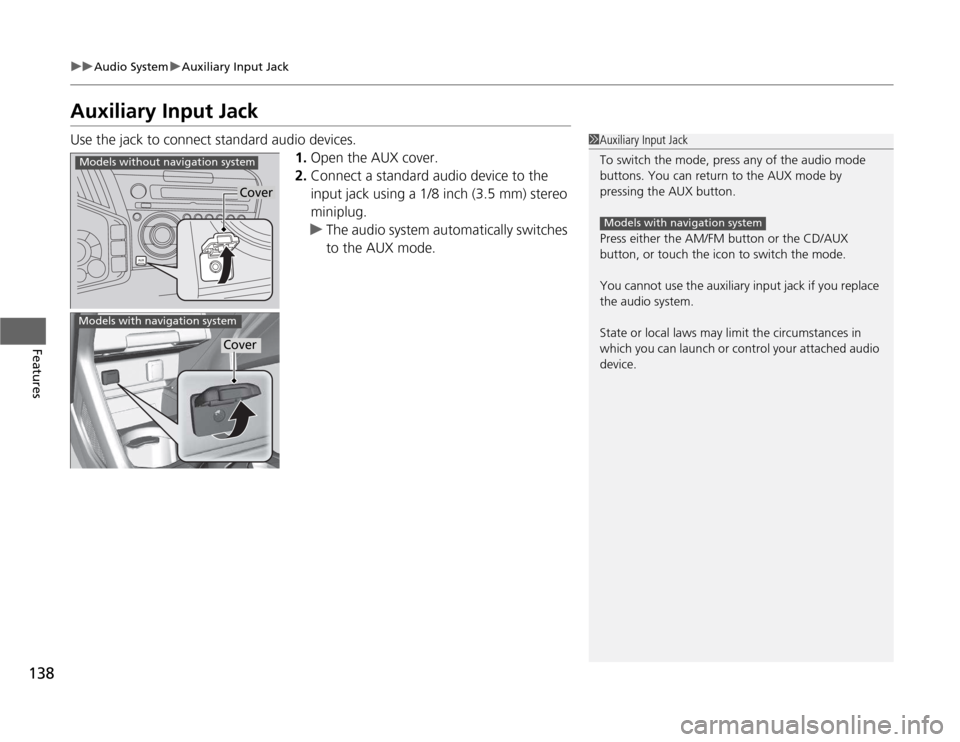
Use the jack to connect standard audio devices.1.Open the AUX cover.
2. Connect a standard audio device to the
input jack using a 1/8 inch (3.5 mm) stereo
miniplug.
uThe audio system automatically switches
to the AUX mode.
1Auxiliary Input Jack
To switch the mode, press any of the audio mode
buttons. You can return to the AUX mode by
pressing the AUX button.
Press either the AM/FM button or the CD/AUX
button, or touch the icon to switch the mode.
You cannot use the auxiliary input jack if you replace
the audio system.
State or local laws may limit the circumstances in
which you can launch or control your attached audio
device.
Models with navigation system
Cover
Models without navigation system
Models with navigation system
Cover
Page 140 of 333
139
uuAudio SystemuAudio System Theft Protection
Features
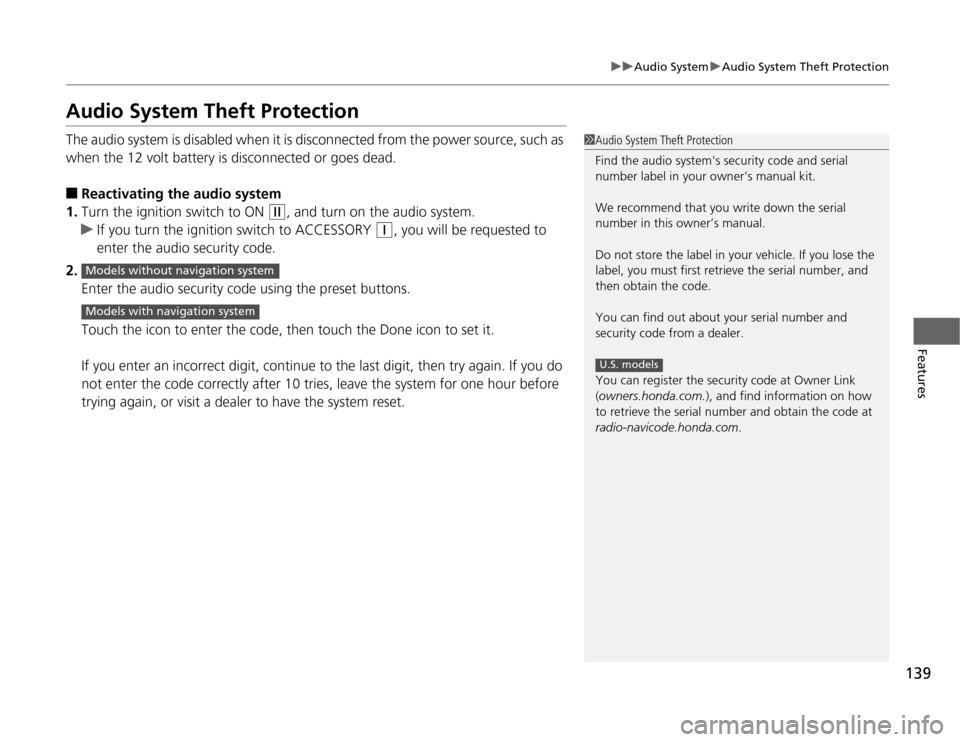
Audio System Theft Protection
The audio system is disabled when it is disconnected from the power source, such as
when the 12 volt battery is disconnected or goes dead. ■Reactivating the audio system
1. Turn the ignition switch to ON
(w , and turn on the audio system.
uIf you turn the ignition switch to ACCESSORY (q , you will be requested to
enter the audio security code.
2. Enter the audio security code using the preset buttons.
Touch the icon to enter the code, then touch the Done icon to set it.
If you enter an incorrect digit, continue to the last digit, then try again. If you do
not enter the code correctly after 10 tries, leave the system for one hour before
trying again, or visit a dealer to have the system reset.
1Audio System Theft Protection
Find the audio system's security code and serial
number label in your owner’s manual kit.
We recommend that you write down the serial
number in this owner’s manual.
Do not store the label in your vehicle. If you lose the
label, you must first retrieve the serial number, and
then obtain the code.
You can find out about your serial number and
security code from a dealer.
You can register the security code at Owner Link (owners.honda.com. ), and find information on how
to retrieve the serial number and obtain the code at
radio-navicode.honda.com .
U.S. models
Models without navigation system
Models with navigation system
Page 144 of 333
143
uuAudio without Navigation SystemuPlaying the AM/FM Radio
Continued
Features
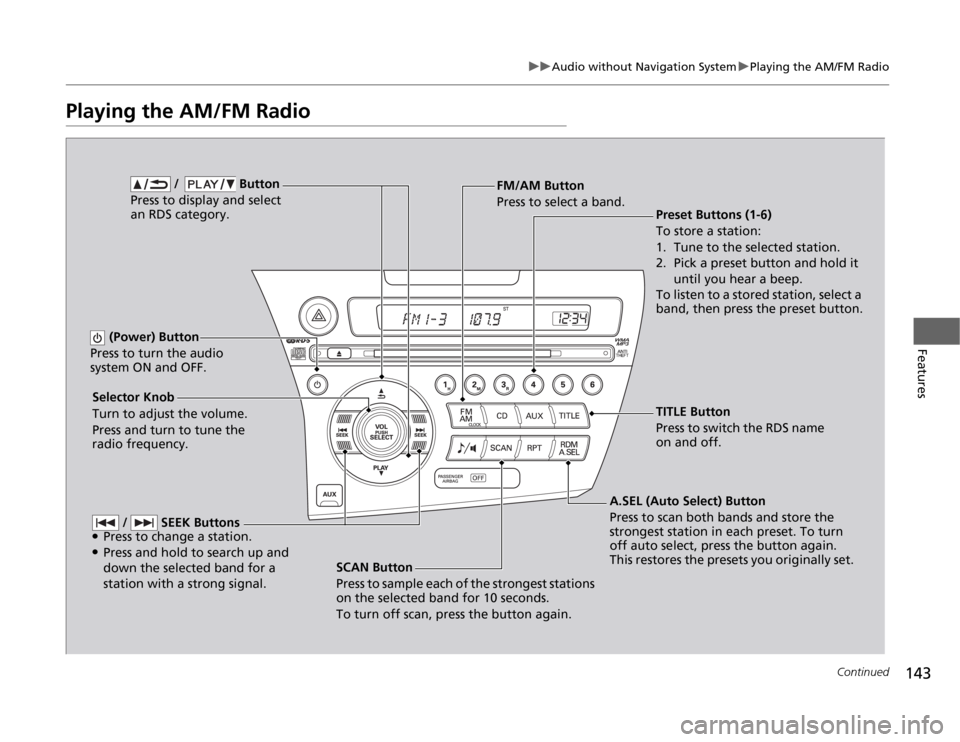
Playing the AM/FM Radio
SCAN Button
Press to sample each of the strongest stations
on the selected band for 10 seconds.
To turn off scan, press the button again.
(Power) Button
Press to turn the audio
system ON and OFF.
Preset Buttons (1-6)
To store a station:
1. Tune to the selected station.
2. Pick a preset button and hold it until you hear a beep.
To listen to a stored station, select a
band, then press the preset button.
Selector Knob
Turn to adjust the volume.
Press and turn to tune the radio frequency. FM/AM Button
Press to select a band.
A.SEL (Auto Select) Button
Press to scan both bands and store the
strongest station in each preset. To turn
off auto select, press the button again.
This restores the presets you originally set.
/ Button
Press to display and select an RDS category.
/ SEEK Buttons
● Press to change a station.
● Press and hold to search up and
down the selected band for a station with a strong signal.
TITLE Button
Press to switch the RDS name
on and off.