heating HONDA CR-Z 2012 1.G Owners Manual
[x] Cancel search | Manufacturer: HONDA, Model Year: 2012, Model line: CR-Z, Model: HONDA CR-Z 2012 1.GPages: 333, PDF Size: 10.43 MB
Page 1 of 333
Contents
This owner’s manual should be considered a permanent part of the
vehicle and should remain with the vehicle when it is sold.
This owner’s manual covers all models of your vehicle. You may find
descriptions of equipment and features that are not on your
particular model.
Images throughout this owner’s manual (including the front cover)
represent features and equipment that are available on some, but
not all, models. Your particular model may not have some of these features.
This owner's manual is for vehicles sold in the United States and Canada.
The information and specifications included in this publication were
in effect at the time of approval for printing. Honda Motor Co., Ltd.
reserves the right, however, to discontinue or change specifications
or design at any time without notice and without incurring any
obligation.2 Safe Driving P. 29
For Safe Driving P. 30 Seat Belts P. 34 Airbags P. 41
2Instrument Panel P. 67
Indicators P. 68 Gauges and Multi-Information Display P. 81
2Controls P. 97
Setting the Clock P. 98 Locking and Unlocking the Doors P. 99
Operating the Switches Around the Steering Wheel P. 109
Interior Lights/Interior Convenience Items P. 124
2Features P. 135
Audio System P. 136 Audio without Navigation System P. 141
General Information on the Audio System P. 169
2Driving P. 191
Before Driving P. 192 Towing a Trailer P. 197
Refueling P. 232 Fuel Economy P. 235
2Maintenance P. 237
Before Performing Maintenance P. 238 Maintenance Minder ™
P. 241
Checking and Maintaining Wiper Blades P. 266
Climate Control System Maintenance P. 280
2 Handling the Unexpected P. 285
Tools P. 286 If a Tire Goes Flat P. 287
Overheating P. 297 Indicator, Coming On/Blinking P. 299
2Information P. 311
Specifications P. 312 Identification Numbers P. 314
Emissions Testing P. 317 Warranty Coverages P. 319
Main Menu2012 CR-Z Online Reference Owner's Manual
Page 24 of 333
Quick Reference Guide
23
Handling the Unexpected
(P285)
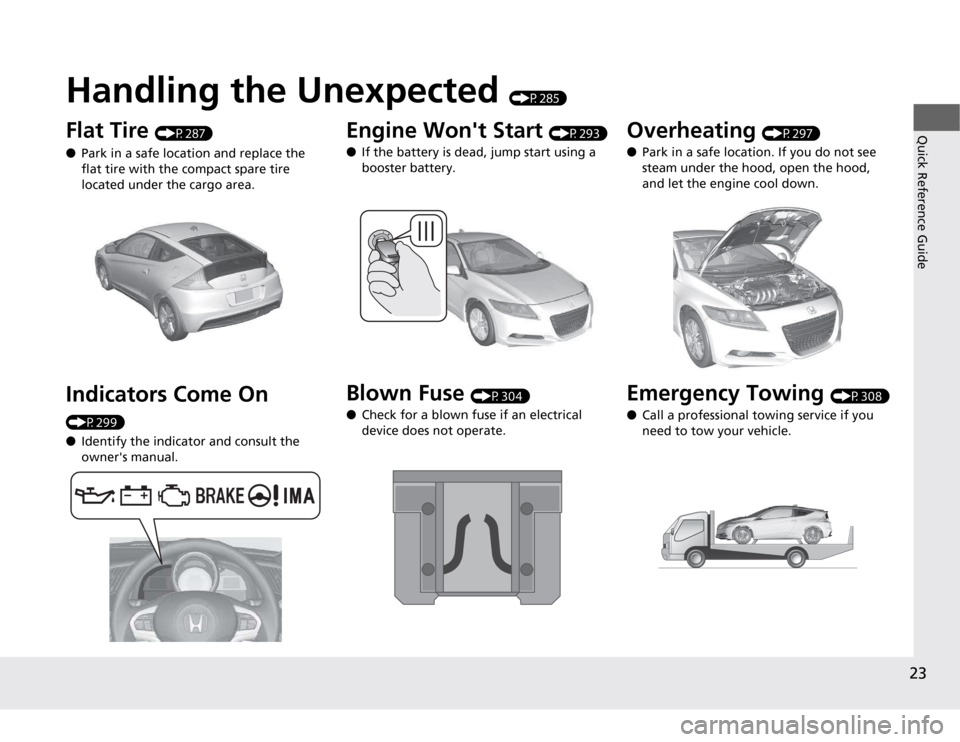
Flat Tire (P287)
● Park in a safe location and replace the
flat tire with the compact spare tire
located under the cargo area.
Indicators Come On
(P299) ● Identify the indicator and consult the owner's manual.
Engine Won't Start (P293)
● If the battery is dead, jump start using a
booster battery.
Blown Fuse (P304)
● Check for a blown fuse if an electrical
device does not operate.Overheating (P297)
● Park in a safe location. If you do not see
steam under the hood, open the hood,
and let the engine cool down.
Emergency Towing (P308)
● Call a professional towing service if you
need to tow your vehicle.
Page 74 of 333
73
uuIndicatorsu
Continued
Instrument Panel
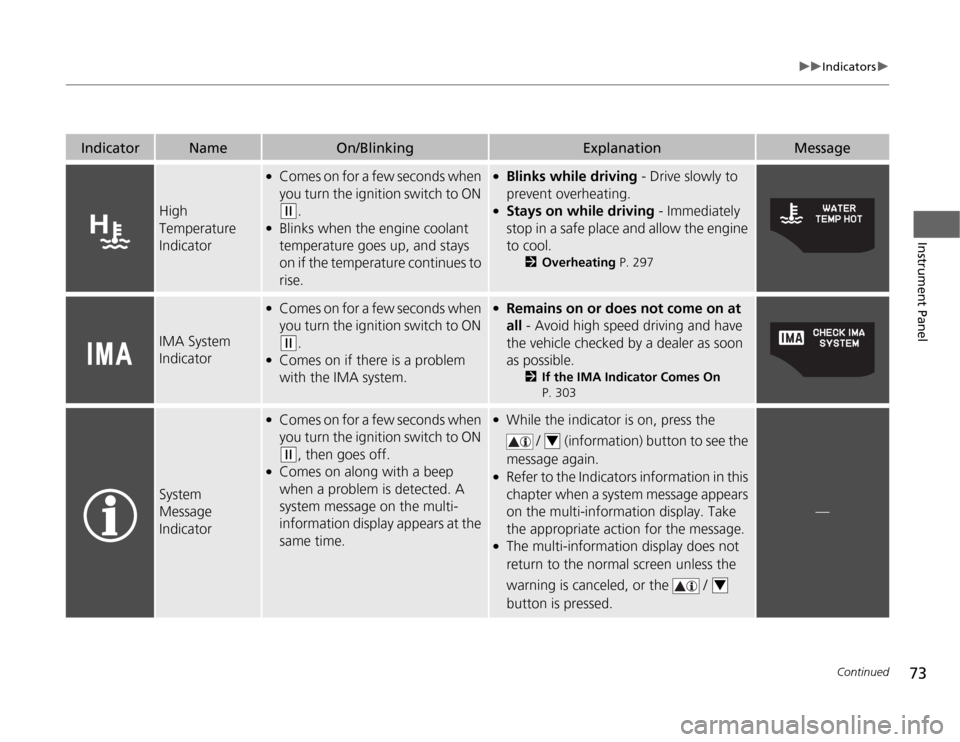
IndicatorNameOn/BlinkingExplanationMessage
High Temperature
Indicator
●Comes on for a few seconds when
you turn the ignition switch to ON
(w .
● Blinks when the engine coolant
temperature goes up, and stays
on if the temperature continues to
rise.
●Blinks while driving - Drive slowly to
prevent overheating.
● Stays on while driving - Immediately
stop in a safe place and allow the engine to cool. 2Overheating P. 297
IMA System
Indicator
●
Comes on for a few seconds when
you turn the ignition switch to ON
(w .
● Comes on if there is a problem
with the IMA system.
●Remains on or does not come on at all - Avoid high speed driving and have
the vehicle checked by a dealer as soon
as possible. 2If the IMA Indicator Comes On
P. 303
System
Message
Indicator
● Comes on for a few seconds when
you turn the ignition switch to ON
(w , then goes off.
● Comes on along with a beep
when a problem is detected. A
system message on the multi-
information display appears at the
same time.
●
While the indicator is on, press the
/ (information) button to see the
message again.
● Refer to the Indicators information in this
chapter when a system message appears
on the multi-information display. Take
the appropriate action for the message.
● The multi-information display does not
return to the normal screen unless the
warning is canceled, or the /
button is pressed.
—
4
4
Page 117 of 333
116
uuOperating the Switches Around the Steering WheeluRear Defogger/Heated Door Mirror*
Button
Controls
Rear Defogger/Heated Door Mirror *
Button
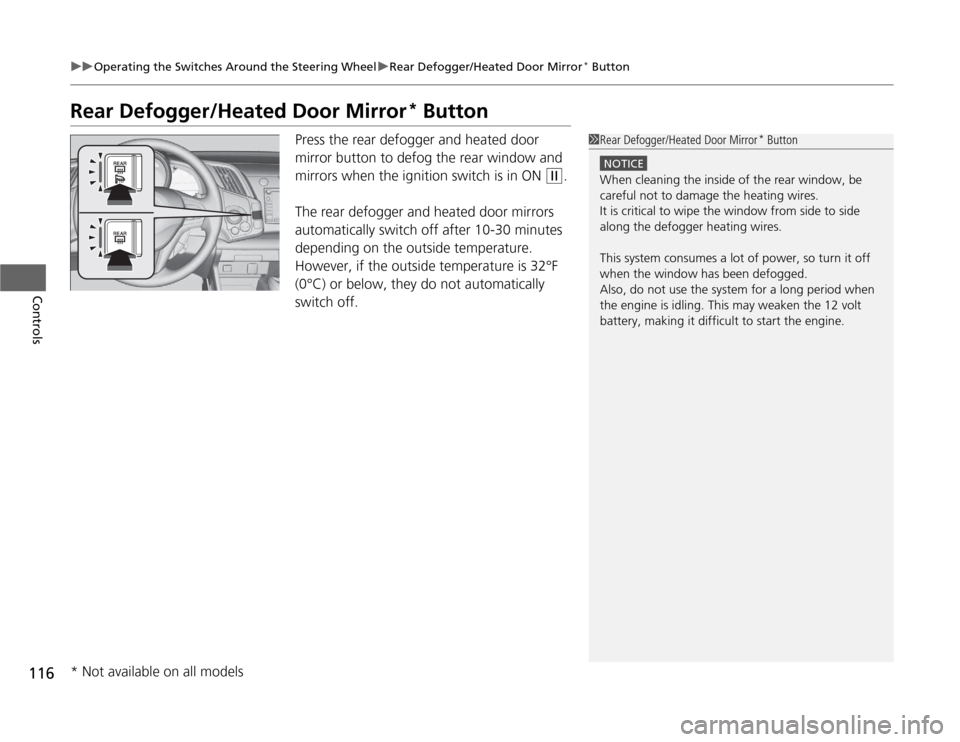
Press the rear defogger and heated door
mirror button to defog the rear window and
mirrors when the ignition switch is in ON
(w .
The rear defogger and heated door mirrors
automatically switch off after 10-30 minutes
depending on the outside temperature.
However, if the outside temperature is 32°F
(0°C) or below, they do not automatically
switch off.
1Rear Defogger/Heated Door Mirror *
Button
NOTICE
When cleaning the inside of the rear window, be
careful not to damage the heating wires.
It is critical to wipe the window from side to side
along the defogger heating wires.
This system consumes a lot of power, so turn it off
when the window has been defogged.
Also, do not use the system for a long period when
the engine is idling. This may weaken the 12 volt
battery, making it difficult to start the engine.
* Not available on all models
Page 270 of 333
269
Maintenance
Checking and Maintaining Tires
Checking Tires
To safely operate your vehicle, your tires must be of the proper type and size, in
good condition with adequate tread, and properly inflated. ■Inflation guidelines
Properly inflated tires provide the best co mbination of handling, tread life, and comfort.
Refer to the driver’s doorjamb label or specification’s page for the specified pressure.
Underinflated tires wear unevenly, adversely affect handling and fuel economy, and
are more likely to fail from overheating.
Overinflated tires make your vehicle ride harshly, are more prone to road hazards, and wear unevenly.
Every day before you drive, look at each of the tires. If one looks lower than the
others, check the pressure with a tire gauge.
At least once a month or before long trips, use a gauge to measure the pressure in
all tires, including the spare. Even tires in good condition can lose 1 to 2 psi (10 to
20 kPa, 0.1 to 0.2 kgf/cm 2
) per month.
■ Inspection guidelines
Every time you check inflation, also examine the tires and valve stems.Look for:• Bumps or bulges on the side or in the tread. Replace the tire if you find any cuts,
splits, or cracks in the side of the tire. Replace it if you see fabric or cord.
• Remove any foreign objects and inspect for air leaks.
• Uneven tread wear. Have a dealer check the wheel alignment.
• Excessive tread wear.
2 Wear Indicators P. 274
• Cracks or other damage around valve stem.
1Checking Tires
Measure the air pressure when tires are cold. This
means the vehicle has been par ked for at least three
hours, or driven less than 1 mile (1.6 km). If
necessary, add or release air until the specified pressure is reached.
If checked when hot, tire pressure can be as much as
4–6 psi (30–40 kPa, 0.3–0.4 kgf/cm 2
) higher than if
checked when cold.
Have a dealer check the tires if you feel a consistent
vibration while driving. New tires and any that have
been removed and reinstalled should be properly balanced.
3WARNING
Using tires that are excessively worn or
improperly inflated can cause a crash in
which you can be seri ously hurt or killed.
Follow all instruc tions in this owner’s
manual regarding tire inflation and
maintenance.
Page 286 of 333
285
Handling the UnexpectedThis chapter explains how to handle unexpected troubles.
Tools
Types of Tools .................................. 286
If a Tire Goes Flat
Changing a Flat Tire ......................... 287
Engine Does Not Start
Checking the Engine ........................ 293
Jump Starting .................................... 294
Shift Lever Does Not Move .............. 296
Overheating
How to Handle Overheating ............. 297 Indicator, Coming On/Blinking
If the Low Oil Pressure Indicator Comes On ............................................. 299
If the Charging System Indicator Comes On ................................................. 300
If the Malfunction Indicator Lamp Comes
On or Blinks ................................... 301
If the Brake System Indicator Comes On... 302
If the EPS Indicator Comes On.......... 302
If the IMA Indicator Comes On......... 303
If the Low Tire Pressure/TPMS Indicator
Comes On or Blinks........................ 303 Fuses
Fuse Locations ................................. 304
Inspecting and Changing Fuses ........ 307
Emergency Towing ........................... 308
When You Cannot Open the Hatch ..... 310
Page 298 of 333
297
Continued
Handling the Unexpected
Overheating
How to Handle Overheating
Overheating symptoms are as follows: •
The high temperature indicator comes on or the engine suddenly loses power.
• Steam is coming out of the engine compartment.
■ First thing to do
1. Immediately park the vehicle in a safe place.
uMove the shift lever to (P and set the parking brake. Turn off all accessories
and turn on the hazard warning lights.
uMove the shift lever to (N and set the parking brake. Turn off all accessories
and turn on the hazard warning lights.
2. No steam coming out: Keep the engine running and open the hood.
Steam coming out: Turn off the engine and wait until steam goes away. Then,
open the hood.
1How to Handle Overheating
NOTICE
Continuing to drive with the high temperature
indicator on may damage the engine.
3WARNING
Steam and spray from an overheated
engine can seriously scald you.
Do not open the ho od if steam is coming
out.
Automatic transmiss ion (CVT) models
Manual transmission models
Page 299 of 333
uuOverheatinguHow to Handle Overheating
298
Handling the Unexpected
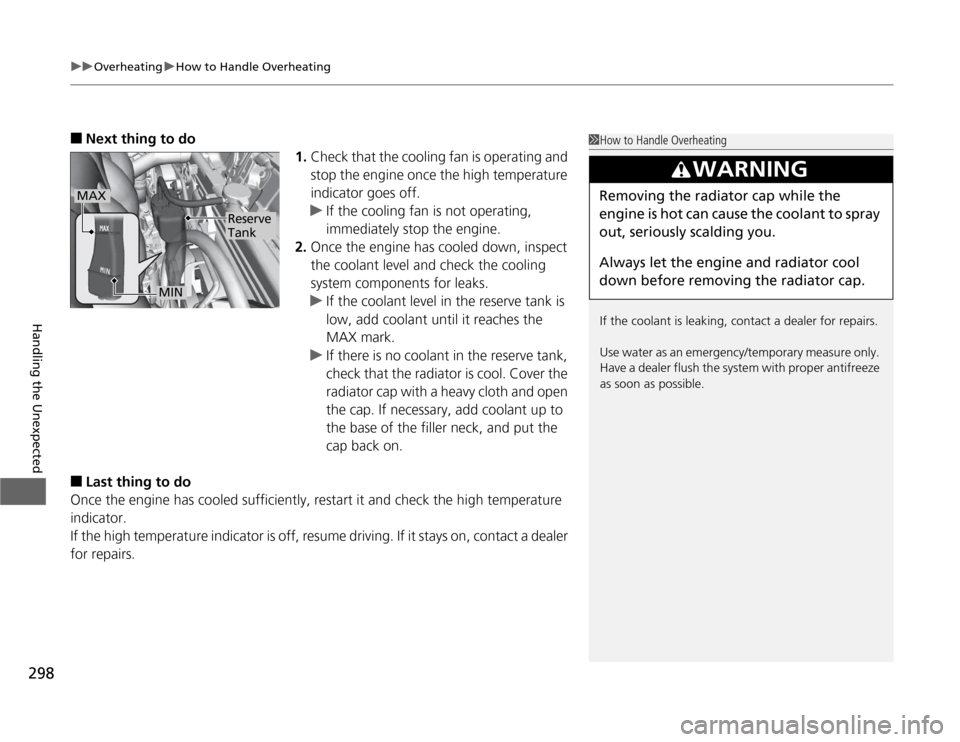
■ Next thing to do
1.Check that the cooling fan is operating and
stop the engine once the high temperature
indicator goes off.
uIf the cooling fan is not operating,
immediately stop the engine.
2. Once the engine has cooled down, inspect
the coolant level and check the cooling
system components for leaks.
uIf the coolant level in the reserve tank is
low, add coolant until it reaches the MAX mark.
uIf there is no coolant in the reserve tank,
check that the radiator is cool. Cover the
radiator cap with a heavy cloth and open
the cap. If necessary, add coolant up to
the base of the filler neck, and put the
cap back on.
■ Last thing to do
Once the engine has co oled sufficiently, restart it and check the high temperature
indicator.
If the high temperature indicator is off, resume driving. If it stays on, contact a dealer
for repairs.
1How to Handle Overheating
If the coolant is leaking, contact a dealer for repairs.
Use water as an emerge ncy/temporary measure only.
Have a dealer flush the system with proper antifreeze
as soon as possible.
3WARNING
Removing the radiator cap while the
engine is hot can cause the coolant to spray
out, seriously scalding you.
Always let the engine and radiator cool
down before removing the radiator cap.MAX
MIN
Reserve Tank
Page 325 of 333

324
Index
Belts (Seat).................................................. 34
Beverage Holders ...................................... 126
Bluetooth ® HandsFreeLink ®............... 88, 173
Booster Seats (For Children) ....................... 63
Brake System ............................................. 220
Anti-lock Brake System (ABS) ................... 222
Brake Assist System ................................. 223
Brake System Indicator............................. 302
Fluid ........................................................ 256
Foot Brake ............................................... 221
Indicator .................................................. 302
Parking Brake .......................................... 220
Brightness Control (In strument Panel).... 115
Bulb Replacement ..................................... 258
Back-Up Lights......................................... 263
Brake/Taillight .......................................... 264
Bulb Specifications ................................... 312
Fog Lights ................................................ 260 Front Turn Signal/Parking/Side Marker Light ...................................................... 262
Headlights ............................................... 258
High-Mount Brake Light .......................... 265
Rear License Plate Light............................ 265
Side Turn Signal/Emergency Indicator Light .....
262 C
Carbon Monoxide Gas
............................... 64
Carrying Cargo ................................. 193, 195
CD Player ........................... 145, 156, 158, 162
Certification Label .................................... 314
Changing Bulbs ........................................ 258
Charging System Indicator ................. 69, 300
Child Safety ................................................. 56
Child Seat .................................................... 56
Booster Seats ............................................ 63
Child Seat for Infants................................. 58
Child Seat for Small Children ..................... 59
Installing a Child Seat ................................ 60
Larger Children ......................................... 62
Selecting a Child Seat ................................ 59
Using a Tether ........................................... 61
CHRG Indicator ........................................... 82
Cleaning the Exterior ............................... 283
Cleaning the Interior ................................ 281
Climate Control System ............................ 132
Changing the Mode ................................ 132
Defrosting the Windscreen and
Windows ............................................... 133
Dust and Pollen Filter............................... 280
Recirculation/Fresh Air Mode ................... 132
Sensors ................................................... 134
Using Automatic Climate Control ............ 132
Compact Spare Tire .......................... 287, 313
Controls ....................................................... 97
Coolant (Engine) ...................................... 252
Adding to the Radiator ............................ 253 Adding to the Reserve Tank .................... 252
High Temperature Indicator ...................... 73
Low Temperature Indicator ....................... 74
Overheating ............................................ 297
Creep Aid System ..................................... 200
Creeping ................................................... 202
Cruise Control .......................................... 212
Indicator ................................................... 76
Cup Holders .............................................. 126
Customer Service Information ................ 322
Customized Features ................................. 90
D
Daytime Running Lights .......................... 112
Dead Battery ............................................ 294
Defrosting the Windshield and Windows ................................................. 133
Devices that Emit Radio Waves ............... 315
Dimming Headlights .............................................. 110
Rearview Mirror ...................................... 118
Dipstick (Engine Oil) ................................ 248
Directional Signals (Turn Signal) ............. 110
Door Mirrors ............................................. 118
Doors .......................................................... 99
Auto Door Locking.................................. 103
Auto Door Unlocking .............................. 103
Door Open Indicator ................................. 72
Door/Hatch Open Indicator ....................... 33
Keys.......................................................... 99
Page 326 of 333

325
Index
Locking/Unlocking the Doors from the Inside...................................... 102
Locking/Unlocking the Doors from the Outside................................... 100
Lockout Prevention System ..................... 101
DOT Tire Quality Grading ........................ 272
Driving ...................................................... 191
Automatic Transmission (CVT)................. 202
Braking ................................................... 220
Cruise Control ........................................ 212
Shifting Gear .......................................... 203
Starting the Engine ................................. 198
Dust and Pollen Filter .............................. 280
E
Eco Assist System .......................................... 8
Eco Drive Bar .......................................... 9, 87
Eco Guide ............................................... 9, 86
Eco Score ................................................ 9, 86
ECON Mode Indicator ................................ 77
Elapsed Time .............................................. 85
Electric Motor Assist Indicator (ASST) ....... 82
Electric Power Steering System (EPS)
Indicator ........................................... 72, 302
Electronic Stability Control (ESC) ............ 215
Emergency ................................................ 308
Emissions Testing (Readiness Codes) ...... 317
Engine ....................................................... 314
Coolant .................................................. 252
Jump Starting ......................................... 294 Oil ........................................................... 247
Starting ................................................... 198
Switch Buzzer .......................................... 109
Engine Coolant ......................................... 252
Adding to the Radiator ............................ 253
Adding to the Reserve Tank ..................... 252
High Temperature Indicator ....................... 73
Low Temperature Indicator ........................ 74
Overheating ............................................ 297
Engine Oil ................................................. 247
Adding .................................................... 249
Checking ................................................. 248
Displaying Oil Life .................................... 241
Low Oil Pressure Indicator .................. 68, 299
Recommended Engine Oil ........................ 247
Engine Oil Life ............................................ 88
EPS
(Electric Power Steering System) ..... 72, 302
Exhaust Gas Hazard (Carbon Monoxide) .. 64
Exterior Care (Cleaning) ........................... 283
Exterior Mirrors ........................................ 118
F Features ..................................................... 135
Filters ......................................................... 280
Dust and Pollen ....................................... 280
Oil ........................................................... 250
Flat Tire ..................................................... 287
Floor Mats ................................................. 282 Fluid
Clutch ..................................................... 256
Manual Transmission ....................... 254, 255
Fluids
Brake ...................................................... 256
Engine Coolant ....................................... 252
Windshield Washer ................................. 257
Foot Brake ................................................ 221
Front Airbags (SRS) ..................................... 44
Front Wiper/Washer ................................. 113
Fuel ...................................................... 21, 232
Economy ................................................. 235
Gauge ....................................................... 81
Instant Fuel Economy Gauge ..................... 81
Low Fuel Indicator ..................................... 70
Range ....................................................... 85
Recommendation .................................... 232
Refueling................................................. 232
Fuel Economy ........................................... 235
Fuel Fill Cap ........................................ 21, 234
Message.................................................. 301
Fuel Fill Door ...................................... 21, 233
Fuses .......................................................... 304
Inspecting and Changing......................... 307
Locations......................................... 304, 305