stop start HONDA CR-Z 2013 1.G User Guide
[x] Cancel search | Manufacturer: HONDA, Model Year: 2013, Model line: CR-Z, Model: HONDA CR-Z 2013 1.GPages: 325, PDF Size: 11.73 MB
Page 115 of 325
114
uuOperating the Switches Around the Steering WheeluWipers and Washers
Controls
Wipers and WashersThe windshield wipers and washers can be
used when the ignition switch is in ON
(w.
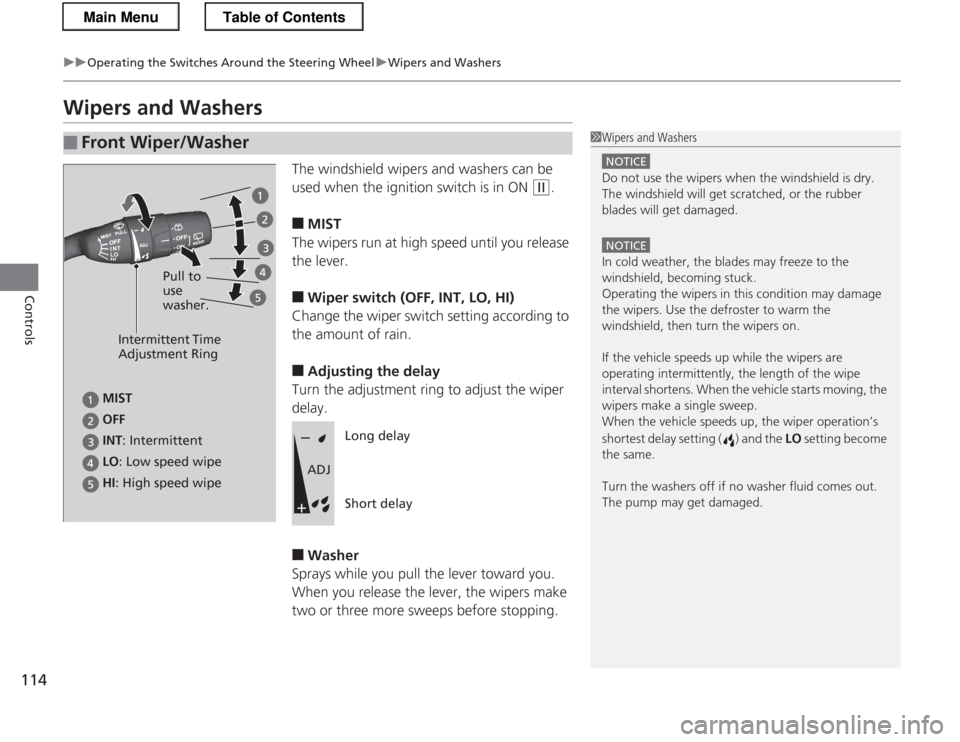
■ MIST
The wipers run at high speed until you release the lever. ■ Wiper switch (OFF, INT, LO, HI)
Change the wiper switch setting according to
the amount of rain. ■ Adjusting the delay
Turn the adjustment ring to adjust the wiper delay. ■ Washer
Sprays while you pull the lever toward you.
When you release the lever, the wipers make
two or three more sweeps before stopping.
■Front Wiper/Washer1Wipers and Washers
NOTICE
Do not use the wipers when the windshield is dry.
The windshield will get scratched, or the rubber
blades will get damaged.
NOTICE
In cold weather, the blades may freeze to the
windshield, becoming stuck.
Operating the wipers in this condition may damage the wipers. Use the defroster to warm the
windshield, then turn the wipers on.
If the vehicle speeds up while the wipers are
operating intermitte ntly, the length of the wipe
interval shortens. When the vehicle starts moving, the
wipers make a single sweep.
When the vehicle speeds up, the wiper operation’s
shortest delay setting ( ) and the LO setting become
the same.
Turn the washers off if no washer fluid comes out.
The pump may get damaged.
Intermittent Time
Adjustment Ring
HI : High speed wipe Pull to use washer.
LO
: Low speed wipe
INT
: Intermittent
OFF
MIST
Long delay Short delay
ADJ
Main MenuTable of Contents
Page 119 of 325
118
uuOperating the Switches Around the Steering WheeluAdjusting the Steering Wheel
Controls
Adjusting the Steering Wheel
The steering wheel height and distance from your body can be adjusted so that you
can comfortably grip the steering wheel in an appropriate driving posture.
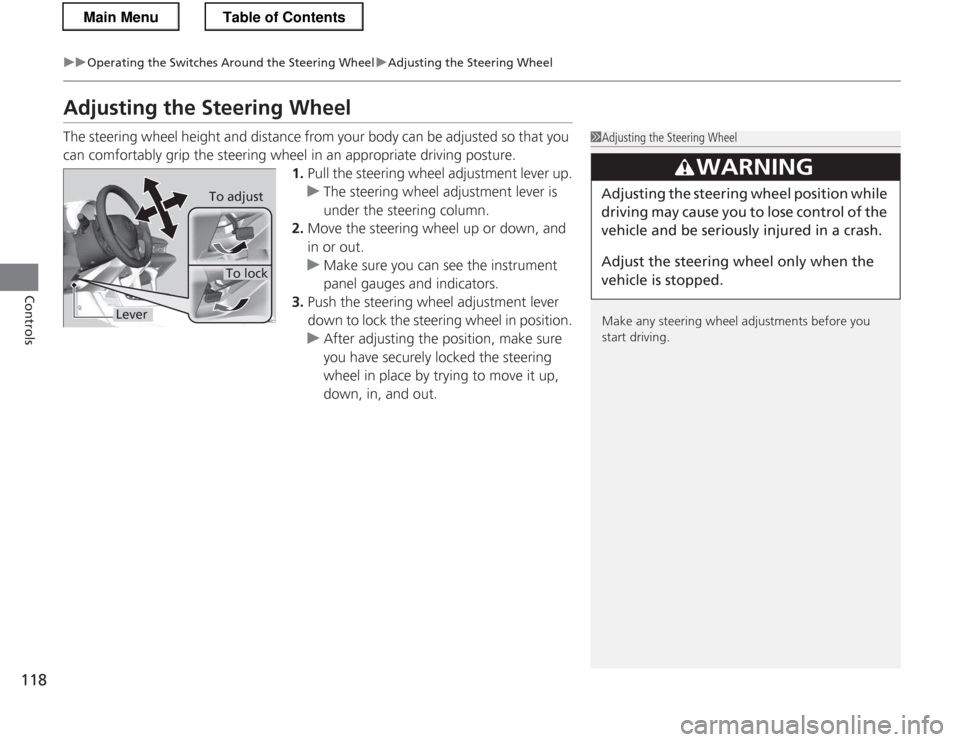
1. Pull the steering wheel adjustment lever up.
uThe steering wheel adjustment lever is
under the steering column.
2. Move the steering wheel up or down, and in or out.
uMake sure you can see the instrument
panel gauges and indicators.
3. Push the steering wheel adjustment lever
down to lock the steering wheel in position.
uAfter adjusting the position, make sure
you have securely locked the steering
wheel in place by trying to move it up,
down, in, and out.
1Adjusting the Steering Wheel
Make any steering wheel adjustments before you
start driving.
3WARNING
Adjusting the steering wheel po sition while
driving may cause you to lose control of the
vehicle and be seriously injured in a crash.
Adjust the steering wheel only when the
vehicle is stopped.To adjust
To lock
Lever
Main MenuTable of Contents
Page 135 of 325
134
Controls
Climate Control System
Using Automatic Climate Control
The automatic climate control system maintains the interior temperature you select.
The system also selects the proper mix of heated or cooled air that will as quickly as
possible, raise or lower the interior temperature to your preference.
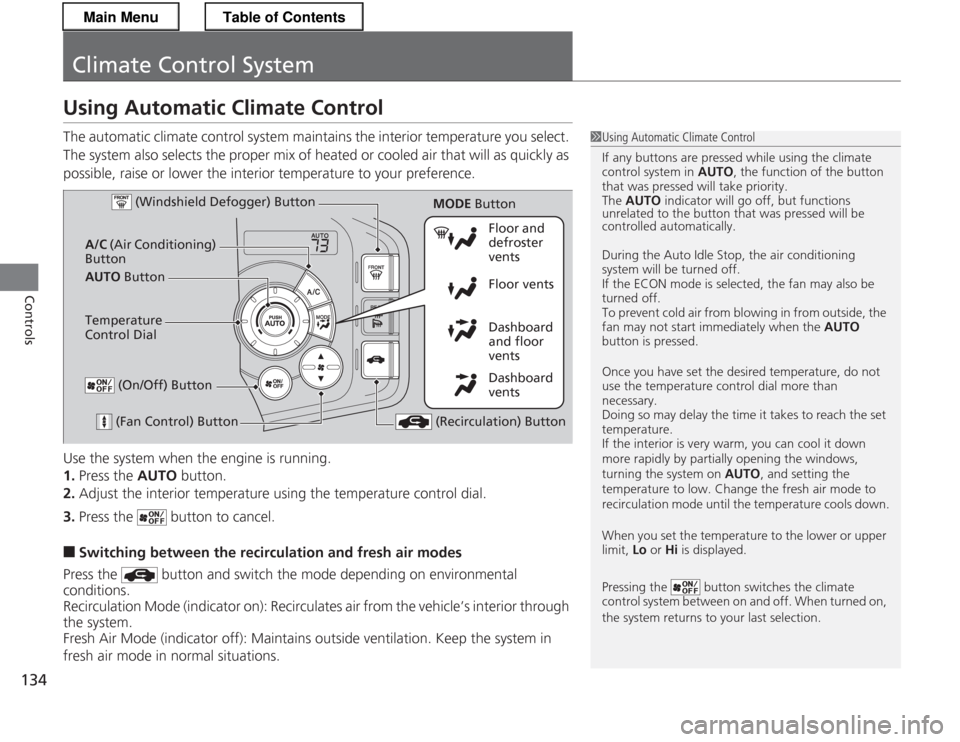
Use the system when the engine is running. 1.Press the AUTO button.
2. Adjust the interior temperature using the temperature control dial.
3. Press the button to cancel.
■ Switching between the recirculation and fresh air modes
Press the button and switch the mode depending on environmental
conditions.
Recirculation Mode (indicator on): Recirculates air from the vehicle’s interior through
the system.
Fresh Air Mode (indicator off): Maintains outside ventilation. Keep the system in
fresh air mode in normal situations.
1Using Automatic Climate Control
If any buttons are pressed while using the climate control system in AUTO, the function of the button
that was pressed will take priority.
The AUTO indicator will go off, but functions
unrelated to the button that was pressed will be
controlled automatically.
During the Auto Idle Stop, the air conditioning
system will be turned off.
If the ECON mode is selected, the fan may also be
turned off.
To prevent cold air from blowing in from outside, the
fan may not start immediately when the AUTO
button is pressed.
Once you have set the desired temperature, do not use the temperature control dial more than necessary.
Doing so may delay the time it takes to reach the set temperature.
If the interior is very warm, you can cool it down
more rapidly by partially opening the windows,
turning the system on AUTO, and setting the
temperature to low. Change the fresh air mode to
recirculation mode until the temperature cools down.
When you set the temperature to the lower or upper
limit, Lo or Hi is displayed.
Pressing the button switches the climate
control system between on and off. When turned on,
the system returns to your last selection.
Dashboard
vents
Dashboard
and floor
vents
Floor vents
Floor and defroster
vents
AUTO Button
A/C
(Air Conditioning)
Button
(Fan Control) Button
(Recirculation) Button
Temperature
Control Dial (Windshield Defogger) Button
(On/Off) Button
MODE
Button
Main MenuTable of Contents
Page 136 of 325
135
uuClimate Control SystemuUsing Automatic Climate Control
Controls
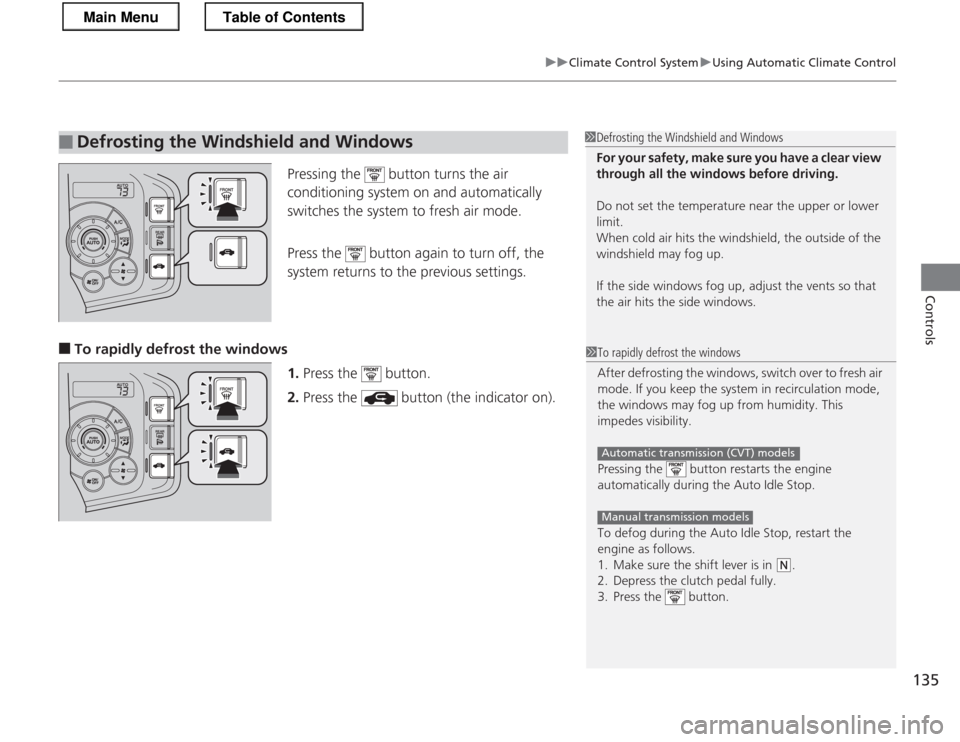
Pressing the button turns the air
conditioning system on and automatically
switches the system to fresh air mode.
Press the button again to turn off, the
system returns to the previous settings.
■ To rapidly defrost the windows
1.Press the button.
2. Press the button (the indicator on).
■Defrosting the Windshield and Windows1Defrosting the Windshield and Windows
For your safety, make sure you have a clear view
through all the windows before driving.
Do not set the temperature near the upper or lower
limit.
When cold air hits the windshield, the outside of the
windshield may fog up.
If the side windows fog up, adjust the vents so that
the air hits the side windows.
1To rapidly defrost the windows
After defrosting the windows, switch over to fresh air
mode. If you keep the system in recirculation mode,
the windows may fog up from humidity. This
impedes visibility.
Pressing the button restarts the engine
automatically during the Auto Idle Stop.
To defog during the Auto Idle Stop, restart the
engine as follows.
1. Make sure the shift lever is in
(N.
2. Depress the clutch pedal fully.
3. Press the button.
Automatic transmission (CVT) models
Manual transmission models
Main MenuTable of Contents
Page 172 of 325
171
Driving
This chapter discusses driving, refueling, and information on items such as accessories.
Before Driving Driving Preparation .............................. 172
Maximum Load Limit............................ 175
Towing a Trailer Towing Your Vehicle ............................ 177
When Driving Starting the Engine .............................. 178
Precautions While Driving..................... 181
Automatic Transmission (CVT) .............. 182
Shifting ................................................ 183
Shifting ................................................ 188
Automatic transmission (CVT) models
Manual transmission models
Auto Idle Stop ..................................... 191
Auto Idle Stop ..................................... 194
3-Mode Drive System........................... 197
Plus Sport System ................................ 198
Cruise Control ..................................... 200
VSA ® (Vehicle Stability Assist), aka ESC
(Electronic Stability Control), System .. 203
TPMS (Tire Pressure Monitoring System) ........ 205
Tire Pressure Monitoring System (TPMS) -
Required Federal Explanation ............. 206
Braking
Brake System ....................................... 208
Automatic transmission (CVT) models
Manual transmission models
ABS (Anti-lock Brake System) ................ 210
Brake Assist System .............................. 211
Parking Your Vehicle When Stopped ..................................... 212
Multi-View Rear Camera .................. 213
Rearview Camera ............................. 214
Refueling Fuel Information ................................... 216
How to Refuel ...................................... 217
Fuel Economy
Improving Fuel Economy....................... 219
Accessories and Modifications
Accessories ........................................... 220
Modifications ....................................... 220
Main Menu
Page 180 of 325
Continued179
uuWhen DrivinguStarting the Engine
Driving
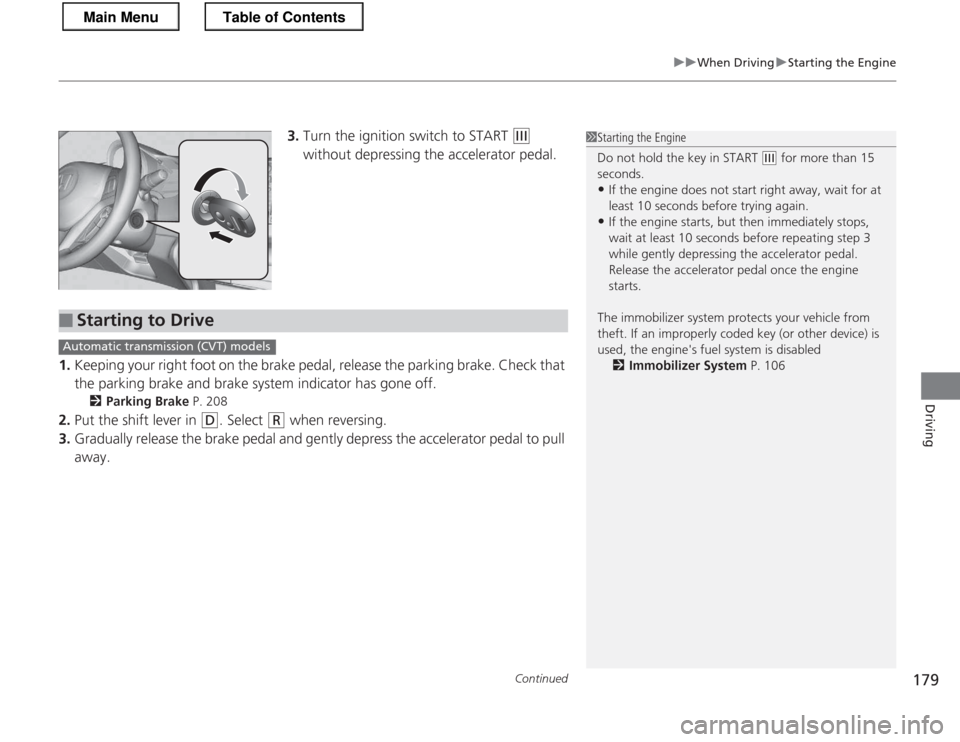
3.Turn the ignition switch to START (e
without depressing the accelerator pedal.
1. Keeping your right foot on the brake pedal, release the parking brake. Check that
the parking brake and brake system indicator has gone off.
2 Parking Brake P. 208
2. Put the shift lever in
(D . Select (R when reversing.
3. Gradually release the brake pedal and gently depress the accelerator pedal to pull
away.
1Starting the Engine
Do not hold the key in START
(e for more than 15
seconds.
• If the engine does not start right away, wait for at least 10 seconds before trying again.
• If the engine starts, but then immediately stops,
wait at least 10 seconds before repeating step 3
while gently depressing the acce lerator pedal.
Release the accelerator pedal once the engine
starts.
The immobilizer system protects your vehicle from
theft. If an improperly coded key (or other device) is
used, the engine's fuel system is disabled 2 Immobilizer System P. 106
■Starting to Drive
Automatic transmission (CVT) models
Main MenuTable of Contents
Page 191 of 325
190
uuWhen DrivinguShifting
Driving
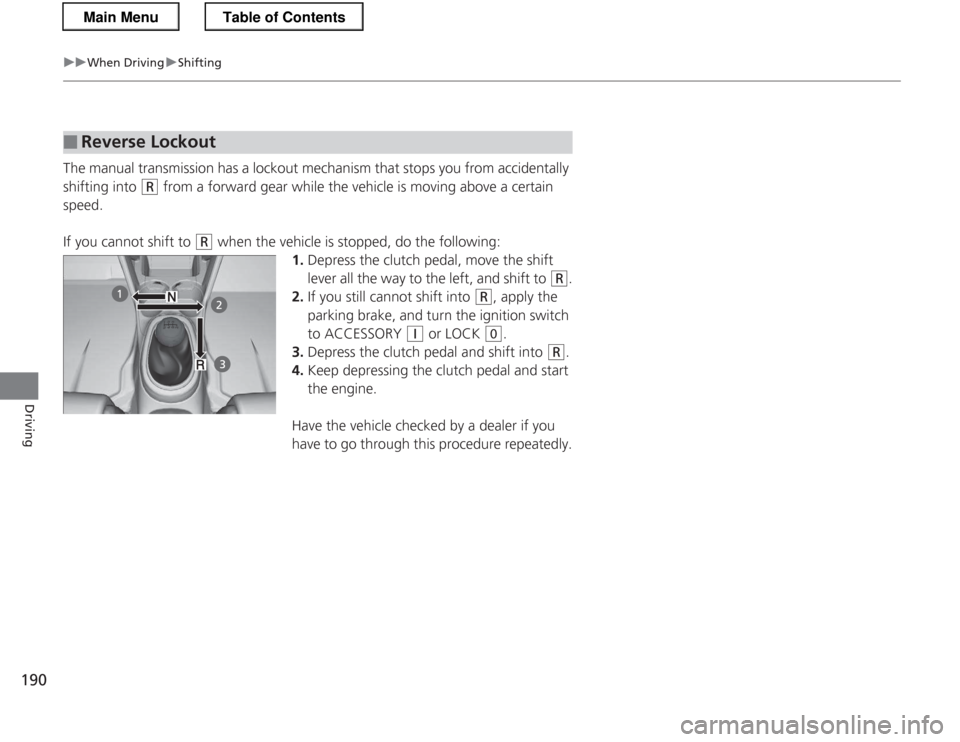
The manual transmission has a lockout mechanism that stops you from accidentally
shifting into
(R from a forward gear while the vehicle is moving above a certain
speed.
If you cannot shift to
(R when the vehicle is stopped, do the following:
1.Depress the clutch pedal, move the shift
lever all the way to the left, and shift to
(R .
2. If you still cannot shift into
(R , apply the
parking brake, and turn the ignition switch
to ACCESSORY
(q or LOCK (0 .
3. Depress the clutch pedal and shift into
(R .
4. Keep depressing the clutch pedal and start
the engine.
Have the vehicle checked by a dealer if you
have to go through this procedure repeatedly.
■Reverse Lockout
Main MenuTable of Contents
Page 192 of 325
191
uuWhen DrivinguAuto Idle Stop
Continued
Driving
Auto Idle Stop
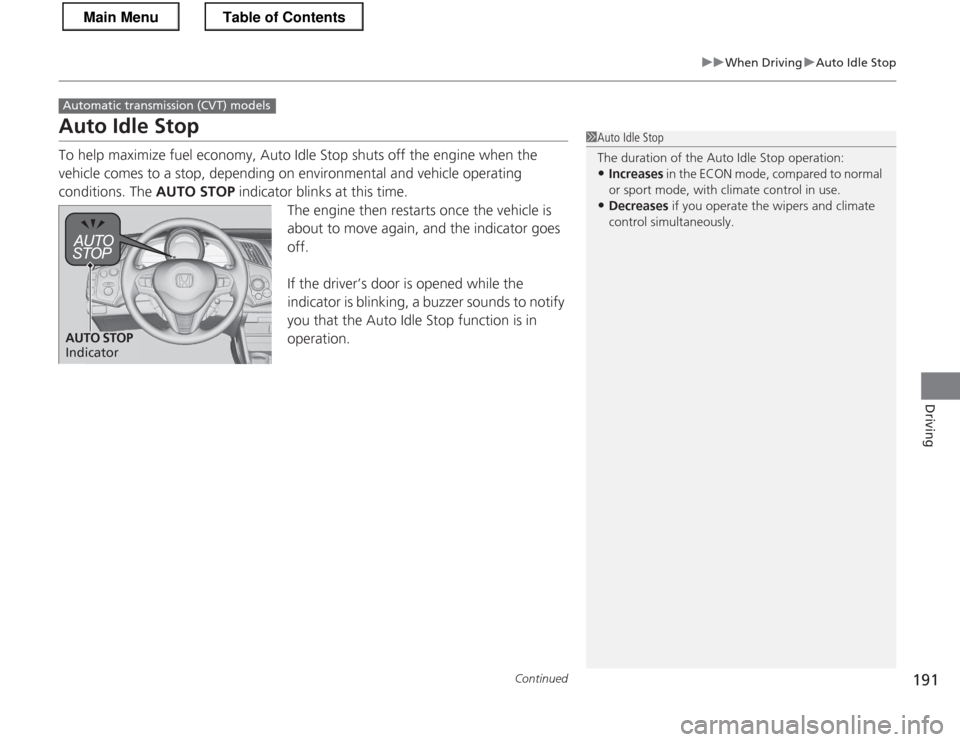
To help maximize fuel economy, Auto Idle Stop shuts off the engine when the
vehicle comes to a stop, depending on environmental and vehicle operating
conditions. The AUTO STOP indicator blinks at this time.
The engine then restarts once the vehicle is
about to move again, and the indicator goes off.
If the driver’s door is opened while the
indicator is blinking, a buzzer sounds to notify
you that the Auto Idle Stop function is in operation.
Automatic transmiss ion (CVT) models
1Auto Idle Stop
The duration of the Auto Idle Stop operation:
• Increases in the ECON mode, compared to normal
or sport mode, with climate control in use.
• Decreases if you operate the wipers and climate
control simultaneously.
AUTO STOP
Indicator
Main MenuTable of Contents
Page 193 of 325
uuWhen DrivinguAuto Idle Stop
192
Driving
The vehicle stops with the shift lever in (D and the brake pedal depressed.
■ Auto Idle Stop does not activate when:
• The low temperature indicator is on.
• The IMA battery charge is low.
• The bars of the ASST/CHRG indicators do not move when accelerating or
decelerating.
• The transmission fluid temperature is low.
• The vehicle comes to a stop again before the vehicle speed reaches 9 mph
(15 km/h) after the engine starts.
• Stopped on a steep incline.
• The shift lever is in a position other than
(D or (N .
• Airflow from the climate control system increases. (Except when in ECON mode)
uIf you have selected the fan speed manually:
The display shows more than five vertical bars.
• Shift mode is in the L mode.
• is on (the indicator is on).
■ Auto Idle Stop may not activate when:
• The climate control system is in use, and there is a significant difference between
the set temperature and the actual interior temperature. (Except when in ECON mode).
• When humidity in the interior is high.
• The vehicle is stopped by braking suddenly.
■Auto Idle Stop Activates When:1Auto Idle Stop Activates When:
The Auto Idle Stop may also activate when the brake
pedal is depressed, and the vehicle slows down to a
speed below 6 mph (10 km/h).
Main MenuTable of Contents
Page 194 of 325
193
uuWhen DrivinguAuto Idle Stop
Driving
The brake pedal is released. ■The engine restarts even if the brake pedal is depressed when:
• The shift position is changed to
(R .
• Shift mode set in the L mode.
• The accelerator pedal is depressed.
• The pressure to the brake pedal is reduced and the vehicle starts moving while
stopped on an incline.
• The IMA battery charge becomes low.
• The low temperature indicator comes on.
• The climate control system is in use, and the difference between the set
temperature and actual interior temperature becomes significant.
• The climate control system is being used to dehumidify the interior.
• The pressure on the brake pedal is repeatedly applied and released slightly.
• The (windshield defogger) button is pressed.
■The Engine Automatically Restarts When:
Main MenuTable of Contents