phone HONDA CR-Z 2016 1.G User Guide
[x] Cancel search | Manufacturer: HONDA, Model Year: 2016, Model line: CR-Z, Model: HONDA CR-Z 2016 1.GPages: 409, PDF Size: 19.68 MB
Page 183 of 409
uuAudio System Basic Operation uPlaying an iPod
182
Features
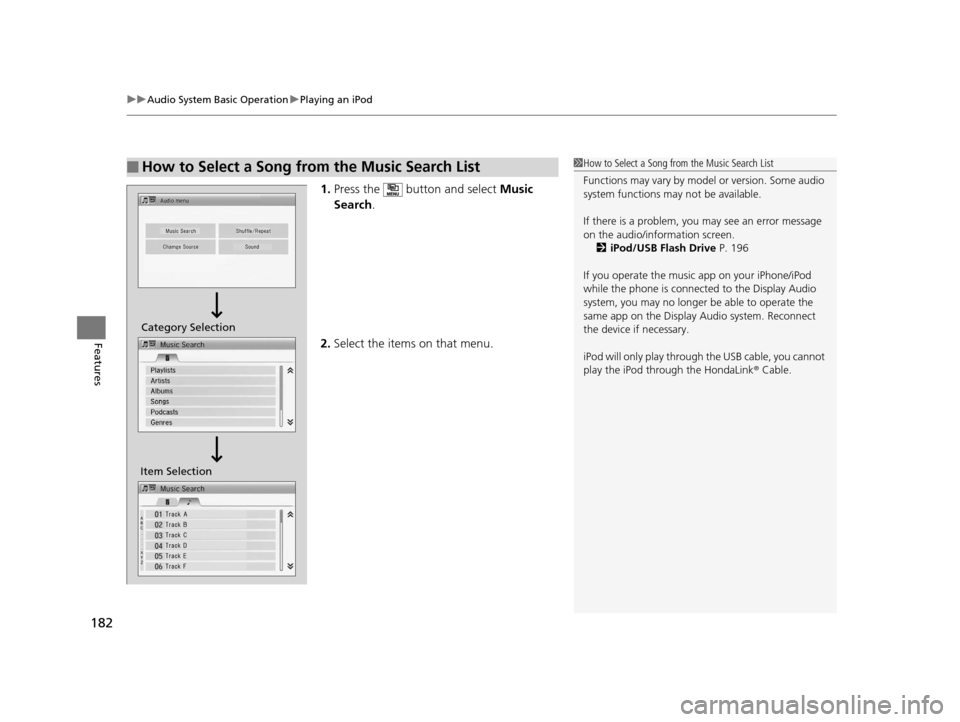
1. Press the button and select Music
Search .
2. Select the items on that menu.
■How to Select a Song from the Music Search List1How to Select a Song from the Music Search List
Functions may vary by mode l or version. Some audio
system functions may not be available.
If there is a problem, you may see an error message
on the audio/information screen.
2 iPod/USB Flash Drive P. 196
If you operate the musi c app on your iPhone/iPod
while the phone is connecte d to the Display Audio
system, you may no longer be able to operate the
same app on the Display Audio system. Reconnect
the device if necessary.
iPod will only play through th e USB cable, you cannot
play the iPod through the HondaLink ® Cable.
Item SelectionCategory Selection
16 CR-Z-31SZT6500.book 182 ページ 2015年9月11日 金曜日 午前11時47分
Page 185 of 409
184
uuAudio System Basic Operation uPlaying Internet Radio
Features
Playing Internet Radio
Connect a compatible phone through Bluetooth®.
2Phone Setup P. 220
You can also connect the phone using your dock connector to the USB port. Select
SOURCE to select Pandora ® mode.
*1:Some or all of the lists may not be displayed.
U.S. models
Compatible phones only1 Playing Internet Radio
Pandora ®, the Pandora logo, and the Pandora trade
dress are trademarks or registered trademarks of
Pandora Media, Inc., used with permission. Pandora
is currently available exclusively in the United States.
To find out if your phone is compatible with this
feature, visit www.handsfreelink.honda.com , or call
1-888-528-7876.
To use this service in your vehicle, the Pandora ® app
must first be installed on your phone. Visit
www.pandora.com . for more information.
Pandora ® on the iPhone will only play through the
USB cable or Bluetooth® Audio, you cannot play
Pandora ® through the HondaLink® Cable.
iPhone only
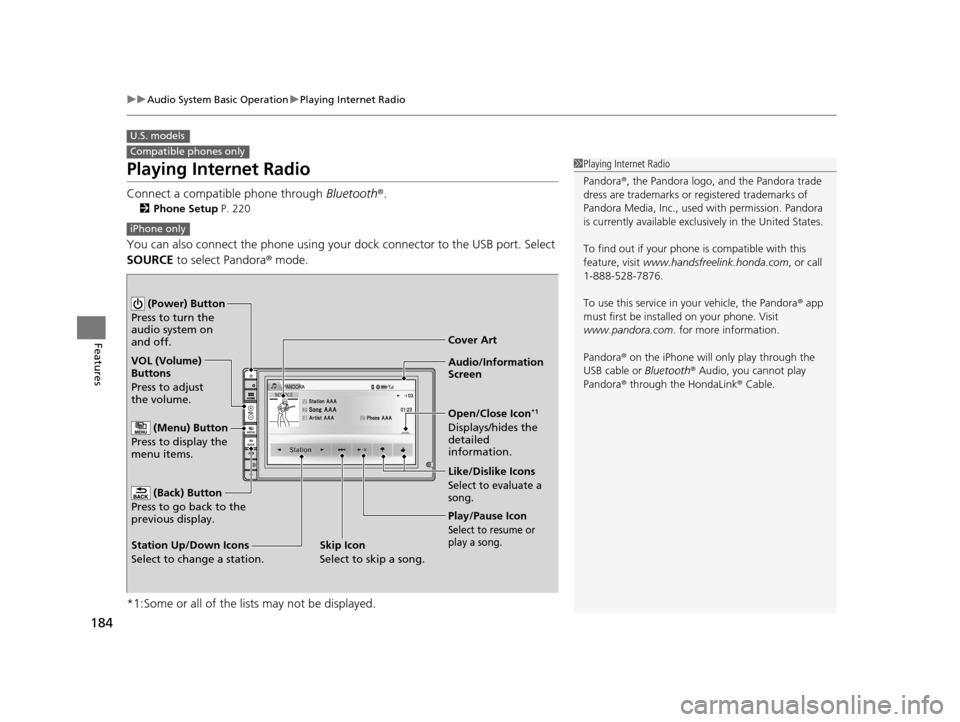
Audio/Information
Screen Cover Art
VOL (Volume)
Buttons
Press to adjust
the volume.
(Back) Button
Press to go back to the
previous display.
(Power) Button
Press to turn the
audio system on
and off.
(Menu) Button
Press to display the
menu items.
Play/Pause Icon
Select to resume or
play a song.
Open/Close Icon*1
Displays/hides the
detailed
information.
Station Up/Down Icons
Select to change a station. Like/Dislike Icons
Select to evaluate a
song.
Skip Icon
Select to skip a song.
16 CR-Z-31SZT6500.book 184 ページ 2015年9月11日 金曜日 午前11時47分
Page 190 of 409
189
uuAudio System Basic Operation uPlaying Bluetooth ® Audio
Continued
Features
Playing Bluetooth ® Audio
Your audio system allows you to listen to music from your Bluetooth-compatible
phone.
This function is available when the phone is paired an d connected to the vehicle’s
Bluetooth ® HandsFreeLink ® (HFL) system.
2Phone Setup P. 220
*1:Depending on the Bluetooth® device you connect, some or all of the lists may not
be displayed.
1 Playing Bluetooth ® Audio
Not all Bluetooth -enabled phones with streaming
audio capabilities are compatible with the system.
For a list of compatible phones:
•U.S.: Visit www.handsfreelink.honda.com , or call
1-888-528-7876.
•Canada: Visit www.handsfreelink.ca , or call 1-888-
528-7876.
In some states, it may be illegal to operate devices
that use data while driving.
Only one phone can be used with HFL at a time.
When there are more than two paired phones in the
vehicle, the first paired phone the system finds is
automatically connected.
If more than one phone is paired to the HFL system,
there may be a delay before the system begins to play.
In some cases, the name of the artist, album, or track
may not appear correctly.
Some functions may not be available on some
devices.
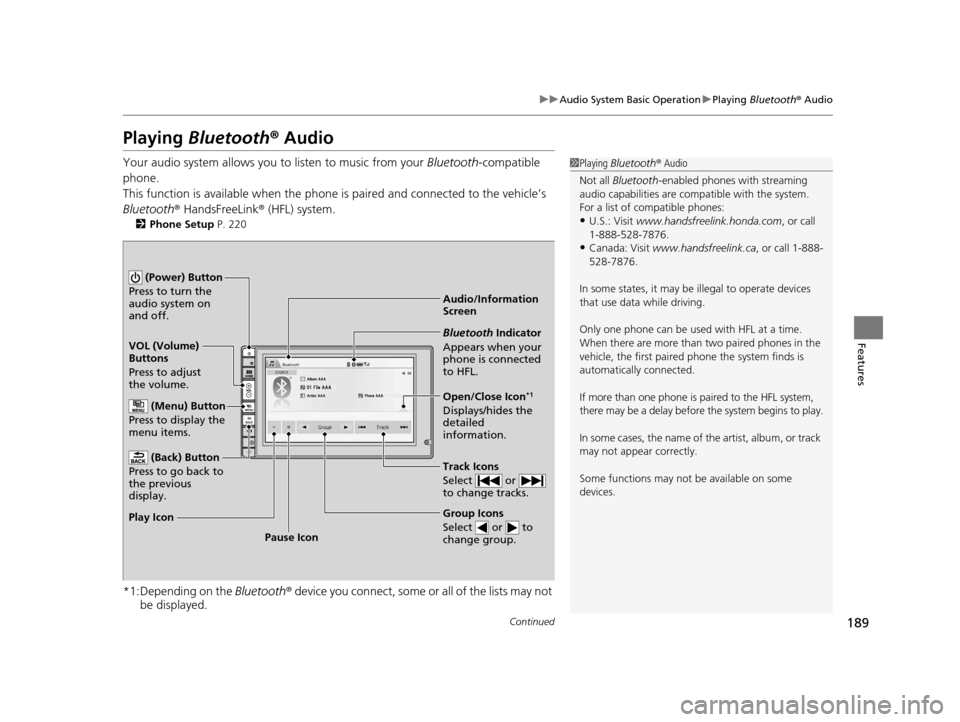
Audio/Information
Screen
VOL (Volume)
Buttons
Press to adjust
the volume.
(Back) Button
Press to go back to
the previous
display.
(Power) Button
Press to turn the
audio system on
and off.
(Menu) Button
Press to display the
menu items.
Group Icons
Select or to
change group.
Pause Icon
Play Icon
Bluetooth Indicator
Appears when your
phone is connected
to HFL.
Track Icons
Select or
to change tracks.
Open/Close Icon*1
Displays/hides the
detailed
information.
16 CR-Z-31SZT6500.book 189 ページ 2015年9月11日 金曜日 午前11時47分
Page 191 of 409
uuAudio System Basic Operation uPlaying Bluetooth ® Audio
190
Features
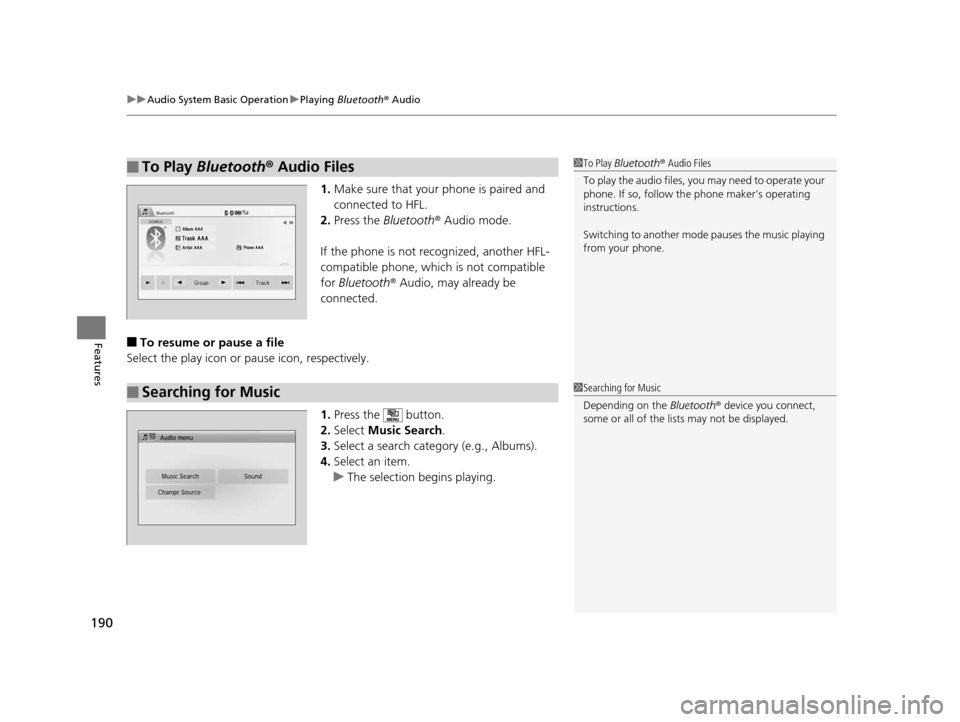
1. Make sure that your phone is paired and
connected to HFL.
2. Press the Bluetooth ® Audio mode.
If the phone is not recognized, another HFL-
compatible phone, which is not compatible
for Bluetooth ® Audio, may already be
connected.
■To resume or pause a file
Select the play icon or pause icon, respectively.
1.Press the button.
2. Select Music Search.
3. Select a search cate gory (e.g., Albums).
4. Select an item.
u The selection begins playing.
■To Play Bluetooth® Audio Files1To Play Bluetooth ® Audio Files
To play the audio files, y ou may need to operate your
phone. If so, follow the phone maker's operating
instructions.
Switching to another mode pauses the music playing
from your phone.
■Searching for Music1 Searching for Music
Depending on the Bluetooth® device you connect,
some or all of the list s may not be displayed.
16 CR-Z-31SZT6500.book 190 ページ 2015年9月11日 金曜日 午前11時47分
Page 194 of 409
193
uuAudio System Basic Operation uSmartphone Apps
Features
Smartphone Apps
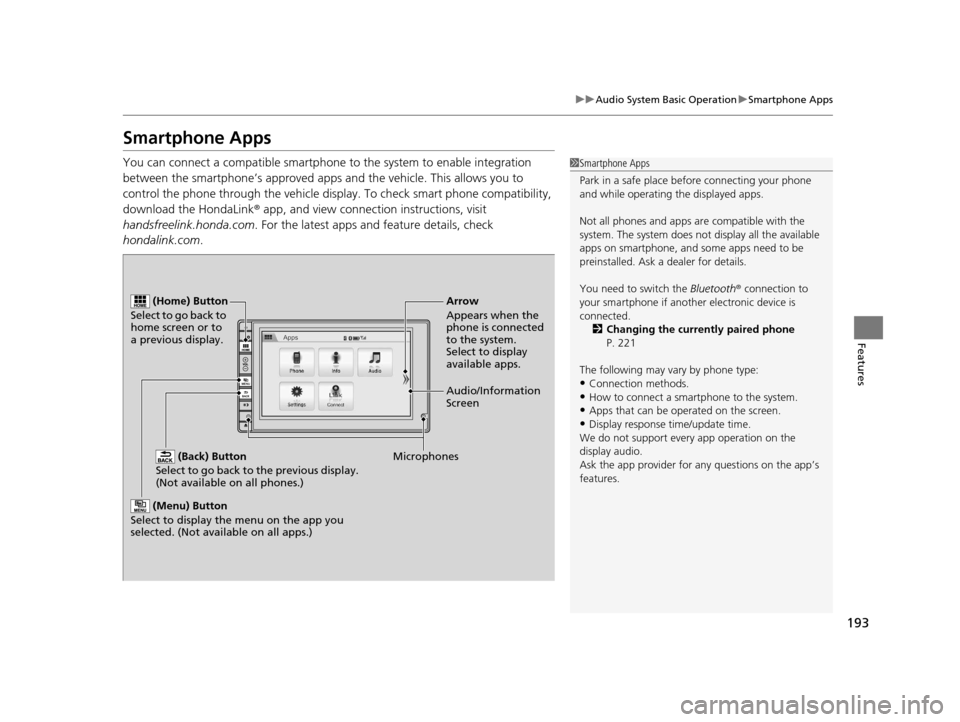
You can connect a compatible smartphone to the system to enable integration
between the smartphone’s appr oved apps and the vehicle. This allows you to
control the phone through the vehicle display. To check smart phone compatibility,
download the HondaLink® app, and view connecti on instructions, visit
handsfreelink.honda.com . For the latest apps and feature details, check
hondalink.com .1Smartphone Apps
Park in a safe place be fore connecting your phone
and while operating the displayed apps.
Not all phones and apps ar e compatible with the
system. The system does not display all the available
apps on smartphone, and so me apps need to be
preinstalled. Ask a dealer for details.
You need to switch the Bluetooth® connection to
your smartphone if another electronic device is
connected. 2 Changing the currently paired phone
P. 221
The following may vary by phone type:
•Connection methods.•How to connect a smartphone to the system.
•Apps that can be operated on the screen.
•Display response ti me/update time.
We do not support every app operation on the
display audio.
Ask the app provider for an y questions on the app’s
features.
(Back) Button
Select to go back to the previous display.
(Not available on all phones.)
(Home) Button
Select to go back to
home screen or to
a previous display.
Microphones Audio/Information
Screen Arrow
Appears when the
phone is connected
to the system.
Select to display
available apps.
(Menu) Button
Select to display the menu on the app you
selected. (Not available on all apps.)
16 CR-Z-31SZT6500.book 193 ページ 2015年9月11日 金曜日 午前11時47分
Page 195 of 409
194
uuAudio System Basic Operation uSiri ® Eyes Free
Features
Siri ® Eyes Free
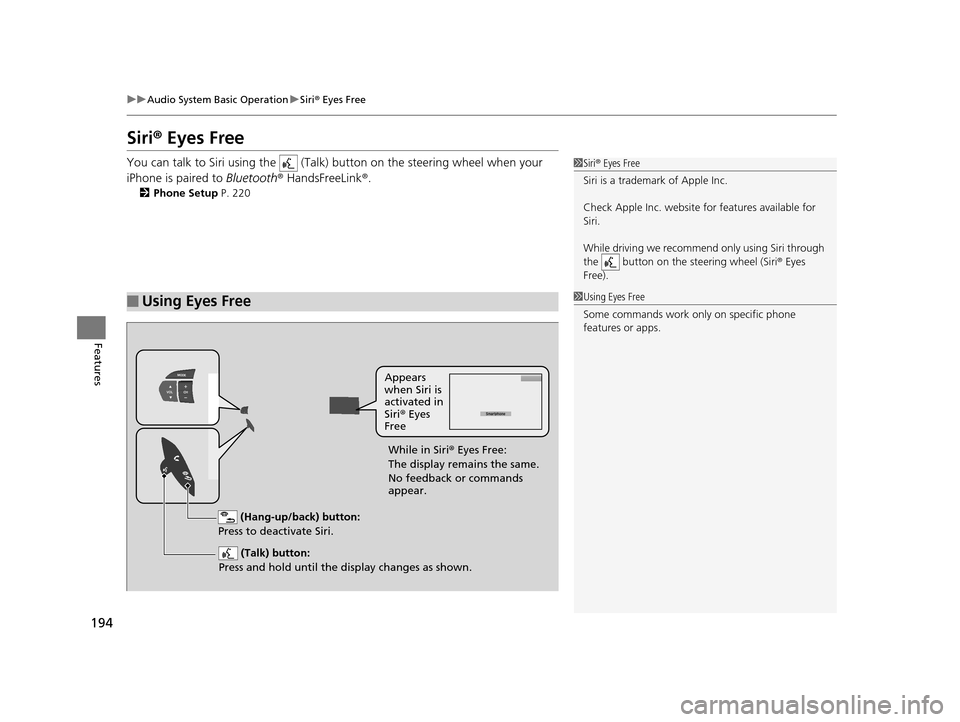
You can talk to Siri using the (Talk) button on the steering wheel when your
iPhone is paired to Bluetooth® HandsFreeLink ®.
2Phone Setup P. 220
■Using Eyes Free
1Siri ® Eyes Free
Siri is a trademark of Apple Inc.
Check Apple Inc. website for features available for
Siri.
While driving we recomme nd only using Siri through
the button on the steering wheel (Siri® Eyes
Free).
1 Using Eyes Free
Some commands work only on specific phone
features or apps.
(Hang-up/back) button:
Press to deactivate Siri.
(Talk) button:
Press and hold until the display changes as shown.
Appears
when Siri is
activated in
Siri ® Eyes
Free
While in Siri ® Eyes Free:
The display remains the same.
No feedback or commands
appear.
16 CR-Z-31SZT6500.book 194 ページ 2015年9月11日 金曜日 午前11時47分
Page 198 of 409
197
uuAudio Error Messages uPandora ®
Continued
Features
Pandora ®
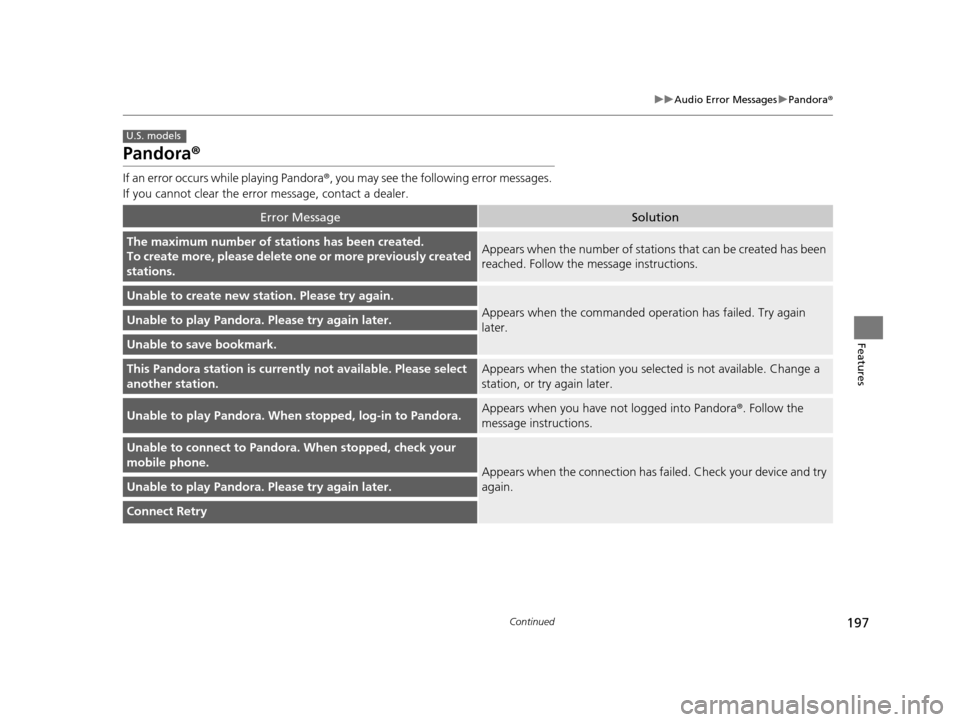
If an error occurs while playing Pandora ®, you may see the following error messages.
If you cannot clear the error message, contact a dealer.
Error MessageSolution
The maximum number of stations has been created.
To create more, please delete one or more previously created
stations.Appears when the number of stations that can be created has been
reached. Follow the message instructions.
Unable to create new station. Please try again.
Appears when the commanded ope ration has failed. Try again
later.Unable to play Pandora. Please try again later.
Unable to save bookmark.
This Pandora station is currentl y not available. Please select
another station.Appears when the station you select ed is not available. Change a
station, or try again later.
Unable to play Pandora. When stopped, log-in to Pandora.Appears when you have not logged into Pandora ®. Follow the
message instructions.
Unable to connect to Pandora. When stopped, check your
mobile phone.
Appears when the connection has fa iled. Check your device and try
again.
Unable to play Pandora. Please try again later.
Connect Retry
U.S. models
16 CR-Z-31SZT6500.book 197 ページ 2015年9月11日 金曜日 午前11時47分
Page 199 of 409
198
uuAudio Error Messages uPandora®
Features
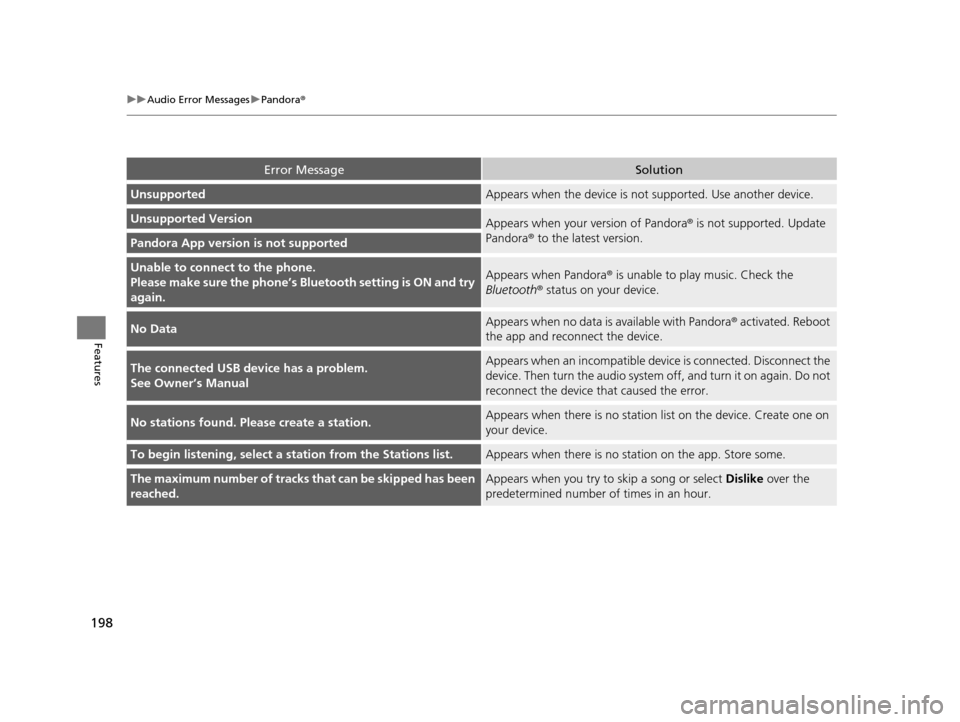
Error MessageSolution
UnsupportedAppears when the device is not supported. Use another device.
Unsupported VersionAppears when your version of Pandora ® is not supported. Update
Pandora® to the latest version.
Pandora App version is not supported
Unable to connec t to the phone.
Please make sure the phone’s Bl uetooth setting is ON and try
again.Appears when Pandora® is unable to play music. Check the
Bluetooth ® status on your device.
No DataAppears when no data is available with Pandora ® activated. Reboot
the app and reconnect the device.
The connected USB device has a problem.
See Owner’s ManualAppears when an incompatible devi ce is connected. Disconnect the
device. Then turn the a udio system off, and turn it on again. Do not
reconnect the device that caused the error.
No stations found. Please create a station.Appears when there is no statio n list on the device. Create one on
your device.
To begin listening, select a station from the Stations list.Appears when there is no stat ion on the app. Store some.
The maximum number of tracks that can be skipped has been
reached.Appears when you try to skip a song or select Dislike over the
predetermined number of times in an hour.
16 CR-Z-31SZT6500.book 198 ページ 2015年9月11日 金曜日 午前11時47分
Page 202 of 409
201
uuGeneral Information on the Audio SystemuCompatible iPod, iPhone and USB Flash Drives
Features
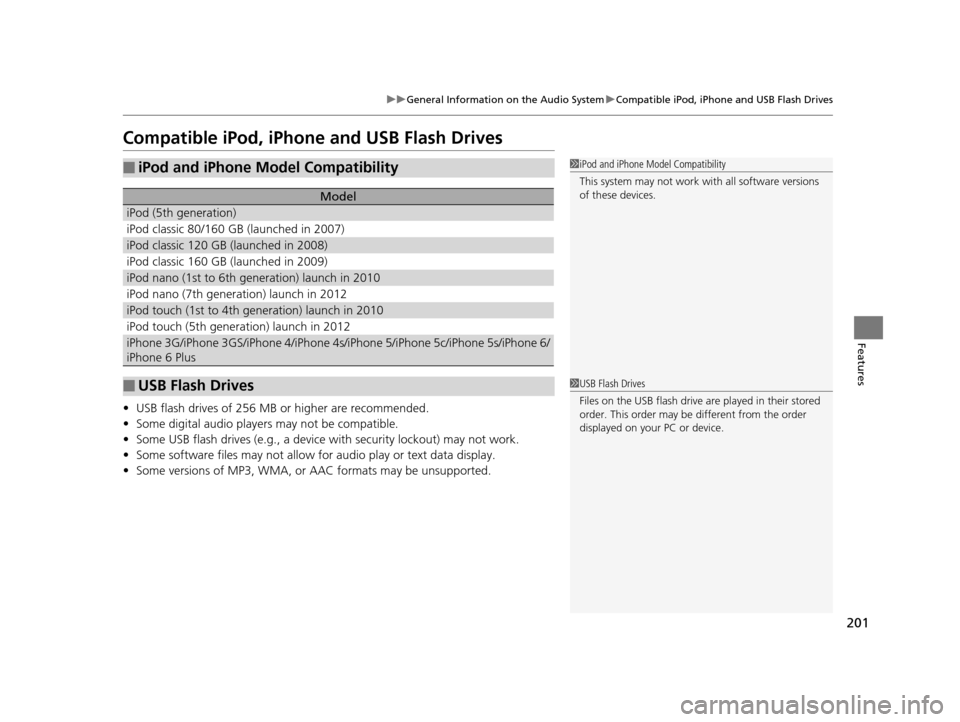
Compatible iPod, iPhone and USB Flash Drives
•USB flash drives of 256 MB or higher are recommended.
• Some digital audio players may not be compatible.
• Some USB flash drives (e.g., a device with security lockout) may not work.
• Some software files may not allow for audio play or text data display.
• Some versions of MP3, WMA, or AAC formats may be unsupported.
■iPod and iPhone Model Compatibility
Model
iPod (5th generation)
iPod classic 80/160 GB (launched in 2007)
iPod classic 120 GB (launched in 2008)
iPod classic 160 GB (launched in 2009)
iPod nano (1st to 6th generation) launch in 2010
iPod nano (7th generation) launch in 2012
iPod touch (1st to 4th generation) launch in 2010
iPod touch (5th generation) launch in 2012
iPhone 3G/iPhone 3GS/iPhone 4/iPhone 4s/iPhone 5/iPhone 5c/iPhone 5s/iPhone 6/
iPhone 6 Plus
■USB Flash Drives
1iPod and iPhone Model Compatibility
This system may not work with all software versions
of these devices.
1USB Flash Drives
Files on the USB flash drive are played in their stored
order. This order may be different from the order
displayed on your PC or device.
16 CR-Z-31SZT6500.book 201 ページ 2015年9月11日 金曜日 午前11時47分
Page 204 of 409
203
uuCustomized Features u
Continued
Features
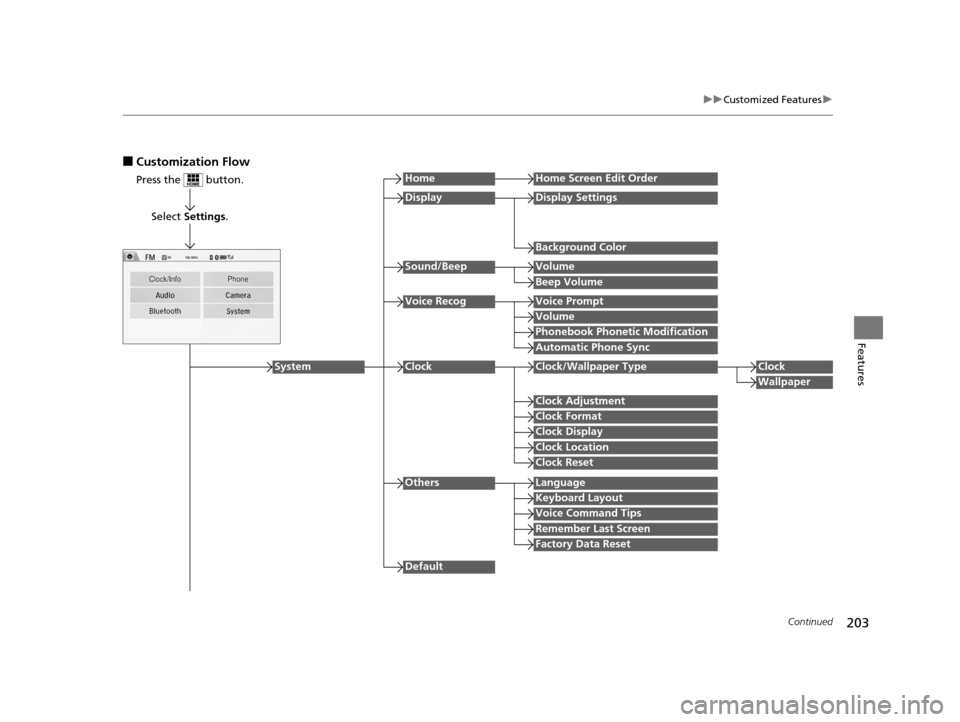
■Customization Flow
Press the button.
Select Settings .
HomeHome Screen Edit Order
Background Color
DisplayDisplay Settings
Beep Volume
Sound/BeepVolume
Volume
Voice RecogVoice Prompt
Automatic Phone Sync
Phonebook Phonetic Modification
Default
Factory Data Reset
Clock Format
ClockClock/Wallpaper TypeClock
Wallpaper
Clock Adjustment
Clock Display
Clock Location
Clock Reset
Keyboard Layout
OthersLanguage
Remember Last Screen
Voice Command Tips
System
16 CR-Z-31SZT6500.book 203 ページ 2015年9月11日 金曜日 午前11時47分