phone HONDA CR-Z 2016 1.G Owner's Manual
[x] Cancel search | Manufacturer: HONDA, Model Year: 2016, Model line: CR-Z, Model: HONDA CR-Z 2016 1.GPages: 409, PDF Size: 19.68 MB
Page 206 of 409
205
uuCustomized Features u
Continued
Features
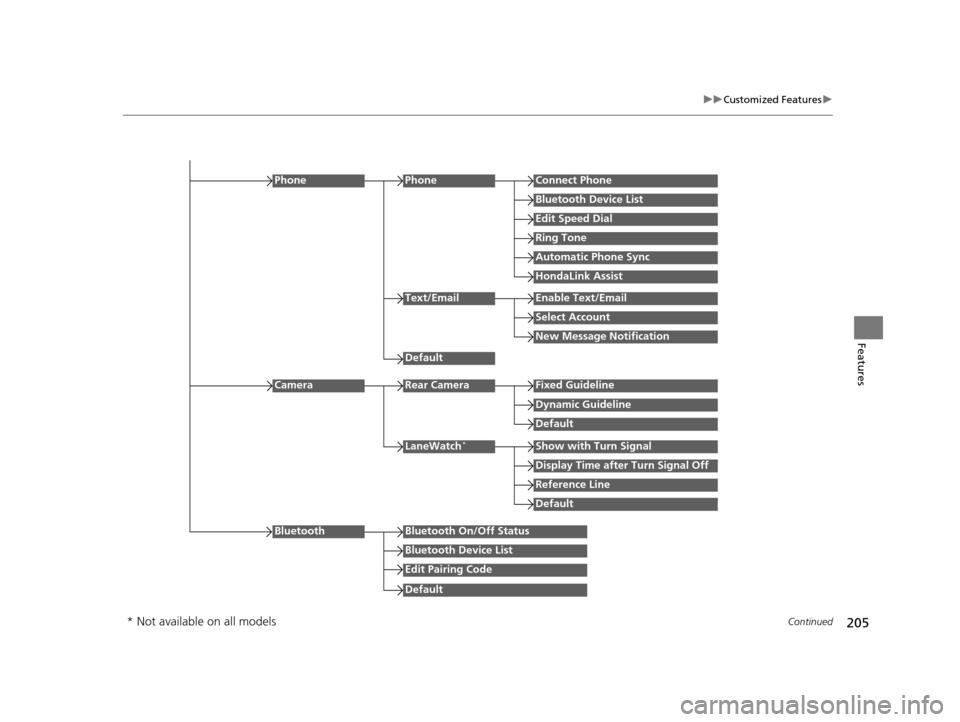
Edit Speed Dial
PhoneConnect Phone
Bluetooth Device List
Ring Tone
Automatic Phone Sync
HondaLink Assist
Phone
Default
Text/EmailEnable Text/Email
Select Account
New Message Notification
Reference Line
LaneWatch*Show with Turn Signal
Display Time after Turn Signal Off
Default
Camera
Default
Rear CameraFixed Guideline
Dynamic Guideline
Default
Bluetooth On/Off Status
Bluetooth Device List
Edit Pairing Code
Bluetooth
* Not available on all models
16 CR-Z-31SZT6500.book 205 ページ 2015年9月11日 金曜日 午前11時47分
Page 207 of 409
206
uuCustomized Features u
Features
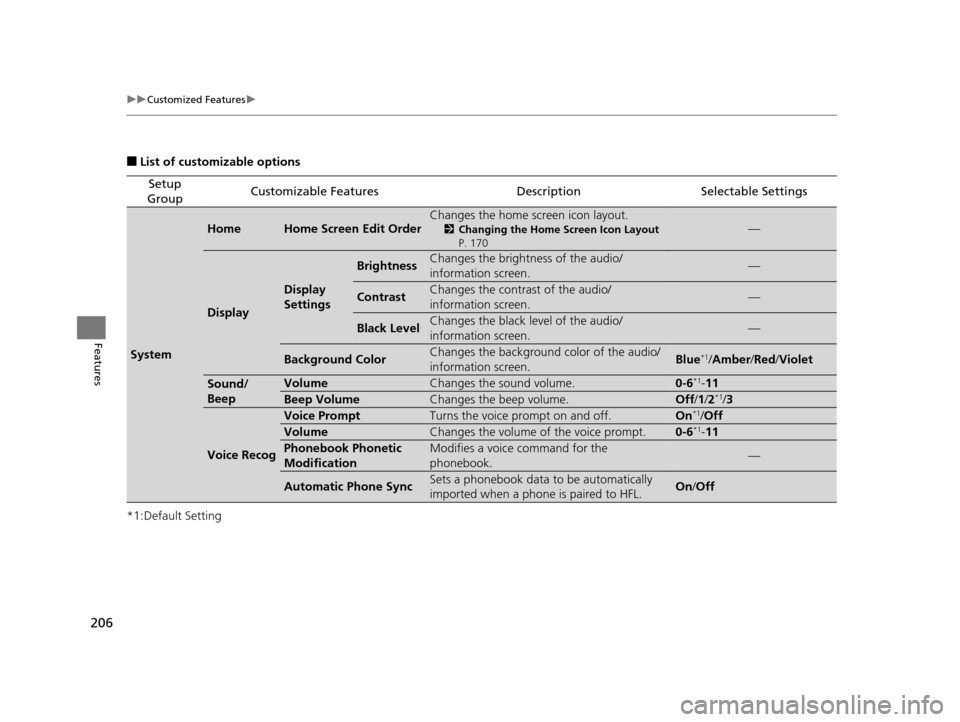
■List of customizable options
*1:Default Setting
Setup
GroupCustomizable FeaturesDescriptionSelectable Settings
System
HomeHome Screen Edit OrderChanges the home screen icon layout.
2 Changing the Home Screen Icon Layout
P. 170—
Display
Display
Settings
BrightnessChanges the brightness of the audio/
information screen.—
ContrastChanges the contrast of the audio/
information screen.—
Black LevelChanges the black level of the audio/
information screen.—
Background ColorChanges the background color of the audio/
information screen.Blue*1/ Amber /Red/ Violet
Sound/
BeepVolumeChanges the sound volume.0-6*1-11
Beep VolumeChanges the beep volume.Off /1 /2*1/3
Voice Recog
Voice PromptTurns the voice prompt on and off.On*1/Off
VolumeChanges the volume of the voice prompt.0-6*1- 11
Phonebook Phonetic
ModificationModifies a voice command for the
phonebook.—
Automatic Phone SyncSets a phonebook data to be automatically
imported when a phone is paired to HFL.On /Off
16 CR-Z-31SZT6500.book 206 ページ 2015年9月11日 金曜日 午前11時47分
Page 210 of 409
209
uuCustomized Features u
Continued
Features
*1:Default Setting
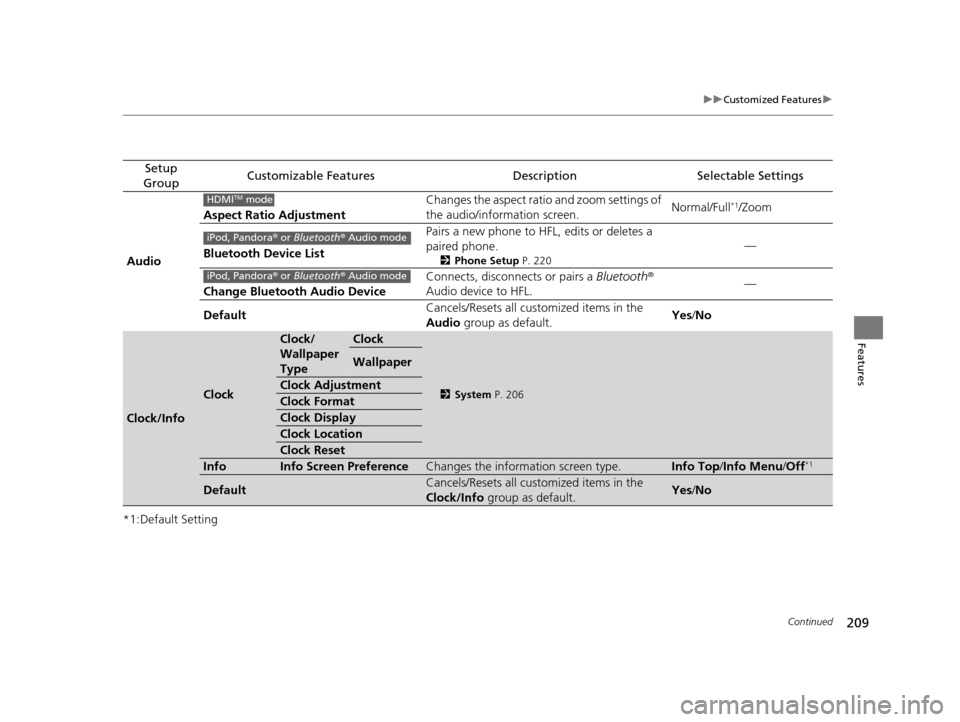
Setup
GroupCustomizable FeaturesDescriptionSelectable Settings
Audio Aspect Ratio Adjustment
Changes the aspect ratio and zoom settings of
the audio/information screen.
Normal/Full
*1/Zoom
Bluetooth Device List Pairs a new phone to HFL, edits or deletes a
paired phone.
2
Phone Setup P. 220
—
Change Bluetooth Audio Device Connects, disconnects or pairs a
Bluetooth®
Audio device to HFL. —
Default Cancels/Resets all customized items in the
Audio
group as default. Yes
/No
Clock/Info
Clock
Clock/
Wallpaper
TypeClock
2 System P. 206
Wallpaper
Clock Adjustment
Clock Format
Clock Display
Clock Location
Clock Reset
InfoInfo Screen PreferenceChanges the information screen type.Info Top /Info Menu/ Off*1
DefaultCancels/Resets all customized items in the
Clock/Info group as default.Yes/No
HDMITM mode
iPod, Pandora ® or Bluetooth® Audio mode
iPod, Pandora ® or Bluetooth® Audio mode
16 CR-Z-31SZT6500.book 209 ページ 2015年9月11日 金曜日 午前11時47分
Page 211 of 409
210
uuCustomized Features u
Features
*1:Default Setting
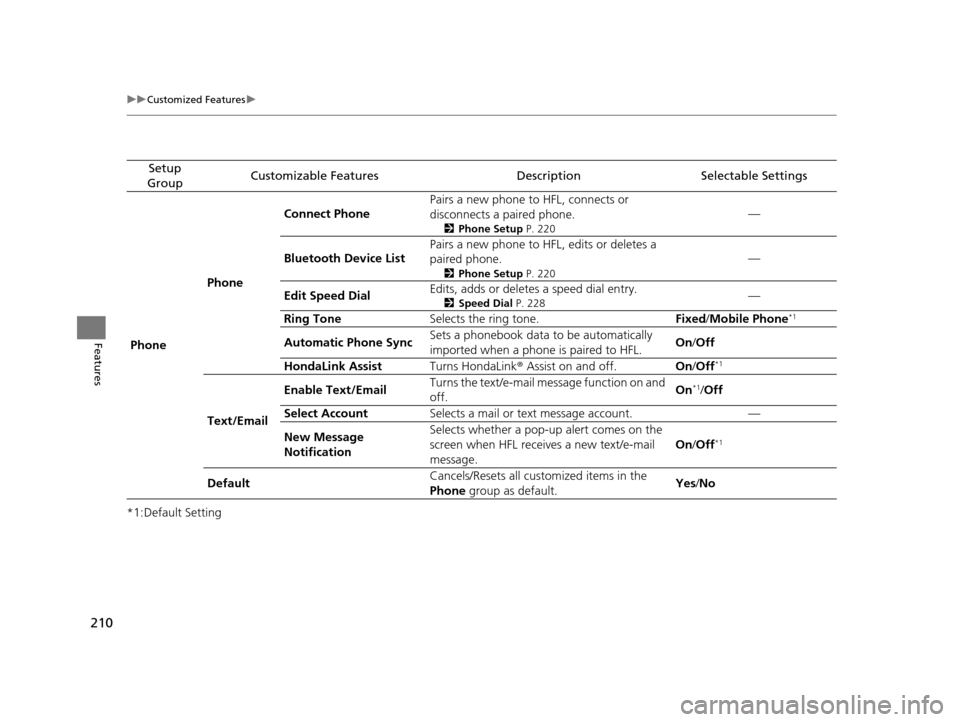
Setup
GroupCustomizable FeaturesDescriptionSelectable Settings
Phone PhoneConnect Phone
Pairs a new phone to HFL, connects or
disconnects a paired phone.
2
Phone Setup P. 220
—
Bluetooth Device List Pairs a new phone to HFL, edits or deletes a
paired phone.
2
Phone Setup P. 220
—
Edit Speed Dial Edits, adds or deletes a speed dial entry.
2
Speed Dial P. 228—
Ring Tone Selects the ring tone. Fixed/Mobile Phone
*1
Automatic Phone Sync Sets a phonebook data to be automatically
imported when a phone is paired to HFL. On
/Off
HondaLink Assist Turns HondaLink® Assist on and off. On/Off
*1
Text/Email Enable Text/Email
Turns the text/e-mail me
ssage function on and
off. On
*1/
Off
Select Account Selects a mail or text message account. —
New Message
Notification Selects whether a pop-up
alert comes on the
screen when HFL receives a new text/e-mail
message. On
/Off
*1
Default Cancels/Resets all customized items in the
Phone
group as default. Yes
/No
16 CR-Z-31SZT6500.book 210 ページ 2015年9月11日 金曜日 午前11時47分
Page 212 of 409
211
uuCustomized Features u
Features
*1:Default Setting
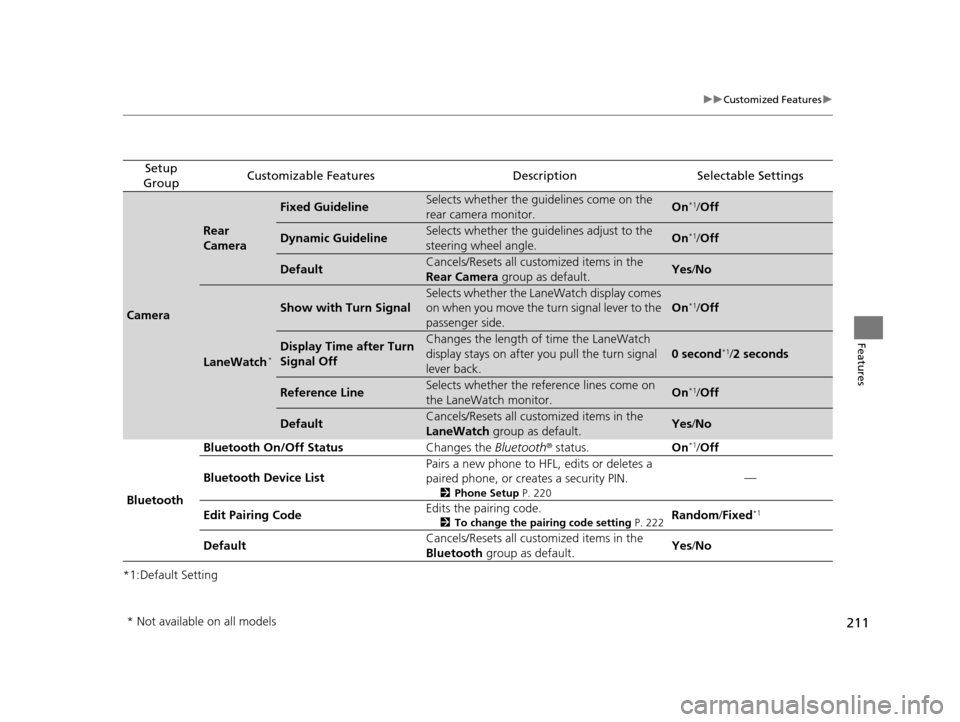
Setup
GroupCustomizable FeaturesDescriptionSelectable Settings
Camera
Rear
Camera
Fixed GuidelineSelects whether the guidelines come on the
rear camera monitor.On*1/ Off
Dynamic GuidelineSelects whether the guidelines adjust to the
steering wheel angle.On*1/Off
DefaultCancels/Resets all customized items in the
Rear Camera group as default.Yes/No
LaneWatch*
Show with Turn Signal
Selects whether the LaneWatch display comes
on when you move the turn signal lever to the
passenger side.
On*1/ Off
Display Time after Turn
Signal OffChanges the length of time the LaneWatch
display stays on after you pull the turn signal
lever back.
0 second*1/2 seconds
Reference LineSelects whether the reference lines come on
the LaneWatch monitor.On*1/ Off
DefaultCancels/Resets all customized items in the
LaneWatch group as default.Yes/No
Bluetooth Bluetooth On/Off Status
Changes the Bluetooth® status. On
*1/Off
Bluetooth Device List Pairs a new phone to HFL, edits or deletes a
paired phone, or cr
eates a security PIN.
2Phone Setup P. 220
—
Edit Pairing Code Edits the pairing code.
2
To change the pairing code setting P. 222Random/Fixed*1
Default Cancels/Resets all customized items in the
Bluetooth
group as default. Yes
/No
* Not available on all models
16 CR-Z-31SZT6500.book 211 ページ 2015年9月11日 金曜日 午前11時47分
Page 213 of 409
212
uuCustomized Features uDefaulting All the Settings
Features
Defaulting All the Settings
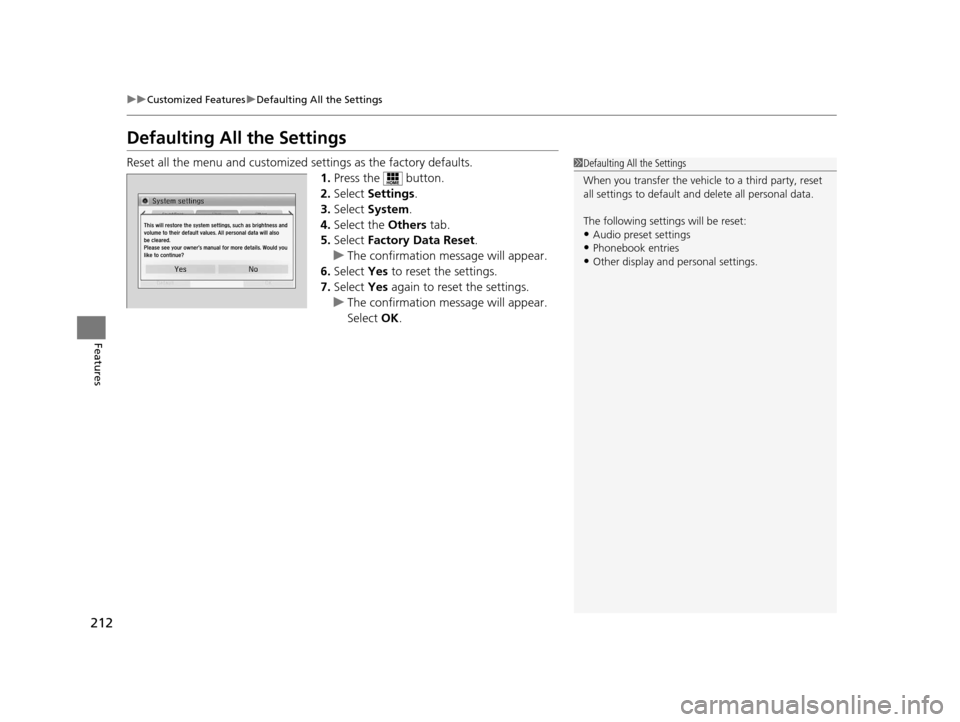
Reset all the menu and customized settings as the factory defaults.
1. Press the button.
2. Select Settings .
3. Select System .
4. Select the Others tab.
5. Select Factory Data Reset .
u The confirmation message will appear.
6. Select Yes to reset the settings.
7. Select Yes again to reset the settings.
u The confirmation message will appear.
Select OK.1Defaulting All the Settings
When you transfer the vehicle to a third party, reset
all settings to default a nd delete all personal data.
The following settin gs will be reset:
•Audio preset settings
•Phonebook entries
•Other display and personal settings.
16 CR-Z-31SZT6500.book 212 ページ 2015年9月11日 金曜日 午前11時47分
Page 214 of 409
213Continued
Features
Bluetooth® HandsFreeLink ®
See the Navigation System Manual for how to operate the Bluetooth® HandsFreeLink® .
Bluetooth ® HandsFreeLink ® (HFL) allows you to place and receive phone calls using
your vehicle's audio system, without handling your cell phone.
Using HFL
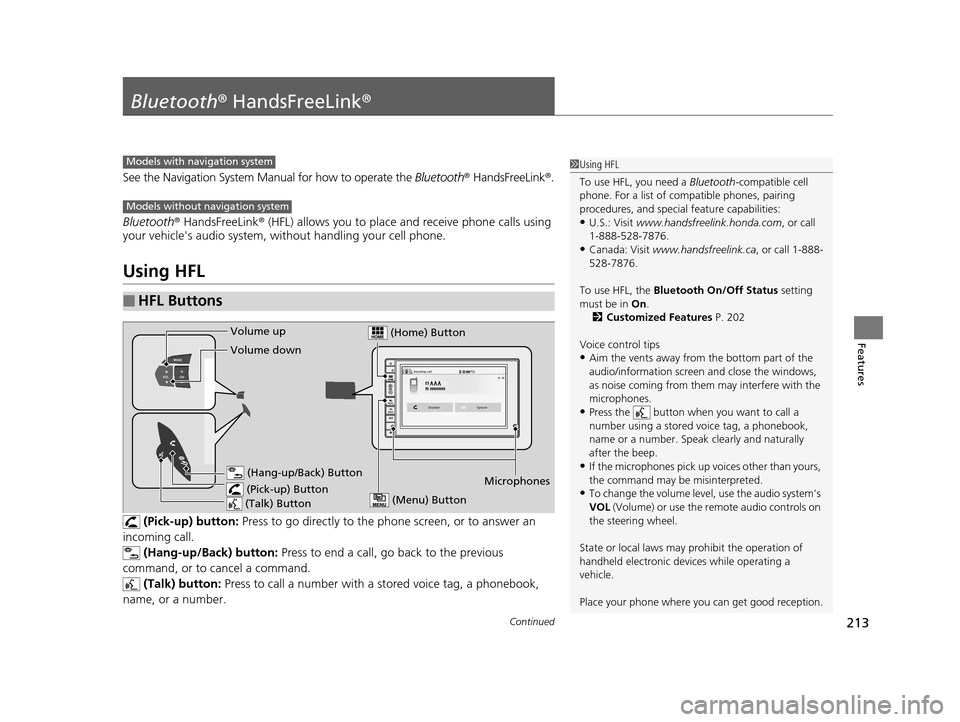
(Pick-up) button: Press to go directly to the p hone screen, or to answer an
incoming call. (Hang-up/Back) button: Press to end a call, go back to the previous
command, or to cancel a command.
(Talk) button: Press to call a number with a st ored voice tag, a phonebook,
name, or a number.
■HFL Buttons
Models with navigation system
Models without navigation system
1 Using HFL
To use HFL, you need a Bluetooth-compatible cell
phone. For a list of compatible phones, pairing
procedures, and special feature capabilities:
•U.S.: Visit www.handsfreelink.honda.com , or call
1-888-528-7876.
•Canada: Visit www.handsfreelink.ca , or call 1-888-
528-7876.
To use HFL, the Bluetooth On/Off Status setting
must be in On.
2 Customized Features P. 202
Voice control tips
•Aim the vents away from the bottom part of the
audio/information screen and close the windows,
as noise coming from them may interfere with the
microphones.
•Press the button when you want to call a
number using a stored voice tag, a phonebook,
name or a number. Speak clearly and naturally
after the beep.
•If the microphones pick up vo ices other than yours,
the command may be misinterpreted.
•To change the volume level, use the audio system's
VOL (Volume) or use the remote audio controls on
the steering wheel.
State or local laws may pr ohibit the operation of
handheld electronic devi ces while operating a
vehicle.
Place your phone where y ou can get good reception.Microphones
(Pick-up) Button (Hang-up/Back) Button
Volume up
(Talk) Button
Volume down
(Menu) Button
(Home) Button
16 CR-Z-31SZT6500.book 213 ページ 2015年9月11日 金曜日 午前11時47分
Page 215 of 409
uuBluetooth ® HandsFreeLink ®u Using HFL
214
Features
To go to the Phone menu screen:
1. Press the button.
2. Select Phone to switch the display to the phone screen.
3. Press the button.
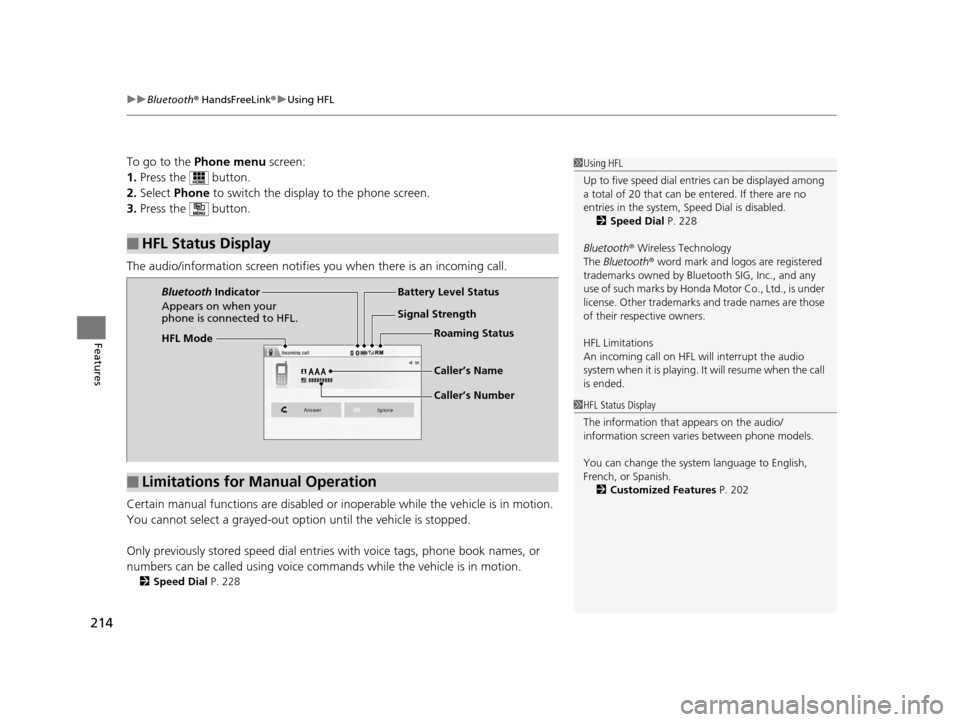
The audio/information screen notifies you when there is an incoming call.
Certain manual functions are disabled or inoperable while the ve hicle is in motion.
You cannot select a grayed-out option until the vehicle is stopped.
Only previously stored speed dial entries with voice tags, phone book names, or
numbers can be called using voice commands while the vehicle is in motion.
2 Speed Dial P. 228
■HFL Status Display
1Using HFL
Up to five speed dial entries can be displayed among
a total of 20 that can be entered. If there are no
entries in the system, Speed Dial is disabled. 2 Speed Dial P. 228
Bluetooth ® Wireless Technology
The Bluetooth ® word mark and logos are registered
trademarks owned by Blue tooth SIG, Inc., and any
use of such marks by Honda Motor Co., Ltd., is under
license. Other trademarks and trade names are those
of their respective owners.
HFL Limitations
An incoming call on HFL will interrupt the audio
s y s te m wh e n it is p la y i n g . It wi ll re s u m e w h en t h e c a l l
is ended.
1 HFL Status Display
The information that appears on the audio/
information screen vari es between phone models.
You can change the system language to English,
French, or Spanish. 2 Customized Features P. 202
HFL Mode Battery Level Status
Signal Strength
Bluetooth
Indicator
Appears on when your
phone is connected to HFL.
Caller’s Name
Caller’s NumberRoaming Status
■Limitations for Manual Operation
16 CR-Z-31SZT6500.book 214 ページ 2015年9月11日 金曜日 午前11時47分
Page 216 of 409
215
uuBluetooth ® HandsFreeLink ®u HFL Menus
Continued
Features
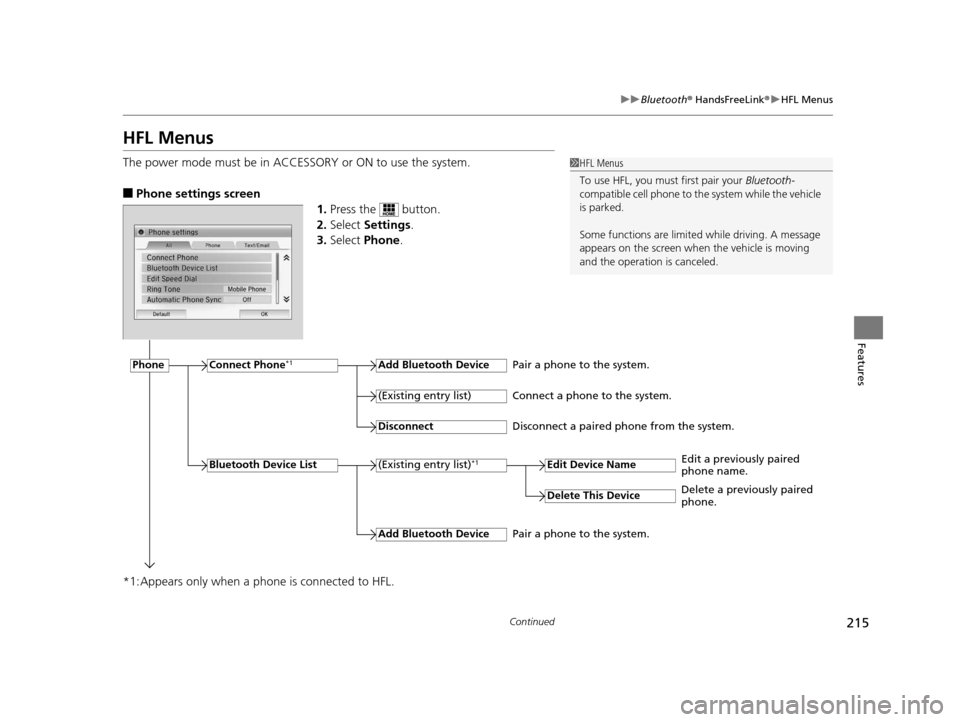
HFL Menus
The power mode must be in ACCESSO RY or ON to use the system.
■Phone settings screen
1.Press the button.
2. Select Settings .
3. Select Phone.
*1:Appears only when a phone is connected to HFL.
1 HFL Menus
To use HFL, you must first pair your Bluetooth-
compatible cell phone to th e system while the vehicle
is parked.
Some functions are limited while driving. A message
appears on the screen when the vehicle is moving
and the operation is canceled.
PhoneConnect Phone*1Add Bluetooth Device
(Existing entry list)*1
(Existing entry list)
Disconnect
Edit Device Name
Add Bluetooth Device
Bluetooth Device List
Delete This Device
Pair a phone to the system.
Connect a phone to the system.
Disconnect a paired phone from the system.
Edit a previously paired
phone name.
Pair a phone to the system. Delete a previously paired
phone.
16 CR-Z-31SZT6500.book 215 ページ 2015年9月11日 金曜日 午前11時47分
Page 217 of 409
216
uuBluetooth ® HandsFreeLink ®u HFL Menus
Features
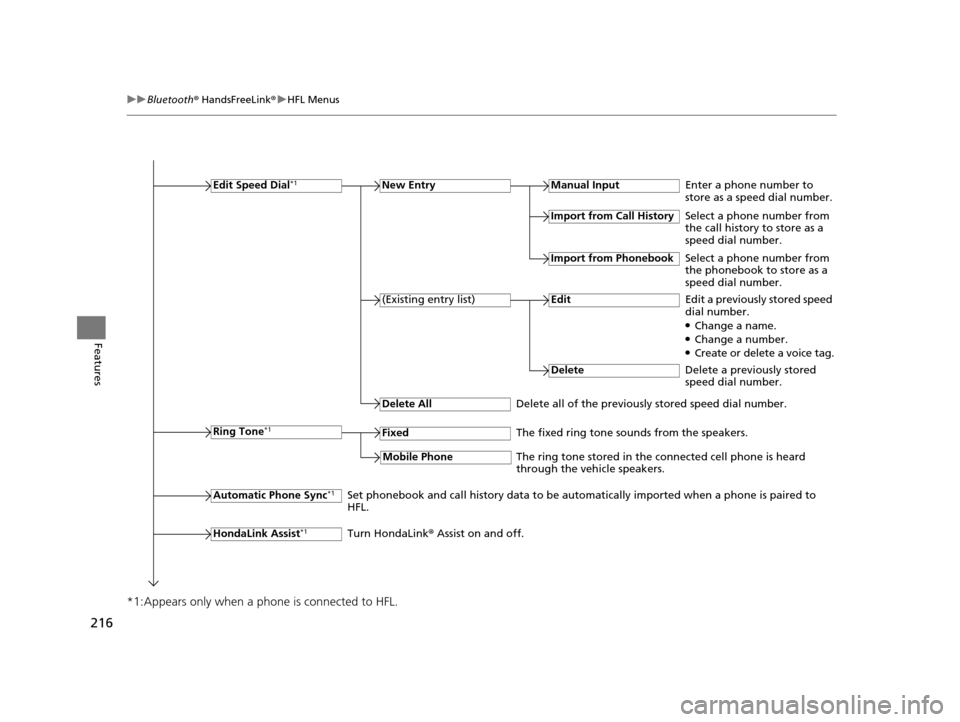
*1:Appears only when a ph one is connected to HFL.
Edit Speed Dial*1New Entry
Delete All
Automatic Phone Sync*1
Manual Input
HondaLink Assist*1
Ring Tone*1
Import from Call History
Enter a phone number to
store as a speed dial number.
The fixed ring tone sounds from the speakers. Select a phone number from
the call history to store as a
speed dial number.
Import from Phonebook
Select a phone number from
the phonebook to store as a
speed dial number.
(Existing entry list)EditEdit a previously stored speed
dial number.
●Change a name.●Change a number.●Create or delete a voice tag.
Delete all of the previously stored speed dial number. Delete
Delete a previously stored
speed dial number.
Set phonebook and call history data to be automatically imported when a phone is paired to
HFL.
Turn HondaLink ® Assist on and off.
Fixed
Mobile PhoneThe ring tone stored in the connected cell phone is heard
through the vehicle speakers.
16 CR-Z-31SZT6500.book 216 ページ 2015年9月11日 金曜日 午前11時47分