lock HONDA CR-Z 2016 1.G Workshop Manual
[x] Cancel search | Manufacturer: HONDA, Model Year: 2016, Model line: CR-Z, Model: HONDA CR-Z 2016 1.GPages: 409, PDF Size: 19.68 MB
Page 139 of 409
138
uuOperating the Switches Around the Steering Wheel uAdjusting the Steering Wheel
Controls
Adjusting the Steering Wheel
The steering wheel height and distance from your body can be adjusted so that you
can comfortably grip the steering wheel in an appropriate driving posture.
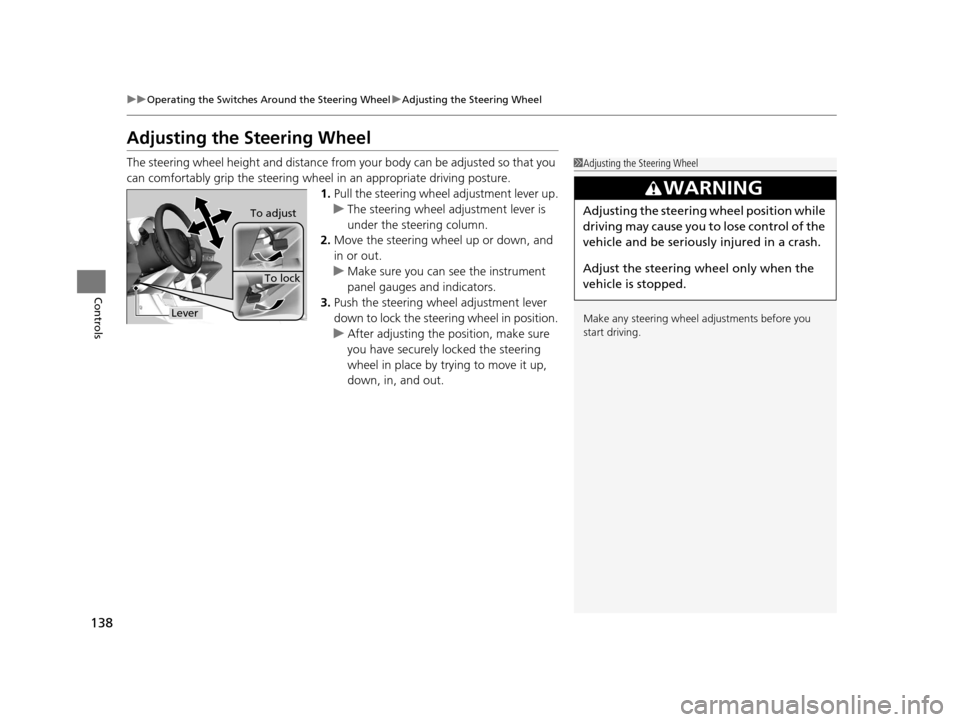
1.Pull the steering wheel adjustment lever up.
u The steering wheel adjustment lever is
under the steering column.
2. Move the steering wheel up or down, and
in or out.
u Make sure you can see the instrument
panel gauges and indicators.
3. Push the steering wheel adjustment lever
down to lock the steering wheel in position.
u After adjusting the position, make sure
you have securely locked the steering
wheel in place by trying to move it up,
down, in, and out.1Adjusting the Steering Wheel
Make any steering wheel adjustments before you
start driving.
3WARNING
Adjusting the steering wheel position while
driving may cause you to lose control of the
vehicle and be seriously injured in a crash.
Adjust the steering wheel only when the
vehicle is stopped.To adjust
To lock
Lever
16 CR-Z-31SZT6500.book 138 ページ 2015年9月11日 金曜日 午前11時47分
Page 142 of 409
141Continued
Controls
Adjusting the Seats
Adjusting the Seat Positions
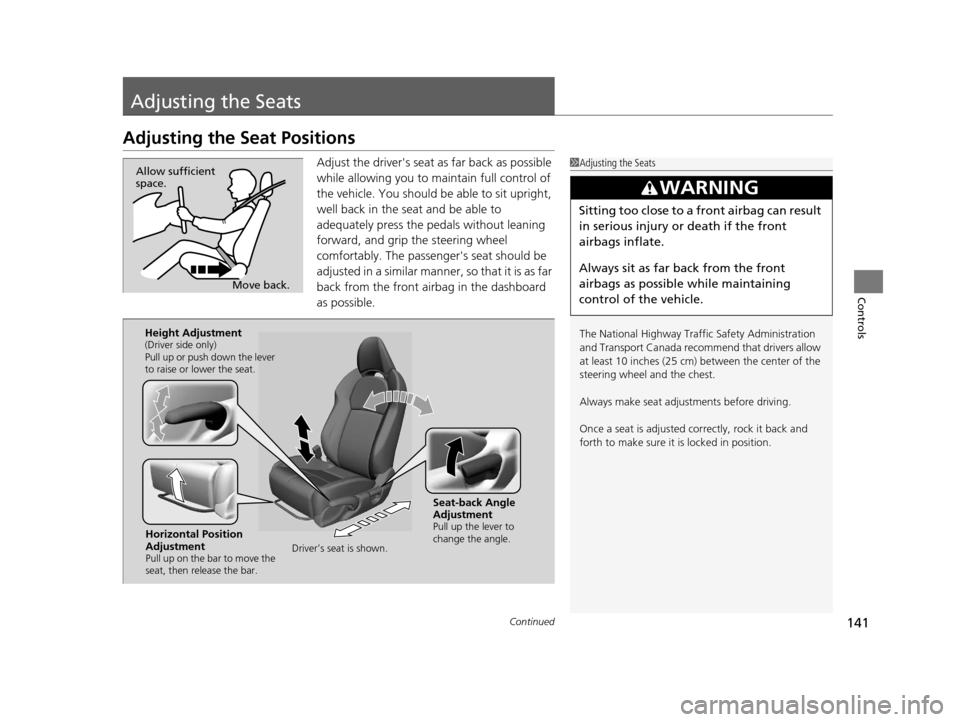
Adjust the driver's seat as far back as possible
while allowing you to ma intain full control of
the vehicle. You should be able to sit upright,
well back in the seat and be able to
adequately press the pedals without leaning
forward, and grip the steering wheel
comfortably. The passenger's seat should be
adjusted in a similar manner, so that it is as far
back from the front airbag in the dashboard
as possible.1 Adjusting the Seats
The National Highway Traffic Safety Administration
and Transport Cana da recommend that drivers allow
at least 10 inches (25 cm) between the center of the
steering wheel and the chest.
Always make seat adjustments before driving.
Once a seat is adjusted co rrectly, rock it back and
forth to make sure it is locked in position.
3WARNING
Sitting too close to a front airbag can result
in serious injury or death if the front
airbags inflate.
Always sit as far back from the front
airbags as possible while maintaining
control of the vehicle.
Move back.
Allow sufficient
space.
Horizontal Position
Adjustment
Pull up on the bar to move the
seat, then release the bar.
Height Adjustment(Driver side only)
Pull up or push down the lever
to raise or lower the seat.
Seat-back Angle
Adjustment
Pull up the lever to
change the angle.
Driver’s seat is shown.
16 CR-Z-31SZT6500.book 141 ページ 2015年9月11日 金曜日 午前11時47分
Page 145 of 409
uuAdjusting the Seats uAdjusting the Seat Positions
144
Controls
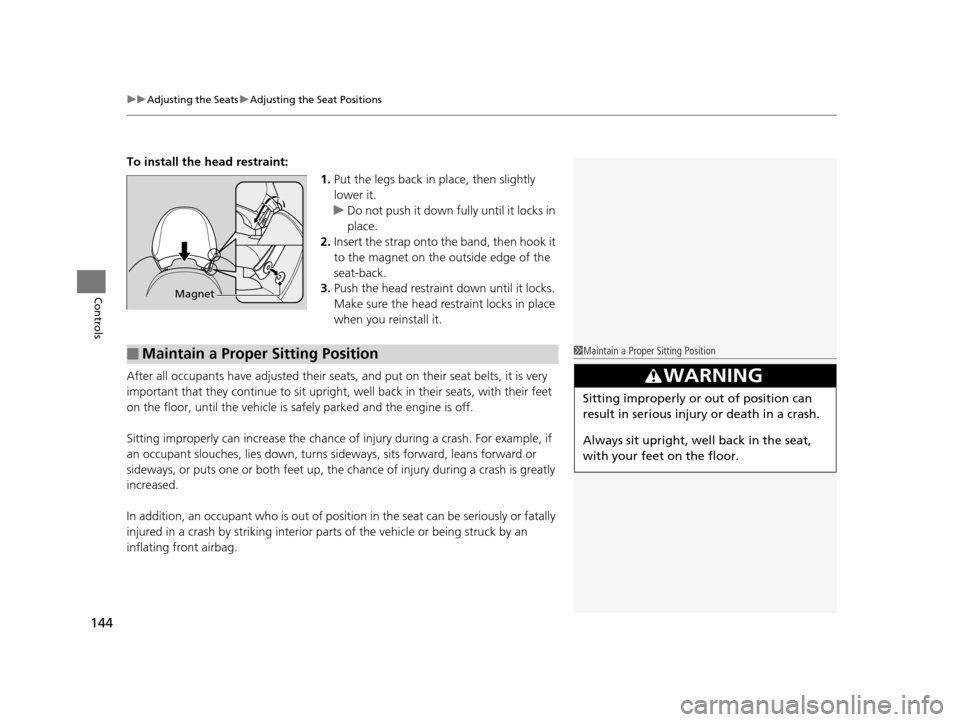
To install the head restraint:
1.Put the legs back in place, then slightly
lower it.
u Do not push it down fully until it locks in
place.
2. Insert the strap onto th e band, then hook it
to the magnet on the outside edge of the
seat-back.
3. Push the head restraint down until it locks.
Make sure the head restraint locks in place
when you reinstall it.
After all occupants have adjusted their seats, and put on their seat belts, it is very
important that they continue to sit upright, well back in their seats, with their feet
on the floor, until the vehicle is safely parked and the engine is off.
Sitting improperly can increase the chance of injury during a crash. For example, if
an occupant slouches, lies down, turns si deways, sits forward, leans forward or
sideways, or puts one or both feet up, the chance of injury during a crash is greatly
increased.
In addition, an occupant who is out of position in the seat can be seriously or fatally
injured in a crash by striking interior parts of the vehicle or being struck by an
inflating front airbag.
Magnet
■Maintain a Proper Sitting Position1 Maintain a Proper Sitting Position
3WARNING
Sitting improperly or out of position can
result in serious injury or death in a crash.
Always sit upright, well back in the seat,
with your feet on the floor.
16 CR-Z-31SZT6500.book 144 ページ 2015年9月11日 金曜日 午前11時47分
Page 147 of 409
146
Controls
Interior Lights/Interior Convenience Items
Interior Lights
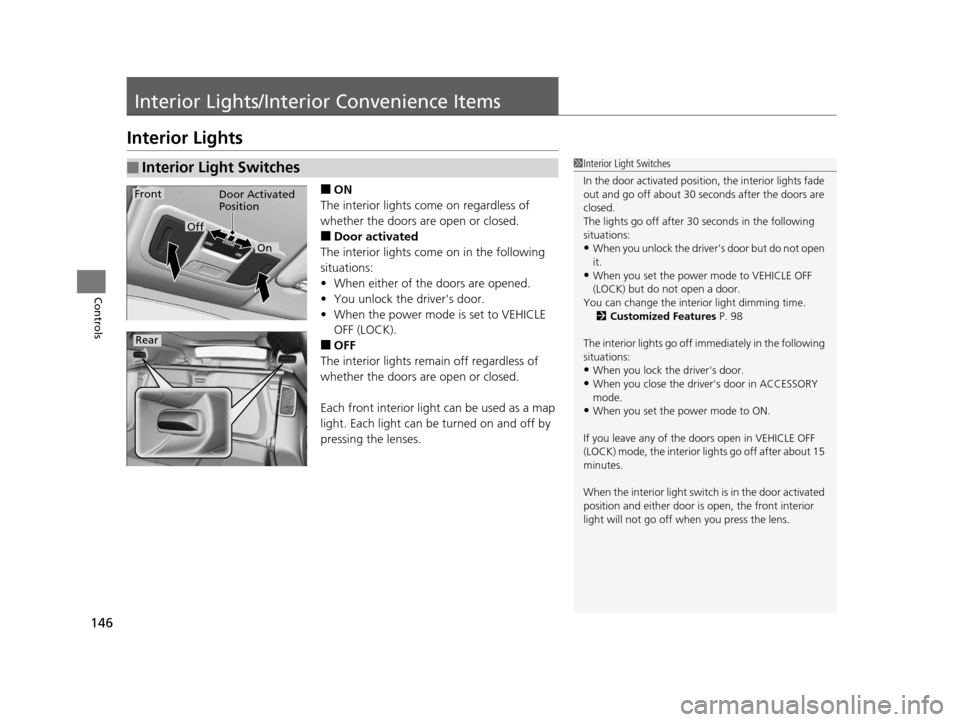
■ON
The interior lights come on regardless of
whether the doors are open or closed.
■Door activated
The interior lights come on in the following
situations:
• When either of the doors are opened.
• You unlock the driver's door.
• When the power mode is set to VEHICLE
OFF (LOCK).
■OFF
The interior lights remain off regardless of
whether the doors are open or closed.
Each front interior light can be used as a map
light. Each light can be turned on and off by
pressing the lenses.
■Interior Light Switches1 Interior Light Switches
In the door activated position, the interior lights fade
out and go off about 30 se conds after the doors are
closed.
The lights go off after 30 seconds in the following
situations:
•When you unlock the driver's door but do not open
it.
•When you set the power mode to VEHICLE OFF
(LOCK) but do not open a door.
You can change the inte rior light dimming time.
2 Customized Features P. 98
The interior lights go off i mmediately in the following
situations:
•When you lock the driver's door.
•When you close the driver's door in ACCESSORY
mode.
•When you set the power mode to ON.
If you leave any of the doors open in VEHICLE OFF
(LOCK) mode, the interior lights go off after about 15
minutes.
When the interior light swit ch is in the door activated
position and either door is open, the front interior
light will not go off when you press the lens.
Door Activated
Position
On
Off
Rear
Front
16 CR-Z-31SZT6500.book 146 ページ 2015年9月11日 金曜日 午前11時47分
Page 151 of 409
uuInterior Lights/Interior Convenience Items uInterior Convenience Items
150
Controls
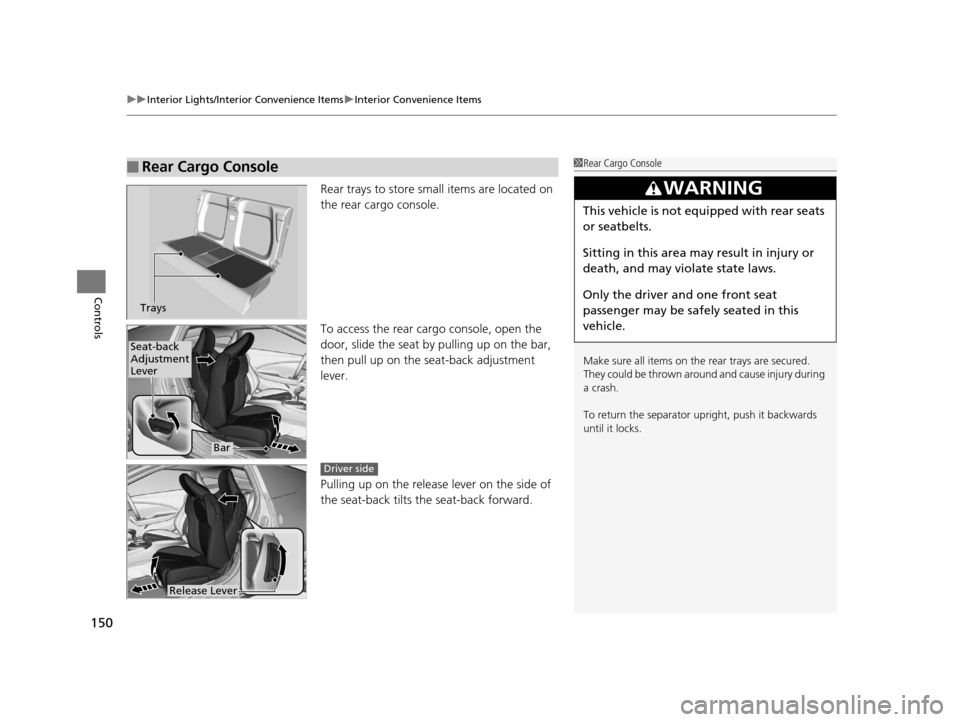
Rear trays to store small items are located on
the rear cargo console.
To access the rear cargo console, open the
door, slide the seat by pulling up on the bar,
then pull up on the seat-back adjustment
lever.
Pulling up on the releas e lever on the side of
the seat-back tilts the seat-back forward.
■Rear Cargo Console1 Rear Cargo Console
Make sure all items on the rear trays are secured.
They could be thrown around and cause injury during
a crash.
To return the separator upright, push it backwards
until it locks.
3WARNING
This vehicle is not equi pped with rear seats
or seatbelts.
Sitting in this area may result in injury or
death, and may violate state laws.
Only the driver and one front seat
passenger may be safely seated in this
vehicle.
Trays
Seat-back
Adjustment
Lever
Bar
Release Lever
Driver side
16 CR-Z-31SZT6500.book 150 ページ 2015年9月11日 金曜日 午前11時47分
Page 153 of 409
uuInterior Lights/Interior Convenience Items uInterior Convenience Items
152
Controls
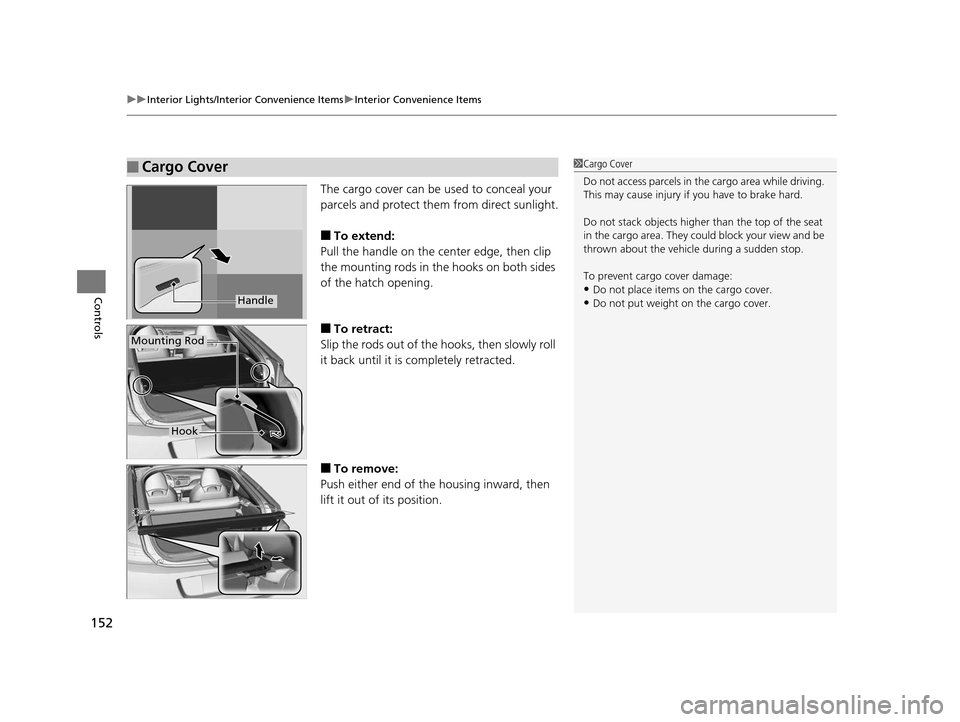
The cargo cover can be used to conceal your
parcels and protect them from direct sunlight.
■To extend:
Pull the handle on the center edge, then clip
the mounting rods in the hooks on both sides
of the hatch opening.
■To retract:
Slip the rods out of the hooks, then slowly roll
it back until it is completely retracted.
■To remove:
Push either end of the housing inward, then
lift it out of its position.
■Cargo Cover1 Cargo Cover
Do not access parcels in the cargo area while driving.
This may cause injury if you have to brake hard.
Do not stack objects higher than the top of the seat
in the cargo area. They could block your view and be
thrown about the vehicle during a sudden stop.
To prevent cargo cover damage:
•Do not place items on the cargo cover.•Do not put weight on the cargo cover.Handle
Mounting Rod
Hook
16 CR-Z-31SZT6500.book 152 ページ 2015年9月11日 金曜日 午前11時47分
Page 170 of 409
169
uuAudio System Basic Operation uAudio/Information Screen
Continued
Features
■Info
Displays Trip Computer or Clock/Wallpaper. To see all available information, Trip
Computer , Voice Info , Clock/Wallpaper , or System/Device Information , press
the button.
■Audio
Shows the current audio information.
■Settings
Enters the customizing menu screen.
2 Customized Features P. 202
■Connect
Connects with your smartphone*1 to play personalized music, information, and
social media streams.
2 Smartphone Apps P. 193
*1: Available on specific phones only. Check handsfreelink.honda.com for
compatible phones and hondalink.com for feature details.
16 CR-Z-31SZT6500.book 169 ページ 2015年9月11日 金曜日 午前11時47分
Page 172 of 409
Continued171
uuAudio System Basic Operation uAudio/Information Screen
Features
You can change, store, and delete the wa llpaper on the audio/information screen.
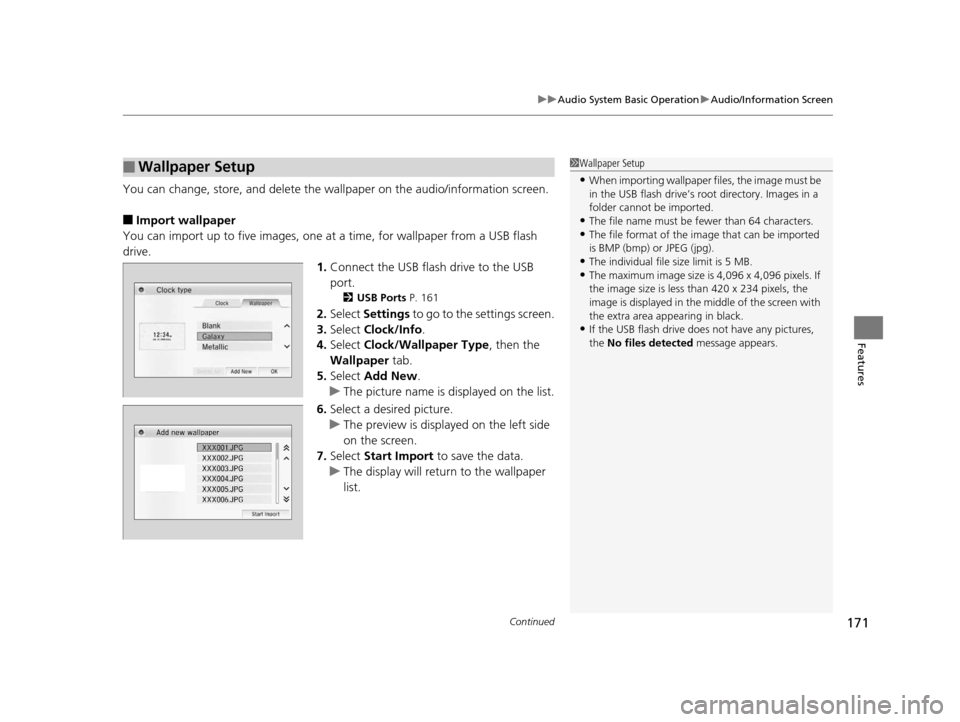
■Import wallpaper
You can import up to five images, one at a time, for wallpaper from a USB flash
drive.
1.Connect the USB flash drive to the USB
port.
2 USB Ports P. 161
2.Select Settings to go to the settings screen.
3. Select Clock/Info .
4. Select Clock/Wallpaper Type , then the
Wallpaper tab.
5. Select Add New .
u The picture name is displayed on the list.
6. Select a desired picture.
u The preview is displayed on the left side
on the screen.
7. Select Start Import to save the data.
u The display will return to the wallpaper
list.
■Wallpaper Setup1Wallpaper Setup
•When importing wallpaper files, the image must be
in the USB flash drive’s root directory. Images in a
folder cannot be imported.
•The file name must be fewer than 64 characters.•The file format of the im age that can be imported
is BMP (bmp) or JPEG (jpg).
•The individual file size limit is 5 MB.•The maximum image size is 4,096 x 4,096 pixels. If
the image size is less than 420 x 234 pixels, the
image is displayed in the middle of the screen with
the extra area appearing in black.
•If the USB flash drive doe s not have any pictures,
the No files detected message appears.
16 CR-Z-31SZT6500.book 171 ページ 2015年9月11日 金曜日 午前11時47分
Page 173 of 409
uuAudio System Basic Operation uAudio/Information Screen
172
Features
■Select wallpaper
1. Select Settings to go to the settings screen.
2. Select Clock/Info .
3. Select Clock/Wallpaper Type , then the Wallpaper tab.
u The screen changes to the wallpaper list.
4. Select a desired wallpaper.
u The preview is displayed on the left side on the screen.
u The pop-up menu appears on the screen.
5. Select Set.
u The display will return to the wallpaper list.
■To view wallpaper once it is set
1. Press the button.
2. Select Info.
3. Press the button.
4. Select Clock/Wallpaper .
■Delete wallpaper
1. Select Settings to go to the settings screen.
2. Select Clock/Info .
3. Select Clock/Wallpaper Type , then the Wallpaper tab.
u The screen changes to the wallpaper list.
4. Select a wallpaper that you want to delete.
u The preview is displayed on the left side on the screen.
u The pop-up menu appears on the screen.
5. Select Delete.
u The confirmation message will appear.
6. Select Yes to delete completely.
u The display will return to the wallpaper list.
1Wallpaper Setup
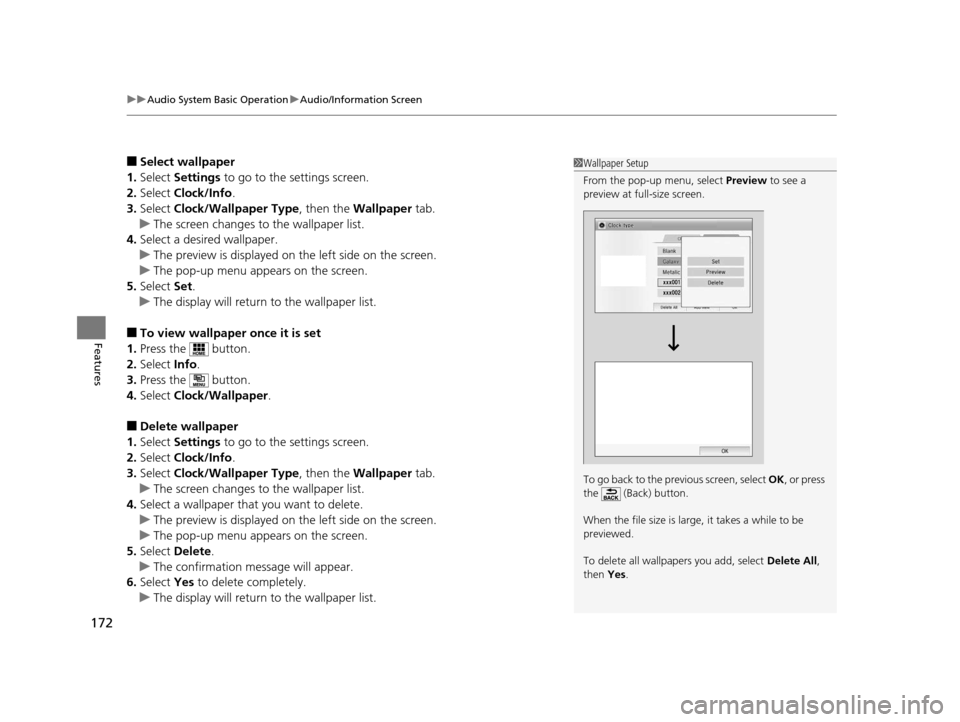
From the pop-up menu, select Preview to see a
preview at full-size screen.
To go back to the previous screen, select OK, or press
the (Back) button.
When the file size is large, it takes a while to be
previewed.
To delete all wallpapers you add, select Delete All,
then Yes.
16 CR-Z-31SZT6500.book 172 ページ 2015年9月11日 金曜日 午前11時47分
Page 202 of 409
201
uuGeneral Information on the Audio SystemuCompatible iPod, iPhone and USB Flash Drives
Features
Compatible iPod, iPhone and USB Flash Drives
•USB flash drives of 256 MB or higher are recommended.
• Some digital audio players may not be compatible.
• Some USB flash drives (e.g., a device with security lockout) may not work.
• Some software files may not allow for audio play or text data display.
• Some versions of MP3, WMA, or AAC formats may be unsupported.
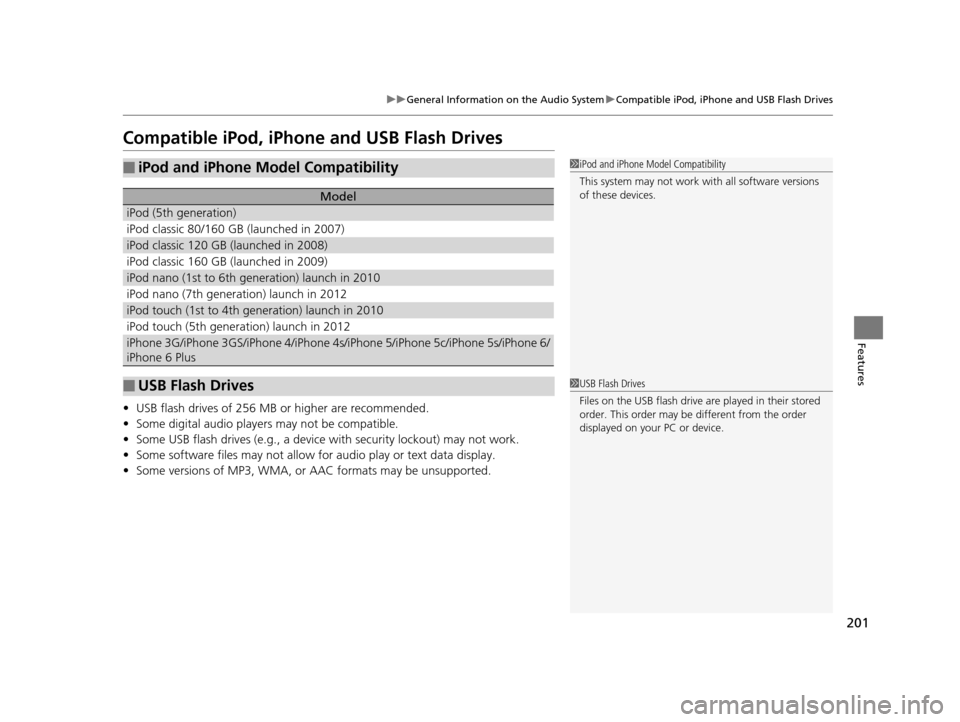
■iPod and iPhone Model Compatibility
Model
iPod (5th generation)
iPod classic 80/160 GB (launched in 2007)
iPod classic 120 GB (launched in 2008)
iPod classic 160 GB (launched in 2009)
iPod nano (1st to 6th generation) launch in 2010
iPod nano (7th generation) launch in 2012
iPod touch (1st to 4th generation) launch in 2010
iPod touch (5th generation) launch in 2012
iPhone 3G/iPhone 3GS/iPhone 4/iPhone 4s/iPhone 5/iPhone 5c/iPhone 5s/iPhone 6/
iPhone 6 Plus
■USB Flash Drives
1iPod and iPhone Model Compatibility
This system may not work with all software versions
of these devices.
1USB Flash Drives
Files on the USB flash drive are played in their stored
order. This order may be different from the order
displayed on your PC or device.
16 CR-Z-31SZT6500.book 201 ページ 2015年9月11日 金曜日 午前11時47分