lock HONDA CR-Z 2016 1.G Manual Online
[x] Cancel search | Manufacturer: HONDA, Model Year: 2016, Model line: CR-Z, Model: HONDA CR-Z 2016 1.GPages: 409, PDF Size: 19.68 MB
Page 341 of 409
340
Maintenance
12-Volt Battery
Checking the 12-Volt Battery
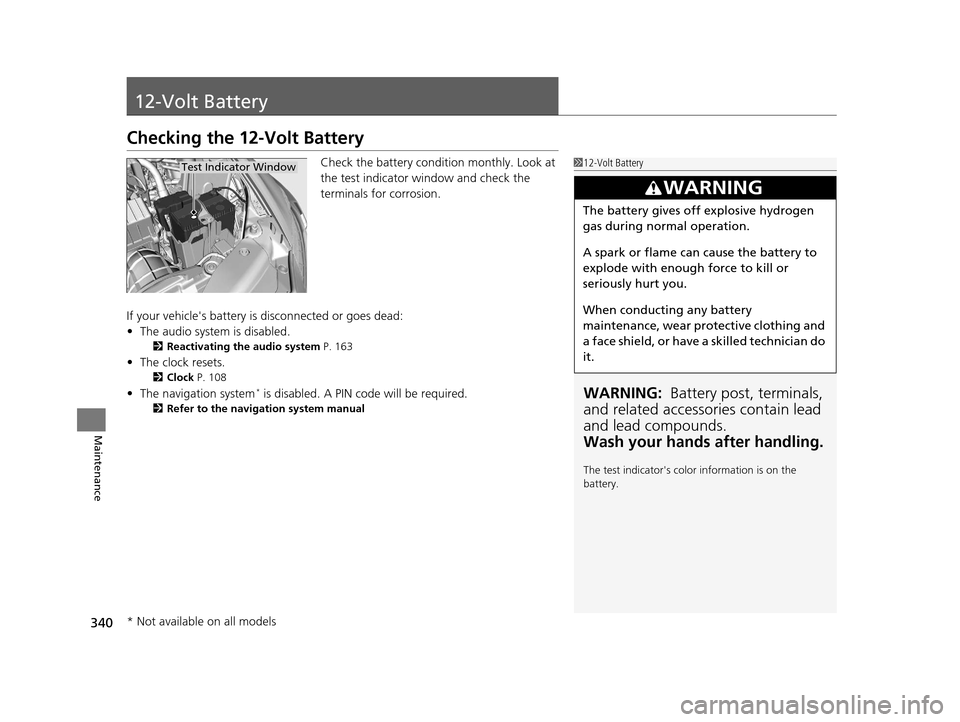
Check the battery condition monthly. Look at
the test indicator window and check the
terminals for corrosion.
If your vehicle's battery is disconnected or goes dead:
• The audio system is disabled.
2 Reactivating the audio system P. 163
•The clock resets.
2 Clock P. 108
•The navigation system* is disabled. A PIN code will be required.
2 Refer to the navigation system manual
112-Volt Battery
WARNING: Battery post, terminals,
and related accessories contain lead
and lead compounds.
Wash your hands after handling.
The test indicator's color information is on the
battery.
3WARNING
The battery gives off explosive hydrogen
gas during normal operation.
A spark or flame can cause the battery to
explode with enough force to kill or
seriously hurt you.
When conducting any battery
maintenance, wear prot ective clothing and
a face shield, or have a skilled technician do
it.
Test Indicator Window
* Not available on all models
16 CR-Z-31SZT6500.book 340 ページ 2015年9月11日 金曜日 午前11時47分
Page 346 of 409
345
uuCleaning uInterior Care
Maintenance
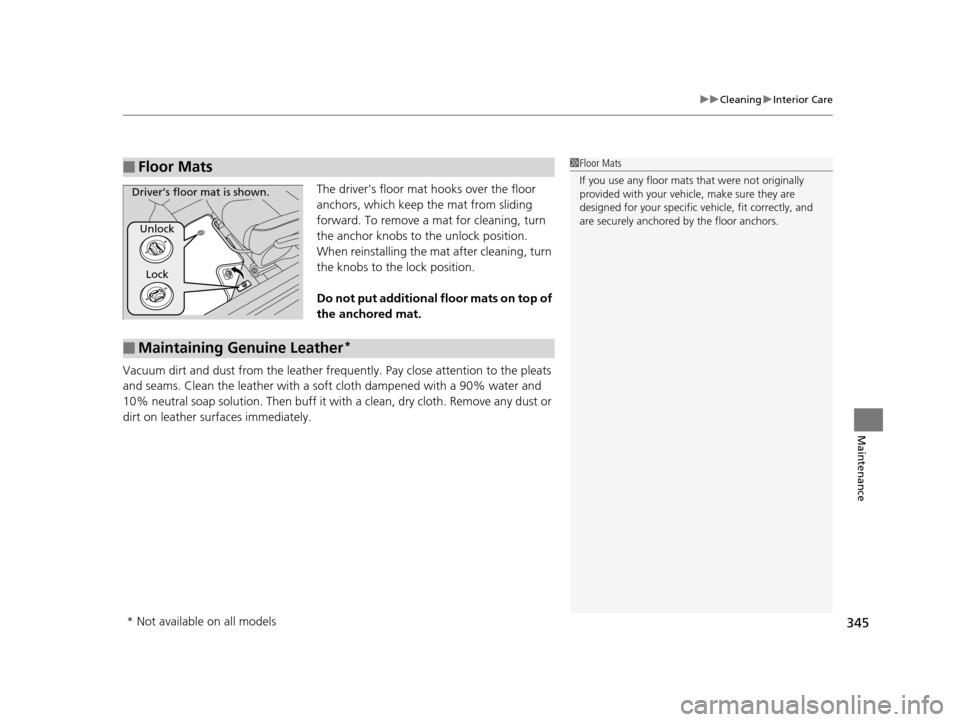
The driver’s floor mat hooks over the floor
anchors, which keep the mat from sliding
forward. To remove a mat for cleaning, turn
the anchor knobs to the unlock position.
When reinstalling the mat after cleaning, turn
the knobs to the lock position.
Do not put additional floor mats on top of
the anchored mat.
Vacuum dirt and dust from the leather frequ ently. Pay close attention to the pleats
and seams. Clean the leather with a so ft cloth dampened with a 90% water and
10% neutral soap solution. Then buff it with a clean, dry cloth. Remove any dust or
dirt on leather surfaces immediately.
■Floor Mats1 Floor Mats
If you use any floor mats that were not originally
provided with your vehicle, make sure they are
designed for your specific ve hicle, fit correctly, and
are securely anchored by the floor anchors.
Unlock
Lock
Driver’s floor mat is shown.
■Maintaining Genuine Leather*
* Not available on all models
16 CR-Z-31SZT6500.book 345 ページ 2015年9月11日 金曜日 午前11時47分
Page 362 of 409
361
uuIf a Tire Goes Flat uTemporarily Repairing a Flat Tire
Handling the Unexpected
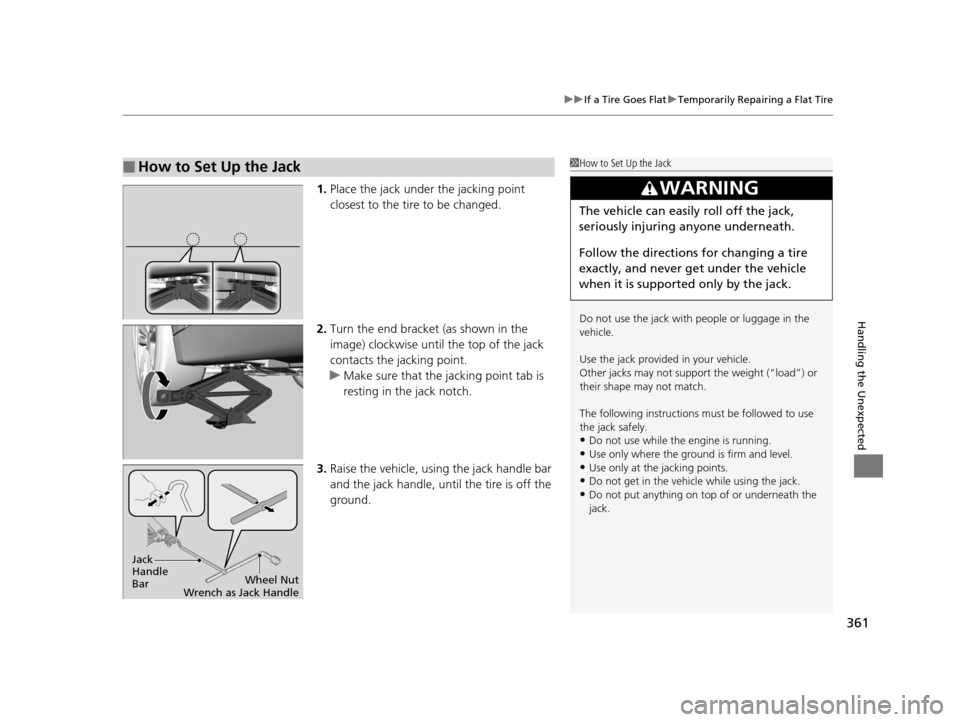
1. Place the jack under the jacking point
closest to the tire to be changed.
2. Turn the end bracket (as shown in the
image) clockwise until the top of the jack
contacts the jacking point.
u Make sure that the jacking point tab is
resting in the jack notch.
3. Raise the vehicle, using the jack handle bar
and the jack handle, until the tire is off the
ground.
■How to Set Up the Jack1How to Set Up the Jack
Do not use the jack with people or luggage in the
vehicle.
Use the jack provided in your vehicle.
Other jacks may not support the weight (“load”) or
their shape may not match.
The following instructions must be followed to use
the jack safely.
•Do not use while the engine is running.
•Use only where the ground is firm and level.
•Use only at the jacking points.•Do not get in the vehicl e while using the jack.
•Do not put anything on top of or underneath the
jack.
3WARNING
The vehicle can easily roll off the jack,
seriously injuring anyone underneath.
Follow the directions for changing a tire
exactly, and never get under the vehicle
when it is supported only by the jack.
Jack
Handle
Bar Wheel Nut
Wrench as Jack Handle
16 CR-Z-31SZT6500.book 361 ページ 2015年9月11日 金曜日 午前11時47分
Page 366 of 409
365
uuEngine Does Not Start uEmergency Engine Stop
Handling the Unexpected
Emergency Engine Stop
The ENGINE START/STOP button may be used to stop the engine due to an
emergency situation even while driving. If you must stop the engine, do either of the
following operations:
• Press and hold the ENGINE START/STOP button for about two seconds.
• Firmly press the ENGINE START/STOP button twice.
The steering wheel will not lock. However, because turning off the engine disables
the power assist the engine provides to the steering and braking systems, it will
require significantly more physical effort an d time to steer and slow the vehicle. Use
both feet on the brake pedal to slow down the vehicle and stop immediately in a
safe place. With manual transmission models you can also downshift the
transmission to utilize engine braking.
The power mode is in ACCESSORY when the engine is stopped.
To change the mode to VEHICLE OF F, change the gear position to
(P after the
vehicle comes to a complete stop.
Then press the ENGINE START/STOP button twice without depressing the brake
pedal.
The power mode changes to VEHICLE OFF.
1 Emergency Engine Stop
Do not press the button while driving unless it is
absolutely necessary for th e engine to be switched
off.
Continuously variable transmission for U.S. models
Continuously variable transmission for Canadian models
Manual transmission models
16 CR-Z-31SZT6500.book 365 ページ 2015年9月11日 金曜日 午前11時47分
Page 370 of 409
369
Handling the Unexpected
Shift Lever Does Not Move
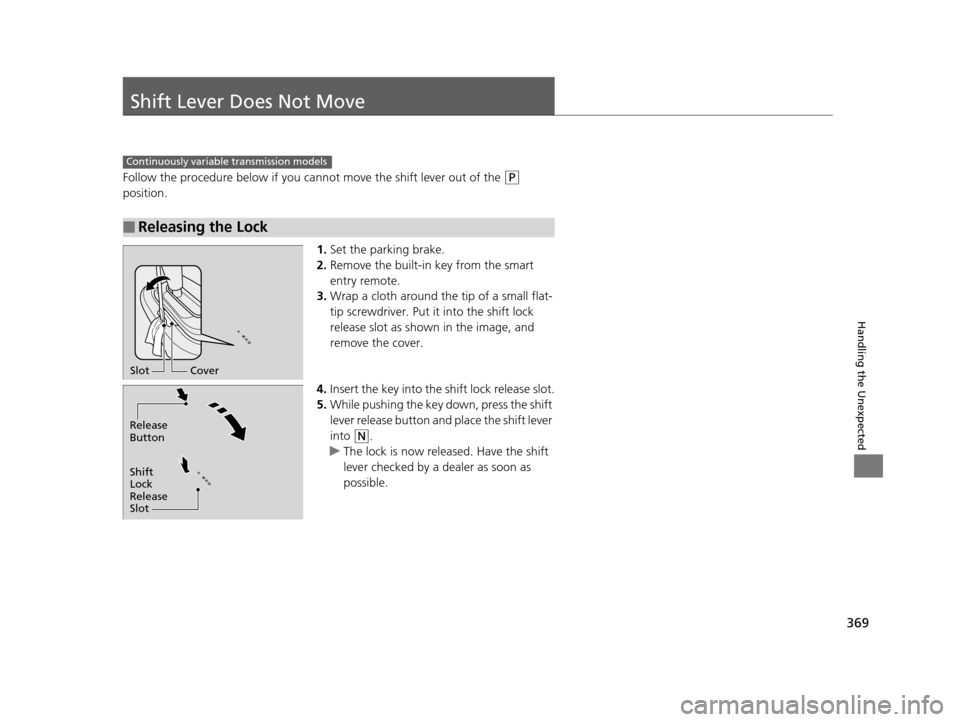
Follow the procedure below if you cannot move the shift lever out of the (P
position.
1.Set the parking brake.
2. Remove the built-in key from the smart
entry remote.
3. Wrap a cloth around the tip of a small flat-
tip screwdriver. Put it into the shift lock
release slot as shown in the image, and
remove the cover.
4. Insert the key into the shift lock release slot.
5. While pushing the key down, press the shift
lever release button and place the shift lever
into
(N.
u The lock is now released. Have the shift
lever checked by a de aler as soon as
possible.
■Releasing the Lock
Continuously variable transmission models
Slot Cover
Release
Button
Shift
Lock
Release
Slot
16 CR-Z-31SZT6500.book 369 ページ 2015年9月11日 金曜日 午前11時47分
Page 380 of 409
379
uuFuses uFuse Locations
Continued
Handling the Unexpected
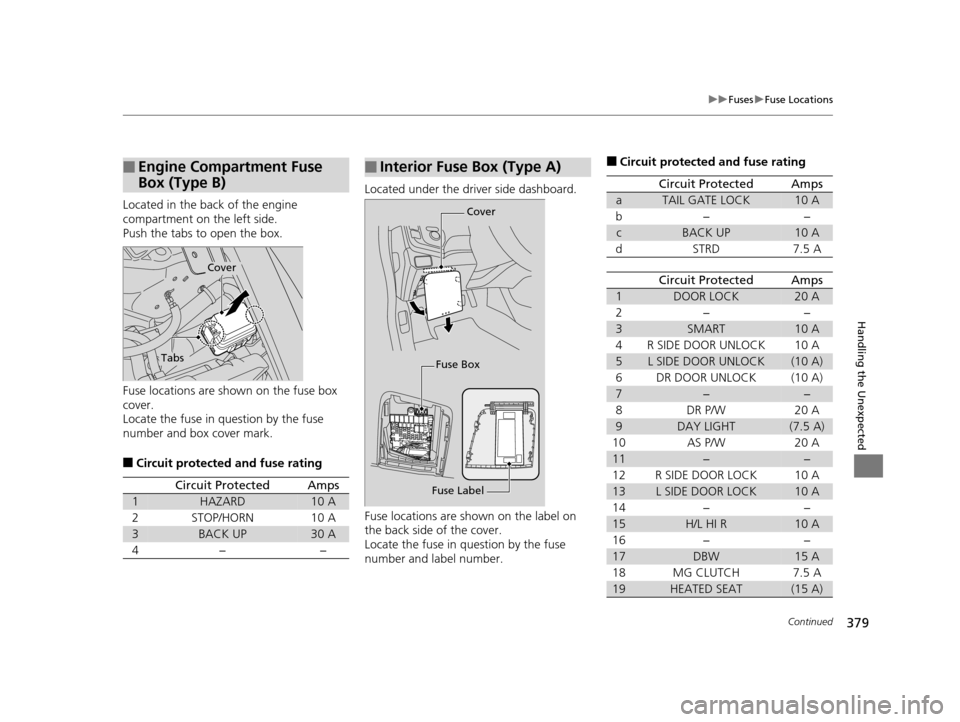
Located in the back of the engine
compartment on the left side.
Push the tabs to open the box.
Fuse locations are shown on the fuse box
cover.
Locate the fuse in question by the fuse
number and box cover mark.
■Circuit protected and fuse rating
■Engine Compartment Fuse
Box (Type B)
Cover
Tabs
Circuit ProtectedAmps
1HAZARD10 A
2STOP/HORN10 A
3BACK UP30 A
4−−
Located under the driver side dashboard.
Fuse locations are shown on the label on
the back side of the cover.
Locate the fuse in question by the fuse
number and label number.
■Interior Fuse Box (Type A)
Fuse Label Cover
Fuse Box
■Circuit protected and fuse rating
Circuit ProtectedAmps
aTAIL GATE LOCK10 A
b−−
cBACK UP10 A
dSTRD7.5 A
Circuit ProtectedAmps
1DOOR LOCK20 A
2−−
3SMART10 A
4R SIDE DOOR UNLOCK10 A
5L SIDE DOOR UNLOCK(10 A)
6DR DOOR UNLOCK(10 A)
7−−
8DR P/W20 A
9DAY LIGHT(7.5 A)
10AS P/W20 A
11−−
12R SIDE DOOR LOCK10 A
13L SIDE DOOR LOCK10 A
14−−
15H/L HI R10 A
16−−
17DBW15 A
18MG CLUTCH7.5 A
19HEATED SEAT(15 A)
16 CR-Z-31SZT6500.book 379 ページ 2015年9月11日 金曜日 午前11時47分
Page 383 of 409
382
uuFuses uInspecting and Changing Fuses
Handling the Unexpected
Inspecting and Changing Fuses
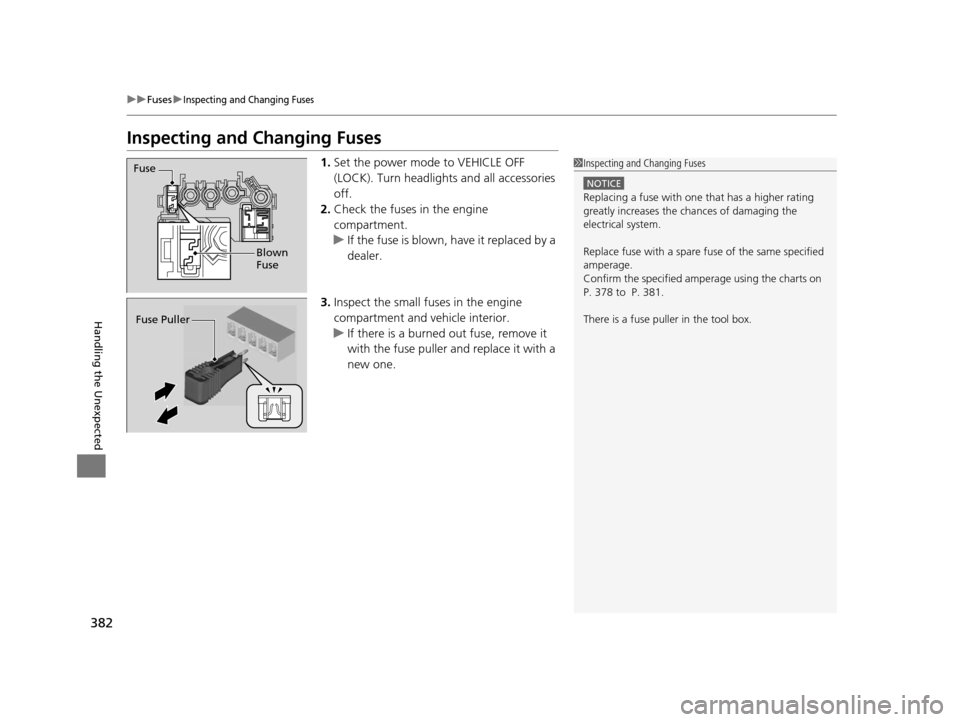
1.Set the power mode to VEHICLE OFF
(LOCK). Turn headlight s and all accessories
off.
2. Check the fuses in the engine
compartment.
u If the fuse is blown, have it replaced by a
dealer.
3. Inspect the small fuses in the engine
compartment and vehicle interior.
u If there is a burned out fuse, remove it
with the fuse puller and replace it with a
new one.1Inspecting and Changing Fuses
NOTICE
Replacing a fuse with on e that has a higher rating
greatly increases the chances of damaging the
electrical system.
Replace fuse with a spare fuse of the same specified
amperage.
Confirm the specified amperage using the charts on
P. 378 to P. 381.
There is a fuse puller in the tool box.
Fuse
Blown
Fuse
Fuse Puller
16 CR-Z-31SZT6500.book 382 ページ 2015年9月11日 金曜日 午前11時47分
Page 386 of 409
385
Handling the Unexpected
When You Cannot Open the Hatch
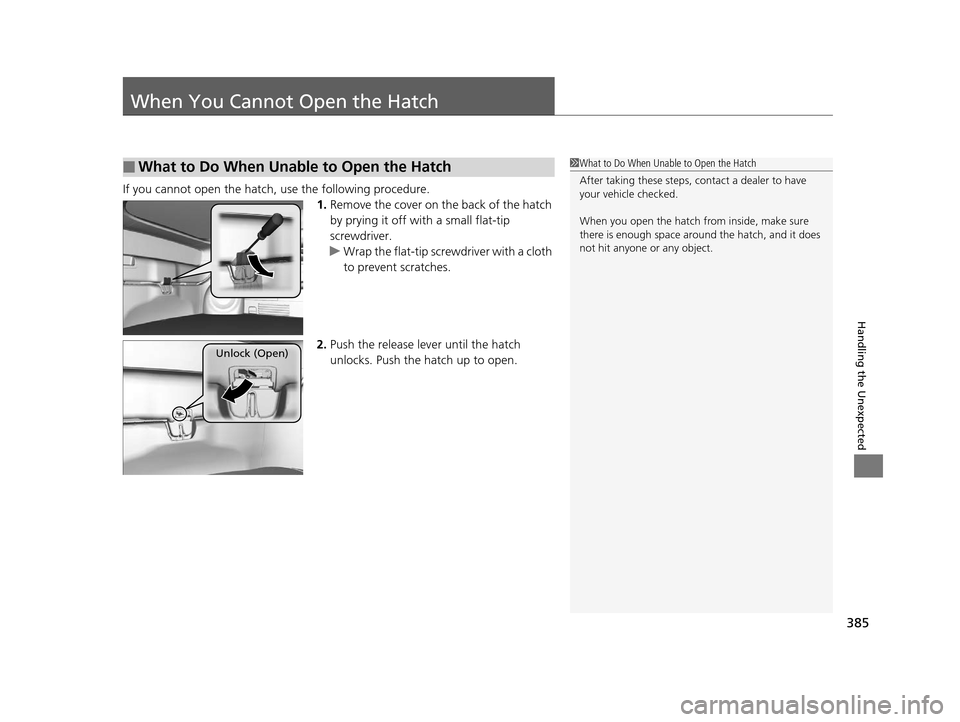
If you cannot open the hatch, use the following procedure.
1.Remove the cover on the back of the hatch
by prying it off with a small flat-tip
screwdriver.
u Wrap the flat-tip scre wdriver with a cloth
to prevent scratches.
2. Push the release lever until the hatch
unlocks. Push the hatch up to open.
■What to Do When Unable to Open the Hatch1What to Do When Unab le to Open the Hatch
After taking these steps, contact a dealer to have
your vehicle checked.
When you open the hatch fr om inside, make sure
there is enough space around the hatch, and it does
not hit anyone or any object.
Unlock (Open)
16 CR-Z-31SZT6500.book 385 ページ 2015年9月11日 金曜日 午前11時47分
Page 400 of 409
Index
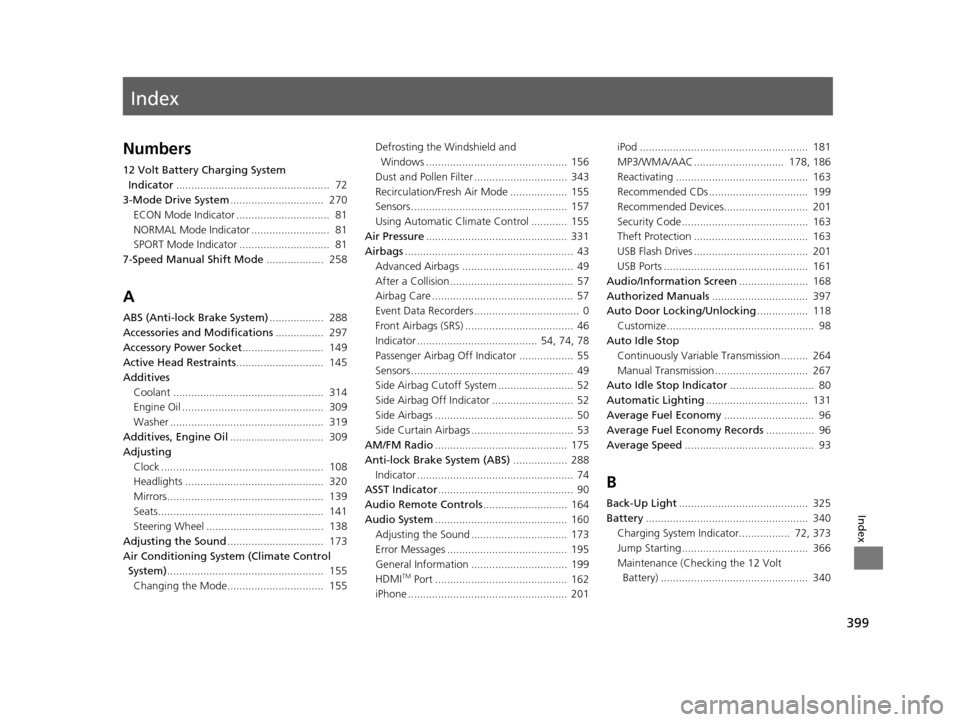
399
Index
Index
Numbers
12 Volt Battery Charging System Indicator ................................................... 72
3-Mode Drive System ............................... 270
ECON Mode Indicator ............................... 81
NORMAL Mode Indicator .......................... 81
SPORT Mode Indicator .............................. 81
7-Speed Manual Shift Mode ................... 258
A
ABS (Anti-lock Brake System) .................. 288
Accessories and Modifications ................ 297
Accessory Power Socket ........................... 149
Active Head Restraints ............................. 145
Additives
Coolant .................................................. 314
Engine Oil ............................................... 309
Washer ................................................... 319
Additives, Engine Oil ............................... 309
Adjusting
Clock ...................................................... 108
Headlights .............................................. 320
Mirrors.................................................... 139
Seats....................................................... 141
Steering Wheel ....................................... 138
Adjusting the Sound ................................ 173
Air Conditioning System (Climate Control System) .................................................... 155
Changing the Mode................................ 155 Defrosting the Windshield and
Windows ............................................... 156
Dust and Pollen Filter ............................... 343
Recirculation/Fresh Air Mode ................... 155
Sensors .................................................... 157
Using Automatic Climate Control ............ 155
Air Pressure ............................................... 331
Airbags ........................................................ 43
Advanced Airbags ..................................... 49
After a Collision ......................................... 57
Airbag Care ............................................... 57
Event Data Recorders ................................... 0
Front Airbags (SRS) .................................... 46
Indicator ........................................ 54, 74, 78
Passenger Airbag Off Indicator .................. 55
Sensors ...................................................... 49
Side Airbag Cutoff System ......................... 52
Side Airbag Off Indicator ........................... 52
Side Airbags .............................................. 50
Side Curtain Airbags .................................. 53
AM/FM Radio ............................................ 175
Anti-lock Brake System (ABS) .................. 288
Indicator .................................................... 74
ASST Indicator ............................................. 90
Audio Remote Controls ............................ 164
Audio System ............................................ 160
Adjusting the Sound ................................ 173
Error Messages ........................................ 195
General Information ................................ 199
HDMI
TM Port ............................................ 162
iPhone ..................................................... 201 iPod ........................................................ 181
MP3/WMA/AAC .............................. 178, 186
Reactivating ............................................ 163
Recommended CDs ................................. 199
Recommended Devices............................ 201
Security Code .......................................... 163
Theft Protection ...................................... 163
USB Flash Drives ...................................... 201
USB Ports ................................................ 161
Audio/Information Screen ....................... 168
Authorized Manuals ................................ 397
Auto Door Locking/Unlocking ................. 118
Customize ................................................. 98
Auto Idle Stop
Continuously Variable Transmission ......... 264
Manual Transmission ............................... 267
Auto Idle Stop Indicator ............................ 80
Automatic Lighting .................................. 131
Average Fuel Economy .............................. 96
Average Fuel Economy Records ................ 96
Average Speed ........................................... 93
B
Back-Up Light........................................... 325
Battery ...................................................... 340
Charging System Indicator................. 72, 373
Jump Starting .......................................... 366
Maintenance (Checking the 12 Volt Battery) ................................................. 340
16 CR-Z-31SZT6500.book 399 ページ 2015年9月11日 金曜日 午前11時47分
Page 401 of 409
400
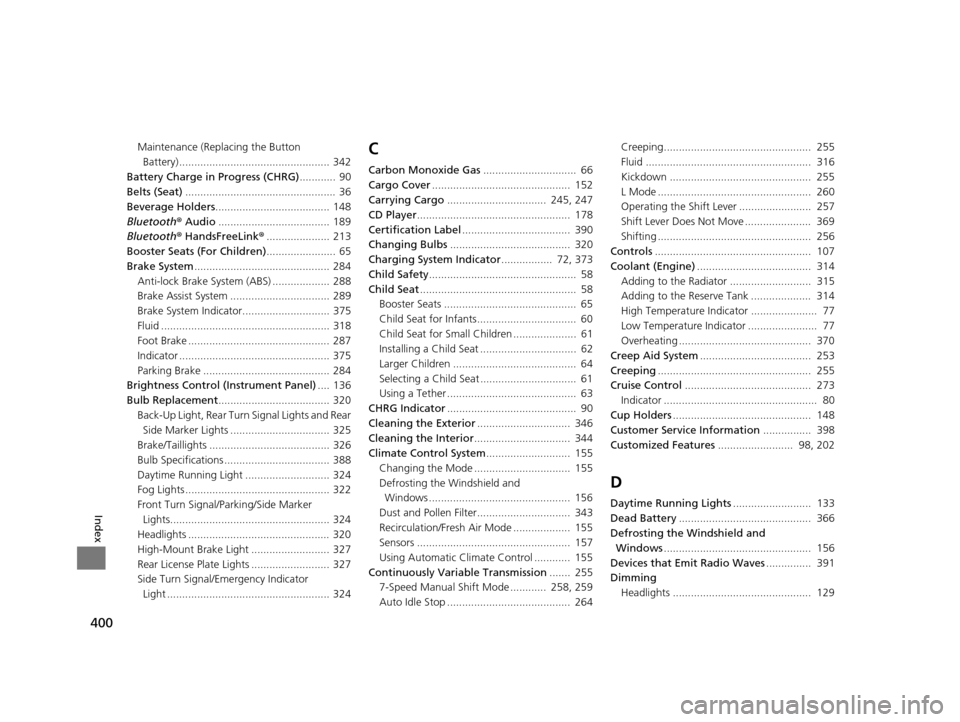
Index
Maintenance (Replacing the Button Battery) .................................................. 342
Battery Charge in Progress (CHRG) ............ 90
Belts (Seat) .................................................. 36
Beverage Holders ...................................... 148
Bluetooth ® Audio ..................................... 189
Bluetooth ® HandsFreeLink ®..................... 213
Booster Seats (For Children) ....................... 65
Brake System ............................................. 284
Anti-lock Brake System (ABS) ................... 288
Brake Assist System ................................. 289
Brake System Indicator............................. 375
Fluid ........................................................ 318
Foot Brake ............................................... 287
Indicator .................................................. 375
Parking Brake .......................................... 284
Brightness Control (Instrument Panel) .... 136
Bulb Replacement ..................................... 320
Back-Up Light, Rear Turn Signal Lights and Rear
Side Marker Lights ................................. 325
Brake/Taillights ........................................ 326
Bulb Specifications ................................... 388
Daytime Running Light ............................ 324
Fog Lights ................................................ 322
Front Turn Signal/Par king/Side Marker
Lights..................................................... 324
Headlights ............................................... 320
High-Mount Brake Light .......................... 327
Rear License Plate Lights .......................... 327
Side Turn Signal/Emergency Indicator Light ...................................................... 324C
Carbon Monoxide Gas ............................... 66
Cargo Cover .............................................. 152
Carrying Cargo ................................. 245, 247
CD Player ................................................... 178
Certification Label .................................... 390
Changing Bulbs ........................................ 320
Charging System Indicator ................. 72, 373
Child Safety ................................................. 58
Child Seat .................................................... 58
Booster Seats ............................................ 65
Child Seat for Infants................................. 60
Child Seat for Small Children ..................... 61
Installing a Child Seat ................................ 62
Larger Children ......................................... 64
Selecting a Child Seat ................................ 61
Using a Tether ........................................... 63
CHRG Indicator ........................................... 90
Cleaning the Exterior ............................... 346
Cleaning the Interior ................................ 344
Climate Control System ............................ 155
Changing the Mode ................................ 155
Defrosting the Windshield and Windows ............................................... 156
Dust and Pollen Filter............................... 343
Recirculation/Fresh Air Mode ................... 155
Sensors ................................................... 157
Using Automatic Climate Control ............ 155
Continuously Variable Transmission ....... 255
7-Speed Manual Shift Mode ............ 258, 259
Auto Idle Stop ......................................... 264 Creeping................................................. 255
Fluid ....................................................... 316
Kickdown ............................................... 255
L Mode ................................................... 260
Operating the Shift Lever ........................ 257
Shift Lever Does Not Move ...................... 369
Shifting ................................................... 256
Controls .................................................... 107
Coolant (Engine) ...................................... 314
Adding to the Radiator ........................... 315
Adding to the Reserve Tank .................... 314
High Temperature Indicator ...................... 77
Low Temperature Indicator ....................... 77
Overheating ............................................ 370
Creep Aid System ..................................... 253
Creeping ................................................... 255
Cruise Control .......................................... 273
Indicator ................................................... 80
Cup Holders .............................................. 148
Customer Service Information ................ 398
Customized Features ......................... 98, 202
D
Daytime Running Lights .......................... 133
Dead Battery ............................................ 366
Defrosting the Windshield and
Windows ................................................. 156
Devices that Emit Radio Waves ............... 391
Dimming
Headlights .............................................. 129
16 CR-Z-31SZT6500.book 400 ページ 2015年9月11日 金曜日 午前11時47分