lock HONDA CR-Z 2016 1.G Repair Manual
[x] Cancel search | Manufacturer: HONDA, Model Year: 2016, Model line: CR-Z, Model: HONDA CR-Z 2016 1.GPages: 409, PDF Size: 19.68 MB
Page 204 of 409
203
uuCustomized Features u
Continued
Features
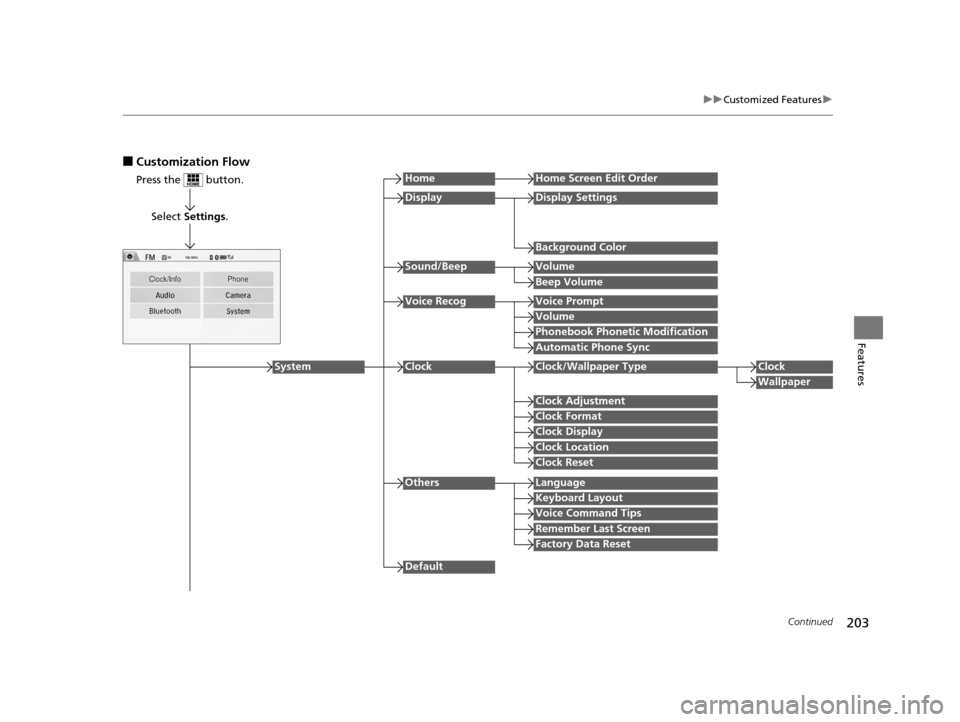
■Customization Flow
Press the button.
Select Settings .
HomeHome Screen Edit Order
Background Color
DisplayDisplay Settings
Beep Volume
Sound/BeepVolume
Volume
Voice RecogVoice Prompt
Automatic Phone Sync
Phonebook Phonetic Modification
Default
Factory Data Reset
Clock Format
ClockClock/Wallpaper TypeClock
Wallpaper
Clock Adjustment
Clock Display
Clock Location
Clock Reset
Keyboard Layout
OthersLanguage
Remember Last Screen
Voice Command Tips
System
16 CR-Z-31SZT6500.book 203 ページ 2015年9月11日 金曜日 午前11時47分
Page 205 of 409
![HONDA CR-Z 2016 1.G Repair Manual 204
uuCustomized Features u
Features
*1:May change depending on your currently selected source.
Sound
Color
Tint
Audio
Audio Source Pop-Up
[Your selected media] Cover Art*1
Color
Display Adjustment*1](/img/13/5820/w960_5820-204.png "HONDA CR-Z 2016 1.G Repair Manual 204
uuCustomized Features u
Features
*1:May change depending on your currently selected source.
Sound
Color
Tint
Audio
Audio Source Pop-Up
[Your selected media] Cover Art*1
Color
Display Adjustment*1")
204
uuCustomized Features u
Features
*1:May change depending on your currently selected source.
Sound
Color
Tint
Audio
Audio Source Pop-Up
[Your selected media] Cover Art*1
Color
Display Adjustment*1DisplayBrightness
Contrast
Black Level
Aspect Ratio Adjustment*1
Bluetooth Device List*1
Change Bluetooth Audio Device*1
Default
RDS INFO*1
Clock Format
ClockClock/Wallpaper TypeClock
Wallpaper
Clock Adjustment
Clock Display
Clock Location
Clock Reset
Default
InfoInfo Screen Preference
Clock/Info
16 CR-Z-31SZT6500.book 204 ページ 2015年9月11日 金曜日 午前11時47分
Page 208 of 409
207
uuCustomized Features u
Continued
Features
*1:Default Setting
Setup
GroupCustomizable FeaturesDescriptionSelectable Settings
System
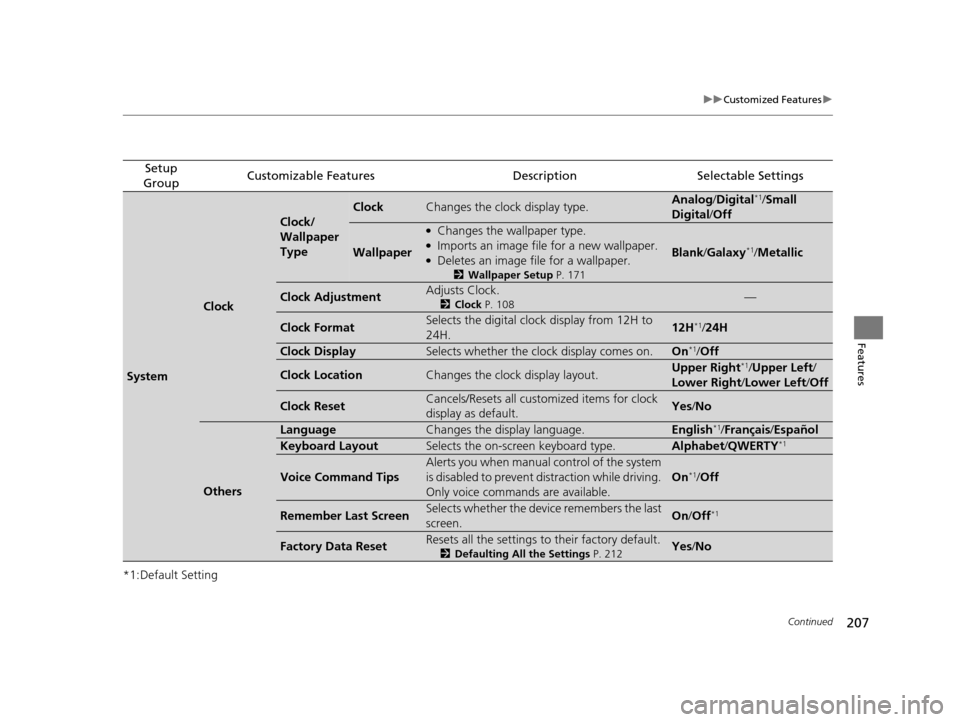
Clock
Clock/
Wallpaper
Type
ClockChanges the clock display type.Analog /Digital*1/ Small
Digital /Off
Wallpaper
●Changes the wallpaper type.●Imports an image file for a new wallpaper.●Deletes an image file for a wallpaper.
2 Wallpaper Setup P. 171
Blank/Galaxy*1/Metallic
Clock AdjustmentAdjusts Clock.
2 Clock P. 108—
Clock FormatSelects the digital clock display from 12H to
24H.12H*1/24H
Clock DisplaySelects whether the clock display comes on.On*1/ Off
Clock LocationChanges the clock display layout.Upper Right*1/Upper Left /
Lower Right/ Lower Left/Off
Clock ResetCancels/Resets all customized items for clock
display as default.Yes /No
Others
LanguageChanges the display language.English*1/Français /Español
Keyboard LayoutSelects the on-screen keyboard type.Alphabet/ QWERTY*1
Voice Command Tips
Alerts you when manual control of the system
is disabled to prevent distraction while driving.
Only voice commands are available.
On*1/Off
Remember Last ScreenSelects whether the device remembers the last
screen.On /Off*1
Factory Data ResetResets all the settings to their factory default.
2 Defaulting All the Settings P. 212Yes/No
16 CR-Z-31SZT6500.book 207 ページ 2015年9月11日 金曜日 午前11時47分
Page 210 of 409
209
uuCustomized Features u
Continued
Features
*1:Default Setting
Setup
GroupCustomizable FeaturesDescriptionSelectable Settings
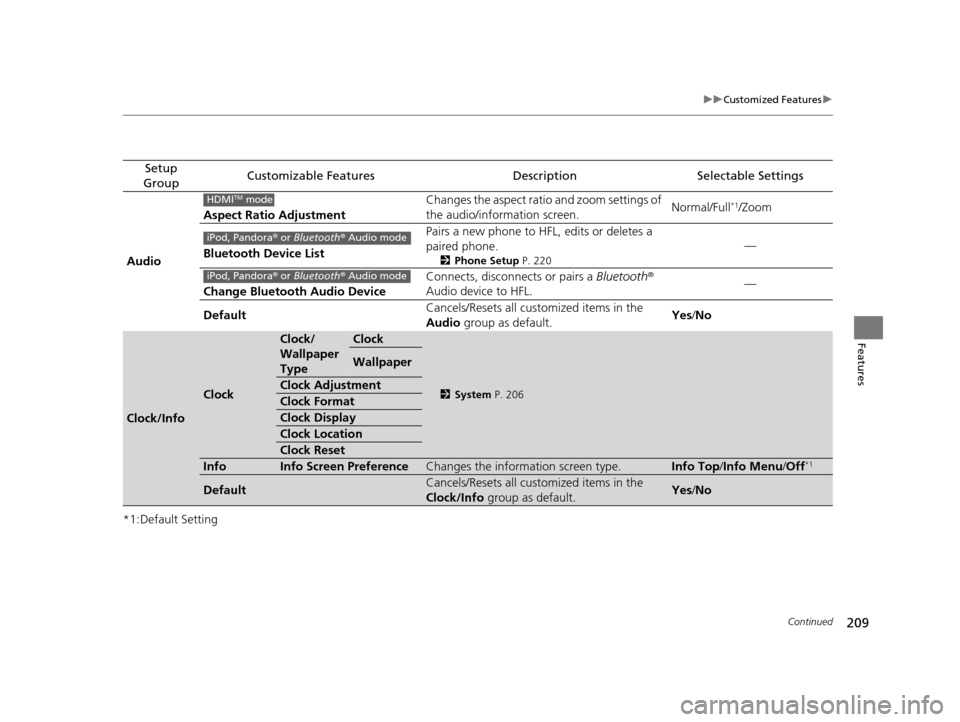
Audio Aspect Ratio Adjustment
Changes the aspect ratio and zoom settings of
the audio/information screen.
Normal/Full
*1/Zoom
Bluetooth Device List Pairs a new phone to HFL, edits or deletes a
paired phone.
2
Phone Setup P. 220
—
Change Bluetooth Audio Device Connects, disconnects or pairs a
Bluetooth®
Audio device to HFL. —
Default Cancels/Resets all customized items in the
Audio
group as default. Yes
/No
Clock/Info
Clock
Clock/
Wallpaper
TypeClock
2 System P. 206
Wallpaper
Clock Adjustment
Clock Format
Clock Display
Clock Location
Clock Reset
InfoInfo Screen PreferenceChanges the information screen type.Info Top /Info Menu/ Off*1
DefaultCancels/Resets all customized items in the
Clock/Info group as default.Yes/No
HDMITM mode
iPod, Pandora ® or Bluetooth® Audio mode
iPod, Pandora ® or Bluetooth® Audio mode
16 CR-Z-31SZT6500.book 209 ページ 2015年9月11日 金曜日 午前11時47分
Page 244 of 409
243
Driving
This chapter discusses driving, refueling, and information on items such as accessories.
Before DrivingDriving Preparation .............................. 244
Maximum Load Limit............................ 247
Towing a TrailerTowing Your Vehicle ............................ 250When DrivingStarting the Engine .............................. 251
Precautions While Driving..................... 254
Continuously Variable Transmission
*.... 255
Shifting ................................................ 256
Shifting ................................................ 261Continuously variable transmission models
Manual transmission models
Auto Idle Stop ..................................... 264
Auto Idle Stop ..................................... 267
3-Mode Drive System........................... 270
Plus Sport System ................................ 271
Cruise Control ..................................... 273
Vehicle Stability Assist (VSA ®), aka Electronic
Stability Control (ESC), System ........... 276
LaneWatch
TM*...................................... 278
Tire Pressure Monitoring System (TPMS) ........ 280
Tire Pressure Monitoring System (TPMS) - Required Federal Explanation ............. 282
Continuously variable transmission models
Manual transmission models
BrakingBrake System ........................................ 284
Anti-lock Brake System (ABS) ................ 288
Brake Assist System .............................. 289
Parking Your VehicleWhen Stopped ..................................... 290Multi-View Rear Camera .................. 291
Refueling
Fuel Information ................................... 293
How to Refuel ...................................... 294
Fuel EconomyImproving Fuel Economy....................... 296Accessories and Modifications ........ 297
* Not available on all models
16 CR-Z-31SZT6500.book 243 ページ 2015年9月11日 金曜日 午前11時47分
Page 245 of 409
244
Driving
Before Driving
Driving Preparation
Check the following items before you start driving.
• Make sure there are no obstructions on th e windows, door mirrors, exterior
lights, or other parts of the vehicle.
u Remove any frost, snow, or ice.
u Remove any snow on the roof, as this can slip down and obstruct your field of
vision while driving. If frozen solid , remove ice once it has softened.
u When removing ice from around the wheel s, be sure not to damage the wheel
or wheel components.
• Make sure the hood is securely closed.
u If the hood opens while driving, your front view will be blocked.
• Make sure the tires are in good condition.
u Check air pressures, and check for damage and excessive wear.
2Checking and Maintaining Tires P. 331
•Make sure there are no people or ob jects behind or around the vehicle.
u There are blind spots from the inside.
■Exterior Checks1Exterior Checks
NOTICE
When doors are frozen s hut, use warm water around
the door edges to melt any ice. Do not try to force
them open, as this can damage the rubber trim
around the doors. When done, wipe dry to avoid
further freezing.
Do not pour warm water into the key cylinder.
You will be unable to insert the key if the water
freezes in the hole.
Heat from the engine and exhaust can ignite
flammable material s left under the hood, causing a
fire. If you've parked y our vehicle for an extended
period, inspect and remove any debris that may have
collected, such as dried grass and leaves that have
fallen or have been carried in for use as a nest by a
small animal. Also check under the hood for leftover
flammable materials after you or someone else has
performed maintenance on your vehicle.
16 CR-Z-31SZT6500.book 244 ページ 2015年9月11日 金曜日 午前11時47分
Page 246 of 409
Continued245
uuBefore Driving uDriving Preparation
Driving
• Store or secure all items on board properly.
u Carrying too much cargo, or improperly storing it, can affect your vehicle's
handling, stability, sto pping distance, and tires, and make it unsafe.
2Maximum Load Limit P. 247
•Do not pile items higher than the seat height.
u They can block your view and may be thrown forward in the event of sudden
braking.
• Do not place anything in the seat footwells. Make sure to secure the floor mats.
u An object or unsecured floor mat can in terfere with your brake and accelerator
pedal operation while driving.
• If you have any animals on board, do not let them move around in the vehicle.
u They may interfere with driv ing and a crash could occur.
• Securely close and lock both doors and the hatch.
2 Locking/Unlocking the Doors from the Inside P. 116
•Adjust your seating position properly.
2 Adjusting the Seats P. 141
•Adjust the mirrors and steering wh eel properly for your driving.
u Adjust them while sitting in the proper driving position.
2 Adjusting the Mirrors P. 139
2 Adjusting the Steering Wheel P. 138
■Interior Checks1Interior Checks
The headlight aim is set by the factory, and does not
need to be adjusted. Howeve r, if you regularly carry
heavy items in the cargo area, have the aiming
readjusted at a dealer or by a qualified technician.
16 CR-Z-31SZT6500.book 245 ページ 2015年9月11日 金曜日 午前11時47分
Page 252 of 409
251Continued
Driving
When Driving
Starting the Engine
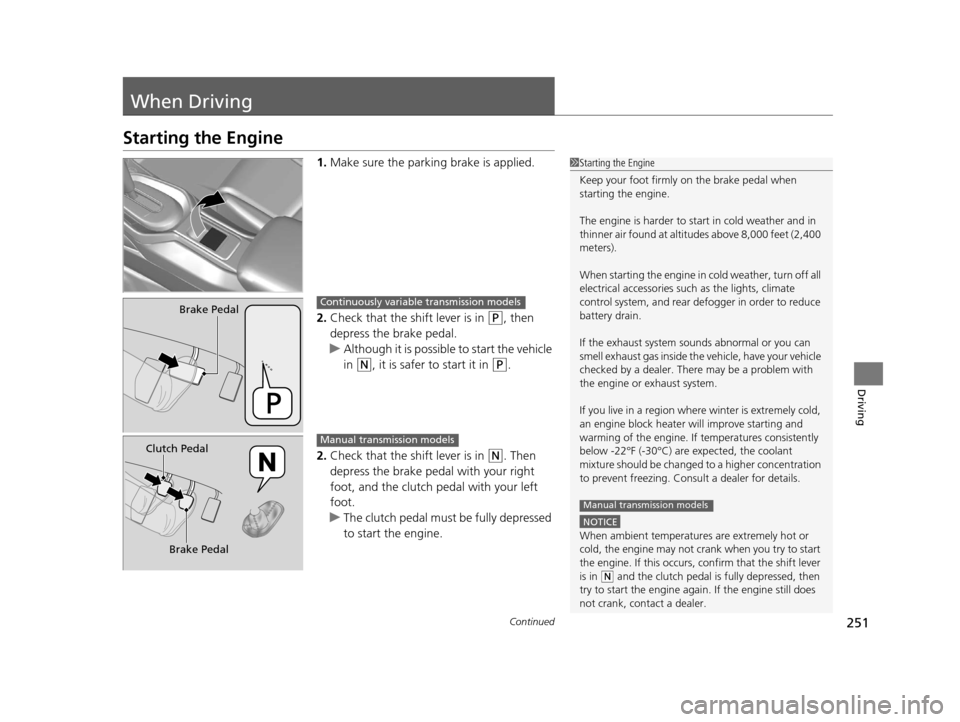
1.Make sure the parkin g brake is applied.
2. Check that the shift lever is in
(P, then
depress the brake pedal.
u Although it is possible to start the vehicle
in
(N, it is safer to start it in (P.
2. Check that the shift lever is in
(N. Then
depress the brake pedal with your right
foot, and the clutch pedal with your left
foot.
u The clutch pedal must be fully depressed
to start the engine.
1Starting the Engine
Keep your foot firmly on the brake pedal when
starting the engine.
The engine is harder to st art in cold weather and in
thinner air found at altitudes above 8,000 feet (2,400
meters).
When starting the engine in cold weather, turn off all
electrical accessories such as the lights, climate
control system, and rear de fogger in order to reduce
battery drain.
If the exhaust system sounds abnormal or you can
smell exhaust gas inside the vehicle, have your vehicle
checked by a dealer. There may be a problem with
the engine or exhaust system.
If you live in a region where winter is extremely cold,
an engine block heater will improve starting and
warming of the engine. If temperatures consistently
below -22°F (-30°C) are expected, the coolant
mixture should be changed to a higher concentration
to prevent freezing. Cons ult a dealer for details.
NOTICE
When ambient temperatures are extremely hot or
cold, the engine may not crank when you try to start
the engine. If this occurs, confirm that the shift lever
is in
(N and the clutch pedal is fully depressed, then
try to start the engine agai n. If the engine still does
not crank, contact a dealer.
Manual transmission models
Brake PedalContinuously variable transmission models
Clutch Pedal
Brake PedalManual transmission models
16 CR-Z-31SZT6500.book 251 ページ 2015年9月11日 金曜日 午前11時47分
Page 256 of 409
255
uuWhen Driving uContinuously Variable Transmission*
Driving
If there is a strong impact with something under the vehicle, stop in a safe location.
Check the underside of the vehicle for damage or any fluid leaks.
Continuously Variable Transmission*
The engine runs at higher id le speed and creeping increases.
Keep the brake pedal firmly depressed when stopped.
Quickly depressing the accelerator peda l while driving uphill may cause the
transmission to drop to a lower ratio, unexpectedly increasing vehicle speed.
Depress the accelerator pedal carefully, es pecially on slippery roads and curves.
■Other Precautions
■Creeping
■Kickdown
1Precautions While Driving
NOTICE
Following can damage the under spoiler:•Parking the vehicle by a parking block
•Parallel pa rking along the road shoulder
•Driving towards the bottom of a hill•Driving up or down to a different surface level
(such as a road shoulder)
•Driving on a rutted or bumpy road•Driving on a road with potholes
* Not available on all models
16 CR-Z-31SZT6500.book 255 ページ 2015年9月11日 金曜日 午前11時47分
Page 257 of 409
256
uuWhen Driving uShifting
Driving
Shifting
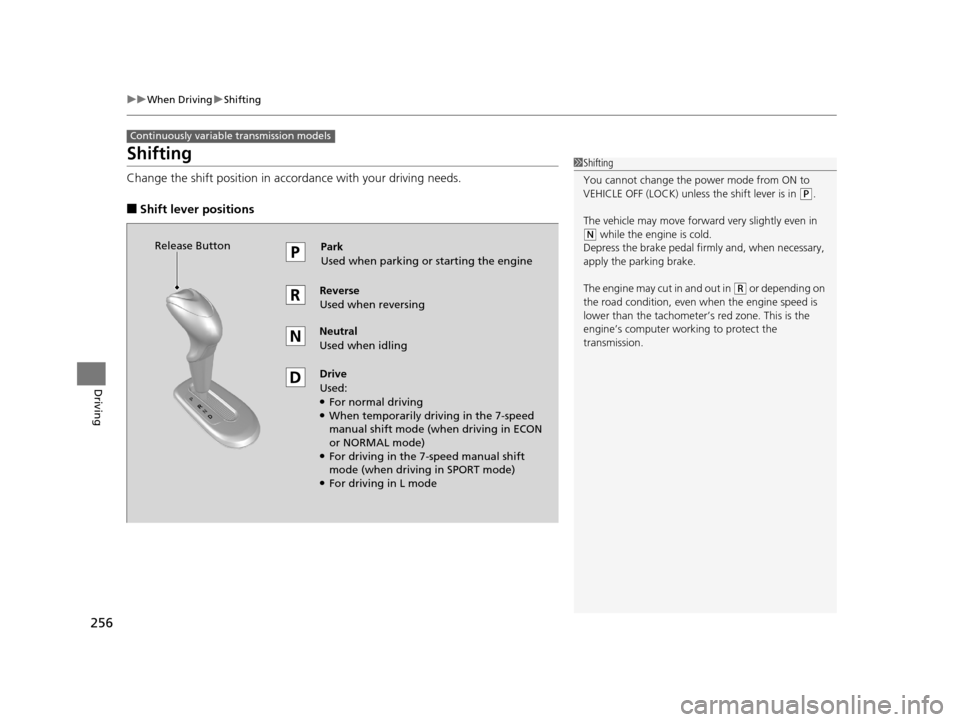
Change the shift position in accordance with your driving needs.
■Shift lever positions
Continuously variable transmission models
1Shifting
You cannot change the pow er mode from ON to
VEHICLE OFF (LOCK) unless the shift lever is in
( P.
The vehicle may move forward very slightly even in
(N while the engine is cold.
Depress the brake pe dal firmly and, when necessary,
apply the parking brake.
The engine may cut in and out in
( R or depending on
the road condition, even when the engine speed is
lower than the tachometer’s red zone. This is the
engine’s computer wo rking to protect the
transmission.
Park
Used when parking or starting the engine
Reverse
Used when reversing
Neutral
Used when idling
Drive
Used:
●For normal driving●When temporarily driving in the 7-speed
manual shift mode (when driving in ECON
or NORMAL mode)
●For driving in the 7-speed manual shift
mode (when driving in SPORT mode)
●For driving in L mode
Release Button
16 CR-Z-31SZT6500.book 256 ページ 2015年9月11日 金曜日 午前11時47分