wheel HONDA CR-Z 2016 1.G Quick Guide
[x] Cancel search | Manufacturer: HONDA, Model Year: 2016, Model line: CR-Z, Model: HONDA CR-Z 2016 1.GPages: 64, PDF Size: 4.38 MB
Page 52 of 64
96 || 97
MAINTENANCE
MAINTENANCE
TABLE OF CONTENTS
INDEX
VISUAL INDEX
VOICE COMMAND
INDEX
SAFETY
INFORMATION
CUSTOMER
INFORMATION
INSTRUMENT PANEL
SPECIFICATIONS
VEHICLE
CONTROLS
MAINTENANCE
AUDIO AND
CONNECTIVITY
HANDLING THE UNEXPECTED
BLUETOOTH®
HANDSFREELINK®
DRIVING
HONDALINK®
NAVIGATION
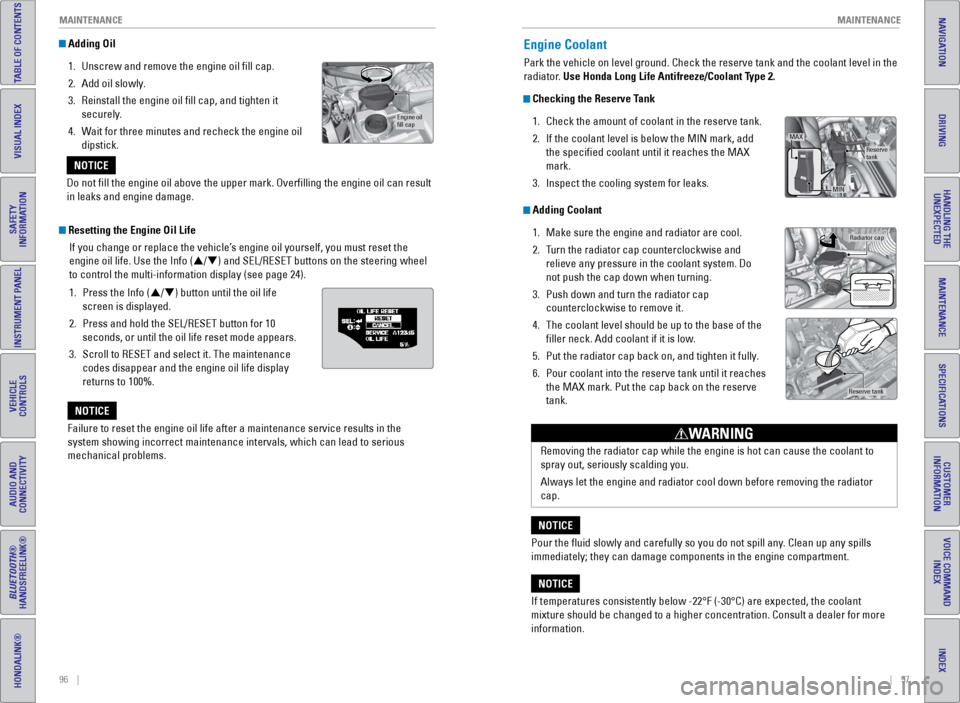
Adding Oil
1.
Unscrew and remove the engine oil fill cap.
2.
Add oil slowly
.
3.
Reinstall the engine oil fill cap, and tighten it
securely
.
4.
W
ait for three minutes and recheck the engine oil
dipstick.
Resetting the Engine Oil Life
If you change or replace the vehicle’s engine oil yourself, you must reset the
engine oil life. Use the Info (p/q) and SEL/RESET buttons on the steering wheel
to control the multi-information display (see page 24).
1.
Press the Info (
p/q) button until the oil life
screen is displayed.
2.
Press and hold the SEL/RESET button for 10
seconds, or until the oil life reset mode appears.
3.
Scroll to RESET and select it. The maintenance
codes disappear and the engine oil life display
returns to 100%.
Failure to reset the engine oil life after a maintenance service results\
in
the
system showing incorrect maintenance intervals, which can lead to seriou\
s
mechanical problems.
NOTICE
Engine oil
ll ca p
Do not fill the engine oil above the upper mark. Overfilling the eng\
ine oil can result
in leaks and engine damage.
NOTICE
Engine Coolant
Park the vehicle on level ground. Check the reserve tank and the coolant\
level in the
radiator. Use Honda Long Life Antifreeze/Coolant Type 2.
Checking the Reserve Tank
1.
Check the amount of coolant in the reserve tank.
2.
If the coolant level is below the MIN mark, add
the specified coolant until it reaches the MAX
mark.
3.
Inspect the cooling system for leaks.
Adding Coolant1.
Make sure the engine and radiator are cool.
2.
T
urn the radiator cap counterclockwise and
relieve any pressure in the coolant system. Do
not push the cap down when turning.
3.
Push down and turn the radiator cap
counterclockwise to remove it.
4.
The coolant level should be up to the base of the
filler neck. Add coolant if it is low
.
5.
Put the radiator cap back on, and tighten it fully
.
6.
Pour coolant into the reserve tank until it reaches
the MAX mark. Put the cap back on the reserve
tank.
Reserve
tank
MAX
MIN
Radiator cap
Reserve tank
If temperatures consistently below -22°F (-30°C) are expected, t\
he coolant
mixture should be changed to a higher concentration. Consult a dealer fo\
r more
information.
NOTICERemoving the radiator cap while the engine is hot can cause the coolant \
to
spray out, seriously scalding you.
Always let the engine and radiator cool down before removing the radiato\
r
cap.
WARNING
Pour the fluid slowly and carefully so you do not spill any. Clean up any spills
immediately; they can damage components in the engine compartment.
NOTICE
Page 55 of 64
102 || 103
MAINTENANCE
MAINTENANCE
TABLE OF CONTENTS
INDEX
VISUAL INDEX
VOICE COMMAND
INDEX
SAFETY
INFORMATION
CUSTOMER
INFORMATION
INSTRUMENT PANEL
SPECIFICATIONS
VEHICLE
CONTROLS
MAINTENANCE
AUDIO AND
CONNECTIVITY
HANDLING THE UNEXPECTED
BLUETOOTH®
HANDSFREELINK®
DRIVING
HONDALINK®
NAVIGATION
Tire Information
To safely operate your vehicle, your tires must be of the proper type and\
size, in good
condition with adequate tread, and properly inflated.
Inflation Guidelines
•
Properly inflated tires provide the best combination of handling, trea\
d life, and
comfort. Refer to the driver’
s doorjamb label or the specifications (see page
109) for the specified pressure.
•
Underinflated tires wear unevenly
, adversely affect handling and fuel economy,
and are more likely to fail from overheating.
•
Overinflated tires make your vehicle ride harshly
, are more prone to road
hazards, and wear unevenly.
•
Every day before you drive, look at each of the tires. If one looks lowe\
r than t
he
others, check the pressure with a tire gauge.
•
Measure the air pressure when tires are cold. This means the vehicle ha
s been
parked for at least 3 hours, or driven less than 1 mile (1.6 km). If n\
ecessary, add
or release air until the specified pressure is reached, and then calib\
rate the
system (see page 85). If checked when hot, tire pressure can be as muc\
h as
4–6 psi (30–40 kPa, 0.3–0.5 kgf/cm
2) higher than checked when cold.
•
At least once a month or before long trips, use a gauge to measure the p\
ressure
in all tires, including the spare. Even tires in good condition can lose\
1–2 ps
i
(10–20 kPa, 0.1–0.2 kgf/cm
2) per month.
Inspection Guidelines
Every time you inflate the tires, check for the following:
•
Any damage to tires, including bumps, bulges, cuts, splits, or cracks in\
t
he side
or tread. Remove any foreign objects and inspect for air leaks. Replace \
tires if
you see fabric or cord.
•
Uneven or excessive tread wear
. Have a dealer check the wheel alignment.
•
Cracks or other damage around the valve stems.
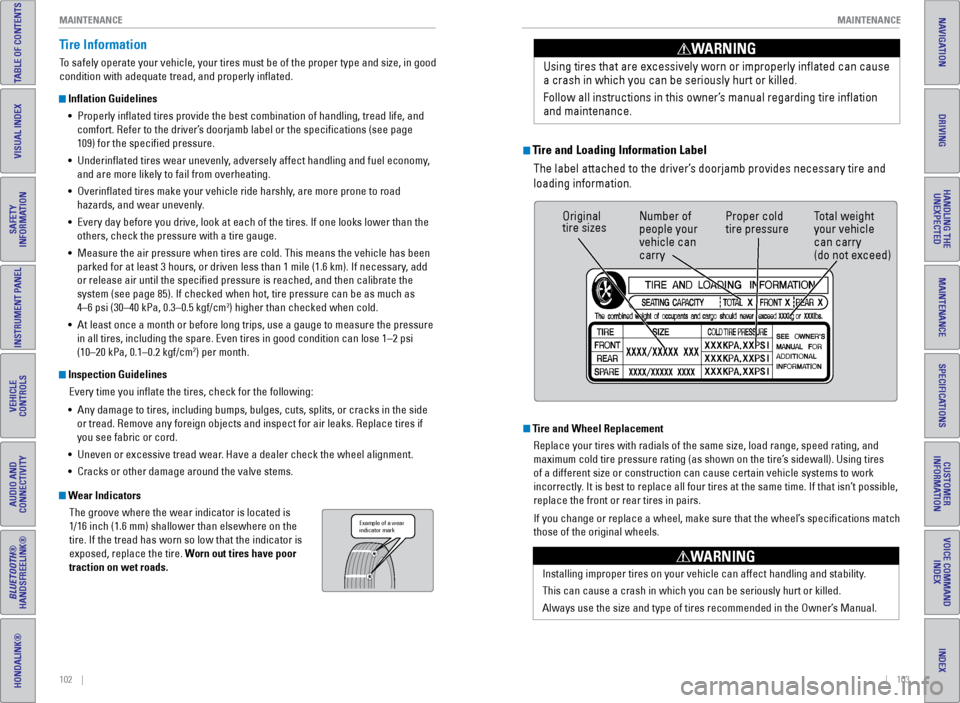
Wear IndicatorsThe groove where the wear indicator is located is
1/16 inch (1.6 mm) shallower than elsewhere on the
tire. If the tread has worn so low that the indicator is
exposed, replace the tire. Worn out tires have poor
traction on wet roads.
Example of a wear
indicator mark
Tire and Loading Information LabelThe label attached to the driver’s doorjamb provides necessary tire and
loading information. Using tires that are excessively worn or improperly inflated can cause\
a crash in which you can be seriously hurt or killed.
Follow all instructions in this owner’s manual regarding tire inflation
and maintenance
.
WARNING
Original
tire sizes
Number of
people your
vehicle can
carry Proper cold
tire pressure
Total weight
your vehicle
can carry
(do not exceed)
Tire and Wheel Replacement
Replace your tires with radials of the same size, load range, speed rati\
ng, and
maximum cold tire pressure rating (as shown on the tire’s sidewall). Using tires
of a different size or construction can cause certain vehicle systems to\
work
incorrectly. It is best to replace all four tires at the same time. If that isn’\
t possible,
replace the front or rear tires in pairs.
If you change or replace a wheel, make sure that the wheel’s specifications match
those of the original wheels.
Installing improper tires on your vehicle can affect handling and stabil\
ity.
This can cause a crash in which you can be seriously hurt or killed.
Always use the size and type of tires recommended in the Owner’s Manual.
WARNING
Page 56 of 64

104 || 105
MAINTENANCE
MAINTENANCE
TABLE OF CONTENTS
INDEX
VISUAL INDEX
VOICE COMMAND
INDEX
SAFETY
INFORMATION
CUSTOMER
INFORMATION
INSTRUMENT PANEL
SPECIFICATIONS
VEHICLE
CONTROLS
MAINTENANCE
AUDIO AND
CONNECTIVITY
HANDLING THE UNEXPECTED
BLUETOOTH®
HANDSFREELINK®
DRIVING
HONDALINK®
NAVIGATION
Tire Service Life
The life of your tires is dependent on many factors, including driving h\
abits, road
conditions, vehicle loading, inflation pressure, maintenance history, speed, and
environmental conditions (even when the tires are not in use).
In addition to regular inspections and inflation pressure maintenance,\
it is
recommended that you have annual inspections performed once the tires re\
ach
five years old. All tires, including the spare, should be removed from\
service after
10 years from the date of manufacture, regardless of their condition or \
state of
wear.
Winter TiresIf driving on snowy or frozen roads, mount all season tires marked “M\
+S”, snow
tires, or tire chains; reduce speed; and maintain sufficient distance \
between
vehicles when driving. For winter tires, select the size and load ranges\
that are the
same as the original tires, and mount them to all four wheels.
Tire ChainsBecause your vehicle has limited tire clearance, we strongly recommend u\
sing
the following chains:
Models with P195/55 R16 tires: Cable-type: SCC Radial Chain SC1030
Models with 205/45 R17 tires: Do not install tire chains.
Install tire chains on the front tires only. Mount chains as tightly as you can, and
make sure that they do not touch the brake lines or suspension.
Using the wrong chains, or not properly installing chains, can damage th\
e
brake lines and cause a crash in which you can be seriously injured or k\
illed.
Follow all instructions in this guide regarding the selection and use of\
tire
chains.
WARNING
Traction devices that are the wrong size or improperly installed can dama\
ge your
vehicle’s brake lines, suspension, body, and wheels. Stop driving if they are hitting
any part of the vehicle.
NOTICE
Tire Labeling
The tires that came on your vehicle have a number of markings. Those you\
should be aware of are described below.
Here is an example of what each marking means:
P195/55R16 86V
•
P: vehicle type (P indicates passenger
vehicle)
•
195: tire width in millimeters
•
55: aspect ratio (tire section height as a
percentage of its width)
•
R: tire construction code (radial)
•
16: rim diameter in inches
•
86: load index (code indicating maximum
load tire can carry)
•
H: speed symbol (code indicating maximum speed rating)
Tire Identification Number (TIN)The tire identification number
(TIN) is a group of numbers
and letters that look like the
example below. TIN is located
on the sidewall of the tire.
Glossary of Tire TerminologyCold Tire Pressure – The tire air pressure when the vehicle has been
parked for at least three hours or driven less than 1 mile (1.6 km).
Load Rating – The maximum load that a tire is rated to carry for a gi\
ven
inflation pressure.
Maximum Inflation Pressure – The maximum tire air pressure that the\
tire
can hold.
Maximum Load Rating – The load rating for a tire at the maximum
permissible inflation pressure for that tire.
Recommended Inflation Pressure – The cold tire inflation pressure\
recommended by the manufacturer.
Treadwear Indicators (TWI) – The projections within the principal gr\
ooves
designed to give a visual indication of the degrees of wear of the tread\
.
Tire size
Tire
identication
number (TIN)
Maximum
tire load
Maximum
tire pressure
Tire size
DOT B97R FW6X 2209\n
DOT: This in\ficat\bs t\nhat th\b tir\b m\b\bts all
r\bquir\bm\bnts of th\b U.S\n. D\bpartm\bnt of
Transportation.
B97R: Manufactur\br’s \ni\f\bntifcation mar
FW6X: Tir\b typ\b co\f\b
22 09: Dat\b of Transp\nortation
Year
Week
Page 57 of 64
106 || 107
MAINTENANCE
MAINTENANCE
TABLE OF CONTENTS
INDEX
VISUAL INDEX
VOICE COMMAND
INDEX
SAFETY
INFORMATION
CUSTOMER
INFORMATION
INSTRUMENT PANEL
SPECIFICATIONS
VEHICLE
CONTROLS
MAINTENANCE
AUDIO AND
CONNECTIVITY
HANDLING THE UNEXPECTED
BLUETOOTH®
HANDSFREELINK®
DRIVING
HONDALINK®
NAVIGATION
DOT Tire Quality Grading
The tires on your vehicle meet all U.S. Federal Safety Requirements. All\
tires are
also graded for treadwear, traction, and temperature performance according
to Department of Transportation (DOT) standards. The following explains these
gradings.
Uniform Tire Quality Grading
Quality grades can be found where applicable on the tire sidewall betwee\
n tread
shoulder and maximum section width.
For example:
Treadwear 200
Traction AA
Temperature A
All passenger car tires must conform to Federal Safety Requirements in
addition to these grades.
TreadwearThe treadwear grade is a comparative rating based on the wear rate of th\
e tire
when tested under controlled conditions on a specified government test\
course.
For example, a tire graded 150 would wear one and one-half (1 1/2) tim\
es as well
on the government course as a tire graded 100. The relative performance \
of
tires depends upon the actual conditions of their use, however, and may depart
significantly from the norm due to variations in driving habits, servi\
ce practices,
and differences in road characteristics and climate.
TractionThe traction grades, from highest to lowest, are AA, A, B, and C. Those \
grades
represent the tire’s ability to stop on wet pavement as measured under controlled
conditions on specified government test surfaces of asphalt and concre\
te. A tire
marked C may have poor traction performance.
WARNING: The traction grade assigned to this tire is based on straight-ahead
braking traction tests, and does not include acceleration, cornering, hy\
droplaning,
or peak traction characteristics.
TemperatureThe temperature grades are A (the highest), B, and C, representing the\
tire’s
resistance to the generation of heat and its ability to dissipate heat w\
hen tested
under controlled conditions on a specified indoor laboratory test whee\
l. Sustained
high temperature can cause the material of the tire to degenerate and re\
duce
tire life, and excessive temperature can lead to sudden tire failure. Th\
e grade
C corresponds to a level of performance which all passenger car tires must
meet under the Federal Motor Vehicle Safety Standard No. 109. Grades B and
A represent higher levels of performance on the laboratory test wheel th\
an the
minimum required by law.
WARNING: The temperature grade for this tire is established for a tire that
is properly inflated and not overloaded. Excessive speed, underinfla\
tion, or
excessive loading, either separately or in combination, can cause heat b\
uildup
and possible tire failure.
Page 58 of 64
108 || 109
SPECIFICATIONS
MAINTENANCE
TABLE OF CONTENTS
INDEX
VISUAL INDEX
VOICE COMMAND
INDEX
SAFETY
INFORMATION
CUSTOMER
INFORMATION
INSTRUMENT PANEL
SPECIFICATIONS
VEHICLE
CONTROLS
MAINTENANCE
AUDIO AND
CONNECTIVITY
HANDLING THE UNEXPECTED
BLUETOOTH®
HANDSFREELINK®
DRIVING
HONDALINK®
NAVIGATION
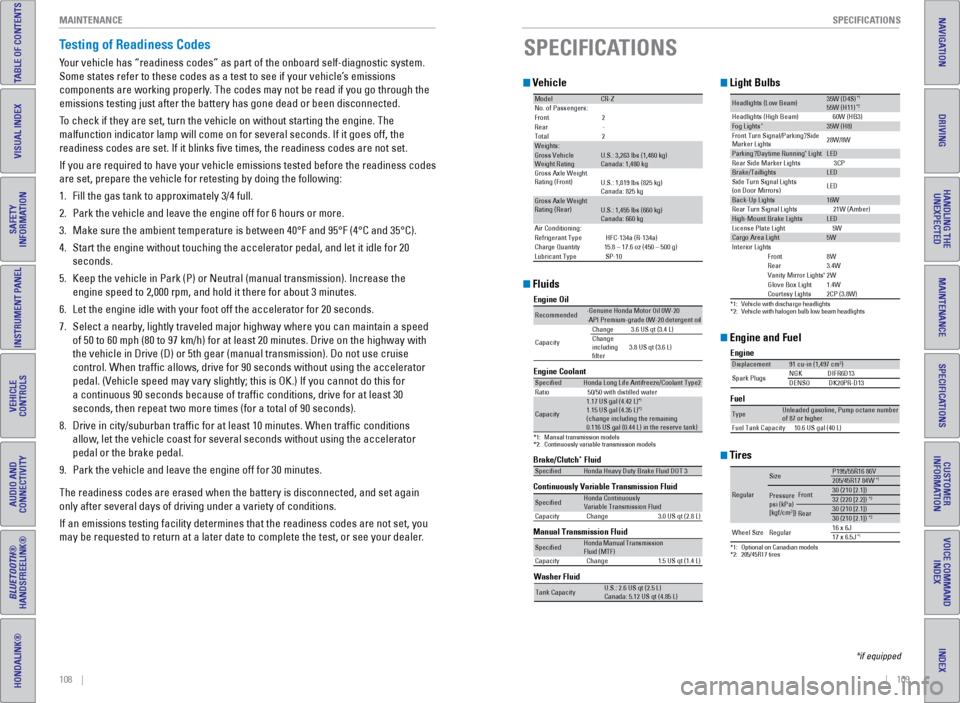
Testing of Readiness Codes
Your vehicle has “readiness codes” as part of the onboard self-diag\
nostic system.
Some states refer to these codes as a test to see if your vehicle’s emissions
components are working properly. The codes may not be read if you go through the
emissions testing just after the battery has gone dead or been disconnec\
ted.
To check if they are set, turn the vehicle on without starting the engine\
. The
malfunction indicator lamp will come on for several seconds. If it goes \
off, the
readiness codes are set. If it blinks five times, the readiness codes \
are not set.
If you are required to have your vehicle emissions tested before the rea\
diness codes
are set, prepare the vehicle for retesting by doing the following:
1.
Fill the gas tank to approximately 3/4 full.
2.
Park the vehicle and leave the engine off for 6 hours or more.
3.
Make sure the ambient temperature is between 40°F and 95°F (4°\
C and 3
5°C).
4.
Start the engine without touching the accelerator pedal, and let it idle\
for 20
seconds.
5.
Keep the vehicle in Park (P) or Neutral (manual transmission). Incre\
ase
the
engine speed to 2,000 rpm, and hold it there for about 3 minutes.
6.
Let the engine idle with your foot off the accelerator for 20 seconds.
7.
Select a nearby
, lightly traveled major highway where you can maintain a speed
of 50 to 60 mph (80 to 97 km/h) for at least 20 minutes. Drive on the \
highway with
the vehicle in Drive (D) or 5th gear (manual transmission). Do not u\
se cruise
control. When traffic allows, drive for 90 seconds without using the a\
ccelerator
pedal. (Vehicle speed may vary slightly; this is OK.) If you cannot do this for
a continuous 90 seconds because of traffic conditions, drive for at le\
ast 30
seconds, then repeat two more times (for a total of 90 seconds).
8.
Drive in city/suburban traffic for at least 10 minutes. When traffic\
conditions
allow, let the vehicle coast for several seconds without using the accelerator
pedal or the brake pedal.
9.
Park the vehicle and leave the engine off for 30 minutes.
The readiness codes are erased when the battery is disconnected, and set\
again
only after several days of driving under a variety of conditions.
If an emissions testing facility determines that the readiness codes are\
not
set, you
may be requested to return at a later date to complete the test, or see \
your dealer.
Vehicle
ModelCR-ZNo. of Passengers:
Front2
Rear -
Tota l2
Weights:Gross Vehicle
Weight Rating U.S.: 3,263 lbs (1,480 kg)
Canada: 1,480 kg
Gross Axle Weight
Rating (Front)U.S.: 1,819 lbs (825 kg)
Canada: 825 kg
Gross Axle Weight
Rating (Rear)U.S.: 1,455 lbs (660 kg)
Canada: 660 kg
Air Conditioning:
Refrigerant Type HFC-134a (R-134a)
Charge Quantit y15.8 – 17.6 oz (450 – 500 g)
Lubricant Type SP-10
Engine and Fuel
Engine
FuelDisplacement91 cu-in (1,497 cm3)
Spark Plugs NG
KD IFR6D13
DENSO DK20PR-D13
TypeUnleaded gasoline, Pump octane number of 87 or higher
Fuel Tank Capacity 10.6 US gal (40 L)
Tires
*1:Optional on Canadian model s*2: 205/45R17 tires
Regular
SizeP195/55R16 86 V205/45R17 84W*1
Pressure
psi (kPa)
[kgf/cm
2])
Front30 (210 [2.1])32 (220 [2.2])*2
Rear30 (210 [2.1])30 (210 [2.1])*2
Wheel SizeRegula r16 x 6J17 x 6.5J*1
SPECIFICATIONS
*if equipped
Light Bulbs
*1:Vehicle with discharge headlights*2: Vehicle with halogen bulb low beam headlights
Headlights (L ow Beam)35W (D4S )*155W (H11)*2Headlights (High Beam )60W (HB3)Fog Lights*35W (H8)
Front Turn Signal/Parkin g*/Side
Marker Light s 28W/8W
Pa
rkin g*/Daytime Runnin g* LightLED
Rear Side Marker Lights 3CP
Brake/Taillight sLED
Side Turn Signal Lights
(on Door Mirrors) LE
D
Back-Up Lights16W
Rear Turn Signal Lights 21W (Amber)
High-Mount Brak e LightsLED
License Plate Ligh t5 W
Cargo Area Light5WInteri or Light sFront8WRear3.4WVanity Mirror Lights*2WGlove Box Ligh t1.4WCourtesy Lights2CP (3.8W) Fluids
Brake/Clutch* Fluid
Continuously Variable Transmission Fluid
Manual Transmission Fluid
SpeciedHonda Heavy Duty Brake Fluid DOT 3
SpeciedHonda Continuously
Capacity Change 3.0 US qt (2.8L)
SpeciedFluid (MTF)Capacity Change 1.5 US qt (1.4L)
Engine Oil
Engine Coolan
t
*1: Manual transmission model s
*2: Continuously variable transmission models
Recommended·Genuine Honda Motor Oil 0W-2 0·API Premium-grade 0W-20 detergent oi l
Capacity Change
3.6 US qt (3.4 L)
Change
including
lter 3.8 US qt (3.6 L)
Specie
dHonda Long Life Antifreeze/Coolant Type 2
Ratio 50/50 with distilled wate r
Capacity
1.17 US gal (4.42 L)*11.15 US gal (4.35 L)*2(change including the remaining
0.116 US gal (0.44 L) in the reserve tank )
Washer Fluid
Tank Capacit yU.S.: 2.6 US qt (2.5 L)
Canada: 5.12 US qt (4.85 L)
Variable Transmission Fluid
Honda Manual Transmission
Page 63 of 64
118 || 119
INDEX
VOICE COMMAND INDEX
TABLE OF CONTENTS
INDEX
VISUAL INDEX
VOICE COMMAND
INDEX
SAFETY
INFORMATION
CUSTOMER
INFORMATION
INSTRUMENT PANEL
SPECIFICATIONS
VEHICLE
CONTROLS
MAINTENANCE
AUDIO AND
CONNECTIVITY
HANDLING THE UNEXPECTED
BLUETOOTH®
HANDSFREELINK®
DRIVING
HONDALINK®
NAVIGATION
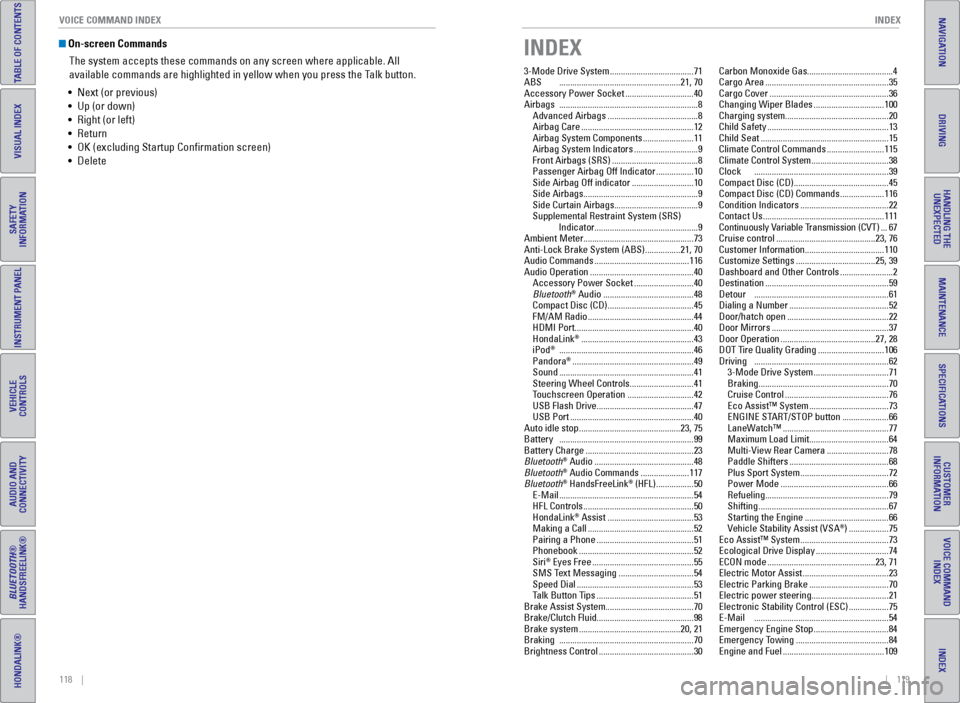
On-screen Commands
The system accepts these commands on any screen where applicable. All
available commands are highlighted in yellow when you press the Talk button.
•
Next (or previous)
•
Up (or down)
•
Right (or left)
•
Return
•
OK (excluding Startup Confirmation screen)
•
Delete
INDEX
3-Mode Drive System ...................................... 71
ABS
....................................................... 21, 70
Accessory Power Socket
...............................40
Airbags
............................................................... 8
Advanced Airbags
......................................... 8
Airbag Care
................................................... 12
Airbag System Components
.......................11
Airbag System Indicators
.............................9
Front Airbags (SRS)
.......................................8
Passenger Airbag Off Indicator
.................10
Side Airbag Off indicator
............................10
Side Airbags
.................................................... 9
Side Curtain Airbags
......................................9
Supplemental Restraint System (SRS) Indicator...............................................9
Ambient Meter..................................................73
Anti-Lock Brake System (ABS)
................21, 70
Audio Commands
........................................... 116
Audio Operation
............................................... 40
Accessory Power Socket
...........................40
Bluetooth
® Audio ......................................... 48
Compact Disc (CD) ....................................... 45
FM/AM Radio
................................................ 44
HDMI Port
...................................................... 40
HondaLink
® ................................................... 43
iPod® ............................................................. 46
Pandora® ....................................................... 49
Sound
............................................................. 41
Steering Wheel Controls
............................. 41
Touchscreen Operation
.............................. 42
USB Flash Drive
............................................ 47
USB Port
........................................................ 40
Auto idle stop
.............................................. 23, 75
Battery
............................................................. 99
Battery Charge
................................................. 23
Bluetooth
® Audio ............................................. 48
Bluetooth® Audio Commands ...................... 117
Bluetooth® HandsFreeLink® (HFL) ................. 50
E-Mail
............................................................. 54
HFL Controls
.................................................. 50
HondaLink
® Assist ....................................... 53
Making a Call ................................................ 52
Pairing a Phone
............................................ 51
Phonebook
.................................................... 52
Siri
® Eyes Free .............................................. 55
SMS T ext Messaging .................................. 54
Speed Dial
..................................................... 53
Talk Button Tips
............................................ 51
Brake Assist System........................................70
Brake/Clutch Fluid............................................98
Brake system
.............................................. 20, 21
Braking
............................................................. 70
Brightness Control
........................................... 30Carbon Monoxide Gas.......................................4
Cargo Area
........................................................
35
Cargo Cover ......................................................
36
Changing Wiper Blades
................................
100
Charging system...............................................20
Child Safety
.......................................................
13
Child Seat ..........................................................
15
Climate Control Commands ..........................
115
Climate Control System
...................................
38
Clock
.............................................................
39
Compact Disc (CD) ...........................................
45
Compact Disc (CD) Commands ....................
116
Condition Indicators ........................................
22
Contact Us .......................................................
111
Continuously Variable Transmission (CVT) ...
67
Cruise control .............................................
23, 76
Customer Information....................................110
Customize Settings ....................................
25, 39
Dashboard and Other Controls ........................
2
Destination ........................................................
59
Detour
.............................................................
61
Dialing a Number .............................................
52
Door/hatch open
..............................................
22
Door Mirrors
.....................................................
37
Door Operation ...........................................
27, 28
DOT Tire Quality Grading
..............................
106
Driving
.............................................................
62
3-Mode Drive System
..................................
71
Braking
...........................................................
70
Cruise Control ...............................................
76
Eco Assist™ System ....................................
73
ENGINE START/STOP button .....................
66
LaneWatch™ ................................................
77
Maximum Load Limit ....................................
64
Multi-View Rear Camera ............................
78
Paddle Shifters .............................................
68
Plus Sport System
........................................
72
Power Mode
.................................................
66
Refueling ........................................................
79
Shifting ...........................................................
67
Starting the Engine
......................................
66
V
ehicle Stability Assist (VSA
®) ..................
75
Eco Assist™ System
........................................ 73
Ecological Drive Display
................................. 74
ECON mode
................................................. 23, 71
Electric Motor Assist
....................................... 23
Electric Parking Brake
.................................... 70
Electric power steering...................................21
Electronic Stability Control (ESC)
.................. 75
E-Mail
............................................................. 54
Emergency Engine Stop
.................................. 84
Emergency Towing
.......................................... 84
Engine and Fuel
.............................................. 109
Page 64 of 64
120 || 121
INDEX
INDEX
TABLE OF CONTENTS
INDEX
VISUAL INDEX
VOICE COMMAND
INDEX
SAFETY
INFORMATION
CUSTOMER
INFORMATION
INSTRUMENT PANEL
SPECIFICATIONS
VEHICLE
CONTROLS
MAINTENANCE
AUDIO AND
CONNECTIVITY
HANDLING THE UNEXPECTED
BLUETOOTH®
HANDSFREELINK®
DRIVING
HONDALINK®
NAVIGATION
Engine Coolant..................................................97
Engine Oil...........................................................95
ENGINE START/STOP button
.........................66
Exterior lights
.............................................. 23, 30
Fastening a Seat Belt
........................................ 7
Find Nearest Place
.......................................... 60
Find Place Commands
...................................114
Floor Mats
......................................................... 33
Fluids
........................................................... 109
FM/AM Radio
.................................................... 44
FM/AM Radio Commands
.............................116
Fog lights
..................................................... 23, 30
Foot Brake
......................................................... 70
Frequently Asked Questions
........................110
Front Airbags (SRS)
........................................... 8
Front Door Inner Handle
.................................28
Front Wipers
..................................................... 31
Fuel Information
............................................... 79
Fuse Locations..................................................88
Hatch
....................................................... 27, 28
Hazards
............................................................. 23
HDMI Port..........................................................40
Head Restraints
................................................ 34
High beams
....................................................... 23
High temperature
............................................. 21
Home Address
.................................................. 59
HondaLink
® ....................................................... 43
HondaLink® Assist ........................................... 53
Honda Roadside Assistance ........................112
Hood
............................................................. 94
IMA Battery Charge Level
.............................. 23
IMA (Integrated Motor Assist).......................21
Immobilizer
........................................................ 22
Info Commands...............................................117
Information Display..........................................24
Instrument Panel
.............................................. 20
Interior Lights....................................................30
iPod
® ............................................................. 46
iPod® Commands ........................................... 116
Jump Starting ................................................... 81
LaneWatch™
.................................................... 77
Lap/Shoulder Seat Belts
................................... 5
Light Bulbs.......................................................109
Lights
............................................................. 30
Lock Tab
............................................................. 28
Low fuel
............................................................. 22
Low oil pressure
............................................... 20
Low temperature
.............................................. 21
Low tire pressure
............................................. 22
Maintenance.....................................................91 Battery
........................................................... 99
Brake/Clutch Fluid
........................................ 98
Engine Coolant
.............................................. 97
Engine Oil
....................................................... 95
Maintenance Minder™
...............................92Safety Precautions
......................................
91
Service Codes
...............................................
93
Under the Hood
............................................
94
Window W
asher Fluid
.................................
98
Wiper Blades
..............................................
100
Making a Call ....................................................
52
Malfunction indicator lamp ............................
21
Malfunction Indicators....................................20
Manual Transmission
......................................
69
Map Display Commands
...............................
113
Map Legend
......................................................
61
Master Door Lock Switch
...............................
28
Maximum Load Limit........................................64
Mirrors
.............................................................
37
Multi-Information Display
...............................
24
Multi-View Rear Camera
................................
78
Navigation
.........................................................
56
Detour ............................................................
61
Display and Controls
....................................
57
Entering a Destination
.................................
59
Find Nearest Place
......................................
60
Home Address
..............................................
59
Map Legend ..................................................
61
Place Name ...................................................
60
Routing ...........................................................
61
Steering Wheel Controls .............................
56
Street Address ..............................................
59
Talk Button Tips ............................................
58
Traffic
.............................................................
61
Voice Prompt.................................................58
Navigation Commands
..................................
113
NORMAL mode
...........................................
23, 71
One-Touch Turn Signal
....................................
29
On/Off Indicators
..............................................
23
On-screen Commands...................................118
Opening the Hood ............................................
94
Overheating.......................................................83
Paddle Shifters .................................................
68
Pairing a Phone ................................................51
Pandora® ........................................................... 49
Pandora® Commands .................................... 117
Parking brake..............................................22, 70
Passenger Airbag Off Indicator
.....................10
Phone
............................................................. 51
Phonebook
........................................................ 52
Phone Commands
.......................................... 117
Place Name.......................................................60
Plus Sport system
...................................... 23, 72
Power Door Mirrors.........................................37
Power Flow Monitor
........................................ 73
Power Mode
..................................................... 66
Power Windows
............................................... 29
Radio
............................................................. 44
Readiness Codes............................................108 Rear Camera
..................................................... 78Rear Cargo
........................................................
35
Rearview Mirror ...............................................
37
Rear Wiper ........................................................
31
Refueling............................................................79
Remote Battery Strength ................................
80
Remote Transmitter
.........................................
26
Reporting Safety Defects................................19
Roadside Assistance
.....................................
112
Route Commands
...........................................
115
Routing
.............................................................
61
Safety Information .............................................
3
Carbon Monoxide Gas
...................................
4
Child Safety
...................................................
13
Reporting Safety Defects ............................
19
Safety Label Locations
................................
18
Safety Messages
...........................................
3
Seat Belts ............................................................
5
Fastening a Seat Belt
....................................
7
Lap/Shoulder Seat Belts
...............................
5
Seat Belt Inspection
......................................
6
Seat belt reminder ....................................... 22
Seat Heaters ..................................................... 38
Seats
............................................................. 32
Service Codes...................................................93
Settings
....................................................... 25, 39
Setting the Clock
.............................................. 39
Shifting
............................................................. 67
Shift Lever Does Not Move
............................80
Side airbag off
............................................ 10, 23
Side Airbags........................................................9
Side Curtain Airbags..........................................9
Siri
® Eyes Free .................................................. 55
Smart Entry System ......................................... 27
SMS Text Messaging
...................................... 54
Song By V
oice™ Commands ........................117
Sound
............................................................. 41
Specifications
................................................. 109
Speed Dial
......................................................... 53
SPORT mode
............................................... 23, 71
Starting the Engine
.......................................... 66
Steering Wheel.................................................37
Steering Wheel and Nearby Controls
............1
Steering Wheel Controls...........................41, 56
Street Address..................................................59
Supplemental Restraint System (SRS)
.....9, 20
System message
.............................................. 22
Talk button
................................................... 50, 56
Talk Button Tips
.......................................... 51, 58
Text Messaging
................................................ 54
Tire Information
.............................................. 102
DOT Tire Quality Grading
..........................106
Inflation Guidelines
.................................... 102
T
ire and Loading Information Label ........103
Tire and Wheel Replacement
...................103
Tire Chains
................................................... 104Tire Identification Number (TIN)
..............
105
Tire Labeling ................................................
105
Tire Service Life ..........................................
104
Tire Terminology .........................................
105
Wear Indicators .........................................
102
Winter Tires .................................................
104
Tire Pressure Monitoring System (TPMS)
.........................................
21, 85
T
ire Repair Kit ...................................................
87
Tires
...........................................................
109
Touchscreen Operation ..................................
42
Towing
.............................................................
84
Traffic
.............................................................
61
Troubleshooting ..............................................
110
Turn Signal ..................................................
23, 29
Under the Hood ................................................
94
USB Commands..............................................116
USB Flash Drive................................................47
USB Port ............................................................
40
Vehicle
...........................................................
109
Vehicle Controls ...............................................
26
Vehicle Stability Assist (VSA
®) .......... 21, 23, 75
Visual Index.........................................................1
V
oice Command Index
.................................. 113
V
oice Prompt
.................................................... 58
Warranty Coverages
..................................... 112
W
ear Indicators
............................................. 102
Window Washer Fluid
..................................... 98
Windows............................................................29
Winter T
ires
..................................................... 104
Wiper Blades
.................................................. 100
Wiper Operation
............................................... 31