lock HONDA CROSSTOUR 2013 1.G Workshop Manual
[x] Cancel search | Manufacturer: HONDA, Model Year: 2013, Model line: CROSSTOUR, Model: HONDA CROSSTOUR 2013 1.GPages: 573, PDF Size: 25.21 MB
Page 116 of 573
115
uuOperating the Switches Around the Steering WheeluENGINE START/STOP Button*
Continued
Controls
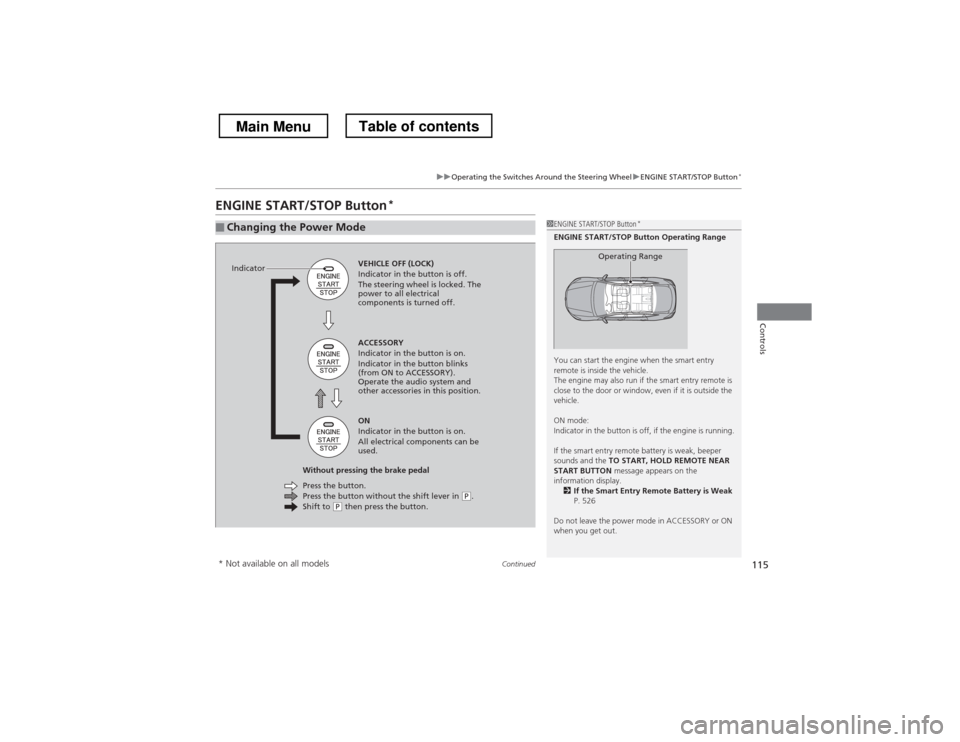
ENGINE START/STOP Button *
■Changing the Power Mode1ENGINE START/STOP Button
*
ENGINE START/STOP Button Operating Range
You can start the engine when the smart entry
remote is inside the vehicle.
The engine may also run if the smart entry remote is
close to the door or window, even if it is outside the
vehicle.
ON mode:
Indicator in the button is off, if the engine is running.
If the smart entry remote battery is weak, beeper
sounds and the TO START, HOLD REMOTE NEAR
START BUTTON message appears on the
information display. 2 If the Smart Entry Remote Battery is Weak
P. 526
Do not leave the power mode in ACCESSORY or ON
when you get out.
Operating RangeVEHICLE OFF (LOCK)
Indicator in the button is off.
The steering wheel is locked. The
power to all electrical
components is turned off.
Press the button without the shift lever in
(P .
Shift to (P then press the button.
Press the button.
Without pressing the brake pedal ACCESSORY
Indicator in the button is on.
Indicator in the button blinks
(from ON to ACCESSORY).
Operate the audio system and
other accessories in this position. ON
Indicator in the button is on.
All electrical components can be
used.
Indicator
* Not available on all models
Main MenuTable of contents
Page 117 of 573
uuOperating the Switches Around the Steering WheeluENGINE START/STOP Button*
116
Controls
If you leave the vehicle for 30 to 60 minutes with the shift lever in (P and the power
mode in ACCESSORY, the vehicle automatically goes into the mode similar to
VEHICLE OFF (LOCK) to avoid the battery drain.
When in this mode:
The steering wheel does not lock.
You cannot lock or unlock doors with the remote transmitter or the smart entry system. Press the ENGINE START/STOP button to switch the mode to VEHICLE OFF (LOCK).
■Automatic Power Off1ENGINE START/STOP Button*
If the power mode does not change from VEHICLE
OFF to ACCESSORY, press the ENGINE START/STOP
button while moving the steering wheel left and
right. The steering wheel will unlock, allowing the
mode to change.
* Not available on all models
Main MenuTable of contents
Page 119 of 573
118
uuOperating the Switches Around the Steering WheeluIgnition Switch and Power Mode Comparison
Controls
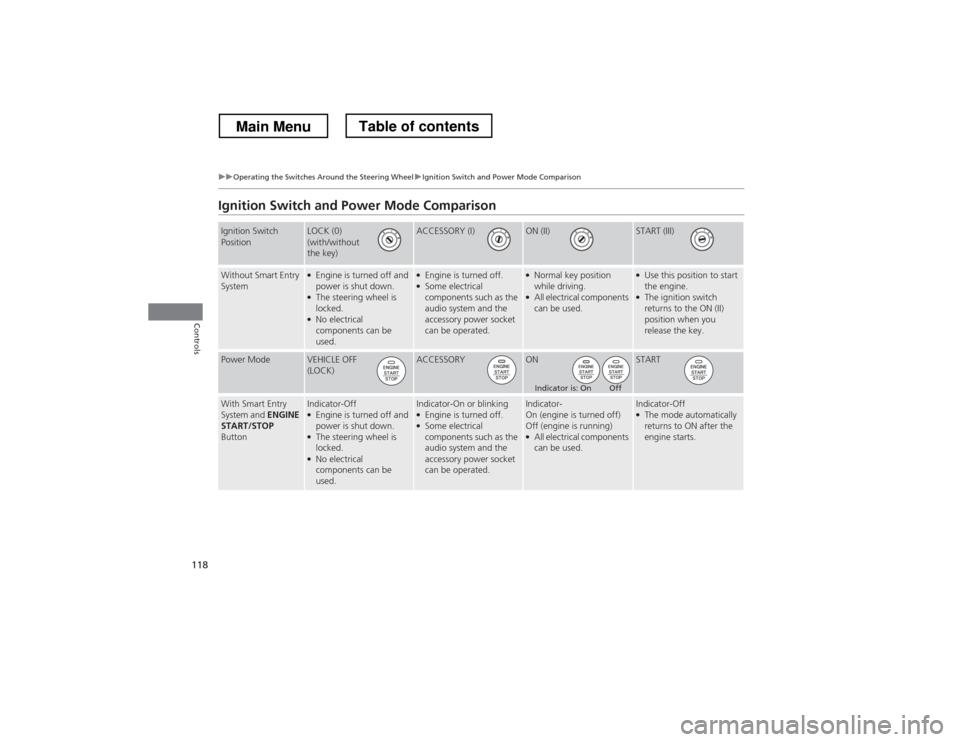
Ignition Switch and Power Mode Comparison
Ignition Switch
PositionLOCK (0)
(with/without
the key)ACCESSORY (I)ON (II)START (III)
Without Smart Entry
System●
Engine is turned off and
power is shut down.
● The steering wheel is
locked.
● No electrical
components can be used.●Engine is turned off.
● Some electrical components such as the
audio system and the
accessory power socket can be operated.● Normal key position
while driving.
● All electrical components
can be used.●
Use this position to start the engine.
● The ignition switch
returns to the ON (II)
position when you
release the key.
Power ModeVEHICLE OFF
(LOCK)ACCESSORYONSTART
With Smart Entry
System and ENGINE
START/STOP
ButtonIndicator-Off ● Engine is turned off and
power is shut down.
● The steering wheel is
locked.
● No electrical
components can be used.Indicator-On or blinking ●Engine is turned off.
● Some electrical components such as the
audio system and the
accessory power socket can be operated.Indicator-
On (engine is turned off)
Off (engine is running) ● All electrical components
can be used.Indicator-Off ●The mode automatically
returns to ON after the
engine starts.
Indicator is: On Off
Main MenuTable of contents
Page 120 of 573
119
uuOperating the Switches Around the Steering WheeluTurn Signals
Continued
Controls
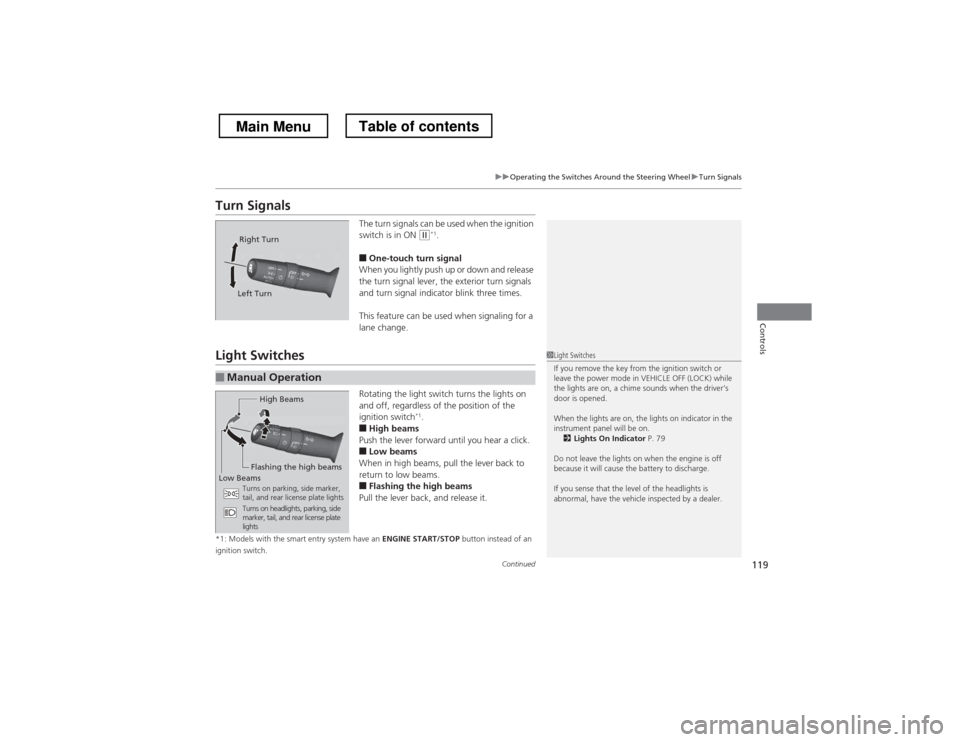
Turn SignalsThe turn signals can be used when the ignition
switch is in ON
(w*1
.
■ One-touch turn signal
When you lightly push up or down and release
the turn signal lever, the exterior turn signals
and turn signal indicator blink three times.
This feature can be used when signaling for a
lane change.
Light Switches
Rotating the light switch turns the lights on
and off, regardless of the position of the
ignition switch*1
.
■ High beams
Push the lever forward until you hear a click.
■ Low beams
When in high beams, pull the lever back to
return to low beams.
■ Flashing the high beams
Pull the lever back, and release it.
*1: Models with the smart entry system have an ENGINE START/STOP button instead of an
ignition switch.
Right Turn
Left Turn
■Manual Operation
1Light Switches
If you remove the key from the ignition switch or
leave the power mode in VEHICLE OFF (LOCK) while
the lights are on, a chime sounds when the driver’s
door is opened.
When the lights are on, the lights on indicator in the
instrument panel will be on. 2 Lights On Indicator P. 79
Do not leave the lights on when the engine is off
because it will cause the battery to discharge.
If you sense that the level of the headlights is
abnormal, have the vehicle inspected by a dealer.
High Beams
Flashing the high beams
Low Beams Turns on parking, side marker,
tail, and rear license plate lights
Turns on headlights, parking, side
marker, tail, and rear license plate lights
Main MenuTable of contents
Page 122 of 573
121
uuOperating the Switches Around the Steering WheeluLight Switches
Controls
The headlights, all other exterior lights, and the instrument panel lights turn off
within 15 seconds after you remove the key and close the driver’s door.
The headlights, all other exterior lights, and the instrument panel lights turn off
within 15 seconds after you set the power mode to VEHICLE OFF (LOCK), take the
remote with you, and close the driver’s door.
uYou can change the headlight auto off timer setting.
2 Customized Features *
P. 281
If you turn the ignition switch to LOCK
(0 *1
with the headlight switch on, but do
not open the door, the lights turn off after 10 minutes (three minutes, if the switch is in the AUTO position).
The lights turn on again when you unlock or open the driver’s door. If you unlock
the door, but do not open it within 15 seconds, the lights go off. If you open the
driver’s door, you will hear a lights on reminder chime.
*1: Models with the smart entry system have an ENGINE START/STOP button instead of an
ignition switch.
■Automatic Lighting Off Feature
Models without smart entry system
Models with smart entry system
All models
* Not available on all models
Main MenuTable of contents
Page 125 of 573
uuOperating the Switches Around the Steering WheeluWipers and Washers
124
Controls
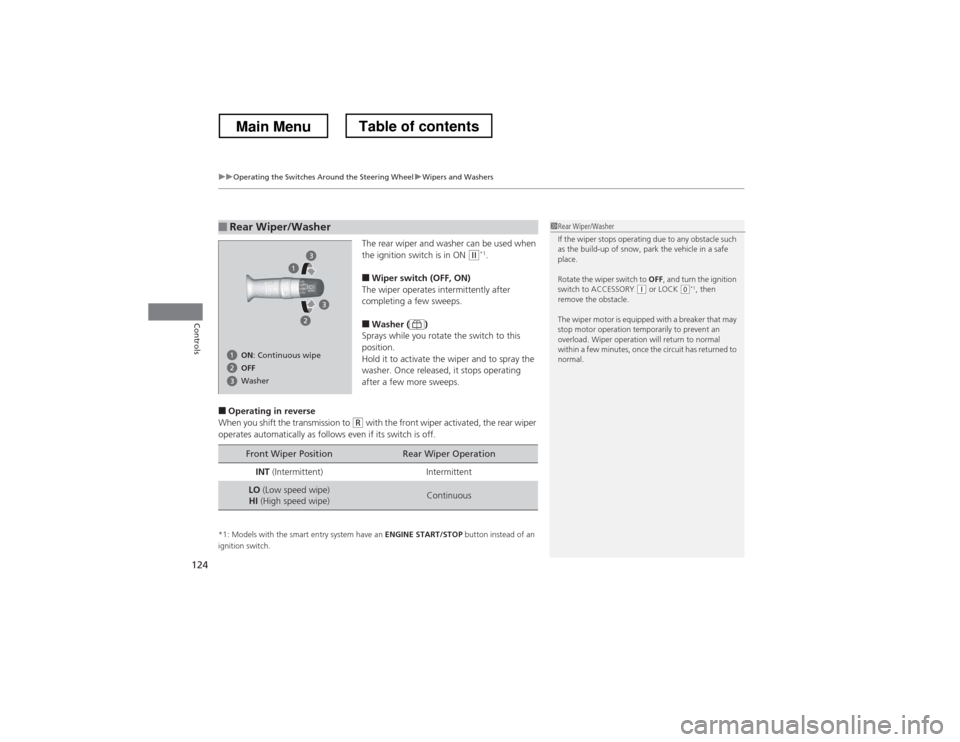
The rear wiper and washer can be used when
the ignition switch is in ON (w *1
.
■ Wiper switch (OFF, ON)
The wiper operates intermittently after
completing a few sweeps. ■ Washer ( )
Sprays while you rotate the switch to this
position.
Hold it to activate the wiper and to spray the
washer. Once released, it stops operating
after a few more sweeps.
■ Operating in reverse
When you shift the transmission to
(R with the front wiper activated, the rear wiper
operates automatically as follows even if its switch is off.
*1: Models with the smart entry system have an ENGINE START/STOP button instead of an
ignition switch.
■Rear Wiper/Washer1Rear Wiper/Washer
If the wiper stops operating due to any obstacle such
as the build-up of snow, park the vehicle in a safe place.
Rotate the wiper switch to OFF, and turn the ignition
switch to ACCESSORY
(q or LOCK (0*1
, then
remove the obstacle.
The wiper motor is equipped with a breaker that may
stop motor operation temporarily to prevent an
overload. Wiper operation will return to normal
within a few minutes, once the circuit has returned to
normal.
OFF
ON
: Continuous wipe
Washer
Front Wiper PositionRear Wiper Operation
INT (Intermittent)Intermittent
LO (Low speed wipe)
HI (High speed wipe)Continuous
Main MenuTable of contents
Page 128 of 573
127
uuOperating the Switches Around the Steering WheeluDriving Position Memory System*
Continued
Controls
Driving Position Memory System *
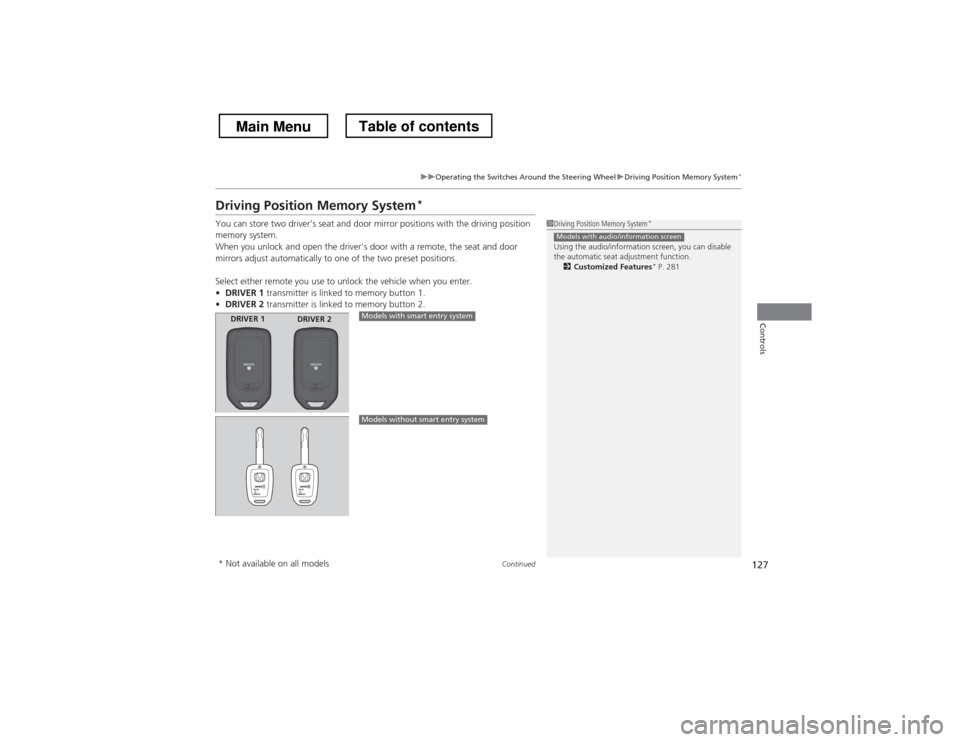
You can store two driver’s seat and door mirror positions with the driving position
memory system.
When you unlock and open the driver’s door with a remote, the seat and door
mirrors adjust automatically to one of the two preset positions.
Select either remote you use to unlock the vehicle when you enter. • DRIVER 1 transmitter is linked to memory button 1.
• DRIVER 2 transmitter is linked to memory button 2.
1Driving Position Memory System *
Using the audio/information screen, you can disable
the automatic seat adjustment function. 2 Customized Features *
P. 281
Models with audio/information screen
DRIVER 1 DRIVER 2Models with smart entry system
Models without smart entry system
* Not available on all models
Main MenuTable of contents
Page 130 of 573
129
uuOperating the Switches Around the Steering WheeluAdjusting the Steering Wheel
Controls
Adjusting the Steering Wheel
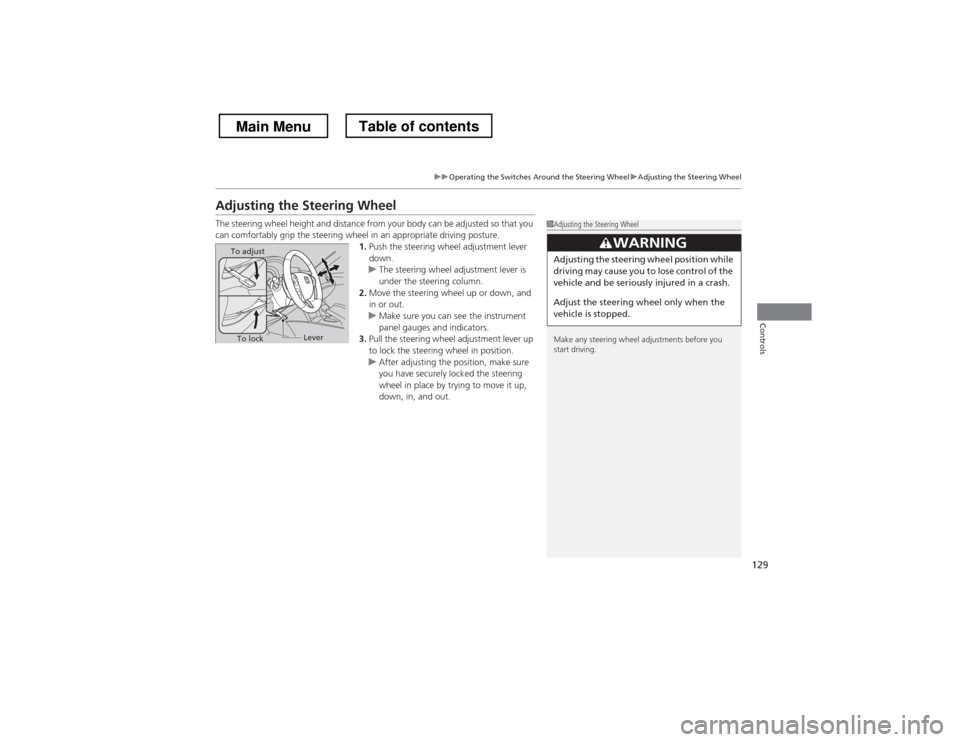
The steering wheel height and distance from your body can be adjusted so that you
can comfortably grip the steering wheel in an appropriate driving posture.1.Push the steering wheel adjustment lever
down.
uThe steering wheel adjustment lever is
under the steering column.
2. Move the steering wheel up or down, and
in or out.
uMake sure you can see the instrument
panel gauges and indicators.
3. Pull the steering wheel adjustment lever up
to lock the steering wheel in position.
uAfter adjusting the position, make sure
you have securely locked the steering
wheel in place by trying to move it up,
down, in, and out.
1Adjusting the Steering Wheel
Make any steering wheel adjustments before you
start driving.
3WARNING
Adjusting the steering wheel position while
driving may cause you to lose control of the
vehicle and be seriously injured in a crash.
Adjust the steering wheel only when the
vehicle is stopped.To adjust
To lockLever
Main MenuTable of contents
Page 135 of 573
uuAdjusting the SeatsuAdjusting the Seat Positions
134
Controls
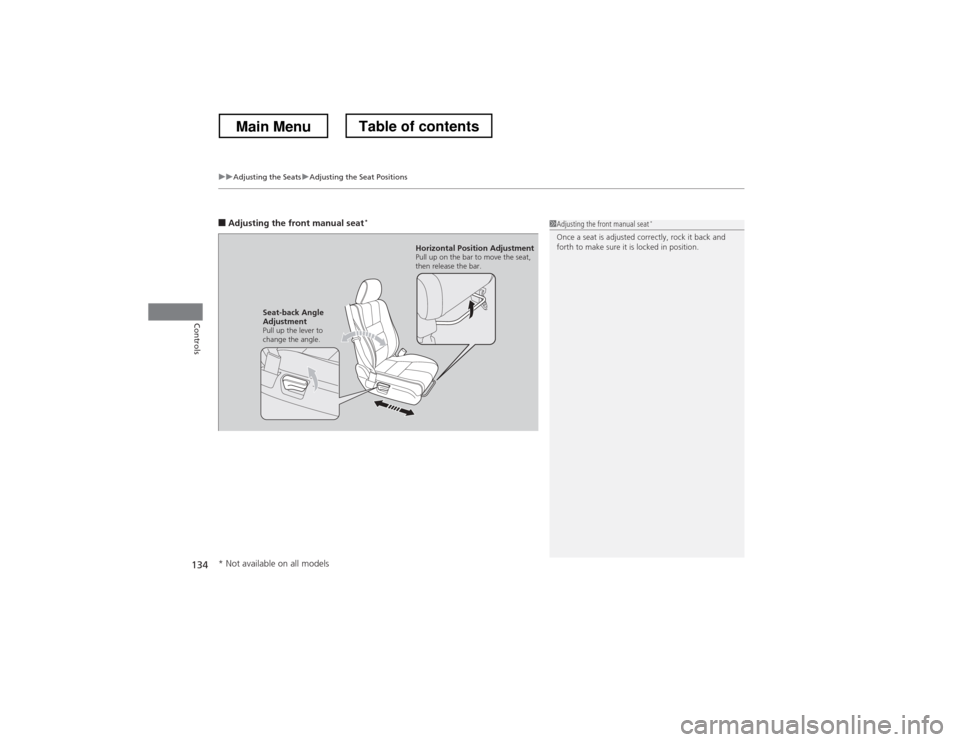
■ Adjusting the front manual seat *1Adjusting the front manual seat
*
Once a seat is adjusted correctly, rock it back and
forth to make sure it is locked in position.
Horizontal Position Adjustment
Pull up on the bar to move the seat,
then release the bar.
Seat-back Angle
Adjustment
Pull up the lever to
change the angle.
* Not available on all models
Main MenuTable of contents
Page 138 of 573
Continued137
uuAdjusting the SeatsuAdjusting the Seat Positions
Controls
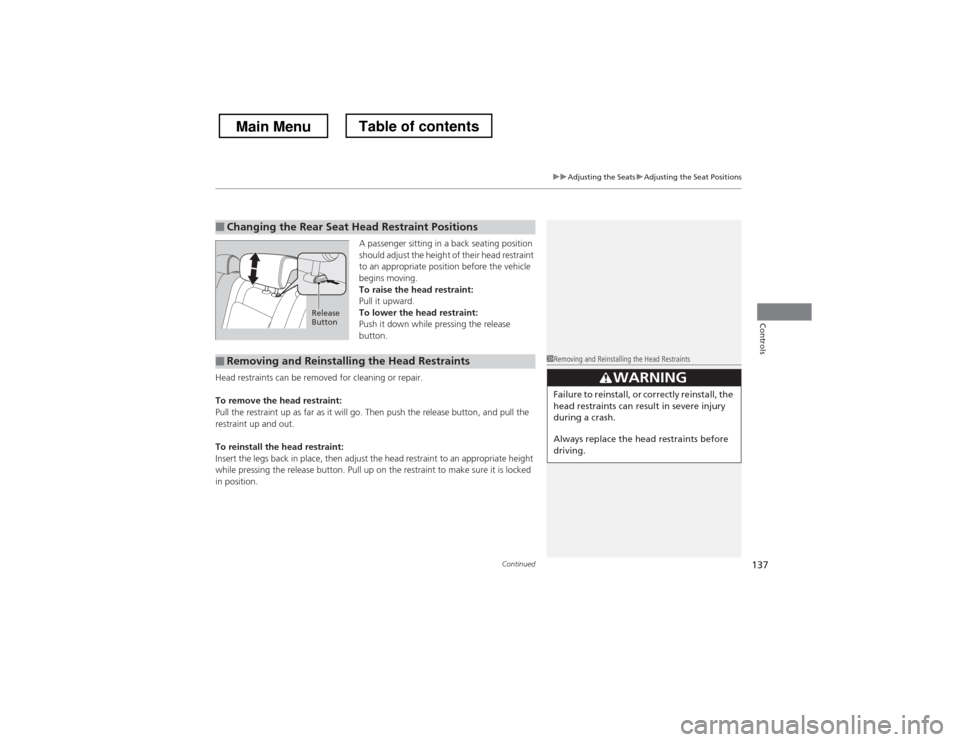
A passenger sitting in a back seating position
should adjust the height of their head restraint
to an appropriate position before the vehicle
begins moving.
To raise the head restraint:
Pull it upward.
To lower the head restraint:
Push it down while pressing the release
button.
Head restraints can be removed for cleaning or repair.
To remove the head restraint:
Pull the restraint up as far as it will go. Then push the release button, and pull the
restraint up and out.
To reinstall the head restraint:
Insert the legs back in place, then adjust the head restraint to an appropriate height
while pressing the release button. Pull up on the restraint to make sure it is locked
in position.
■Changing the Rear Seat Head Restraint Positions
Release
Button
■Removing and Reinstalling the Head Restraints1Removing and Reinstalling the Head Restraints
33WARNING
Failure to reinstall, or correctly reinstall, the
head restraints can result in severe injury
during a crash.
Always replace the head restraints before
driving.
Main MenuTable of contents