audio HONDA CRV 2022 Owners Manual
[x] Cancel search | Manufacturer: HONDA, Model Year: 2022, Model line: CRV, Model: HONDA CRV 2022Pages: 692, PDF Size: 22.05 MB
Page 366 of 692
364
uuCustomized Features u
Features
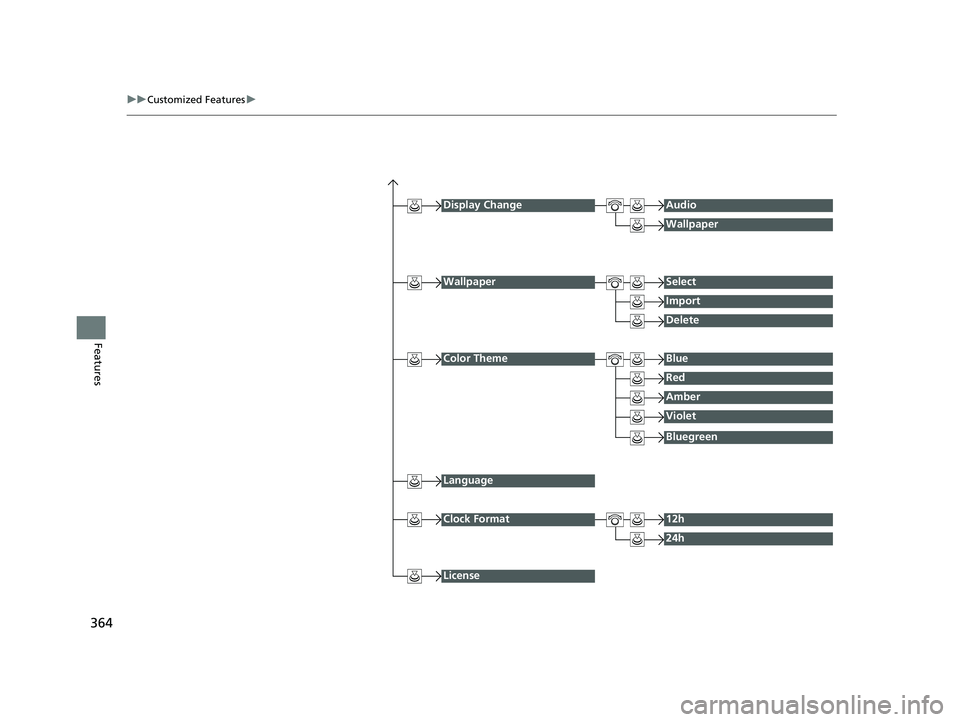
Display ChangeAudio
Wallpaper
WallpaperSelect
Import
Delete
Color ThemeBlue
Red
Amber
Violet
Language
Clock Format12h
24h
License
Bluegreen
22 CR-V HEV ELP-31TPG6200.book 364 ページ 2021年6月30日 水曜日 午前11時6分
Page 367 of 692
365
uuCustomized Features u
Continued
Features
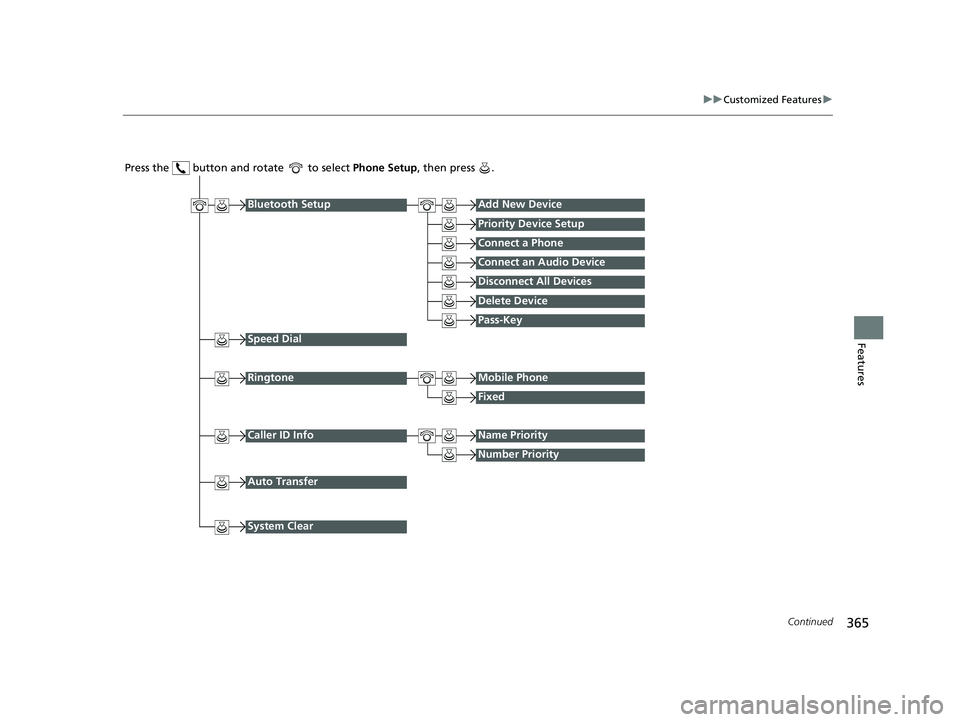
Press the button and rotate to select Phone Setup, then press .
RingtoneMobile Phone
Fixed
Bluetooth SetupAdd New Device
Priority Device Setup
Connect a Phone
Connect an Audio Device
Disconnect All Devices
Delete Device
Speed Dial
Caller ID InfoName Priority
Number Priority
System Clear
Pass-Key
Auto Transfer
22 CR-V HEV ELP-31TPG6200.book 365 ページ 2021年6月30日 水曜日 午前11時6分
Page 368 of 692
366
uuCustomized Features u
Features
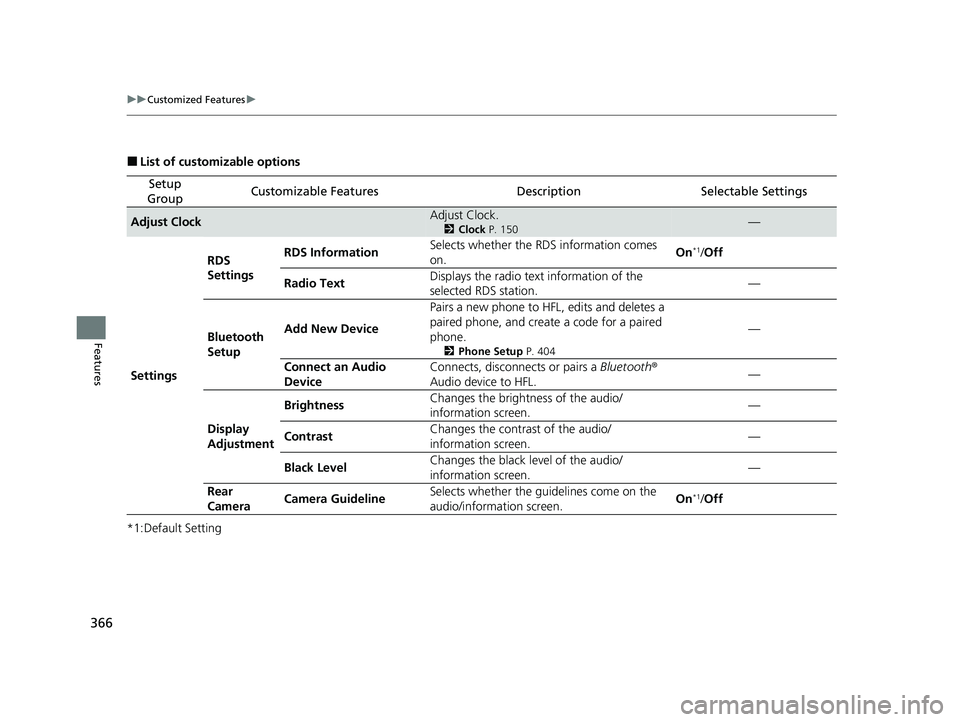
■List of customizable options
*1:Default Setting
Setup
GroupCustomizable FeaturesDescriptionSelectable Settings
Adjust ClockAdjust Clock.
2 Clock P. 150—
Settings RDS
Settings
RDS Information
Selects whether the RDS information comes
on. On
*1/
Off
Radio Text Displays the radio text information of the
selected RDS station. —
Bluetooth
Setup Add New Device
Pairs a new phone to HFL, edits and deletes a
paired phone, and create a code for a paired
phone.
2
Phone Setup P. 404
—
Connect an Audio
Device Connects, disconnects or pairs a
Bluetooth®
Audio device to HFL. —
Display
Adjustment Brightness
Changes the brightness of the audio/
information screen. —
Contrast Changes the contrast of the audio/
information screen.
—
Black Level Changes the black level of the audio/
information screen. —
Rear
Camera Camera Guideline
Selects whether the guidelines come on the
audio/information screen. On
*1/
Off
22 CR-V HEV ELP-31TPG6200.book 366 ページ 2021年6月30日 水曜日 午前11時6分
Page 369 of 692
367
uuCustomized Features u
Continued
Features
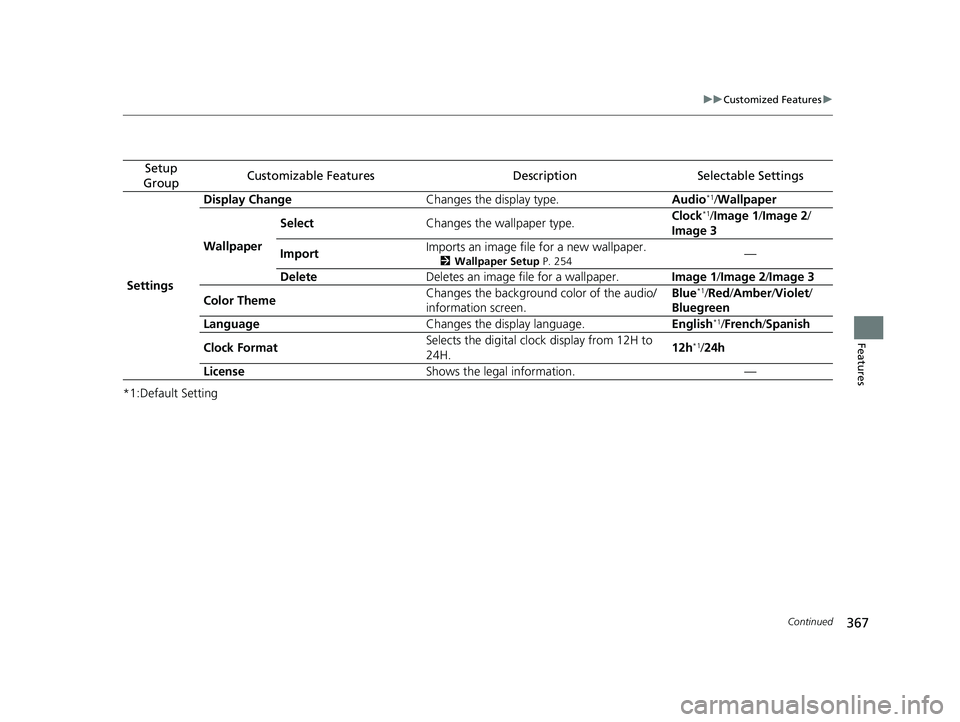
*1:Default Setting
Setup
GroupCustomizable FeaturesDescriptionSelectable Settings
Settings Display Change
Changes the display type. Audio
*1/Wallpaper
Wallpaper Select
Changes the wallpaper type. Clock*1/
Image 1/ Image 2/
Image 3
Import Imports an image file for a new wallpaper.
2
Wallpaper Setup P. 254—
Delete Deletes an image file for a wallpaper. Image 1/Image 2/Image 3
Color Theme Changes the background color of the audio/
information screen. Blue
*1/
Red /Amber /Violet /
Bluegreen
Language Changes the display language. English
*1/French /Spanish
Clock Format Selects the digital clock display from 12H to
24H. 12h
*1/
24h
License Shows the legal information. —
22 CR-V HEV ELP-31TPG6200.book 367 ページ 2021年6月30日 水曜日 午前11時6分
Page 370 of 692
368
uuCustomized Features u
Features
*1:Default Setting
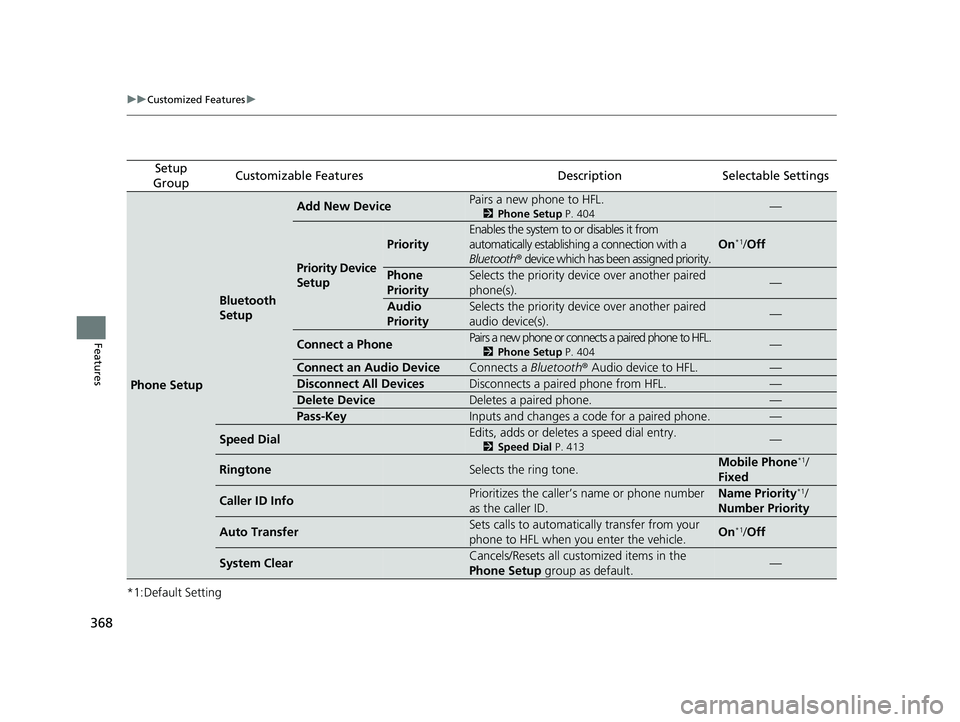
Setup
GroupCustomizable FeaturesDescriptionSelectable Settings
Phone Setup
Bluetooth
Setup
Add New DevicePairs a new phone to HFL.
2 Phone Setup P. 404—
Priority Device
Setup
Priority
Enables the system to or disables it from
automatically establishi ng a connection with a
Bluetooth ® device which has been assigned priority.
On*1/Off
Phone
PrioritySelects the priority device over another paired
phone(s).—
Audio
PrioritySelects the priority device over another paired
audio device(s).—
Connect a PhonePairs a new phone or connects a paired phone to HFL.
2 Phone Setup P. 404—
Connect an Audio DeviceConnects a Bluetooth® Audio device to HFL.—
Disconnect All DevicesDisconnects a paired phone from HFL.—
Delete DeviceDeletes a paired phone.—
Pass-KeyInputs and changes a code for a paired phone.—
Speed DialEdits, adds or deletes a speed dial entry.
2Speed Dial P. 413—
RingtoneSelects the ring tone.Mobile Phone*1/
Fixed
Caller ID InfoPrioritizes the caller’s name or phone number
as the caller ID.Name Priority*1/
Number Priority
Auto TransferSets calls to automatically transfer from your
phone to HFL when you enter the vehicle.On*1/Off
System ClearCancels/Resets all customized items in the
Phone Setup group as default.—
22 CR-V HEV ELP-31TPG6200.book 368 ページ 2021年6月30日 水曜日 午前11時6分
Page 371 of 692
369Continued
Features
Customized Features
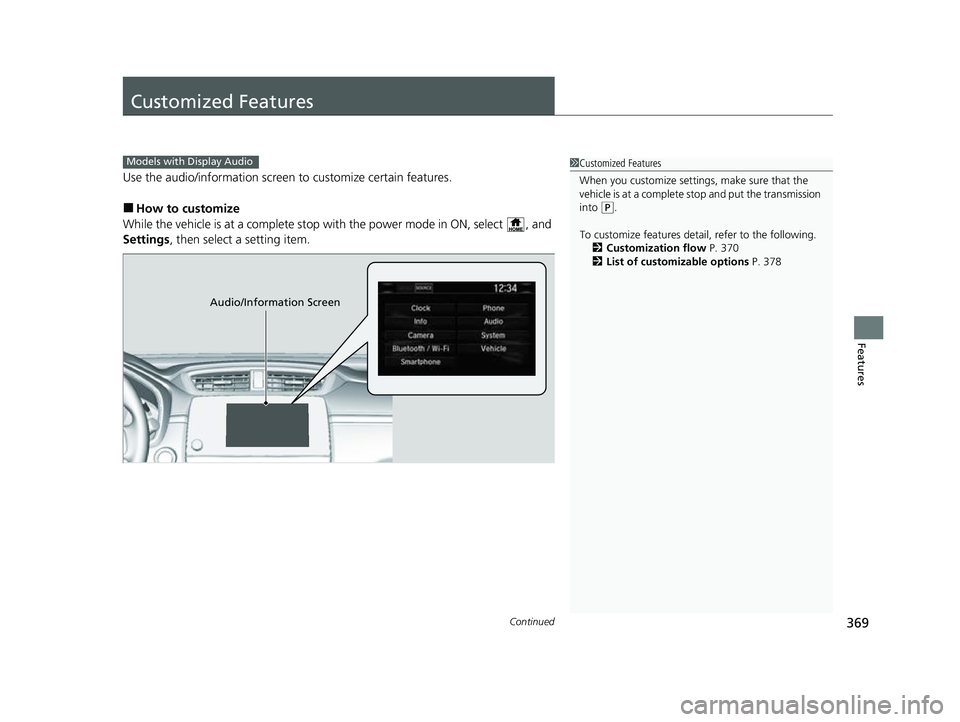
Use the audio/information screen to customize certain features.
■How to customize
While the vehicle is at a complete stop wi th the power mode in ON, select , and
Settings , then select a setting item.
Models with Display Audio1Customized Features
When you customize settings, make sure that the
vehicle is at a complete stop and put the transmission
into
( P.
To customize features detail, refer to the following. 2 Customization flow P. 370
2 List of customizable options P. 378
Audio/Information Screen
22 CR-V HEV ELP-31TPG6200.book 369 ページ 2021年6月30日 水曜日 午前11時6分
Page 374 of 692
372
uuCustomized Features u
Features
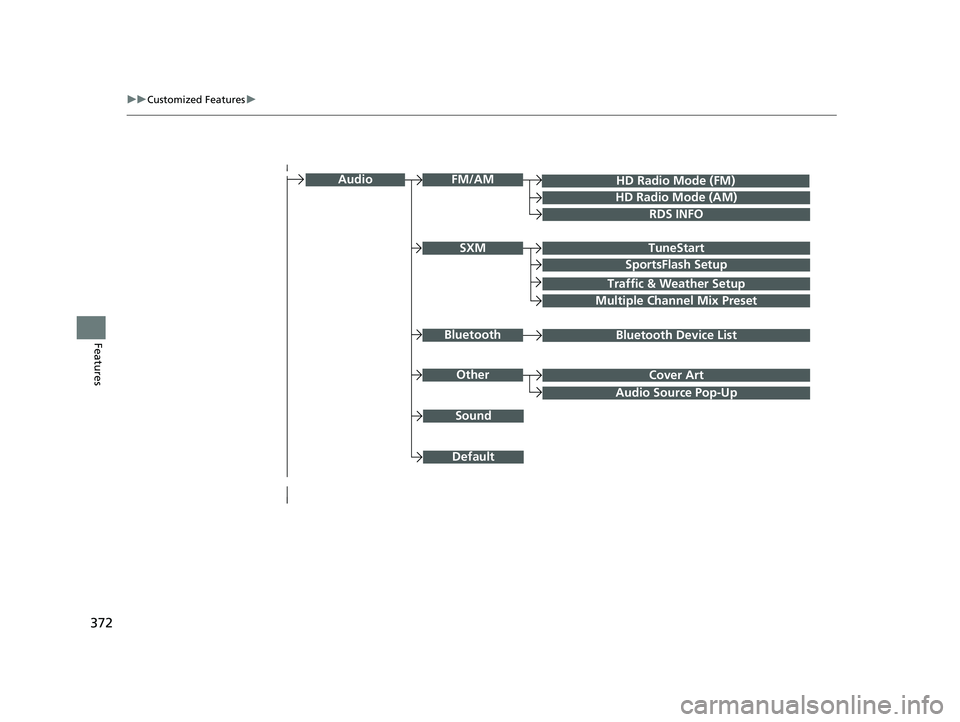
Audio Source Pop-Up
Cover Art
HD Radio Mode (FM)
RDS INFO
TuneStart
SportsFlash Setup
Traffic & Weather Setup
Audio
Other
FM/AM
SXM
Sound
Bluetooth Device ListBluetooth
Multiple Channel Mix Preset
HD Radio Mode (AM)
Default
22 CR-V HEV ELP-31TPG6200.book 372 ページ 2021年6月30日 水曜日 午前11時6分
Page 383 of 692
381
uuCustomized Features u
Continued
Features
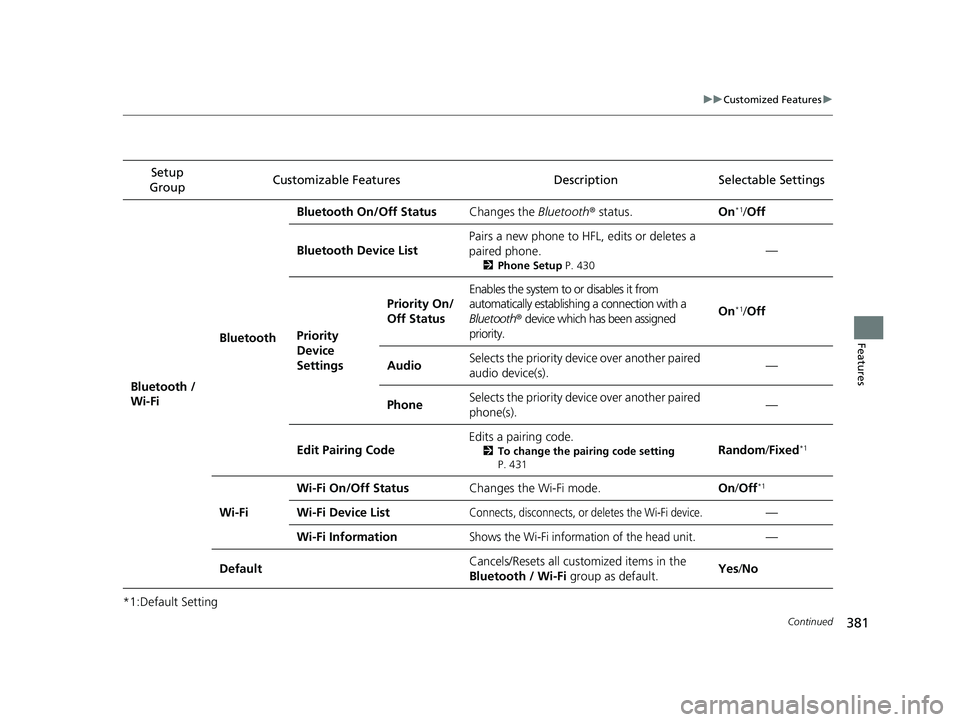
*1:Default SettingSetup
Group Customizable Features Descri
ption Selectable Settings
Bluetooth /
Wi-Fi BluetoothBluetooth On/Off Status
Changes the Bluetooth® status. On
*1/Off
Bluetooth Device List Pairs a new phone to HF
L, edits or deletes a
paired phone.
2 Phone Setup P. 430
—
Priority
Device
Settings
Priority On/
Off Status
Enables the system to or disables it from
automatically establishi ng a connection with a
Bluetooth ® device which has been assigned
priority.
On*1/ Off
AudioSelects the priority devi ce over another paired
audio device(s).—
PhoneSelects the priority devi ce over another paired
phone(s).—
Edit Pairing Code Edits a pairing code.
2
To change the pairing code setting
P. 431Random /Fixed*1
Wi-Fi Wi-Fi On/Off Status
Changes the Wi-Fi mode. On/Off
*1
Wi-Fi Device ListConnects, disconnects, or deletes the Wi-Fi device.—
Wi-Fi Information
Shows the Wi-Fi information of the head unit.—
Default Cancels/Resets all customized items in the
Bluetooth / Wi-Fi
group as default. Yes
/No
22 CR-V HEV ELP-31TPG6200.book 381 ページ 2021年6月30日 水曜日 午前11時6分
Page 385 of 692
383
uuCustomized Features u
Continued
Features
*1:Default SettingSetup
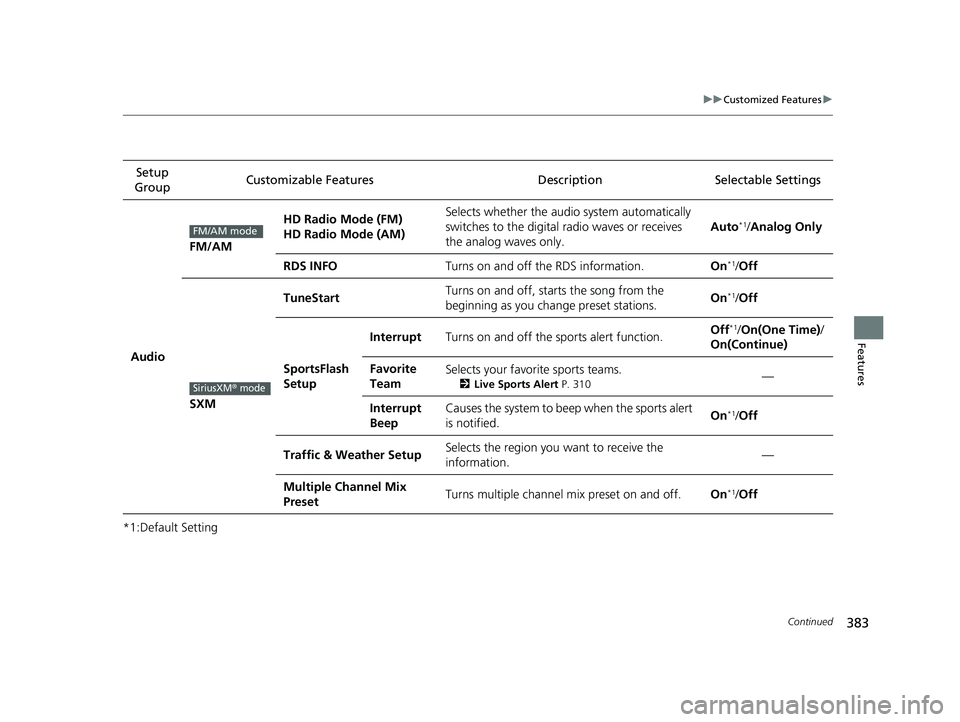
Group Customizable Features Desc
ription Selectable Settings
Audio
FM/AM
HD Radio Mode (FM)
HD Radio Mode (AM)Selects whether the audio system automatically
switches to the digital radio waves or receives
the analog waves only.
Auto*1/ Analog Only
RDS INFOTurns on and off the RDS information.On*1/Off
SXM
TuneStartTurns on and off, starts the song from the
beginning as you change preset stations.On*1/Off
SportsFlash
Setup
InterruptTurns on and off the sports alert function.Off*1/ On(One Time) /
On(Continue)
Favorite
TeamSelects your favorite sports teams.
2 Live Sports Alert P. 310—
Interrupt
BeepCauses the system to beep when the sports alert
is notified.On*1/ Off
Traffic & Weather SetupSelects the region you want to receive the
information.—
Multiple Channel Mix
PresetTurns multiple channel mix preset on and off.On*1/Off
FM/AM mode
SiriusXM® mode
22 CR-V HEV ELP-31TPG6200.book 383 ページ 2021年6月30日 水曜日 午前11時6分
Page 386 of 692
384
uuCustomized Features u
Features
*1:Default Setting
*2:Appears only when you change the screen interface design.Setup
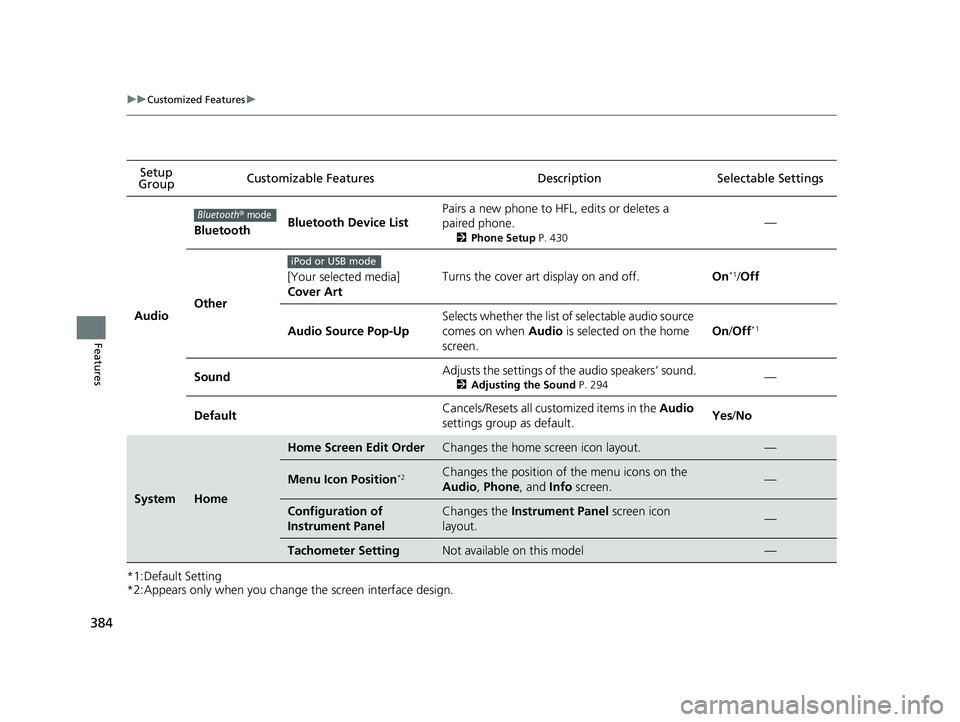
Group Customizable Features
DescriptionSelectable Settings
Audio
BluetoothBluetooth Device List
Pairs a new phone to HFL, edits or deletes a
paired phone.
2Phone Setup P. 430
—
Other
[Your selected media]
Cover ArtTurns the cover art display on and off.On*1/Off
Audio Source Pop-Up
Selects whether the list of selectable audio source
comes on when Audio is selected on the home
screen.
On /Off*1
SoundAdjusts the settings of the audio speakers’ sound.
2 Adjusting the Sound P. 294—
DefaultCancels/Resets all cust omized items in the Audio
settings group as default.Yes /No
SystemHome
Home Screen Edit OrderChanges the home screen icon layout.—
Menu Icon Position*2Changes the position of the menu icons on the
Audio , Phone , and Info screen.—
Configuration of
Instrument PanelChanges the Instrument Panel screen icon
layout. —
Tachometer SettingNot available on this model—
Bluetooth® mode
iPod or USB mode
22 CR-V HEV ELP-31TPG6200.book 384 ページ 2021年6月30日 水曜日 午前11時6分