audio HONDA CRV 2022 Owners Manual
[x] Cancel search | Manufacturer: HONDA, Model Year: 2022, Model line: CRV, Model: HONDA CRV 2022Pages: 692, PDF Size: 22.05 MB
Page 571 of 692
569
uuParking Your Vehicle uCross Traffic Monitor*
Driving
You can switch on and off the system using the audio/information screen.
1. Select .
2. Select Settings .
3. Select Camera .
4. Select Cross Traffic Monitor .
5. Select On or Off , then select OK.
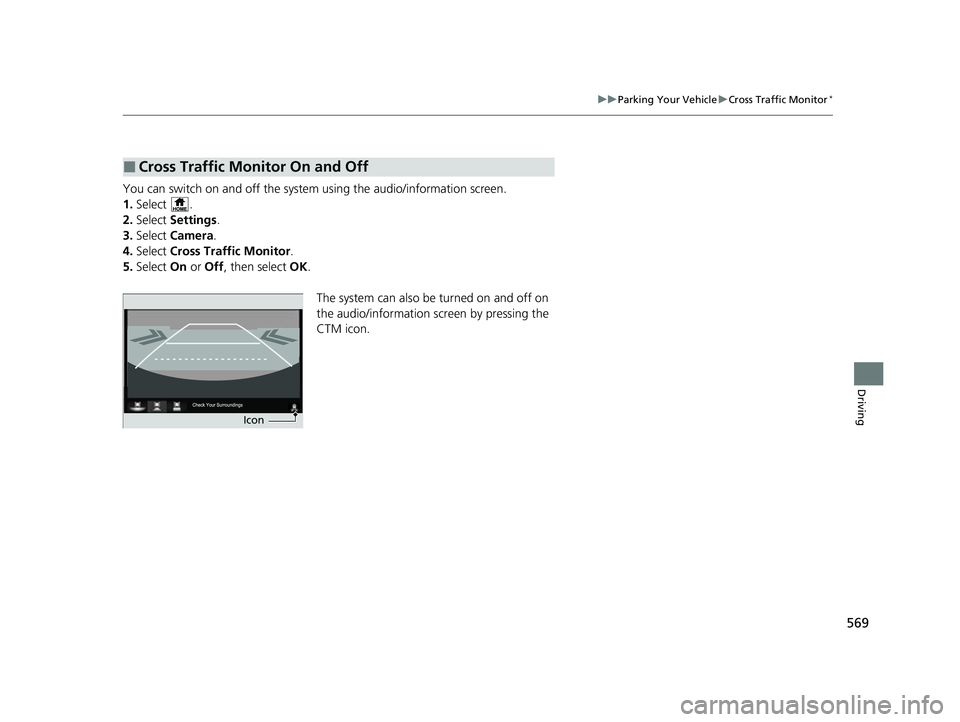
The system can also be turned on and off on
the audio/information screen by pressing the
CTM icon.
■Cross Traffic Monitor On and Off
Icon
22 CR-V HEV ELP-31TPG6200.book 569 ページ 2021年6月30日 水曜日 午前11時6分
Page 572 of 692

570
Driving
Multi-View Rear Camera
About Your Multi-View Rear Camera
The audio/information screen can display your vehicle’s rear view.
The display automatically changes to a rear view when the transmission is put into
(R.
■Multi-View Rear Camera Display Area
1About Your Multi-View Rear Camera
The rear camera view is restricted. You cannot see
the corner ends of the bumper or what is underneath
the bumper. Its unique le ns also makes objects
appear closer or farther than they actually are.
Visually confirm that it is safe to drive before backing
up. Certain conditions (such as weather, lighting, and
high temperatures) may also restrict the rear view. Do
not rely on the rearview display which does not give
you all information about conditions at the back of
your vehicle.
If the camera lens is cove red with dirt or moisture,
use a soft, moist cloth to keep the lens clean and free
of debris.
You can change the Fixed Guideline and Dynamic
Guideline settings. 2 Customized Features P. 369
Fixed Guideline
On: Guidelines appear when you put the
transmission into
( R.
Off: Guidelines do not appear.
Dynamic Guideline
On: Guidelines move accordi ng to the steering wheel
direction.
Off: Guidelines do not move.
Models with Display Audio
Guidelines Bumper Wide View Mode
Normal View Mode
Top Down View Mode
Approx.
39
inches
(1 m
)
Approx.
20 inches
(50 cm)
Tailgate
Open
Range
Camera
22 CR-V HEV ELP-31TPG6200.book 570 ページ 2021年6月30日 水曜日 午前11時6分
Page 573 of 692

571
uuMulti-View Rear Camera uAbout Your Multi-View Rear Camera
Driving
You can view three different camera angles on the rearview display.
Press the selector knob to switch the angle.
Touch the appropriate icon to switch the angle.
: Wide view mode
: Normal view mode
: Top down view mode
• If you were last using Wide view mode or Normal view mode, the same view
mode will be activated the next ti me you put the transmission into
(R.
• If you were using Top down view mode before you turned off the power system,
Wide view mode will be activated the ne xt time you set the power mode to ON
and put the trans mission into
(R.
• If you were using Top down view mode and 10 seconds elapsed after you took
the transmission out of
(R, Wide view mode will be activated the next time you
put the transmission into
(R.
1 About Your Multi-View Rear Camera
You can change the Camera Guideline On or Off
settings. 2 Customized Features P. 362
Camera Guideline
On: Guidelines appear when you put the
transmission into
( R.
Off: Guidelines do not appear.
Models with color audio systemModels with color audio system
Models with Display Audio
All models
22 CR-V HEV ELP-31TPG6200.book 571 ページ 2021年6月30日 水曜日 午前11時6分
Page 587 of 692

585
uuMaintenance MinderTMuTo Use Maintenance MinderTM
Maintenance
Reset the maintenance minder information display if you have performed the
maintenance service.
1. Set the power mode to ON.
2. Press the (display/information) bu tton repeatedly until the appears.
3. Press the ENTER button.
4. Press and hold the ENTER button for about 10 second s to enter the reset mode.
5. Press / to select a maintenance item to reset, or to select All Due Items
(You can also select Cancel to end the process).
6. Press the ENTER button to reset the selected item.
7. Repeat from step 4 for other items you wish to reset.
■Resetting the Display1Resetting the Display
NOTICE
Failure to reset the Maintenance MinderTM display
after a maintenance servic e results in the system
showing incorrect maintenance intervals, which can
lead to serious mechanical problems.
The dealer will reset the Maintenance Minder
TM
display after completing th e required maintenance
service. If someone other than a dealer performs
maintenance service, reset the Maintenance
Minder
TM display yourself.
You can also reset the Maintenance Minder
TM display
using the audio/information screen.
2 How to customize P. 369
Models with Display Audio
ENTEq Button
(Display/Information) Button
34
22 CR-V HEV ELP-31TPG6200.book 585 ページ 2021年6月30日 水曜日 午前11時6分
Page 617 of 692
615
Maintenance
12-volt Battery
Checking the 12-volt Battery
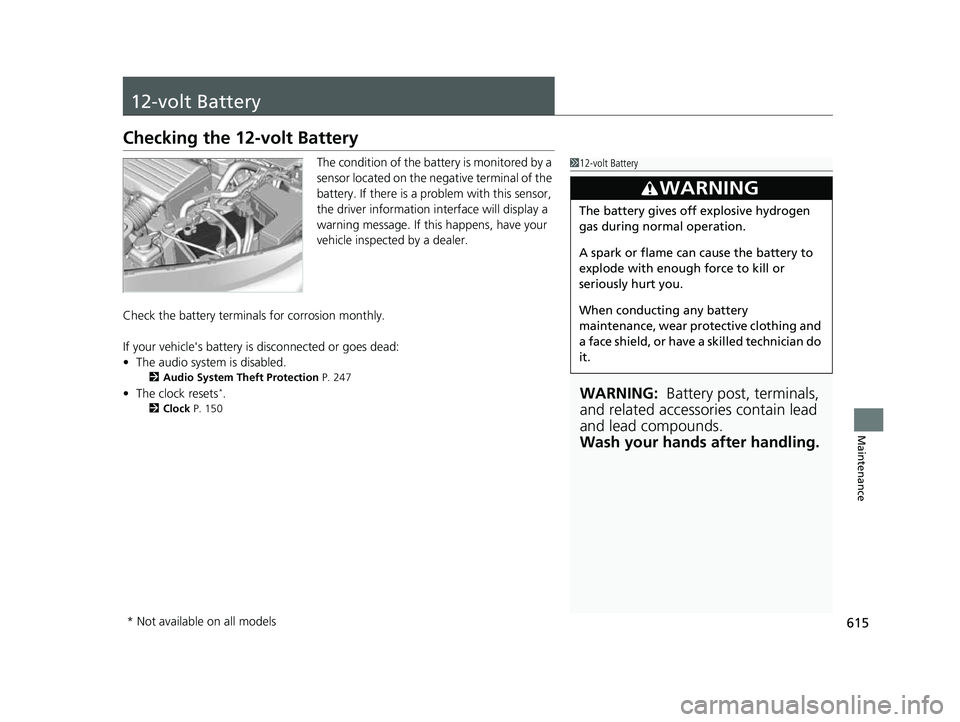
The condition of the battery is monitored by a
sensor located on the negative terminal of the
battery. If there is a problem with this sensor,
the driver information interface will display a
warning message. If this happens, have your
vehicle inspected by a dealer.
Check the battery termina ls for corrosion monthly.
If your vehicle's battery is disconnected or goes dead:
• The audio system is disabled.
2 Audio System Theft Protection P. 247
•The clock resets*.
2 Clock P. 150
112-volt Battery
WARNING: Battery post, terminals,
and related accessories contain lead
and lead compounds.
Wash your hands after handling.
3WARNING
The battery gives off explosive hydrogen
gas during normal operation.
A spark or flame can cause the battery to
explode with enough force to kill or
seriously hurt you.
When conducting any battery
maintenance, wear prot ective clothing and
a face shield, or have a skilled technician do
it.
* Not available on all models
22 CR-V HEV ELP-31TPG6200.book 615 ページ 2021年6月30日 水曜日 午前11時6分
Page 621 of 692
619Continued
Maintenance
Cleaning
Interior Care
Use a damp cloth with a mixture of mild detergent and warm water to remove dirt.
Use a clean cloth to remove detergent residue.
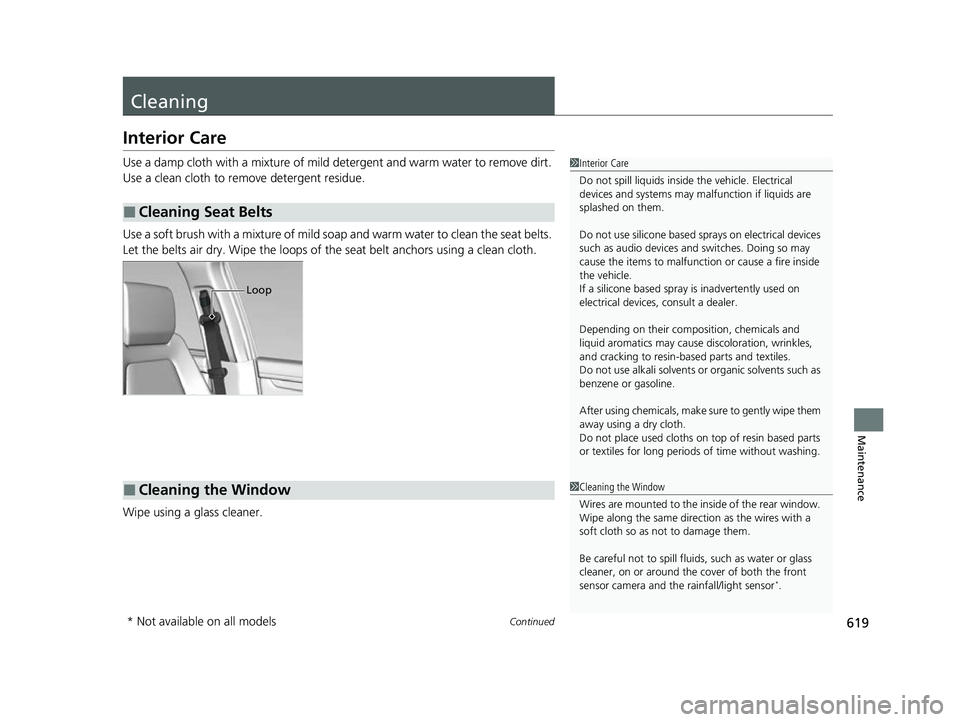
Use a soft brush with a mixture of mild soap and warm water to clean the seat belts.
Let the belts air dry. Wipe the loops of the seat belt anchors using a clean cloth.
Wipe using a glass cleaner.
■Cleaning Seat Belts
1 Interior Care
Do not spill liquids inside the vehicle. Electrical
devices and systems may ma lfunction if liquids are
splashed on them.
Do not use silicone based sprays on electrical devices
such as audio devices and switches. Doing so may
cause the items to malfunction or cause a fire inside
the vehicle.
If a silicone based spray is inadvertently used on
electrical devices, consult a dealer.
Depending on their compos ition, chemicals and
liquid aromatics may cause discoloration, wrinkles,
and cracking to resin-ba sed parts and textiles.
Do not use alkali solvents or organic solvents such as
benzene or gasoline.
After using chemicals, make su re to gently wipe them
away using a dry cloth.
Do not place used cloths on top of resin based parts
or textiles for long periods of time without washing.
Loop
■Cleaning the Window1Cleaning the Window
Wires are mounted to the in side of the rear window.
Wipe along the same direct ion as the wires with a
soft cloth so as not to damage them.
Be careful not to spill fluids, such as water or glass
cleaner, on or around the co ver of both the front
sensor camera and the rainfall/light sensor
*.
* Not available on all models
22 CR-V HEV ELP-31TPG6200.book 619 ページ 2021年6月30日 水曜日 午前11時6分
Page 649 of 692
647Continued
Handling the Unexpected
If the 12-Volt Battery Is Dead
Jump Starting Procedure
Turn off the power to electric devices, such as audio and lights. Turn off the power
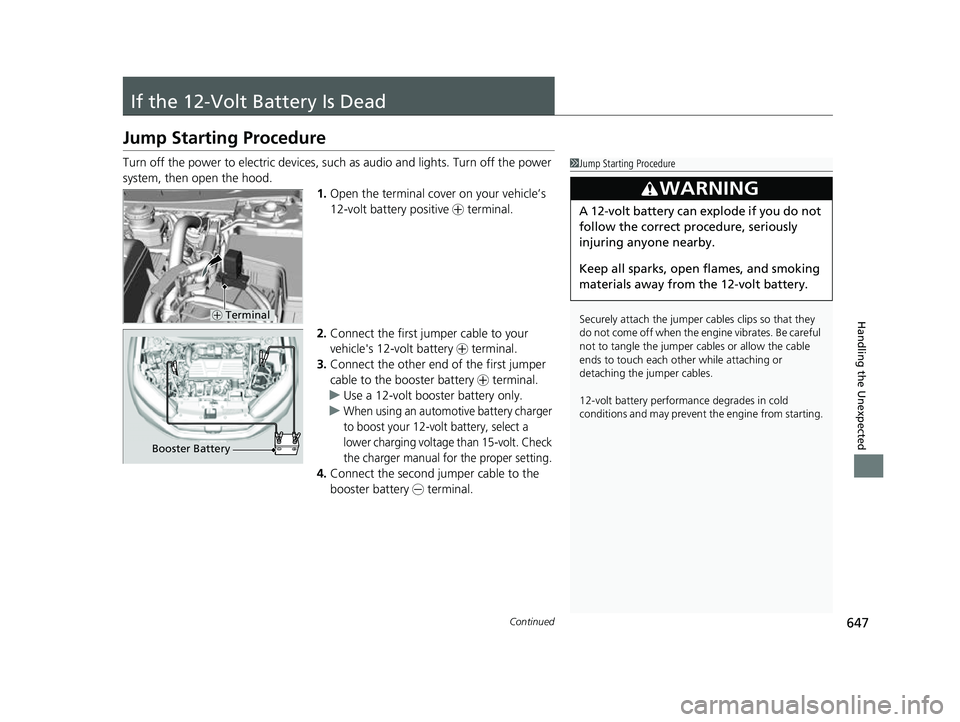
system, then open the hood. 1.Open the terminal cover on your vehicle’s
12-volt battery positive + terminal.
2. Connect the first jumper cable to your
vehicle's 12-volt battery + terminal.
3. Connect the other end of the first jumper
cable to the booster battery + terminal.
u Use a 12-volt booster battery only.
u
When using an automotive battery charger
to boost your 12-volt battery, select a
lower charging voltage than 15-volt. Check
the charger manual for the proper setting.
4. Connect the second jumper cable to the
booster battery - terminal.
1Jump Starting Procedure
Securely attach the jumper cables clips so that they
do not come off when the e ngine vibrates. Be careful
not to tangle the jumper cables or allow the cable
ends to touch each other while attaching or
detaching the jumper cables.
12-volt battery performa nce degrades in cold
conditions and may prevent the engine from starting.
3WARNING
A 12-volt battery can explode if you do not
follow the correct procedure, seriously
injuring anyone nearby.
Keep all sparks, open flames, and smoking
materials away from the 12-volt battery.
+ Terminal
Booster Battery
22 CR-V HEV ELP-31TPG6200.book 647 ページ 2021年6月30日 水曜日 午前11時6分
Page 661 of 692
659Continued
Handling the Unexpected
Fuses
Fuse Locations
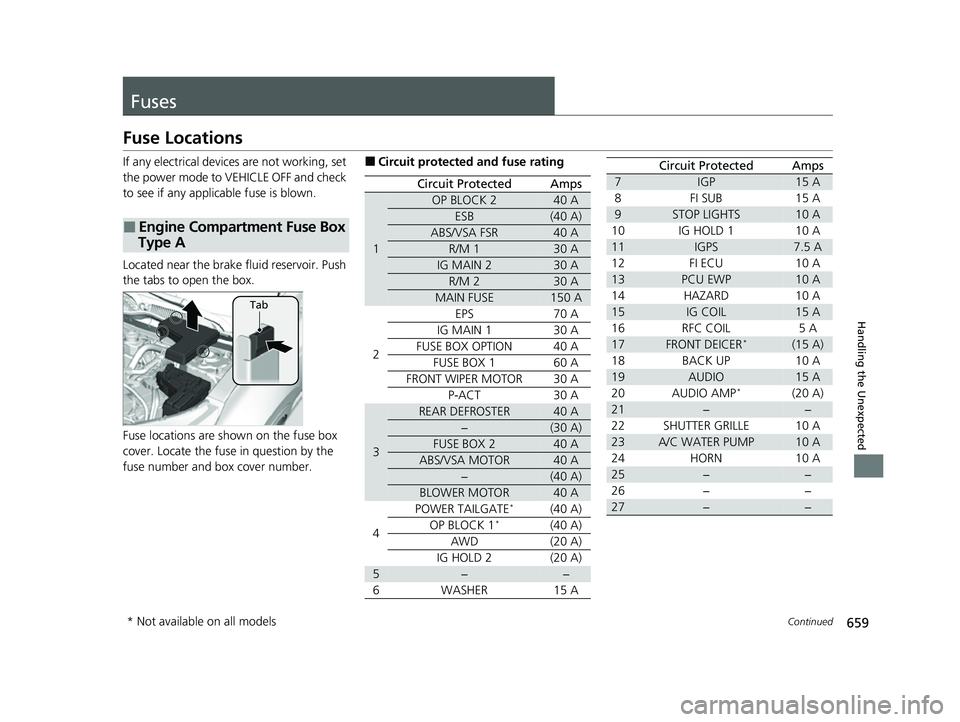
If any electrical devices are not working, set
the power mode to VEHICLE OFF and check
to see if any applic able fuse is blown.
Located near the brake fluid reservoir. Push
the tabs to open the box.
Fuse locations are shown on the fuse box
cover. Locate the fuse in question by the
fuse number and box cover number.
■Engine Compartment Fuse Box
Type A
Tab
■Circuit protected and fuse rating
Circuit ProtectedAmps
1
OP BLOCK 240 A
ESB(40 A)
ABS/VSA FSR40 A
R/M 130 A
IG MAIN 230 A
R/M 230 A
MAIN FUSE150 A
2
EPS70 A
IG MAIN 130 A
FUSE BOX OPTION40 A
FUSE BOX 160 A
FRONT WIPER MOTOR30 A
P-ACT30 A
3
REAR DEFROSTER40 A
−(30 A)
FUSE BOX 240 A
ABS/VSA MOTOR40 A
−(40 A)
BLOWER MOTOR40 A
4
POWER TAILGATE*(40 A)
OP BLOCK 1*(40 A)
AWD(20 A)
IG HOLD 2(20 A)
5−−
6WASHER15 A
7IGP15 A
8FI SUB15 A
9STOP LIGHTS10 A
10IG HOLD 110 A
11IGPS7.5 A
12FI ECU10 A
13PCU EWP10 A
14HAZARD10 A
15IG COIL15 A
16RFC COIL5 A
17FRONT DEICER*(15 A)
18BACK UP10 A
19AUDIO15 A
20AUDIO AMP*(20 A)
21−−
22SHUTTER GRILLE10 A
23A/C WATER PUMP10 A
24HORN10 A
25−−
26−−
27−−
Circuit ProtectedAmps
* Not available on all models
22 CR-V HEV ELP-31TPG6200.book 659 ページ 2021年6月30日 水曜日 午前11時6分
Page 682 of 692
680
uuCustomer Service Information u
Information
Requirements to access Pandora®
• Latest version of the Pandora app
installed on your Android, Blackberry, or
iPhone.
• Registered Pandora account (you can
create a free account at
www.pandora.com
smartphone)
• Connection to the internet via Wi-Fi or
cellular data network.
■Disclaimer of Pandora ®Limitations
•Access to Pandora requires an active
internet connection
• Ability to access Pandora through this
system is subject to change without
notice
• Certain functionality of Pandora service is
not available when accessing the service
through this system including, but not
limited to, creating new stations, deleting
stations, emailing current stations,
buying tracks, viewing additional text
information, logging in to Pandora, and
adjusting Cell Network Audio Quality.
Pandora internet radio is a music service
not affiliated with HONDA. More
information is available at
http:// www.pandora.com
the Pandora logo, and the Pandora trade
dress are trademarks or registered
trademarks of Pandora Media, Inc., used
with permission.
• Mobile access requires a smartphone
with an active data plan. Standard data
rates may apply.
• Pandora is only available in the United
States.
22 CR-V HEV ELP-31TPG6200.book 680 ページ 2021年6月30日 水曜日 午前11時6分
Page 683 of 692
Index
681
Index
Index
Numbers
12-volt Battery......................................... 615
Charging System Indicator ................ 95, 652
Maintenance (Check ing the 12-volt
Battery) ................................................. 615
12-volt Battery Charging System Indicator ........................................... 95, 652
4WD .......................................................... 492
A
AAC................................................... 265, 321
ABS (Anti-lock Brake System) .................. 557
Accessories and Modifications ................ 624
Accessory Power Socket ........................... 229
Adaptive Cruise Control (ACC) with Low
Speed Follow .................................. 105, 517
Additives
Coolant .................................................. 593
Engine Oil ............................................... 588
Washer ................................................... 597
Additives, Engine Oil ............................... 588
Adjusting Armrest .................................................. 217
Front Seats.............................................. 208
Head Restraints ....................................... 215
Mirrors.................................................... 206
Rear Seats ............................................... 212
Steering Wheel ....................................... 205
Temperature ........................................... 138 Adjusting the Sound
........................ 256, 294
Agile Handling Assist ............................... 491
Air Conditioning System (Climate Control System) .................................................... 235
Changing the Mode ................................ 238
Defrosting the Windshield and Windows ............................................... 238
Dust and Pollen Filter ............................... 618
Recirculation/Fresh Air Mode ................... 238
Sensor ..................................................... 241
Synchronized Mode ................................. 240
Using Automatic Climate Control ............ 235
Air Pressure ....................................... 607, 669
Airbags ........................................................ 56
Advanced Airbags ..................................... 62
Airbag Care ............................................... 71
Event Data Recorder .................................... 0
Front Airbags (SRS) .................................... 59
Indicator .............................................. 68, 97
Passenger Airbag Off Indicator .................. 69
Sensors ...................................................... 56
Side Airbags .............................................. 64
Side Curtain Airbags .................................. 66
All-Wheel Drive (AWD) ............................ 492
AM/FM Radio .................................... 258, 301
Android Auto
TM........................................ 336
Anti-lock Brake System (ABS) .................. 557
Indicator .................................................... 97
Apple CarPlay
TM........................................ 333
Armrest ..................................................... 217
Audio Remote Controls ............................ 248 Audio System
............................ 244, 251, 272
Adjusting the Sound........................ 256, 294
AM/FM Radio .................................. 258, 301
Android Auto
TM....................................... 336
Apple CarPlayTM....................................... 333
Audio/Information Screen................ 252, 273
Changing the Home Screen Icon Layout .. 277
Changing the Screen Interface ................ 291
Closing Apps ........................................... 293
Customizing the Meter............................ 278
Display Setup .................................. 257, 295
Error Messages ........................................ 340
General Information ................................ 345
Home Screen........................................... 284
HondaLink ®........................................... 326
How to use Siri ® Eyes Free .............. 271, 332
iPod ................................................ 260, 312
Limitations for Manual Operation ............ 296
Menu Customize ..................................... 292
MP3/WMA/AAC .............................. 265, 321
Pandora ®....................................... 263, 319
Playing Bluetooth ® Audio ................ 268, 324
Playing SiriusXM ® Radio .......................... 305
Reactivating ............................................ 247
Recommended Devices............................ 346
Remote Controls ..................................... 248
Security Code .......................................... 247
Selecting an Audio Source ....................... 296
Song By Voice
TM (SBV) ............................. 315
Status Area ............................................. 290
22 CR-V HEV ELP-31TPG6200.book 681 ページ 2021年6月30日 水曜日 午前11時6分