brake HONDA CRV 2023 User Guide
[x] Cancel search | Manufacturer: HONDA, Model Year: 2023, Model line: CRV, Model: HONDA CRV 2023Pages: 719, PDF Size: 13.43 MB
Page 97 of 719
96
Instrument Panel
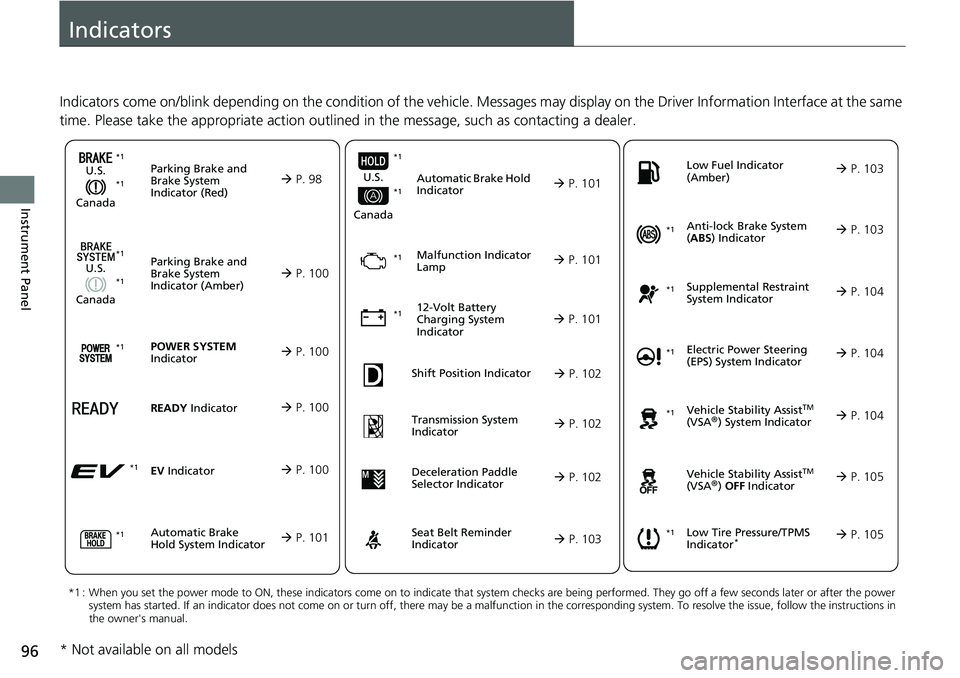
Indicators
Indicators come on/blink depending on the condition of the vehicle. Messages may display on the Driver Information Interface at the same
time. Please take the appropriate action outlined in the message, such as contacting a dealer.
Parking Brake and
Brake System
Indicator (Red)
U.S.
Canada P. 98*1 *1
Parking Brake and
Brake System
Indicator (Amber)
U.S.
Canada
Automatic Brake
Hold System Indicator
Automatic Brake Hold
Indicator
U.S.
Canada
*1 : When you set the power mode to ON, these indicators come on to indicate that system checks are being performed. They go off a few seconds later or after the power
system has started. If an indicator does not come on or turn o ff, there may be a malfunction in the corresponding system. To re solve the issue, follow the instructions in
the owner's manual.
Malfunction Indicator
Lamp
12-Volt Battery
Charging System
Indicator
Anti-lock Brake System
( ABS ) Indicator
Seat Belt Reminder
Indicator Low Fuel Indicator
(Amber)
Vehicle Stability AssistTM
(VSA®) System Indicator
Vehicle Stability Assist
TM
(VSA®) OFF Indicator
Supplemental Restraint
System Indicator
Low Tire Pressure/TPMS
Indicator*
Electric Power Steering
(EPS) System Indicator
P. 100
P. 101
P. 101
P. 101
P. 101*1
*1
P. 105
*1
Shift Position Indicator P. 102
Transmission System
Indicator P. 102
P. 103
P. 103
P. 103
P. 104
P. 104
*1
*1
P. 105
*1 P. 104
*1
*1*1 *1
*1
*1
Deceleration Paddle
Selector Indicator
P. 102
POWER SYSTEM
Indicator P. 100*1
READY Indicator P. 100
EV Indicator P. 100*1
* Not available on all models
Page 99 of 719
98
uuIndicators u
Instrument Panel
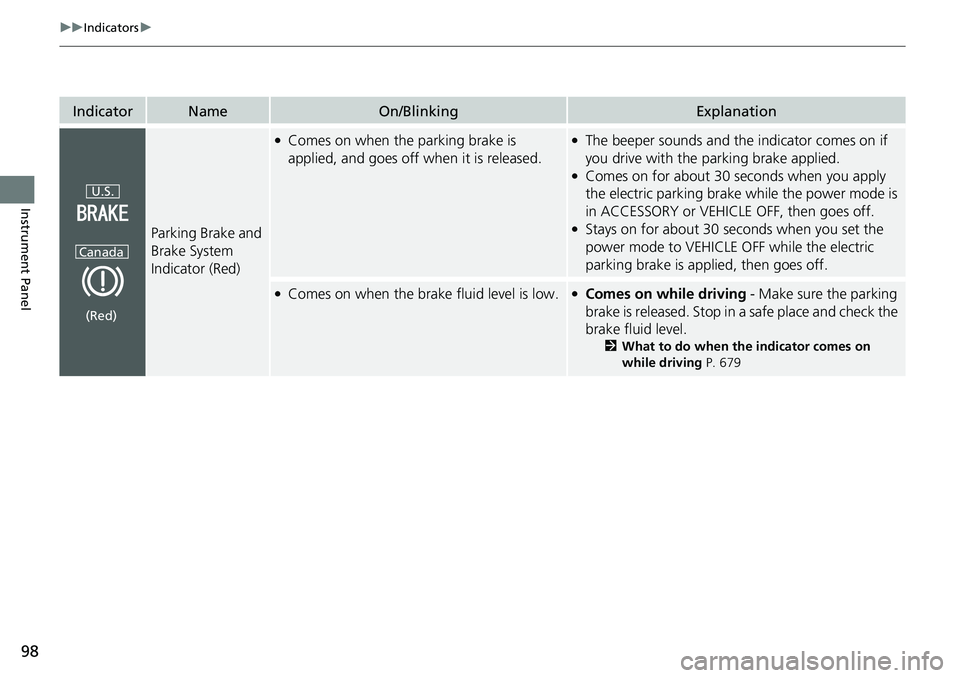
IndicatorNameOn/BlinkingExplanation
Parking Brake and
Brake System
Indicator (Red)
●Comes on when the parking brake is
applied, and goes off when it is released.●The beeper sounds and th e indicator comes on if
you drive with the parking brake applied.
●Comes on for about 30 seconds when you apply
the electric parking brake while the power mode is
in ACCESSORY or VEHICLE OFF, then goes off.
●Stays on for about 30 seconds when you set the
power mode to VEHICLE OFF while the electric
parking brake is applied, then goes off.
●Comes on when the brake fluid level is low.●Comes on while driving - Make sure the parking
brake is released. Stop in a safe place and check the
brake fluid level.
2 What to do when th e indicator comes on
while driving P. 679
U.S.
Canada
(Red)
Page 100 of 719
99
uuIndicators u
Continued
Instrument Panel
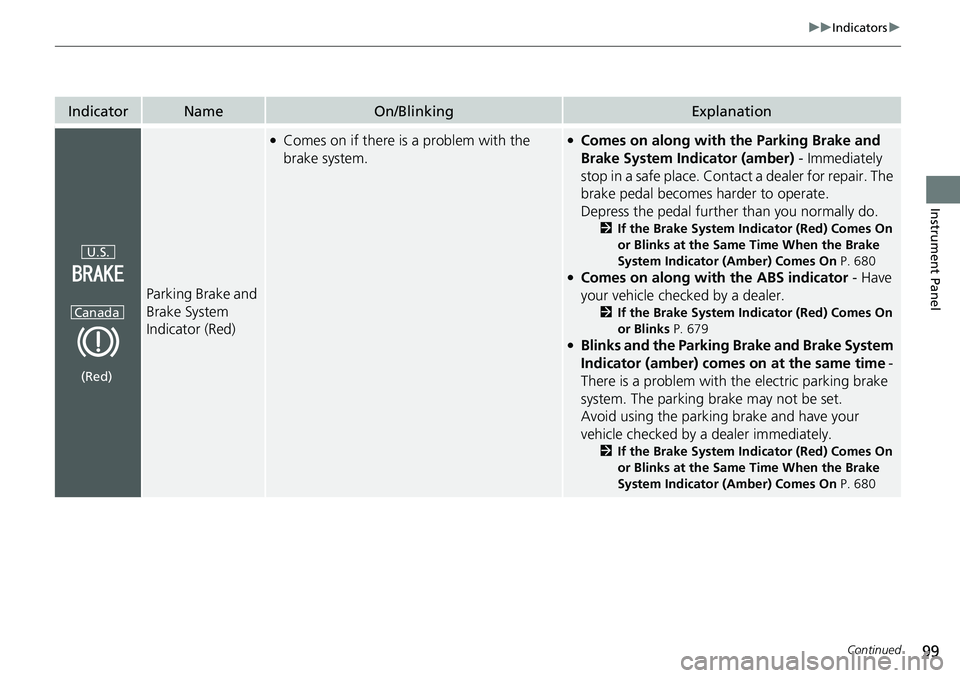
IndicatorNameOn/BlinkingExplanation
Parking Brake and
Brake System
Indicator (Red)
●Comes on if there is a problem with the
brake system.●Comes on along with the Parking Brake and
Brake System Indicator (amber) - Immediately
stop in a safe place. Contact a dealer for repair. The
brake pedal becomes harder to operate.
Depress the pedal further than you normally do.
2 If the Brake System Indicator (Red) Comes On
or Blinks at the Same Time When the Brake
System Indicator (Amber) Comes On P. 680
●Comes on along with the ABS indicator - Have
your vehicle checked by a dealer.
2 If the Brake System Indicator (Red) Comes On
or Blinks P. 679
●Blinks and the Parking Brake and Brake System
Indicator (amber) comes on at the same time -
There is a problem with the electric parking brake
system. The parking brake may not be set.
Avoid using the parki ng brake and have your
vehicle checked by a dealer immediately.
2 If the Brake System Indicator (Red) Comes On
or Blinks at the Same Time When the Brake
System Indicator (Amber) Comes On P. 680
U.S.
Canada
(Red)
Page 101 of 719
100
uuIndicators u
Instrument Panel
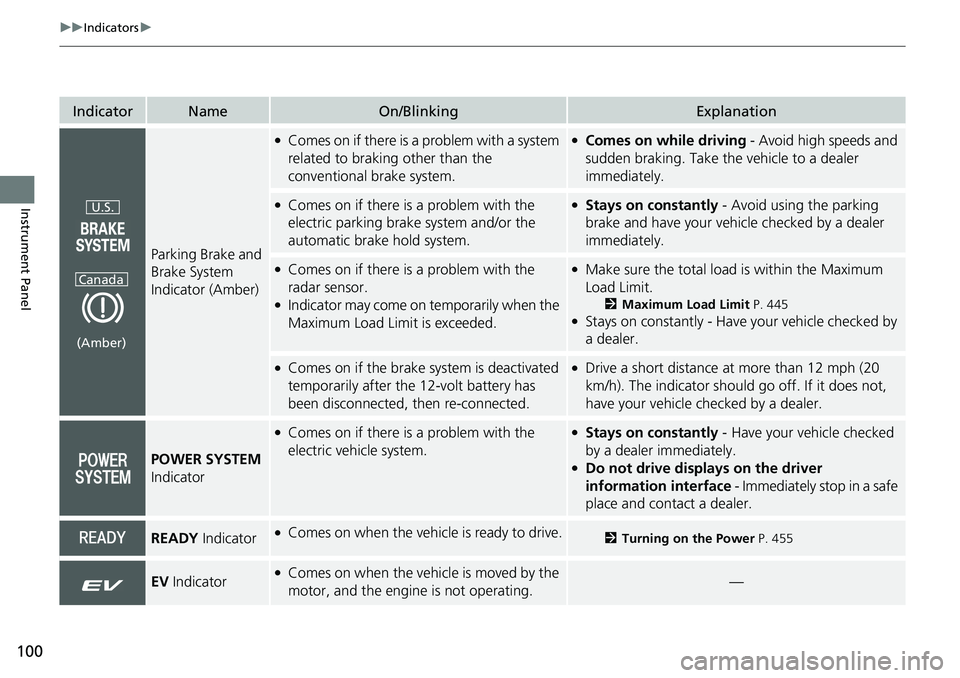
IndicatorNameOn/BlinkingExplanation
Parking Brake and
Brake System
Indicator (Amber)
●Comes on if there is a problem with a system
related to braking other than the
conventional brake system.●Comes on while driving - Avoid high speeds and
sudden braking. Take the vehicle to a dealer
immediately.
●Comes on if there is a problem with the
electric parking brake system and/or the
automatic brake hold system.●Stays on constantly - Avoid using the parking
brake and have your vehicl e checked by a dealer
immediately.
●Comes on if there is a problem with the
radar sensor.
●Indicator may come on temporarily when the
Maximum Load Limi t is exceeded.
●Make sure the total load is within the Maximum
Load Limit.
2 Maximum Load Limit P. 445●Stays on constantly - Have your vehicle checked by
a dealer.
●Comes on if the brake system is deactivated
temporarily after the 12-volt battery has
been disconnected, then re-connected.●Drive a short distance at more than 12 mph (20
km/h). The indicator should go off. If it does not,
have your vehicle checked by a dealer.
POWER SYSTEM
Indicator
●Comes on if there is a problem with the
electric vehicle system.●Stays on constantly - Have your vehicle checked
by a dealer immediately.
●Do not drive displays on the driver
information interface - Immediately stop in a safe
place and contact a dealer.
READY Indicator●Comes on when the vehicle is ready to drive.2Turning on the Power P. 455
EV Indicator●Comes on when the vehicle is moved by the
motor, and the engine is not operating.—
U.S.
Canada
(Amber)
Page 102 of 719
101
uuIndicators u
Continued
Instrument Panel
IndicatorNameOn/BlinkingExplanation
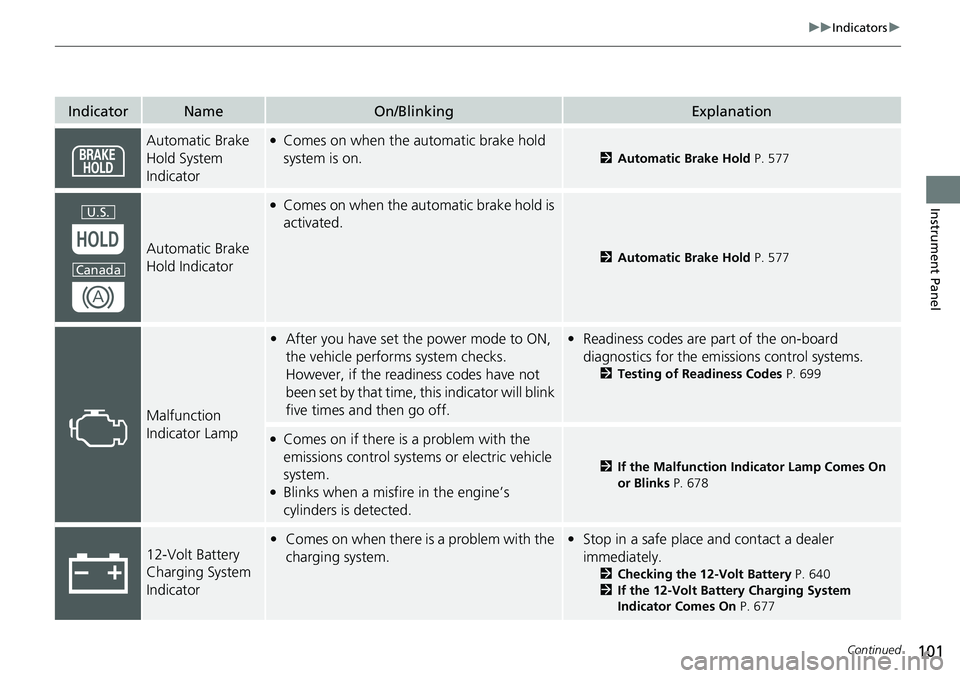
Automatic Brake
Hold System
Indicator●Comes on when the automatic brake hold
system is on.
2Automatic Brake Hold P. 577
Automatic Brake
Hold Indicator
●Comes on when the automatic brake hold is
activated.
2Automatic Brake Hold P. 577
Malfunction
Indicator Lamp
•After you have set the power mode to ON,
the vehicle performs system checks.
However, if the readiness codes have not
been set by that time, this indicator will blink
five times and then go off.•Readiness codes are part of the on-board
diagnostics for the emissions control systems.
2 Testing of Readiness Codes P. 699
●Comes on if there is a problem with the
emissions control systems or electric vehicle
system.
●Blinks when a misfire in the engine’s
cylinders is detected.
2If the Malfunction Indicator Lamp Comes On
or Blinks P. 678
12-Volt Battery
Charging System
Indicator•Comes on when there is a problem with the
charging system.•Stop in a safe place and contact a dealer
immediately.
2 Checking the 12-Volt Battery P. 640
2 If the 12-Volt Battery Charging System
Indicator Comes On P. 677
U.S.
Canada
Page 104 of 719
103
uuIndicators u
Continued
Instrument Panel
IndicatorNameOn/BlinkingExplanation
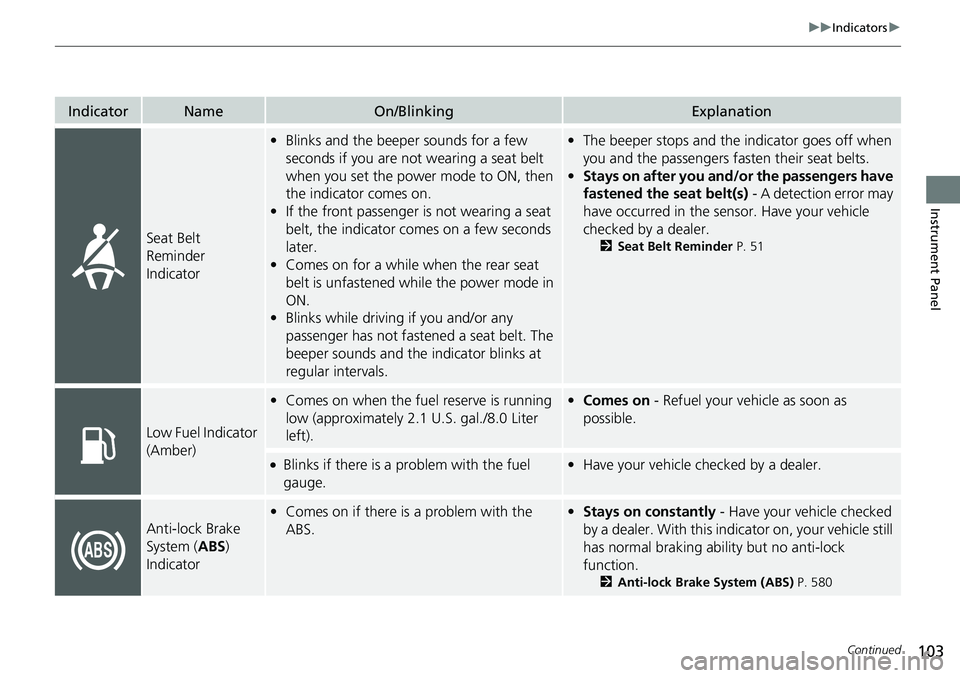
Seat Belt
Reminder
Indicator
•Blinks and the beeper sounds for a few
seconds if you are not wearing a seat belt
when you set the power mode to ON, then
the indicator comes on.
• If the front passenger is not wearing a seat
belt, the indicator comes on a few seconds
later.
• Comes on for a while when the rear seat
belt is unfastened while the power mode in
ON.
• Blinks while driving if you and/or any
passenger has not fastened a seat belt. The
beeper sounds and the indicator blinks at
regular intervals.•The beeper stops and the indicator goes off when
you and the passengers fa sten their seat belts.
• Stays on after you and/or the passengers have
fastened the seat belt(s) - A detection error may
have occurred in the sensor. Have your vehicle
checked by a dealer.
2 Seat Belt Reminder P. 51
Low Fuel Indicator
(Amber)
•Comes on when the fuel reserve is running
low (approximately 2.1 U.S. gal./8.0 Liter
left).• Comes on - Refuel your vehicle as soon as
possible.
●Blinks if there is a problem with the fuel
gauge.•Have your vehicle checked by a dealer.
Anti-lock Brake
System ( ABS)
Indicator
• Comes on if there is a problem with the
ABS.•Stays on constantly - Have your vehicle checked
by a dealer. With this indi cator on, your vehicle still
has normal braking ability but no anti-lock
function.
2 Anti-lock Brake System (ABS) P. 580
Page 108 of 719
107
uuIndicators u
Continued
Instrument Panel
*1:Canadian models only: Apply and hold the brake pedal before selecting the ON mode.
IndicatorNameOn/BlinkingExplanation
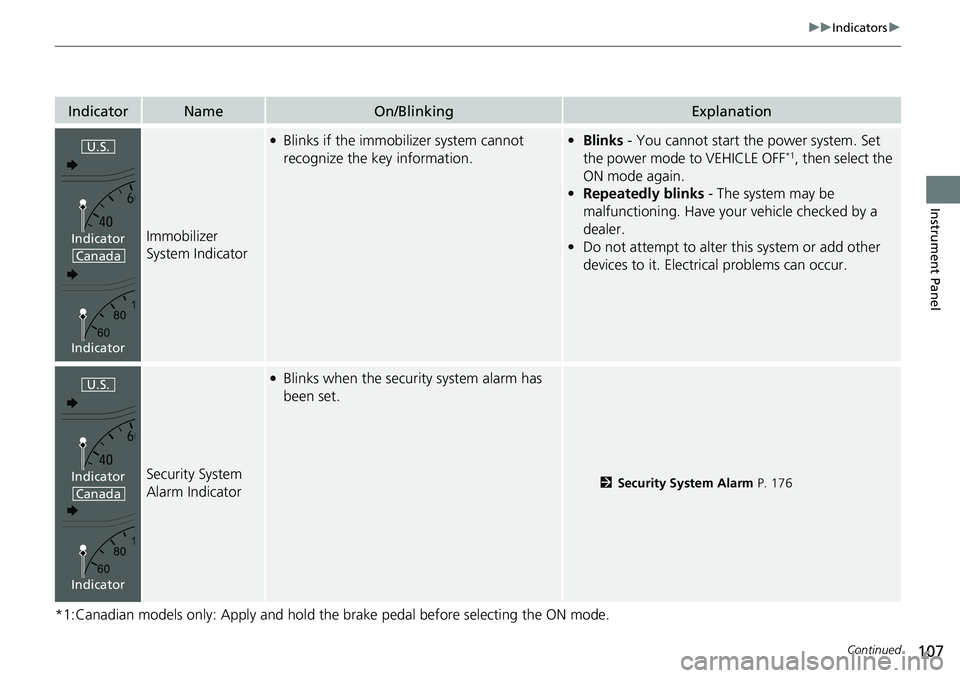
Immobilizer
System Indicator
●Blinks if the immobilizer system cannot
recognize the key information.•Blinks - You cannot start the power system. Set
the power mode to VEHICLE OFF*1, then select the
ON mode again.
• Repeatedly blinks - The system may be
malfunctioning. Have your vehicle checked by a
dealer.
• Do not attempt to alter this system or add other
devices to it. Electrical problems can occur.
Security System
Alarm Indicator
●Blinks when the security system alarm has
been set.
2 Security System Alarm P. 176
U.S.
Canada
Indicator
Indicator
U.S.
Canada
Indicator
Indicator
Page 132 of 719
Continued131
uuGauges and Driver Information Interface uDriver Information Interface
Instrument Panel
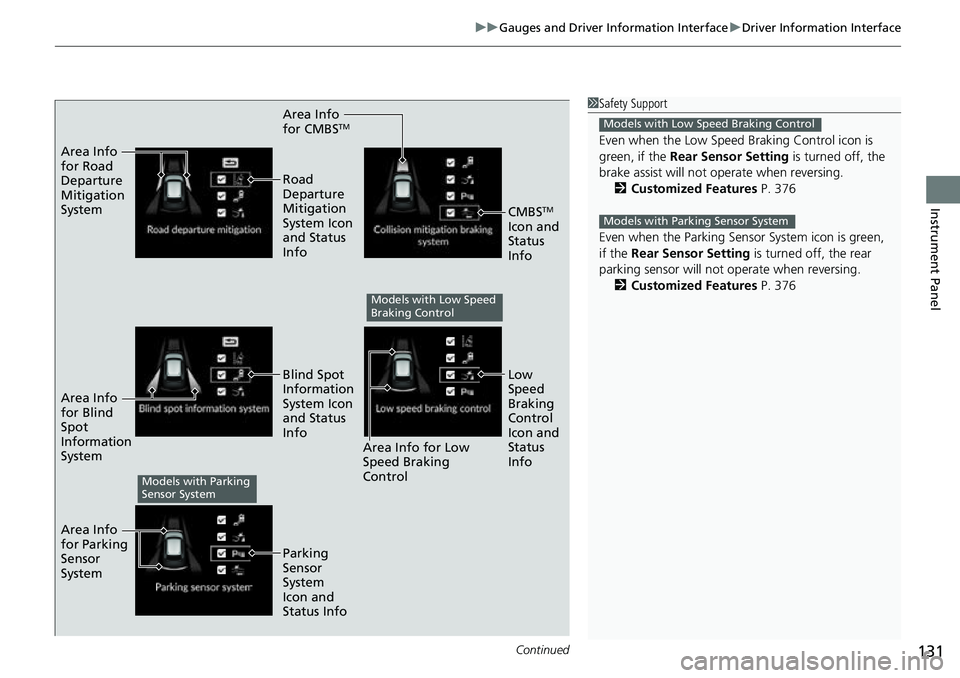
Area Info
for CMBSTM
Area Info
for Road
Departure
Mitigation
System
Area Info
for Blind
Spot
Information
System
Area Info
for Parking
Sensor
System Road
Departure
Mitigation
System Icon
and Status
Info
Area Info for Low
Speed Braking
Control
Blind Spot
Information
System Icon
and Status
Info
Parking
Sensor
System
Icon and
Status Info
CMBSTM
Icon and
Status
Info
Low
Speed
Braking
Control
Icon and
Status
Info
Models with Low Speed
Braking Control
Models with Parking
Sensor System
1 Safety Support
Even when the Low Speed Braking Control icon is
green, if the Rear Sensor Setting is turned off, the
brake assist will not operate when reversing.
2 Customized Features P. 376
Even when the Parking Sensor System icon is green,
if the Rear Sensor Setting is turned off, the rear
parking sensor will not operate when reversing. 2 Customized Features P. 376
Models with Low Speed Braking Control
Models with Parking Sensor System
Page 177 of 719
176
Controls
Security System
Immobilizer System
This system prevents a key that has not been pre-registered from starting the power
system.
Pay attention to the follo wing when pressing the POWER button:
• Do not allow objects that emit strong radio waves near the POWER button.
• Make sure the key is not covered by or touching a metal object.
• Do not bring a key from another vehi cle’s immobilizer system near the POWER
button.
• Do not put the key near magnetic items. El ectronic device, such as televisions and
audio systems emit strong magnetic fields. Note that even a key chain can
become magnetic.
Security System Alarm
The security system alarm activates when the tailgate, hood, or doors are forcibly
opened. The alarm does not activate if the tailgate or doors are opened with the key,
remote transmitter or keyless access system.
However, the alarm activates if a door is opened with the key and then the hood is
opened before the power mode is set to ON.
1 Immobilizer System
NOTICE
Leaving the key in the vehicl e can result in theft or
accidental movement of the vehicle.
Always take the key with you whenever you leave the
vehicle unattended.
Do not alter the system or add other devices to it.
Doing so may damage the system and make your
vehicle inoperable.
Apply and hold the brake pedal before turning the
vehicle on the first time after the battery has been
disconnected.
Canadian models
1 Security System Alarm
Do not alter the system or add other devices to it.
Doing so may damage the system and make your
vehicle inoperable.
The security system alarm continues for a maximum
of two minutes until the security system alarm
deactivates.
Page 185 of 719
184
Controls
Operating the Switches Around the Steering Wheel
POWER Button
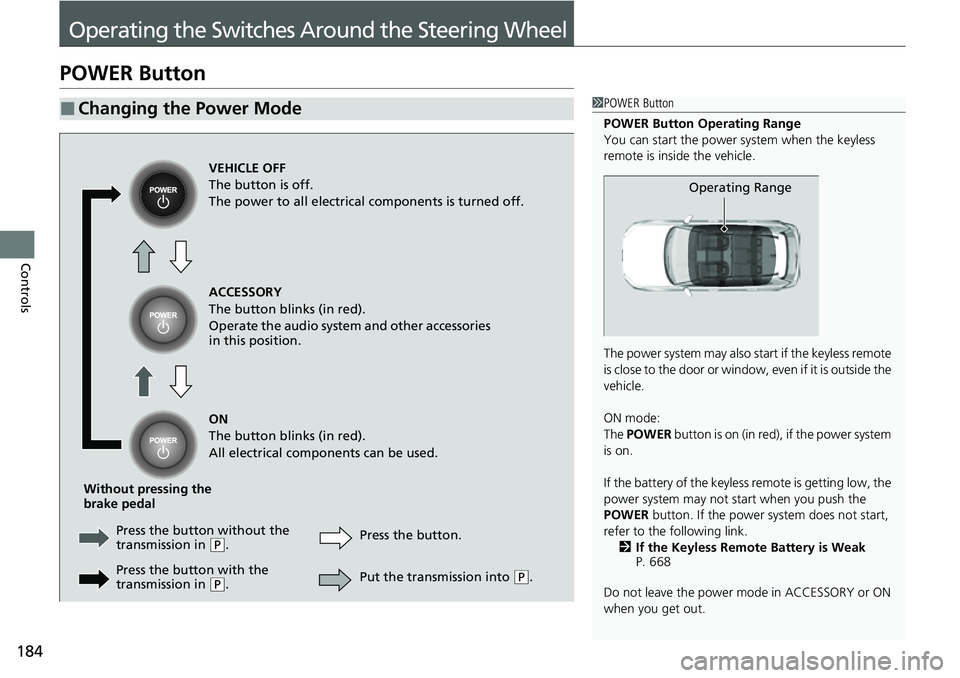
■Changing the Power Mode1POWER Button
POWER Button Operating Range
You can start the power system when the keyless
remote is inside the vehicle.
The power system may also start if the keyless remote
i s c l o s e t o t h e d o o r o r w i n d o w , e v e n i f i t i s o u t s i d e t h e
vehicle.
ON mode:
The POWER button is on (in red), if the power system
is on.
If the battery of the keyless remote is getting low, the
power system may not start when you push the
POWER button. If the power system does not start,
refer to the following link. 2 If the Keyless Remote Battery is Weak
P. 668
Do not leave the power mode in ACCESSORY or ON
when you get out.
Operating Range
VEHICLE OFF
The button is off.
The power to all electrical components is turned off.
ACCESSORY
The button blinks (in red).
Operate the audio system and other accessories
in this position.
ON
The button blinks (in red).
All electrical components can be used.
Without pressing the
brake pedal Press the butto n without the
transmission in
( P. Press the button.
Press the button with the
transmission in
( P. Put the transmission into (
P.