brake HONDA CRV 2023 Service Manual
[x] Cancel search | Manufacturer: HONDA, Model Year: 2023, Model line: CRV, Model: HONDA CRV 2023Pages: 719, PDF Size: 13.43 MB
Page 479 of 719
478
uuWhen Driving uAgile Handling Assist
Driving
Agile Handling Assist
Lightly brakes each of the front and rear wheels, as needed, when you turn the
steering wheel, and helps support the vehicle’s stability and performance during
cornering.1 Agile Handling Assist
The agile handling assist ca nnot enhance stability in
all driving situations. You still need to drive and
corner at speeds appropriate for the conditions and
always leave a sufficient margin of safety.
When the VSA ® system indicator comes on and stays
on while driving, the agil e handling assist does not
activate.
You may hear a sound coming from the engine
compartment while the agile handling assist is
activated. This is normal.
Page 482 of 719
Continued481
uuWhen Driving uTire Pressure Monitoring System (TPMS)
Driving
You must start TPMS calibration every time you:
• Adjust the pressure in one or more tires.
• Rotate the tires.
• Replace one or more tires.
Before calibrating the TPMS:
• Set the cold tire pressure in all four tires.
2 Checking Tires P. 631
Make sure:
•The vehicle is at a complete stop.
• The transmission is in
(P.
• The power mode is in ON.
1Tire Pressure Monitoring System (TPMS)
The Vehicle Stability Assist
TM (VSA ®) system, brake
system (Amber), Adaptive Cruise Control (ACC) with
Low Speed Follow, low tire pressure/TPMS and safety
support indicators may come on in amber along with
a message in the gauge when you set the power
mode to ON after re connecting the battery.
Drive a short distance at more than 12 mph (20 km/h).
Each indicator should go off. If any do not, have your
vehicle checked by a dealer.
■TPMS Calibration1 TPMS Calibration
The calibration process requires approximately 30
minutes of cumulative dr iving at speeds between
31-62 mph (50-100 km/h).
During this period, if power mode is set to ON and
the vehicle is not moved within 45 seconds, you may
notice the low tire pres sure indicator comes on
briefly. This is normal and indicates that the
calibration process is not yet complete.
If the tire chains are installed, remove them before
calibrating the TPMS.
If the low tire pressure/TPMS indicator comes on even
when the properly inflated specified regular tires are
installed, have your vehi cle checked by a dealer.
We recommend that the tires be replaced with the
same brand, model, and size as the originals. Ask a
dealer for details.
Page 489 of 719
uuWhen Driving uBlind Spot Information System
488
Driving
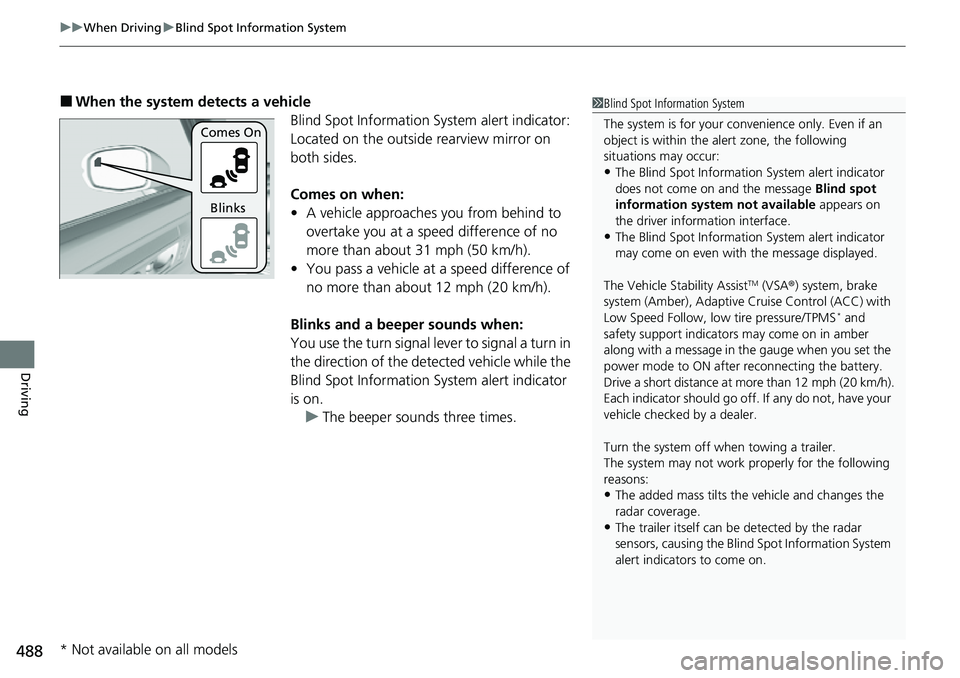
■When the system detects a vehicle
Blind Spot Information System alert indicator:
Located on the outside rearview mirror on
both sides.
Comes on when:
• A vehicle approaches you from behind to
overtake you at a speed difference of no
more than about 31 mph (50 km/h).
• You pass a vehicle at a speed difference of
no more than about 12 mph (20 km/h).
Blinks and a beeper sounds when:
You use the turn signal lever to signal a turn in
the direction of the detected vehicle while the
Blind Spot Information System alert indicator
is on. u The beeper sounds three times.1Blind Spot Information System
The system is for your convenience only. Even if an
object is within the alert zone, the following
situations may occur:
•The Blind Spot Informati on System alert indicator
does not come on and the message Blind spot
information system not available appears on
the driver information interface.
•The Blind Spot Informati on System alert indicator
may come on even with the message displayed.
The Vehicle Stability Assist
TM (VSA ®) system, brake
system (Amber), Adaptive Cruise Control (ACC) with
Low Speed Follow, low tire pressure/TPMS
* and
safety support indicators may come on in amber
along with a message in the gauge when you set the
power mode to ON after reconnecting the battery.
Drive a short distance at more than 12 mph (20 km/h).
Each indicator should go off. If any do not, have your
vehicle checked by a dealer.
Turn the system off when towing a trailer.
The system may not work properly for the following
reasons:
•The added mass tilts the vehicle and changes the
radar coverage.
•The trailer itself can be detected by the radar
sensors, causing the Blind Spot Information System
alert indicators to come on.
Comes On
Blinks
* Not available on all models
Page 496 of 719
495
uuHonda Sensing ®u Collision Mitigation Braking SystemTM (CMBSTM)
Continued
Driving
Collision Mitigation Braking SystemTM (CMBSTM)
The system can assist you when it determines there is a possibility of your vehicle
colliding with a vehicle (including moto rcycles) ahead from behind, an oncoming
vehicle in front, a pedestrian, or someon e riding a bicycle (moving bicycle). The
CMBS
TM is designed to alert you when the potential for a collision is determined, as
well as assist in reducing speed, avoiding collisions, and reducing collision severity.
1 Collision Mitigation Braking SystemTM (CMBSTM)
Important Safety Reminder
The CMBS
TM is designed to reduce the severity of an
unavoidable collision. It does not prevent collisions
nor stop the vehicle automati cally. It is still your
responsibility to operate th e brake pedal and steering
wheel appropriately acco rding to the driving
conditions.
The CMBS
TM may not activate or may not detect a
vehicle in front of y our vehicle under certain
conditions: 2 CMBS
TM Conditions and Limitations P. 500
For directions on the prop er handling of the radar
sensor, refer to the following page. 2 Radar Sensor P. 570
You can read about handling information for the
camera equipped with this system. 2 Front Sensor Camera P. 568
Page 497 of 719
uuHonda Sensing ®u Collision Mitigation Braking SystemTM (CMBSTM)
496
Driving
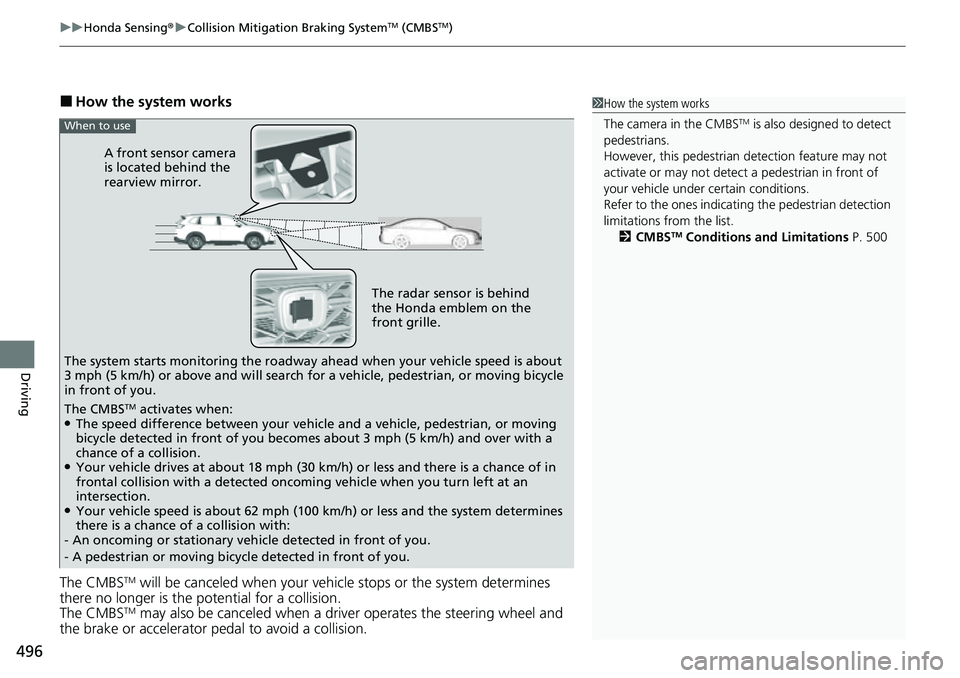
■How the system works
The CMBS
TM will be canceled when your vehi cle stops or the system determines
there no longer is the potential for a collision.
The CMBS
TM may also be canceled when a driver operates the steering wheel and
the brake or accelerator pedal to avoid a collision.
1 How the system works
The camera in the CMBS
TM is also designed to detect
pedestrians.
However, this pedestrian detection feature may not
activate or may not detect a pedestrian in front of
your vehicle under certain conditions.
Refer to the ones indicating the pedestrian detection
limitations from the list. 2 CMBS
TM Conditions and Limitations P. 500
The radar sensor is behind
the Honda emblem on the
front grille.
A front sensor camera
is located behind the
rearview mirror.
The system starts monitoring the roadway ah ead when your vehicle speed is about
3 mph (5 km/h) or above and will search for a vehicle, pedestrian, or moving bicycle
in front of you.
When to use
The CMBSTM activates when:●The speed difference between your vehicle and a vehicle, pedestrian, or moving
bicycle detected in front of you becomes about 3 mph (5 km/h) and over with a
chance of a collision.
●Your vehicle drives at about 18 mph (30 km/h) or less and there is a chance of in
frontal collision with a detected oncoming vehicle when you turn left at an
intersection.
●Your vehicle speed is about 62 mph (100 km/h) or less and the system determines
there is a chance of a collision with:
- An oncoming or stationary vehicle detected in front of you.
- A pedestrian or moving bicycle detected in front of you.
Page 498 of 719
497
uuHonda Sensing ®u Collision Mitigation Braking SystemTM (CMBSTM)
Continued
Driving
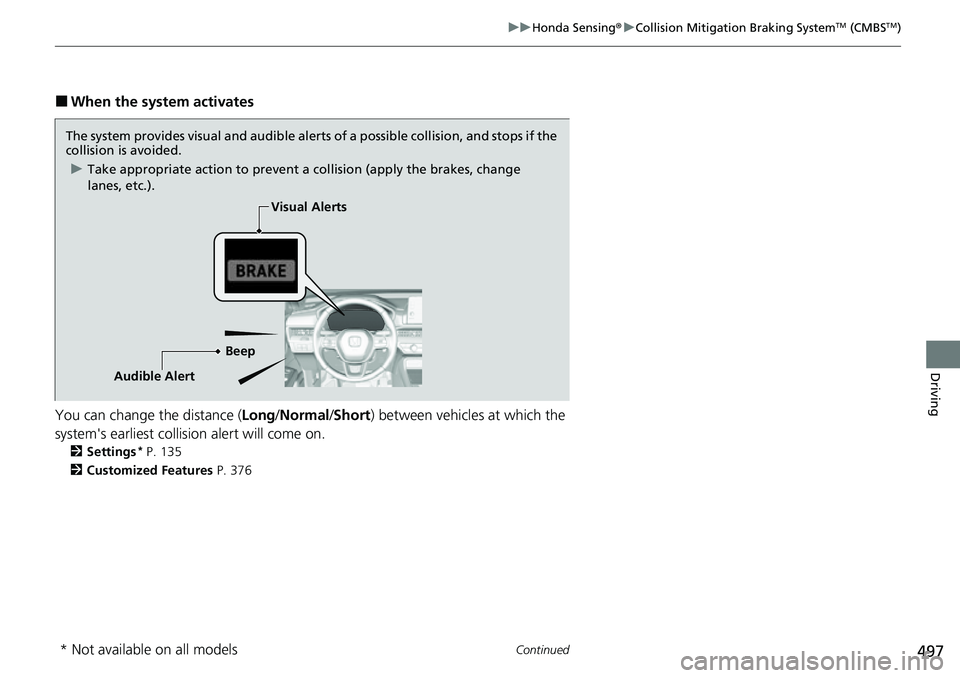
■When the system activates
You can change the distance ( Long/Normal /Short ) between vehicles at which the
system's earliest collision alert will come on.
2 Settings* P. 135
2 Customized Features P. 376
The system provides visual and audible alerts of a possible collisi on, and stops if the
collision is avoided.
u Take appropriate action to prevent a collision (apply the brakes, change
lanes, etc.).
BeepVisual Alerts
Audible Alert
* Not available on all models
Page 500 of 719
Continued499
uuHonda Sensing ®u Collision Mitigation Braking SystemTM (CMBSTM)
Driving
You can turn the system on and off using the driver information interface.
2 Switching the Display P. 117
2 Safety Support P. 130
The CMBSTM is turned on every time you turn the power system on, even if you
turned it off the last ti me you drove the vehicle.
■CMBSTM On and Off1CMBSTM On and Off
You cannot turn the CMBS
TM off while driving.
The CMBS
TM may automatically shut off, and the
safety support indicator (amb er) will come and stay
on under certain conditions: 2 CMBS
TM Conditions and Limitations P. 500
When the CMBS
TM is activated, it will continue to
operate even if the accele rator pedal is partially
depressed. However, it w ill be canceled if the
accelerator pedal is fully depressed.
Have your vehicle checked by a dealer if you find any
unusual behavior of the system (e.g., the warning
message appears too frequently).
The Vehicle Stability Assist
TM (VSA ®) system, brake
system (Amber), Adaptive Cruise Control (ACC) with
Low Speed Follow, low tire pressure/TPMS
* and
safety support indicators may come on in amber
along with a message in the gauge when you set the
power mode to ON after reconnecting the battery.
Drive a short distance at more than 12 mph (20 km/h).
Each indicator should go off. If any do not, have your
vehicle checked by a dealer.
* Not available on all models
Page 502 of 719
501
uuHonda Sensing ®u Collision Mitigation Braking SystemTM (CMBSTM)
Continued
Driving
■Vehicle conditions
• Headlight lenses are dirty or the h eadlights are not properly adjusted.
• The outside of the windshield is blocked by dirt, mud, leaves, wet snow, etc.
• The inside of the windshield is fogged.
• An abnormal tire or wheel condition (inco rrect sizes, varied sizes or construction,
improperly inflated, etc.).
• When tire chains are installed.
• The vehicle is tilted due to a heavy load or suspension modifications.
• The camera temperature gets too high.
• Driving with the parking brake applied.
• When the radar sensor behind the Hond a emblem on the front grille gets dirty.
• The vehicle is towing a trailer.
• Driving at night or in a dark place (e.g., a tunnel) with the headlights off.
• There is residue on the windshi eld from the windshield wipers.
Page 504 of 719
503
uuHonda Sensing ®u Collision Mitigation Braking SystemTM (CMBSTM)
Continued
Driving
■Examples of other limitations on detection or system operation
• When the vehicle ahead of you is a small motorcycle, motorcycle with a sidecar,
wheelchair, or other sp ecially shaped vehicle.
• When a vehicle is lower in the rear than the front such as trucks that are not
carrying a load, or a narrow vehicle.
• When the vehicle ahead of you, oncoming vehicle, pedestrian or moving bicycle
is not in front of the vehicle.
• The speed difference between your ve hicle and the vehicle ahead of you,
oncoming vehicle, pedestrian or moving bicycle is significantly large.
• When the vehicle or moving bicycle in front of you slows suddenly.
• When the driver operates the brake peda l and steering wheel to avoid a collision.
• When you approach the vehicle ahead of you, oncoming vehicle, pedestrians or
moving bicycles while accelerating rapidly or operating the steering wheel (except
when turning left at an intersection, etc.)
*1
•When the moving bicycle is a child-sized bi cycle, folding bicycle, three-wheeler or
other bicycle with small tires, or a long bicycle like a tandem bicycle.
• When the radar and camera cannot correct ly identify the shape of the vehicle
ahead of you, oncoming vehicle, pedestrian, or moving bicycle.
• When the minimum ground clearance of a vehicle ahead of you is extremely high.
• When turning left or right and your turn signal is not activated in the same
direction you are turning.
*1 : When there is a possibility of a frontal collision with the oncoming vehicle while turning left, the CMBSTM
is activated. However, it ma y not be activated if you suddenly turn the steering wheel.
Page 505 of 719
504
uuHonda Sensing ®u Collision Mitigation Braking SystemTM (CMBSTM)
Driving
■Automatic shutoff
The CMBSTM may automatically shut itself off and the safety support indicator
(amber) comes and stays on when:
• You drive off-road or on a mountain ro ad, or curved and winding road for an
extended period.
• Driving in bad weather (rain, fog, snow, etc.).
• Driving with the parking brake applied.
• The camera temperature gets too high.
• The front of the camera or radar sensor behind the Honda emblem is covered by
dirt, fog, rain, mud, wet snow, seals, accessories, stickers, or film on the
windshield.
• An abnormal tire condition is detected (i ncorrect tire size, flat tire, etc.).
Once the conditions that caused the CMBS
TM to shut off improv e or are addressed
(e.g., cleaning), the system comes back on.