Parking HONDA CRV 2023 Owner's Manual
[x] Cancel search | Manufacturer: HONDA, Model Year: 2023, Model line: CRV, Model: HONDA CRV 2023Pages: 719, PDF Size: 13.43 MB
Page 442 of 719
441
Driving
This chapter discusses driving and refueling.
Before Driving................................... 442
Towing a Trailer ................................ 447
Off-Highway Driving Guidelines ..... 453
When Driving Turning on the Power ...................... 455
Precautions While Driving................. 462
Transmission........................................ 463Shifting ............................................ 464
Deceleration Paddle Selector ............ 466
Acoustic Vehicle Al erting System ...... 469
Drive Mode Switch ........................... 470
Hill Descent Control System ............. 474
Vehicle Stability AssistTM (VSA®), aka Electronic
Stability Control (ESC), System .............. 476
Agile Handling Assist ....................... 478
Real Time AWD with Intelligent Control System
TM*...................................... 479Tire Pressure Monitoring System (TPMS) .... 480Tire Pressure Monitoring System (TPMS) - Required Federal Explanation ......... 485
Blind Spot Information System ......... 487
High Voltage Battery ........................ 491
Honda Sensing ®................................ 492
Collision Mitigati on Braking System
TM
(CMBSTM) ....................................... 495 Low Speed Braking Control
*............ 507
Adaptive Cruise Control (ACC) with Low Speed Follow ................................. 513
Lane Keeping Assist System (LKAS).... 533
Traffic Jam Assist ............................. 545
Road Departure Miti gation System... 554
Traffic Sign Recognition System ....... 562
Front Sensor Camera ....................... 568
Radar Sensor ................................... 570
Sonar Sensors
*................................ 571
Braking .............................................. 572
Parking Your Vehicle ........................ 582
Multi-View Rear Camera .................. 593
Refueling ........................................... 595
Fuel Economy and CO
2 Emissions .... 598
* Not available on all models
Page 451 of 719
450
uuTowing a Trailer uDriving Safely with a Trailer
Driving
Driving Safely with a Trailer
• Have the trailer properly serviced and keep it in good condition.
• Make sure that all the weights and load in the vehicle and trailer are within limits.
2Towing Load Limits P. 447
•Securely attach the hitch, safety chains, and other necessary parts to the trailer.
• Securely store all the items in and on the tr ailer so that they do not shift while
driving.
• Check if the lights and brakes on the trailer are working properly.
• Check the pressure of the traile r tires, including the spare.
• Turn off the rear parking sensor system.
2 Parking sensor system on and off P. 585
•Turn off the Low Speed Braking Control syst em. It may activate if it detects the
towed object as an obstacle.
2 System On and Off P. 510
•Drive slower than normal.
• Obey posted speed limits for vehicles with trailers.
• Use the
(D position when towing a trailer on level roads.
■Things You Need To Know Before Towing a Trailer
■Towing Speeds and Shift Position
1Driving Safely with a Trailer
Operating speed when towing a trailer must not
exceed 62 mph (100 km/h).
Parking
In addition to the normal precautions, place wheel
chocks at each of the trailer's tires.
When towing a trailer, we recommend that you carry
a full-size spare wheel and tire for both your vehicle
and trailer.
Remember to unhitch the tra iler before changing a
flat tire. Ask the trailer sales or rental agency where
and how to store the trailer’s spare tire.
Models with parking sensor system
1 Towing Speeds and Shift Position
When towing a fixed-sided trailer (e.g., camper), do
not exceed 55 mph (88 km/h). At higher speeds, the
trailer may sway or af fect vehicle handling.
Page 456 of 719
455Continued
Driving
When Driving
Turning on the Power
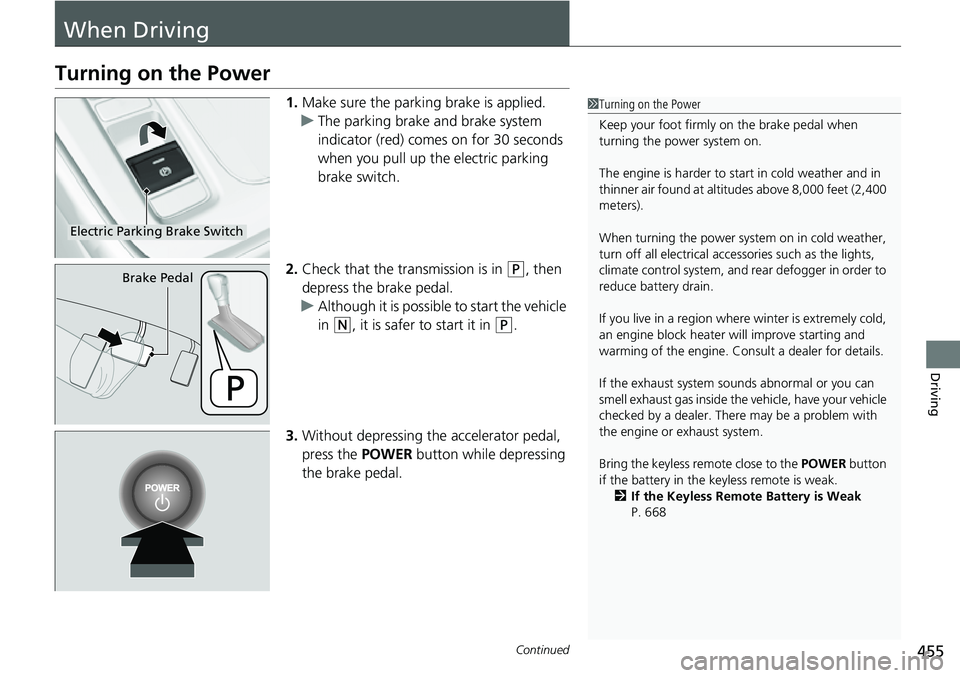
1.Make sure the parkin g brake is applied.
u The parking brake and brake system
indicator (red) comes on for 30 seconds
when you pull up the electric parking
brake switch.
2. Check that the transmission is in
(P, then
depress the brake pedal.
u Although it is possible to start the vehicle
in
(N, it is safer to start it in (P.
3. Without depressing the accelerator pedal,
press the POWER button while depressing
the brake pedal.
1 Turning on the Power
Keep your foot firmly on the brake pedal when
turning the power system on.
The engine is harder to st art in cold weather and in
thinner air found at altit udes above 8,000 feet (2,400
meters).
When turning the power system on in cold weather,
turn off all electrical accessories such as the lights,
climate control system, and rear defogger in order to
reduce battery drain.
If you live in a region where winter is extremely cold,
an engine block heater will improve starting and
warming of the engine. Consult a dealer for details.
If the exhaust system sounds abnormal or you can
smell exhaust gas inside the vehicle, have your vehicle
checked by a dealer. There may be a problem with
the engine or exhaust system.
Bring the keyless remote close to the POWER button
if the battery in the keyless remote is weak. 2 If the Keyless Remote Battery is Weak
P. 668
Electric Parking Brake Switch
Brake Pedal
Page 461 of 719
uuWhen Driving uTurning on the Power
460
Driving
1. Depress and hold the brake pedal, then press the POWER button.
2. Keeping your right foot on the brake pedal, check that the READY indicator is on,
then put the tra nsmission into
(D. Select (R when reversing.
3. With the parking brake applied, release the brake pedal and gently depress the
accelerator pedal.
u Make sure the parking brake and brake system indicator (red) goes off.
2 Parking Brake P. 572
■Hill start assist system
Hill start assist keeps the brake engaged br iefly to help prevent the vehicle from
rolling on inclines as you move your fo ot from the brake pedal to the accelerator.
Put the transmission into
(D or when facing uphill, or (R when facing downhill,
then release the brake pedal.
■Starting to Drive1 Starting to Drive
The power system is turned off when the transmission
is taken out of
( P before the POWER button is
pressed. Follow step 1 when starting to drive.
You can also release the parking brake by pressing
the electric parking brake sw itch while depressing the
brake pedal.
When facing downhill, you can start your vehicle
more smoothly by manually releasing it with the
electric parking brake switch than by releasing it with
the accelerator pedal.
As a hybrid vehicle, the sounds and vibrations from
the engine may be absent even though the vehicle is
ready for driving. It also makes you fail to recognize
that you can start.
Make sure to check if the READY indicator is on
before you start to drive.
When the power system was turned on using the
button on the keyless remoteWhen the power system was turned on using the button on the keyless remote
When the power system was turned on in any case
1 Hill start assist system
Hill start assist may not prevent the vehicle from
rolling downhill on a very st eep or slippery slope, and
will not operate on small inclines.
Hill start assist is not a replacement for the parking
brake.
Hill start assist will operate even when VSA ® is
switched off.
B
Page 465 of 719
464
uuWhen Driving uShifting
Driving
Shifting
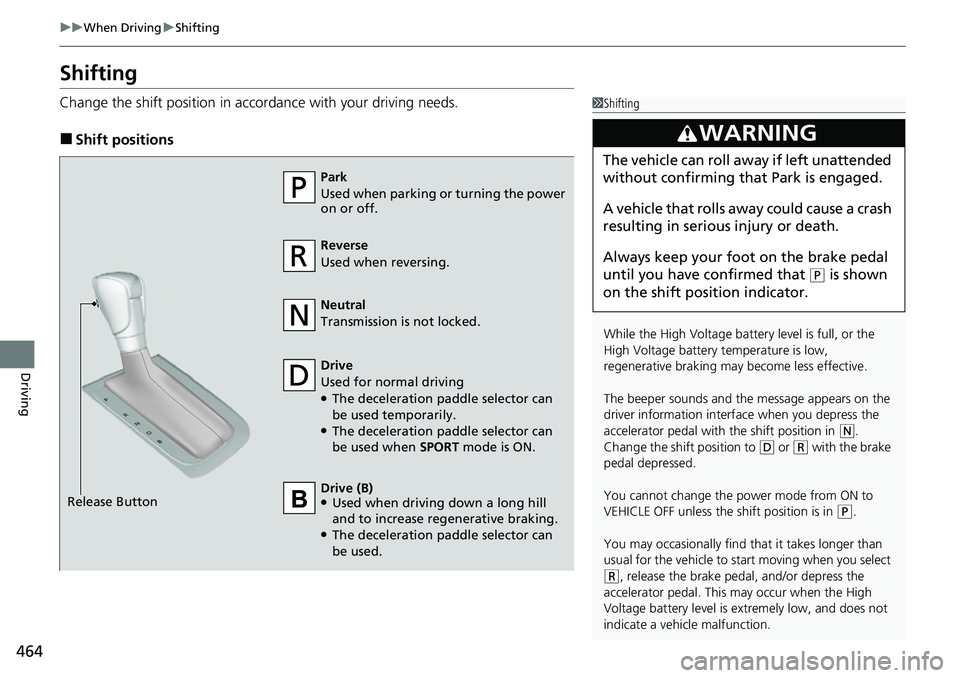
Change the shift positi on in accordance with your driving needs.
■Shift positions
1Shifting
While the High Voltage battery level is full, or the
High Voltage battery temperature is low,
regenerative braking ma y become less effective.
The beeper sounds and the message appears on the
driver information interf ace when you depress the
accelerator pedal with the shift position in
( N.
Change the shift position to
( D or (R with the brake
pedal depressed.
You cannot change the power mode from ON to
VEHICLE OFF unless the shift position is in
( P.
You may occasionally find th at it takes longer than
usual for the vehicle to st art moving when you select
(R, release the brake peda l, and/or depress the
accelerator pedal. This may occur when the High
Voltage battery level is extremely low, and does not
indicate a vehicle malfunction.
3WARNING
The vehicle can roll aw ay if left unattended
without confirming that Park is engaged.
A vehicle that rolls away could cause a crash
resulting in seriou s injury or death.
Always keep your foot on the brake pedal
until you have confirmed that
( P is shown
on the shift posi tion indicator.
Reverse
Used when reversing.
Drive
Used for normal driving
●The deceleration paddle selector can
be used temporarily.
●The deceleration paddle selector can
be used when SPORT mode is ON.
Park
Used when parking or turning the power
on or off.
Neutral
Transmission is not locked.
Release Button Drive (B)
●Used when driving down a long hill
and to increase regenerative braking.
●The deceleration paddle selector can
be used.
Page 492 of 719
491
uuWhen Driving uHigh Voltage Battery
Driving
High Voltage Battery
The High Voltage battery gradually discharges even if the vehicle is not in use. As a
result, if your vehicle is parked for an extended period of time, the battery charge
level will become low. Extended periods of time at a low state of charge will shorten
battery life. To maintain the battery state of charge, drive your vehicle for more than
30 minutes at least once every three months.
Extreme high temperatures can affect the battery life. You can minimize the effects
by parking the vehicle in the shade during the summer.1 High Voltage Battery
Be careful not to let the High Voltage battery drain
too much. If the battery level becomes close to zero,
it will make it impossible to turn the power system
on.
Page 502 of 719
501
uuHonda Sensing ®u Collision Mitigation Braking SystemTM (CMBSTM)
Continued
Driving
■Vehicle conditions
• Headlight lenses are dirty or the h eadlights are not properly adjusted.
• The outside of the windshield is blocked by dirt, mud, leaves, wet snow, etc.
• The inside of the windshield is fogged.
• An abnormal tire or wheel condition (inco rrect sizes, varied sizes or construction,
improperly inflated, etc.).
• When tire chains are installed.
• The vehicle is tilted due to a heavy load or suspension modifications.
• The camera temperature gets too high.
• Driving with the parking brake applied.
• When the radar sensor behind the Hond a emblem on the front grille gets dirty.
• The vehicle is towing a trailer.
• Driving at night or in a dark place (e.g., a tunnel) with the headlights off.
• There is residue on the windshi eld from the windshield wipers.
Page 505 of 719
504
uuHonda Sensing ®u Collision Mitigation Braking SystemTM (CMBSTM)
Driving
■Automatic shutoff
The CMBSTM may automatically shut itself off and the safety support indicator
(amber) comes and stays on when:
• You drive off-road or on a mountain ro ad, or curved and winding road for an
extended period.
• Driving in bad weather (rain, fog, snow, etc.).
• Driving with the parking brake applied.
• The camera temperature gets too high.
• The front of the camera or radar sensor behind the Honda emblem is covered by
dirt, fog, rain, mud, wet snow, seals, accessories, stickers, or film on the
windshield.
• An abnormal tire condition is detected (i ncorrect tire size, flat tire, etc.).
Once the conditions that caused the CMBS
TM to shut off improv e or are addressed
(e.g., cleaning), the system comes back on.
Page 507 of 719
506
uuHonda Sensing ®u Collision Mitigation Braking SystemTM (CMBSTM)
Driving
• When your vehicle approaches vehicles , pedestrians, or moving bicycles.
• When vehicles, pedestrians, or moving bicycles are passing in front of you.
• When you drive under a low structure or through a narrow gate at high speed.
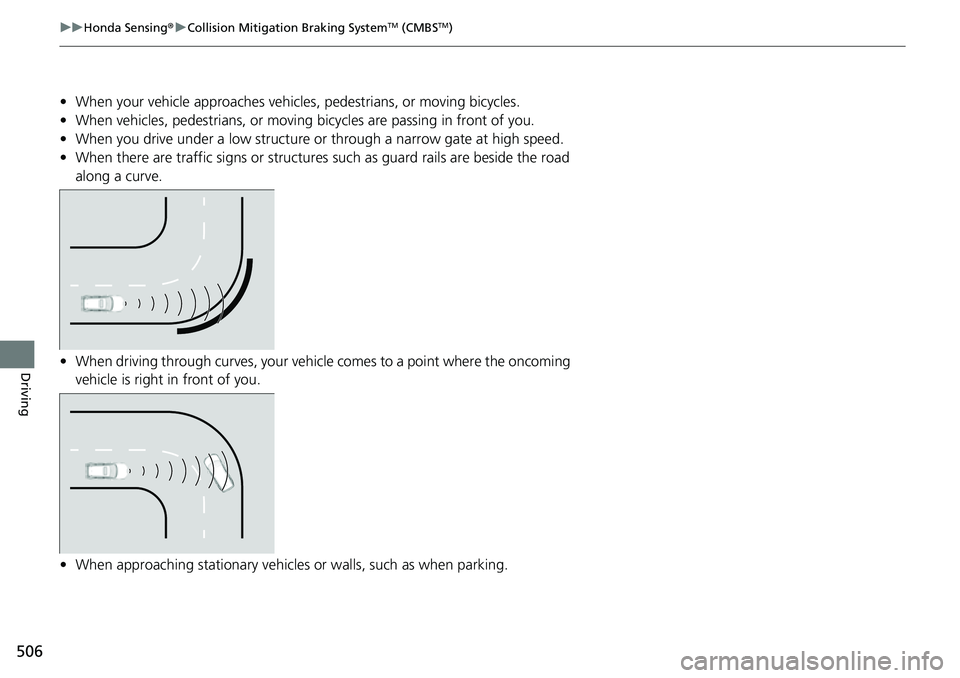
• When there are traffic signs or structures such as guard rails are beside the road
along a curve.
• When driving through curves, your vehicle comes to a point where the oncoming
vehicle is right in front of you.
• When approaching stationary vehicles or walls, such as when parking.
Page 509 of 719
uuHonda Sensing ®u Low Speed Braking Control*
508
Driving
■Assistive braking
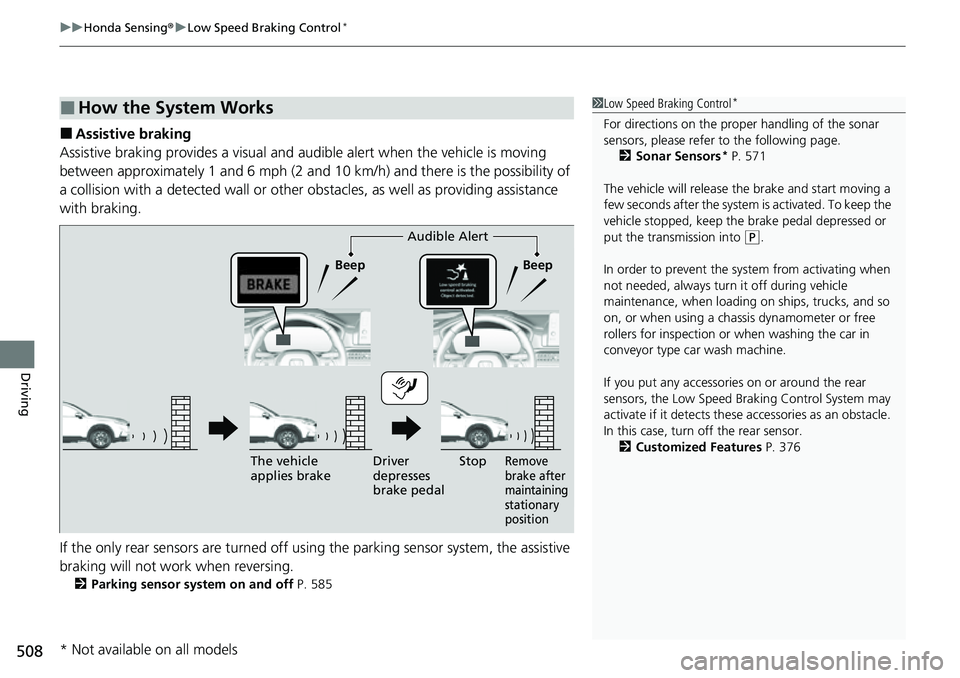
Assistive braking provides a visual and audible alert when the vehicle is moving
between approximately 1 and 6 mph (2 and 10 km/h) and there is the possibility of
a collision with a detected wall or other obstacles, as well as providing assistance
with braking.
If the only rear sensors are turned off using the parking sensor system, the assistive
braking will not work when reversing.
2 Parking sensor system on and off P. 585
■How the System Works1Low Speed Braking Control*
For directions on the prop er handling of the sonar
sensors, please refer to the following page.
2 Sonar Sensors
* P. 571
The vehicle will release the brake and start moving a
few seconds after the system is activated. To keep the
vehicle stopped, keep the brake pedal depressed or
put the transmission into
( P.
In order to prevent the sy stem from activating when
not needed, always turn it off during vehicle
maintenance, when loading on ships, trucks, and so
on, or when using a chas sis dynamometer or free
rollers for inspection or when washing the car in
conveyor type car wash machine.
If you put any accessories on or around the rear
sensors, the Low Speed Br aking Control System may
activate if it detects these accessories as an obstacle.
In this case, turn off the rear sensor. 2 Customized Features P. 376Audible Alert
Beep Beep
The vehicle
applies brake Driver
depresses
brake pedal
Remove
brake after
maintaining
stationary
positionStop
* Not available on all models