Parking HONDA CRV 2023 Workshop Manual
[x] Cancel search | Manufacturer: HONDA, Model Year: 2023, Model line: CRV, Model: HONDA CRV 2023Pages: 719, PDF Size: 13.43 MB
Page 589 of 719
588
uuParking Your Vehicle uParking Sensor System*
Driving
To temporarily turn off the beeper, press the left selector wheel while it is sounding.
Temporary OFF will be canceled when the shift position is switched or the vehicle
speed reaches 8 mph (14 km/h) or higher.
Page 590 of 719
589
uuParking Your Vehicle uCross Traffic Monitor
Continued
Driving
Cross Traffic Monitor
Monitors the rear corner areas using the radar sensors when reversing, and alerts
you if a vehicle approaching from a rear corner is detected.
The system is convenient when you are backing out of a parking space.1Cross Traffic Monitor
The parking sensor system’s alerting buzzer overrides
the Cross Traffic Monitor buzzer when the sensors
are detecting obstacles at the closest range.
3CAUTION
Cross Traffic Monitor cannot detect all
approaching vehicles and may not detect
an approaching vehicle at all.
Failure to visually confirm that it is safe to
back up the vehicle before doing so may
result in a collision.
Do not solely rely on the system when
reversing; always also use your mirrors, and
look behind and to the sides of your vehicle
before reversing.
Models with parking sensor system
Page 591 of 719
uuParking Your Vehicle uCross Traffic Monitor
590
Driving
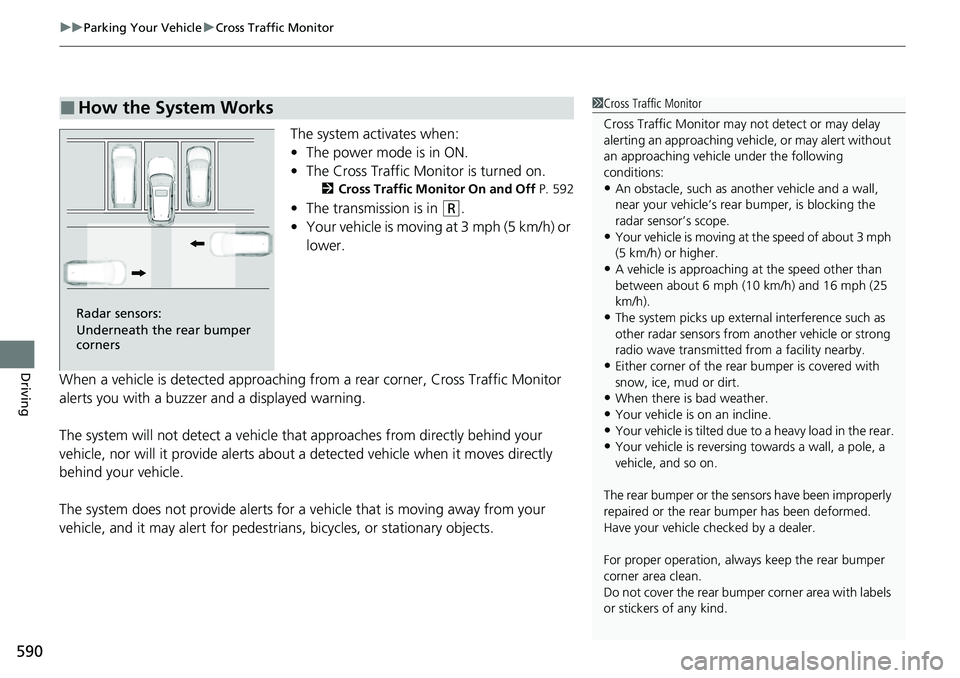
The system activates when:
• The power mode is in ON.
• The Cross Traffic Monitor is turned on.
2 Cross Traffic Monitor On and Off P. 592
•The transmission is in (R.
• Your vehicle is moving at 3 mph (5 km/h) or
lower.
When a vehicle is detected approaching from a rear corner, Cross Traffic Monitor
alerts you with a buzzer and a displayed warning.
The system will not detect a vehicle that approaches from directly behind your
vehicle, nor will it provide alerts about a detected vehicle when it moves directly
behind your vehicle.
The system does not provide alerts for a vehicle that is moving away from your
vehicle, and it may alert for pedestri ans, bicycles, or stationary objects.
■How the System Works1Cross Traffic Monitor
Cross Traffic Monitor may not detect or may delay
alerting an approach ing vehicle, or may alert without
an approaching vehicle under the following
conditions:
•An obstacle, such as a nother vehicle and a wall,
near your vehicle’s rear bumper, is blocking the
radar sensor’s scope.
•Your vehicle is moving at the speed of about 3 mph
(5 km/h) or higher.
•A vehicle is approaching at the speed other than
between about 6 mph (10 km/h) and 16 mph (25
km/h).
•The system picks up external interference such as
other radar sensors from an other vehicle or strong
radio wave transmitted fr om a facility nearby.
•Either corner of the rear bumper is covered with
snow, ice, mud or dirt.
•When there is bad weather.
•Your vehicle is on an incline.
•Your vehicle is tilted due to a heavy load in the rear.•Your vehicle is reversing towards a wall, a pole, a
vehicle, and so on.
The rear bumper or the sens ors have been improperly
repaired or the rear bum per has been deformed.
Have your vehicle checked by a dealer.
For proper operation, always keep the rear bumper
corner area clean.
Do not cover the rear bumper corner area with labels
or stickers of any kind.
Radar sensors:
Underneath the rear bumper
corners
Page 592 of 719
Continued591
uuParking Your Vehicle uCross Traffic Monitor
Driving
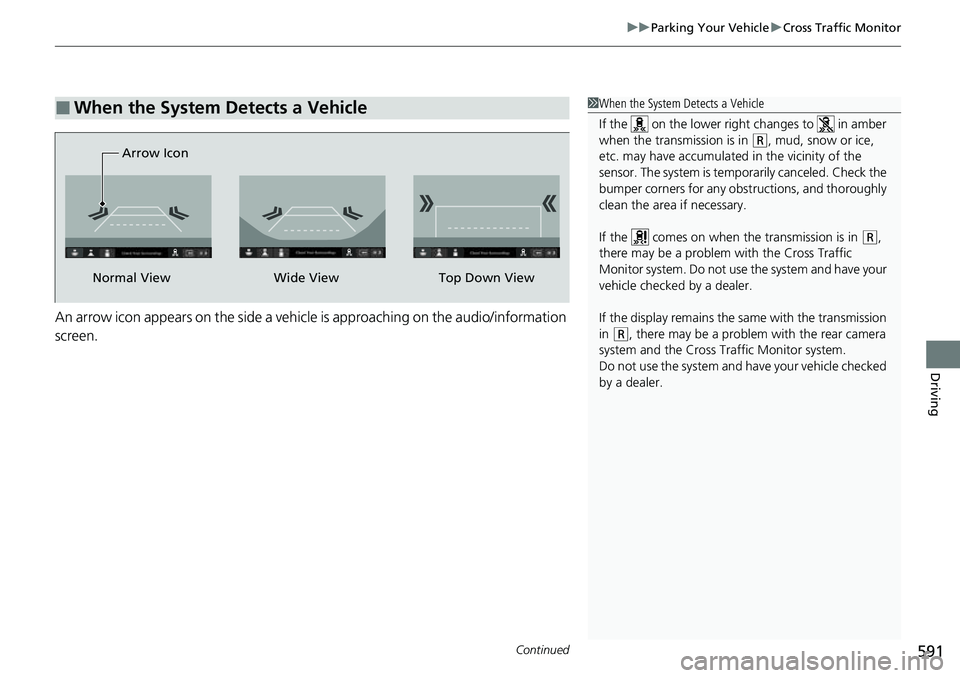
An arrow icon appears on the side a vehicle is approaching on the audio/information
screen.
■When the System Detects a Vehicle1When the System Detects a Vehicle
If the on the lower right changes to in amber
when the transmission is in
( R, mud, snow or ice,
etc. may have accumulated in the vicinity of the
sensor. The system is temporarily canceled. Check the
bumper corners for any obs tructions, and thoroughly
clean the area if necessary.
If the comes on when the transmission is in
( R,
there may be a problem with the Cross Traffic
Monitor system. Do not use the system and have your
vehicle checked by a dealer.
If the display remains the same with the transmission
in
( R, there may be a problem with the rear camera
system and the Cross Traffic Monitor system.
Do not use the system and have your vehicle checked
by a dealer.
Wide View
Normal View Arrow IconTop Down View
Page 593 of 719
592
uuParking Your Vehicle uCross Traffic Monitor
Driving
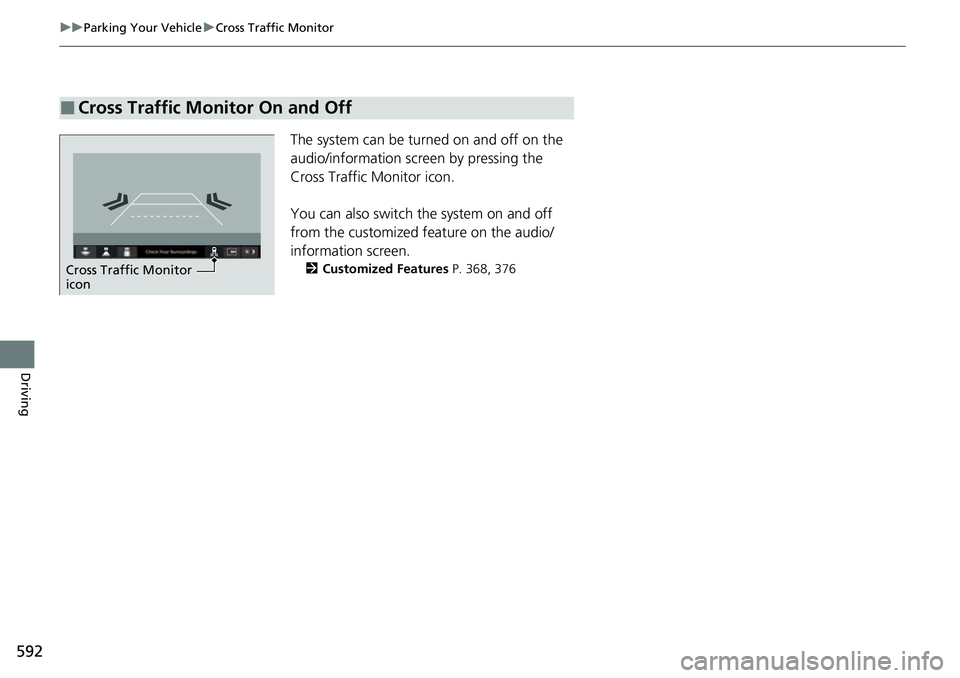
The system can be turned on and off on the
audio/information screen by pressing the
Cross Traffic Monitor icon.
You can also switch the system on and off
from the customized feature on the audio/
information screen.
2 Customized Features P. 368, 376
■Cross Traffic Monitor On and Off
Cross Traffic Monitor
icon
Page 603 of 719
uuBefore Performing Maintenance uParts and Fluids Used in Maintenance Service
602
Maintenance
• The vehicle must be in a stationary condition.
u Make sure your vehicle is parked on leve l ground, the parking brake is set, and
the power system is turned off.
• Be aware that hot parts can burn you.
u Make sure to let the power system incl uding the engine and exhaust system
cool thoroughly before touching vehicle parts.
• Be aware that moving parts can injure you.
u Do not activate the power system unle ss instructed, and keep your hands and
limbs away from moving parts. When the power mode is on, the engine can
automatically start, or the radiator fan may start operating without the engine
running.
• Do not touch the high -voltage battery and wiring (orange).
Parts and Fluids Used in Maintenance Service
The use of Honda genuine parts and fluids is recommended when maintaining and
servicing your vehicle. Honda genuine parts are manufactured according to the
same high quality standards used in Honda vehicles.
■Vehicle Safety
1Parts and Fluids Used in Maintenance Service
NOTICE
Do not press the engine cover forcibly. This may
damage the engine cover and component parts.
Page 613 of 719
612
uuMaintenance Under the Hood uOpening the Hood
Maintenance
Opening the Hood
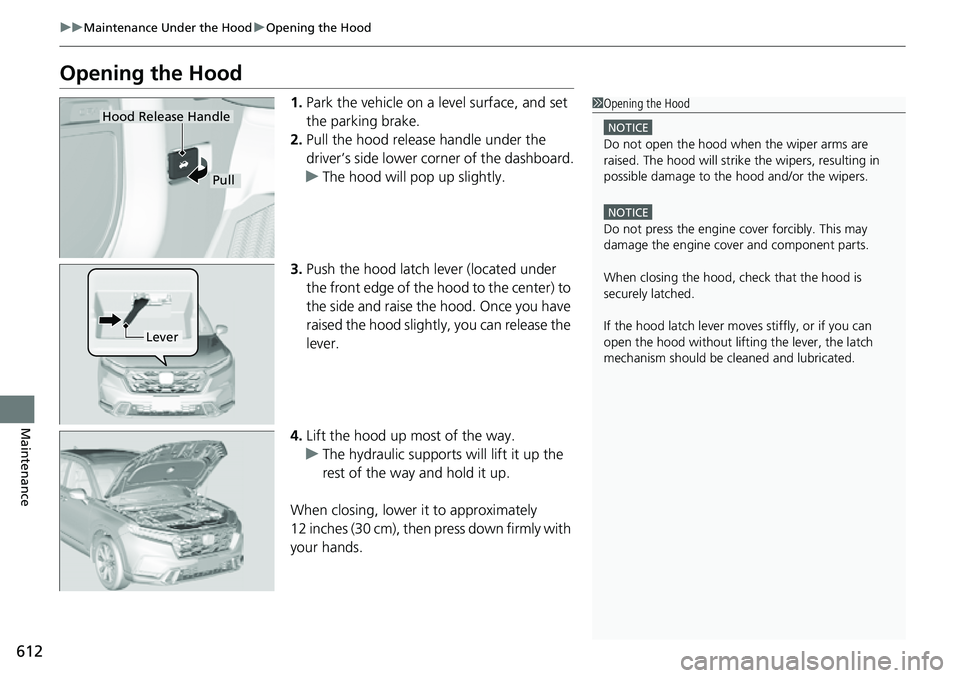
1. Park the vehicle on a level surface, and set
the parking brake.
2. Pull the hood release handle under the
driver’s side lower corner of the dashboard.
u The hood will pop up slightly.
3. Push the hood latch lever (located under
the front edge of the hood to the center) to
the side and raise the hood. Once you have
raised the hood slightly, you can release the
lever.
4. Lift the hood up most of the way.
u The hydraulic supports will lift it up the
rest of the way and hold it up.
When closing, lower it to approximately
12 inches (30 cm), then press down firmly with
your hands.1 Opening the Hood
NOTICE
Do not open the hood when the wiper arms are
raised. The hood will strike the wipers, resulting in
possible damage to the hood and/or the wipers.
NOTICE
Do not press the engine cover forcibly. This may
damage the engine cover and component parts.
When closing the hood, check that the hood is
securely latched.
If the hood latch lever moves stiffly, or if you can
open the hood without lifti ng the lever, the latch
mechanism should be cl eaned and lubricated.
Pull
Hood Release Handle
Lever
Page 624 of 719
623
Maintenance
Replacing Light Bulbs
Headlights
Headlights are LED type. Have an authorized Honda dealer inspect and replace the
light assembly.
Front Turn Signal, Parkin g/Daytime Running Lights
Front turn signal, parking/daytime running lights are LED type. Have an authorized
Honda dealer inspect and replace the light assembly.
Front Side Marker Lights
Front side marker lights are LED type. Have an authorized Hond a dealer inspect and
replace the light assembly.
Side Turn Signal/Emer gency Indicator Lights
Door mirror side turn lights are LED type. Have an authorized Honda dealer inspect
and replace the light assembly.
1 Headlights
The headlight aim is set by the factory, and does not
need to be adjusted. Howeve r, if you regularly carry
heavy items in the cargo area or tow a trailer, have
the aiming readjusted at a dealer or by a qualified
technician.
Page 654 of 719
653Continued
Handling the Unexpected
If a Tire Goes Flat
Temporarily Repairing a Flat Tire
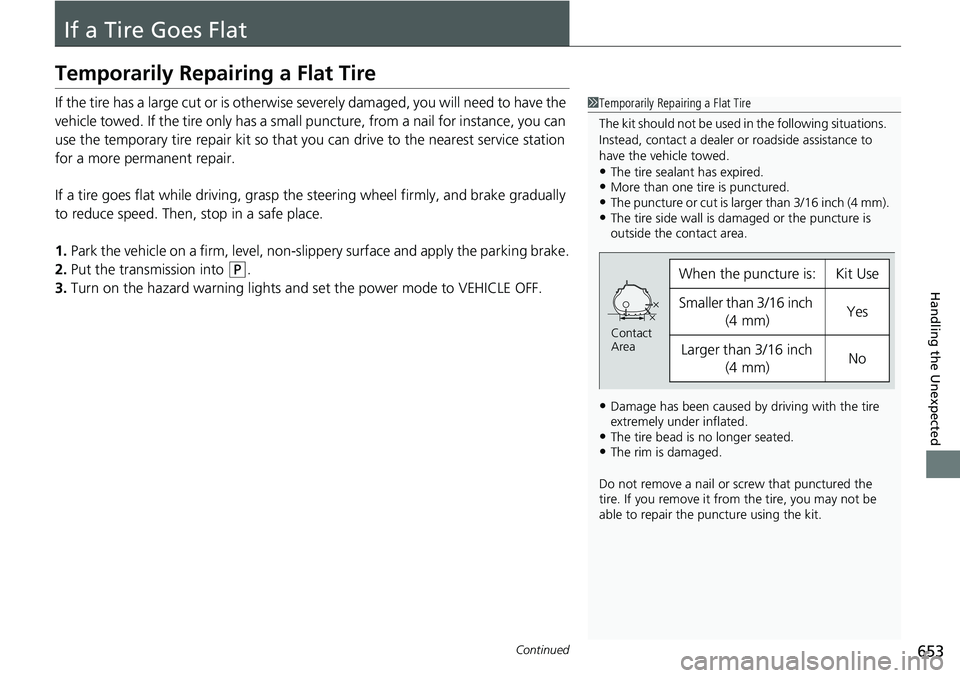
If the tire has a large cut or is otherwise severely damaged, you will need to have the
vehicle towed. If the tire only has a small puncture, from a nail for instance, you can
use the temporary tire repair kit so that you can drive to the nearest service station
for a more permanent repair.
If a tire goes flat while driving, grasp the steering wheel firmly, and brake gradually
to reduce speed. Then, stop in a safe place.
1. Park the vehicle on a firm, level, non-slippery surface and apply the parking brake.
2. Put the transmission into
(P.
3. Turn on the hazard warning lights an d set the power mode to VEHICLE OFF.
1Temporarily Repairing a Flat Tire
The kit should not be used in the following situations.
Instead, contact a dealer or roadside assistance to
have the vehicle towed.
•The tire sealant has expired.•More than one tire is punctured.•The puncture or cut is larger than 3/16 inch (4 mm).•The tire side wall is da maged or the puncture is
outside the contact area.
•Damage has been caused by driving with the tire
extremely under inflated.
•The tire bead is no longer seated.•The rim is damaged.
Do not remove a nail or screw that punctured the
tire. If you remove it from the tire, you may not be
able to repair the puncture using the kit.
When the puncture is:Kit Use
Smaller than 3/16 inch
(4 mm)Yes
Larger than 3/16 inch (4 mm)No
Contact
Area
Page 670 of 719
669
uuPower System Won’t Start uEmergency Power System On
Handling the Unexpected
Emergency Power System On
If the power system cannot be turned on using the normal starting procedure, you
may be able to turn it on using the emergency starting procedure below.
Do not use this procedure if it is not an emergency.
1. Make sure the parking brake is applied.
2. Check that the transmission is in
(P, then set the power mode to ACCESSORY.
3. Firmly depress the brake peda l, then press and hold the POWER button for at
least 15 seconds.
This should be considered a system malfun ction even if you are able to turn the
power system on using the above procedure.
Have your vehicle checked by a dealer immediately.
1Emergency Power System On
Refer to the following if you cannot move the shift
lever out of the
( P position.
2 Shift Lever Does Not Move P. 673