change HONDA CRV 2023 Owners Manual
[x] Cancel search | Manufacturer: HONDA, Model Year: 2023, Model line: CRV, Model: HONDA CRV 2023Pages: 719, PDF Size: 13.43 MB
Page 7 of 719
Contents
This owner’s manual should be considered a permanent part of the
vehicle and should remain with the vehicle when it is sold.
The Navigation Manual is available online at owners.honda.com
(U.S.) or honda.ca (Canada). If you are the first registered owner
of your vehicle, you may request a complimentary printed
copy of the Navigation Manual within the first six months of
vehicle purchase. To request a copy, visit owners.honda.com. In
Canada, please request a copy from your Honda dealer.
This owner’s manual covers all models of your vehicle. You may find
descriptions of equipment and features that are not on your
particular model.
Images throughout this owner’s ma nual (including the front cover)
represent features and equipment that are available on some, but
not all, models. Your particular mo del may not have some of these
features.
This owner’s manual is for vehicles sold in the United States and
Canada.
The information and specifications in cluded in this publication were
in effect at the time of approval for printing. Honda Motor Co., Ltd.
reserves the right, however, to discontinue or change specifications
or design at any time without notice and without incurring any
obligation.2 Safe Driving P. 43
For Safe Driving P. 44 Seat Belts P. 49 Airbags P. 59
2Instrument Panel P. 95
Indicators P. 96 Gauges and Driver Information Interface P. 114
2Controls P. 145
Clock P. 146 Locking and Unlocking the Doors P. 148
Moonroof P. 183
Seats P. 205 Interior Convenience Items P. 216
2Features P. 237
Audio System P. 238 Audio System Basic Operation P. 246, 271
Customized Features P. 368, 376
2 Driving P. 441
Before Driving P. 442 Towing a Trailer P. 447Parking Your Vehicle P. 582 Multi-View Rear Camera P. 593
2Maintenance P. 599
Before Performing Maintenance P. 600 Maintenance MinderTM P. 603
Checking and Maintaining Wiper Blades P. 627
Climate Control System Maintenance P. 643
2Handling the Unexpected P. 651
Tools P. 652 If a Tire Goes Flat P. 653
Shift Lever Does Not Move P. 673 Overheating P. 674
If You Cannot Unlock the Fuel Fill Door P. 690
2 Information P. 693
Specifications P. 694 Identification Numbers P. 696
Emissions Testing P. 699 Warranty Coverages P. 701
Page 21 of 719
20
Quick Reference Guide
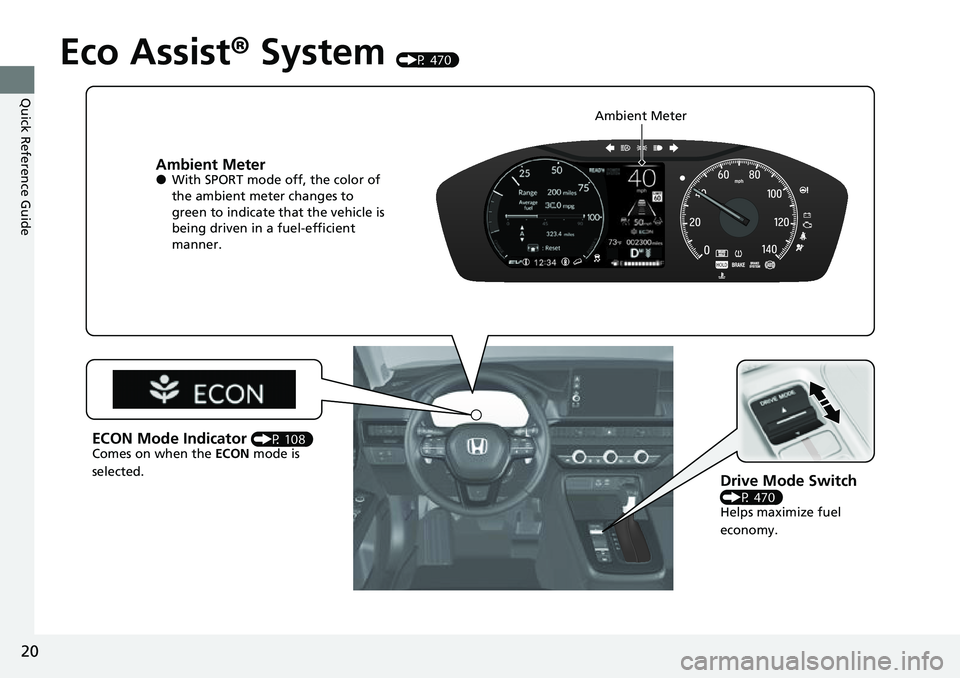
Eco Assist® System (P 470)
Ambient Meter●With SPORT mode off, the color of
the ambient meter changes to
green to indicate that the vehicle is
being driven in a fuel-efficient
manner.
Drive Mode Switch
(P 470)
Helps maximize fuel
economy.
ECON Mode Indicator (P 108)
Comes on when the ECON mode is
selected. Ambient Meter
Page 24 of 719
23
Quick Reference Guide
Controls (P 145)
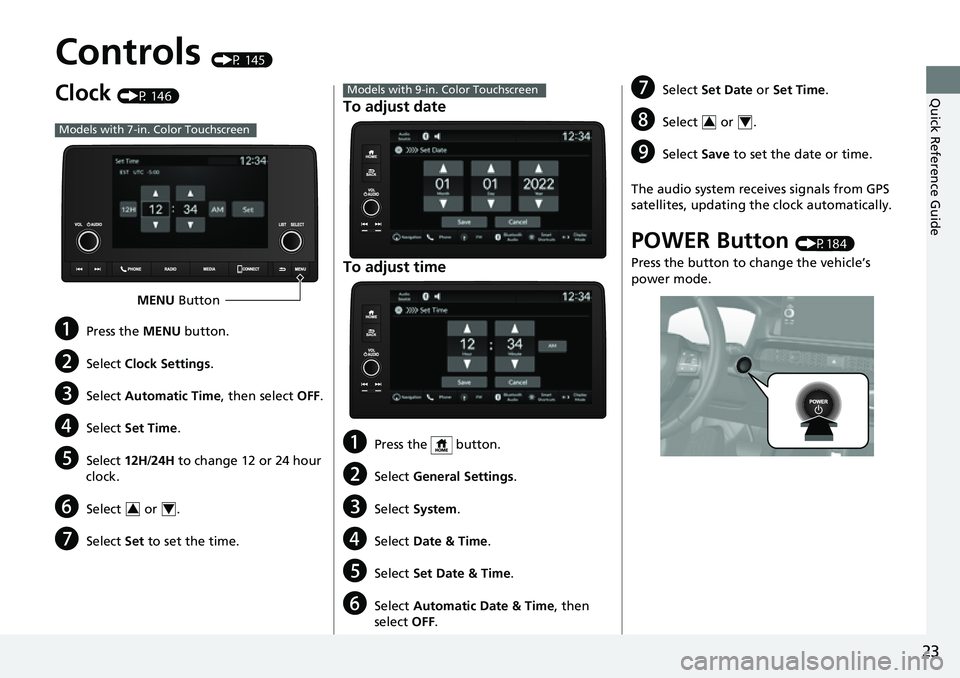
Clock (P 146)
aPress the MENU button.
bSelect Clock Settings .
cSelect Automatic Time , then select OFF.
dSelect Set Time .
eSelect 12H/24H to change 12 or 24 hour
clock.
fSelect or .
gSelect Set to set the time.
Models with 7-in. Color Touchscreen
MENU Button
34
To adjust date
To adjust time
aPress the button.
bSelect General Settings .
cSelect System .
dSelect Date & Time .
eSelect Set Date & Time .
fSelect Automatic Date & Time , then
select OFF.
Models with 9-in. Color TouchscreengSelect Set Date or Set Time.
hSelect or .
iSelect Save to set the date or time.
The audio system receives signals from GPS
satellites, updating the clock automatically.
POWER Button (P184)
Press the button to change the vehicle’s
power mode.
34
Page 29 of 719
28
Quick Reference Guide
Features (P237)
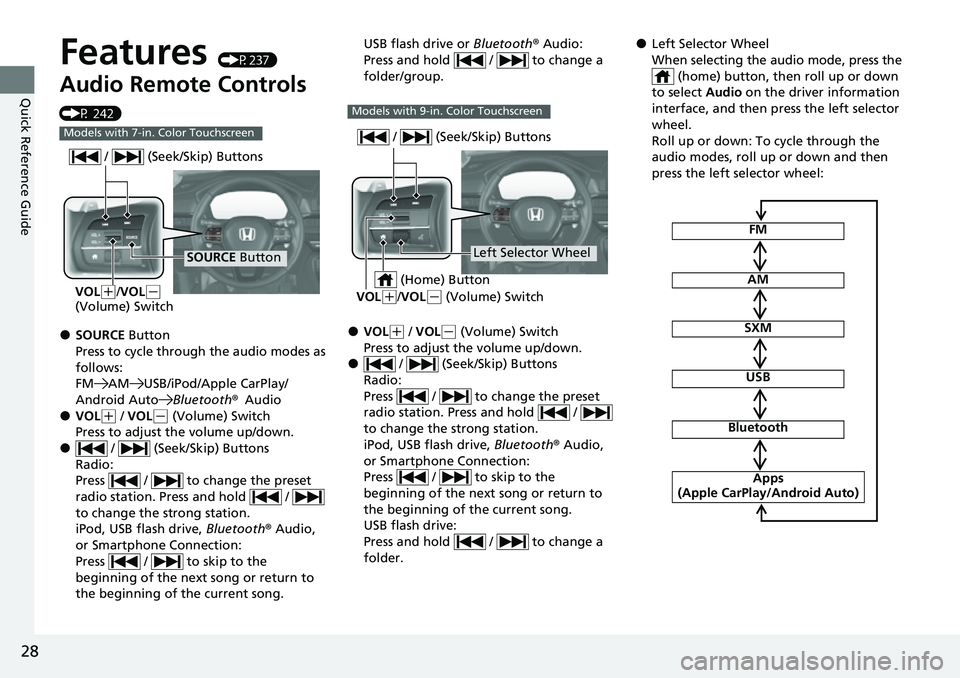
Audio Remote Controls
(P 242)
●SOURCE Button
Press to cycle through the audio modes as
follows:
FM AM USB/iPod/Apple CarPlay/
Android Auto Bluetooth®Audio
●VOL(+ / VOL(- (Volume) Switch
Press to adjust the volume up/down.
● / (Seek/Skip) Buttons
Radio:
Press / to change the preset
radio station. Press and hold /
to change the strong station.
iPod, USB flash drive, Bluetooth® Audio,
or Smartphone Connection:
Press / to skip to the
beginning of the next song or return to
the beginning of the current song.
Models with 7-in. Color Touchscreen
SOURCE Button
/ (Seek/Skip) Buttons
VOL(
+/VOL(-
(Volume) Switch
USB flash drive or Bluetooth® Audio:
Press and hold / to change a
folder/group.
●VOL( + / VOL(- (Volume) Switch
Press to adjust the volume up/down.
● / (Seek/Skip) Buttons
Radio:
Press / to change the preset
radio station. Press and hold /
to change the strong station.
iPod, USB flash drive, Bluetooth® Audio,
or Smartphone Connection:
Press / to skip to the
beginning of the next song or return to
the beginning of the current song.
USB flash drive:
Press and hold / to change a
folder.
Models with 9-in. Color Touchscreen
Left Selector Wheel
/ (Seek/Skip) Buttons
VOL(
+/VOL(- (Volume) Switch
(Home) Button
●Left Selector Wheel
When selecting the audio mode, press the
(home) button, then roll up or down
to select Audio on the driver information
interface, and then press the left selector
wheel.
Roll up or down: To cycle through the
audio modes, roll up or down and then
press the left selector wheel:
FM
AM
SXM
USB
Bluetooth
Apps
(Apple CarPlay/Android Auto)
Page 33 of 719
32
Quick Reference Guide
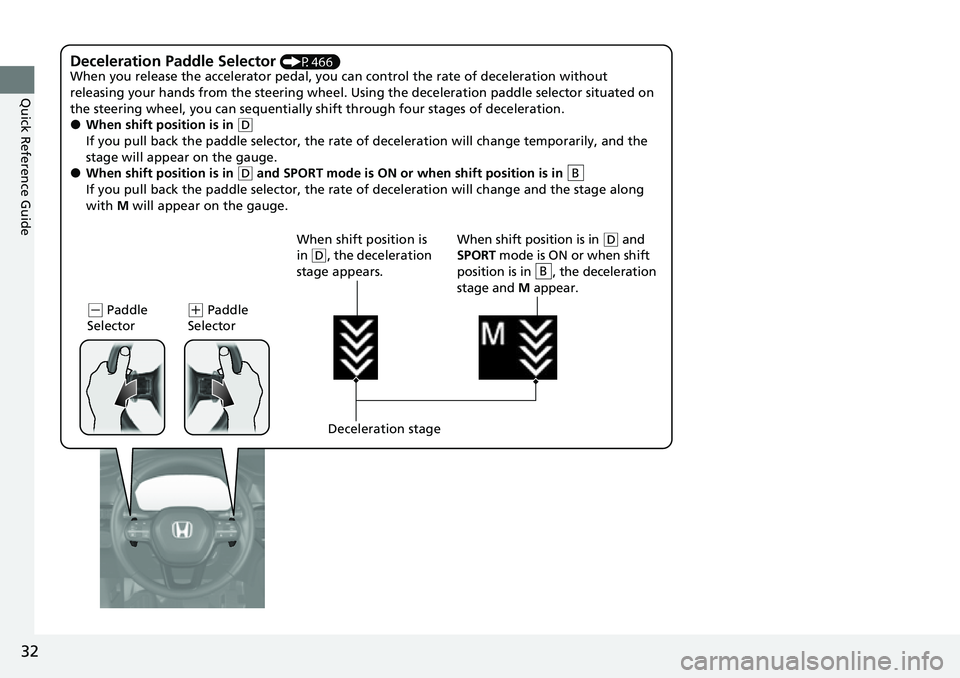
Deceleration Paddle Selector (P466)
When you release the accelerator pedal, you ca n control the rate of deceleration without
releasing your hands from the steering wheel. Using the deceleration paddle selector situated on
the steering wheel, you can sequentially sh ift through four stages of deceleration.
●When shift position is in (D
If you pull back the paddle selector, the rate of deceleration will change temporarily, and the
stage will appear on the gauge.
●When shift position is in (D and SPORT mode is ON or when shift position is in
If you pull back the paddle selector, the rate of deceleration will change and the stage along
with M will appear on the gauge.B
(- Paddle
Selector( + Paddle
Selector
Deceleration stage
When shift position is
in
(
D, the deceleration
stage appears. When shift position is in (
D and
SPORT mode is ON or when shift
position is in , the deceleration
stage and M appear.
B
Page 34 of 719
33
Quick Reference Guide
VSA® On and Off (P477)
●The Vehicle Stability AssistTM (VSA® )
system helps stabilize the vehicle during
cornering, and helps maintain traction
while accelerating on loose or slippery
road surfaces.
●VSA ® comes on automatically every time
you turn the power system on.
●To partially disable or fully restore VSA®
function, press and hold the (VSA ®
OFF) button until you hear a beep.
Tire Pressure Monitoring
System (TPMS)
(P480)
●Detects a change in tire conditions and
overall dimensions due to decrease in tire
pressures.
●The TPMS is turned on automatically
every time you turn the power system on.
●A calibration procedure must be
performed when certain conditions arise.
CMBSTM On and Off
(P499)
●When a possible frontal collision is likely
unavoidable, the CMBSTM can reduce the
vehicle speed and the severity of the
collision.
●The CMBSTM is turned on every time you
turn the power system on.
●To turn the CMBSTM on or off, use the
safety support of th e driver information
interface.
U.S. models
Page 40 of 719
39
Quick Reference Guide
What to Do If
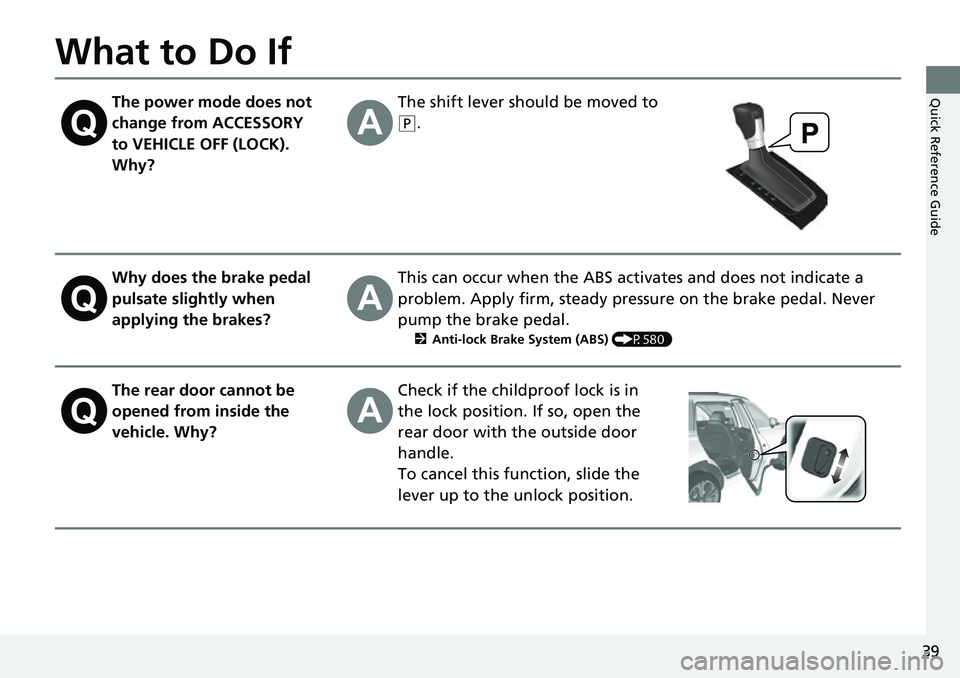
The power mode does not
change from ACCESSORY
to VEHICLE OFF (LOCK).
Why?The shift lever should be moved to
(P.
Why does the brake pedal
pulsate slightly when
applying the brakes?This can occur when the ABS activates and does not indicate a
problem. Apply firm, steady pressure on the brake pedal. Never
pump the brake pedal.
2Anti-lock Brake System (ABS) (P580)
The rear door cannot be
opened from inside the
vehicle. Why?Check if the childproof lock is in
the lock position. If so, open the
rear door with the outside door
handle.
To cancel this function, slide the
lever up to the unlock position.
Page 42 of 719
41
Quick Reference GuideI'm seeing an amber
indicator of a tire with an
exclamation point. What is
that?
The Tire Pressure Monitoring System (TPMS) needs attention. If
you recently inflated or changed a tire, you have to recalibrate
the system.
2 Tire Pressure Monitoring System (TPMS) (P480)
Depressing the accelerator
pedal does not release the
parking brake
automatically. Why?●Fasten the driver’s seat belt.
●Check if the transmission is in (P or (N. If so, select any other
position.
Why do I hear a screeching
sound when I apply the
brake pedal?The brake pads may need to be replaced. Have your vehicle
inspected by a dealer.
U.S. models
Page 46 of 719
45
uuFor Safe Driving uImportant Safety Precautions
Safe Driving
■Pay appropriate attention to the task of driving safely
Engaging in cell phone conversation or other activities that keep you from paying
close attention to the road, other vehicles, and pedestrians could lead to a crash.
Remember, situations can change quickly, and only you can decide when it is safe to
divert some attention away from driving.
■Control your speed
Excessive speed is a major factor in crash injuries and deaths. Generally, the higher
the speed, the greater the risk, but serious injuries can also occur at lower speeds.
Never drive faster than is safe for current conditions, regardless of the maximum
speed posted.
■Keep your vehicle in safe condition
Having a tire blowout or a mechanical failure can be extremely hazardous.
To reduce the possibility of such problems, check your tire pressures and condition
frequently, and perform all regul arly scheduled maintenance.
■Do not leave children unattended in the vehicle
Children, pets, and people needing assistance left unattended in the vehicle may be
injured if they activate one or more of the vehicle controls. They may also cause the
vehicle to move, resulting in a crash in wh ich they and/or another person(s) can be
injured or killed. Also, depending on the am bient temperature, the temperature of
the interior may reach extreme levels, which can result in harm or death. Even if the
climate control system is on, never leave them in the vehicle unattended as the
climate control system can shut off at any time.
Page 71 of 719
70
uuAirbags uSide Airbags
Safe Driving
Side Airbags
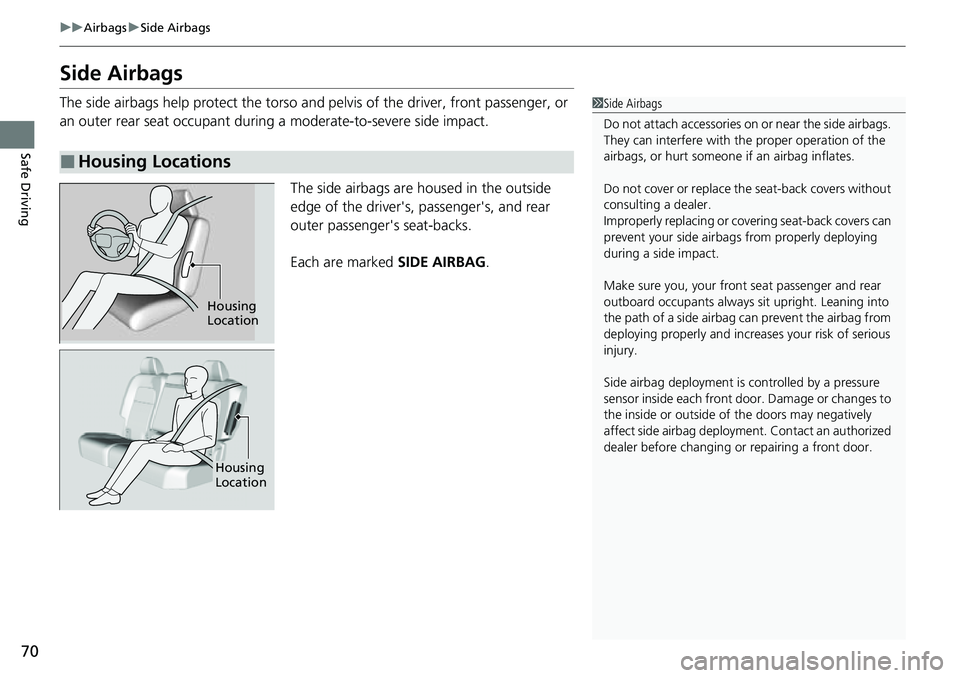
The side airbags help protect the torso and pelvis of the driver, front passenger, or
an outer rear seat occupant during a moderate-to-severe side impact.
The side airbags are housed in the outside
edge of the driver's, passenger's, and rear
outer passenger's seat-backs.
Each are marked SIDE AIRBAG.
■Housing Locations
1Side Airbags
Do not attach accessories on or near the side airbags.
They can interfere with the proper operation of the
airbags, or hurt someone if an airbag inflates.
Do not cover or replace th e seat-back covers without
consulting a dealer.
Improperly replacing or covering seat-back covers can
prevent your side airbag s from properly deploying
during a side impact.
Make sure you, your front seat passenger and rear
outboard occupants always sit upright. Leaning into
the path of a side airbag can prevent the airbag from
deploying properly and increa ses your risk of serious
injury.
Side airbag deploy ment is controlled by a pressure
sensor inside each front door . Damage or changes to
the inside or outside of the doors may negatively
affect side airbag deployment. Contact an authorized
dealer before ch anging or repairing a front door.
Housing
Location
Housing
Location